

Overview
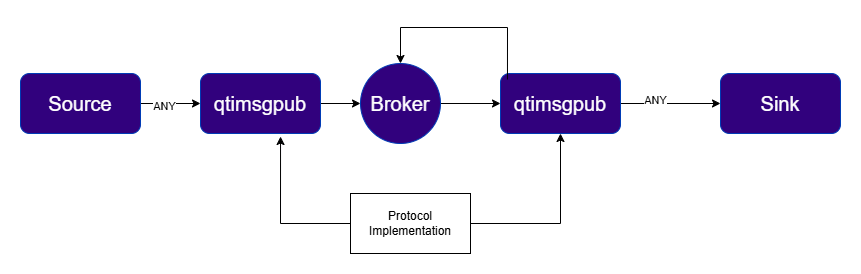
The gst-plugin-msgbroker package consists of two GStreamer elements that implement standard Publish/Subscribe messaging semantics:
qtimsgpub, which publishes messages to an external messaging backend
qtimsgsub, which subsribes to messages from an external messaging backend
gst-plugin-msgbroker is a foundational messaging component in the Qualcomm QTI GStreamer plugin ecosystem. It enables seamless Pub/Sub communication by exposing a unified interface to the GStreamer pipeline.
At the architectural level, msgbroker functions as a high-level adapter that abstracts the underlying messaging protocol. Its extensible protocol adaptation layer is designed to support multiple Pub/Sub backends, allowing applications to integrate different messaging systems without changing the pipeline-facing interface.
By decoupling protocol-specific details from pipeline logic, gst-plugin-msgbroker allows GStreamer pipelines to operate cleanly as message producers or consumers while remaining portable across supported messaging implementations.
qtimsgpub: A publisher element that transmits pipeline data to an external message broker.
gst-launch-1.0 -e --gst-debug=2 \
[Source Plugin] ! \
[Filter/Processing] ! \
[Publisher Plugin] topic=<Target Topic> host=<Target Host> port=<Port> protocol=<Protocol>
qtimsgsub: A subscriber element that receives external messages from the broker and injects them into the media pipeline.
Supported protocols
-
MQTT
-
MQTT is a lightweight publish/subscribe messaging protocol optimized for machine-to-machine (M2M) telemetry in low-bandwidth environments. It uses a broker-based communication model that decouples clients from one another: publishers send messages to named topics, and subscribers receive messages from the topics to which they are subscribed.
Built on the libmosquitto Mosquitto C/C++ client library,
gst-plugin-msgbroker abstracts the underlying complexity of the OASIS-standard MQTT protocol and provides application developers with a clean, high-level interface for integrating reliable publish/subscribe (Pub/Sub) messaging into GStreamer-based applications and pipelines.
-
KAFKA
-
Kafka is a distributed streaming platform designed for building real-time data pipelines and streaming applications. Kafka uses a distributed commit log architecture where messages are persisted to disk and replicated across multiple brokers for fault tolerance. Kafka organizes messages into topics, which are partitioned and distributed across a cluster of brokers. Producers publish messages to topics, and consumers subscribe to topics as part of consumer groups, enabling scalable message processing with automatic load balancing and fault tolerance.
Built on the librdkafka C client library, the kafka protocol library abstracts the underlying complexity of the Apache Kafka protocol and provides application developers with a clean, high-level interface for integrating reliable publish/subscribe (Pub/Sub) messaging into GStreamer-based applications and pipelines.
# Message Construction
echo "Message in file" > /usr/local/message.txt
# Publisher pipeline
gst-launch-1.0 -e --gst-debug=2 filesrc location=/usr/local/message.txt ! qtimsgpub topic=file host=127.0.0.1 port=1883 protocol=mqtt config=/usr/local/config
# Subscriber pipeline
gst-launch-1.0 -e --gst-debug=2 qtimsgsub topic=file host=127.0.0.1 port=1883 protocol=mqtt config=/usr/local/config ! filesink location=/usr/local/sub_message.txt async=false
Publisher pipeline reads from disk and publishes the content via file topic to MQTT server. Subscriber pipeline receives messages from MQTT server via file topic and writes to disk.
Hierarchy
Pad Templates
| Capabilities | |
|---|
ANY | format: NA |
| Availability: Always | |
| Direction: sink | |
| Capabilities | |
|---|
ANY | format: NA |
| Availability: Always | |
| Direction: src | |
Element Properties
| Property | Plugin | Description |
|---|
config | qtimsgpub / qtimsgsub | Absolute path to the protocol configuration file.
Type: String
Default: NULL
Flags: readable/writable |
host | qtimsgpub / qtimsgsub | Message broker server IP address.
Type: String
Default: NULL
Flags: readable/writable |
json | qtimsgpub | Converts messages to JSON format before publishing. Ignored by qtimsgsub.
Type: Boolean
Default: false
Flags: readable/writable |
message | qtimsgpub | Message payload specified directly for publishing. Ignored by qtimsgsub.
Type: String
Default: NULL
Flags: readable/writable (changeable in NULL, READY, PAUSED, PLAYING states) |
port | qtimsgpub / qtimsgsub | Message broker server port.
Type: Integer
Default: 1883
Range: 0 - 2147483647
Flags: readable/writable |
protocol | qtimsgpub / qtimsgsub | Message protocol such as mqtt or kafka.
Type: String
Default: NULL
Flags: readable/writable |
topic | qtimsgpub / qtimsgsub | Topic to publish to for qtimsgpub or subscribe to for qtimsgsub.
Type: String
Default: NULL
Flags: readable/writable (changeable in NULL, READY, PAUSED, PLAYING states) |
Signals
| Signals | Plugin | Description |
|---|
add-publish | qtimsgpub | Signal to publish an additional topic and message at runtime.
Type: Signal (boolean return)
Parameters: (string topic, string message) |
MQTT Configuration File Options
This configuration file is provided to the element through the config property. The file uses a key=value format and supports comments starting with #.
| Option | Description |
|---|
clean_session | Whether to clear historical sessions for the same client ID.
Type: bool
Default: TRUE |
id | MQTT client ID.
Type: string
Default: NULL (randomly assigned) |
keepalive | Heartbeat keep‑alive interval (seconds).
Type: int
Default: 60 |
max_inflight | Maximum concurrent in‑flight messages for QoS 1/2.
Type: int
Default: 20 |
mqtt_version | MQTT protocol version (MQTTV31 / MQTTV311 / MQTTV5).
Type: string
Default: MQTTV311 |
password | Broker authentication password.
Type: string
Default: NULL |
qos | Quality of Service level (0 / 1 / 2).
Type: int
Default: 0 |
retain | Whether messages are retained on the Broker.
Type: bool
Default: FALSE |
tcp_nodelay | Disable Nagle’s algorithm for lower latency.
Type: bool
Default: FALSE |
username | Broker authentication username.
Type: string
Default: NULL |
will_payload | Last Will message payload for unexpected disconnects.
Type: string
Default: NULL |
will_qos | QoS level for the Last Will message (0 / 1 / 2).
Type: int
Default: 0 |
will_retain | Whether the Last Will message is retained on the Broker.
Type: bool
Default: FALSE |
will_topic | Last Will message topic for unexpected disconnects.
Type: string
Default: NULL |
Kafka Configuration File Options
This configuration file is provided to the element through the config property. The file uses an INI-style format with sections and supports comments starting with #.
The configuration file is organized into three sections:
[global-config]
Common configuration options that apply to both producers and consumers.
| Option | Description |
|---|
proto-cfg | Protocol‑specific configuration string in key‑value format, separated by semicolons.
Type: string
Default: NULL (optional) Example: acks=all; compression.type=gzip; retries=3 |
[producer-config]
Configuration options specific to Kafka producers (qtimsgpub).
| Option | Description |
|---|
partition-key | Key used for message partitioning. Messages with the same key are sent to the same partition.
Type: string
Default: NULL (required) Example: partition-key = "cars" |
proto-cfg | Producer‑specific protocol configuration string in key‑value format, separated by semicolons.
Type: string
Default: NULL (optional) Example: batch.size=16384; linger.ms=10 |
timeout-ms | Maximum time (in milliseconds) to wait for message delivery confirmation.
Type: int (milliseconds)
Default: NULL (required) Example: timeout-ms = "5000" |
[consumer-config]
Configuration options specific to Kafka consumers (qtimsgsub).
| Property | Description |
|---|
group-id | Consumer group identifier. Consumers with the same group‑id share the load of consuming messages.
Type: string
Default: NULL (required) Example: group-id = "tmp-group" |
proto-cfg | Consumer‑specific protocol configuration string in key‑value format, separated by semicolons.
Type: string
Default: NULL (optional)
Example: auto.offset.reset=earliest; enable.auto.commit=true |
Internal Architecture
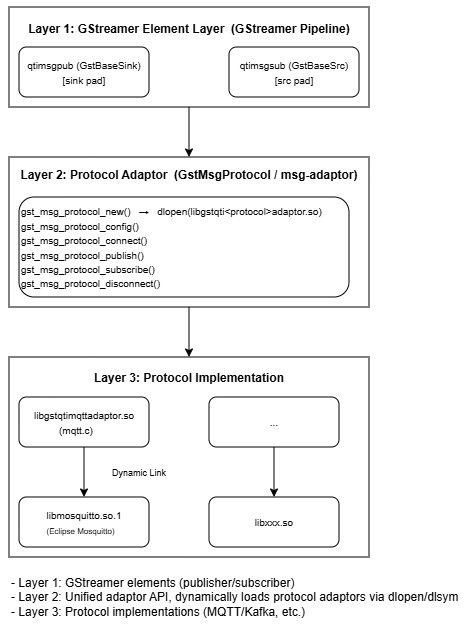
The plugin follows a three-layer architecture that decouples the GStreamer element layer from the underlying messaging protocol: GStreamer Element Layer → Protocol Adaptor → Protocol Implementation. The adaptor layer dynamically loads protocol-specific implementations using dlopen and dlsym, and exposes a unified interface to the element layer.
Protocol Adapter
GstMsgProtocol is responsible for loading the protocol-specific shared library based on the configured protocol name (for example, libgstqtimqttadaptor.so), resolving the unified entry symbol GST_PROTOCOL_CFUNC_SYMBOL, and forwarding upper-layer API calls to the corresponding protocol implementation.
GstProtocolCommonFunc defines the common protocol interface, including new, free, config, connect, disconnect, publish, and subscribe.
struct _GstProtocolCommonFunc {
GstProtocolNewFunction new; // Create protocol instance
GstProtocolFreeFunction free; // Release protocol instance
GstProtocolConfigFunction config; // Configure protocol parameters
GstProtocolConnectFunction connect; // Connect to Broker
GstProtocolDisconnectFunction disconnect; // Disconnect
GstProtocolPublishFunction publish; // Publish message
GstProtocolSubscribeFunction subscribe; // Subscribe to Topic
};
MQTT Protocol Implementation (GstMqtt)
GstMqtt (mqtt.c) implements the complete lifecycle of the Mosquitto clients and serves as the concrete MQTT protocol implementation behind the generic adaptor API.
- Dynamic Loading: The Mosquitto library is loaded at runtime using
dlopen("libmosquitto.so.1"), avoiding a hard build-time dependency.
- Dual-role support: The implementation supports both publisher (
pub) and subscriber (sub) roles. The role parameter determines the operating mode and the corresponding callbacks are registered accordingly.
- Asynchronous event handling: The Mosquitto network loop is started on a dedicated thread using
mosquitto_loop_start(), enabling non-blocking network I/O.
- Callback flow: For subscribed messages, data is propagated through the callback chain
message_callback → gst_adaptor_sub_callback → gst_plugin_sub_callback, and is ultimately pushed into GstDataQueue for consumption by the GStreamer pipeline thread.
Message Delivery Flow
Publisher │ Upstream element (GStreamer pipeline thread)
│ │
│ ▼
│ GstBuffer
│ │
│ ▼
│ gst_msg_pub_render()
│ │
│ ▼
│ gst_msg_protocol_publish()
│ │
│ ▼
│ gst_mqtt_publish()
│ │ mosquitto_publish_v5()
│ ▼
-----------+----------------------------------------------
Broker │ ┌──────────────┐
│ │ MQTT Broker │
│ └──────────────┘
-----------+----------------------------------------------
Subscriber │ │ (Mosquitto network thread)
│ ▼
│ message_callback()
│ │
│ ▼
│ gst_adaptor_sub_callback()
│ │
│ ▼
│ gst_plugin_sub_callback()
│ │ gst_data_queue_push()
│ ▼
│ GstDataQueue (msg_queue)
│ │ gst_data_queue_pop() (GStreamer pipeline thread)
│ ▼
│ gst_msg_sub_create()
│ │
│ ▼
│ GstBuffer → downstream elements
Publish Side Flow (qtimsgpub)
Pipeline PLAYING
│
▼
gst_msg_pub_start()
├── gst_msg_protocol_new(protocol="mqtt", role="pub")
│ └── dlopen("libgstqtimqttadaptor.so")
│ └── gst_mqtt_new("pub")
│ └── mosquitto_lib_init()
├── gst_msg_protocol_config(config_path)
│ └── gst_mqtt_config()
│ ├── Parse configuration file (extract_prop_from_file)
│ ├── mosquitto_new(id, clean_session)
│ ├── Set protocol version, maximum inflight messages, will message, authentication, etc.
│ └── Register connect/disconnect/publish callbacks
└── gst_msg_protocol_connect(host, port)
└── gst_mqtt_connect()
├── mosquitto_connect_bind_v5()
└── mosquitto_loop_start() ← Start asynchronous network thread
data arrival (gst_msg_pub_render)
├── [Optional] Publish CLI message from message_cmd
├── [Optional] Convert GstBuffer data to JSON
└── gst_msg_protocol_publish(topic, message)
└── gst_mqtt_publish()
└── mosquitto_publish_v5()
Pipeline STOP
└── gst_msg_pub_stop()
└── gst_msg_protocol_disconnect()
└── gst_mqtt_disconnect()
├── mosquitto_disconnect_v5()
└── mosquitto_loop_stop()
Subscribe Side Flow (qtimsgsub)
Pipeline PLAYING
│
▼
gst_msg_sub_start()
├── gst_msg_protocol_new(protocol="mqtt", role="sub")
│ └── dlopen("libgstqtimqttadaptor.so")
│ └── gst_mqtt_new("sub")
├── gst_msg_protocol_config(config_path)
│ └── gst_mqtt_config()
│ ├── Parse configuration file
│ ├── mosquitto_new()
│ └── Register connect/disconnect/subscribe/message callbacks
├── gst_msg_protocol_connect(host, port)
│ └── mosquitto_connect_bind_v5() + mosquitto_loop_start()
└── gst_msg_protocol_subscribe(topic, msg_queue, callback)
└── gst_mqtt_subscribe()
└── mosquitto_subscribe_v5(topic)
Message arrival (network thread)
└── message_callback()
├── Verify Topic match
├── Wrap into GstBuffer (gst_buffer_new_memdup)
└── Push into GstDataQueue
GStreamer thread requests data
└── gst_msg_sub_create()
├── gst_data_queue_pop()
└── Return GstBuffer
Pipeline STOP
└── gst_msg_sub_stop()
└── gst_msg_protocol_disconnect()
Kafka Protocol Implementation (GstKafka)
GstKafka (kafka.c) implements the complete lifecycle of the librdkafka client and serves as the concrete Kafka protocol implementation behind the generic adaptor API.
-
Dual-role support: The implementation supports both producer (pub) and subscriber (sub) roles. The role parameter determines the operating mode, and the corresponding callbacks are registered accordingly.
-
Asynchronous event handling:
- For producers, the delivery callback (
gst_kafka_dr_msg_cb) is invoked asynchronously when messages are acknowledged by the broker. The producer uses rd_kafka_poll() to service delivery callbacks.
- For consumers, a dedicated
GstTask thread continuously polls the broker using rd_kafka_consumer_poll() for new messages, enabling non-blocking network I/O.
-
Callback flow: For subscribed messages, data is propagated through the callback chain:
gst_kafka_consume_message → gst_adaptor_sub_callback → gst_plugin_sub_callback, and is ultimately pushed into GstDataQueue for consumption by the GStreamer pipeline thread.
-
Message delivery tracking: The producer implementation uses a mutex-protected status variable to track message delivery state (submitted, success, or failure), ensuring synchronous confirmation of message delivery.
Message Delivery Flow
Publisher │ Upstream element (GStreamer pipeline thread)
│ │
│ ▼
│ GstBuffer
│ │
│ ▼
│ gst_msg_pub_render()
│ │
│ ▼
│ gst_msg_protocol_publish()
│ │
│ ▼
│ gst_kafka_publish()
│ │ rd_kafka_producev()
│ │ rd_kafka_poll() (wait for delivery callback)
│ ▼
-----------+----------------------------------------------
Broker │ ┌──────────────────┐
│ │ Kafka Cluster │
│ │ (Partitioned Topics) │
│ │ │
│ └──────────────────┘
-----------+----------------------------------------------
Subscriber │ │ (Consumer task thread - GstTask)
│ ▼
│ gst_kafka_consume_message()
│ │ rd_kafka_consumer_poll()
│ ▼
│ message received
│ │
│ ▼
│ gst_adaptor_sub_callback()
│ │
│ ▼
│ gst_plugin_sub_callback()
│ │ gst_data_queue_push()
│ ▼
│ GstDataQueue (msg_queue)
│ │ gst_data_queue_pop() (GStreamer pipeline thread)
│ ▼
│ gst_msg_sub_create()
│ │
│ ▼
│ GstBuffer → downstream elements
Publisher Side Flow(qtimsgpub)
Pipeline PLAYING
│
▼
gst_msg_pub_start()
├── gst_msg_protocol_new(protocol="kafka", role="pub")
│ └── dlopen("libgstqtikafkaadaptor.so")
│ └── gst_kafka_new("pub")
│ └── Initialize GstKafka structure
├── gst_msg_protocol_config(config_path)
│ └── gst_kafka_config()
│ ├── Parse configuration file (gst_fetch_config_value)
│ ├── Parse proto-cfg strings (gst_kafka_parse_proto_cfg)
│ │ └── Set key=value pairs via rd_kafka_conf_set()
│ └── Create rd_kafka_conf_t configuration object
└── gst_msg_protocol_connect(host, port)
└── gst_kafka_connect()
├── Set bootstrap.servers = host:port
├── Register delivery callback (gst_kafka_dr_msg_cb)
└── rd_kafka_new(RD_KAFKA_PRODUCER, conf)
Data arrival (gst_msg_pub_render)
├── [Optional] Publish CLI message from message_cmd
├── [Optional] Convert GstBuffer data to JSON
└── gst_msg_protocol_publish(topic, message)
└── gst_kafka_publish()
├── Set msgstatus = GST_KAFKA_MSG_SUBMITTED
├── rd_kafka_producev()
│ ├── RD_KAFKA_V_TOPIC(topic)
│ ├── RD_KAFKA_V_VALUE(payload)
│ ├── RD_KAFKA_V_KEY(partition_key)
│ └── RD_KAFKA_V_OPAQUE(self) for callback context
├── rd_kafka_poll(timeout_ms) ← Wait for delivery callback
└── Check msgstatus == GST_KAFKA_MSG_DELIVERY_SUCCESS
Delivery callback (network thread)
└── gst_kafka_dr_msg_cb()
├── Check rkmessage->err
├── Set msgstatus = SUCCESS or FAIL
└── rd_kafka_yield() ← Return control to rd_kafka_poll()
Pipeline STOP
└── gst_msg_pub_stop()
└── gst_msg_protocol_disconnect()
└── gst_kafka_disconnect()
├── rd_kafka_flush(10000) ← Flush pending messages
└── rd_kafka_destroy(producer)
Subscribe Side Flow(qtimsgsub)
Pipeline PLAYING
│
▼
gst_msg_sub_start()
├── gst_msg_protocol_new(protocol="kafka", role="sub")
│ └── dlopen("libgstqtikafkaadaptor.so")
│ └── gst_kafka_new("sub")
├── gst_msg_protocol_config(config_path)
│ └── gst_kafka_config()
│ ├── Parse configuration file
│ ├── Parse proto-cfg strings
│ └── Set group.id via rd_kafka_conf_set()
├── gst_msg_protocol_connect(host, port)
│ └── gst_kafka_connect()
│ ├── Set bootstrap.servers = host:port
│ └── rd_kafka_new(RD_KAFKA_CONSUMER, conf)
└── gst_msg_protocol_subscribe(topic, msg_queue, callback)
└── gst_kafka_subscribe()
├── rd_kafka_topic_partition_list_new()
├── rd_kafka_topic_partition_list_add(topic)
├── rd_kafka_subscribe(subscription)
├── Create GstTask (gst_kafka_consume_message)
└── gst_task_start() ← Start consumer polling thread
Consumer task loop (dedicated thread)
└── gst_kafka_consume_message()
├── rd_kafka_consumer_poll(100ms)
├── Check rkm->err
├── Extract payload and topic
├── Create GstBuffer from payload
└── Invoke callback chain
└── gst_adaptor_sub_callback()
└── Push to GstDataQueue
GStreamer thread requests data
└── gst_msg_sub_create()
├── gst_data_queue_pop()
└── Return GstBuffer
Pipeline STOP
└── gst_msg_sub_stop()
└── gst_msg_protocol_disconnect()
└── gst_kafka_disconnect()
├── gst_task_stop() ← Stop consumer task
├── rd_kafka_consumer_close()
├── rd_kafka_destroy(consumer)
└── gst_task_join() ← Wait for task completion
Prerequisites & Assumptions
MQTT
- Mosquitto server installed and configured with optional username/password.
- Steps to run Mosquitto server:
The location of the configuration file mosquitto.conf is displayed after this installation.
mosquitto_passwd -c /etc/mosquitto/pwfile <username>, set password following the instructions on shell
- Config
mosquitto.conf with below settings:
password_file /etc/mosquitto/pwfile
allow_anonymous false
listener 1883
systemctl daemon-reload && systemctl restart mosquitto
- Client has a valid plugin configuration file on device (/usr/local/config) with mqtt_version/username/password as needed.
# MQTT Client Configuration
mqtt_version = MQTTV311
username = <username registered on server>
password = <password registered on server>
...
- Network connectivity: client and server can ping each other; broker listens on 1883.
KAFKA
- Step 1: Get Kafka server running on a host machine.
- Download the latest Kafka release and extract it.
$ tar -xzf kafka_<ver>.tgz
$ cd kafka_<ver>
This has been tested with v2.13-4.3.0
- Step 2: Start the Kafka environment
- NOTE: Your local environment must have Java 17+ installed.
- Kafka can be run using local scripts and downloaded files or the docker image.
- Using downloaded files:
- Update config/server.properties.
# Update the "advertised.listeners" with the IP address of the machine.
advertised.listeners=PLAINTEXT://<IP ADDR of HOST>:9092,CONTROLLER://localhost:9093
- Generate a Cluster UUID
$ KAFKA_CLUSTER_ID="$(bin/kafka-storage.sh random-uuid)"
- Format Log Directories
$ bin/kafka-storage.sh format --standalone -t $KAFKA_CLUSTER_ID -c config/server.properties
- Start the Kafka Server
$ bin/kafka-server-start.sh config/server.properties
Once the Kafka server has successfully launched, you will have a basic Kafka environment running and ready to use.
- Create topics with partitions based on your use case.
This topic will be used to publish and consume messages later.
# From a different shell
$ bin/kafka-topics.sh --create --topic tmp --bootstrap-server localhost:9092
A topic has to be created before running any testcases.
- Step 3: Connect the device to the same netowork as the server. Server and client(qtimsgpub/qtimsgsub) should be able to ping each other.
Use Cases
Copy files to device
# Run from your host machine — replace <user> and <device-ip>
ssh <user>@<device-ip> "mkdir -p $HOME/{models,labels,media,media/output}"
scp yolo_x_w8a8.tflite <user>@<device-ip>:$HOME/models/
scp yolov8.json <user>@<device-ip>:$HOME/labels/
scp ai_demo_sample.mp4 <user>@<device-ip>:$HOME/media/
Connect to device
# Run from your host machine — replace <user> and <device-ip>
ssh <user>@<device-ip>
Set environment variables
Run below command on your devicemkdir -p $HOME/{models,labels,media,media/output}
export MODEL_NAME=yolo_x_w8a8.tflite
export LABELS_NAME=yolov8.json
export SRC_VIDEO_NAME=ai_demo_sample.mp4
Subscriber pipeline should be run first and then launch the publisher pipeline from a different shell.
Publish CLI message -> Subscribe to file
This example demonstrates how a message provided through the message property is transmitted from the publisher pipeline to the subscriber pipeline.

In this pipeline (publisher), fakesrc is used as a dummy source to establish the pipeline structure. The qtimsgpub element then publishes the literal message ("Command Message") specified through its message property to the cmd_topic topic on the configured MQTT or KAFKA broker.
Publisher Pipeline:
Use following for MQTT:
Publisher (one-shot):
gst-launch-1.0 -e --gst-debug=2 fakesrc ! qtimsgpub topic=cmd_topic message="Command Message" host=<mosquitto server server ip> port=<port advertised by the server> protocol=mqtt config=<path to mqtt config file>
for Kafka:
# Create topic on host
bin/kafka-topics.sh --create --topic cmd_topic --bootstrap-server localhost:9092
#Example configuration file
[producer-config]
partition-key = "objects"
timeout-ms = "5000"
[consumer-config]
group-id = "tmp-group"
Publisher (one-shot):
gst-launch-1.0 -e --gst-debug=2 fakesrc ! qtimsgpub topic=cmd_topic message="Command Message" host=<kafka server ip> port=<port advertised by the server> protocol=kafka config=<path to kafka config file>
Subscriber Pipeline:
This pipeline (subscriber) uses qtimsgsub to subscribe to messages published on the cmd_topic topic of the specified MQTT or KAFKA broker. The received messages are forwarded directly to filesink, which writes them to sub_message.txt.
Use following for MQTT:
Subscriber (press Ctrl+C to stop):
gst-launch-1.0 -e --gst-debug=2 qtimsgsub topic=cmd_topic host=<mosquitto server> port=<port advertised by the server> protocol=mqtt config=<path to mqtt config file> ! filesink location=$HOME/media/output/sub_message.txt async=false
for Kafka
Subscriber (press Ctrl+C to stop):
gst-launch-1.0 -e --gst-debug=2 qtimsgsub topic=cmd_topic host=<kafka server ip> port=<port advertised by the server> protocol=kafka config=<path to kafka config file> ! filesink location=$HOME/media/output/sub_message.txt async=false
Publish file contents → Subscribe to file
This example demonstrates the transmission of a text-file-based message from the publisher pipeline to the subscriber pipeline. The file message.txt is first created with the content "Message in file", and the publisher pipeline uses filesrc to read the file contents. The qtimsgpub element then publishes the data as a message to the file_topic topic on the configured MQTT/KAFKA broker. Similar to Use Case 1, the subscriber pipeline uses qtimsgsub to subscribe to the file_topic topic on the MQTT or KAFKA broker, and the received messages are written to sub_message.txt using filesink.

Publisher Pipeline:
Use following for MQTT:
Publisher (prepare and send):
echo "Message in file" > $HOME/media/message.txt
gst-launch-1.0 -e --gst-debug=2 filesrc location=$HOME/media/message.txt ! qtimsgpub topic=file_topic host=<mosquitto server> port=<port advertised by the server> protocol=mqtt config=<path to mqtt config file>
For Kafka:
# Create topic on host
bin/kafka-topics.sh --create --topic file_topic --bootstrap-server localhost:9092
Publisher (prepare and send):
echo "Message in file" > $HOME/media/message.txt
gst-launch-1.0 -e --gst-debug=2 filesrc location=$HOME/media/message.txt ! qtimsgpub topic=file_topic host=<kafka server ip> port=<port advertised by the server> protocol=kafka config=<path to kafka config file>
Subscriber Pipeline:
Use following for MQTT:
Subscriber (press Ctrl+C to stop):
gst-launch-1.0 -e --gst-debug=2 qtimsgsub topic=file_topic host=<mosquitto server> port=<port advertised by the server> protocol=mqtt config=<path to mqtt config file> ! filesink location=$HOME/media/output/sub_message.txt async=false
For Kafka:
Subscriber (press Ctrl+C to stop):
gst-launch-1.0 -e --gst-debug=2 qtimsgsub topic=file_topic host=<kafka server ip> port=<port advertised by the server> protocol=kafka config=<path to kafka config file> ! filesink location=$HOME/media/output/sub_message.txt async=false
This example demonstrates how AI metadata produced after model inference can be transmitted from the publisher pipeline running the AI model to the subscriber pipeline. The subscriber pipeline can then implement custom logic to handle the AI event and trigger the appropriate action.
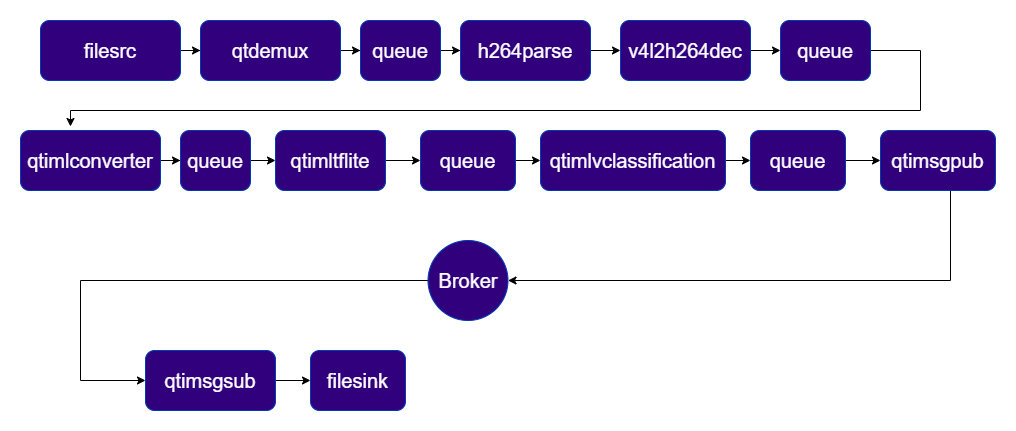
This AI pipeline performs object detection on incoming video frames, and qtimsgpub publishes the resulting classification metadata to the MQTT or KAFKA broker in JSON format.
Publisher Pipeline:
Use following for MQTT:
Publisher (AI pipeline → JSON):
gst-launch-1.0 -e --gst-debug=2 filesrc location=$HOME/media/$SRC_VIDEO_NAME ! qtdemux ! h264parse ! v4l2h264dec capture-io-mode=4 output-io-mode=4 ! queue ! qtimlvconverter ! queue ! qtimltflite delegate=external external-delegate-path=libQnnTFLiteDelegate.so external-delegate-options="QNNExternalDelegate,backend_type=htp;" model=$HOME/models/$MODEL_NAME ! queue ! qtimlpostprocess module=yolov8 labels=$HOME/labels/$LABELS_NAME settings="{\"confidence\": 51.0}" ! text/x-raw ! queue ! qtimsgpub topic=detection_topic host=<mosquitto server> port=<port advertised by the server> protocol=mqtt config=<path to mqtt config file> json=true async=false
For Kafka
# Create topic on host
bin/kafka-topics.sh --create --topic detection_topic --bootstrap-server localhost:9092
Publisher (AI pipeline → JSON):
gst-launch-1.0 -e --gst-debug=2 filesrc location=$HOME/media/$SRC_VIDEO_NAME ! qtdemux ! h264parse ! v4l2h264dec capture-io-mode=4 output-io-mode=4 ! queue ! qtimlvconverter ! queue ! qtimltflite delegate=external external-delegate-path=libQnnTFLiteDelegate.so external-delegate-options="QNNExternalDelegate,backend_type=htp;" model=$HOME/models/$MODEL_NAME ! queue ! qtimlpostprocess module=yolov8 labels=$HOME/labels/$LABELS_NAME settings="{\"confidence\": 51.0}" ! text/x-raw ! queue ! qtimsgpub topic=detection_topic host=<kafka server ip> port=<port advertised by the server> protocol=kafka config=<path to kafka config file> json=true async=false
Subscriber Pipeline:
This subscriber pipeline uses qtimsgsub to subscribe to the detection_topic MQTT or KAFKA topic. The received data, expected to be in JSON format, is then written directly to sub.json through filesink.
Use following for MQTT:
Subscriber (press Ctrl+C to stop):
gst-launch-1.0 -e --gst-debug=2 qtimsgsub topic=detection_topic host=<mosquitto server> port=<port advertised by the server> protocol=mqtt config=<path to mqtt config file> ! filesink location=$HOME/media/output/sub.json async=false
For Kafka:
Subscriber (press Ctrl+C to stop):
gst-launch-1.0 -e --gst-debug=2 qtimsgsub topic=detection_topic host=<kafka server ip> port=<port advertised by the server> protocol=kafka config=<path to kafka config file> ! filesink location=$HOME/media/output/sub.json async=false