
Overview
v4l2h264enc is a hardware-accelerated video encoder that uses the Video4Linux2 (V4L2) stateful encoder API to offload H.264 (AVC) video encoding to the Qualcomm Video Processing Unit (VPU).
This plugin is provided and maintained by the GStreamer community. This document focuses on its usage in conjunction with Qualcomm-specific QIM SDK GStreamer plugins, along with relevant use cases and internal architectural considerations.
v4l2h264enc is typically used in encoding pipelines for:
- Camera capture and local recording
- Video transcoding (e.g., H.265 → H.264)
- Live streaming (RTSP, HLS, UDP)
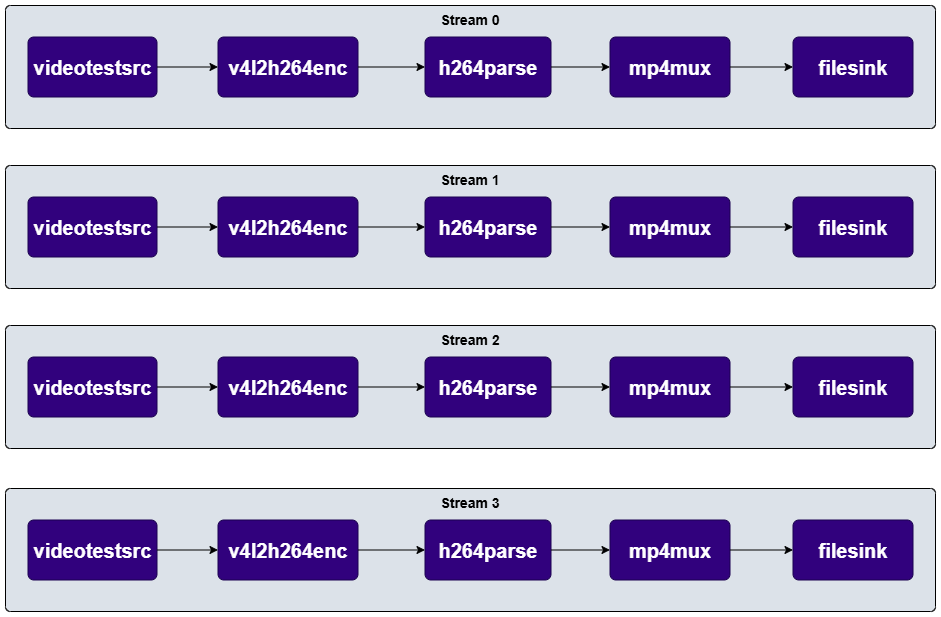
- Multi-stream simultaneous encoding
h264parse, mp4mux).
Example Pipeline

1
Set environment variables
Run below command on your device
2
Connect to device
3
Run the pipeline
Key Responsibilities
v4l2h264enc is responsible for:
- Hardware acceleration — offloads H.264/AVC encoding to the dedicated VPU
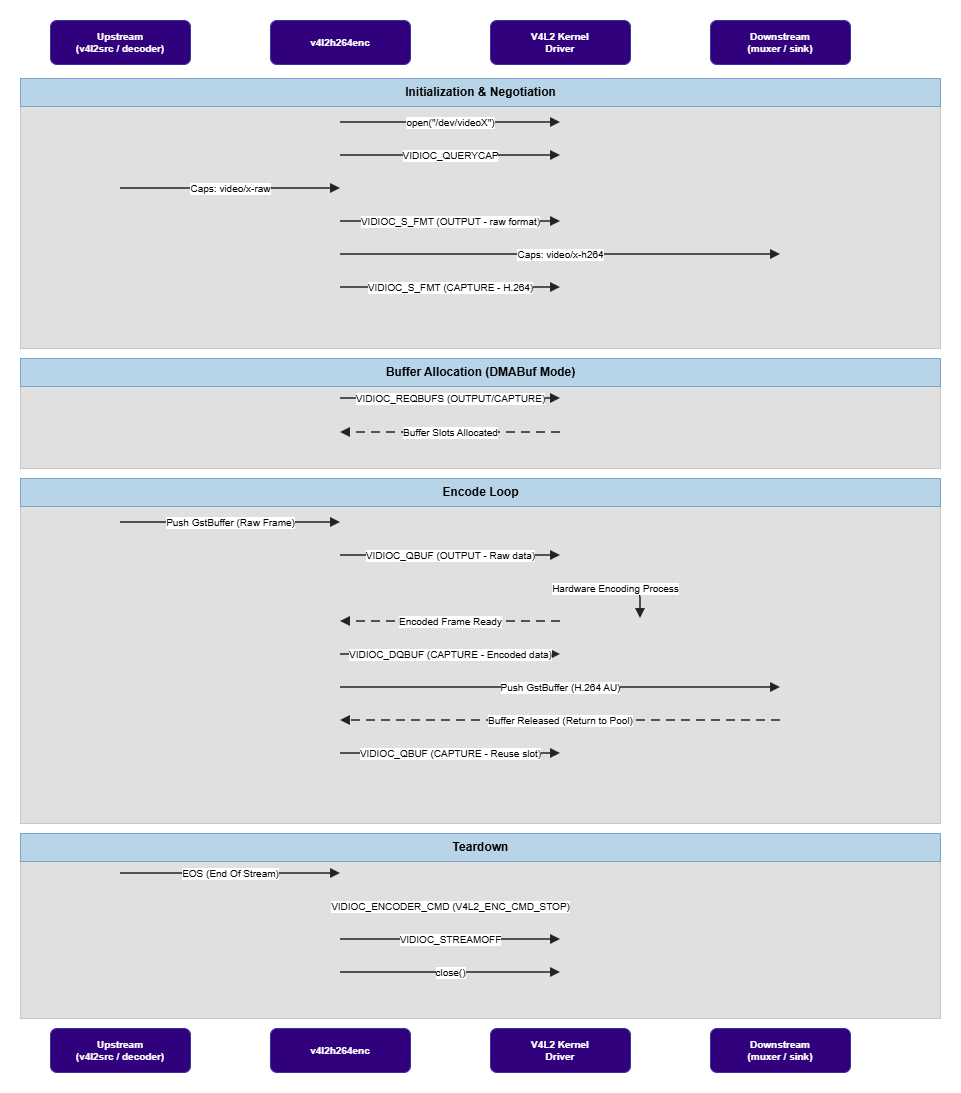
- V4L2 state management — manages the V4L2 stateful encoder state machine (device open, buffer allocation, stream on/off)
- Buffer I/O management — handles buffer exchange between GStreamer and the V4L2 driver using DMABuf, MMAP, or UserPtr modes
- Format negotiation — negotiates raw input formats supported by the hardware, including UBWC-compressed formats for reduced memory bandwidth
- Profile and level selection — negotiates H.264 profile and level with downstream elements based on hardware capabilities probed at registration time
- Encoder parameter control — supports runtime configuration of encoding parameters (bitrate, GOP size, QP values, entropy mode, etc.) via the
extra-controlsproperty - Multi-stream support — supports multiple concurrent encoder instances (subject to hardware resource limits)
Hierarchy
GObjectGstObject
GstElement
GstVideoEncoder
GstV4l2VideoEnc
v4l2h264enc
Pad Templates
sink
src
The exact set of profiles and levels reported depends on what the underlying V4L2 driver enumerates via
V4L2_CID_MPEG_VIDEO_H264_PROFILE and V4L2_CID_MPEG_VIDEO_H264_LEVEL.Element Properties
I/O Mode Values
Bothcapture-io-mode and output-io-mode accept the same GstV4l2IOMode enumeration:
Internal Architecture
v4l2h264enc operates using two V4L2 queue objects internally:
- Output queue (
V4L2_BUF_TYPE_VIDEO_OUTPUT) — receives raw video frame buffers from upstream - Capture queue (
V4L2_BUF_TYPE_VIDEO_CAPTURE) — produces encoded H.264 bitstream buffers for downstream
State Transitions
Memory and Buffer Management
DMABuf Usage
For zero-copy pipelines where raw frames originate from a hardware source (camera, GPU, or hardware decoder):- Set
output-io-mode=dmabuf-import(value5) to import DMABuf handles from upstream directly into the V4L2 output queue without CPU copies - Set
capture-io-mode=dmabuf(value4) to export encoded output as DMABuf file descriptors for downstream elements
Alignment Requirements
Input buffers follow Qualcomm hardware alignment requirements (e.g., 128-byte stride alignment). UBWC-compressed input formats (NV12_Q08C) are supported for reduced memory bandwidth when the upstream source produces UBWC output.
Encoder Parameter Control
Encoding parameters are configured via theextra-controls property using V4L2 control IDs. Common parameters include:
Example:
Drain and Flush
- Drain — sends
V4L2_ENC_CMD_STOPviaVIDIOC_ENCODER_CMD; waits for all remaining encoded frames to be produced - Flush — stops both queues, resets buffer pools, and restarts streaming; used during seek operations
Usage
Ensure you have followed the prerequisites before continuing
Record Camera to H.264 MP4 File
Captures raw video from a camera source, encodes to H.264 with DMABuf zero-copy, and muxes into an MP4 container.
Transcode H.265 to H.264
Decodes an H.265 stream from an MP4 file using the hardware decoder and re-encodes to H.264 using the hardware encoder. DMABuf is used for zero-copy transfer between decoder and encoder.
Four-Stream Simultaneous Encoding
Encodes four concurrent H.264 streams from four sources using four independent hardware encoder instances.