

Object detection

gst-ai-video-detection Given a video frame, identify objects, and draw bounding boxes around them.
Ensure you have QIMSDK installed. QIM SDK Installation Guide

Prerequisites

Run these commands on your device first:
mkdir -p $HOME/{models,labels,media,media/output}
export MODEL_NAME=yolo_x_w8a8.tflite
export LABELS_NAME=yolov8.json
export SRC_VIDEO_NAME=video.mp4
# Download YOLO-X W8A8 model
curl -L -o $HOME/models/$MODEL_NAME \
  https://huggingface.co/Qualcomm/Yolo-X/resolve/v0.30.5/Yolo-X_w8a8.tflite

# Download detection labels
curl -L -o $HOME/labels/$LABELS_NAME \
  https://raw.githubusercontent.com/quic/sample-apps-for-Qualcomm-linux/refs/heads/main/Qualcomm-linux/artifacts/json_labels/yolox.json

# Download sample video
curl -L -o $HOME/media/$SRC_VIDEO_NAME \
  https://raw.githubusercontent.com/quic/sample-apps-for-Qualcomm-linux/refs/heads/main/Qualcomm-linux/artifacts/videos/video.mp4

Option 1. Run prebuilt application for object detection on device

Ensure you have followed the prerequisites before continuing
1

Configure the application

Overwrite the existing config file:
sudo tee /etc/configs/config_detection.json << EOF
{
  "file-path": "$HOME/media/$SRC_VIDEO_NAME",
  "ml-framework": "tflite",
  "yolo-model-type": "yolox",
  "model": "$HOME/models/$MODEL_NAME",
  "labels": "$HOME/labels/$LABELS_NAME",
  "threshold": 40,
  "runtime": "dsp",
  "output-type": "waylandsink"
}
EOF
2

Run the pipeline

gst-ai-object-detection 
3

View results

Your display now shows the video feed with bounding boxes and class labels drawn around each detected object. Detection results update in real time with every frame.
Press Ctrl+C to stop the pipeline gracefully.
This is made possible by many blocks (plugins) working together to form a pipeline.
Let’s run the same example, but this time, in a way you can see all the plugins at work.

Option 2. Object detection pipeline command

Ensure you have followed the prerequisites before continuing
1

Run the pipeline command

gst-launch-1.0 -e --gst-debug=2 \
filesrc location=$HOME/media/$SRC_VIDEO_NAME ! qtdemux ! h264parse ! \
v4l2h264dec capture-io-mode=4 output-io-mode=4 ! video/x-raw,format=NV12 ! queue ! \
tee name=t ! qtimetamux name=obj_mux ! qtivoverlay ! waylandsink fullscreen=true sync=false \
t. ! queue ! qtimlvconverter ! queue ! \
qtimltflite model=$HOME/models/$MODEL_NAME delegate=external external-delegate-path=libQnnTFLiteDelegate.so external-delegate-options="QNNExternalDelegate,backend_type=htp,log_level=(string)1;" ! queue ! \
qtimlpostprocess module=yolov8 labels=$HOME/labels/$LABELS_NAME settings="{\"confidence\": 51.0}" ! text/x-raw ! queue ! obj_mux.
2

View results

Your display shows the video feed with bounding boxes and class labels rendered over each detected object. The pipeline processes frames in real time
Press Ctrl+C to stop the pipeline gracefully.
  • In case you want to build around this demo, command line might not be the most robust solution
  • You could paste it into a shell file…
  • But if you want other code to interact with this, you would want a cpp or python file (pipeline application).

Option 3. Build your object detection pipeline application with Python

Ensure you have followed the prerequisites before continuing
1

Create the script

cat > obj_det.py << 'PYEOF'
#!/usr/bin/env python3
import os, signal, gi
gi.require_version("Gst", "1.0")
gi.require_version("GLib", "2.0")
from gi.repository import Gst, GLib

SAMPLES = os.environ.get("QIMSDK_SAMPLES", "/etc")
MODEL   = f"{SAMPLES}/models/{os.environ.get('MODEL_NAME',    'yolo_x_w8a8.tflite')}"
LABELS  = f"{SAMPLES}/labels/{os.environ.get('LABELS_NAME',   'yolov8.json')}"
VIDEO   = f"{SAMPLES}/media/{os.environ.get('SRC_VIDEO_NAME', 'video.mp4')}"


def make(pipeline, factory, **props):
    el = Gst.ElementFactory.make(factory)
    for k, v in props.items():
        el.set_property(k.replace("_", "-"), v)
    pipeline.add(el)
    return el


def on_demux_pad(demux, pad, next_el):
    if "video" in pad.get_current_caps().to_string():
        pad.link(next_el.get_static_pad("sink"))


def build_pipeline():
    p = Gst.Pipeline.new()

    src      = make(p, "filesrc",    location=VIDEO)
    demux    = make(p, "qtdemux")
    parse    = make(p, "h264parse")
    decoder  = make(p, "v4l2h264dec", capture_io_mode=4, output_io_mode=4)
    q0       = make(p, "queue")
    tee      = make(p, "tee")

    q1       = make(p, "queue")
    pre_proc = make(p, "qtimlvconverter")
    q2       = make(p, "queue")
    infer    = make(p, "qtimltflite",
                   model=MODEL, delegate="external",
                   external_delegate_path="libQnnTFLiteDelegate.so")
    infer.set_property("external-delegate-options",
                       Gst.Structure.new_from_string(
                           "QNNExternalDelegate,backend_type=htp,log_level=(string)1"))
    q3       = make(p, "queue")
    post_proc= make(p, "qtimlpostprocess",
                   module="yolov8", labels=LABELS,
                   settings='{"confidence": 51.0}')
    q4       = make(p, "queue")

    mux      = make(p, "qtimetamux")
    q5       = make(p, "queue")
    overlay  = make(p, "qtivoverlay")
    q6       = make(p, "queue")
    sink     = make(p, "waylandsink", fullscreen=True, sync=False)
    q7       = make(p, "queue")

    src.link(demux)
    demux.connect("pad-added", on_demux_pad, parse)
    parse.link(decoder)
    decoder.link_filtered(q0, Gst.Caps.from_string("video/x-raw,format=NV12"))
    q0.link(tee)

    tee.request_pad_simple("src_%u").link(q1.get_static_pad("sink"))
    for a, b in [(q1, pre_proc), (pre_proc, q2), (q2, infer),
                 (infer, q3), (q3, post_proc)]:
        a.link(b)
    post_proc.link_filtered(q4, Gst.Caps.from_string("text/x-raw"))
    q4.link(mux)

    tee.request_pad_simple("src_%u").link(q7.get_static_pad("sink"))
    q7.link(mux)

    for a, b in [(mux, q5), (q5, overlay), (overlay, q6), (q6, sink)]:
        a.link(b)

    return p


Gst.init(None)
loop     = GLib.MainLoop()
pipeline = build_pipeline()

def on_message(bus, msg):
    if msg.type == Gst.MessageType.ERROR:
        print("Error:", msg.parse_error()[0].message)
    if msg.type in (Gst.MessageType.EOS, Gst.MessageType.ERROR):
        loop.quit()

pipeline.get_bus().add_watch(GLib.PRIORITY_DEFAULT, lambda b, m: (on_message(b, m), True)[1])
GLib.unix_signal_add(GLib.PRIORITY_HIGH, signal.SIGINT, lambda: loop.quit() or GLib.SOURCE_CONTINUE)

pipeline.set_state(Gst.State.PLAYING)
loop.run()
pipeline.set_state(Gst.State.NULL)
PYEOF
2

Run the script

python3 obj_det.py
3

View results

Your display shows the video feed with bounding boxes and class labels rendered over each detected object. The Python application processes frames in real time.
Press Ctrl+C to stop the pipeline gracefully.

Option 4. Build your object detection pipeline application with C++

Go to Building AI Pipelines

How it works

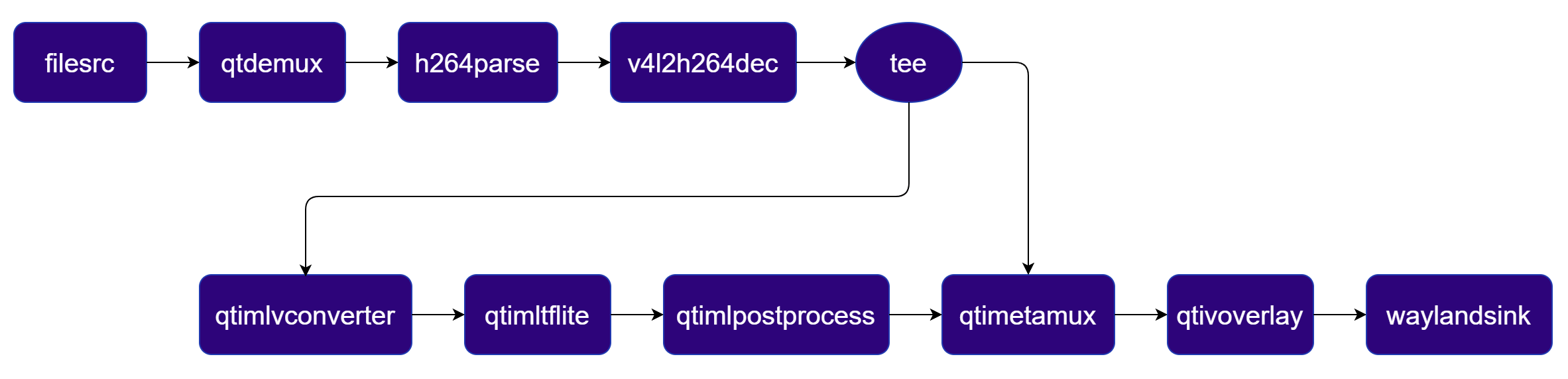
The pipeline reads an H.264 video file, hardware-decodes it, branches the decoded stream, runs YOLO-X inference on the Qualcomm® AI Engine (HTP backend), post-processes the bounding-box results, blends the annotations back onto the original frame using a hardware compositor, and displays the output to a screen. Pipeline Diagram Pipeline Diagram
Next Steps

You’ve run an object detection pipeline in three different ways on Qualcomm® hardware. Here’s where to go next:

AI Sample Pipelines

Ready-to-run GStreamer pipelines for classification, segmentation, pose estimation, super resolution, and more.

Blogs

Real-world examples built by the QIM SDK community — covering object detection, PPE compliance, security cameras, and more.

Supported Models

Full catalogue of quantized TFLite models tested on Qualcomm® hardware, with pipeline commands for each.

Plugin Reference

API-level documentation for every QIM SDK GStreamer plugin — properties, caps, and usage examples.