

Overview
qtimltflite is a GStreamer inference element that executes TensorFlow Lite models as part of AI and multimedia pipelines. The element operates entirely in tensor mode: it accepts input tensors on its sink pad and produces output tensors on its source pad according to the model’s input and output specifications. The element is limited to model execution. It does not perform preprocessing, tensor reshaping, batching, layout conversion, or model-specific post-processing. These functions are expected to be handled by adjacent elements in the pipeline. As a result, upstream elements must provide tensors that already match the model requirements, and downstream elements must interpret the output tensors produced by inference. qtimltflite supports multiple TensorFlow Lite execution backends through delegates, including CPU, GPU, and external delegate configurations. This allows the same pipeline structure to be deployed across different hardware targets and optimized for different performance, latency, and power requirements. The element is intended for real-time and embedded AI pipelines where inference is one stage in a larger modular processing flow.Key Responsibilities
qtimltflite is responsible for:- Loading and executing a TensorFlow Lite model
- Accepting preformatted input tensors from upstream elements
- Producing output tensors that match the model output signature
- Negotiating tensor data types and dimensions with adjacent elements
- Propagating tensor metadata required by downstream elements
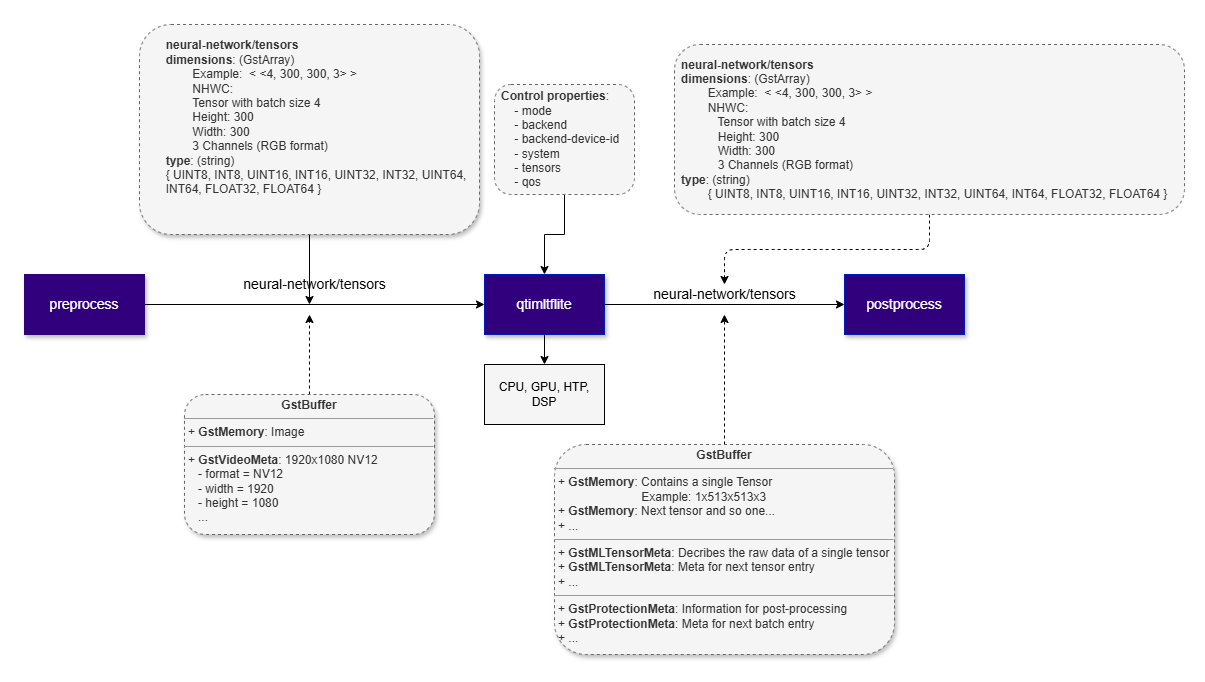
Example Pipeline
1
Download Required Files
If any downloaded file is a
.zip archive, extract it on your host machine before copying:
unzip filename.zip2
Copy files to device
3
Connect to device
4
Set environment variables
Run below command on your device
5
Run the pipeline
Hierarchy
GObjectGstObject
GstElement
GstBaseTransform
qtimltflite
Pad Templates
sink
src
Element Properties
Input and Output Behavior
Input Tensors
qtimltflite exposes a single sink pad, but it supports both single-input and multi-input models. For multi-input models, all required tensors are delivered through the same sink pad as a tensor set. Input tensors must be fully prepared before they reachqtimltflite. Expected tensor layout, shape, data type, and batch size are determined by:
- the TensorFlow Lite model input signature
- caps negotiation with upstream elements
qtimlvconverterfor scaling, color conversion, normalization, and quantizationqtibatchfor batch construction
qtimltflite does not modify, reshape, batch, or reinterpret incoming tensors. It passes them to the TensorFlow Lite runtime as received.
Output Tensors
qtimltflite exposes a single source pad and produces output tensors according to the model output signature. The single source pad does not limit the element to a single tensor. Models with multiple output tensors are fully supported, and all outputs are emitted together on the same pad.
The element supports:
- single-output and multi-output models
- arbitrary tensor ranks, including batch and depth dimensions
- quantized and floating-point outputs
Quantization and Dequantization
qtimltflite can optionally dequantize quantized output tensors, such as UINT8 or INT8, into FLOAT32. This conversion uses the quantization parameters stored in the TensorFlow Lite model metadata.
Conditional Output Dequantization
Dequantization is performed only when the downstream path requiresFLOAT32 tensors. In practice, this is enabled when downstream caps negotiation indicates that floating-point output is needed.
When dequantization is applied, qtimltflite:
- reads the tensor
scale - reads the tensor
zero_point - applies the standard TensorFlow Lite dequantization formula:
- produces
FLOAT32tensors for downstream processing
When Dequantization Is Skipped
Dequantization is not performed when:- downstream elements accept only quantized tensor types
- no downstream element negotiates
FLOAT32 - the model output tensor does not contain valid quantization metadata
Supported Data Types
qtimltflite supports the tensor data types provided by the TensorFlow Lite runtime and the selected execution backend, subject to caps negotiation with adjacent elements.
Commonly used data types include:
UINT8INT8INT32FLOAT16FLOAT32
Batch and Depth Model Support
qtimltflite supports models with batch and multi-dimensional tensor inputs and outputs, including tensors with explicit batch and depth dimensions.
Examples include:
- batched tensors:
N × H × W × C - multi-dimensional tensors:
N × D × H × W × C
qtibatch.
This behavior keeps inference predictable across single-frame, batched, and higher-dimensional workflows.
Delegates
A TensorFlow Lite delegate defines the execution backend used to run a model. Delegates allow qtimltflite to offload inference from the default TensorFlow Lite CPU interpreter to an optimized backend, such as GPU, an optimized CPU runtime, or NPU.qtimltflite supports multiple delegate options. The delegate is selected through the delegate property and controls how TensorFlow Lite dispatches model operations during inference.
Built-in Delegate Options
none
Runs the model on the default TensorFlow Lite CPU interpreter.- Backend: CPU
- Use case: reference execution, debugging, or systems without acceleration
gpu
Runs supported operations through the TensorFlow Lite GPU delegate.- Backend: GPU
- Use case: floating-point models/workloads that benefit from GPU parallelism
xnnpack
Runs inference through the XNNPACK optimized CPU backend.- Backend: Optimized CPU
- Use case: improved CPU performance for supported floating-point and quantized models
External Delegate Support
External delegate is used to accelerate models on Qualcomm’s NPU. When an external delegate is selected,qtimltflite loads and configures the delegate at runtime using the following properties:
external-delegate-path- Path to the external delegate shared library.
external-delegate-options- Delegate-specific initialization options passed to the external delegate.
Runtime Memory Behavior and GAP Handling
qtimltflite operates within the memory model of the TensorFlow Lite runtime. Although the surrounding pipeline may use zero-copy transport for tensor buffers, TensorFlow Lite execution requires input and output tensors to reside in runtime-managed memory.
TensorFlow Lite Memory Model
TensorFlow Lite uses an internal memory arena to allocate:- input tensors
- intermediate activation tensors
- output tensors
GAP Buffer Handling
qtimltflite is GAP-aware and correctly handles input buffers marked with GST_BUFFER_FLAG_GAP.
When a GAP buffer is received, the element skips inference and forwards the buffer downstream. This preserves timing and synchronization while explicitly indicating that no valid inference input is available for that timestamp.
GAP buffers commonly appear in conditional AI pipelines, such as cascaded workflows where later inference stages run only when earlier stages produce valid regions of interest.
Usage
Single-Stage AI Inference on Live Camera Stream
This example demonstrates real-time inference on a live camera stream using a single instance ofqtimltflite. Inference results are attached to each GstBuffer as MLMeta, allowing downstream elements to access synchronized metadata directly from the frame. An overlay stage then uses this metadata to render annotations such as bounding boxes, labels, or key-points before display or further processing.
1
Download Required Files
If any downloaded file is a
.zip archive, extract it on your host machine before copying:
unzip filename.zip2
Copy files to device
3
Connect to device
4
Set environment variables
Run below command on your device
5
Run the pipeline
Run the pipeline

Two-Stage Daisy Chain AI Inference on Live Camera Stream
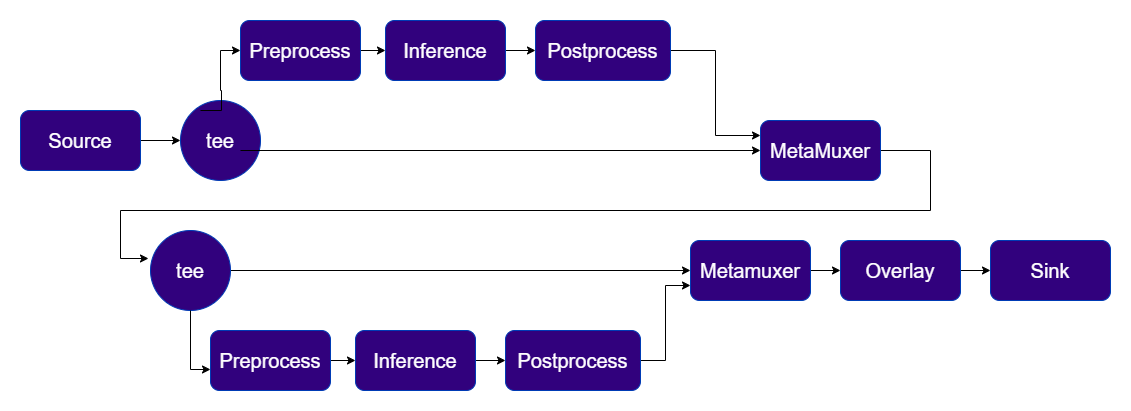
This example demonstrates a two-stage TensorFlow Lite inference workflow using two qtimltflite instances. The first model operates on full video frames after preprocessing by aqtimlvconverter configured for full-frame input. Inference results, such as detected objects, are attached to the corresponding video buffer and propagated downstream. The second model runs once for each object detected by the first stage. A second qtimlvconverter, configured for ROI-based processing, crops each detected region from the input frame and prepares it as input for the second qtimltflite instance.
1
Download Required Files
If any downloaded file is a
.zip archive, extract it on your host machine before copying:
unzip filename.zip2
Copy files to device
3
Connect to device
4
Set environment variables
Run below command on your device
5
Run the pipeline
Run the pipeline
Four-Stage Daisy Chain AI Inference on Live Camera Stream
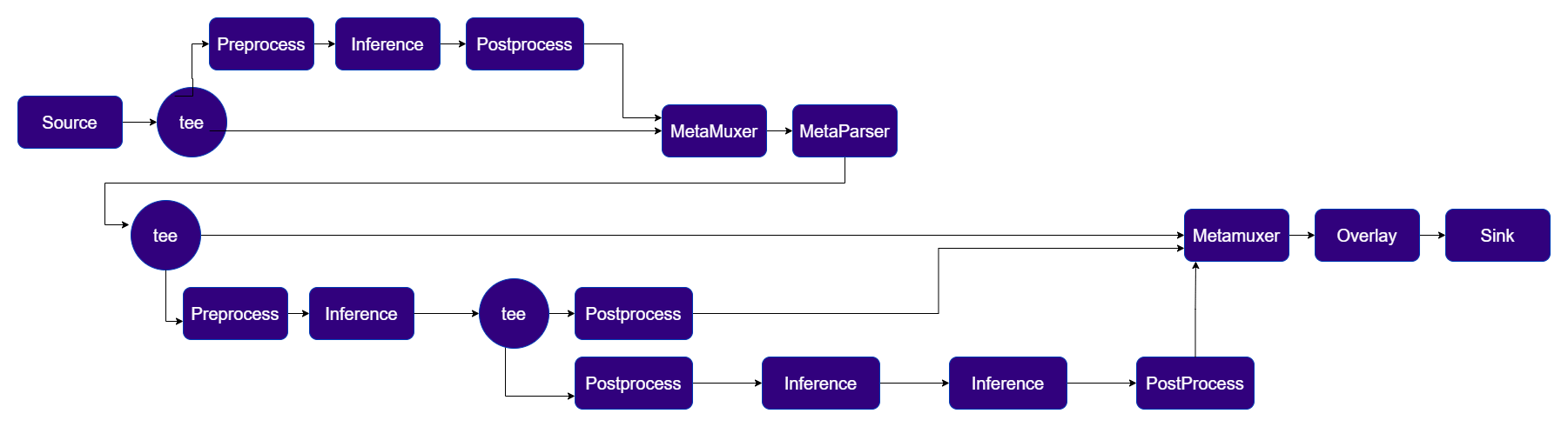
The example demonstrates a multi-stage inference workflow for live Hand-Gesture recognition use case built with four TensorFlow Lite models executed through four qtimltflite instances.- Stage 1 performs full-frame palm detection. The input video frame is preprocessed, passed through inference, and post-processed to generate metadata describing the detected palm.
- Stage 2 performs per-ROI hand landmark inference. Regions detected in the first stage are cropped and batched for processing. Two post-processing paths are used: one generates visualization metadata, while the other reformats the output tensors for the next stage.
- Stage 3 chains two models in tensor-only mode, without additional preprocessing or post-processing. The first model consumes multiple tensors produced by the previous stage, and its output is passed directly to the second model.
- Stage 4 performs final gesture classification and converts the model output into metadata for downstream use.
1
Download Required Files
Download the gesture recognizer models from Google MediaPipe:
These are FLOAT precision models.
2
Copy files to device
3
Connect to device
4
Set environment variables
Run below command on your device
5
Run the pipeline
Run the pipeline