

This plugin is currently in alpha status.
qtimlqairt is only available in
For more information on QLI images refer to Qualcomm Linux release
qcom-multimedia-proprietary-image For more information on QLI images refer to Qualcomm Linux release
Overview
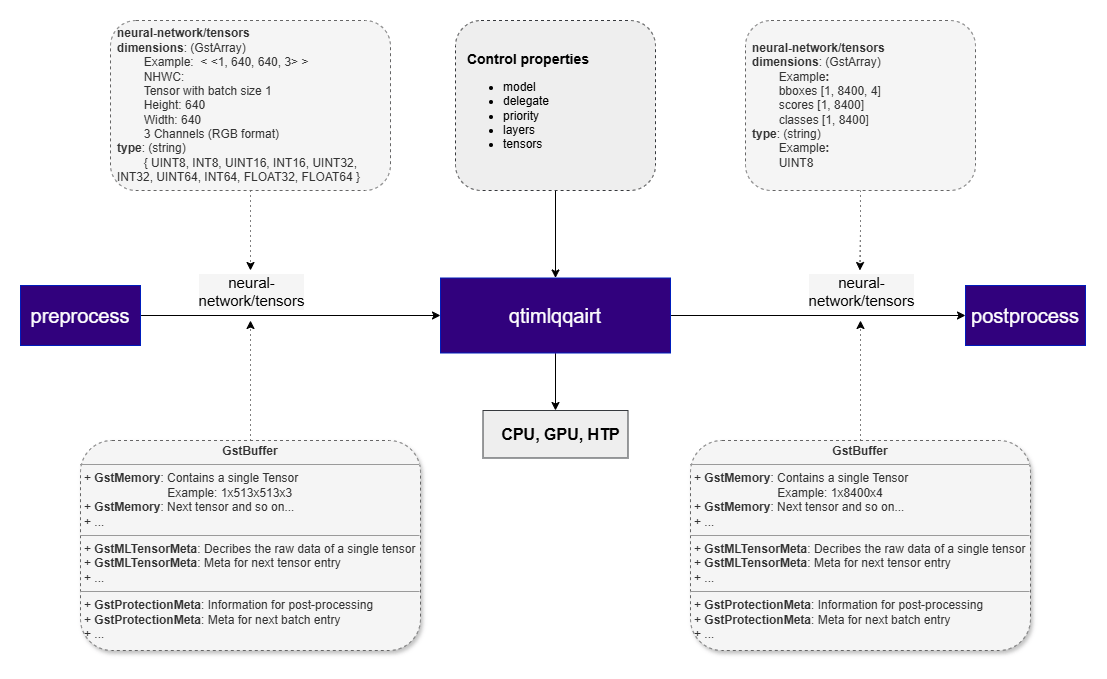
qtimlqairt is a GStreamer inference element that executes neural network models using the Qualcomm AI Runtime (QAIRT), the unified runtime that consolidates the earlier SNPE and QNN runtimes into a single, runtime-independent API. It supersedes the runtime-specificqtimlsnpe and qtimlqnn elements: a single element loads the model and executes it on the selected hardware backend (CPU, GPU, or HTP), exposing one consistent set of properties regardless of the target.
The element operates entirely in tensor mode: it accepts input tensors on its sink pad and produces output tensors on its source pad according to the model’s declared input and output specifications.
qtimlqairt runs models prepared for QAIRT. It accepts a QAIRT/SNPE Deep Learning Container (.dlc) or a cached context binary (.bin). Note that QNN model.so model libraries are not supported by QAIRT and must be reconverted to DLC.
The element is limited to model execution. It does not perform preprocessing, tensor reshaping, batching, layout conversion, or model-specific post-processing. These functions are expected to be handled by adjacent elements in the pipeline.
Key Responsibilities
qtimlqairt is responsible for:- Loading and executing a QAIRT model artifact — a
.dlccontainer or a cached.binbinary - Selecting the execution backend (CPU, GPU, or HTP) through the
backendproperty - Accepting preformatted input tensors from upstream elements
- Producing output tensors that match the model output signature
- Negotiating tensor data types and dimensions with adjacent pipeline elements
- Dequantizing quantized model outputs to
FLOAT32for downstream elements - Propagating tensor metadata required by downstream elements
- Managing DMA-backed buffers through
GstMLBufferPoolto reduce unnecessary memory copies
Example Pipeline

1
Download Required Files
2
Copy files to device
3
Connect to device
4
Set environment variables
Run below command on your device
5
Run the pipeline
Hierarchy
GObjectGstObject
GstElement
GstBaseTransform
qtimlqairt
Pad Templates
sink
src
Element Properties
Input and Output Behavior
Input Tensors
qtimlqairt exposes a single sink pad, but it supports both single-input and multi-input models. For multi-input models, all required tensors are delivered through the same sink pad as a tensor set. Input tensors must be fully prepared before they reach qtimlqairt. Expected tensor layout, shape, data type, and batch size are determined by:- The model input signature (read from the DLC or context binary at load time)
- Caps negotiation with upstream elements
qtimlvconverter— for scaling, color conversion, normalization, and quantization (if required)
Output Tensors
qtimlqairt exposes a single source pad and produces output tensors that follow the model’s declared output signature. Models with multiple output tensors are fully supported, and all outputs are emitted together on the source pad. Supported output behavior includes:- Single-tensor and multi-tensor outputs
- Arbitrary tensor shapes and ranks, including batch and depth dimensions
- Ordering and selection of output tensors using the
layersortensorsproperty - Dequantization to
FLOAT32: when a model produces quantized (fixed-point) outputs, qtimlqairt dequantizes them toFLOAT32using the tensor’s quantization parameters (scale and offset) before emitting them. This lets downstream post-processing consume floating-point tensors without changing the model artifact.
Supported Data Types
qtimlqairt supports the tensor data types provided by the QAIRT runtime and the selected execution backend, subject to caps negotiation with adjacent elements. Supported data types include:INT8UINT8INT16UINT16INT32UINT32INT64UINT64FLOAT16FLOAT32
FLOAT32 on the source pad. The element does not impose additional data-type restrictions beyond those required by the runtime, the selected backend, and negotiated pipeline caps.
Backends
A QAIRT backend defines the hardware target used to run a model. It is selected through thebackend property, which accepts the name or path of a QAIRT backend shared library. Choosing a backend lets qtimlqairt offload inference from the CPU to an optimized hardware accelerator.
The backend must be compatible with the model’s quantization. This is a property of the model artifact and is fixed at conversion time — the element cannot change it at runtime.
libQairtHtp.so
Runs the model on the AI accelerator. This is the recommended backend for quantized models.libQairtGpu.so
Runs the model on the GPU. The GPU backend is preferred for float models.libQairtCpu.so
Runs the model on the CPU. This is the default whenbackend is not explicitly set. Suitable for reference execution and bring-up. Quantized-operation support on CPU is model-dependent.
Runtime Memory Behavior and GAP Handling
QAIRT Memory Model
qtimlqairt operates within the memory model of the QAIRT runtime. The element uses DMA buffers viaGstMLBufferPool to minimize memory copies and maintain zero-copy transport where possible.
The element discovers input/output tensor metadata (count, shape, type) at model load time and configures buffer pools accordingly. Mapped tensor memory is bound directly to the runtime’s tensors for execution.
GAP Buffer Handling
qtimlqairt is GAP-aware and correctly handles input buffers marked withGST_BUFFER_FLAG_GAP.
When a GAP buffer is received, the element skips inference and forwards the buffer downstream. This preserves timing and synchronization while explicitly indicating that no valid inference input is available for that timestamp.
GAP buffers commonly appear in conditional AI pipelines, such as cascaded workflows where later inference stages run only when earlier stages produce valid regions of interest.
Usage
Single-Stage AI Inference on Live Camera Stream (HTP)
This example demonstrates real-time inference on a live camera stream using a single instance of qtimlqairt with the HTP backend and a quantized model. Inference results are attached to eachGstBuffer as MLMeta, allowing downstream elements to access synchronized metadata directly from the frame. An overlay stage then uses this metadata to render annotations such as bounding boxes, labels, or key-points before display or further processing.

1
Download Required Files
2
Copy files to device
3
Connect to device
4
Set environment variables
Run below command on your device
5
Run the pipeline
Run the pipeline
Single-Stage AI Inference on Live Camera Stream (GPU)
This example demonstrates the same single-stage inference workflow using the GPU backend instead of HTP. The GPU backend is floating-point, so it requires a float model — use a float DLC.
1
Download Required Files
2
Copy files to device
3
Connect to device
4
Set environment variables
Run below command on your device
5
Run the pipeline
Run the pipeline