

Overview

The qtiredissink is a GStreamer sink element that publishes text-based pipeline output to a Redis server in real time via Redis Pub/Sub. It accepts text/x-raw buffers from upstream elements and forwards each buffer as a message to a configured Redis channel. It is designed for media and AI pipelines where machine learning results, analytics output, or serialized metadata must be delivered to backend systems, dashboards, or distributed consumers with minimal integration effort. Supported payload types:
  • Machine learning metadata — detection/classification results, tracking information
  • Application-generated messages or serialized custom data
  • JSON or other serialized text payloads
qtiredissink manages the Redis connection and publishing internally, reducing the application logic needed to bridge a GStreamer pipeline with Redis messaging. Core capabilities:
  • Redis connectivity — connects to a Redis server using configurable host and port, with optional authentication
  • Channel-based publishing — sends each incoming buffer to a selected Redis Pub/Sub channel
  • Live data forwarding — publishes metadata or text output as soon as it arrives
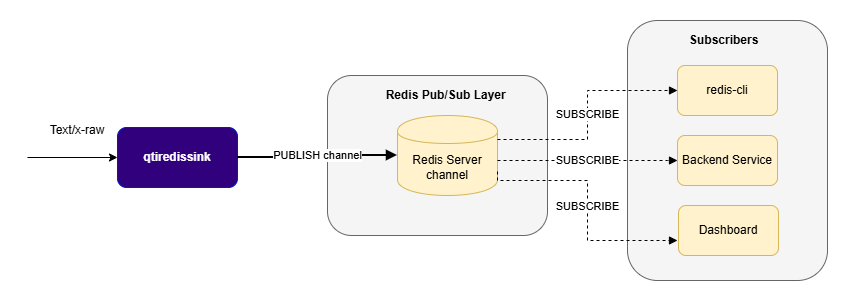
  • qtiredissink is a sink element — it terminates the pipeline branch.
  • It accepts only text/x-raw input; it is not intended for raw audio or video transport.
  • Messages are delivered only to currently connected subscribers and are not retained for later delivery.
  • A valid channel must be configured before publishing.
qtiredissink_arch

Example Pipeline

1

Download Required Files

FileDownloadSave as
YOLOX W8A8 modelQualcomm AI Hub — YOLOXyolo_x_w8a8.tflite
Detection labelsyolov8.jsonyolov8.json
Sample videoInput videoai_demo_sample.mp4
2

Copy files to device

# Replace $HOME to the appropriate device path before running the commands.
# For QLI:    /root
# For Ubuntu: /home/ubuntu
# Modify this based on your platform and ensure files are copied to the correct location on the device.
# Run from your host machine — replace <user> and <device-ip>

ssh <user>@<device-ip> "mkdir -p $HOME/{models,labels,media,media/output}"
scp yolo_x_w8a8.tflite          <user>@<device-ip>:$HOME/models/
scp yolov8.json                  <user>@<device-ip>:$HOME/labels/
scp ai_demo_sample.mp4   <user>@<device-ip>:$HOME/media/
3

Connect to device

# Run from your host machine — replace <user> and <device-ip>
ssh <user>@<device-ip>
4

Set environment variables

Run below command on your device
export MODEL_NAME=yolo_x_w8a8.tflite
export LABELS_NAME=yolov8.json
export SRC_VIDEO_NAME=ai_demo_sample.mp4
5

Run the pipeline

gst-launch-1.0 -e --gst-debug=2 \
filesrc location=$HOME/media/$SRC_VIDEO_NAME ! qtdemux ! h264parse ! \
v4l2h264dec capture-io-mode=4 output-io-mode=4 ! video/x-raw,format=NV12 ! queue ! \
qtimlvconverter ! queue ! \
qtimltflite model=$HOME/models/$MODEL_NAME delegate=external external-delegate-path=libQnnTFLiteDelegate.so \
  external-delegate-options="QNNExternalDelegate,backend_type=htp,log_level=(string)1;" ! queue ! \
qtimlpostprocess module=yolov8 labels=$HOME/labels/$LABELS_NAME \
  settings="{\"confidence\": 51.0}" ! text/x-raw ! qtiredissink host=127.0.0.1 port=6379 channel=ml_results

#Listen to the published data with Redis CLI from another shell:
redis-cli SUBSCRIBE detections

Hierarchy

GObject
   GstObject
      GstElement
         GstBaseSink
            qtiredissink

Pad Templates

sink

Capabilities
text/x-rawformat: NA
Availability: Always
Direction: sink

Element Properties

PropertyDescription
channelRedis Pub/Sub channel to publish messages to.

Type: String
Default: NULL
Flags: readable/writable
hostRedis server hostname or IP address.

Type: String
Default: "127.0.0.1"
Flags: readable/writable
passwordPassword for Redis authentication.

Type: String
Default: NULL
Flags: readable/writable
portRedis server TCP port.

Type: Unsigned Integer
Default: 6379
Range: 0 - 4294967295
Flags: readable/writable
usernameUsername for Redis authentication.

Type: String
Default: NULL
Flags: readable/writable

Internal Architecture and Messaging Model

qtiredissink connects to the configured Redis host and port (with optional authentication), reads each incoming text/x-raw buffer, and publishes its contents to the specified channel using the Redis PUBLISH command. Because it uses Pub/Sub, messages are delivered only in real time to currently connected subscribers and are not retained for later delivery. This makes the element suitable for live metadata and event distribution rather than persistent storage.

Custom Payload Support

qtiredissink can transport any custom textual or serialized payload as long as it is text/x-raw. This is useful for:
  • Sensor or telemetry data serialized as text
  • Application-specific metadata such as JSON
  • Event notifications and status messages
  • Any AI metadata not natively supported by IMSDK

Usage

Ensure you have followed the prerequisites before continuing

AI pipeline with video overlay and Redis metadata streaming

This pipeline performs object detection on offline video. Inference results are attached to each frame as metadata by qtimetamux, converted to JSON by qtimlmetaparser, and published to a Redis channel by qtiredissink. In parallel, the video stream continues to the display path where detection overlays are rendered on screen. This separates metadata distribution from video rendering, allowing external applications to consume real-time inference results through Redis independently of the displayed video. qtiredissink_arch

gst-launch-1.0 filesrc location=$HOME/media/$SRC_VIDEO_NAME ! qtdemux ! h264parse ! v4l2h264dec capture-io-mode=4 output-io-mode=4 ! video/x-raw,format=NV12 ! queue ! tee name=t t. ! queue ! qtimlvconverter ! queue ! qtimltflite delegate=external external-delegate-path=libQnnTFLiteDelegate.so external-delegate-options="QNNExternalDelegate,backend_type=htp;" model=$HOME/models/$MODEL_NAME ! queue ! qtimlpostprocess module=yolov8 results=6 labels=$HOME/labels/$LABELS_NAME ! queue ! text/x-raw ! metamux. t. ! qtimetamux name=metamux ! qtivoverlay ! tee name=t_split_4 t_split_4. ! queue ! waylandsink sync=false fullscreen=true t_split_4. ! queue ! qtimlmetaparser module=json ! qtiredissink sync=false async=false channel=ml_results host=127.0.0.1 port=6379
Listen to the published data with Redis CLI:
redis-cli SUBSCRIBE ml_results

AI pipeline with direct metadata streaming to Redis

This pipeline performs object detection on offline video. The decoded frames pass through the inference and post-processing stages, which produce detection results as structured text. That output is consumed directly by qtiredissink, which publishes the inference metadata to a Redis channel — without any video overlay or display path. qtiredissink_arch

gst-launch-1.0 -e --gst-debug=2 filesrc location=$HOME/media/$SRC_VIDEO_NAME ! qtdemux ! h264parse ! v4l2h264dec capture-io-mode=4 output-io-mode=4 ! video/x-raw,format=NV12 ! queue ! qtimlvconverter ! queue ! qtimltflite delegate=external external-delegate-path=libQnnTFLiteDelegate.so external-delegate-options="QNNExternalDelegate,backend_type=htp;" model=$HOME/models/$MODEL_NAME ! queue ! qtimlpostprocess results=5 module=yolov8 labels=$HOME/labels/$LABELS_NAME ! text/x-raw ! queue ! qtiredissink host=127.0.0.1 port=6379 channel=detections
Listen to the published data with Redis CLI:
redis-cli SUBSCRIBE detections
