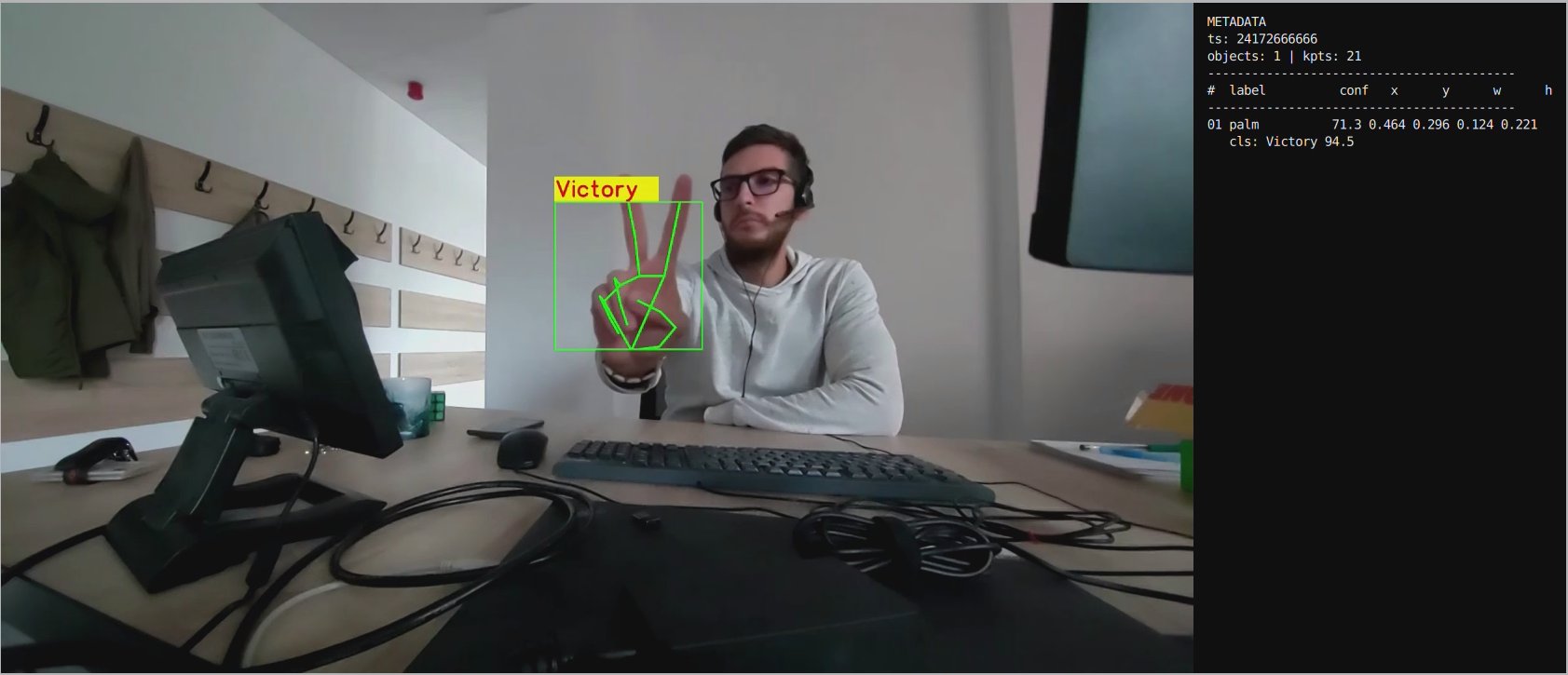
This section covers QIM SDK AI pipelines that use LiteRT for inference.

Vision AI Pipelines

Object Detection

Single‑Stream Object Detection Pipeline.

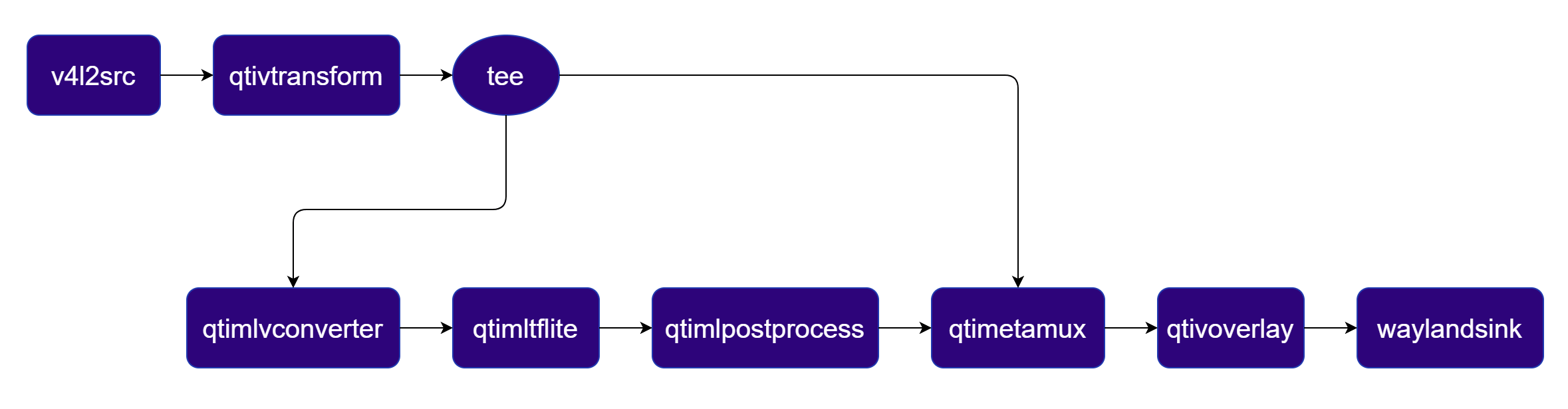
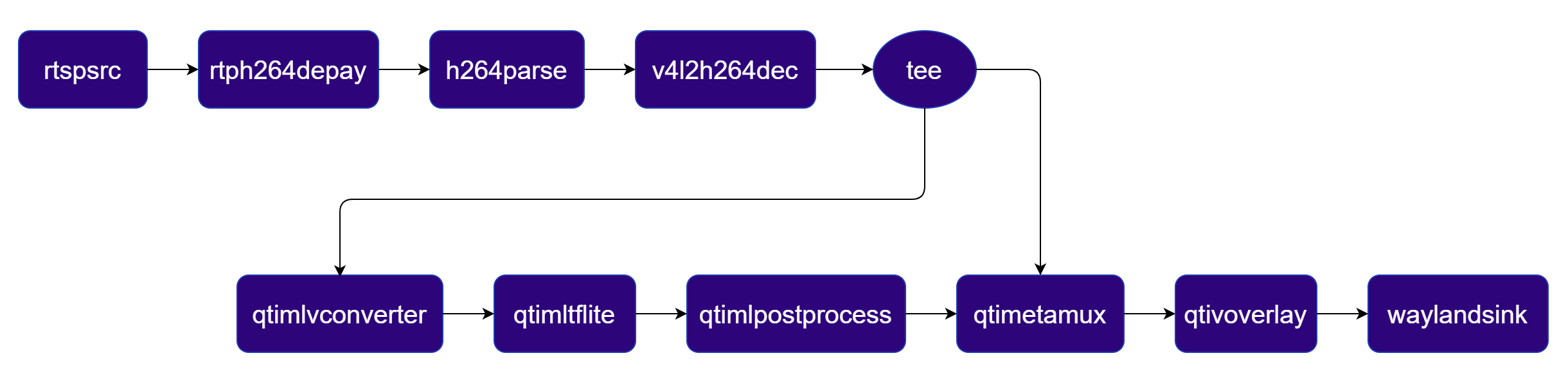
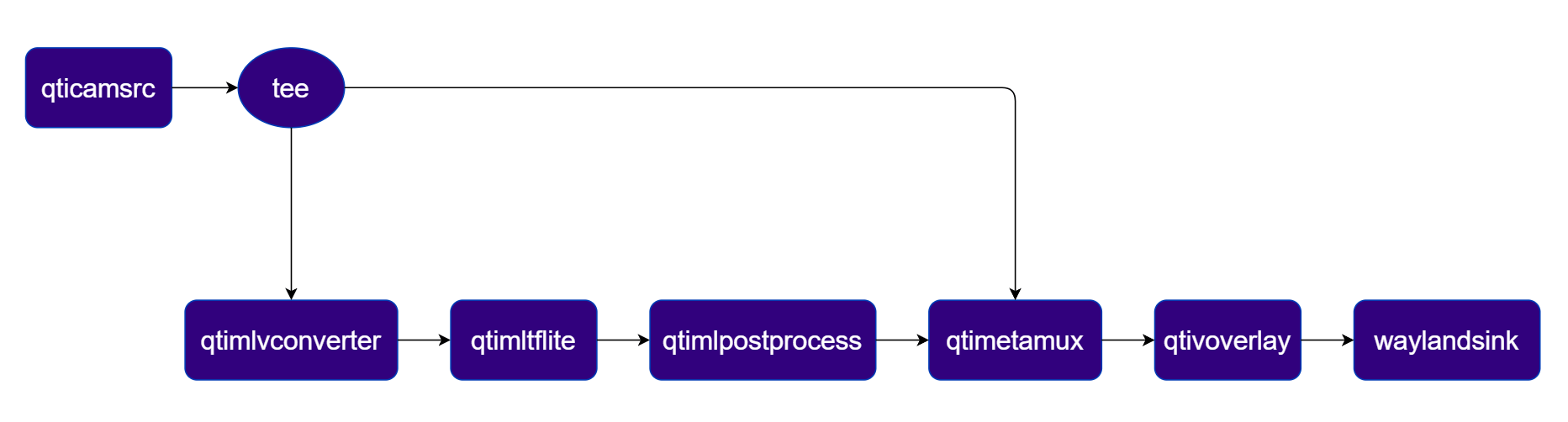
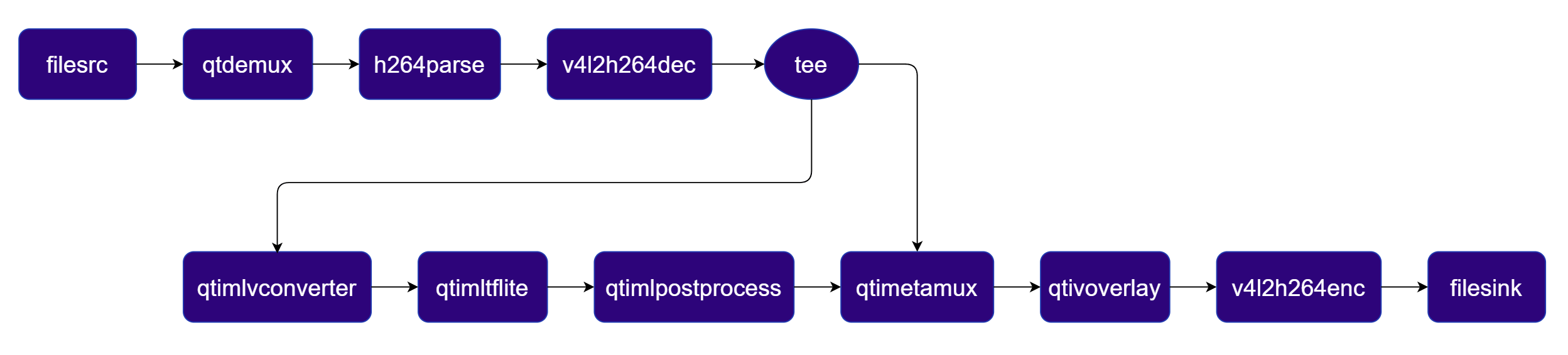
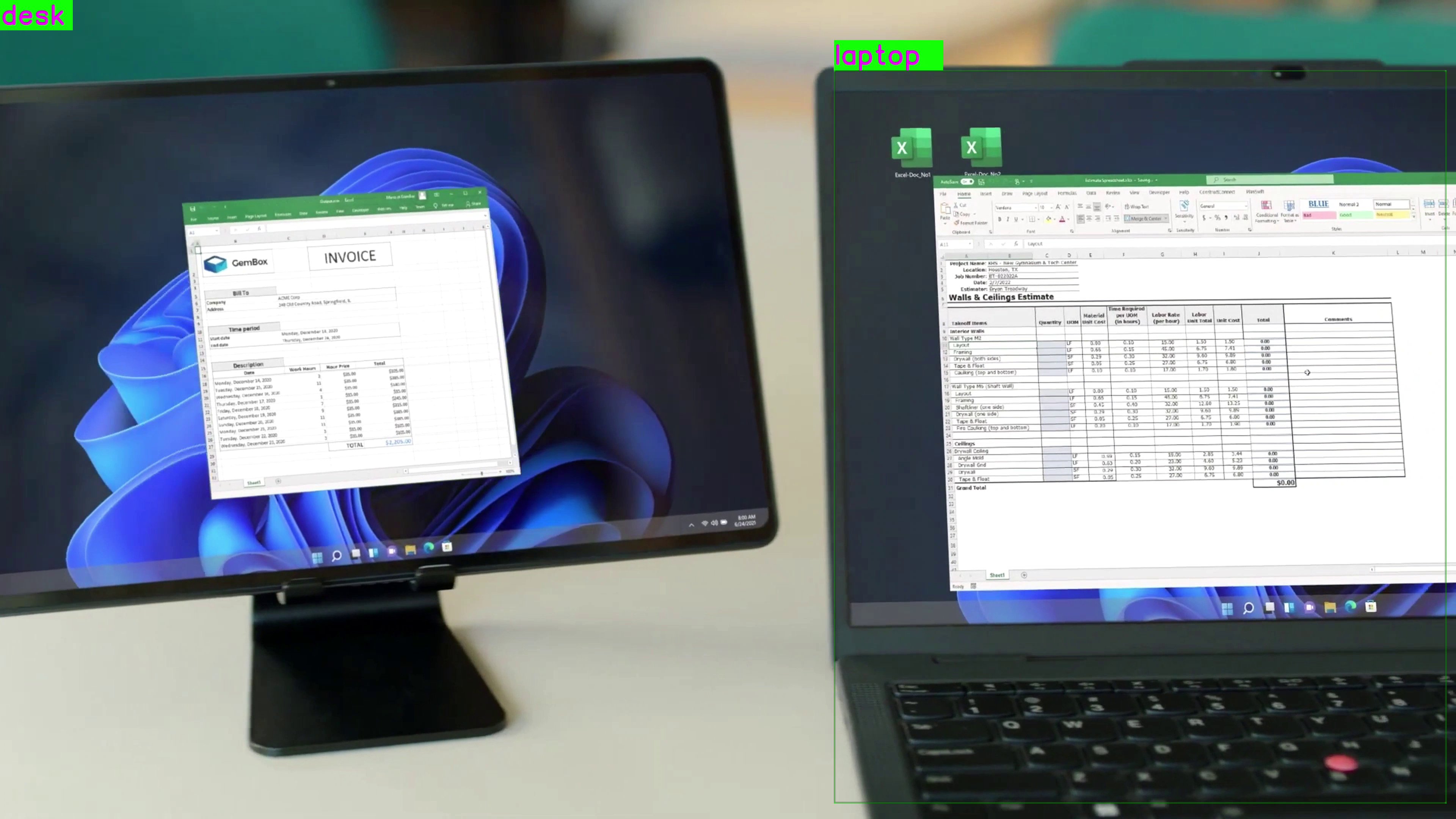
Detects objects in each frame using a YOLOX LiteRT model and overlays bounding boxes and labels. Pipeline Diagram
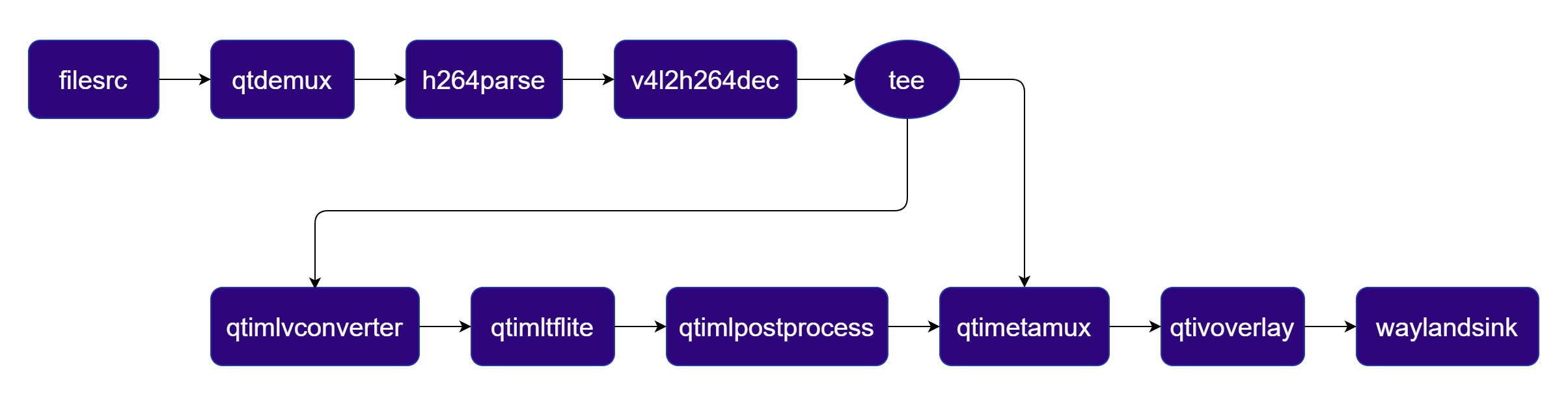
Pipeline Diagram

1

Download Required Files:

FileDownloadSave as
YOLOX W8A8 modelQualcomm AI Hub — YOLOXyolox_w8a8.tflite
Detection labelsyolov8.jsonyolov8.json
Sample videoInput videoai_demo_sample.mp4
If any downloaded file is a .zip archive, extract it on your host machine before copying: unzip filename.zip
2

Copy files to device

Create the required directories and transfer the downloaded files to your device.
# Replace $HOME to the appropriate device path before running the commands.
# For QLI:    /root
# For Ubuntu: /home/ubuntu
# Modify this based on your platform and ensure files are copied to the correct location on the device.
# Run from your host machine — replace <user> and <device-ip>

ssh <user>@<device-ip> "mkdir -p $HOME/{models,media,media/output}"
scp yolox_w8a8.tflite          <user>@<device-ip>:$HOME/models/
scp yolov8.json                  <user>@<device-ip>:$HOME/labels/
scp ai_demo_sample.mp4   <user>@<device-ip>:$HOME/media/
3

Connect to device

# Run from your host machine — replace <user> and <device-ip>
ssh <user>@<device-ip>
4

Set environment variables

Run below command on your device
export MODEL_NAME=yolox_w8a8.tflite
export LABELS_NAME=yolov8.json
export SRC_VIDEO_NAME=ai_demo_sample.mp4
5

Run the pipeline

gst-launch-1.0 -e --gst-debug=2 \
filesrc location=$HOME/media/$SRC_VIDEO_NAME ! qtdemux ! h264parse ! \
v4l2h264dec capture-io-mode=4 output-io-mode=4 ! video/x-raw,format=NV12 ! queue ! \
tee name=t ! qtimetamux name=obj_mux ! qtivoverlay ! waylandsink fullscreen=true sync=true \
t. ! queue ! qtimlvconverter ! queue ! \
qtimltflite model=$HOME/models/$MODEL_NAME delegate=external external-delegate-path=libQnnTFLiteDelegate.so external-delegate-options="QNNExternalDelegate,backend_type=htp,log_level=(string)1;" ! queue ! \
qtimlpostprocess module=yolov8 labels=$HOME/labels/$LABELS_NAME bbox-stabilization=true ! text/x-raw ! queue ! obj_mux.
6

Expected Output

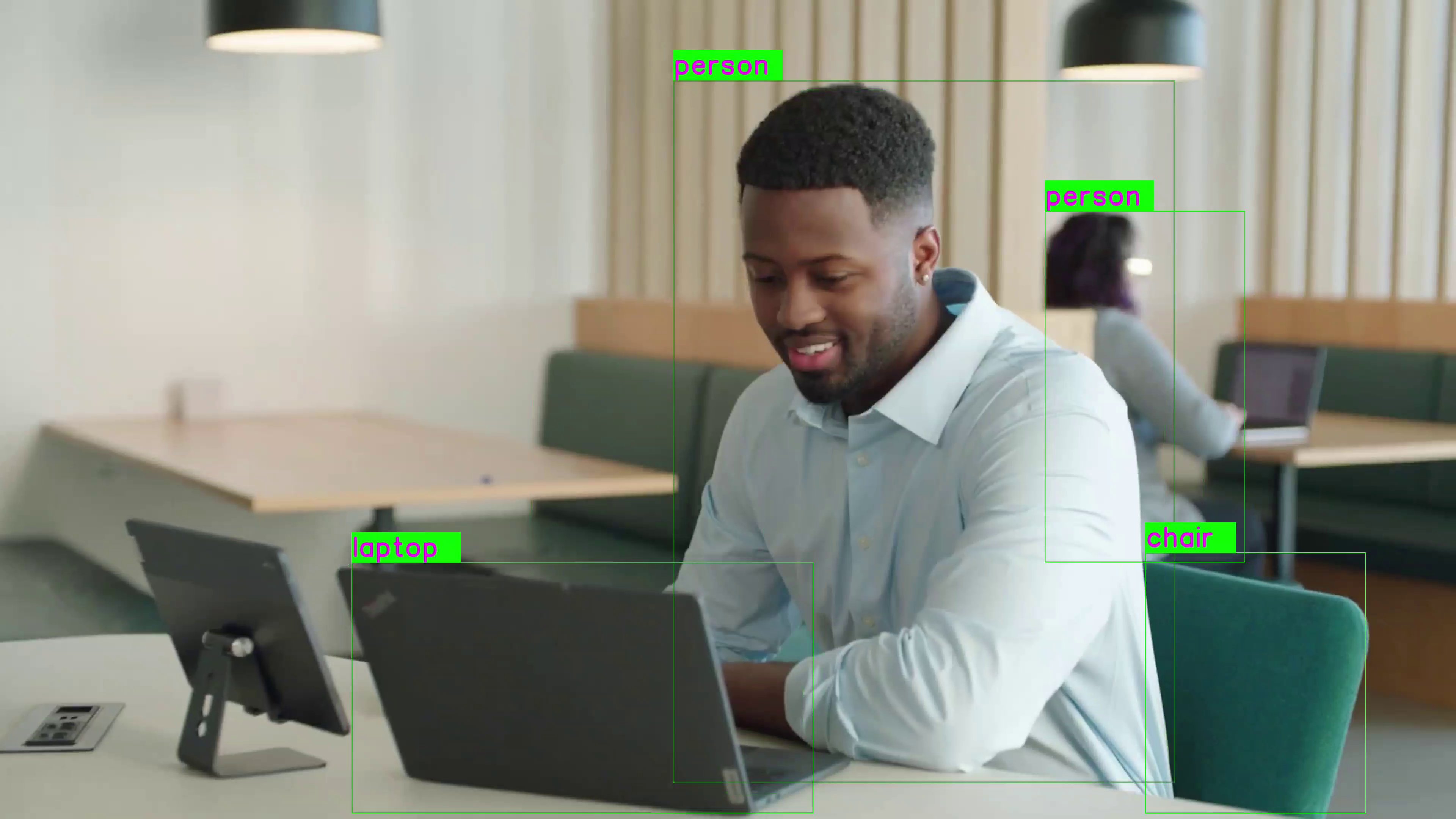
The pipeline overlays bounding boxes and class labels on each video frame. Results are rendered on the display or saved to the output file.Expected Output
Object Detection Pipelines with Various Input and Output Configurations
Make sure you have completed Download Required Files (Step 1) and Set Environment Variables (Step 2) before running the pipelines below.
Render object detection result on display
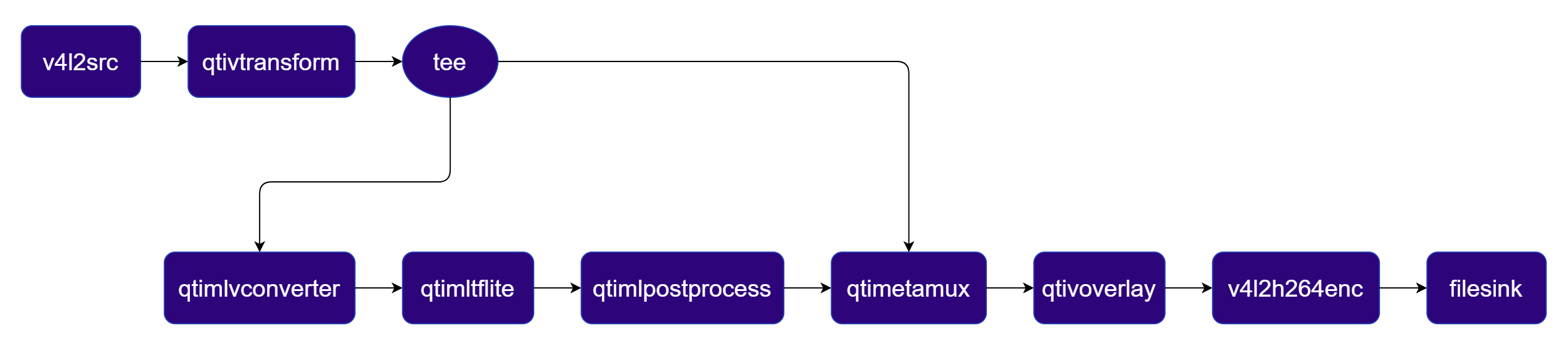
Pipeline Diagram
Pipeline Diagram
gst-launch-1.0 -e --gst-debug=2 \
filesrc location=$HOME/media/$SRC_VIDEO_NAME ! qtdemux ! h264parse ! \
v4l2h264dec capture-io-mode=4 output-io-mode=4 ! video/x-raw,format=NV12 ! queue ! \
tee name=t ! qtimetamux name=obj_mux ! qtivoverlay ! waylandsink fullscreen=true sync=true \
t. ! queue ! qtimlvconverter ! queue ! \
qtimltflite model=$HOME/models/$MODEL_NAME delegate=external external-delegate-path=libQnnTFLiteDelegate.so external-delegate-options="QNNExternalDelegate,backend_type=htp,log_level=(string)1;" ! queue ! \
qtimlpostprocess module=yolov8 labels=$HOME/labels/$LABELS_NAME settings="{\"confidence\": 51.0}" bbox-stabilization=true ! text/x-raw ! queue ! obj_mux.
Pipeline Diagram
Pipeline Diagram
gst-launch-1.0 -e --gst-debug=2 \
v4l2src device=/dev/video0 ! video/x-raw,format=YUY2 ! qtivtransform ! video/x-raw,format=NV12 ! queue ! \
tee name=t ! qtimetamux name=obj_mux ! qtivoverlay ! waylandsink fullscreen=true sync=true \
t. ! queue ! qtimlvconverter ! queue ! \
qtimltflite model=$HOME/models/$MODEL_NAME delegate=external external-delegate-path=libQnnTFLiteDelegate.so external-delegate-options="QNNExternalDelegate,backend_type=htp,log_level=(string)1;" ! queue ! \
qtimlpostprocess module=yolov8 labels=$HOME/labels/$LABELS_NAME settings="{\"confidence\": 51.0}" bbox-stabilization=true ! text/x-raw ! queue ! obj_mux.
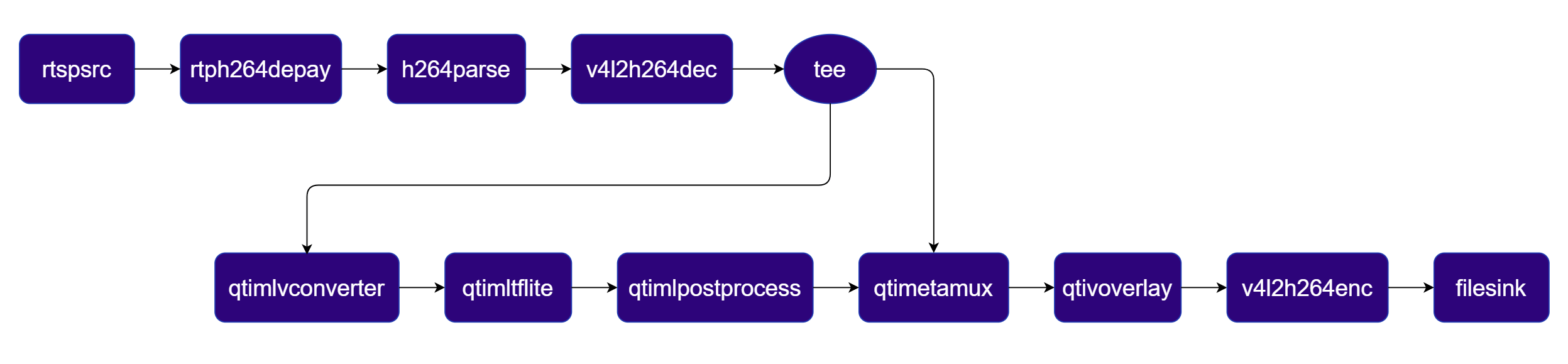
Pipeline Diagram
Pipeline Diagram
gst-launch-1.0 -e --gst-debug=2 \
rtspsrc location=rtsp://<ip>:<port>/stream ! rtph264depay ! h264parse ! \
v4l2h264dec capture-io-mode=4 output-io-mode=4 ! video/x-raw,format=NV12 ! queue ! \
tee name=t ! qtimetamux name=obj_mux ! qtivoverlay ! waylandsink fullscreen=true sync=true \
t. ! queue ! qtimlvconverter ! queue ! \
qtimltflite model=$HOME/models/$MODEL_NAME delegate=external external-delegate-path=libQnnTFLiteDelegate.so external-delegate-options="QNNExternalDelegate,backend_type=htp,log_level=(string)1;" ! queue ! \
qtimlpostprocess module=yolov8 labels=$HOME/labels/$LABELS_NAME settings="{\"confidence\": 51.0}" bbox-stabilization=true ! text/x-raw ! queue ! obj_mux.
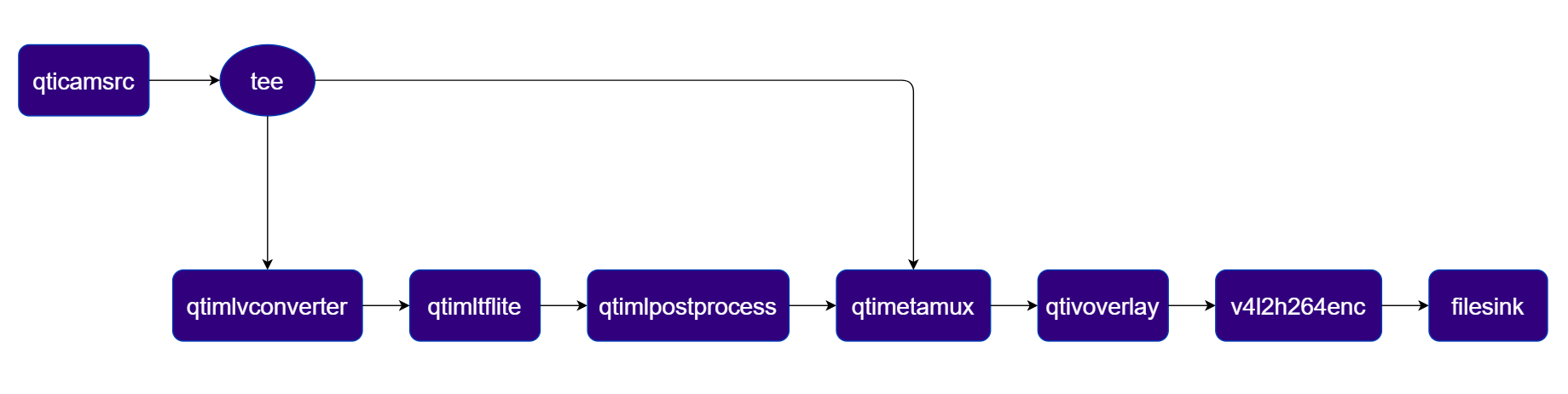
Pipeline Diagram
Pipeline Diagram
gst-launch-1.0 -e --gst-debug=2 \
qticamsrc name=camsrc ! video/x-raw,format=NV12,width=1920,height=1080,framerate=30/1 ! queue ! \
tee name=t ! qtimetamux name=obj_mux ! qtivoverlay ! waylandsink fullscreen=true sync=true \
t. ! queue ! qtimlvconverter ! queue ! \
qtimltflite model=$HOME/models/$MODEL_NAME delegate=external external-delegate-path=libQnnTFLiteDelegate.so external-delegate-options="QNNExternalDelegate,backend_type=htp,log_level=(string)1;" ! queue ! \
qtimlpostprocess module=yolov8 labels=$HOME/labels/$LABELS_NAME settings="{\"confidence\": 51.0}" bbox-stabilization=true ! text/x-raw ! queue ! obj_mux.
Encode object detection result into file
Pipeline Diagram
Pipeline Diagram
gst-launch-1.0 -e --gst-debug=2 \
filesrc location=$HOME/media/$SRC_VIDEO_NAME ! qtdemux ! h264parse ! \
v4l2h264dec capture-io-mode=4 output-io-mode=4 ! video/x-raw,format=NV12 ! queue ! \
tee name=t ! qtimetamux name=obj_mux ! qtivoverlay ! v4l2h264enc capture-io-mode=4 output-io-mode=4 ! h264parse ! mp4mux ! filesink location=$HOME/media/output/obj_detect_out.mp4 \
t. ! queue ! qtimlvconverter ! queue ! \
qtimltflite model=$HOME/models/$MODEL_NAME delegate=external external-delegate-path=libQnnTFLiteDelegate.so external-delegate-options="QNNExternalDelegate,backend_type=htp,log_level=(string)1;" ! queue ! \
qtimlpostprocess module=yolov8 labels=$HOME/labels/$LABELS_NAME settings="{\"confidence\": 51.0}" bbox-stabilization=true ! text/x-raw ! queue ! obj_mux.
Pipeline Diagram
Pipeline Diagram
gst-launch-1.0 -e --gst-debug=2 \
v4l2src device=/dev/video0 ! video/x-raw,format=YUY2 ! qtivtransform ! video/x-raw,format=NV12 ! queue ! \
tee name=t ! qtimetamux name=obj_mux ! qtivoverlay ! queue ! v4l2h264enc capture-io-mode=4 output-io-mode=4 ! h264parse ! mp4mux ! filesink location=$HOME/media/output/obj_detect_out.mp4 \
t. ! queue ! qtimlvconverter ! queue ! \
qtimltflite model=$HOME/models/$MODEL_NAME delegate=external external-delegate-path=libQnnTFLiteDelegate.so external-delegate-options="QNNExternalDelegate,backend_type=htp,log_level=(string)1;" ! queue ! \
qtimlpostprocess module=yolov8 labels=$HOME/labels/$LABELS_NAME settings="{\"confidence\": 51.0}" ! text/x-raw bbox-stabilization=true ! queue ! obj_mux.
Pipeline Diagram
Pipeline Diagram
gst-launch-1.0 -e --gst-debug=2 \
rtspsrc location=rtsp://<ip>:<port>/stream ! rtph264depay ! h264parse ! \
v4l2h264dec capture-io-mode=4 output-io-mode=4 ! video/x-raw,format=NV12 ! queue ! \
tee name=t ! qtimetamux name=obj_mux ! qtivoverlay ! v4l2h264enc capture-io-mode=4 output-io-mode=4 ! h264parse ! mp4mux ! filesink location=$HOME/media/output/obj_detect_out.mp4 \
t. ! queue ! qtimlvconverter ! queue ! \
qtimltflite model=$HOME/models/$MODEL_NAME delegate=external external-delegate-path=libQnnTFLiteDelegate.so external-delegate-options="QNNExternalDelegate,backend_type=htp,log_level=(string)1;" ! queue ! \
qtimlpostprocess module=yolov8 labels=$HOME/labels/$LABELS_NAME settings="{\"confidence\": 51.0}" bbox-stabilization=true ! text/x-raw ! queue ! obj_mux.
Pipeline Diagram
Pipeline Diagram
gst-launch-1.0 -e --gst-debug=2 \
qticamsrc name=camsrc ! video/x-raw,format=NV12,width=1920,height=1080,framerate=30/1 ! queue ! \
tee name=t ! qtimetamux name=obj_mux ! qtivoverlay ! v4l2h264enc capture-io-mode=4 output-io-mode=4 ! h264parse ! mp4mux ! filesink location=$HOME/media/output/obj_detect_out.mp4 \
t. ! queue ! qtimlvconverter ! queue ! \
qtimltflite model=$HOME/models/$MODEL_NAME delegate=external external-delegate-path=libQnnTFLiteDelegate.so external-delegate-options="QNNExternalDelegate,backend_type=htp,log_level=(string)1;" ! queue ! \
qtimlpostprocess module=yolov8 labels=$HOME/labels/$LABELS_NAME settings="{\"confidence\": 51.0}" bbox-stabilization=true ! text/x-raw ! queue ! obj_mux.
PluginDescription
filesrcReads an H.264 encoded video file as the pipeline source.
v4l2h264decHardware-decodes the H.264 stream to raw NV12 frames using V4L2.
teeDuplicates the decoded video stream for parallel video passthrough and ML inference branches.
qtimlvconverterPreprocesses video frames (color conversion, scaling, normalization) and converts to tensor stream.
qtimltfliteLoads the TFLite model, applies the chosen delegate, and runs inference to produce result tensors.
qtimlpostprocessPost-processes detection tensors, applies confidence threshold, and forwards bounding-box metadata.
qtimetamuxMerges video and metadata/text streams, attaching inference results as GST buffer metadata.
qtivoverlayOverlays inference results (labels, bounding boxes, keypoints) onto the video frame using CL.
v4l2h264encHardware-encodes the video stream to H.264 using V4L2.
filesinkWrites the encoded video stream to an output file.

Two‑Stream Object Detection Pipeline

Object detection on Stream 1 with side‑by‑side composition on Stream 2 Pipeline Diagram
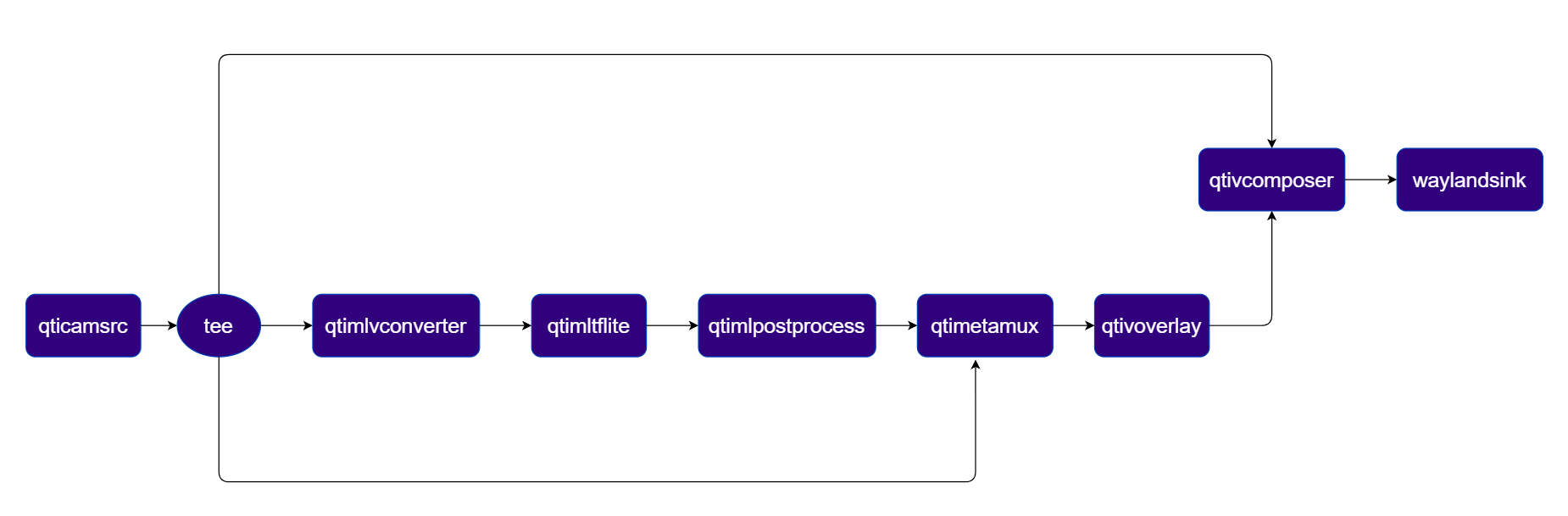
Pipeline Diagram

1

Download Required Files:

FileDownloadSave as
YOLOX W8A8 modelQualcomm AI Hub — YOLOXyolox_w8a8.tflite
Detection labelsyolov8.jsonyolov8.json
If any downloaded file is a .zip archive, extract it on your host machine before copying: unzip filename.zip
2

Copy files to device

# Replace $HOME to the appropriate device path before running the commands.
# For QLI:    /root
# For Ubuntu: /home/ubuntu
# Modify this based on your platform and ensure files are copied to the correct location on the device.

ssh <user>@<device-ip> "mkdir -p $HOME/{models,media,media/output}"
scp yolox_w8a8.tflite  <user>@<device-ip>:$HOME/models/
scp yolov8.json          <user>@<device-ip>:$HOME/labels/
3

Connect to device

# Run from your host machine — replace <user> and <device-ip>
ssh <user>@<device-ip>
4

Set environment variables

Run below command on your device
export MODEL_NAME=yolox_w8a8.tflite
export LABELS_NAME=yolov8.json
export SRC_VIDEO_NAME=ai_demo_sample.mp4
5

Run the pipeline

gst-launch-1.0 -e --gst-debug=2 \
qtivcomposer name=comp \
  sink_0::position="<0, 0>" sink_0::dimensions="<960, 1080>" \
  sink_1::position="<960, 0>" sink_1::dimensions="<960, 1080>" ! \
queue ! waylandsink fullscreen=true sync=true \
qtimetamux name=obj_mux ! queue ! qtivoverlay ! queue ! comp.sink_1 \
qticamsrc name=camsrc ! video/x-raw,format=NV12,width=1920,height=1080,framerate=30/1 ! queue ! \
tee name=t_src \
t_src. ! queue ! comp.sink_0 \
t_src. ! queue ! qtimlvconverter ! queue ! \
qtimltflite model=$HOME/models/$MODEL_NAME delegate=external external-delegate-path=libQnnTFLiteDelegate.so external-delegate-options="QNNExternalDelegate,backend_type=htp,log_level=(string)1;" ! queue ! \
qtimlpostprocess module=yolov8 labels=$HOME/labels/$LABELS_NAME settings="{\"confidence\": 51.0}" bbox-stabilization=true ! text/x-raw ! queue ! obj_mux. \
t_src. ! queue ! obj_mux.
6

Expected Output

The pipeline overlays bounding boxes and class labels on each video frame. Results are rendered on the display or saved to the output file.Expected Output
PluginDescription
qticamsrcCaptures live video from the ISP camera as the pipeline source.
teeSplits the camera stream into three branches: raw passthrough, ML inference, and metadata mux.
qtimlvconverterPreprocesses video frames (color conversion, scaling, normalization) and converts to tensor stream.
qtimltfliteLoads the TFLite model, applies the chosen delegate, and runs inference to produce result tensors.
qtimlpostprocessPost-processes detection tensors, applies confidence threshold, and forwards bounding-box metadata.
qtimetamuxMerges video and metadata/text streams, attaching inference results as GST buffer metadata.
qtivoverlayOverlays inference results (labels, bounding boxes, keypoints) onto the video frame using CL.
qtivcomposerComposites the raw camera stream (sink_0) and the overlay stream (sink_1) side-by-side.
waylandsinkRenders the final composited video stream to a local display via Weston.

Three-Stream Object Detection Pipeline

Object detection on Stream 1, side‑by‑side composition on Stream 2, and video encoding to file on Stream 3 Pipeline Diagram
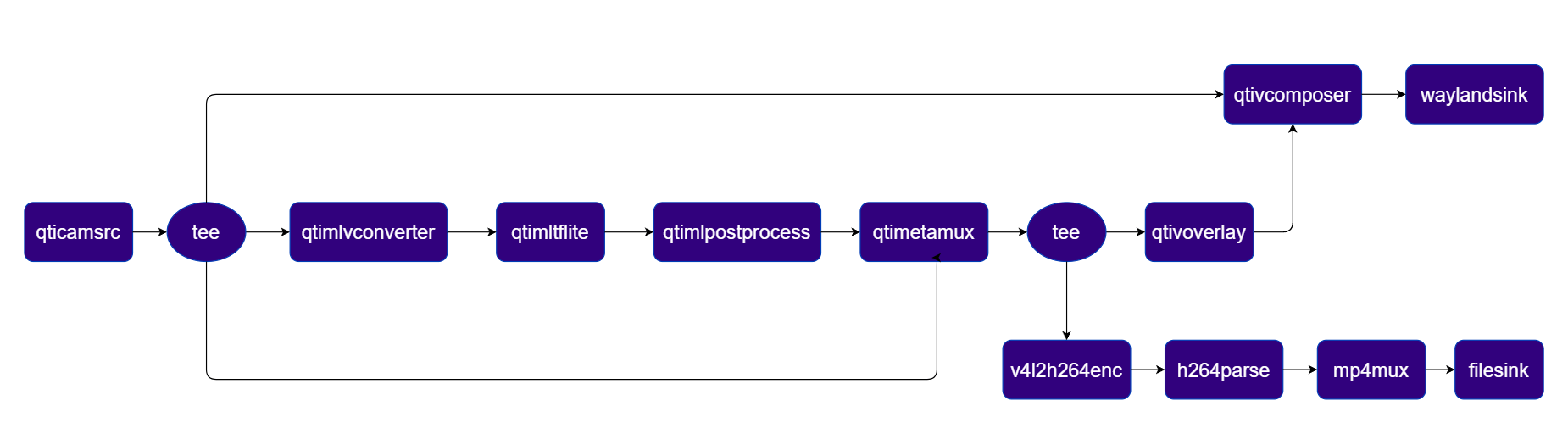
Pipeline Diagram

1

Download Required Files:

FileDownloadSave as
YOLOX W8A8 modelQualcomm AI Hub — YOLOXyolox_w8a8.tflite
Detection labelsyolov8.jsonyolov8.json
If any downloaded file is a .zip archive, extract it on your host machine before copying: unzip filename.zip
2

Copy files to device

# Replace $HOME to the appropriate device path before running the commands.
# For QLI:    /root
# For Ubuntu: /home/ubuntu
# Modify this based on your platform and ensure files are copied to the correct location on the device.

ssh <user>@<device-ip> "mkdir -p $HOME/{models,media,media/output}"
scp yolox_w8a8.tflite  <user>@<device-ip>:$HOME/models/
scp yolov8.json          <user>@<device-ip>:$HOME/labels/
3

Connect to device

# Run from your host machine — replace <user> and <device-ip>
ssh <user>@<device-ip>
4

Set environment variables

Run below command on your device
export MODEL_NAME=yolox_w8a8.tflite
export LABELS_NAME=yolov8.json
export SRC_VIDEO_NAME=ai_demo_sample.mp4
5

Run the pipeline

gst-launch-1.0 -e --gst-debug=2 \
qtivcomposer name=comp \
  sink_0::position="<0, 0>" sink_0::dimensions="<960, 1080>" \
  sink_1::position="<960, 0>" sink_1::dimensions="<960, 1080>" ! \
queue ! waylandsink fullscreen=true sync=true \
qtimetamux name=obj_mux ! queue ! tee name=ai_tee \
ai_tee. ! queue ! qtivoverlay ! queue ! comp.sink_1 \
ai_tee. ! queue ! v4l2h264enc capture-io-mode=4 output-io-mode=4 ! h264parse ! mp4mux ! \
filesink location=$HOME/media/output/obj_detect_out.mp4 sync=false \
qticamsrc name=camsrc ! video/x-raw,format=NV12,width=1920,height=1080,framerate=30/1 ! queue ! \
tee name=t_src \
t_src. ! queue ! comp.sink_0 \
t_src. ! queue ! qtimlvconverter ! queue ! \
qtimltflite model=$HOME/models/$MODEL_NAME delegate=external external-delegate-path=libQnnTFLiteDelegate.so external-delegate-options="QNNExternalDelegate,backend_type=htp,log_level=(string)1;" ! queue ! \
qtimlpostprocess module=yolov8 labels=$HOME/labels/$LABELS_NAME settings="{\"confidence\": 51.0}" bbox-stabilization=true ! text/x-raw ! queue ! obj_mux. \
t_src. ! queue ! obj_mux.
6

Expected Output

The pipeline overlays bounding boxes and class labels on each video frame. Results are rendered on the display or saved to the output file.Expected Output

PluginDescription
qticamsrcCaptures live video from the ISP camera as the pipeline source.
teeSplits the stream into branches for display composition, ML inference, and file encoding.
qtimlvconverterPreprocesses video frames (color conversion, scaling, normalization) and converts to tensor stream.
qtimltfliteLoads the TFLite model, applies the chosen delegate, and runs inference to produce result tensors.
qtimlpostprocessPost-processes detection tensors, applies confidence threshold, and forwards bounding-box metadata.
qtimetamuxMerges video and metadata/text streams, attaching inference results as GST buffer metadata.
qtivcomposerComposites the raw camera stream (sink_0) and the overlay stream (sink_1) side-by-side.
qtivoverlayOverlays inference results (labels, bounding boxes, keypoints) onto the video frame using CL.
v4l2h264encHardware-encodes the video stream to H.264 using V4L2.
filesinkWrites the encoded video stream to an output file.
waylandsinkRenders the final composited video stream to a local display via Weston.

Face Detection

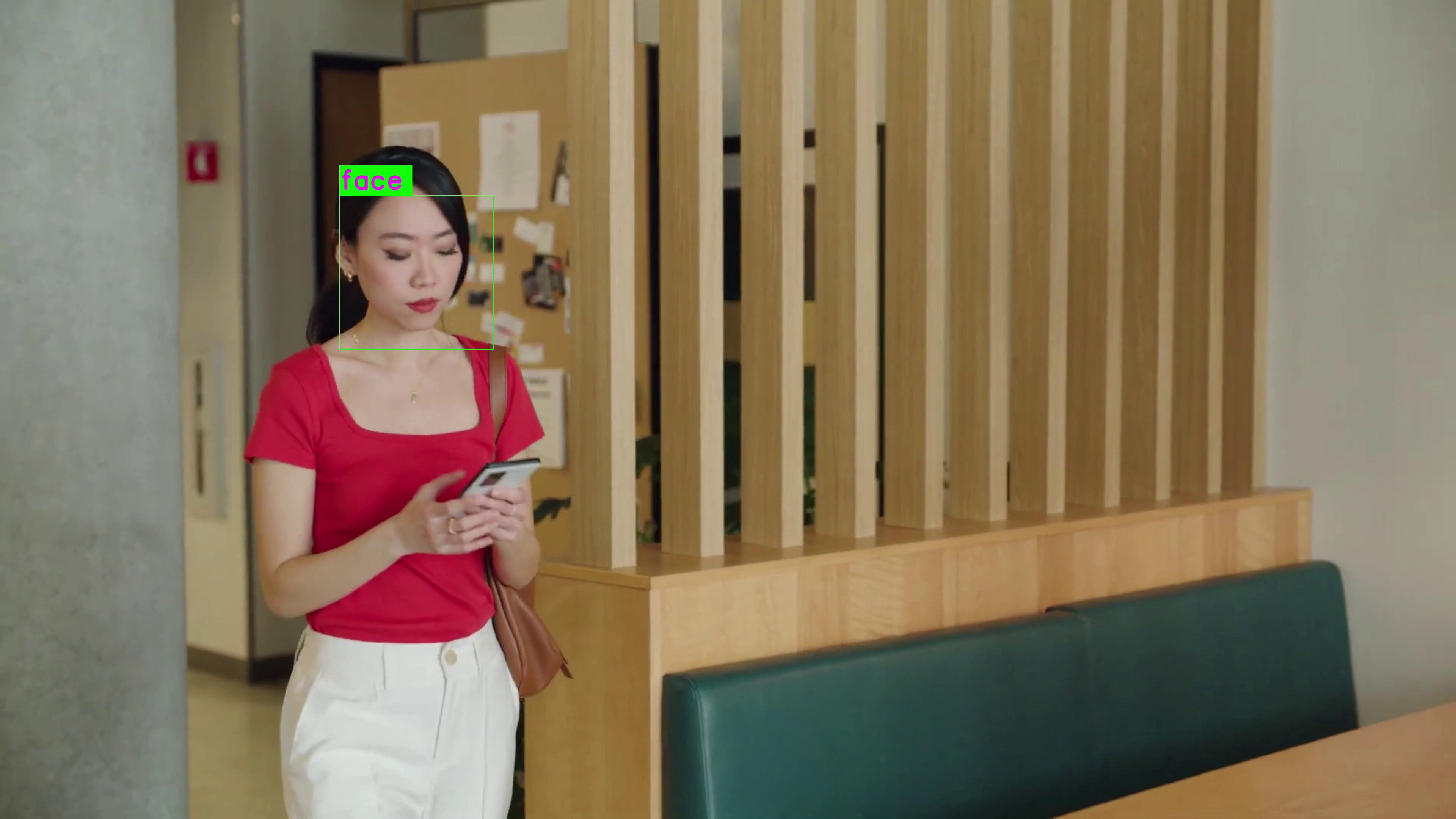
Detects faces using a quantized Face Detection Lite model accelerated via QNN (HTP backend). Pipeline Diagram
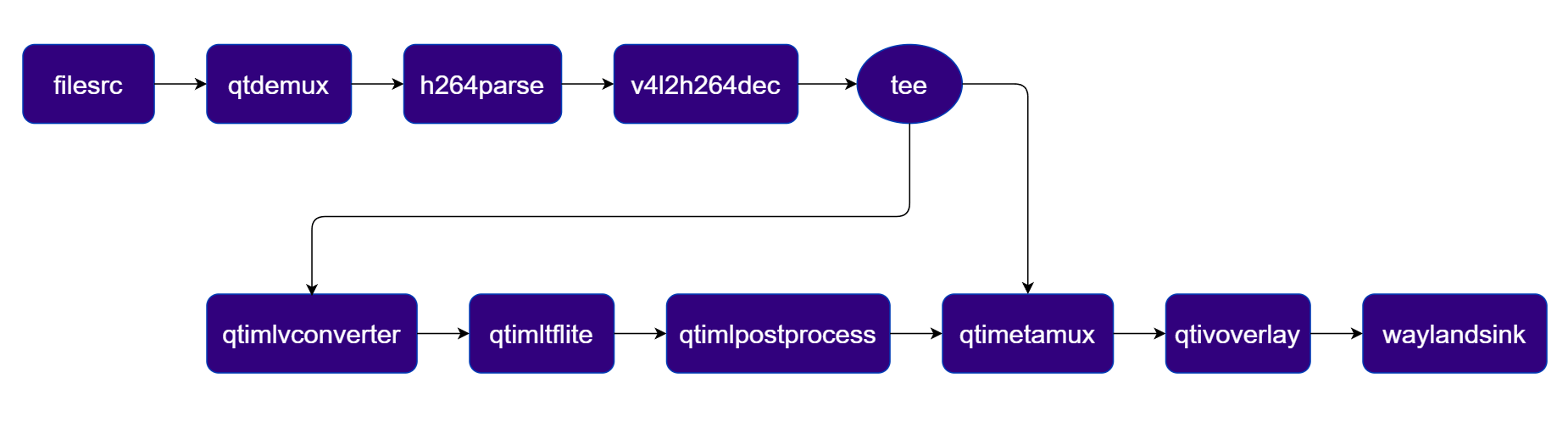
Pipeline Diagram

1

Download Required Files:

FileDownloadSave as
Face Detection Lite modelQualcomm AI Hub — Face Detection Liteface_det_lite_w8a8.tflite
Detection labelsface_det_lite labelsface_det_lite.json
Sample videoInput videoai_demo_sample.mp4
If any downloaded file is a .zip archive, extract it on your host machine before copying: unzip filename.zip
2

Copy files to device

# Replace $HOME to the appropriate device path before running the commands.
# For QLI:    /root
# For Ubuntu: /home/ubuntu
# Modify this based on your platform and ensure files are copied to the correct location on the device.

ssh <user>@<device-ip> "mkdir -p $HOME/{models,media,media/output}"
scp face_det_lite_w8a8.tflite  <user>@<device-ip>:$HOME/models/
scp face_det_lite.json    <user>@<device-ip>:$HOME/labels/
scp ai_demo_sample.mp4                              <user>@<device-ip>:$HOME/media/
3

Connect to device

# Run from your host machine — replace <user> and <device-ip>
ssh <user>@<device-ip>
4

Set environment variables

Run below command on your device
export MODEL_NAME=face_det_lite_w8a8.tflite
export LABELS_NAME=face_det_lite.json
export SRC_VIDEO_NAME=ai_demo_sample.mp4
5

Run the pipeline

gst-launch-1.0 -e --gst-debug=2 \
filesrc location=$HOME/media/$SRC_VIDEO_NAME ! qtdemux ! h264parse ! \
v4l2h264dec capture-io-mode=4 output-io-mode=4 ! video/x-raw,format=NV12 ! queue ! \
tee name=t ! qtimetamux name=face_mux ! qtivoverlay ! waylandsink fullscreen=true sync=true \
t. ! queue ! qtimlvconverter ! queue ! \
qtimltflite model=$HOME/models/$MODEL_NAME delegate=external external-delegate-path=libQnnTFLiteDelegate.so external-delegate-options="QNNExternalDelegate,backend_type=htp,log_level=(string)1;" ! queue ! \
qtimlpostprocess module=qfd labels=$HOME/labels/$LABELS_NAME ! text/x-raw ! queue ! face_mux.
6

Expected Output

The pipeline detects faces and overlays bounding boxes on each frame. Results are rendered on the display or saved to the output file.Expected Output

PluginDescription
filesrcReads an H.264 encoded video file as the pipeline source.
v4l2h264decHardware-decodes the H.264 stream to raw NV12 frames using V4L2.
teeSplits the decoded stream for video passthrough and ML inference branches.
qtimlvconverterPreprocesses video frames (color conversion, scaling, normalization) and converts to tensor stream.
qtimltfliteLoads the TFLite model, applies the chosen delegate, and runs inference to produce result tensors.
qtimlpostprocessPost-processes face detection tensors and forwards bounding-box/landmark metadata.
qtimetamuxMerges video and metadata/text streams, attaching inference results as GST buffer metadata.
qtivoverlayOverlays inference results (labels, bounding boxes, keypoints) onto the video frame using CL.
v4l2h264encHardware-encodes the video stream to H.264 using V4L2.
filesinkWrites the encoded video stream to an output file.

Image Classification

Classifies each video frame into predefined scene categories using the InceptionV3 LiteRT model and overlays the top classification results on the video stream. Pipeline Diagram
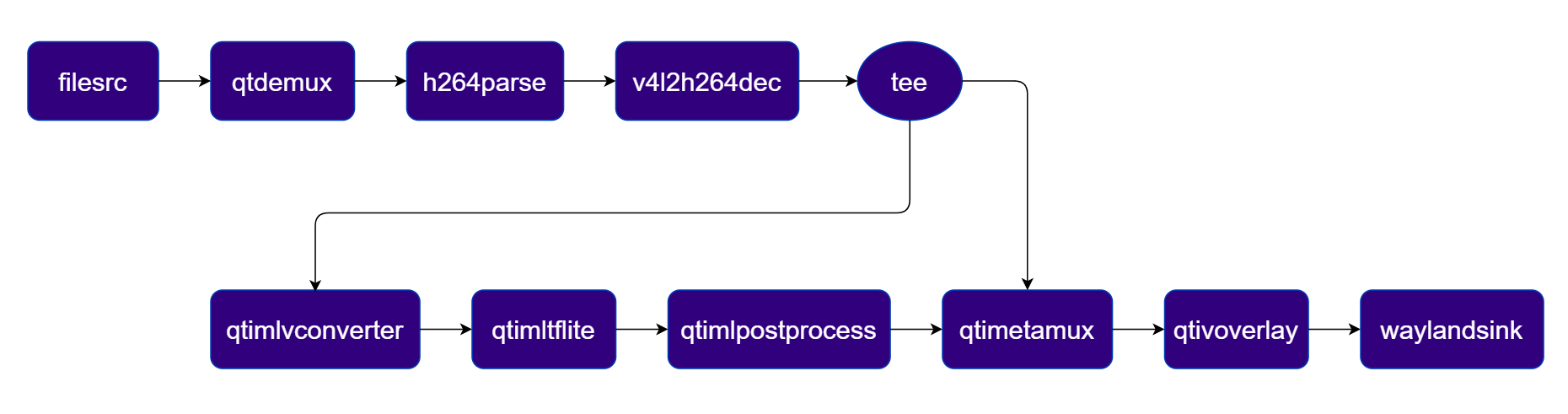
Pipeline Diagram

1

Download Required Files:

FileDownloadSave as
InceptionV3 modelQualcomm AI Hub — InceptionV3mobilenet_v2_w8a8.tflite
Classification labelsmobilenet.jsonmobilenet.json
Sample videoInput videoai_demo_sample.mp4
If any downloaded file is a .zip archive, extract it on your host machine before copying: unzip filename.zip
2

Copy files to device

# Replace $HOME to the appropriate device path before running the commands.
# For QLI:    /root
# For Ubuntu: /home/ubuntu
# Modify this based on your platform and ensure files are copied to the correct location on the device.

ssh <user>@<device-ip> "mkdir -p $HOME/{models,media,media/output}"
scp mobilenet_v2_w8a8.tflite       <user>@<device-ip>:$HOME/models/
scp mobilenet.json                  <user>@<device-ip>:$HOME/labels/
scp ai_demo_sample.mp4      <user>@<device-ip>:$HOME/media/
3

Connect to device

# Run from your host machine — replace <user> and <device-ip>
ssh <user>@<device-ip>
4

Set environment variables

Run below command on your device
export MODEL_NAME=mobilenet_v2_w8a8.tflite
export LABELS_NAME=mobilenet.json
export SRC_VIDEO_NAME=ai_demo_sample.mp4
5

Run the pipeline

gst-launch-1.0 -e --gst-debug=2 \
filesrc location=$HOME/media/$SRC_VIDEO_NAME ! qtdemux ! h264parse ! \
v4l2h264dec capture-io-mode=4 output-io-mode=4 ! video/x-raw,format=NV12 ! queue ! \
tee name=t ! qtimetamux name=class_mux ! qtivoverlay ! waylandsink fullscreen=true sync=true \
t. ! queue ! qtimlvconverter ! queue ! \
qtimltflite model=$HOME/models/$MODEL_NAME delegate=external external-delegate-path=libQnnTFLiteDelegate.so external-delegate-options="QNNExternalDelegate,backend_type=htp,log_level=(string)1;" ! queue ! \
qtimlpostprocess module=mobilenet labels=$HOME/labels/$LABELS_NAME settings="{\"confidence\": 51.0}" ! text/x-raw ! queue ! class_mux.
6

Expected Output

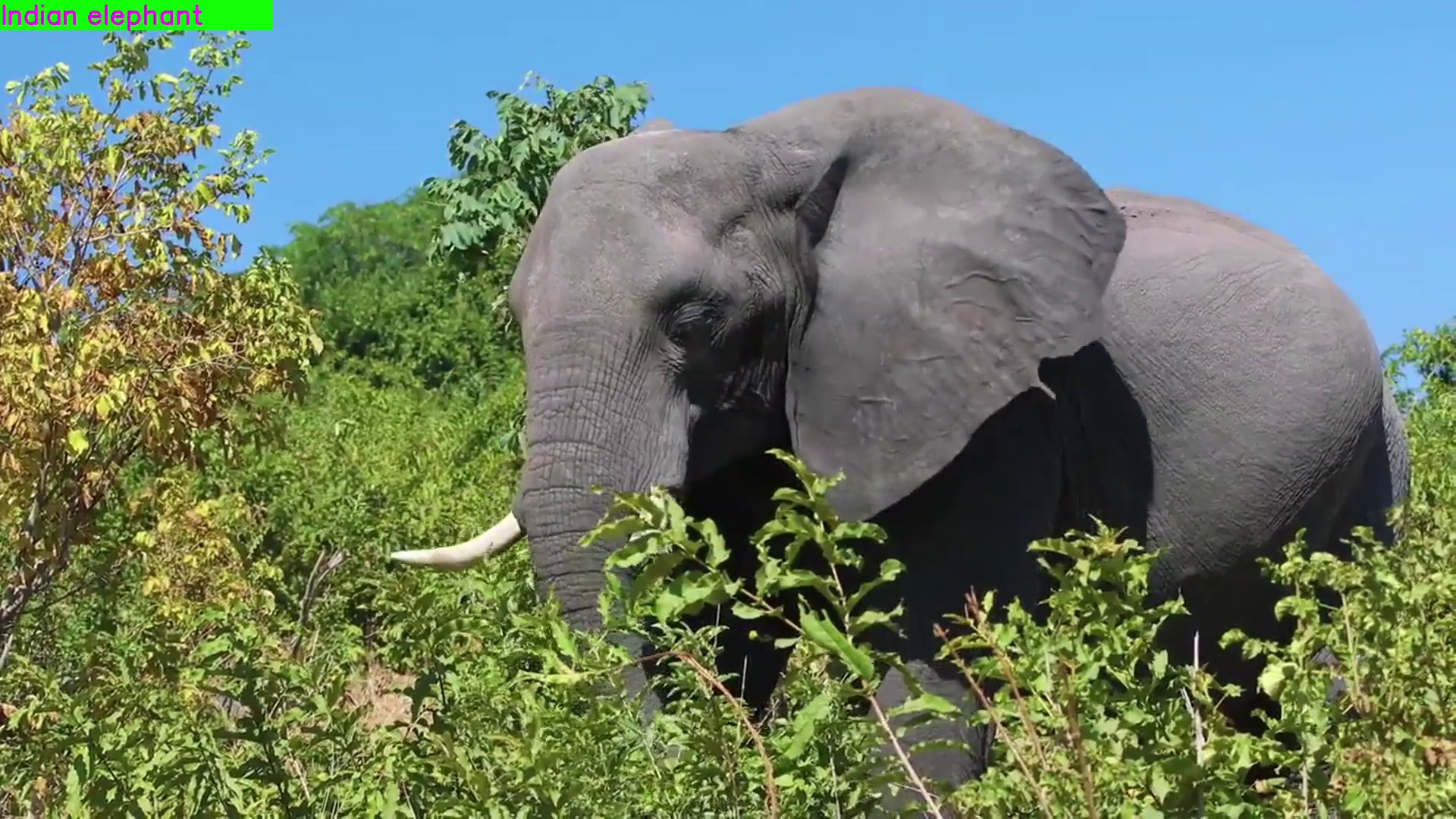
The pipeline classifies each frame and overlays the top label and confidence score in the corner. Results are rendered on the display or saved to the output file.Image of a camel classification
PluginDescription
filesrcReads an H.264 encoded video file as the pipeline source.
v4l2h264decHardware-decodes the H.264 stream to raw NV12 frames using V4L2.
teeSplits the decoded stream for video passthrough and ML inference branches.
qtimlvconverterPreprocesses video frames (color conversion, scaling, normalization) and converts to tensor stream.
qtimltfliteLoads the TFLite model, applies the chosen delegate, and runs inference to produce result tensors.
qtimlpostprocessPost-processes classification tensors, applies confidence threshold, and produces top-N label text.
qtimetamuxMerges video and metadata/text streams, attaching inference results as GST buffer metadata.
qtivoverlayOverlays inference results (labels, bounding boxes, keypoints) onto the video frame using CL.
v4l2h264encHardware-encodes the video stream to H.264 using V4L2.
filesinkWrites the encoded video stream to an output file.

Segmentation

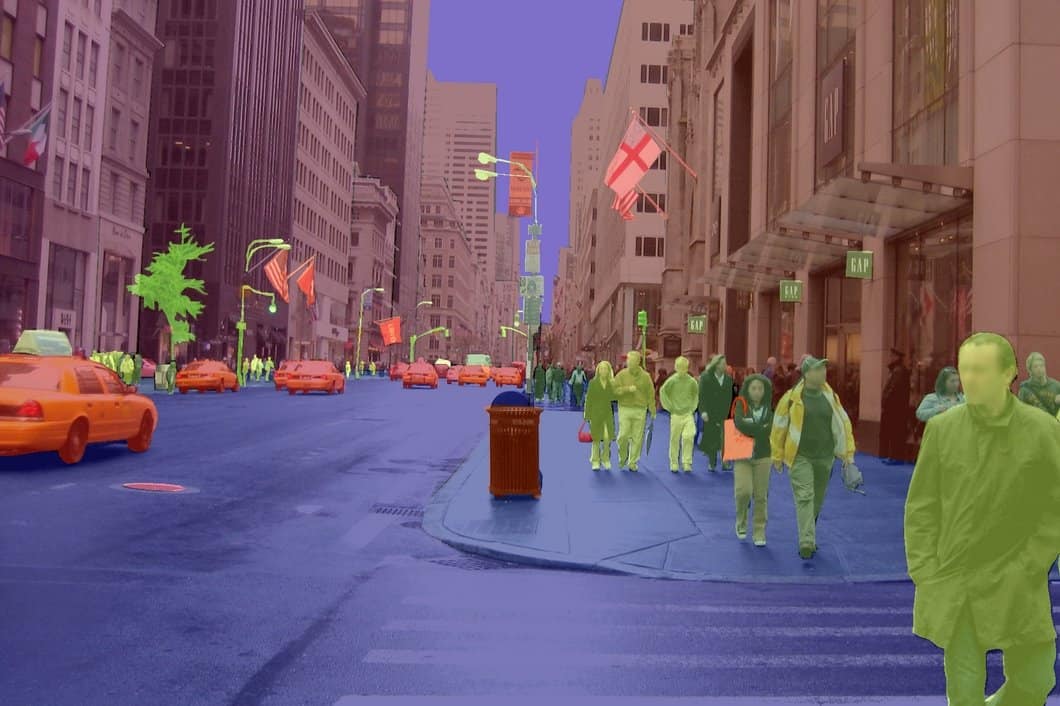
Performs pixel-wise semantic segmentation using DeepLabV3+ and blends the segmentation mask with the original video. Pipeline Diagram
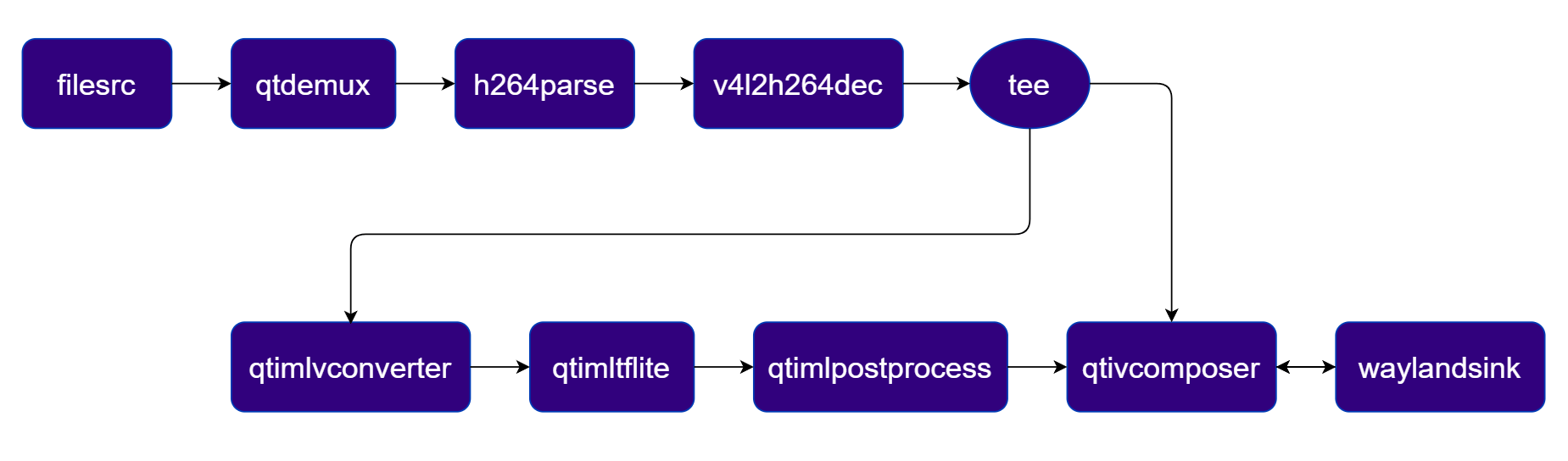
Pipeline Diagram

1

Download Required Files:

FileDownloadSave as
DeepLabV3+ modelQualcomm AI Hub — DeepLabV3+deeplabv3_plus_mobilenet_w8a8.tflite
Segmentation labelsdv3-argmax.jsondv3-argmax.json
Sample videoInput videoai_demo_sample.mp4
If any downloaded file is a .zip archive, extract it on your host machine before copying: unzip filename.zip
2

Copy files to device

# Replace $HOME to the appropriate device path before running the commands.
# For QLI:    /root
# For Ubuntu: /home/ubuntu
# Modify this based on your platform and ensure files are copied to the correct location on the device.

ssh <user>@<device-ip> "mkdir -p $HOME/{models,media,media/output}"
scp deeplabv3_plus_mobilenet_w8a8.tflite  <user>@<device-ip>:$HOME/models/
scp dv3-argmax.json                        <user>@<device-ip>:$HOME/labels/
scp ai_demo_sample.mp4             <user>@<device-ip>:$HOME/media/
3

Connect to device

# Run from your host machine — replace <user> and <device-ip>
ssh <user>@<device-ip>
4

Set environment variables

Run below command on your device
export MODEL_NAME=deeplabv3_plus_mobilenet_w8a8.tflite
export LABELS_NAME=dv3-argmax.json
export SRC_VIDEO_NAME=ai_demo_sample.mp4
5

Run the pipeline

gst-launch-1.0 -e --gst-debug=2 \
filesrc location=$HOME/media/$SRC_VIDEO_NAME ! qtdemux ! h264parse ! \
v4l2h264dec capture-io-mode=4 output-io-mode=4 ! video/x-raw,format=NV12 ! queue ! \
tee name=t \
t. ! queue ! qtivcomposer name=seg_mix sink_1::alpha=0.5 ! queue ! waylandsink fullscreen=true sync=true \
t. ! queue ! qtimlvconverter ! queue ! \
qtimltflite model=$HOME/models/$MODEL_NAME delegate=external external-delegate-path=libQnnTFLiteDelegate.so external-delegate-options="QNNExternalDelegate,backend_type=htp,log_level=(string)1;" ! queue ! \
qtimlpostprocess module=deeplab-argmax labels=$HOME/labels/$LABELS_NAME ! video/x-raw,format=BGRA,width=520,height=520 ! queue ! seg_mix.
6

Expected Output

The pipeline blends the segmentation mask with the original video frame. Results are rendered on the display or saved to the output file.Expected Output

PluginDescription
filesrcReads an H.264 encoded video file as the pipeline source.
v4l2h264decHardware-decodes the H.264 stream to raw NV12 frames using V4L2.
qtivtransformPerforms GPU-accelerated color/format conversion on the video frame.
teeSplits the stream for video passthrough and ML inference branches.
qtimlvconverterPreprocesses video frames (color conversion, scaling, normalization) and converts to tensor stream.
qtimltfliteLoads the TFLite model, applies the chosen delegate, and runs inference to produce result tensors.
qtimlpostprocessApplies argmax post-processing to segmentation tensors and outputs an RGBA mask frame.
qtivcomposerBlends the original video frame with the segmentation mask (alpha composite).
v4l2h264encHardware-encodes the video stream to H.264 using V4L2.
filesinkWrites the encoded video stream to an output file.

Pose Estimation

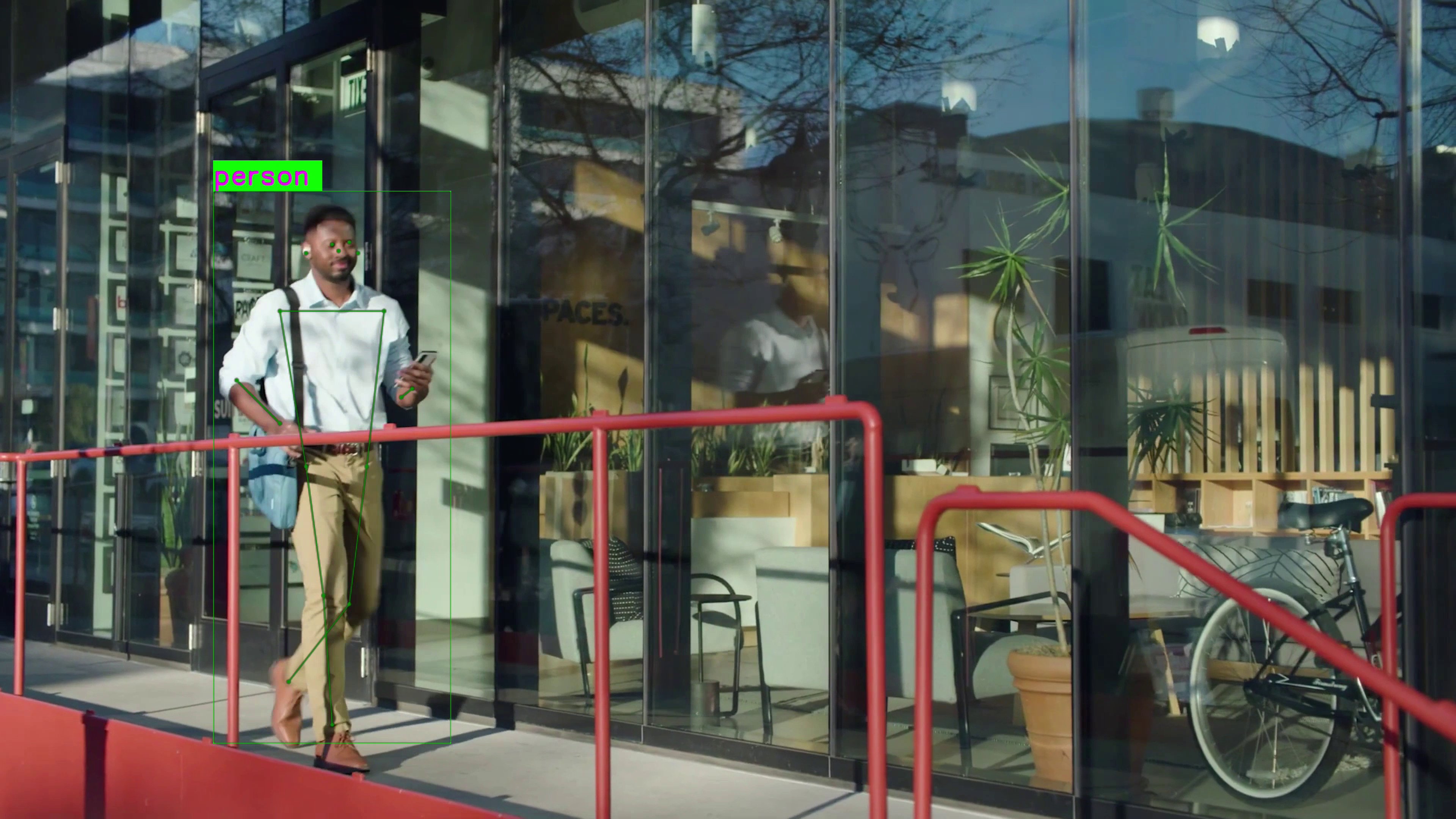
This pipeline performs real-time Human Pose Estimation using the HRNet Pose model. It analyzes video frames to identify individuals and precisely maps their anatomical keypoints (such as shoulders, elbows, knees, and ankles). It then generates a skeletal overlay on the video stream, allowing for the tracking of body posture and movement dynamics. Pipeline Diagram
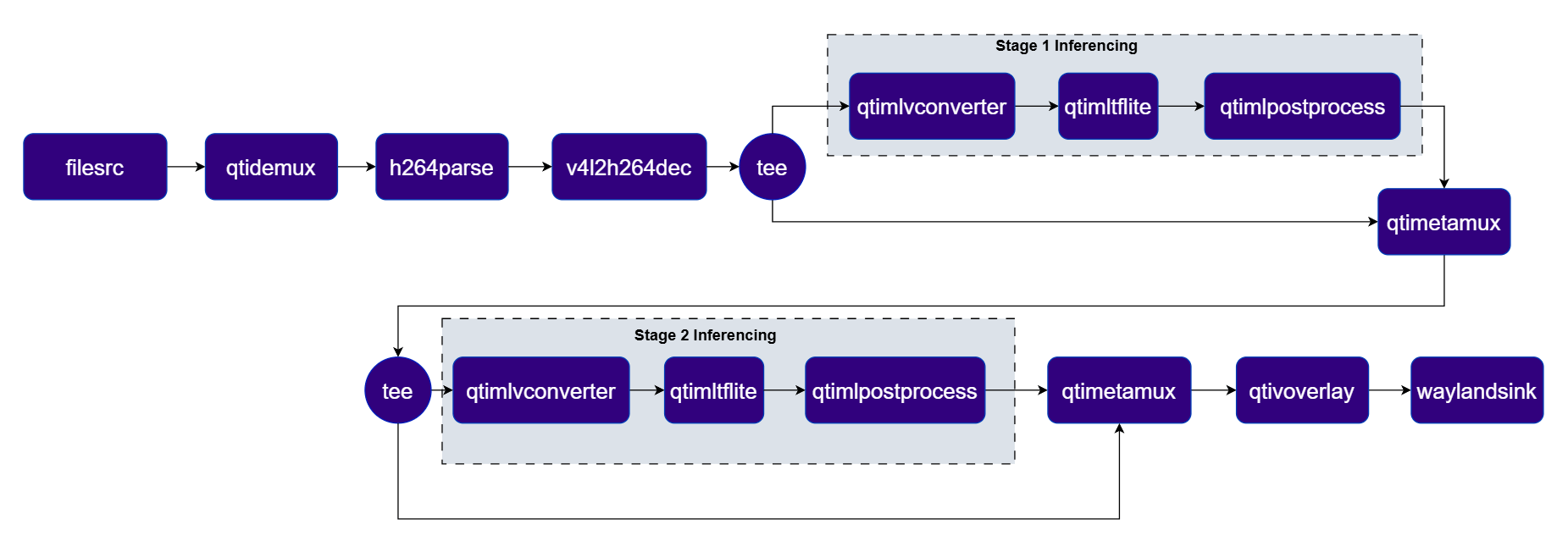
Pipeline Diagram

1

Download Required Files:

FileDownloadSave as
Person/foot detection modelQualcomm AI Hub — HRNet Poseperson_foot_detection_w8a8.tflite
Person detection labelsfoot_track_net.jsonfoot_track_net.json
HRNet pose modelQualcomm AI Hub — HRNet Posehrnetpose_w8a8.tflite
Pose labelshrnet.jsonhrnet.json
Sample videoInput videoai_demo_sample.mp4
You also need foot_track_net_settings.json and hrnet_settings.json — these are included in the QIM SDK sample package at $HOME/labels/ on Qualcomm Linux or $HOME/models/ on Ubuntu.
If any downloaded file is a .zip archive, extract it on your host machine before copying: unzip filename.zip
2

Copy files to device

# Replace $HOME to the appropriate device path before running the commands.
# For QLI:    /root
# For Ubuntu: /home/ubuntu
# Modify this based on your platform and ensure files are copied to the correct location on the device.

ssh <user>@<device-ip> "mkdir -p $HOME/{models,media,media/output}"
scp person_foot_detection_w8a8.tflite  <user>@<device-ip>:$HOME/models/
scp foot_track_net.json                <user>@<device-ip>:$HOME/labels/
scp hrnetpose_w8a8.tflite              <user>@<device-ip>:$HOME/models/
scp hrnet.json                         <user>@<device-ip>:$HOME/labels/
scp ai_demo_sample.mp4          <user>@<device-ip>:$HOME/media/
3

Connect to device

# Run from your host machine — replace <user> and <device-ip>
ssh <user>@<device-ip>
4

Set environment variables

Run below command on your device
export MODEL_NAME_1=person_foot_detection_w8a8.tflite
export LABELS_NAME_1=foot_track_net.json
export MODEL_NAME_2=hrnetpose_w8a8.tflite
export LABELS_NAME_2=hrnet.json
export SRC_VIDEO_NAME=ai_demo_sample.mp4
5

Run the pipeline

gst-launch-1.0 -e --gst-debug=2 \
  qtimlvconverter name=stage_01_preproc \
  qtimltflite name=stage_01_inference delegate=external external-delegate-path=libQnnTFLiteDelegate.so \
  external-delegate-options="QNNExternalDelegate,backend_type=htp,log_level=(string)1;" \
  model=$HOME/models/$MODEL_NAME_1 \
  qtimlpostprocess name=stage_01_postproc results=10 module=qpd labels=$HOME/labels/$LABELS_NAME_1 \
  settings=$HOME/labels/foot_track_net_settings.json \
  qtimlvconverter name=stage_02_preproc mode=roi-batch-cumulative image-disposition=centre \
  qtimltflite name=stage_02_inference delegate=external external-delegate-path=libQnnTFLiteDelegate.so \
  external-delegate-options="QNNExternalDelegate,backend_type=htp,htp_performance_mode=(string)2,log_level=(string)1;" \
  model=$HOME/models/$MODEL_NAME_2 \
  qtimlpostprocess name=stage_02_postproc results=2 module=hrnet labels=$HOME/labels/$LABELS_NAME_2 \
  settings=$HOME/labels/hrnet_settings.json \
  filesrc location=$HOME/media/$SRC_VIDEO_NAME ! qtdemux ! h264parse ! \
  v4l2h264dec capture-io-mode=4 output-io-mode=4 ! video/x-raw,format=NV12 ! queue ! \
  tee name=t_split_1 \
  t_split_1. ! queue ! stage_01_preproc. stage_01_preproc. ! queue ! stage_01_inference. stage_01_inference. ! queue ! \
  stage_01_postproc. stage_01_postproc. ! text/x-raw ! queue ! qtimetamux name=metamux_1 \
  t_split_1. ! queue ! metamux_1. metamux_1. ! queue ! tee name=t_split_2 \
  t_split_2. ! queue ! stage_02_preproc. stage_02_preproc. ! queue ! stage_02_inference. stage_02_inference. ! queue ! \
  stage_02_postproc. stage_02_postproc. ! text/x-raw ! queue ! qtimetamux name=metamux_2 \
  metamux_2. ! queue ! qtivoverlay ! queue ! waylandsink fullscreen=true sync=true \
  t_split_2. ! queue ! metamux_2.
6

Expected Output

The pipeline detects persons and overlays skeleton keypoints on each frame. Results are rendered on the display or saved to the output file.
PluginDescription
filesrcReads an H.264 encoded video file as the pipeline source.
v4l2h264decHardware-decodes the H.264 stream to raw NV12 frames using V4L2.
qtivtransformPerforms GPU-accelerated color/format conversion on the video frame.
teeSplits the stream for video passthrough and person-detection inference.
qtimlvconverterPreprocesses frames for Stage 1 (person detection) and Stage 2 (pose estimation) respectively.
qtimltfliteRuns Stage 1 (foot/person detection) and Stage 2 (HRNet pose estimation) inference sequentially.
qtimlpostprocessPost-processes detection and pose tensors, producing keypoint metadata for overlay.
qtimetamuxMerges video and metadata/text streams, attaching inference results as GST buffer metadata.
qtivoverlayOverlays inference results (labels, bounding boxes, keypoints) onto the video frame using CL.
v4l2h264encHardware-encodes the video stream to H.264 using V4L2.
filesinkWrites the encoded video stream to an output file.

AI Wall

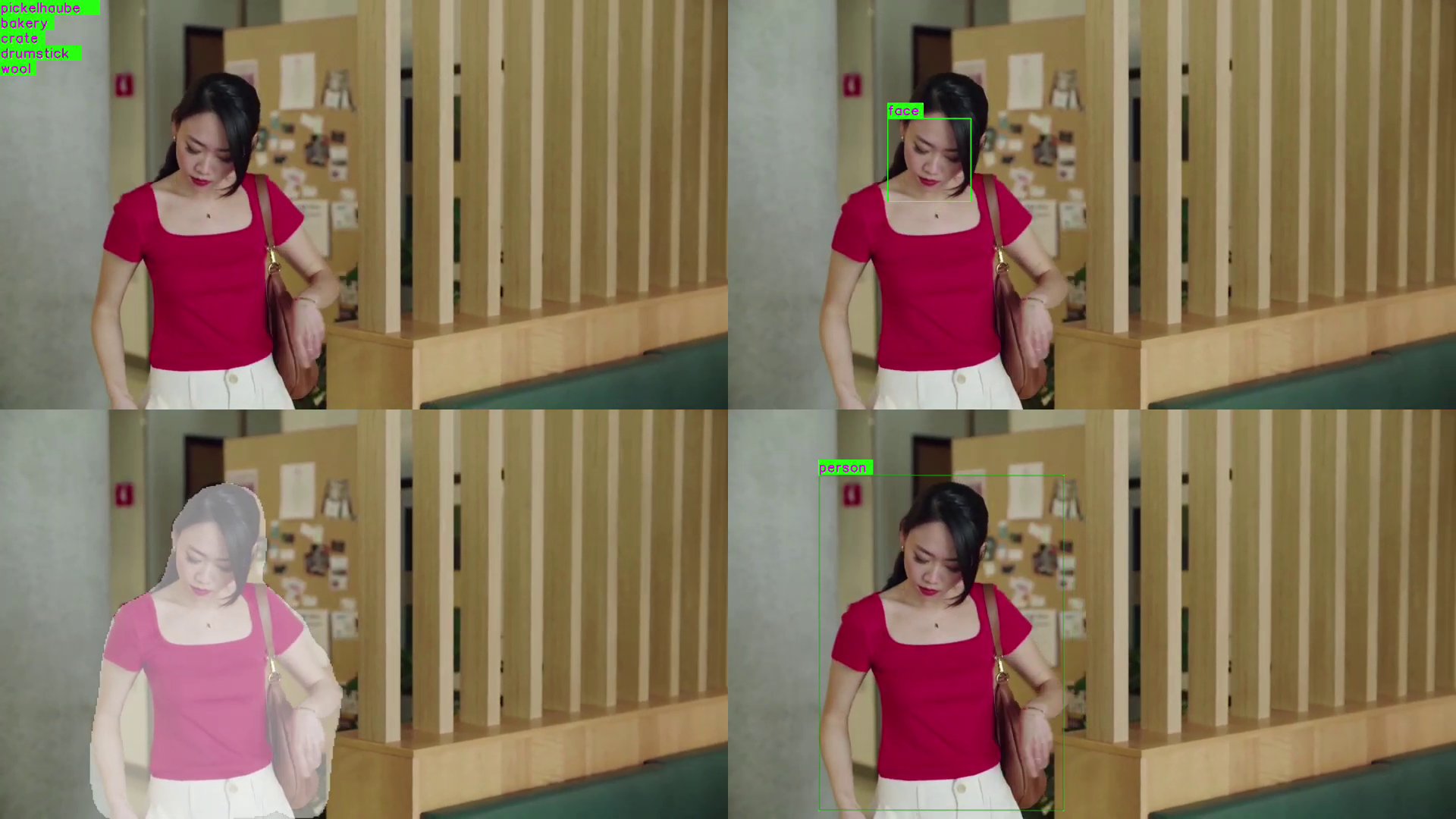
This use-case demonstrates the capability to run 4 parallel AI inference sessions simultaneously using InceptionV3, Face Detection Lite, DeepLabV3+, and YOLOX. The results are composed into a single 2x2 grid display. This use case highlights the multi-stream processing and compositing capabilities of the platform. Pipeline Diagram
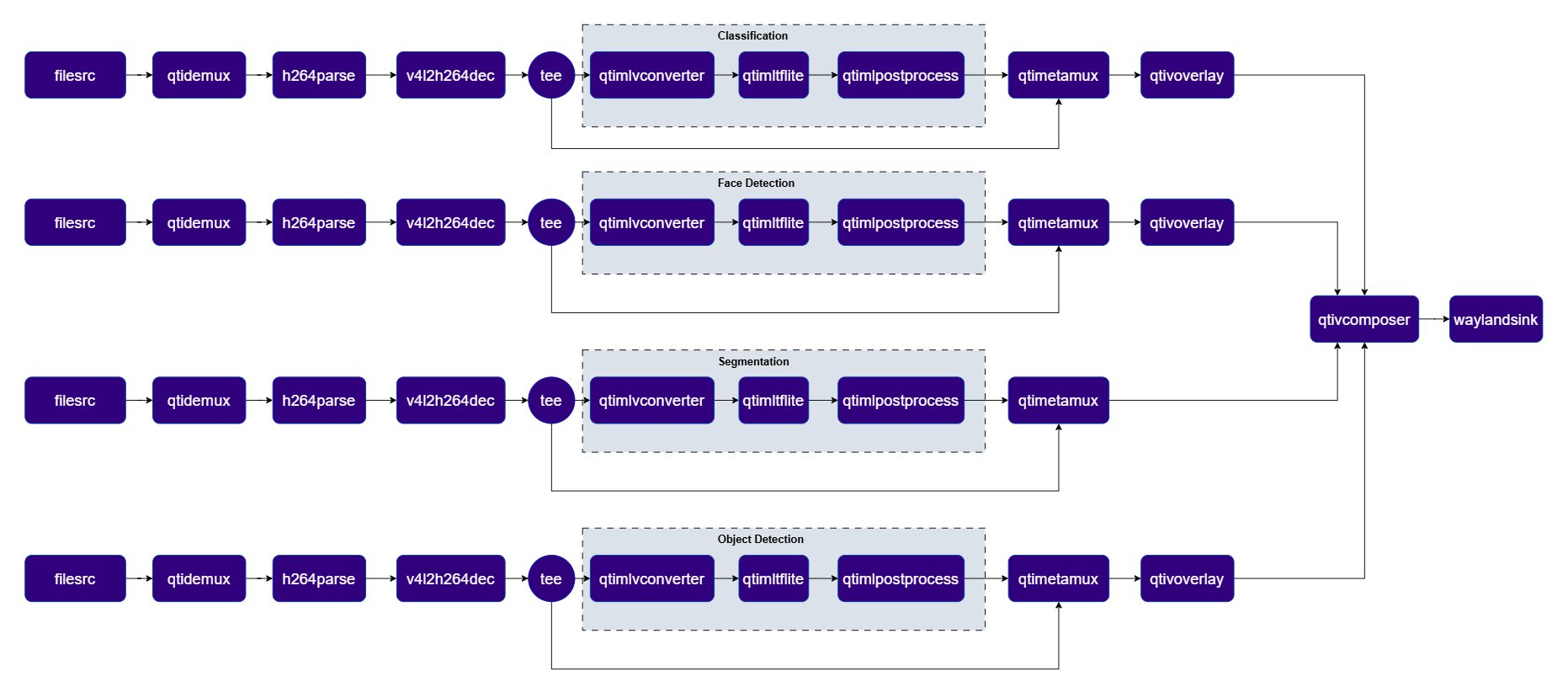
Pipeline Diagram

1

Download Required Files:

FileDownloadSave as
Classification modelQualcomm AI Hub — InceptionV3mobilenet_v2_w8a8.tflite
Classification labelsmobilenet.jsonmobilenet.json
Face detection modelQualcomm AI Hub — Face Detection Liteface_det_lite_w8a8.tflite
Face detection labelsface_det_lite labelsface_det_lite.json
Segmentation modelQualcomm AI Hub — DeepLabV3+deeplabv3_plus_mobilenet_w8a8.tflite
Segmentation labelsdv3-argmax.jsondv3-argmax.json
Object detection modelQualcomm AI Hub — YOLOXyolox_w8a8.tflite
Object detection labelsyolov8.jsonyolov8.json
Sample videoInput videoai_demo_sample.mp4
If any downloaded file is a .zip archive, extract it on your host machine before copying: unzip filename.zip
2

Copy files to device

# Replace $HOME to the appropriate device path before running the commands.
# For QLI:    /root
# For Ubuntu: /home/ubuntu
# Modify this based on your platform and ensure files are copied to the correct location on the device.

ssh <user>@<device-ip> "mkdir -p $HOME/{models,media,media/output}"
scp mobilenet_v2_w8a8.tflite            <user>@<device-ip>:$HOME/models/
scp mobilenet.json                       <user>@<device-ip>:$HOME/labels/
scp face_det_lite_w8a8.tflite            <user>@<device-ip>:$HOME/models/
scp face_det_lite.json                   <user>@<device-ip>:$HOME/labels/
scp deeplabv3_plus_mobilenet_w8a8.tflite <user>@<device-ip>:$HOME/models/
scp dv3-argmax.json                      <user>@<device-ip>:$HOME/labels/
scp yolox_w8a8.tflite                    <user>@<device-ip>:$HOME/models/
scp yolov8.json                          <user>@<device-ip>:$HOME/labels/
scp ai_demo_sample.mp4            <user>@<device-ip>:$HOME/media/
3

Connect to device

# Run from your host machine — replace <user> and <device-ip>
ssh <user>@<device-ip>
4

Set environment variables

Run below command on your device
export MODEL_NAME_1=mobilenet_v2_w8a8.tflite
export LABELS_NAME_1=mobilenet.json
export MODEL_NAME_2=face_det_lite_w8a8.tflite
export LABELS_NAME_2=face_det_lite.json
export MODEL_NAME_3=deeplabv3_plus_mobilenet_w8a8.tflite
export LABELS_NAME_3=dv3-argmax.json
export MODEL_NAME_4=yolox_w8a8.tflite
export LABELS_NAME_4=yolov8.json
export SRC_VIDEO_NAME=ai_demo_sample.mp4
5

Run the pipeline

gst-launch-1.0 -e --gst-debug=2 \
qtimlvconverter name=class_pre \
qtimltflite name=class_infer model=$HOME/models/$MODEL_NAME_1 delegate=external external-delegate-path=libQnnTFLiteDelegate.so external-delegate-options="QNNExternalDelegate,backend_type=htp,log_level=(string)1;" \
qtimlpostprocess name=class_post results=5 module=mobilenet labels=$HOME/labels/$LABELS_NAME_1 settings="{\"confidence\": 51.0}" \
qtimetamux name=class_mux \
qtivoverlay name=class_overlay \
qtimlvconverter name=face_pre \
qtimltflite name=face_infer model=$HOME/models/$MODEL_NAME_2 delegate=external external-delegate-path=libQnnTFLiteDelegate.so external-delegate-options="QNNExternalDelegate,backend_type=htp,log_level=(string)1;" \
qtimlpostprocess name=face_post module=qfd results=6 labels=$HOME/labels/$LABELS_NAME_2 \
qtimetamux name=face_mux \
qtivoverlay name=face_overlay \
qtimlvconverter name=seg_pre \
qtimltflite name=seg_infer model=$HOME/models/$MODEL_NAME_3 delegate=external external-delegate-path=libQnnTFLiteDelegate.so external-delegate-options="QNNExternalDelegate,backend_type=htp,log_level=(string)1;" \
qtimlpostprocess name=seg_post module=deeplab-argmax labels=$HOME/labels/$LABELS_NAME_3 \
qtivcomposer name=seg_mix sink_1::alpha=0.5 \
qtimlvconverter name=obj_pre \
qtimltflite name=obj_infer model=$HOME/models/$MODEL_NAME_4 delegate=external external-delegate-path=libQnnTFLiteDelegate.so external-delegate-options="QNNExternalDelegate,backend_type=htp,log_level=(string)1;" \
qtimlpostprocess name=obj_post module=yolov8 labels=$HOME/labels/$LABELS_NAME_4 settings="{\"confidence\": 51.0}" \
qtimetamux name=obj_mux \
qtivcomposer name=comp \
  sink_0::position="<0, 0>" sink_0::dimensions="<960, 540>" \
  sink_1::position="<960, 0>" sink_1::dimensions="<960, 540>" \
  sink_2::position="<0, 540>" sink_2::dimensions="<960, 540>" \
  sink_3::position="<960, 540>" sink_3::dimensions="<960, 540>" ! \
queue ! waylandsink fullscreen=true sync=true \
filesrc location=$HOME/media/$SRC_VIDEO_NAME ! qtdemux ! h264parse ! \
v4l2h264dec capture-io-mode=4 output-io-mode=4 ! video/x-raw,format=NV12 ! queue ! \
tee name=class_tee \
class_tee. ! queue ! class_mux. \
class_tee. ! queue ! class_pre. class_pre. ! queue ! class_infer. class_infer. ! queue ! class_post. class_post. ! text/x-raw ! queue ! class_mux. \
class_mux. ! queue ! class_overlay. class_overlay. ! queue ! comp.sink_0 \
filesrc location=$HOME/media/$SRC_VIDEO_NAME ! qtdemux ! h264parse ! \
v4l2h264dec capture-io-mode=4 output-io-mode=4 ! video/x-raw,format=NV12 ! queue ! \
tee name=face_tee \
face_tee. ! queue ! face_mux. \
face_tee. ! queue ! face_pre. face_pre. ! queue ! face_infer. face_infer. ! queue ! face_post. face_post. ! text/x-raw ! queue ! face_mux. \
face_mux. ! queue ! face_overlay. face_overlay. ! queue ! comp.sink_1 \
filesrc location=$HOME/media/$SRC_VIDEO_NAME ! qtdemux ! h264parse ! \
v4l2h264dec capture-io-mode=4 output-io-mode=4 ! video/x-raw,format=NV12 ! queue ! \
tee name=seg_tee \
seg_tee. ! queue ! seg_mix. \
seg_tee. ! queue ! seg_pre. seg_pre. ! queue ! seg_infer. seg_infer. ! queue ! seg_post. seg_post. ! video/x-raw,format=BGRA,width=520,height=520 ! queue ! seg_mix. \
seg_mix. ! video/x-raw,format=NV12 ! queue ! comp.sink_2 \
filesrc location=$HOME/media/$SRC_VIDEO_NAME ! qtdemux ! h264parse ! \
v4l2h264dec capture-io-mode=4 output-io-mode=4 ! video/x-raw,format=NV12 ! queue ! \
tee name=obj_tee \
obj_tee. ! queue ! obj_mux. \
obj_tee. ! queue ! obj_pre. obj_pre. ! queue ! obj_infer. obj_infer. ! queue ! obj_post. obj_post. ! text/x-raw ! queue ! obj_mux. \
obj_mux. ! queue ! qtivoverlay ! queue ! comp.sink_3
6

Expected Output

The pipeline processes multiple streams simultaneously and renders all detection results in a composed multi-stream view on the display.
PluginDescription
filesrcFour independent file sources feed the four parallel AI branches.
v4l2h264decHardware-decodes each H.264 stream to raw NV12 frames using V4L2.
teeSplits each branch stream for video passthrough and ML inference.
qtimlvconverterPreprocesses each branch’s video frames into tensors for inference.
qtimltfliteRuns branch-specific inference: classification, face detection, segmentation, and object detection.
qtimlpostprocessPost-processes each branch’s tensors (labels, bounding boxes, masks) for overlay or compositing.
qtimetamuxMerges video and metadata/text streams, attaching inference results as GST buffer metadata.
qtivcomposerComposites all four inference-overlaid streams into a 2×2 grid display.
qtivoverlayOverlays inference results (labels, bounding boxes, keypoints) onto the video frame using CL.
v4l2h264encHardware-encodes the video stream to H.264 using V4L2.
filesinkWrites the encoded video stream to an output file.

Super Resolution

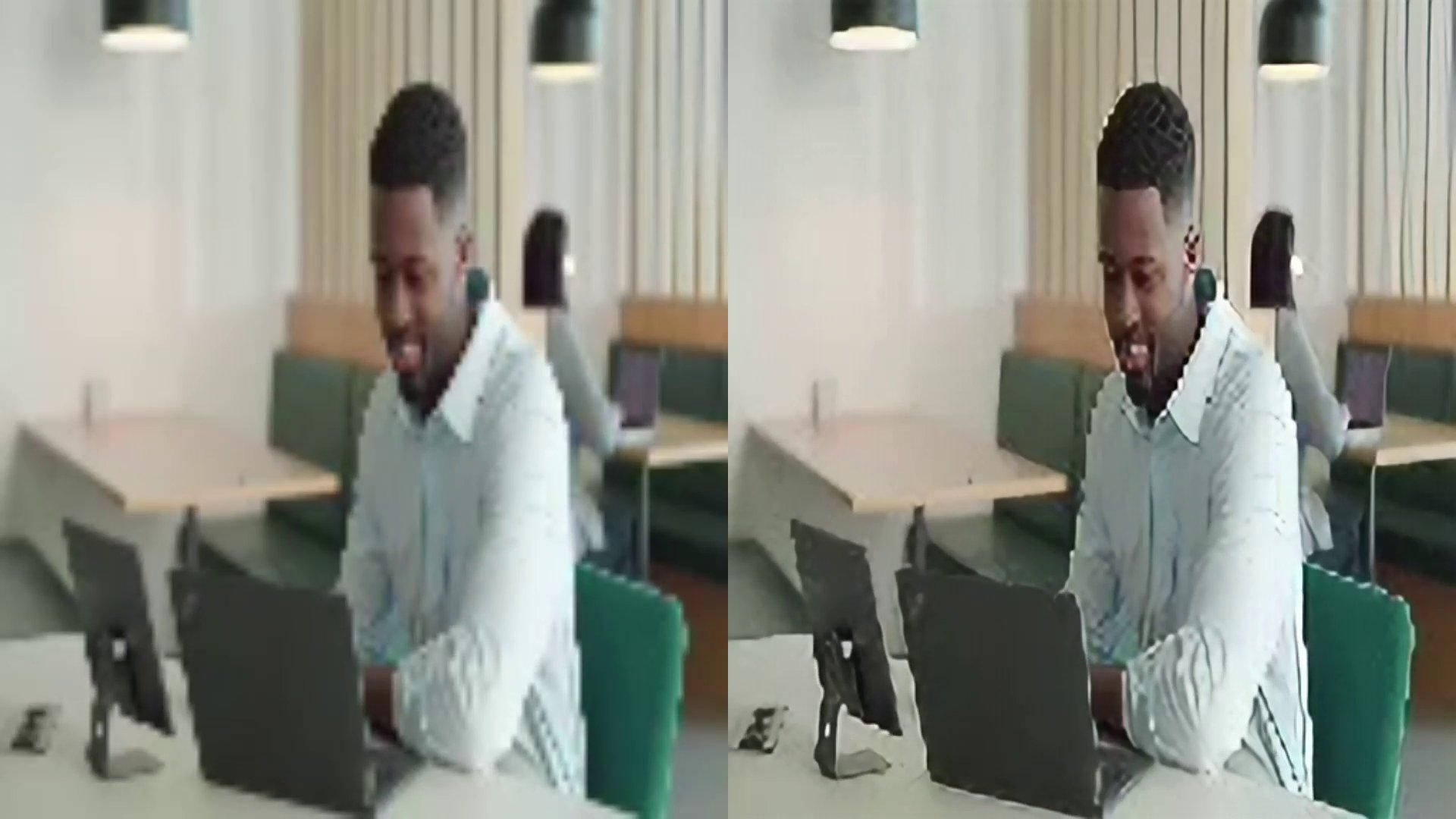
Real-time AI video upscaling using quicksrnetlarge that reconstructs high-definition details from low-resolution inputs, visualized via a side-by-side comparison. Pipeline Diagram
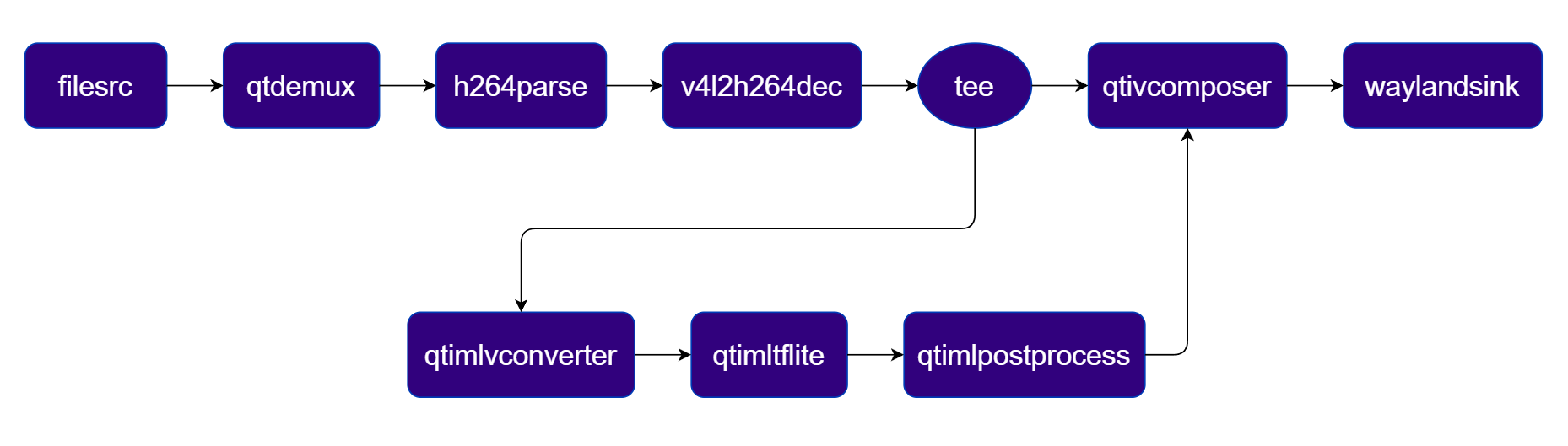
Pipeline Diagram

1

Download Required Files:

FileDownloadSave as
QuickSRNet Large modelQualcomm AI Hub — QuickSRNet Largequicksrnetlarge_w8a8.tflite
Sample videoInput videoai_demo_sample.mp4
The super-resolution pipeline requires an input video resolution of 128×128 or similar low-resolution source.
If any downloaded file is a .zip archive, extract it on your host machine before copying: unzip filename.zip
2

Copy files to device

# Replace $HOME to the appropriate device path before running the commands.
# For QLI:    /root
# For Ubuntu: /home/ubuntu
# Modify this based on your platform and ensure files are copied to the correct location on the device.

ssh <user>@<device-ip> "mkdir -p $HOME/{models,media,media/output}"
scp quicksrnetlarge_w8a8.tflite    <user>@<device-ip>:$HOME/models/
scp ai_demo_sample.mp4      <user>@<device-ip>:$HOME/media/
3

Connect to device

# Run from your host machine — replace <user> and <device-ip>
ssh <user>@<device-ip>
4

Set environment variables

Run below command on your device
export MODEL_NAME=quicksrnetlarge_w8a8.tflite
export SRC_VIDEO_NAME=ai_demo_sample.mp4
5

Run the pipeline

gst-launch-1.0 -e --gst-debug=2 \
filesrc location=$HOME/media/$SRC_VIDEO_NAME ! qtdemux ! h264parse ! \
v4l2h264dec capture-io-mode=4 output-io-mode=4 ! video/x-raw,format=NV12 ! queue ! \
tee name=t \
t. ! queue ! qtivcomposer name=mixer sink_0::position="<0, 0>" sink_0::dimensions="<960, 1080>" sink_1::position="<960, 0>" sink_1::dimensions="<960, 1080>" ! queue ! waylandsink fullscreen=true sync=true \
t. ! qtimlvconverter ! queue ! \
qtimltflite model=$HOME/models/$MODEL_NAME delegate=external external-delegate-path=libQnnTFLiteDelegate.so external-delegate-options="QNNExternalDelegate,backend_type=htp,log_level=(string)1;" ! queue ! \
qtimlpostprocess module=srnet ! video/x-raw,format=RGB ! queue ! mixer.
6

Expected Output

The pipeline outputs an upscaled high-resolution video. Results are rendered on the display or saved to the output file.

PluginDescription
filesrcReads an H.264 encoded video file as the pipeline source.
v4l2h264decHardware-decodes the H.264 stream to raw NV12 frames using V4L2.
teeSplits the decoded stream — one branch for the original view, one for SR inference.
qtimlvconverterPreprocesses video frames (color conversion, scaling, normalization) and converts to tensor stream.
qtimltfliteLoads the TFLite model, applies the chosen delegate, and runs inference to produce result tensors.
qtimlvsuperresolutionApplies the super-resolution post-processing module to reconstruct high-definition output.
qtivcomposerComposites the original and upscaled streams side-by-side for comparison.
waylandsinkRenders the final composited video stream to a local display via Weston.

Daisy Chain


Detection-Classification Daisy Chain

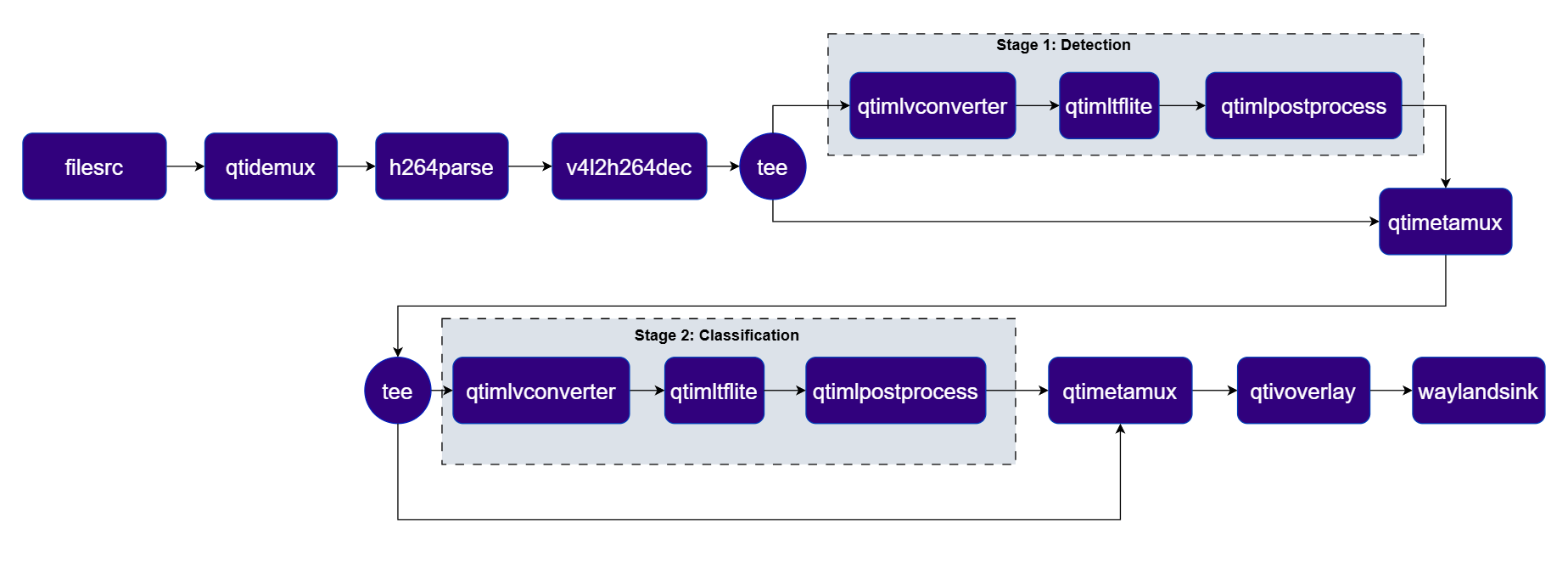
This section details the Detection-Classification Daisy Chain pipeline. This pipeline demonstrates a cascaded inference approach where the output of the YOLOX detection model is used to crop regions of interest (ROIs) which are then fed into the InceptionV3 classification model. Pipeline Diagram
Pipeline Diagram

1

Download Required Files:

FileDownloadSave as
Detection model (YOLOX)Qualcomm AI Hub — YOLOXyolox_w8a8.tflite
Detection labelsyolov8.jsonyolov8.json
Classification model (InceptionV3)Qualcomm AI Hub — InceptionV3mobilenet_v2_w8a8.tflite
Classification labelsmobilenet.jsonmobilenet.json
Sample videoInput videoai_demo_sample.mp4
If any downloaded file is a .zip archive, extract it on your host machine before copying: unzip filename.zip
2

Copy files to device

# Replace $HOME to the appropriate device path before running the commands.
# For QLI:    /root
# For Ubuntu: /home/ubuntu
# Modify this based on your platform and ensure files are copied to the correct location on the device.

ssh <user>@<device-ip> "mkdir -p $HOME/{models,media,media/output}"
scp yolox_w8a8.tflite          <user>@<device-ip>:$HOME/models/
scp yolov8.json                  <user>@<device-ip>:$HOME/labels/
scp mobilenet_v2_w8a8.tflite    <user>@<device-ip>:$HOME/models/
scp mobilenet.json               <user>@<device-ip>:$HOME/labels/
scp ai_demo_sample.mp4   <user>@<device-ip>:$HOME/media/
3

Connect to device

# Run from your host machine — replace <user> and <device-ip>
ssh <user>@<device-ip>
4

Set environment variables

Run below command on your device
export MODEL_NAME_1=yolox_w8a8.tflite
export LABELS_NAME_1=yolov8.json
export MODEL_NAME_2=mobilenet_v2_w8a8.tflite
export LABELS_NAME_2=mobilenet.json
export SRC_VIDEO_NAME=ai_demo_sample.mp4
5

Run the pipeline

gst-launch-1.0 -e --gst-debug=2 \
  qtimlvconverter name=stage_01_preproc \
  qtimltflite name=stage_01_inference delegate=external external-delegate-path=libQnnTFLiteDelegate.so \
  external-delegate-options="QNNExternalDelegate,backend_type=htp,log_level=(string)1;" \
  model=$HOME/models/$MODEL_NAME_1 \
  qtimlpostprocess name=stage_01_postproc module=yolov8 labels=$HOME/labels/$LABELS_NAME_1 \
  settings="{\"confidence\": 51.0}" \
  qtimetamux name=metamux_1 \
  qtivoverlay name=main_overlay \
  qtimlvconverter name=stage_02_preproc \
  qtimltflite name=stage_02_inference delegate=external external-delegate-path=libQnnTFLiteDelegate.so \
  external-delegate-options="QNNExternalDelegate,backend_type=htp,log_level=(string)1;" \
  model=$HOME/models/$MODEL_NAME_2 \
  qtimlpostprocess name=stage_02_postproc module=mobilenet labels=$HOME/labels/$LABELS_NAME_2 \
  settings="{\"confidence\": 51.0}" \
  qtimetamux name=metamux_2 \
  qtivoverlay name=cls_overlay \
  filesrc location=$HOME/media/$SRC_VIDEO_NAME ! qtdemux ! h264parse ! \
  v4l2h264dec capture-io-mode=4 output-io-mode=4 ! video/x-raw,format=NV12 ! queue ! \
  tee name=t_split_1 \
  t_split_1. ! queue ! metamux_1. \
  t_split_1. ! queue ! stage_01_preproc. stage_01_preproc. ! queue ! stage_01_inference. stage_01_inference. ! queue ! \
  stage_01_postproc. stage_01_postproc. ! text/x-raw ! queue ! metamux_1. \
  metamux_1. ! queue ! tee name=t_split_2 \
  t_split_2. ! queue ! metamux_2. \
  t_split_2. ! queue ! stage_02_preproc. stage_02_preproc. ! queue ! stage_02_inference. stage_02_inference. ! queue ! \
  stage_02_postproc. stage_02_postproc. ! text/x-raw ! queue ! metamux_2. \
  metamux_2. ! queue ! cls_overlay. cls_overlay. ! queue ! waylandsink sync=true fullscreen=true
6

Expected Output

The pipeline classifies each frame and overlays the top label and confidence score in the corner. Results are rendered on the display or saved to the output file.Image of a camel classification

PluginDescription
filesrcReads an H.264 encoded video file as the pipeline source.
v4l2h264decHardware-decodes the H.264 stream to raw NV12 frames using V4L2.
teeSplits the stream for Stage 1 video passthrough and YOLOX detection inference.
qtimlvconverterPreprocesses frames for Stage 1 (YOLOX detection) and Stage 2 (MobileNet classification).
qtimltfliteRuns YOLOX (Stage 1) and MobileNet (Stage 2) inference sequentially.
qtimlpostprocessPost-processes detection and classification tensors, forwarding structured metadata.
qtimetamuxMerges video and metadata/text streams, attaching inference results as GST buffer metadata.
qtivoverlayOverlays inference results (labels, bounding boxes, keypoints) onto the video frame using CL.
waylandsinkRenders the final composited video stream to a local display via Weston.

Gesture Recognition

A four-stage cascading pipeline that performs palm detection, hand landmark estimation, gesture embedding, and gesture classification on a live camera stream using ROI-based metadata propagation. Pipeline Diagram
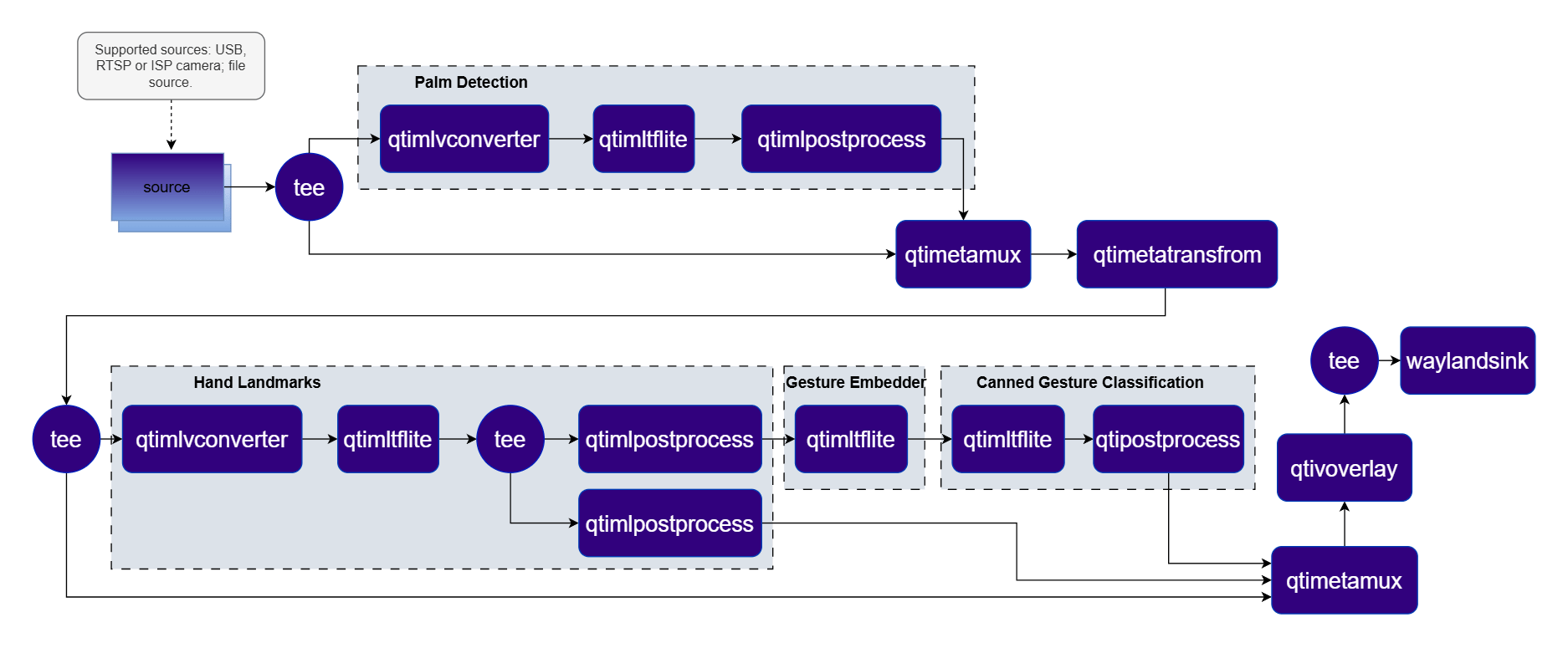
Pipeline Diagram

1

Download Required Files:

Download the gesture recognizer models from Google MediaPipe:
# Download the gesture recognizer task bundle
wget https://storage.googleapis.com/mediapipe-models/gesture_recognizer/gesture_recognizer/float16/latest/gesture_recognizer.task

# Extract the top-level task
unzip gesture_recognizer.task

# Extract hand landmarker models
unzip hand_landmarker.task
# → hand_detector.tflite, hand_landmarks_detector.tflite

# Extract gesture recognizer models
unzip hand_gesture_recognizer.task
# → gesture_embedder.tflite, canned_gesture_classifier.tflite
These are FLOAT precision models.
FileDownloadSave as
Palm detection modelSee download steps abovehand_detector.tflite
Palm detection labelspalmd_labels.jsonpalmd_labels.json
Palm detection settingspalmd_settings.jsonpalmd_settings.json
Hand landmark modelSee download steps abovehand_landmarks_detector.tflite
Hand landmark labelshlandmark_labels.jsonhlandmark_labels.json
Hand landmark settingshlandmark_settings.jsonhlandmark_settings.json
Gesture embedder modelSee download steps abovegesture_embedder.tflite
Gesture classifier modelSee download steps abovecanned_gesture_classifier.tflite
Gesture labelsgesture_labels.jsongesture_labels.json
2

Copy files to device

# Run from your host machine — replace <user> and <device-ip>
ssh <user>@<device-ip> "mkdir -p $HOME/{models,labels}"
scp hand_detector.tflite              <user>@<device-ip>:$HOME/models/
scp palmd_labels.json                  <user>@<device-ip>:$HOME/labels/
scp palmd_settings.json                <user>@<device-ip>:$HOME/labels/
scp hand_landmarks_detector.tflite     <user>@<device-ip>:$HOME/models/
scp hlandmark_labels.json              <user>@<device-ip>:$HOME/labels/
scp hlandmark_settings.json            <user>@<device-ip>:$HOME/labels/
scp gesture_embedder.tflite            <user>@<device-ip>:$HOME/models/
scp canned_gesture_classifier.tflite   <user>@<device-ip>:$HOME/models/
scp gesture_labels.json                <user>@<device-ip>:$HOME/labels/
3

Connect to device

# Run from your host machine — replace <user> and <device-ip>
ssh <user>@<device-ip>
4

Set environment variables

Run below command on your device
mkdir -p $HOME/{models,labels}
export MODEL_NAME_1=hand_detector.tflite
export LABELS_NAME_1=palmd_labels.json
export LABELS_NAME_2=palmd_settings.json
export MODEL_NAME_2=hand_landmarks_detector.tflite
export LABELS_NAME_3=hlandmark_labels.json
export LABELS_NAME_4=hlandmark_settings.json
export MODEL_NAME_3=gesture_embedder.tflite
export MODEL_NAME_4=canned_gesture_classifier.tflite
export LABELS_NAME_5=gesture_labels.json
5

Run the pipeline

gst-launch-1.0 -e --gst-debug=2 \
  qtimlvconverter name=stage_01_preproc \
  qtimltflite name=stage_01_inference model=$HOME/models/$MODEL_NAME_1 delegate=gpu \
  qtimlpostprocess name=stage_01_postproc results=1 module=palmd \
  labels=$HOME/labels/$LABELS_NAME_1 settings=$HOME/labels/$LABELS_NAME_2 \
  qtimlvconverter name=stage_02_preproc mode=roi-batch-non-cumulative \
  qtimltflite name=stage_02_inference model=$HOME/models/$MODEL_NAME_2 delegate=gpu \
  qtimlpostprocess name=stage_02_1_postproc results=6 module=hlandmark \
  labels=$HOME/labels/$LABELS_NAME_3 settings=$HOME/labels/$LABELS_NAME_4 \
  qtimlpostprocess name=stage_02_2_postproc results=6 module=tensor \
  qtimltflite name=stage_03_1_inference model=$HOME/models/$MODEL_NAME_3 delegate=gpu \
  qtimltflite name=stage_03_2_inference model=$HOME/models/$MODEL_NAME_4 delegate=gpu \
  qtimlpostprocess name=stage_03_postproc results=8 module=mobilenet labels=$HOME/labels/$LABELS_NAME_5 \
  qticamsrc ! video/x-raw,format=NV12,width=1920,height=1080,framerate=30/1 ! queue ! \
  tee name=t_split_1 \
  t_split_1. ! queue ! qtimetamux name=metamux_1 ! queue ! qtimetatransform module=roi-palmd ! \
  queue ! tee name=t_split_2 \
  t_split_1. ! queue ! stage_01_preproc. stage_01_preproc. ! queue ! stage_01_inference. \
  stage_01_inference. ! queue ! stage_01_postproc. stage_01_postproc. ! text/x-raw ! queue ! metamux_1. \
  t_split_2. ! queue ! qtimetamux name=metamux_2 ! queue ! qtivoverlay ! waylandsink fullscreen=true sync=false \
  t_split_2. ! queue ! stage_02_preproc. stage_02_preproc. ! queue ! stage_02_inference. \
  stage_02_inference. ! queue ! tee name=t_split_3 \
  t_split_3. ! queue ! stage_02_1_postproc. stage_02_1_postproc. ! text/x-raw ! metamux_2. \
  t_split_3. ! queue ! stage_02_2_postproc. stage_02_2_postproc. ! queue ! \
  stage_03_1_inference. stage_03_1_inference. ! stage_03_2_inference. \
  stage_03_2_inference. ! stage_03_postproc. stage_03_postproc. ! text/x-raw ! metamux_2.
6

Expected Output

The pipeline detects hands, estimates keypoints, and recognizes gestures. Results are overlaid on each frame and rendered on the display.

PluginDescription
qticamsrcCaptures live video from the ISP camera as the pipeline source.
teeSplits the stream for palm detection and downstream ROI-based stages.
qtimlvconverterPreprocesses full frames (Stage 1) and ROI-cropped patches (Stage 2) for inference.
qtimltfliteRuns palm detection, hand landmark, gesture embedder, and gesture classifier inference sequentially.
qtimlpostprocessPost-processes each stage’s tensors (palm ROIs, landmarks, gesture labels).
qtimetatransformTransforms ROI palm-detection metadata into cropped regions for the landmark stage.
qtimetamuxMerges video and metadata/text streams, attaching inference results as GST buffer metadata.
qtivoverlayOverlays inference results (labels, bounding boxes, keypoints) onto the video frame using CL.
waylandsinkRenders the final annotated video stream to a local display via Weston.

Audio AI Pipelines

Audio Classification (FLAC File Decode)

Classifies audio events from a video file containing a FLAC audio track using YAMNet. The audio is decoded and processed in parallel with video playback, with classification results overlaid on the display. Pipeline Diagram

Pipeline Diagram

1

Download Required Files:

FileDownloadSave as
YAMNet modelQualcomm AI Hub — YAMNetyamnet.tflite
Audio classification labelsyamnet.jsonyamnet.json
Sample video with FLAC audioH264_720p_30fps_FLAC.mp4H264_720p_30fps_FLAC.mp4
If any downloaded file is a .zip archive, extract it on your host machine before copying: unzip filename.zip
2

Copy files to device

# Replace $HOME to the appropriate device path before running the commands.
# For QLI:    /root
# For Ubuntu: /home/ubuntu
# Modify this based on your platform and ensure files are copied to the correct location on the device.

ssh <user>@<device-ip> "mkdir -p $HOME/{models,media,media/output}"
scp yamnet.tflite              <user>@<device-ip>:$HOME/models/
scp yamnet.json                <user>@<device-ip>:$HOME/labels/
scp H264_720p_30fps_FLAC.mp4  <user>@<device-ip>:$HOME/media/
3

Connect to device

# Run from your host machine — replace <user> and <device-ip>
ssh <user>@<device-ip>
4

Set environment variables

Run below command on your device
export MODEL_NAME=yamnet.tflite
export LABELS_NAME=yamnet.json
export SRC_VIDEO_NAME=H264_720p_30fps_FLAC.mp4
5

Run the pipeline

gst-launch-1.0 -e filesrc location=$HOME/media/$SRC_VIDEO_NAME ! qtdemux name=demux demux. ! queue ! h264parse ! \
v4l2h264dec capture-io-mode=4 output-io-mode=4 ! video/x-raw, format=NV12 ! qtivcomposer name=mixer sink_1::position="<50, 50>" sink_1::dimensions="<368, 64>" ! \
queue ! waylandsink fullscreen=true demux. ! queue ! flacparse ! flacdec ! queue ! audioconvert ! audioresample ! \
audiobuffersplit output-buffer-size=31200 ! queue ! qtimlaconverter  sample-rate=16000 feature=lmfe params="params,nfft=96,nhop=160,nmels=64,chunklen=0.96;" ! \
queue ! qtimltflite name=infeng model=$HOME/models/$MODEL_NAME ! qtimlpostprocess settings="{\"confidence\": 10.0}" results=3 module=yamnet \
labels=$HOME/labels/$LABELS_NAME ! video/x-raw,format=BGRA,width=368,height=64 ! queue ! mixer.
6

Expected Output

Classification results are printed to the terminal. Each detected audio class with its confidence score is output per audio segment processed.
PluginDescription
filesrcReads an MP4 container file with H.264 video and FLAC audio as the source.
qtdemuxDemultiplexes the container into separate H.264 video and FLAC audio elementary streams.
h264parseParses the H.264 bitstream for downstream decoding.
v4l2h264decHardware-decodes the H.264 stream to raw NV12 frames using V4L2.
flacparseParses the FLAC audio bitstream from the demuxed stream.
flacdecDecodes the FLAC audio stream to raw PCM.
audioconvertConverts decoded PCM to the required sample format (S16LE).
audioresampleResamples the audio to the model’s required sample rate.
audiobuffersplitSplits the audio into fixed-size buffers for frame-by-frame inference.
qtimlaconverterConverts raw PCM audio into the feature representation expected by the model.
qtimltfliteLoads the TFLite model, applies the chosen delegate, and runs inference to produce result tensors.
qtimlaclassificationPost-processes audio inference tensors and produces classification label overlays.
qtivcomposerOverlays the audio classification result panel onto the video playback stream.
waylandsinkRenders the final composited video stream to a local display via Weston.