This section covers QIM SDK multimedia pipelines that use LiteRT for inference.

1. Camera


1.1 Single 1080p YUV stream from live source

Description Captures a live feed from a camera device (e.g., USB via V4L2 or MIPI camera via qticamsrc) and displays it on the screen using Wayland. Pipeline Diagram This Pipeline diagram for USB camera Pipeline Diagram Pipeline Command

gst-launch-1.0 \
  qticamsrc name=camsrc ! \
  video/x-raw,width=1920,height=1080,framerate=30/1 ! \
  waylandsink fullscreen=true
PluginDescription
qticamsrcISP camera source plugin for capturing raw video frames from MIPI camera.
v4l2srcV4L2-based video capture source for USB cameras.
videoconvertConverts video between different color formats.
qtivtransformHardware-accelerated video transformation (format conversion, scaling).
waylandsinkRenders video frames to a Wayland display surface.
In case of an Internal data stream error for USB camera, ensure that the USB camera device node or for RTSP camera RTSP stream location are correctly configured.

1.2 Three 1080p YUV streams from live source

Description Captures three 1080p streams from a single multi-stream capable camera source (qticamsrc) and displays them at different positions on the same screen. Pipeline Diagram Pipeline Diagram Pipeline Command
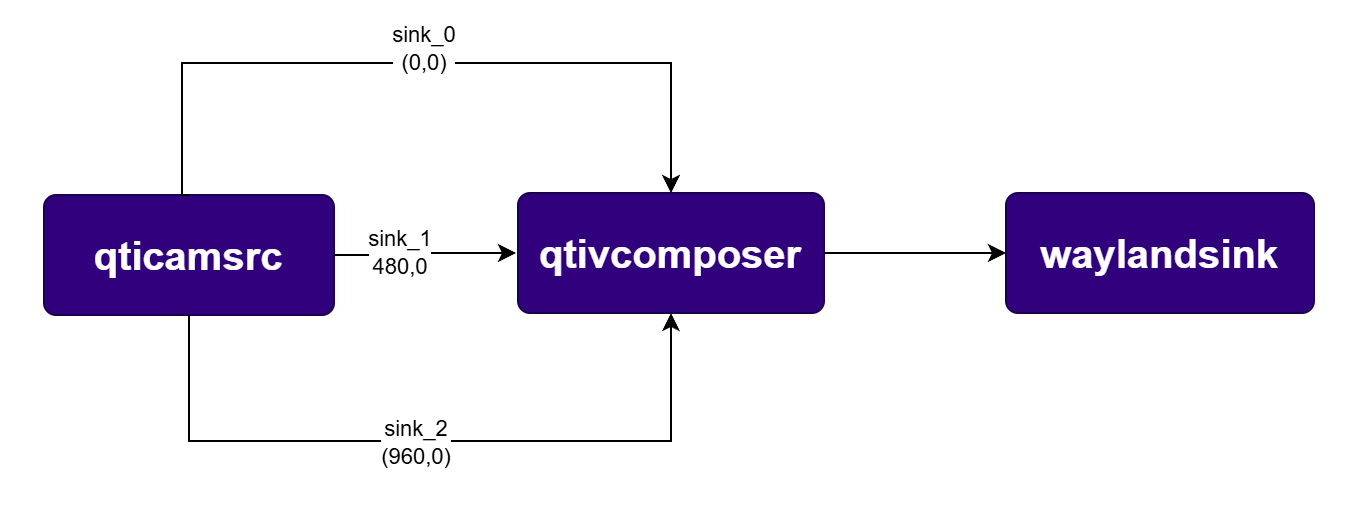
gst-launch-1.0 -e -v \
  qtivcomposer name=mixer \
    sink_0::position="<0,0>"  sink_0::dimensions="<480,270>" \
    sink_1::position="<480,0>"  sink_1::dimensions="<480,270>" \
    sink_2::position="<960,0>"  sink_2::dimensions="<480,270>" \
  mixer. ! queue ! waylandsink fullscreen=true \
  qticamsrc name=camsrc camera=0 video_0::type=preview video_1::type=video \
  camsrc. ! queue ! video/x-raw,format=NV12,width=1920,height=1080,framerate=30/1 \
           ! videoscale ! video/x-raw,width=480,height=270 \
           ! mixer.sink_0 \
  camsrc. ! queue ! video/x-raw,format=NV12,width=1920,height=1080,framerate=30/1 \
           ! videoscale ! video/x-raw,width=480,height=270 \
           ! mixer.sink_1 \
  camsrc. ! queue ! video/x-raw,format=NV12,width=1920,height=1080,framerate=30/1 \
           ! videoscale ! video/x-raw,width=480,height=270 \
           ! mixer.sink_2
PluginDescription
qticamsrcISP camera source plugin supporting multiple simultaneous output streams.
qtivcomposerHardware video compositor that blends multiple input streams into one output.
waylandsinkRenders video frames to a Wayland display surface.

2. Camera and Video Encode

2.1 One Stream — 1080p AVC Video Record

Description This pipeline captures a single 1080p live camera stream, encodes it to H.264 (AVC) using hardware acceleration, muxes it into an MP4 container, and saves it to the device filesystem. Pipeline Diagram Pipeline Diagram Pipeline Command

export command
mkdir -p $HOME/{media,models}
pipeline command
gst-launch-1.0 -e \
  qticamsrc name=camsrc camera=0 video_0::type=preview video_1::type=video ! \
  video/x-raw,format=NV12,width=1920,height=1080,framerate=30/1 ! \
  queue ! v4l2h264enc capture-io-mode=4 output-io-mode=4 ! \
  queue ! h264parse ! mp4mux ! queue ! \
  filesink location=$HOME/media/mux.mp4
PluginDescription
qticamsrcISP camera source plugin for capturing raw video frames.
v4l2h264encHardware-accelerated H.264 video encoder.
h264parseParses H.264 bitstream and adds framing metadata.
mp4muxMuxes encoded streams into an MP4 container.
filesinkWrites pipeline data to a file on the filesystem.
Pull Recorded File to Host PC
# Using SCP
scp -r root@[DEVICE IP-ADDR]:$HOME/mux.mp4 .

2.2 One Stream - 1080p AVC RTSP from live source

Description Captures 1080p video, encodes it to H.264, and streams it over RTSP using gst-rtsp-server (via UDP sink). Pipeline Diagram Pipeline Diagram Pipeline Command

## 1. Start RTSP Server (in background or separate terminal)
gst-rtsp-server -p 8900 -m /live "( udpsrc name=pay0 port=8554 caps=\"application/x-rtp,media=video,clock-rate=90000,encoding-name=H264,payload=96\" )" &

## 2. Run Pipeline
gst-launch-1.0 -e \
  qticamsrc ! video/x-raw,format=NV12,width=1920,height=1080,framerate=30/1 ! \
  v4l2h264enc capture-io-mode=4 output-io-mode=4 ! \
  h264parse config-interval=-1 ! rtph264pay pt=96 ! \
  udpsink host=127.0.0.1 port=8554
PluginDescription
qticamsrcISP camera source plugin for capturing raw video frames.
v4l2h264encHardware-accelerated H.264 video encoder.
h264parseParses H.264 bitstream and adds framing metadata.
rtph264payPayloads H.264 video into RTP packets.
udpsinkSends RTP packets over UDP for RTSP streaming.

2.3 Two streams - 4K AVC and 480p AVC from live source

Description Simultaneously captures and records two streams: one 4K and one 480p, both encoded in H.264 and saved as MP4. Pipeline Diagram Pipeline Diagram Pipeline Command
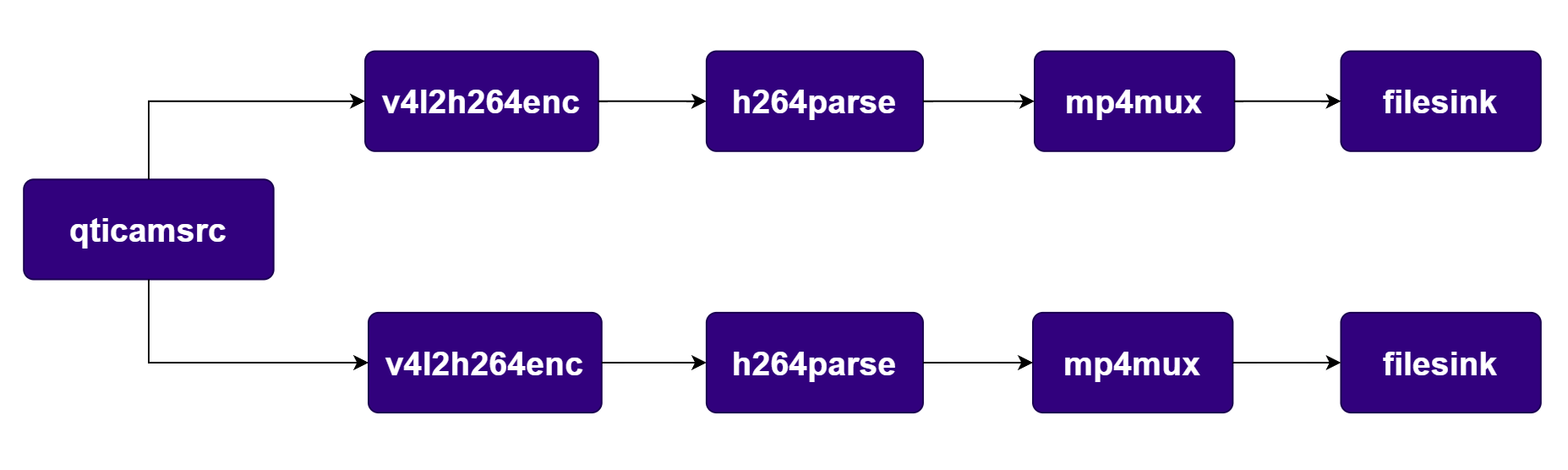
export command
mkdir -p $HOME/{media,models}
pipeline command
gst-launch-1.0 -e --gst-debug=2 \
  qticamsrc name=camsrc camera=0 video_0::type=preview video_1::type=video \
  camsrc. ! video/x-raw,format=NV12,width=3840,height=2160,framerate=30/1 ! \
      queue ! v4l2h264enc capture-io-mode=4 output-io-mode=4 ! \
      queue ! h264parse ! mp4mux ! queue ! filesink location=$HOME/media/video1.mp4 \
  camsrc. ! video/x-raw,format=NV12,width=640,height=480,framerate=30/1 ! \
      queue ! v4l2h264enc capture-io-mode=4 output-io-mode=4 ! \
      queue ! h264parse ! mp4mux ! queue ! filesink location=$HOME/media/video2.mp4
PluginDescription
qticamsrcISP camera source supporting multiple simultaneous output streams.
v4l2h264encHardware-accelerated H.264 video encoder.
h264parseParses H.264 bitstream and adds framing metadata.
mp4muxMuxes encoded streams into an MP4 container.
filesinkWrites pipeline data to a file on the filesystem.

2.4 Three 1080p AVC streams from live source

Description Records 1080p AVC (H.264), 1080p HEVC (H.265), and displays a live 1080p preview simultaneously. Pipeline Diagram Pipeline Diagram Pipeline Command
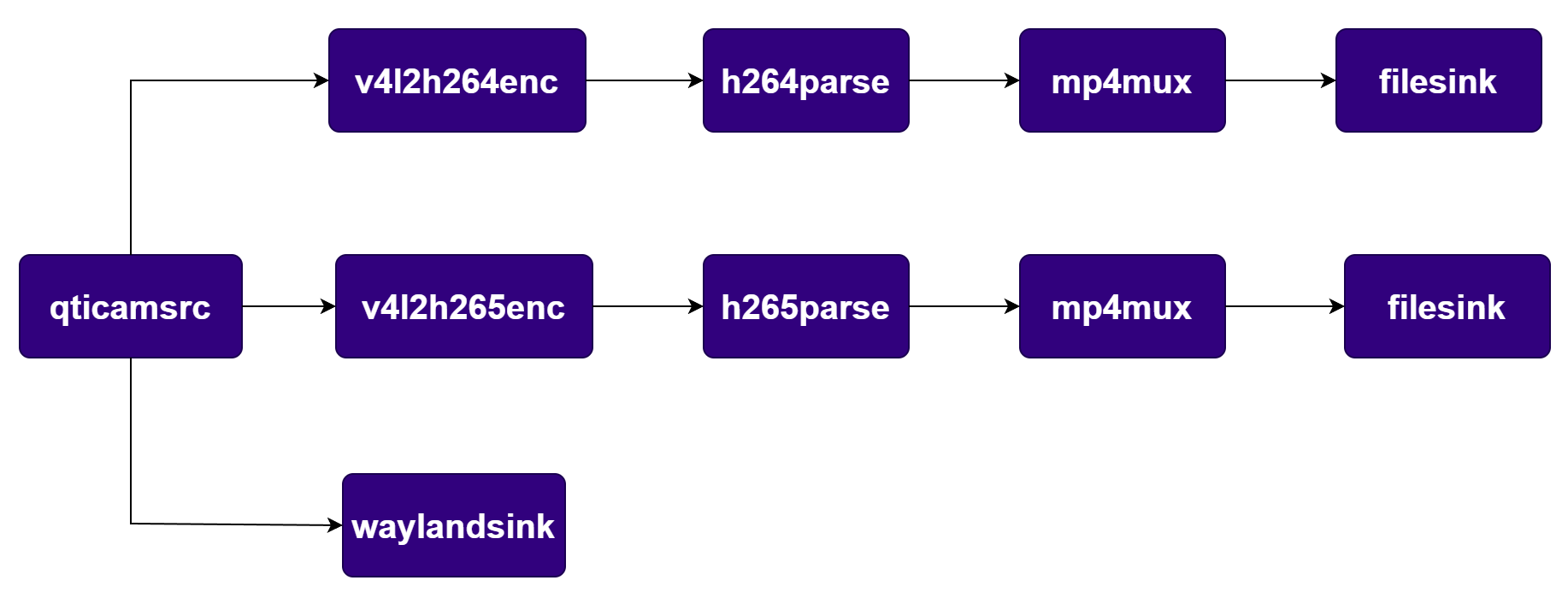
export command
mkdir -p $HOME/{media,models}
pipeline command
gst-launch-1.0 -e --gst-debug=2 \
  qticamsrc name=camsrc camera=0 video_0::type=preview video_1::type=video \
  camsrc. ! video/x-raw,format=NV12,width=1920,height=1080,framerate=30/1 ! \
      queue ! v4l2h264enc capture-io-mode=4 output-io-mode=4 ! \
      queue ! h264parse ! mp4mux ! queue ! filesink location=$HOME/media/video2.mp4 \
  camsrc. ! video/x-raw,format=NV12,width=1920,height=1080,framerate=30/1 ! \
      queue ! v4l2h265enc capture-io-mode=4 output-io-mode=4 ! \
      queue ! h265parse ! mp4mux ! queue ! filesink location=$HOME/media/video2_hevc.mp4 \
  camsrc. ! video/x-raw,format=NV12,width=1920,height=1080,framerate=30/1 ! \
      waylandsink sync=false fullscreen=true enable-last-sample=false
PluginDescription
qticamsrcISP camera source supporting multiple simultaneous output streams.
v4l2h264encHardware-accelerated H.264 video encoder.
h264parseParses H.264 bitstream and adds framing metadata.
v4l2h265encHardware-accelerated H.265/HEVC video encoder.
h265parseParses H.265 bitstream and adds framing metadata.
mp4muxMuxes encoded streams into an MP4 container.
filesinkWrites pipeline data to a file on the filesystem.
waylandsinkRenders video frames to a Wayland display surface.

2.5 Three stream - 4K JPEG Snapshot, 1080p AVC MP4, 1080p YUV from live source

Description Captures 4K JPEG snapshots, records 1080p video, and displays a preview simultaneously. Pipeline Diagram Pipeline Diagram Pipeline Command
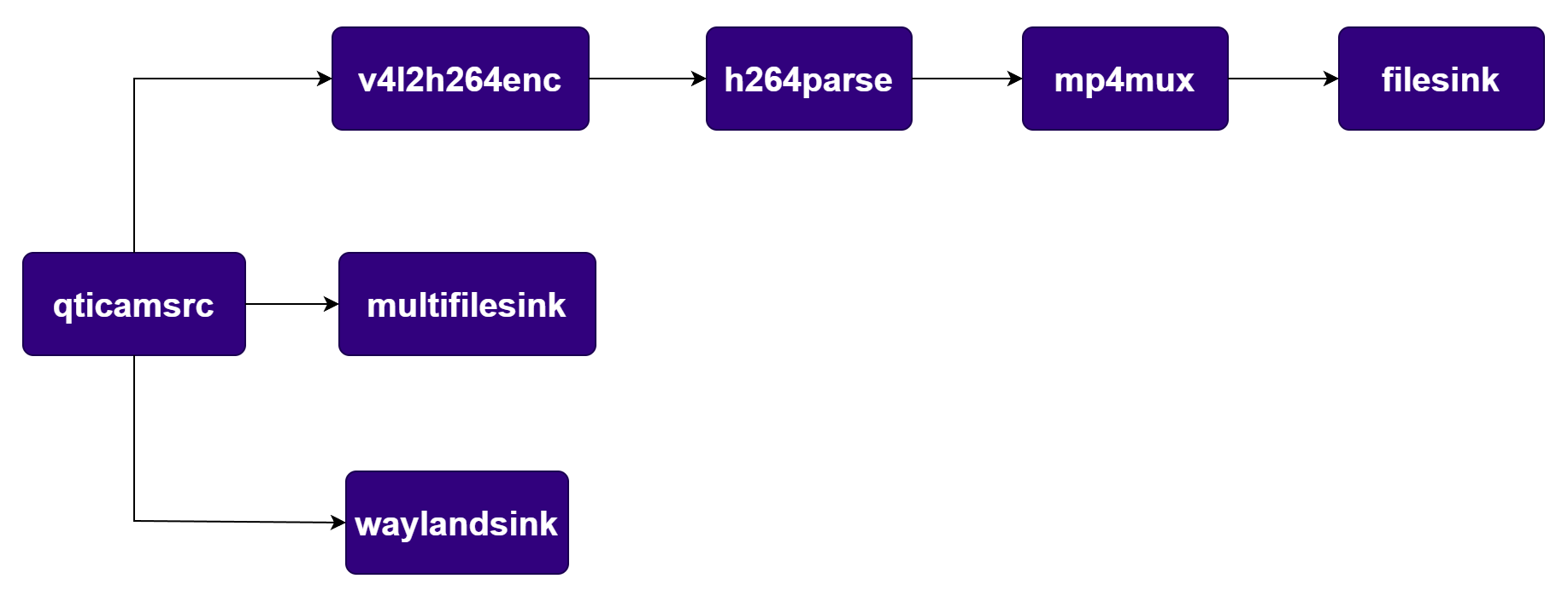
export command
mkdir -p $HOME/{media,models}
pipeline command
gst-launch-1.0 -e --gst-debug=2 \
  qticamsrc name=camsrc camera=0 video_0::type=preview video_1::type=video \
  camsrc. ! video/x-raw,format=NV12,width=1920,height=1080,framerate=30/1 ! \
      queue ! v4l2h264enc capture-io-mode=4 output-io-mode=4 ! \
      queue ! h264parse ! mp4mux ! queue ! filesink location=$HOME/media/video2.mp4 \
  camsrc.image_1 ! "image/jpeg,width=3840,height=2160,framerate=30/1" ! \
      multifilesink location=$HOME/media/frame%d.jpg sync=true async=false \
  camsrc. ! video/x-raw,format=NV12,width=1920,height=1080,framerate=30/1 ! \
      waylandsink fullscreen=true async=true sync=false
PluginDescription
qticamsrcISP camera source supporting video, preview, and image output streams.
v4l2h264encHardware-accelerated H.264 video encoder.
h264parseParses H.264 bitstream and adds framing metadata.
mp4muxMuxes encoded streams into an MP4 container.
filesinkWrites pipeline data to a file on the filesystem.
multifilesinkWrites a sequence of JPEG snapshot files to disk.
waylandsinkRenders video frames to a Wayland display surface.

3. Multi Camera/Multi client use cases

3.1 Two streams: Main camera: 4K AVC MP4, 1080p YUV Preview and Secondary Camera: 720p AVC, 720p YUV

Description Uses two camera sensors. Main camera provides 4K recording and 1080p preview. Secondary camera provides 720p recording and 720p preview. Pipeline Diagram Pipeline Diagram Pipeline Command
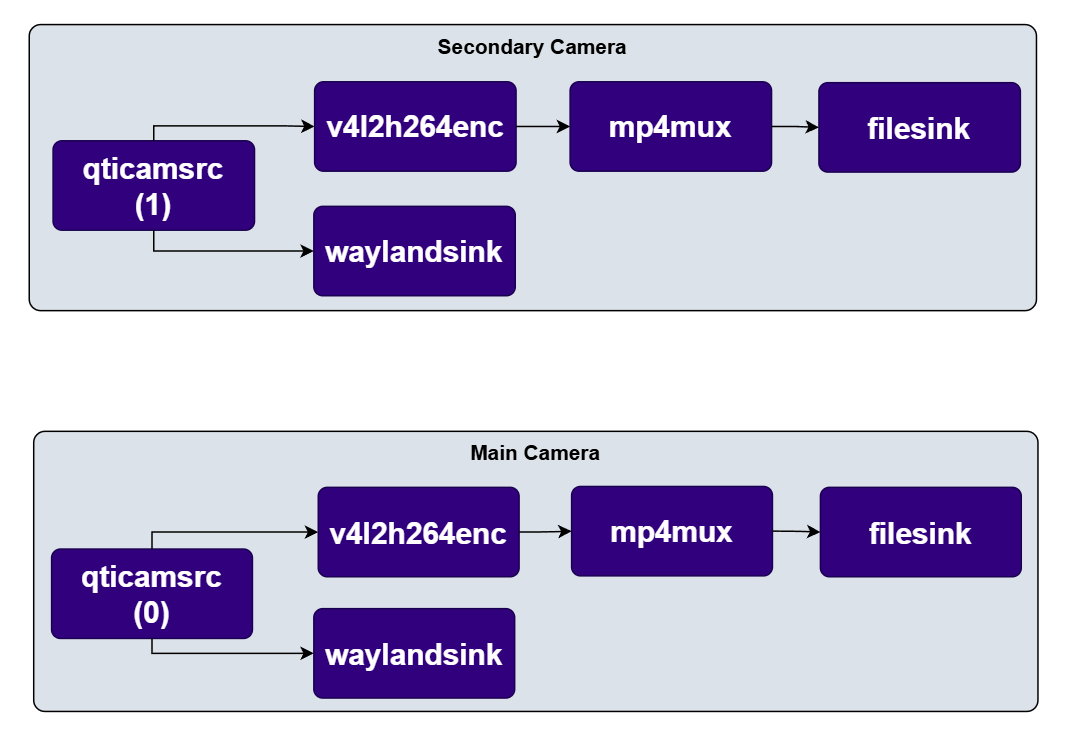
export command
mkdir -p $HOME/{media,models}
pipeline command
gst-launch-1.0 -e \
  qticamsrc name=camsrc_0 camera=0 video_0::type=video video_1::type=preview \
  camsrc_0. ! video/x-raw,format=NV12,width=3840,height=2160,framerate=30/1 \
      ! queue ! v4l2h264enc capture-io-mode=4 output-io-mode=4 \
      ! queue ! h264parse ! mp4mux ! filesink location=$HOME/media/main_4k.mp4 \
  camsrc_0. ! video/x-raw,format=NV12,width=1920,height=1080,framerate=30/1 \
      ! queue ! waylandsink sync=false \
  qticamsrc name=camsrc_1 camera=1 video_0::type=video video_1::type=preview \
  camsrc_1. ! video/x-raw,format=NV12,width=1280,height=720,framerate=30/1 \
      ! queue ! v4l2h264enc capture-io-mode=4 output-io-mode=4 \
      ! queue ! h264parse ! mp4mux ! filesink location=$HOME/media/secondary_720p.mp4 \
  camsrc_1. ! video/x-raw,format=NV12,width=1280,height=720,framerate=30/1 \
      ! queue ! filesink location=$HOME/media/secondary_720p.yuv
PluginDescription
qticamsrcISP camera source plugin; one instance per camera sensor.
v4l2h264encHardware-accelerated H.264 video encoder.
h264parseParses H.264 bitstream and adds framing metadata.
mp4muxMuxes encoded streams into an MP4 container.
filesinkWrites pipeline data to a file on the filesystem.
waylandsinkRenders video frames to a Wayland display surface.

3.2 Two streams - both 720p - one from each camera with Side-By-Side stitching sent to display

Description Stitches two 720p streams (one from each camera) into a single side-by-side frame using qtivcomposer. The result is recorded and streamed via RTSP. Pipeline Diagram Pipeline Diagram Pipeline Command
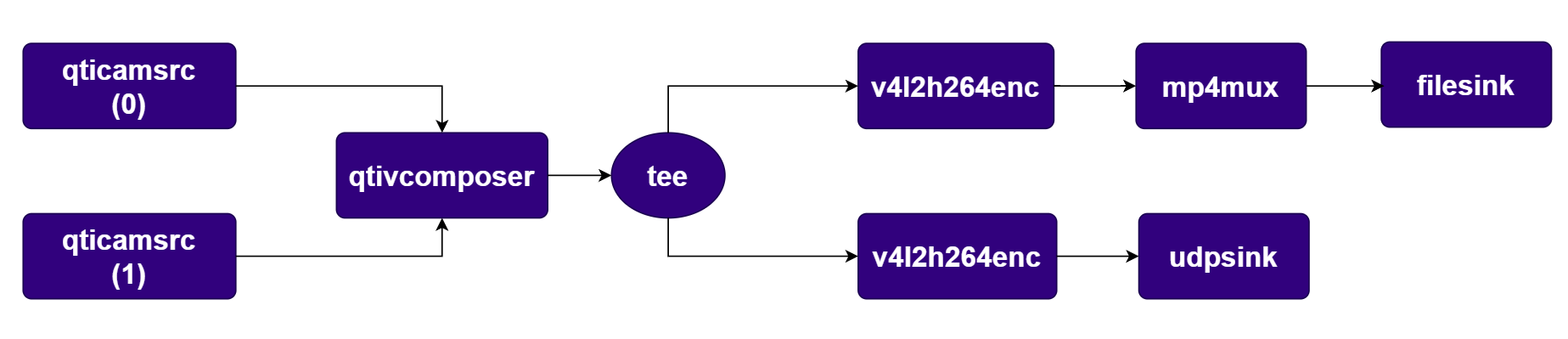
export command
mkdir -p $HOME/{media,models}
pipeline command
gst-launch-1.0 -e -v \
  qtivcomposer name=mixer \
    sink_0::position="<0,0>" sink_0::dimensions="<1280,720>" \
    sink_1::position="<1280,0>" sink_1::dimensions="<1280,720>" \
  mixer. ! queue ! tee name=t_split \
    t_split. ! queue ! v4l2h264enc capture-io-mode=4 output-io-mode=4 \
      ! queue ! h264parse ! mp4mux ! filesink location=$HOME/media/sidebyside.mp4 \
    t_split. ! queue ! v4l2h264enc capture-io-mode=4 output-io-mode=4 \
      ! queue ! h264parse config-interval=-1 ! rtph264pay pt=96 \
      ! udpsink host=127.0.0.1 port=8554 \
  qticamsrc name=camsrc_0 camera=0 \
    ! video/x-raw,format=NV12,width=1280,height=720,framerate=30/1 \
    ! queue ! mixer.sink_0 \
  qticamsrc name=camsrc_1 camera=1 \
    ! video/x-raw,format=NV12,width=1280,height=720,framerate=30/1 \
    ! queue ! mixer.sink_1

3.3 Two streams - both 720p - one from each camera with Picture in Picture composition and sent to display

Description Composes two streams (Picture-in-Picture) using qtivcomposer. The result is recorded and streamed via RTSP. Pipeline Diagram Pipeline Diagram Pipeline Command
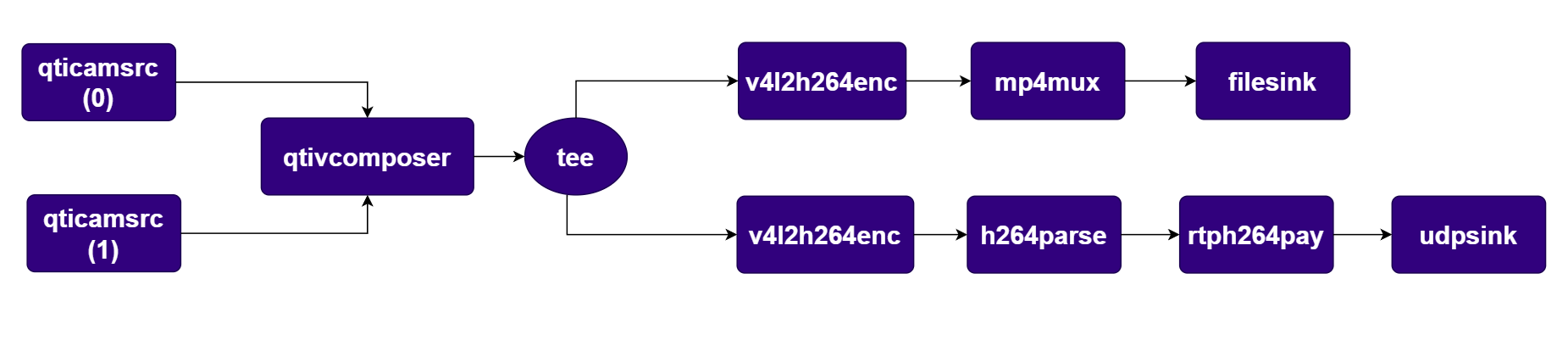
export command
mkdir -p $HOME/{media,models}
pipeline command
gst-launch-1.0 -e -v \
  qtivcomposer name=mixer \
    sink_0::position="<0,0>" sink_0::dimensions="<1280,720>" \
    sink_1::position="<590,310>" sink_1::dimensions="<640,360>" \
  mixer. ! queue ! tee name=t_split \
    t_split. ! queue ! v4l2h264enc capture-io-mode=4 output-io-mode=4 \
      ! queue ! h264parse ! mp4mux ! filesink location=$HOME/media/pip.mp4 \
    t_split. ! queue ! v4l2h264enc capture-io-mode=4 output-io-mode=4 \
      ! queue ! h264parse config-interval=-1 ! rtph264pay pt=96 \
      ! udpsink host=127.0.0.1 port=8554 \
  qticamsrc name=camsrc_0 camera=0 \
    ! video/x-raw,format=NV12,width=1280,height=720,framerate=30/1 \
    ! queue ! mixer.sink_0 \
  qticamsrc name=camsrc_1 camera=1 \
    ! video/x-raw,format=NV12,width=1280,height=720,framerate=30/1 \
    ! queue ! mixer.sink_1

PluginDescription
qticamsrcISP camera source plugin; one instance per camera sensor.
qtivcomposerHardware video compositor composing Picture-in-Picture layout.
v4l2h264encHardware-accelerated H.264 video encoder.
h264parseParses H.264 bitstream and adds framing metadata.
mp4muxMuxes encoded streams into an MP4 container.
filesinkWrites pipeline data to a file on the filesystem.
rtph264payPayloads H.264 video into RTP packets.
udpsinkSends RTP packets over UDP for RTSP streaming.

4. Transform and Transcode use-cases

4.1 Rotate, Flip, and Scale

Description Demonstrates hardware-accelerated transformations (Rotation, Flip, Downscale) using qtivtransform. Pipeline Diagram Pipeline Diagram Pipeline Command
gst-launch-1.0 \
  qticamsrc ! video/x-raw,format=NV12,width=1920,height=1080 ! \
  qtivtransform rotate=180 ! \
  waylandsink fullscreen=true
PluginDescription
qticamsrcISP camera source plugin for capturing raw video frames.
qtivtransformHardware-accelerated video transformation: rotation, flip, and scaling.
waylandsinkRenders video frames to a Wayland display surface.

5. Video Playback use cases


5.1 Single stream video playback

Description The pipeline demonstrates playback of Video stream from a file of media container format like mp4. Pipeline Diagram Pipeline Diagram Pipeline Command

export command
mkdir -p $HOME/{media,models}
pipeline command
# Run in separate consoles or combine with &
gst-launch-1.0 -e -v \
  filesrc location=$HOME/media/video.mp4 ! \
  qtdemux ! queue ! h264parse ! v4l2h264dec capture-io-mode=4 output-io-mode=4 ! video/x-raw,format=NV12 ! queue ! waylandsink
PluginDescription
filesrcReads a media file from the local filesystem.
qtdemuxDemultiplexes MP4/QuickTime container into audio and video streams.
h264parseParses H.264 bitstream and adds framing metadata.
v4l2h264decHardware-accelerated H.264 video decoder.
waylandsinkRenders video frames to a Wayland display surface.

5.2 Two 1080p streams video playback simultaneously

Description Plays two 1080p video files simultaneously to the screen. Pipeline Diagram Pipeline Diagram Pipeline Command
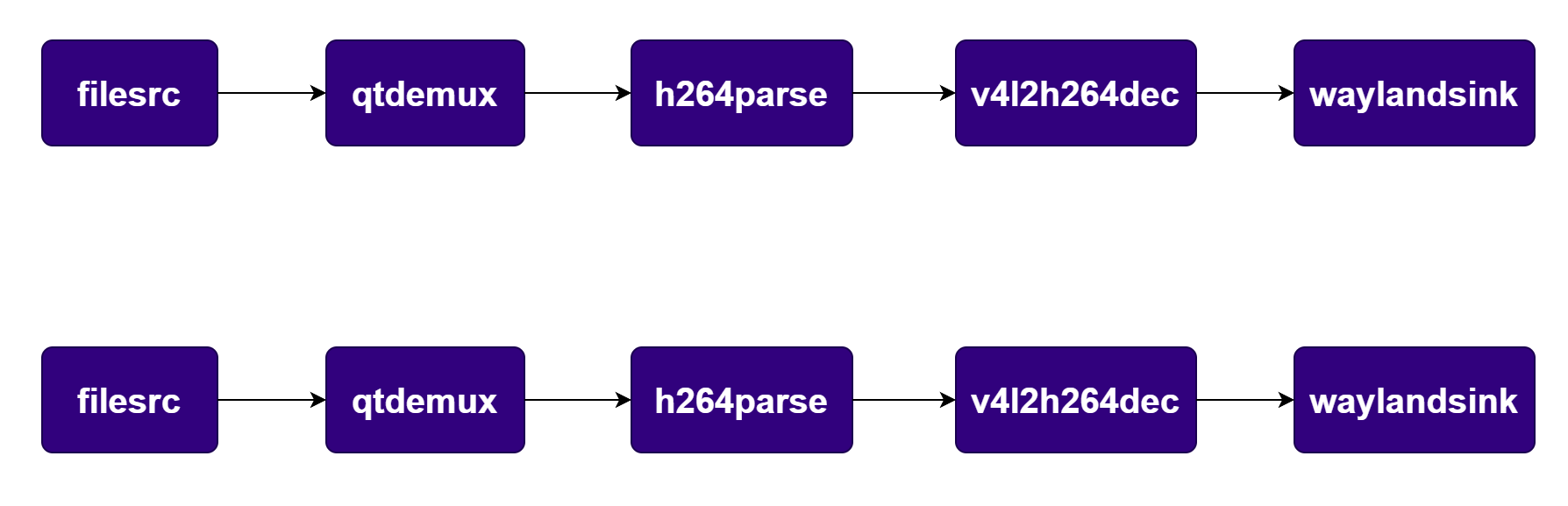
export command
mkdir -p $HOME/{media,models}
pipeline command
# Run in separate consoles or combine with &
gst-launch-1.0 -e -v \
  filesrc location=$HOME/media/video.mp4 ! \
  qtdemux ! queue ! h264parse ! \
  v4l2h264dec capture-io-mode=4 output-io-mode=4 ! \
  video/x-raw,format=NV12 ! queue ! waylandsink &

gst-launch-1.0 -e -v \
  filesrc location=$HOME/media/video.mp4 ! \
  qtdemux ! queue ! h264parse ! \
  v4l2h264dec capture-io-mode=4 output-io-mode=4 ! \
  video/x-raw,format=NV12 ! queue ! waylandsink
``
PluginDescription
filesrcReads a media file from the local filesystem.
qtdemuxDemultiplexes MP4/QuickTime container into audio and video streams.
h264parseParses H.264 bitstream and adds framing metadata.
v4l2h264decHardware-accelerated H.264 video decoder.
waylandsinkRenders video frames to a Wayland display surface.

5.3 8-Stream Grid Playback

Description Decodes 8 1080p video files simultaneously and composes them into a 4x2 grid on the display. Pipeline Diagram Pipeline Diagram Pipeline Command
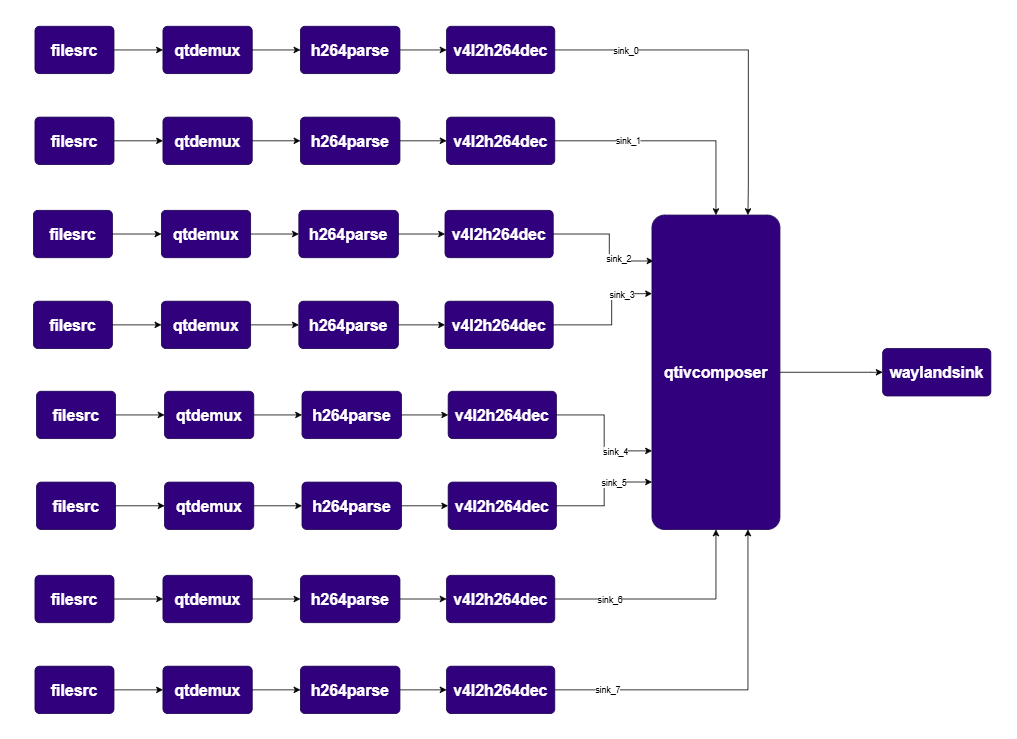
export command
mkdir -p $HOME/{media,models}
pipeline command
gst-launch-1.0 -e --gst-debug=3 \
  qtivcomposer name=comp \
    sink_0::position="<0, 0>" sink_0::dimensions="<480, 540>" \
    sink_1::position="<480, 0>" sink_1::dimensions="<480, 540>" \
    sink_2::position="<960, 0>" sink_2::dimensions="<480, 540>" \
    sink_3::position="<1440, 0>" sink_3::dimensions="<480, 540>" \
    sink_4::position="<0, 540>" sink_4::dimensions="<480, 540>" \
    sink_5::position="<480, 540>" sink_5::dimensions="<480, 540>" \
    sink_6::position="<960, 540>" sink_6::dimensions="<480, 540>" \
    sink_7::position="<1440, 540>" sink_7::dimensions="<480, 540>" ! \
  queue ! waylandsink fullscreen=true \
  filesrc location=$HOME/media/video.mp4 ! qtdemux ! h264parse ! v4l2h264dec capture-io-mode=4 output-io-mode=4 ! video/x-raw,format=NV12 ! queue ! comp.sink_0 \
  filesrc location=$HOME/media/video.mp4 ! qtdemux ! h264parse ! v4l2h264dec capture-io-mode=4 output-io-mode=4 ! video/x-raw,format=NV12 ! queue ! comp.sink_1 \
  filesrc location=$HOME/media/video.mp4 ! qtdemux ! h264parse ! v4l2h264dec capture-io-mode=4 output-io-mode=4 ! video/x-raw,format=NV12 ! queue ! comp.sink_2 \
  filesrc location=$HOME/media/video.mp4 ! qtdemux ! h264parse ! v4l2h264dec capture-io-mode=4 output-io-mode=4 ! video/x-raw,format=NV12 ! queue ! comp.sink_3 \
  filesrc location=$HOME/media/video.mp4 ! qtdemux ! h264parse ! v4l2h264dec capture-io-mode=4 output-io-mode=4 ! video/x-raw,format=NV12 ! queue ! comp.sink_4 \
  filesrc location=$HOME/media/video.mp4 ! qtdemux ! h264parse ! v4l2h264dec capture-io-mode=4 output-io-mode=4 ! video/x-raw,format=NV12 ! queue ! comp.sink_5 \
  filesrc location=$HOME/media/video.mp4 ! qtdemux ! h264parse ! v4l2h264dec capture-io-mode=4 output-io-mode=4 ! video/x-raw,format=NV12 ! queue ! comp.sink_6 \
  filesrc location=$HOME/media/video.mp4 ! qtdemux ! h264parse ! v4l2h264dec capture-io-mode=4 output-io-mode=4 ! video/x-raw,format=NV12 ! queue ! comp.sink_7 
PluginDescription
filesrcReads a media file from the local filesystem.
qtdemuxDemultiplexes MP4/QuickTime container into audio and video streams.
h264parseParses H.264 bitstream and adds framing metadata.
v4l2h264decHardware-accelerated H.264 video decoder.
qtivcomposerHardware video compositor arranging decoded streams in a 4×2 grid.
waylandsinkRenders composed video frames to a Wayland display surface.

5.4 16-Stream Grid Playback

Description Decodes 16 1080p video files simultaneously and composes them into a 4x4 grid on the display. Pipeline Diagram Pipeline Diagram Pipeline Command
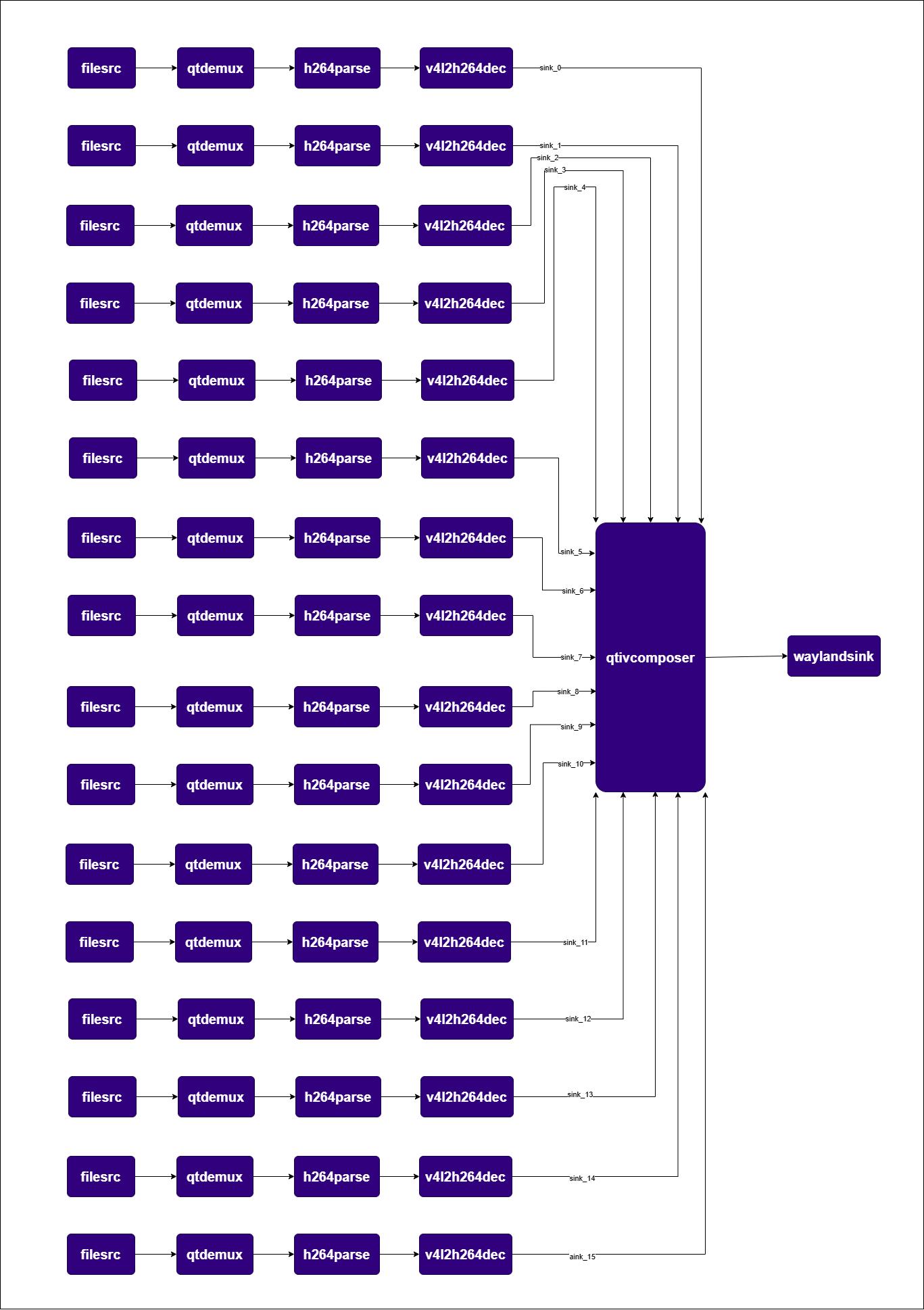
export command
mkdir -p $HOME/{media,models}
pipeline command
gst-launch-1.0 -e --gst-debug=3 \
  qtivcomposer name=comp \
    sink_0::position="<0, 0>" sink_0::dimensions="<480, 270>" \
    sink_1::position="<480, 0>" sink_1::dimensions="<480, 270>" \
    sink_2::position="<960, 0>" sink_2::dimensions="<480, 270>" \
    sink_3::position="<1440, 0>" sink_3::dimensions="<480, 270>" \
    sink_4::position="<0, 270>" sink_4::dimensions="<480, 270>" \
    sink_5::position="<480, 270>" sink_5::dimensions="<480, 270>" \
    sink_6::position="<960, 270>" sink_6::dimensions="<480, 270>" \
    sink_7::position="<1440, 270>" sink_7::dimensions="<480, 270>" \
    sink_8::position="<0, 540>" sink_8::dimensions="<480, 270>" \
    sink_9::position="<480, 540>" sink_9::dimensions="<480, 270>" \
    sink_10::position="<960, 540>" sink_10::dimensions="<480, 270>" \
    sink_11::position="<1440, 540>" sink_11::dimensions="<480, 270>" \
    sink_12::position="<0, 810>" sink_12::dimensions="<480, 270>" \
    sink_13::position="<480, 810>" sink_13::dimensions="<480, 270>" \
    sink_14::position="<960, 810>" sink_14::dimensions="<480, 270>" \
    sink_15::position="<1440, 810>" sink_15::dimensions="<480, 270>" ! \
  queue ! waylandsink fullscreen=true \
  filesrc location=$HOME/media/video.mp4 ! qtdemux ! h264parse ! v4l2h264dec capture-io-mode=4 output-io-mode=4 ! video/x-raw,format=NV12 ! queue ! comp.sink_0 \
  filesrc location=$HOME/media/video.mp4 ! qtdemux ! h264parse ! v4l2h264dec capture-io-mode=4 output-io-mode=4 ! video/x-raw,format=NV12 ! queue ! comp.sink_1 \
  filesrc location=$HOME/media/video.mp4 ! qtdemux ! h264parse ! v4l2h264dec capture-io-mode=4 output-io-mode=4 ! video/x-raw,format=NV12 ! queue ! comp.sink_2 \
  filesrc location=$HOME/media/video.mp4 ! qtdemux ! h264parse ! v4l2h264dec capture-io-mode=4 output-io-mode=4 ! video/x-raw,format=NV12 ! queue ! comp.sink_3 \
  filesrc location=$HOME/media/video.mp4 ! qtdemux ! h264parse ! v4l2h264dec capture-io-mode=4 output-io-mode=4 ! video/x-raw,format=NV12 ! queue ! comp.sink_4 \
  filesrc location=$HOME/media/video.mp4 ! qtdemux ! h264parse ! v4l2h264dec capture-io-mode=4 output-io-mode=4 ! video/x-raw,format=NV12 ! queue ! comp.sink_5 \
  filesrc location=$HOME/media/video.mp4 ! qtdemux ! h264parse ! v4l2h264dec capture-io-mode=4 output-io-mode=4 ! video/x-raw,format=NV12 ! queue ! comp.sink_6 \
  filesrc location=$HOME/media/video.mp4 ! qtdemux ! h264parse ! v4l2h264dec capture-io-mode=4 output-io-mode=4 ! video/x-raw,format=NV12 ! queue ! comp.sink_7 \
  filesrc location=$HOME/media/video.mp4 ! qtdemux ! h264parse ! v4l2h264dec capture-io-mode=4 output-io-mode=4 ! video/x-raw,format=NV12 ! queue ! comp.sink_8 \
  filesrc location=$HOME/media/video.mp4 ! qtdemux ! h264parse ! v4l2h264dec capture-io-mode=4 output-io-mode=4 ! video/x-raw,format=NV12 ! queue ! comp.sink_9 \
  filesrc location=$HOME/media/video.mp4 ! qtdemux ! h264parse ! v4l2h264dec capture-io-mode=4 output-io-mode=4 ! video/x-raw,format=NV12 ! queue ! comp.sink_10 \
  filesrc location=$HOME/media/video.mp4 ! qtdemux ! h264parse ! v4l2h264dec capture-io-mode=4 output-io-mode=4 ! video/x-raw,format=NV12 ! queue ! comp.sink_11 \
  filesrc location=$HOME/media/video.mp4 ! qtdemux ! h264parse ! v4l2h264dec capture-io-mode=4 output-io-mode=4 ! video/x-raw,format=NV12 ! queue ! comp.sink_12 \
  filesrc location=$HOME/media/video.mp4 ! qtdemux ! h264parse ! v4l2h264dec capture-io-mode=4 output-io-mode=4 ! video/x-raw,format=NV12 ! queue ! comp.sink_13 \
  filesrc location=$HOME/media/video.mp4 ! qtdemux ! h264parse ! v4l2h264dec capture-io-mode=4 output-io-mode=4 ! video/x-raw,format=NV12 ! queue ! comp.sink_14 \
  filesrc location=$HOME/media/video.mp4 ! qtdemux ! h264parse ! v4l2h264dec capture-io-mode=4 output-io-mode=4 ! video/x-raw,format=NV12 ! queue ! comp.sink_15
PluginDescription
filesrcReads a media file from the local filesystem.
qtdemuxDemultiplexes MP4/QuickTime container into audio and video streams.
h264parseParses H.264 bitstream and adds framing metadata.
v4l2h264decHardware-accelerated H.264 video decoder.
qtivcomposerHardware video compositor arranging decoded streams in a 4×4 grid.
waylandsinkRenders composed video frames to a Wayland display surface.
16 hardware decode is supported only on IQ‑9075.

6. Audio use cases


Prerequisites for Audio Use Cases:Before running audio pipelines, ensure the correct audio source is configured:
# Check available audio sources and their node numbers
wpctl status

# Set the default audio source (replace <node no.> with the actual source node number)
wpctl set-default <node no.>

6.1 PCM Audio Capture

Description Captures audio from the microphone via PulseAudio, converts it, encodes it to WAV, and saves it to a file. Pipeline Diagram Pipeline Diagram Pipeline Command

export command
mkdir -p $HOME/{media,models}
pipeline command
gst-launch-1.0 -v pulsesrc volume=10 ! audioconvert ! wavenc ! filesink location=$HOME/media/<Audio_PCM>.wav
PluginDescription
pulsesrcCaptures audio from a PulseAudio input device (microphone).
audioconvertConverts audio between different formats/rates.
wavencEncodes raw PCM audio into WAV format.
filesinkWrites pipeline data to a file on the filesystem.

6.2 PCM Audio Playback

Description A basic audio playback pipeline that reads a WAV file and routes the PCM stream to the PulseAudio sink. Pipeline Diagram Pipeline Diagram Pipeline Command

export command
mkdir -p $HOME/{media,models}
pipeline command
gst-launch-1.0 -e filesrc location=$HOME/media/<wav_file>.wav ! wavparse ! audioconvert ! pulsesink volume=10
PluginDescription
filesrcReads a WAV file from the local filesystem.
wavparseParses WAV container and extracts PCM audio stream.
audioconvertConverts audio between different formats/rates.
pulsesinkPlays audio through a PulseAudio output device (speaker).

6.3 MP3 Audio Playback (Software Decode)

Description Reads an MP3 file and decodes it using mpg123audiodec to PulseAudio. Pipeline Diagram Pipeline Diagram Pipeline Command

export command
mkdir -p $HOME/{media,models}
pipeline command
gst-launch-1.0 -e filesrc location=$HOME/media/<mp3_file>.mp3 ! mpegaudioparse ! mpg123audiodec ! pulsesink volume=10
PluginDescription
filesrcReads an MP3 file from the local filesystem.
mpegaudioparseParses MPEG audio bitstream framing.
mpg123audiodecSoftware MP3 audio decoder.
pulsesinkPlays audio through a PulseAudio output device (speaker).

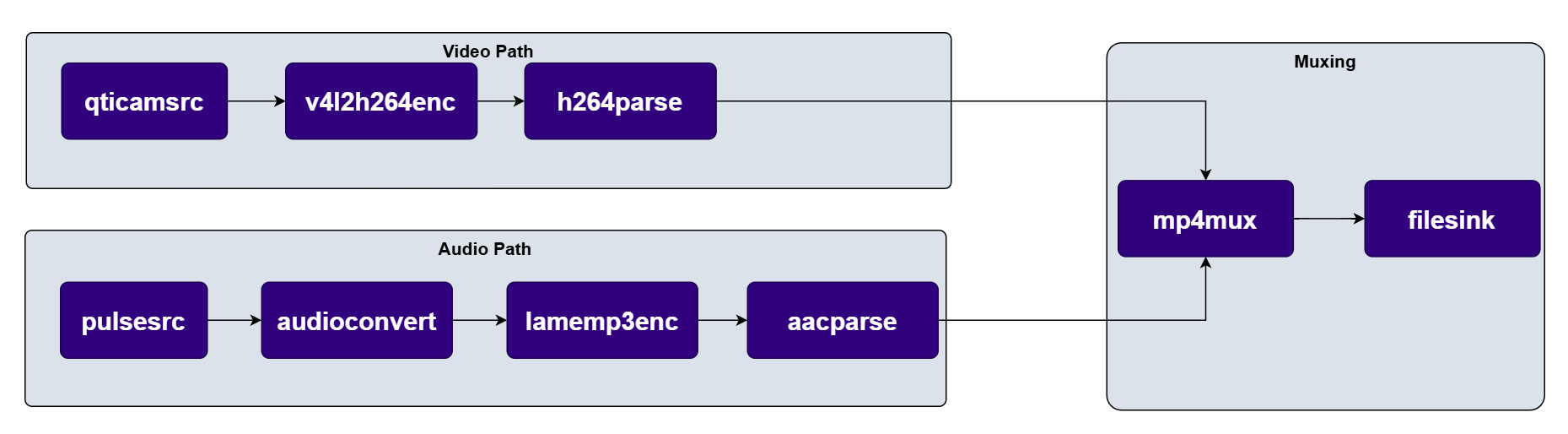
6.4 Record 1080p Video with Audio (AVC/MP3 Capture)

Description Captures 1080p video from the camera and audio from the microphone.
  • Video: Hardware encoded (H.264).
  • Audio: Software encoded (MP3) using lamemp3enc.
  • Muxing: Muxed into an MP4 container.
Pipeline Diagram Pipeline Diagram Pipeline Command
export command
mkdir -p $HOME/{media,models}
pipeline command
gst-launch-1.0 -e \
pulsesrc do-timestamp=true provide-clock=false volume=10 ! audio/x-raw,format=S16LE,channels=1,rate=48000 ! audioconvert ! queue ! lamemp3enc ! queue ! mpegaudioparse ! queue ! mp4mux name=muxer ! queue ! filesink location=$HOME/media/1080p_AVC_MP3.mp4 \
qticamsrc ! video/x-raw,format=NV12,width=1920,height=1080,framerate=30/1,interlace-mode=progressive,colorimetry=bt601 ! queue ! v4l2h264enc capture-io-mode=4 output-io-mode=5 extra-controls="controls,video_bitrate=1000000,video_gop_size=29;" ! queue ! h264parse ! muxer.
PluginDescription
qticamsrcISP camera source plugin for capturing raw 1080p video.
v4l2h264encHardware-accelerated H.264 video encoder.
h264parseParses H.264 bitstream and adds framing metadata.
pulsesrcCaptures audio from a PulseAudio input device (microphone).
audioconvertConverts audio between different formats/rates.
lamemp3encSoftware MP3 audio encoder.
aacparseParses AAC/MP3 audio bitstream for muxing.
mp4muxMuxes video and audio streams into an MP4 container.
filesinkWrites the muxed AV file to the filesystem.

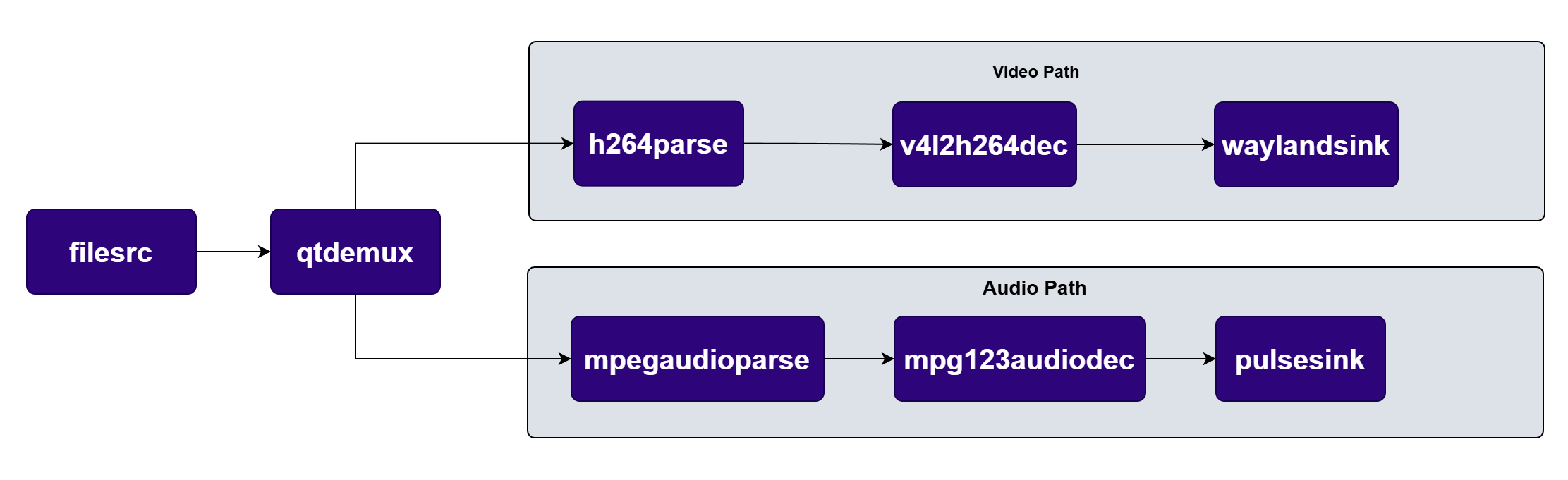
6.5 1080p AVC/MP3 Video Playback

Description Reads an MP4 file and demuxes it into separate audio and video streams.
  • Video: H.264 decoded via hardware and rendered to display.
  • Audio: MP3 decoded via software (mpg123audiodec) and sent to speaker.
Pipeline Diagram Pipeline Diagram Pipeline Command
export command
mkdir -p $HOME/{media,models}
pipeline command
gst-launch-1.0 -e filesrc location=$HOME/media/<AV_file_with_H264_video_and_MP3_audio>.mp4 ! qtdemux name=demux demux. ! queue ! h264parse ! v4l2h264dec capture-io-mode=4 output-io-mode=4 ! waylandsink fullscreen=true demux. ! queue ! mpegaudioparse ! mpg123audiodec ! pulsesink volume=10
PluginDescription
filesrcReads an MP4 file from the local filesystem.
qtdemuxDemultiplexes MP4 container into video and audio streams.
h264parseParses H.264 video bitstream.
v4l2h264decHardware-accelerated H.264 video decoder.
waylandsinkRenders decoded video to a Wayland display surface.
mpegaudioparseParses MPEG audio bitstream framing.
mpg123audiodecSoftware MP3 audio decoder.
pulsesinkPlays decoded audio through PulseAudio speaker output.
asdfsadfhs