

Gesture Recognition
A touchless virtual whiteboard controlled entirely by hand gestures, built on a two-stage palm detection and hand landmark pipeline running on Qualcomm QIM SDK with QNN HTP acceleration.
Introduction
Touchless interaction is becoming increasingly important in edge AI applications. Smart classrooms, conference rooms, digital collaboration platforms, and accessibility tools can all benefit from interfaces that eliminate the need for physical controls. The Smartboard Application demonstrates this concept by transforming a live USB camera feed into a real-time virtual whiteboard that users can write on, erase, and manipulate entirely through hand gestures. The application uses the same two-stage hand-tracking architecture found in the QIM SDK’s gesture pipelines. A palm detection model first identifies the hand, after which the detected region is processed by a hand-landmark model that extracts 21 keypoints. Both models run through the QNN HTP delegate, keeping AI inference off the CPU and maintaining a responsive, real-time whiteboard experience. Unlike a conventional detection demo focused primarily on visual overlays, Smartboard uses landmark metadata to support a broad range of interactive features. Finger positions are analyzed frame by frame to enable mode switching, freehand drawing, shape recognition, erasing, and even grabbing and repositioning existing content on the board.Use Case Overview
1
Two-Stage Hand Tracking
Palm detection locates the hand in the frame; the detected region is converted into a region of interest and passed to the hand-landmark model, which extracts 21 keypoints including the fingertips and wrist.
2
Gesture Interpretation
Finger positions determine the active mode and action. An open palm enters Letter mode, a closed fist enters Shape mode, the index finger draws, the pinky erases, and a thumb-to-index pinch grabs existing content.
3
Persistent Canvas
A Cairo-rendered canvas accumulates freehand strokes and recognized shapes across frames, so drawn content persists on screen rather than being redrawn from scratch each frame.
4
Shape Recognition
Rough hand-drawn strokes made in Shape mode are analyzed and, when they match a supported pattern, converted into cleaner circles, rectangles, lines, or arrows.
5
Object Movement
A pinch gesture near an existing word or shape grabs that object, letting the user drag it to a new position on the board before releasing the pinch.
Pipeline diagram
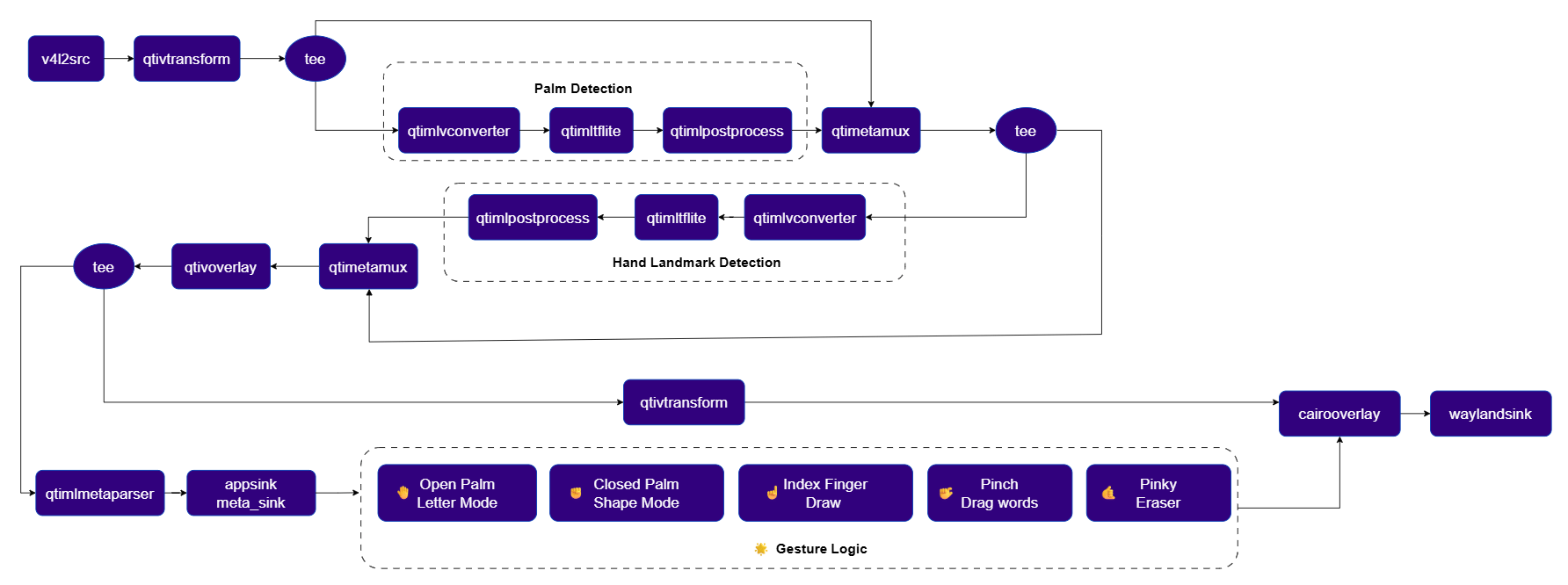
Elements used in pipeline
How it works
1
Capture and Mirror
The USB camera feed is flipped horizontally and normalized to a fixed resolution and frame rate, so on-screen motion matches the user’s real-world hand movement.
2
Palm Detection and ROI Transform
A
tee splits the stream so one branch runs palm detection while the other carries the raw video into a metadata muxer. Once merged, qtimetatransform uses the roi-palmd module to turn the detected palm region into a focused crop for the next stage.3
Hand Landmark Detection
The stream splits again after the ROI transform. The landmark branch preprocesses the cropped region in ROI-batch mode and runs the hand-landmark model through the QNN HTP delegate, producing 21 keypoints per detected hand.
4
Metadata Parsing and Gesture Handling
After a second metadata mux merges the landmark data with the video stream, the pipeline splits into a display branch and a metadata branch. The metadata branch parses the landmarks to JSON and delivers them to an application-side gesture handler through an
appsink callback.5
Gesture-to-Action Mapping
The gesture handler tracks which fingers are extended to decide the active mode and action: an open palm switches to Letter mode, a closed fist switches to Shape mode, the index finger draws, the pinky erases nearby strokes, and a thumb-to-index pinch grabs the nearest word or shape for dragging.
6
Canvas Rendering
The display branch draws the QIM SDK metadata overlay first, then hands off to a Cairo drawing callback that renders the persistent whiteboard canvas, including committed strokes, recognized shapes, live drawing previews, the eraser cursor, and drag indicators, before the composited frame reaches the display.
Setup Requirements
Hardware
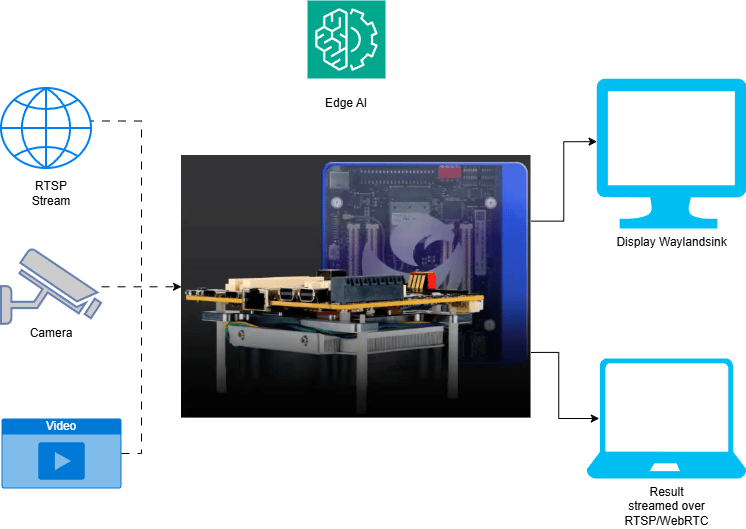
Software
Flash your Qualcomm Edge device by following the device setup and flashing instructions here, then install the Python and GStreamer prerequisites (python3, gstreamer1.0, python3-gi) needed to run the pipeline.
The palm detection and hand landmark TFLite models, along with their label and settings files, are the same assets used by the hand gesture recognition pipeline. See that post’s model download steps for the palm and hand landmark model files. The application performs a runtime validation check for all required model and config files before starting the pipeline, and prints a clear error if any path is missing.
Try me
Try me
- C++
- Python
Check application source code on GitHub:
demo_smartboard/main.ccPre-built application on device: /usr/bin/qimsdk_demo_smartboardDownload Required Files
Download the gesture recognizer task bundle from Google MediaPipe to obtain the palm detection and hand landmark models:If a downloaded model file is a
.zip archive, extract it on your host machine before copying: unzip filename.zip1
Copy Files to Device
2
Connect a USB camera
Connect a USB (UVC) camera to the target device and verify it is exposed as
/dev/video2 (update the --input-config value below if your camera is exposed on a different node).3
Run the application
Application Function Breakdown
The Smartboard application is organized into a handful of function groups, each responsible for one stage of the gesture-to-canvas flow:- Runtime and state management: validates that the palm and hand-landmark models, labels, and settings files are present before the pipeline starts, and maintains a state object tracking freehand strokes, recognized shapes, board mode, and active drag/erase state.
- Metadata parsing: extracts the 21 hand landmark points from the raw metadata stream and converts them into a simple keypoint map that the gesture logic can consume without caring about the underlying JSON structure.
- Gesture detection: inspects which fingers are extended to classify the current hand pose as an open palm, closed fist, or pinch, and applies stability checks so the board doesn’t flicker between modes from noisy frame-to-frame landmark jitter.
- Drawing and shape recognition: turns index-finger movement into smoothed freehand strokes, and analyzes completed strokes in Shape mode to snap them into clean circles, rectangles, lines, or arrows when they match a recognized pattern.
- Erasing: measures the pinky tip’s distance to existing strokes and shapes, and removes anything that falls within the eraser radius.
- Drag and move: checks whether a pinch point lands near an existing shape or word, groups nearby stroke segments so a whole word moves together, and updates the object’s position as the hand moves until the pinch releases.
- Rendering: draws the committed strokes, clean shapes, live previews, eraser cursor, drag indicator, and board-mode status onto the canvas each frame.
- Pipeline setup: assembles the full two-stage QIM SDK pipeline (camera capture, palm detection, ROI transform, hand landmark detection, metadata parsing, and the display/canvas branches) and verifies that all required GStreamer and QIM SDK plugins are available before launch.
Expected Output
Running the application opens a live view on the connected monitor:- The camera feed is shown with hand tracking overlaid, including the palm detection box and hand landmark points.
- On top of that, the Smartboard canvas renders drawing strokes, shape previews, finalized clean shapes, the eraser cursor, drag indicators, and the current board mode.
- Letter mode: an open palm switches the board to freehand writing with the index finger.
- Shape mode: a closed fist switches the board to shape drawing, converting rough strokes into circles, rectangles, lines, or arrows.
- Erasing: the pinky finger removes nearby strokes or shapes.
- Object movement: a pinch gesture near existing content grabs and repositions it.
Ctrl+C to stop the application; the pipeline transitions to the NULL state and releases the camera and display cleanly.