

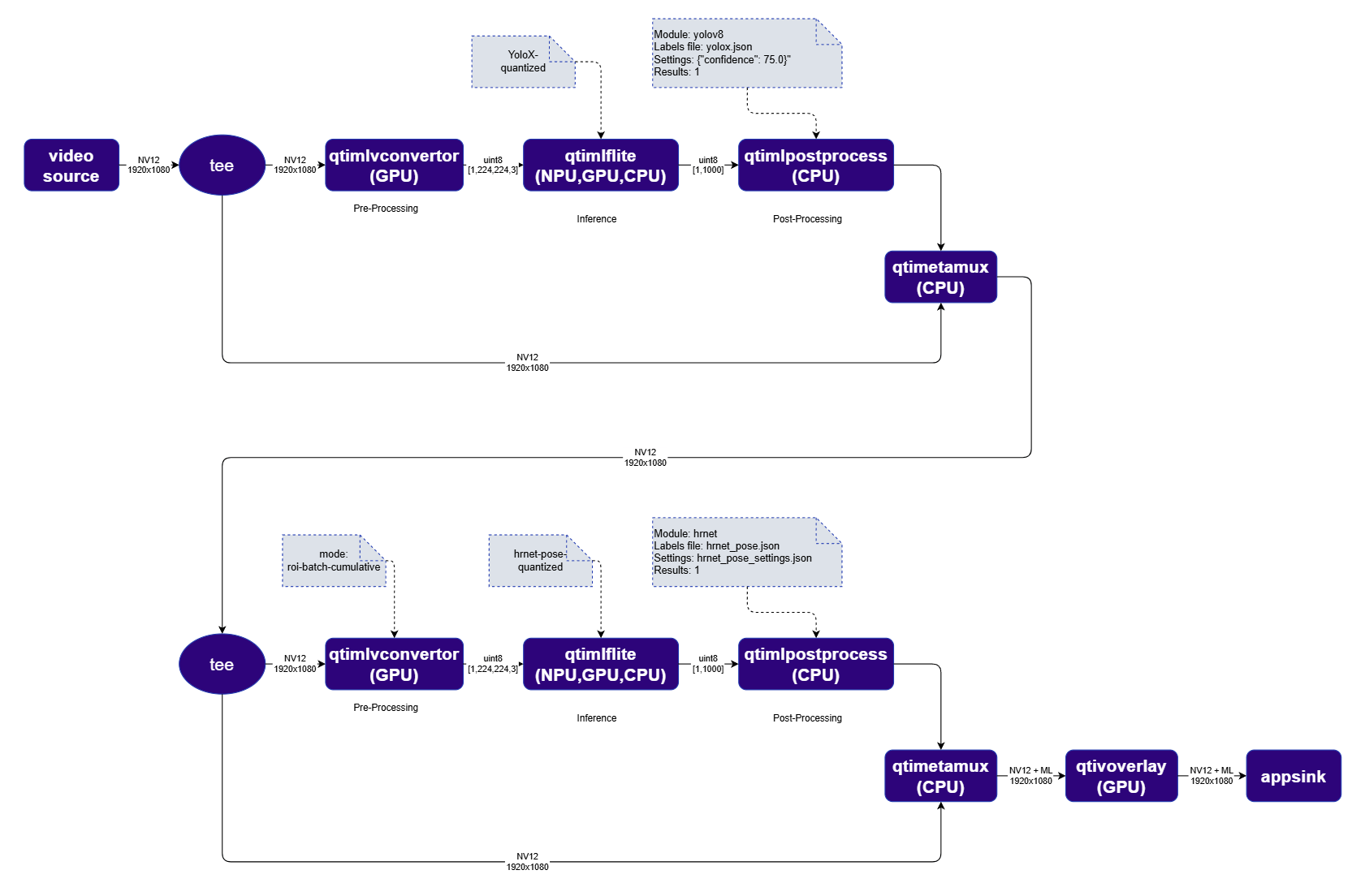
Daisy chaining refers to the sequential execution of multiple machine learning models, where each model specializes in a particular task. This example chains a YoloX object detection model with an HRNet Pose estimation model — YoloX first detects people in the frame, then HRNet estimates the pose of each detected person. gst-ai-video-daisychain-new Stage 1 — Person Detection: qtimlvconverter converts the NV12 frame to a tensor. qtimltflite runs FootTrackNet inference. qtimlpostprocess parses the output into bounding boxes for detected persons. Stage 2 — Pose Estimation: qtimlvconverter in roi-batch-cumulative mode crops and centers each detected person’s bounding box into individual tensors. qtimltflite runs HRNet inference per person. qtimlpostprocess produces keypoints and skeleton connections. All results are mapped back to the original frame and rendered by qtivoverlay.

Run example on device

1

Download Required Files

FileDownloadSave as
YOLOX W8A8 modelQualcomm AI Hub — YOLOXyolox_quantized.tflite
HRNet Pose W8A8 modelQualcomm AI Hub — HRNet Posehrnet_pose_quantized.tflite
Detection labelscoco.txtcoco.txt
Pose labelscoco_pose.txtcoco_pose.txt
Pose settingshrnet_settings.jsonhrnet_pose_settings.json
Sample videoInput videoai_demo_sample.mp4
If any downloaded file is a .zip archive, extract it on your host machine before copying: unzip filename.zip
2

Copy files to device

Create the required directories and transfer the downloaded files to your device.
# Replace $HOME to the appropriate device path before running the commands.
# For QLI:    /root
# For Ubuntu: /home/ubuntu
# Modify this based on your platform and ensure files are copied to the correct location on the device.
# Run from your host machine — replace <user> and <device-ip>
ssh <user>@<device-ip> "mkdir -p $HOME/{models,labels,media,media/output}"
scp yolox_quantized.tflite  <user>@<device-ip>:$HOME/models/
scp hrnet_pose_quantized.tflite        <user>@<device-ip>:$HOME/models/
scp coco.txt                     <user>@<device-ip>:$HOME/labels/
scp coco_pose.txt                <user>@<device-ip>:$HOME/labels/
scp hrnet_pose_settings.json     <user>@<device-ip>:$HOME/labels/
scp ai_demo_sample.mp4                    <user>@<device-ip>:$HOME/media/
3

Connect to device

ssh <user>@<device-ip>
4

Set environment variables

export MODEL_NAME_1=yolox_quantized.tflite
export MODEL_NAME_2=hrnet_pose_quantized.tflite
export LABELS_NAME_1=coco.txt
export LABELS_NAME_2=coco_pose.txt
export HRNET_SETTINGS=hrnet_pose_settings.json
export SRC_VIDEO_NAME=ai_demo_sample.mp4
export VIDEO_SOURCE="filesrc location=$HOME/media/$SRC_VIDEO_NAME ! qtdemux ! h264parse ! v4l2h264dec capture-io-mode=4 output-io-mode=4 ! video/x-raw,format=NV12"
5

Run example on device

gst-launch-1.0 $VIDEO_SOURCE ! \
  tee name=t1 \
  t1. ! qtimlvconverter name=detection-preprocess ! queue ! \
       qtimltflite name=detection-inference delegate=external \
         external-delegate-path=libQnnTFLiteDelegate.so \
         external-delegate-options="QNNExternalDelegate,backend_type=htp;" \
         model=$HOME/models/$MODEL_NAME_1 ! queue ! \
       qtimlpostprocess name=detection-postprocess results=8 module=yolov8 \
         labels=$HOME/labels/$LABELS_NAME_1 settings='{"confidence": 51.0}' ! \
       text/x-raw ! metamux_1. \
  t1. ! qtimetamux name=metamux_1 ! queue ! \
  tee name=t2 \
  t2. ! qtimlvconverter name=pose-preprocess mode=roi-batch-cumulative \
         image-disposition=centre ! queue ! \
       qtimltflite name=pose-inference delegate=external \
         external-delegate-path=libQnnTFLiteDelegate.so \
         external-delegate-options="QNNExternalDelegate,backend_type=htp,htp_performance_mode=(string)2;" \
         model=$HOME/models/$MODEL_NAME_2 ! queue ! \
       qtimlpostprocess name=pose-postprocess results=1 module=hrnet \
         labels=$HOME/labels/$LABELS_NAME_2 \
         settings=$HOME/labels/$HRNET_SETTINGS ! \
       text/x-raw ! metamux_2. \
  t2. ! qtimetamux name=metamux_2 ! qtivoverlay ! waylandsink fullscreen=true sync=true

Expected output

Bounding boxes (from YOLOX) and skeleton keypoints (from HRNet) are overlaid on each video frame in real time.

Exploring output options

The waylandsink in the pipeline above can be replaced with other output elements: Encode to file:
v4l2h264enc output-io-mode=5 capture-io-mode=4 ! queue ! h264parse ! mp4mux ! filesink location=$HOME/media/output.mp4
Save raw frames:
filesink location=$HOME/media/frame.bin
Stream over RTSP:
v4l2h264enc output-io-mode=4 capture-io-mode=4 ! queue ! h264parse config-interval=1 ! queue ! qtirtspbin address=0.0.0.0 port=8900
Access the stream at rtsp://<device-ip>:8900/live.