

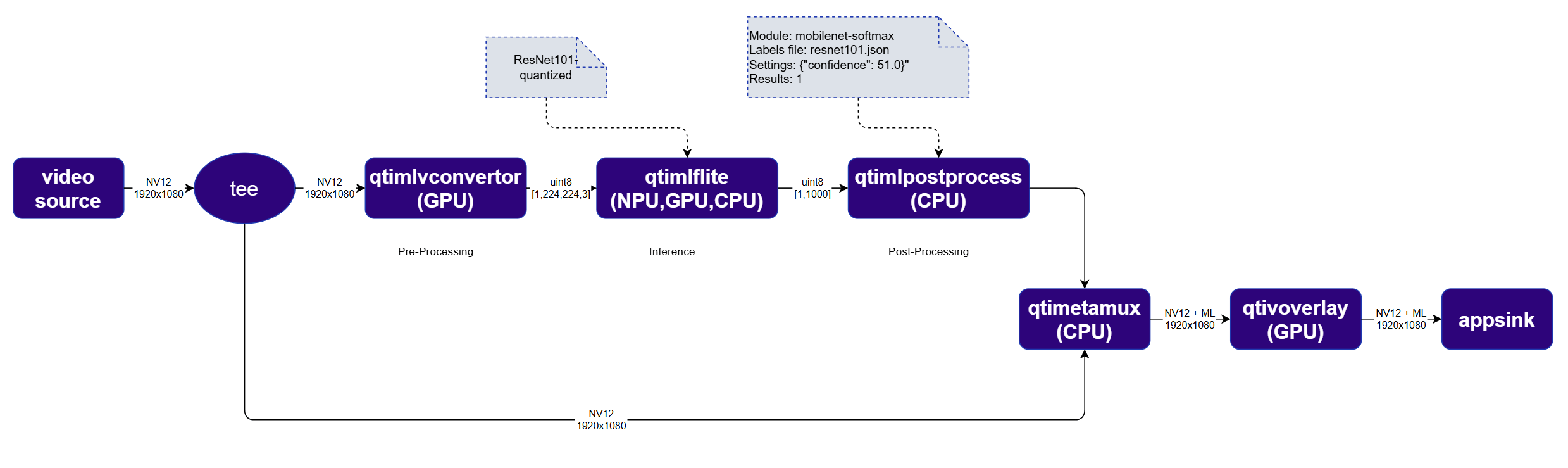
In an image classification system, the pipeline analyzes each frame of a video stream and assigns labels that reflect the scene’s content such as identified objects or scene categories. Let’s walk through an example of building an image classification pipeline with the QIM SDK using the ResNeXt101 image classification model which can be downloaded from Qualcomm’s AI Hub. Here is what our pipeline in this example will look like: Diagram of image classification pipeline
You can refer to the Building AI Pipelines for more general information about each element of an AI pipeline

Run example on device

1

Download Required Files

FileDownloadSave as
ResNeXt101 W8A8 modelQualcomm AI Hub — ResNeXt101resnet101-w8a8.tflite
Classification labelsimagenet.txtimagenet.txt
Sample videoInput videoai_demo_sample.mp4
If any downloaded file is a .zip archive, extract it on your host machine before copying: unzip filename.zip
2

Copy files to device

Create the required directories and transfer the downloaded files to your device.
# Replace $HOME to the appropriate device path before running the commands.
# For QLI:    /root
# For Ubuntu: /home/ubuntu
# Modify this based on your platform and ensure files are copied to the correct location on the device.
# Run from your host machine — replace <user> and <device-ip>
ssh <user>@<device-ip> "mkdir -p $HOME/{models,labels,media,media/output}"
scp resnet101-w8a8.tflite  <user>@<device-ip>:$HOME/models/
scp imagenet.txt           <user>@<device-ip>:$HOME/labels/
scp ai_demo_sample.mp4                <user>@<device-ip>:$HOME/media/
3

Connect to device

ssh <user>@<device-ip>
4

Set environment variables

export MODEL_NAME=resnet101-w8a8.tflite
export LABELS_NAME=imagenet.txt
export SRC_VIDEO_NAME=ai_demo_sample.mp4
export VIDEO_SOURCE="filesrc location=$HOME/media/$SRC_VIDEO_NAME ! qtdemux ! h264parse ! v4l2h264dec capture-io-mode=4 output-io-mode=4 ! video/x-raw,format=NV12"
5

Run example on device

gst-launch-1.0 $VIDEO_SOURCE ! \
  tee name=t \
  t. ! qtimlvconverter name=preprocess ! queue ! \
       qtimltflite name=inference delegate=external \
         external-delegate-path=libQnnTFLiteDelegate.so \
         external-delegate-options="QNNExternalDelegate,backend_type=htp;" \
         model=$HOME/models/$MODEL_NAME ! queue ! \
       qtimlpostprocess name=postprocess results=1 module=mobilenet-softmax \
         labels=$HOME/labels/$LABELS_NAME settings='{"confidence": 51.0}' ! \
       text/x-raw ! metamux. \
  t. ! qtimetamux name=metamux ! qtivoverlay ! waylandsink sync=true fullscreen=true

Expected output

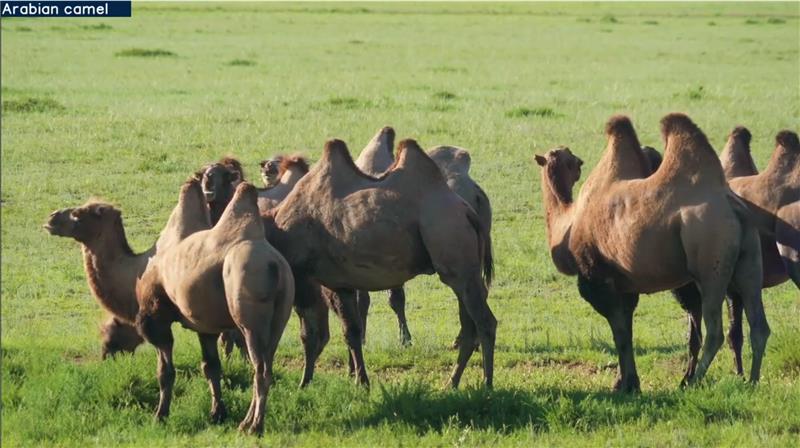
The result of the video classification is visually overlaid in the top-left corner of the frame. Image of a camel classification
Stream Splitting via tee

One of the powerful features of GStreamer is the ability to split a video or audio stream into multiple branches, allowing the same stream to be processed or consumed in different ways simultaneously. In this example, we are using the tee element to split the original video stream. One branch runs through the AI processing pipeline to generate classifications, and at the end it is recombined with the original video stream so that the detected label can be displayed on top of the original image. Note that each branch connected to a tee runs on its own thread, so you often need queue elements after each branch to avoid blocking.

Combining inference results with the original image

The qtimetamux attaches the AI inference results to the original NV12 video frame as custom GStreamer metadata. This ensures synchronization between the video frame and its associated AI metadata, allowing downstream elements to seamlessly access both for visualization, network streaming, or automated decision-making.

Adding a text overlay on top of the image

The qtivoverlay element reads the AI metadata and renders visual overlays, such as bounding boxes and labels, directly onto the video frame without requiring buffer duplication.