

Overview
qtimetatransform is a GStreamer metadata transformation element designed for real-time manipulation of video-associated metadata in multimedia and AI pipelines.
In modern video processing systems, raw video frames are rarely the only data being processed. Additional information - such as object detections, classifications, timestamps, tracking IDs, or other machine‑learning outputs - is attached to video buffers as metadata. Downstream elements often require this metadata to be filtered, reshaped, synchronized, or adapted to match changes in the video stream or application requirements.
qtimetatransform provides a structured and performant way to transform such metadata while preserving buffer synchronization and pipeline correctness.
At a high level, this element:
- Consumes metadata attached to incoming video buffers
- Applies controlled transformations to that metadata
- Outputs updated metadata that remains logically and temporally aligned with the transformed video stream
qtimetatransform a foundational building block for vision pipelines where metadata must evolve alongside video frames.
Why Metadata Transformation Is Necessary
To understand whyqtimetatransform exists, it is important to start from first principles.
What is Metadata in GStreamer?
In GStreamer, metadata is auxiliary information attached to buffers. Unlike raw pixel data, metadata does not represent image content itself, but describes or annotates that content. Examples include:- Bounding boxes produced by object detection models
- Classification labels (e.g., “person”, “vehicle”)
- Confidence scores
- Frame-level timestamps or IDs
- Custom application-specific annotations
The Core Problem
Once video frames are transformed - resized, cropped, rotated, or even dropped - the associated metadata can become invalid unless it is explicitly updated. For example:- A bounding box defined in 1920×1080 coordinates is incorrect after the frame is resized to 1280×720.
- Cropping a region of interest requires translating and clipping object coordinates.
- Some metadata may no longer be relevant downstream and should be removed to reduce processing cost.
qtimetatransform exists to solve this consistency problem in a systematic and reproducible way.
High-Level Functionality
qtimetatransform operates on metadata only. It does not modify pixel data directly.
Its responsibilities include:
- Selecting which metadata types should be processed
- Transforming metadata fields based on pipeline configuration
- Ensuring temporal and logical consistency between metadata and video buffers
- Emitting metadata in formats expected by downstream elements
Hierarchy
GObjectGstObject
GstElement
GstBaseTransform
GstMetaTransform
Pad Templates
sink
src
Element Properties
Internal Architecture
qtimetatransform is implemented as a standard GStreamer element with two pads:
-
Sink Pad (input)
Receives video buffers along with attached metadata from upstream elements (e.g., ML inference, tracking, analytics). -
Source Pad (output)
Outputs the same video buffers with transformed metadata attached.
Processing Flow
The internal processing follows a strict, ordered sequence. Caps NegotiationCaps negotiation establishes the expected buffer type and metadata compatibility between upstream and downstream elements. While
qtimetatransform does not change video caps, it validates that:
- Incoming buffers support metadata attachment
- Required metadata types are present (if configured as mandatory)
Modular Transformation Model
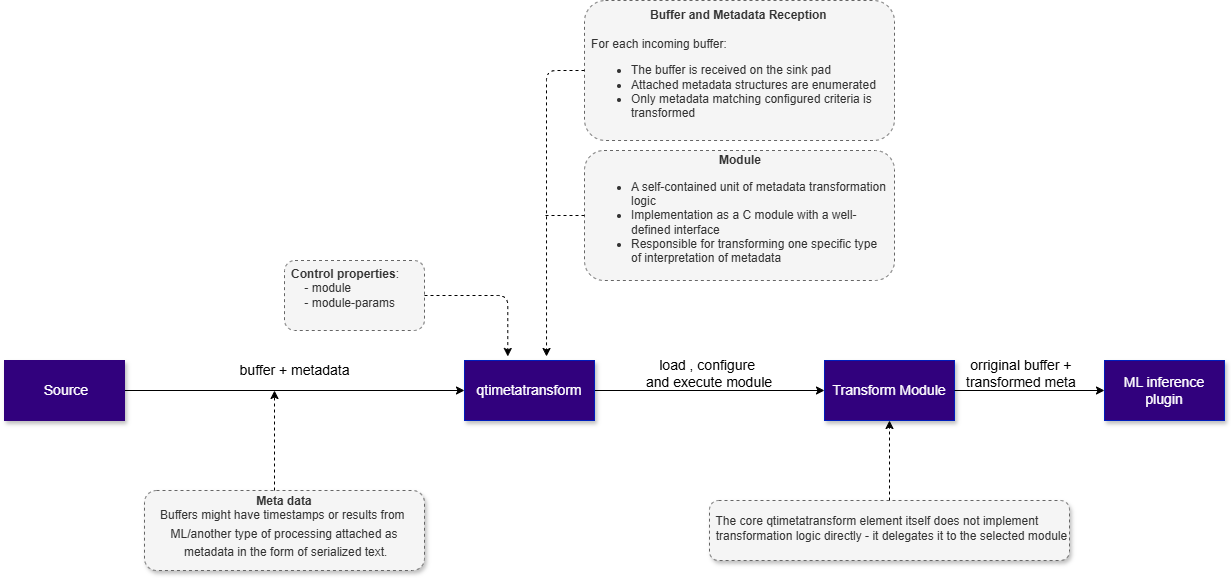
qtimetatransform is built around a modular transformation architecture.Instead of implementing a single, fixed metadata transformation logic, the plugin acts as a runtime-selected container of transformation modules, each responsible for a specific metadata processing strategy. This design enables flexibility, extensibility, and clear separation of concerns. A module in
qtimetatransform is:
- A self-contained unit of metadata transformation logic
- Implemented as a C module with a well-defined interface
- Responsible for transforming one specific type or interpretation of metadata
- How metadata is parsed
- How metadata is transformed
- How metadata is emitted downstream
qtimetatransform element itself does not implement transformation logic directly.Instead, it delegates all metadata processing to the selected module. Buffer and Metadata Reception
For each incoming buffer:
- The buffer is received on the sink pad
- Attached metadata structures are enumerated
- Only metadata matching configured criteria is considered for transformation
- Passed through unchanged
- Explicitly filtered out
- Left untouched, depending on configuration
Each selected metadata instance is transformed according to the configured rules. This may include:
- Coordinate scaling and translation
- Normalization or denormalization of values
- Field filtering or renaming
- Structural adaptation to downstream expectations
Once metadata processing is complete:
- The original video buffer is forwarded
- Updated metadata is attached
- Buffer timestamps and ordering are preserved
Performance Characteristics
qtimetatransform is designed to be lightweight and CPU-efficient:
- No frame copying
- No GPU dependency
- Minimal per-buffer overhead
Usage
End-to-End Video Analytics with Metadata Transformation and Overlay This pipeline demonstrates a complete offline video analytics workflow where:- A recorded video is decoded
- Objects are detected using a neural network
- Detection results are attached to video buffers as metadata
- That metadata is merged, transformed, and visualized
- The final annotated video is re-encoded and saved to disk

1
Download Required Files
2
Copy files to device
3
Connect to device
4
Set environment variables
Run below command on your device
5
Run the pipeline
Group Auto-Framing Using ROI Transformation
Theroi-person-merge and roi-auto-framing modules can be combined to implement intelligent group framing. Instead of tracking a single detected subject, this workflow merges all detected persons in a scene into one group region, then applies temporal smoothing so that the resulting framing window follows the group steadily rather than reacting abruptly to every detection change.
The pipeline performs the following operations:
- Runs YOLOv8 object detection on incoming frames.
- Generates one ROI per detected person.
- Merges all detected person ROIs into a single group ROI using
roi-person-merge. - Applies temporal auto-framing using
roi-auto-framingto generate a smooth framing window. - Supplies the resulting ROI to
qtivsplitfor display.

roi-person-merge
The roi-person-merge module combines multiple ROI metas that share the same label into a single enclosing ROI. Processing Behavior- Scans all attached
GstVideoRegionOfInterestMetaentries - Selects ROIs matching the configured label
- Computes a bounding rectangle enclosing all matching ROIs
- Applies optional padding around the merged ROI
- Removes the original matching ROIs
- Attaches a single merged ROI
Example
roi-auto-framing
The roi-auto-framing module generates a stabilized framing ROI that smoothly follows a subject or group over time. Processing Behavior- Consumes the target ROI
- Applies temporal filtering and stabilization
- Computes a smooth framing rectangle
- Generates an
auto-framingROI - Removes previous ROI metas
- Attaches only the final auto-framing ROI
Example Pipeline
This pipeline detects people with YOLOv8, merges their ROIs into a single group region, applies temporal auto-framing, and displays the stabilized framing window usingqtivsplit in single-roi-meta mode.
1
Download Required Files
2
Copy files to device
3
Connect to device
4
Run the pipeline