

Pipeline SDK Design
Overview This SDK delivers a streamlined, modern interfaces, engineered to facilitate the rapid development, execution, and management of sophisticated multimedia pipelines. By implementing a high-level abstraction layer, the SDK encapsulates complex underlying GStreamer based mechanisms — including element negotiation, signal management, event loops, and state transitions — allowing engineers to prioritize core application logic over boilerplate framework intricacies. Key Capabilities The wrapper empowers developers to architect advanced multimedia and AI-enhanced workflows with precision and efficiency. It supports the seamless integration of diverse components, such as video capture sources, signal processing nodes, machine learning inference engines, graphical overlays, and rendering outputs. Uniquely designed to decouple implementation from the underlying framework, the SDK eliminates the need for deep GStreamer expertise or compile-time dependencies on GStreamer headers, ensuring a clean, robust, and accessible development experience.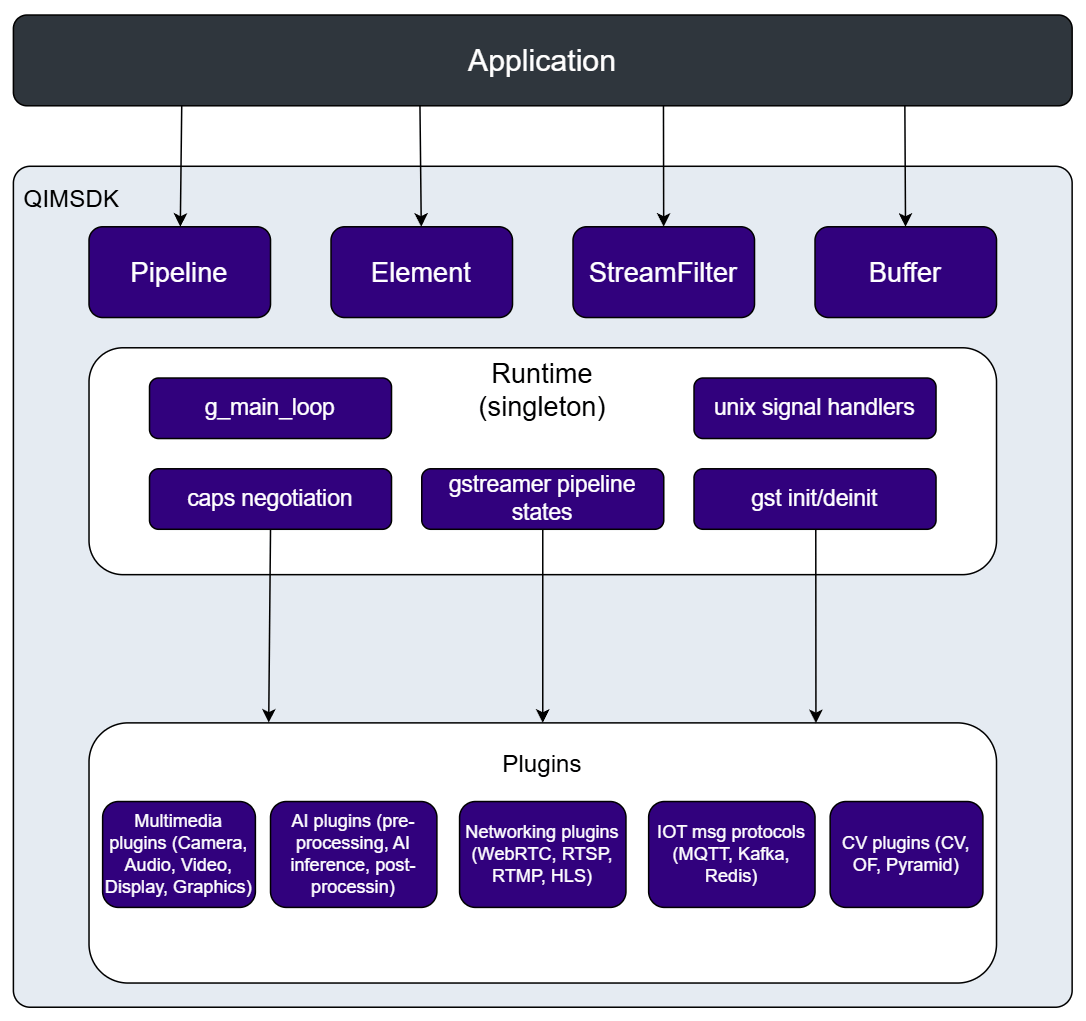
APIs
Public APIs:Pipeline— build & control pipelines fluently.Element— generic element wrapper with variadic property setting, and state control. [it can be instantiated at create time as well as at runtime to update the pipeline.] Some element has special functions which can be controlled by dedicated elements types. Those elements derived fromElementcan be use asElementif special functions are not used.AppSrc— app-facing source for zero-copy buffer pull. [Providing the buffer from application to pipeline using standard lambdas, push APIs, EOS etc]AppSink— app-facing sink for zero-copy buffer push [Providing the buffer from pipeline to application with zero copy]CamSrc- Build-in camera element which expose API for capture images [provides functionality to take snapshots at runtime]MLVConverter- ML video converter (qtimlvconverter). Expose API for custom pre-processing implementation at application utilizing standard lambdas.MLPostprocess- ML postprocess element (qtimlpostprocess). Expose API for custom post-processing implementation at application utilizing standard lambdas. The callback is typed per ML task (classification, object detection, pose estimation, depth estimation, segmentation, raw tensors).MLVideoONNXBin- ONNX inference bin (qtimlvideoonnxbin). Expose API for custom pre-processing and post-processing implementation at application utilizing standard lambdas.MLVideoQNNBin- QNN inference bin (qtimlvideoqnnbin). Expose API for custom pre-processing and post-processing implementation at application utilizing standard lambdas.MLVideoSNPEBin- SNPE inference bin (qtimlvideosnpebin). Expose API for custom pre-processing and post-processing implementation at application utilizing standard lambdas.MLVideoTFLiteBin- TFLite inference bin (qtimlvideotflitebin). Expose API for custom pre-processing and post-processing implementation at application utilizing standard lambdas.
Buffer— opaque buffer that bridges Native Buffer with timestamp helpers and zero-copy paths.StreamFilterand derived concrete stream helpers:VideoFilter(all RAW formats - YUV, RGB, bayer),H264Filter,TensorFilter,TextFilter,AudioFilter,ImageFilter. these filters are used to set characteristics of the streams.- Logging controls —
SetImsdkLogLevel()andSetImsdkGstLogMode()select the SDK’s log verbosity and whether GStreamer’s output is simplified or passed through raw. See Logging and Diagnostics.
Pipeline
Purpose A convenient, exception-safe wrapper around aGstPipeline that:
- Builds pipelines using element factory names or pre-constructed wrapper elements.
- Manages pipeline lifecycle and execution state.
- Performs delayed linking for dynamic/request-pad elements automatically via
pad-added.
- Create and own the underlying
GstPipelineinstance. - Add elements, assign properties, and insert caps filters.
- Link elements (immediately when possible, deferred otherwise).
- Manage the full pipeline lifecycle (
prepare,start,wait,stop). - Install bus watches to handle
ERROR,EOS, and state transitions. - Integrate with runtime shutdown notifications.
execute() starts the pipeline, blocks until EOS/error/termination, and tears it down.
qtdemux is an example of the delayed linking described above: its src pads appear only once the container has been parsed, so the demux → parse link is completed automatically when the pad shows up. No pad-added handling is needed in application code.
The optional key/value pairs passed to
add() are the element’s properties, and they are validated as soon as the element is added. Setting a property the element does not have throws std::invalid_argument naming the property, the element instance, and the element type — so a typo surfaces immediately at that add() call instead of being silently ignored:
A link between two elements that both have only static pads and no common caps fails immediately with
std::runtime_error naming both elements. A deferred link that never resolves surfaces at run time instead; on error the pipeline logs which pads stayed unlinked.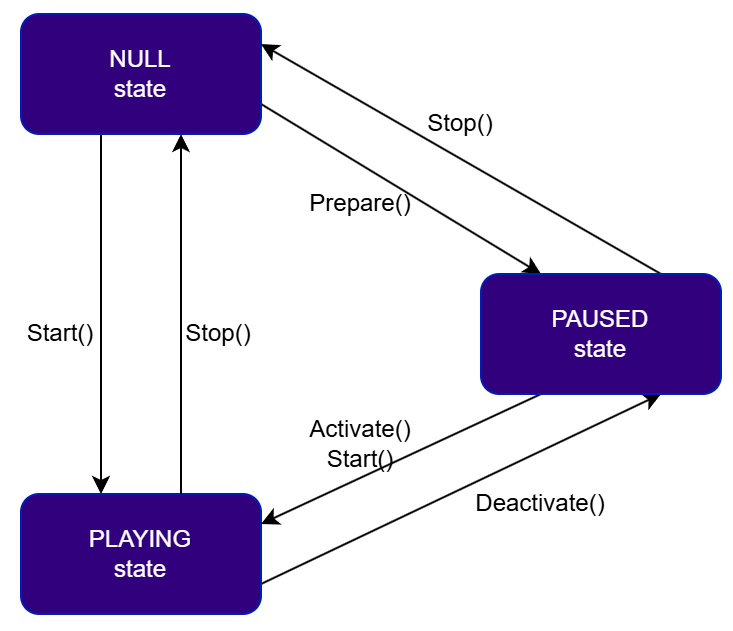
execute() performs the whole NULL → PLAYING → NULL cycle, so most applications never call the individual transitions. prepare(), activate(), and deactivate() — the transitions through PAUSED shown above — are covered in Advanced state control.
To run the pipeline while the application does other work, split
execute() apart:
stop() tears the pipeline down as fast as it can. Every element goes to NULL immediately and whatever buffers are still in flight — queued between elements, held inside an encoder, not yet written by a sink — are discarded. This is usually what you want: the pipeline stops without delay.
Some pipelines must not lose those buffers, and for them eos(true) changes the shutdown sequence. Instead of stopping straight away, stop() sends an end-of-stream event into the pipeline. The event travels downstream element by element; each element finishes processing the data it has already accepted, passes the event on, and the sinks report it back on the bus. Only once that end-of-stream notification comes back does stop() tear the pipeline down. Nothing that had already entered the pipeline is dropped.
The trade-off is shutdown latency: stop() now blocks until the last buffer has made it through the whole graph, which takes as long as the remaining data needs.
Use eos(true) when the tail of the stream is part of the result:
- Muxed recordings. Containers such as MP4 and MKV are written by a muxer (
mp4mux,matroskamux) that writes its index and header metadata — themoovatom, in MP4’s case — only on end-of-stream. Cut it off early and the file is left incomplete, often unplayable rather than merely short. - Encoders with buffered frames. Encoders keep several frames in flight for B-frames, lookahead, and similar optimizations. End-of-stream is what makes the encoder flush those frames downstream; without it the tail of the recording is simply missing.
- Any sink where losing the final buffered data is unacceptable — file sinks, muxed outputs, and applications that expect to receive every frame through
AppSink.
eos() off (the default) when the newest data is all that matters and stopping promptly is preferable — live preview to a display, a camera feed on screen, or writing self-contained files where each buffer is already complete on its own (JPEG frames through multifilesink, for example, which needs no finalization).
If the pipeline has already reached end-of-stream on its own — a file source that ran out of data, for instance —
stop() detects it and tears down immediately instead of sending a second event and waiting again. Enabling eos(true) therefore costs nothing for pipelines that end naturally; it only matters when you stop a pipeline that is still running.NULL.
Accessing elements at run time
Runtime property and per-pad configuration —
get() reaches any element by name while the pipeline is loaded or playing:
get<T>() returns the specialized wrapper, so element-specific calls become available on an element that was added by factory name:
get() returns an element wrapper by value; each call yields a new wrapper referencing the same GstElement. Bind it with auto, not auto&.- Deploying one binary across variants — the same application against a built-in camera, a USB camera, or an RTSP stream, switching source and format per device.
- Tuning without rebuilding — resolution, framerate, model path, or delegate changed on the target, which matters when a rebuild means a full cross-compile and reflash.
- Keeping topology under review — the pipeline shape lives in a file that can be diffed and versioned on its own.
get() and get<T>() reach them as usual.
pipeline:, which takes three independent child keys:
Within
elements:, each entry needs type (the factory name) and name (the instance name); every remaining key is applied as a property of that element. An entry with type: filter inserts a stream filter instead, described by a video:, image:, h264:, tensor:, text:, audio:, or raw caps: block. Any of those blocks may carry an add: sequence of key=value strings, appended to the filter’s caps through add() — the same escape-hatch the typed filters expose in code. It is accepted both inside the filter block and alongside it:
links: mirrors link() — one sequence per chain, so the branching pipeline shown earlier becomes:
qtimlpostprocess element named postprocessing, the application can claim its post-processing without the topology being hard-coded:
Element
Purpose Generic wrapper around aGstElement with fluent, variadic property setting. Can be instantiated at create time or used at runtime to update a live pipeline. Serves as the base class for all specialized element types.
Key Responsibilities
- Create GStreamer elements from a factory name.
- Provide fluent, variadic property setting for all common types and
StreamFilter(caps). - Implement pad linking/unlinking with error checking.
- Support state publication to pipeline (
sync,deactivate,stop). - Expose per-pad configuration through
Port. - Serve as the base class for specialized wrappers.
Pipeline::add(), or reached later by name with Pipeline::get(). Elements cannot be copied — only moved — so pass them by reference or move them where ownership has to change.
Setting properties
set() is variadic, so a whole configuration can go in one call, and property names are validated immediately — an unknown property throws std::invalid_argument naming the property and the element type rather than being silently ignored:
set() accepts a StreamFilter wherever an element takes a caps property, and plain enums (converted to their underlying integer):
input() and output() return a Port for one pad, which carries the same fluent, validated set():
The
id selects which pad, and name_or_type narrows it to a pad template when an element has several families of pads. A template containing %u is formatted with the index ("image_%u" with id 0 gives image_0); otherwise the name and index are joined with an underscore ("sink" with id 1 gives sink_1). Without a name, the pad is matched by numeric suffix first and by position among same-direction pads second. An unresolvable pad throws std::runtime_error.
A
Port refers to a pad of a live element and cannot be copied, only moved. Get it, set the properties, and let it go — as in the one-liner above — rather than storing it beyond the lifetime of the element.Pipeline::get() returns an Element for any element in the pipeline, the same set() works while the pipeline is playing:
sync(), deactivate(), and stop() exist for reconfiguring a live pipeline. An element added to an already-running pipeline starts in NULL while the pipeline is PLAYING, so it will not process data until its state is brought up to match — that is what sync() does. deactivate() and stop() take a single element down without touching the rest of the graph.
Runtime relinking is an advanced use of the API. Pad linking, unlinking, and per-element state changes on a live pipeline must respect GStreamer’s rules about when pads may be changed; the wrappers report failures as exceptions but do not remove the need to get the sequence right.
AppSrc
PurposeAppSrc wraps the appsrc element, the entry point for feeding application-produced buffers into a pipeline. It manages the need-data/enough-data signal plumbing so the application only has to supply buffers, either from a callback or by pushing them directly.
Key Responsibilities
- Validate that the wrapped element is indeed an
appsrc. - Register and dispatch the underlying
need-dataandenough-datasignals. - Let the application supply buffers on demand through
set_buffer_producer(), or push them directly withpush_buffer(). - Signal end-of-stream on this element’s output.
- Manage lifetime of the connected signal handlers.
AppSrc::Format mirrors appsrc’s own format property (DEFAULT, BYTES, TIME, BUFFERS, PERCENT); TIME, used above, is the usual choice for timestamped media.
push_buffer() transfers a buffer’s underlying GstBuffer without copying when the Buffer already owns one — which is exactly the case for a buffer just pulled from an AppSink. A Buffer filled with raw data instead (as inside a set_buffer_producer() callback) is copied into a new GstBuffer on push.AppSink
PurposeAppSink wraps the appsink element, the exit point that delivers pipeline output back to application code. It pulls samples through appsink’s action signals and hands them to the application as Buffer.
Key Responsibilities
- Validate that the wrapped element is indeed an
appsink. - Pull samples via appsink’s action signals and convert them into
Buffer. - Deliver each buffer to the application through
set_buffer_consumer(). - Deliver the first (preroll) sample separately through
set_preroll_handler(). - Notify the application of end-of-stream through
set_eos_handler(). - Manage lifetime of the connected signal handlers.
Bridging two pipelines
Because
AppSink and AppSrc are ordinary elements, they can sit in two independent Pipeline objects and be wired together in application code — useful when one graph produces frames (say, from a camera) and another consumes them (say, encoding or display) on its own clock:
set_buffer_consumer() on pipeline1 is pushed straight into pipeline2 through appsrc.push_buffer(), without a copy.
CamSrc
PurposeCamSrc wraps the qtiqmmfsrc camera source element and exposes its still/burst image-capture action signals as ordinary method calls, so an application can trigger a snapshot without touching GStreamer signals directly.
Key Responsibilities
- Validate that the wrapped element is indeed a
qtiqmmfsrc. - Trigger still or burst image capture through
image_capture(). - Cancel any pending capture request through
cancel_capture().
A running pipeline built from a plain factory name still has a
qtiqmmfsrc element in it; use Pipeline::get<CamSrc>() to reach it as a CamSrc and call its capture API:
examples/test_camera_and_capture for a complete pipeline that branches a qtiqmmfsrc into a live display and a multifilesink for captured images.
MLVConverter
PurposeMLVConverter wraps the qtimlvconverter element, which converts raw video frames into the input tensor format expected by a model. Beyond the properties available on the generic Element, it lets the application replace the built-in conversion with its own implementation through a lambda.
Key Responsibilities
- Validate that the wrapped element is a
qtimlvconverter. - Convert incoming video frames into model input tensors.
- Optionally delegate the conversion to an application-supplied pre-process callback.
- Provide fluent, variadic property setting that returns
MLVConverter&for chaining.
MLVideoBlits (each entry carries the image planes plus the source quadrilateral, destination rectangle, alpha and rotation) and must fill the tensors of the MLFrame output. Returning false marks the conversion as failed.
Set
engine to none to disable the internal pre-processing path when you supply your own callback — otherwise the built-in conversion runs instead.MLPostprocess
PurposeMLPostprocess wraps the qtimlpostprocess element, which decodes model output tensors into ML metadata attached to the frame. It lets the application replace the built-in decoding module with its own implementation through a lambda.
Key Responsibilities
- Validate that the wrapped element is a
qtimlpostprocess. - Decode output tensors into ML metadata (classifications, detections, poses, depth maps, segmentations), or pass the raw tensors through for a further stage.
- Optionally delegate the decoding to an application-supplied post-process callback.
- Select the callback type automatically from the lambda’s third parameter.
- Provide fluent, variadic property setting that returns
MLPostprocess&for chaining.
set_handler() is overloaded once per ML task. The overload is selected by the type of the third parameter of the callback, so the same method name registers any of the supported result types. Each callback receives the model output tensors as MLFrame, the element parameters as MLParam, and an output container to fill. Returning false marks the frame as failed.
Usage
ML inference bins
Purpose The ML video bins wrap a full pre-process → inference → post-process chain into a single element, so a whole AI branch can be added to the pipeline as one node instead of being assembled from separate elements and queues. Four bins are available, one per inference runtime:
All four expose an identical API and differ only in the wrapped element and the runtime-specific properties. Each inherits from both the pre-process and the post-process base, so it accepts a custom pre-process callback, a custom post-process callback, or both.
Key Responsibilities
- Validate that the wrapped element matches the expected bin factory.
- Run pre-processing, inference, and post-processing inside a single element.
- Optionally delegate pre-processing to an application-supplied callback via
set_preprocess_handler(). - Optionally delegate post-processing to an application-supplied callback via
set_postprocess_handler(). - Provide fluent, variadic property setting that returns the concrete bin type for chaining.
preprocess-*, inference-*, and postprocess-*. For example inference-model on the bin corresponds to model on a standalone inference element, and postprocess-labels corresponds to labels on a standalone qtimlpostprocess.
Set
preprocess-engine to none to disable the internal pre-processing path when you supply your own pre-process callback.MLVideoONNXBin, MLVideoQNNBin, MLVideoSNPEBin, and MLVideoTFLiteBin; substitute the concrete class name for <Bin>.
The bins cannot be copied, only moved — the same as the other element wrappers.
Buffer
Purpose Unified buffer abstraction over native GStreamer memory. Provides read/write access, timestamp metadata (pts, dts, duration), resize support, and zero-copy transfer between AppSink and AppSrc. Key Responsibilities- Own and manage mapping/unmapping of underlying
GstBufferorGstSample. - Provide read/write access to buffer memory.
- Support resizing and writable allocation for AppSrc.
- Carry timestamps (PTS/DTS/duration) and apply them back to
GstBuffer. - Enable zero-copy extraction using
take_gst_buffer().
Buffer arrives either from an AppSink — wrapping the sample the pipeline just produced — or is allocated by the application to be filled and pushed through an AppSrc. Which of the two it is determines whether the payload is writable: samples coming out of the pipeline are read-only.
APIs
Like the element wrappers, a
Buffer cannot be copied, only moved — ownership of the underlying memory is unique. Pass it by reference, or std::move() it where ownership has to change, as in the AppSink → AppSrc bridge above.StreamFilter
Purpose StreamFilter describes the characteristics of a media stream between two pipeline stages so they can negotiate concrete parameters rather than relying on defaults. Without explicit parameters, adjacent components may fall back to suboptimal formats, trigger implicit conversions, or produce mismatched configurations. Specialized subtypes provide fluent, type-safe setters for each domain. Raw caps strings are also accepted for cases not covered by typed setters or when copying directly from gst-launch output. When to Use StreamFilter- When two adjacent stages can interoperate in multiple ways, and you want to select explicit parameters instead of relying on defaults.
- When you need to optimize latency or performance by avoiding implicit conversions (e.g., choose a hardware-friendly pixel format).
- When you want predictable behavior across platforms (e.g., lock color range/primaries/transfer/matrix).
- When you integrate tensors for AI/ML and must precisely specify dimensions and element types.
- When you need a human-readable summary of the stream parameters for logs and debugging.
StreamFilter is not an Element and is never added to a pipeline with add(). It is always attached between stages with Pipeline::add_stream_filter(unique_name, filter), which internally creates a capsfilter element and applies the filter’s caps to it. The base StreamFilter class itself only exposes a raw-caps-string constructor and to_string(); the fluent per-domain setters (.format(), .resolution(), .framerate(), …) live on the typed subclasses such as VideoFilter.
Usage
Typed subclass
VideoFilter
Purpose Configures a raw video stream (YUV, RGB, Bayer) between a camera source and any downstream processing or display element. Supports format, resolution, framerate, colorimetry, interlace mode, and pixel aspect ratio. Key Responsibilities- Produce caps with standard raw video attributes: format, resolution, framerate, colorimetry, interlace mode, pixel aspect ratio, etc.
VideoFilter::Format enumerates the raw video formats (video/x-raw), JPEG (image/jpeg), and the Bayer patterns (video/x-bayer: BGGR, RGGB, GBRG, GRBG, MONO).
Usage
We can achieve the same results in three different ways:
Typed (enum) API - if you want compile-time safety, IDE autocompletion, and guardrails against typos. Ideal for SDK consumers and most production code.
H264Filter
Purpose Configures an encoded H.264 stream between an encoder and a downstream parser or muxer. Supports resolution, framerate, stream-format, alignment, profile, and level. Key Responsibilities- Specify resolution, framerate, stream-format, alignment, profile, level.
- Insert
codec_databuffers. - Attach arbitrary name/value string properties.
Usage
TensorFilter
Purpose Configures an ML tensor stream with explicit data type and shape (e.g., UINT8, NHWC). Not needed in a full inference pipeline — when preprocess, inference, and postprocess elements are all present, tensor parameters are negotiated automatically. Use TensorFilter when:- The preprocessing stage does not have model dimension information
- You need exact tensor data output from the inference plugin
- Declare element type (e.g.,
UINT8,FLOAT32) for tensors. - Specify shape (dimensions). Supports:
- Single tensor: a 1D list (e.g.,
1, 520, 520, 3). - Multiple tensors: array-of-arrays (e.g.,
{ {1,3,H,W}, {1,32} }) when needed.
- Single tensor: a 1D list (e.g.,
Usage
We can achieve the same results in three different ways:
Typed (enum) API - if you want compile-time safety, IDE autocompletion, and guardrails against typos. Ideal for SDK consumers and most production code.
TextFilter
Purpose Configures a raw text stream (text/x-raw) for pipelines that carry textual data such as metadata, subtitles, or logs. Minimal by design — attach only the fields you need using .add(“key=value”). Key Responsibilities- Provide a lightweight caps descriptor for text (
text/x-raw) without enforcing a schema. - Let callers attach arbitrary properties (e.g., encoding/charset, language, packetization hints) using
.add("key=value").
Usage
ImageFilter
Overview Used exclusively with CamSrc (qtiqmmfsrc) to enable and link its dedicated image capture pad. Without ImageFilter, the image pad is not requested, not activated, and produces no buffers. It is a structural enabler, not a processing stage — it is not intended for general image processing or frame extraction from video sources.ImageFilter is used to:
- Enable the image output pad exposed by
CamSrc(qtiqmmfsrc) - Attach that pad to the pipeline so the source can activate image capture
- Provide a concrete sink target required by GStreamer for pad activation
- Generic image processing
- Frame extraction from arbitrary video sources
- Replacement of
VideoFilterorAppSink
CamSrc(qtiqmmfsrc) exposes a dedicated image pad that remains inactive unless linked.ImageFilterexplicitly exists to satisfy this requirement.- Without
ImageFilter, the image pad:- Will not be requested
- Will not be activated
- Will not produce buffers
ImageFilter a structural enabler, not a processing stage.
APIs
Usage
AudioFilter
Purpose Configures a raw PCM audio stream with sample format, channel count, sample rate, and layout. Use this to ensure audio converters and sinks negotiate exactly the format your hardware supports rather than inserting an implicit resampler. Key Responsibilities- Set audio sample format (e.g.,
S16LE,F32LE) to match HW/SW capabilities. - Define channels and rate for correct resampling/mixing.
- Choose layout (
interleavedvsnon-interleaved) to align with downstream expectations.
AudioFilter::Format covers the signed/unsigned integer formats (S8 through U32BE, including the packed 18/20/24-bit variants) and the float formats F32LE, F32BE, F64LE, F64BE.
Usage
We can achieve the same results in three different ways:
Typed (enum) API - if you want compile-time safety, IDE autocompletion, and guardrails against typos. Ideal for SDK consumers and most production code.
Logging
The SDK can either simplify GStreamer’s log stream into a compact, uniform format or step aside and let GStreamer log raw, withGST_DEBUG fully in control. Both modes, the verbosity levels, and the ordering constraint on configuring them are covered in Logging and Diagnostics.
QIM SDK Nodes
All nodes are executed by GStreamer elements under the hood. Most elements are handled through theElement base class. However, elements that provide additional functionality — such as application buffer interfaces in appsink and appsrc, or image-capture signals in camera sources like qtiqmmfsrc — require extended interfaces.
If you do not need these extra capabilities (for example, image capture), you can still use these elements via the generic Element base class without any limitations for standard data processing.
Below is a table listing all supported elements and the corresponding QIM SDK wrapper classes used to work with them.
Sources
AI
Multimedia
Common Application Design
Create pipeline with config file
The SDK supports fully declarative pipeline construction using YAML. A YAML pipeline describes elements and links between them, which are translated at runtime into a GStreamer pipeline. TopLevel Structure A YAML pipeline file has a single top-level key:elements is an ordered list of pipeline elements. Each element entry defines:
- The GStreamer element type
- A unique name used for linking
- Optional properties
- Optional filter configuration
type: GStreamer element factory name, orfiltername: Unique identifier within the pipeline- properties: Any remaining key/value pairs are passed directly to the element as GStreamer properties
type: filter and are further specialized by their configuration block.
Stream Filter
links defines explicit connection paths between elements.
Each entry is an ordered list of element names. Elements are linked sequentially from left to right.
Multi-Model Daisy Chain
Below is shown a logical diagram of an AI daisy chain pipeline with sequential and parallel inferencing. The same could be handled by a straight sequential pipeline of inference bins. But we must set manually the source for every inference bin.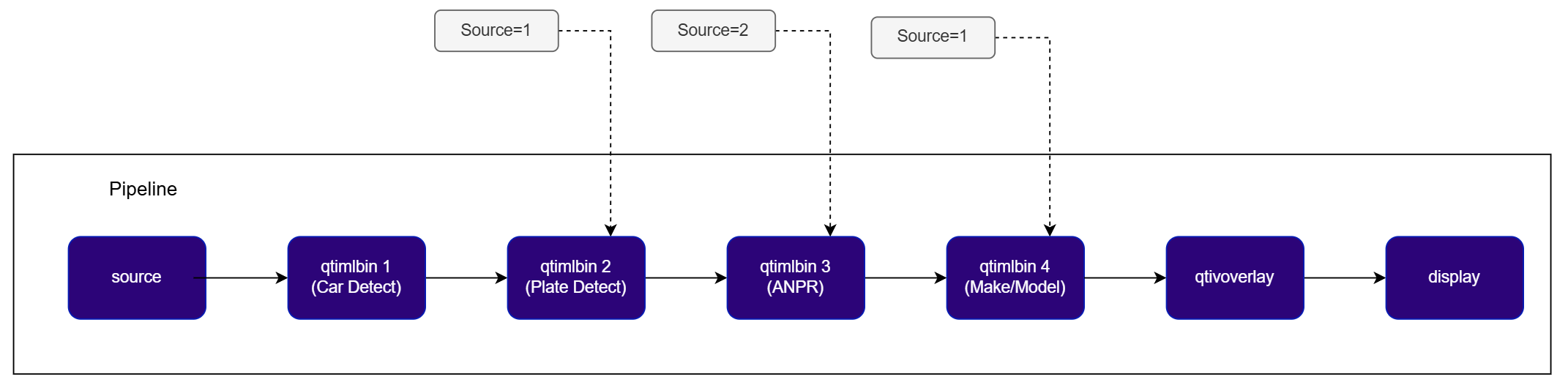
Try me
Try me
Several
.add(...) calls in this example had missing/mismatched quotes in the source PDF (e.g. a stray closing paren instead of a closing quote, or a missing leading quote). These have been corrected below where unambiguous. One inline comment truncated at the page margin was completed using the identical sentence found in the prose above.Custom Postprocessing with YOLOv8 (Detection)
QIM SDK implements AI model post-processing through dedicated modules that take tensors as input and produce predictions. All remaining complexity — such as batching, daisy-chaining, image mask support — is encapsulated within the post-processing plugin. This makes the post-processing module API an ideal integration point for application-specific post-processing logic. As a result, applications do not need to handle batching, chaining, image masks, or ML metadata themselves. We will implement a specialized post-processing module to manage bindings with the application.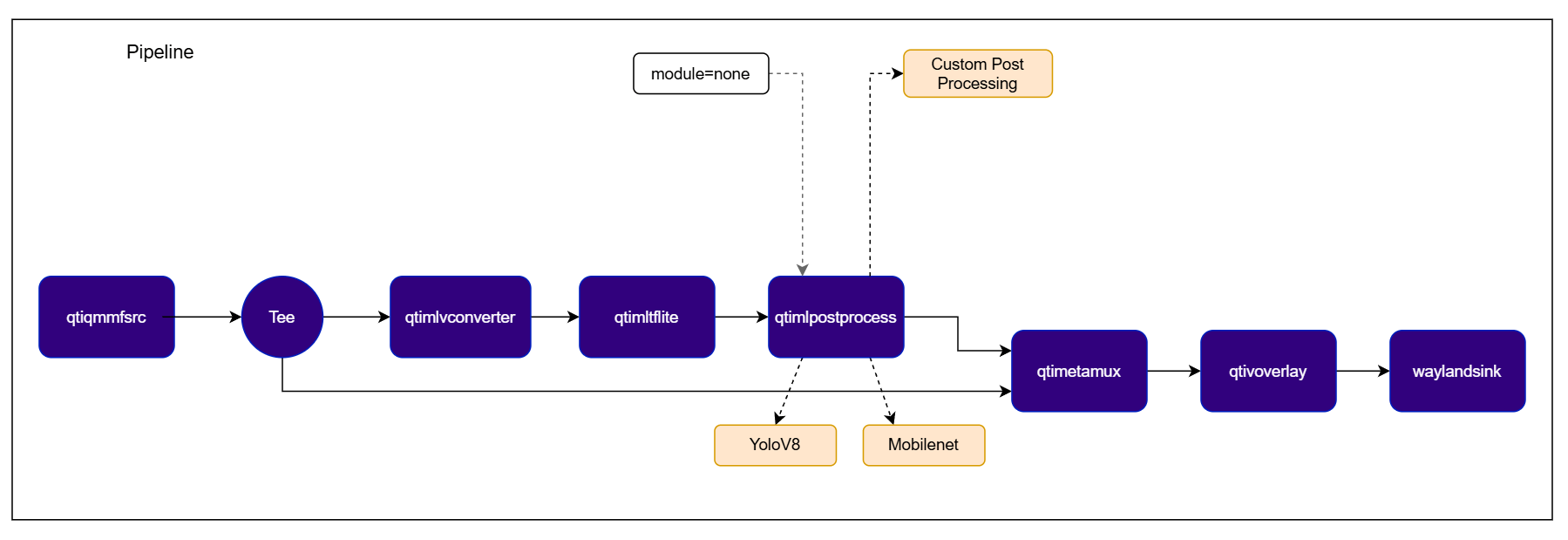
qtimlpostprocess element via MLPostprocess::set_handler(...).
Typical pipeline segment:
- Preprocess frame/tensors (
qtimlvconverter) - Run ML inference (
qtimltflite) - Convert raw tensors in custom callback (
qtimlpostprocess)
ClassificationPostprocessCallbackObjectDetectionPostprocessCallbackPoseEstimationPostprocessCallbackDepthEstimationPostprocessCallbackSegmentationPostprocessCallbackTensorsPostprocessCallback
MLFrameView (read-only model tensors)
Used by classification/detection/pose/depth/segmentation callbacks. Each TensorView contains:
type: tensor element type (MLTensorType)dimensions: tensor shapedata: raw tensor memory (const uint8_t*)size: tensor bytes
MLParam (runtime metadata and context)
MLParam carries key/value fields provided by pipeline and preprocessing/postprocess context. Commonly used keys:
input-tensor-widthinput-tensor-heightinput-tensor-region(mapped toRegion {x, y, width, height})
- Callbacks (
ClassificationPostprocessCallback,ObjectDetectionPostprocessCallback,PoseEstimationPostprocessCallback,DepthEstimationPostprocessCallback,SegmentationPostprocessCallback) fill the provided output metadata container (MLClassifications,MLDetections,MLPoses,MLDepthMaps,MLSegmentations). - Tensor callback (
TensorsPostprocessCallback) fillsMLFrame& outputfor downstream tensor stages. - Input
MLFrameViewis read-only and must not be modified.
MLClassifications with MLClassification items. Field meanings:
name: class label textconfidence: prediction confidencecolor: optional UI/overlay colorextra: optional metadata map
MLDetections with MLDetection items. Field meanings:
left,top,right,bottom: normalized box coordinatesname,confidence,color: class infolandmarks: optional keypointsextra: optional metadata map
frame(const MLFrameView&): read-only model output tensors.params(const MLParam&): runtime metadata (for example:input-tensor-width,input-tensor-height,input-tensor-region).segmentations(MLSegmentations&): output container to fill.
MLSegmentation)
labels: per-pixel semantic labels.colors: per-pixel colors; index-aligned withlabels.n_rows,n_columns: segmentation map dimensions.extra: optional metadata fields.
MLPoses with MLPose items. Field meanings:
keypoints: list ofMLKeypoint(name,x,y,confidence,color)links: list ofMLKeypointLinkdescribing skeleton connectionsname,confidence,extra: pose-level metadata
MLDepthMaps with one or more MLDepthMap items. Field meanings:
values: per-pixel depth values (double)colors: per-pixel pseudo-color values (uint32_t)n_rows,n_columns: depth map shapeextra: optional metadata map
- validates input tensors from
frame - copies/selects required tensors into output
- updates output tensor dimensions/order if needed
classification, detection, pose, depth, segmentation)
frame: input tensors from inference (read-only)params: runtime metadata (input sizes, region, etc.)output: semantic objects to be filled by callback- return
trueon valid output - return
falseon validation/decode failure
frame: input tensors from inference (read-only)params: runtime metadata/contextoutput: writable output tensors for downstream tensor stage- return
trueon valid output - return
falseon validation/decode failure
Try me
Try me
Check application source code on GitHub:
qimsdk_ref_external_postprocess_detection_yolov8Pre-built application on device: /usr/bin/qimsdk_ref_external_postprocess_detection_yolov8Download Required Files
If the downloaded model file is a
.zip archive, extract it on your host machine before copying: unzip filename.zipSome AI Hub models require running the AI Hub export/optimize step for your target runtime before the downloaded file is usable — download alone isn’t always sufficient.1
Copy Files to Device
2
Run the application