

Prerequisites
Try me
Try me
Some of the steps in the pre-requisties will be removed from future releases
once the necessary fixes are mainlined.
1
Set up Wi-Fi
Connect to the Wireless Access Point (Wi-Fi Router):Check the connection and device status:Login to the target deviceLocate the IP address of the device according to the type of network connection,
using the UART console on the Linux host:For Ethernet:For Wi-Fi:Use the IP address from the Linux host to establish an SSH connection to the device:Example:Connect to the SSH shell using the following password:
2
Download Models and Artifacts
On the target device, obtain the
download_artifacts.sh script, set executable
permissions, and run it to download the model, media, and label files:3
Enable qticamsrc
In the terminal of the target device, run the following command to enable the
qticamsrc on Config #2:4
Enable Audio and GPU Delegate
In the terminal of the target device, run the following command to enable audio:To set the default devices for sink and source, get the device numbers from
In the terminal of the target device, run the following command to enable the
GPU delegate and backend:
wpctl status and run the following command:AI Custom Preprocessing Applications
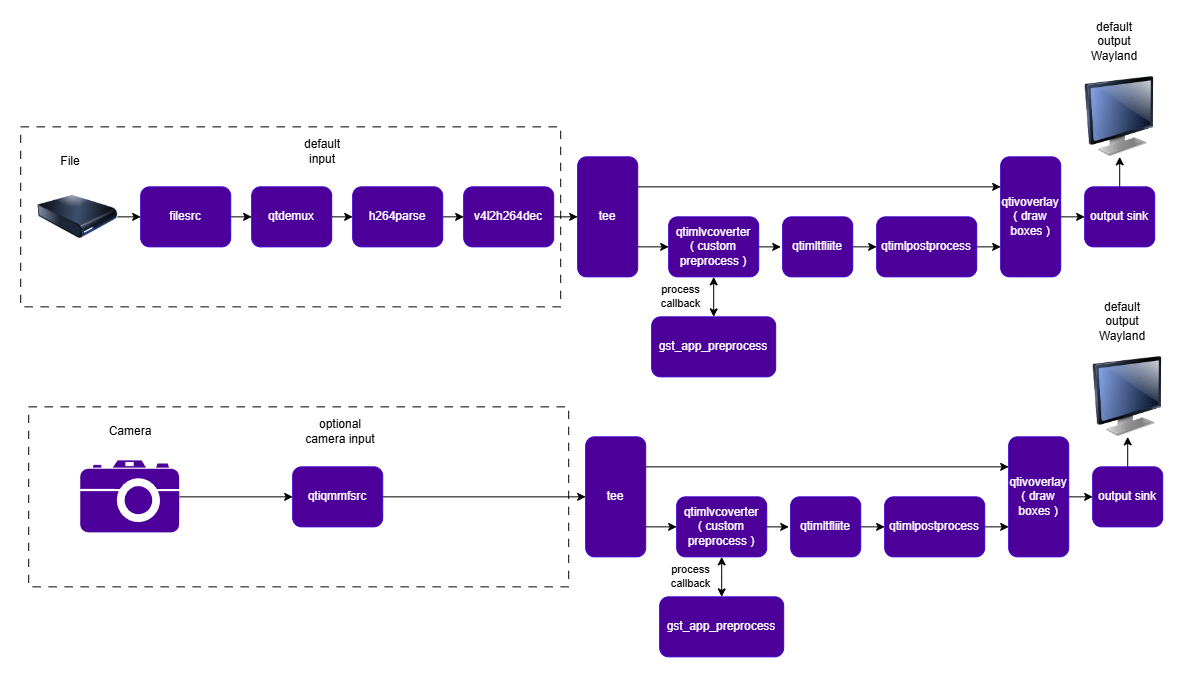
Object Detection (YOLOv8) with Custom Preprocessing
Common Description
gst-custom-preprocess-yolov8 is a GStreamer sample application that demonstrates how to
run real-time object detection on Qualcomm platforms using a YOLOv8 model while substituting
the built-in qtimlvconverter preprocessing stage with an application-provided (custom)
preprocessing callback.
Instead of relying on the converter element’s internal scale/format-conversion engine, the
application sets engine=none on qtimlvconverter and connects to its process signal.
The callback (gst_app_preprocess) manually converts the incoming NV12 video frame to an
8-bit RGB buffer, resizes it to the model’s expected input dimensions, and writes it directly
into the tensor buffer consumed by inference. This pattern is useful when a model requires
input preparation that the stock converter does not support (e.g. custom color-space
conversion, non-standard resizing/letterboxing, or format packing).
Detected objects are annotated with bounding boxes and rendered on the output (display, file,
or an application-supplied sink).
Pipeline Diagram
Input and Output Capabilities
Input
The video source branch is fully configurable via--source / -s. Supported inputs
(anything expressible as a GStreamer source bin) include:
The custom preprocessing callback expects an NV12 input frame (it reads the Y/luma and
interleaved U/V planes of the mapped
GstVideoBlit to build the RGB model input), so any
source branch must ultimately deliver video/x-raw,format=NV12.
Output
The output branch is selected via--output / -o:
Any other value causes the application to abort with
Unknown sink type.
Sample Model and Label Files
--model-base-path must point to a directory containing models/, labels/, and (for the
default source/output) media/ subdirectories, e.g.:
--model-base-path is not supplied, it defaults to $HOME.
Run the Application on the Target Device
- Copy (or ensure present on the target) the model, label, and sample media files in the layout described above.
-
Run with defaults (file source, display output, model-base-path=
$HOME): -
Run with an explicit model base path:
-
Run against a custom source and write encoded output to file:
-
Stop the application with
Ctrl+C; the pipeline receives EOS and shuts down cleanly, or it stops automatically at end-of-stream for finite file sources. -
To display available options:
Configurations
Command line options (parsed withGOption):
Fixed, compile-time pipeline configuration (not exposed on the command line):
Expected Output

Pipeline Flow
- Source: The configured source branch decodes/produces NV12 video frames.
- Tee: Each frame is duplicated — one copy goes to the ML preprocessing branch, the
other is held for later metadata attachment (
qtimetamux). - Custom preprocess (
qtimlvconverter,engine=none): Because no built-in engine is configured, the element emits theprocesssignal instead of transforming the frame itself. The connected callback,gst_app_preprocess:- Validates the ML tensor contract (
UINT8type, 4 dimensions, 3 channels). - Reads the Y (luma) and interleaved U/V (chroma) planes of the input
GstVideoBlit. - Nearest-neighbor scales the frame to the model’s input width/height.
- Converts each sampled NV12 pixel to 8-bit RGB (
nv12_to_rgb). - Writes the resulting 3-channel RGB image into the output ML tensor buffer.
- Validates the ML tensor contract (
- Inference (
qtimltflite): Runsyolov8_det_quantized.tflitethrough the external QNN delegate on the Hexagon HTP backend, producing raw bounding-box/score/class tensors. - Postprocess (
qtimlpostprocess,module=yolov8): Decodes the raw tensors into object bounding boxes using theyolov8module — automatically dispatches to a mono-, dual-, or triple-tensor parsing path depending on the model’s output layout, applies a confidence threshold, and runs non-max suppression. Labels come fromyolov8.json. - Metadata mux (
qtimetamux): Merges the postprocess results (as GStreamer metadata) back onto the original (tee’d) video frame. - Overlay (
qtivoverlay): Draws the bounding boxes/labels on top of the video frame. - Sink: The annotated stream is sent to the selected output (
display,videofile, orappsink). - Shutdown:
SIGINT(Ctrl+C) or anEOS/ERRORbus message stops the GLib main loop; the pipeline transitions toNULLand all resources are released.
Palm Detection with Custom Preprocessing
Common Description
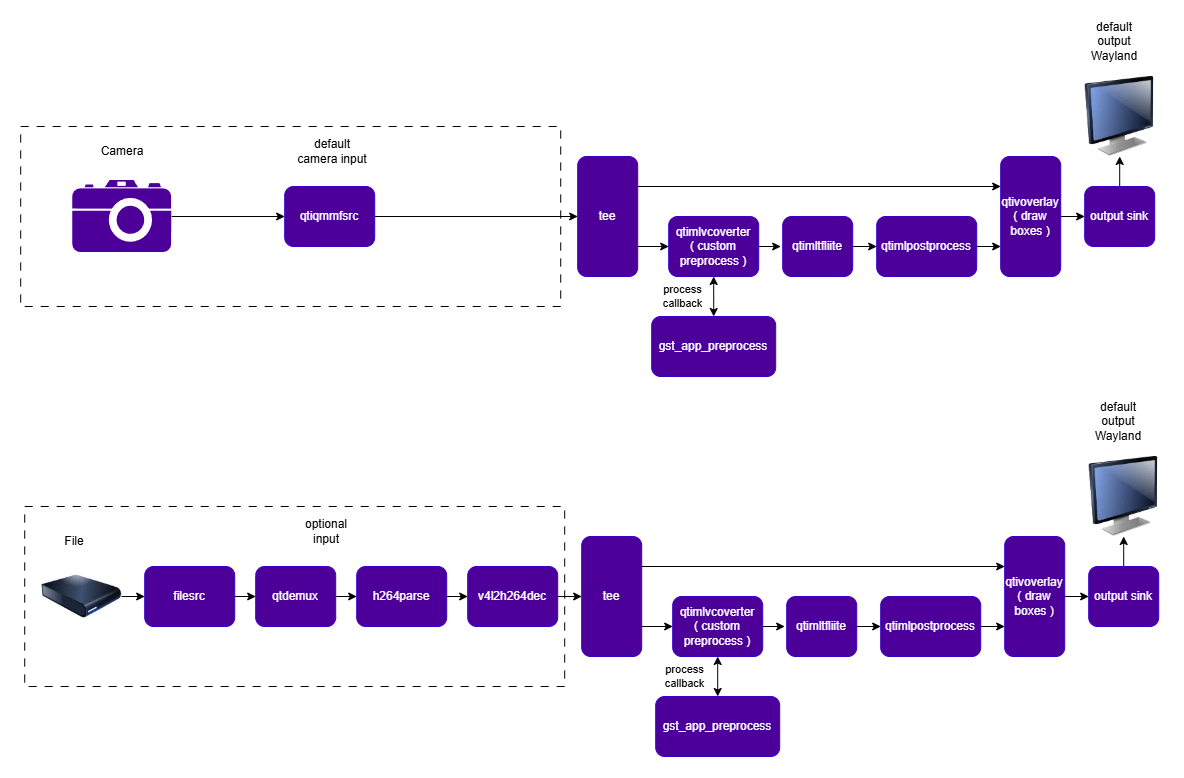
gst-custom-preprocess-palm-detect is a GStreamer sample application that
demonstrates how to run real-time, palm detection on Qualcomm platforms while
substituting the built-in qtimlvconverter preprocessing stage with an
application-provided (custom) preprocessing callback.
Instead of relying on the converter element’s internal scale/format-conversion engine, the
application sets engine=none on qtimlvconverter and connects to its process signal.
The callback (gst_app_preprocess) manually converts the incoming NV12 video frame to a
float32 RGB buffer, resizes it to the model’s expected input dimensions, and
writes it directly into the tensor buffer consumed by inference. This pattern is useful when
a model requires input preparation that the stock converter does not support (e.g. custom
color-space reduction, non-standard resizing/letterboxing, or format packing).
It identifies the presence, location and rotation angle of any hands in the scene and
attaches metadata, visualizes results with bounding boxes and rendered on the output
(display, file, or an application-supplied sink).
Pipeline Diagram
Input and Output Capabilities
Input
The video source branch is fully configurable via--source / -s. Supported inputs
(anything expressible as a GStreamer source bin) include:
The custom preprocessing callback expects an NV12 input frame (it reads only the Y/luma
plane of the mapped
GstVideoBlit to build the grayscale model input), so any source branch
must ultimately deliver video/x-raw,format=NV12.
Output
The output branch is selected via--output / -o:
Any other value causes the application to abort with
Unknown sink type.
Sample Model and Label Files
--model-base-path must point to a directory containing models/, labels/, and (for the
default source/output) media/ subdirectories, e.g.:
--model-base-path is not supplied, it defaults to $HOME.
Run the Application on the Target Device
- Copy (or ensure present on the target) the model, label, and sample media files in the layout described above.
-
Run with defaults (camera source, display output, model-base-path=
$HOME): -
Run with an explicit model base path:
-
Run against a custom source and write encoded output to file:
-
Stop the application with
Ctrl+C; the pipeline receives EOS and shuts down cleanly, or it stops automatically at end-of-stream for finite file sources. -
To display available options:
Configurations
Command line options (parsed withGOption):
Fixed, compile-time pipeline configuration (not exposed on the command line):
Expected Output
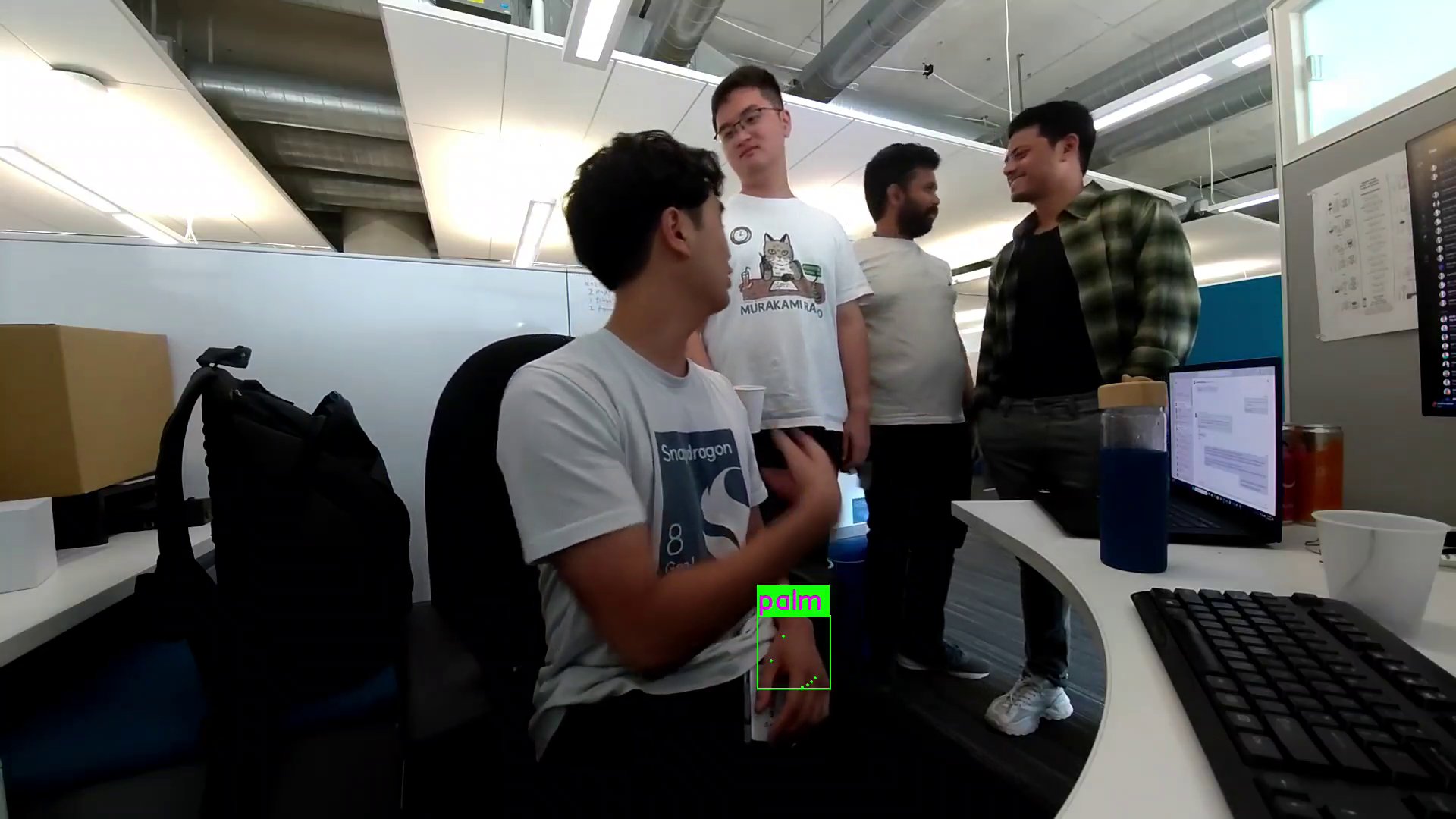
Pipeline Flow
- Source: The configured source branch decodes/produces NV12 video frames.
- Tee: Each frame is duplicated — one copy goes to the ML preprocessing branch, the
other is held for later metadata attachment (
qtimetamux). - Custom preprocess (
qtimlvconverter,engine=none): Because no built-in engine is configured, the element emits theprocesssignal instead of transforming the frame itself. The connected callback,gst_app_preprocess:- Validates the ML tensor contract (
UINT8type, 4 dimensions, 1 channel). - Reads the Y (luma) plane of the input
GstVideoBlit. - Nearest-neighbor scales it to the model’s input width/height.
- Writes the resulting single-channel grayscale image into the output ML tensor buffer.
- Validates the ML tensor contract (
- Inference (
qtimltflite): Runspalm_detection.tfliteon the GPU delegate, producing raw score/bbox/landmark tensors. - Postprocess (
qtimlpostprocess,module=palmd): Decodes the raw tensors into face bounding boxes using thepalmdmodule — applies a confidence threshold, reconstructs boxes from center/landmark offsets, squares them with margin, runs non-max suppression, and stabilizes boxes across frames. Labels come frompalmd_labels.json. - Metadata mux (
qtimetamux): Merges the postprocess results (as GStreamer metadata) back onto the original (tee’d) video frame. - Overlay (
qtivoverlay): Draws the bounding boxes/labels on top of the video frame. - Sink: The annotated stream is sent to the selected output (
display,videofile, orappsink). - Shutdown:
SIGINT(Ctrl+C) or anEOS/ERRORbus message stops the GLib main loop; the pipeline transitions toNULLand all resources are released.
Lightweight Face Detection with Custom Preprocessing
Common Description
gst-custom-preprocess-lightweight-face-detect is a GStreamer sample application that
demonstrates how to run real-time, lightweight face detection on Qualcomm platforms while
substituting the built-in qtimlvconverter preprocessing stage with an
application-provided (custom) preprocessing callback.
Instead of relying on the converter element’s internal scale/format-conversion engine, the
application sets engine=none on qtimlvconverter and connects to its process signal.
The callback (gst_app_preprocess) manually converts the incoming NV12 video frame to a
single-channel grayscale buffer, resizes it to the model’s expected input dimensions, and
writes it directly into the tensor buffer consumed by inference. This pattern is useful when
a model requires input preparation that the stock converter does not support (e.g. custom
color-space reduction, non-standard resizing/letterboxing, or format packing).
Detected faces are annotated with bounding boxes and rendered on the output (display, file,
or an application-supplied sink).
Pipeline Diagram
Input and Output Capabilities
Input
The video source branch is fully configurable via--source / -s. Supported inputs
(anything expressible as a GStreamer source bin) include:
The custom preprocessing callback expects an NV12 input frame (it reads only the Y/luma
plane of the mapped
GstVideoBlit to build the grayscale model input), so any source branch
must ultimately deliver video/x-raw,format=NV12.
Output
The output branch is selected via--output / -o:
Any other value causes the application to abort with
Unknown sink type.
Sample Model and Label Files
--model-base-path must point to a directory containing models/, labels/, and (for the
default source/output) media/ subdirectories, e.g.:
--model-base-path is not supplied, it defaults to $HOME.
Run the Application on the Target Device
- Copy (or ensure present on the target) the model, label, and sample media files in the layout described above.
-
Run with defaults (file source, display output, model-base-path=
$HOME): -
Run with an explicit model base path:
-
Run against a custom source and write encoded output to file:
-
Stop the application with
Ctrl+C; the pipeline receives EOS and shuts down cleanly, or it stops automatically at end-of-stream for finite file sources. -
To display available options:
Configurations
Command line options (parsed withGOption):
Fixed, compile-time pipeline configuration (not exposed on the command line):
Expected Output
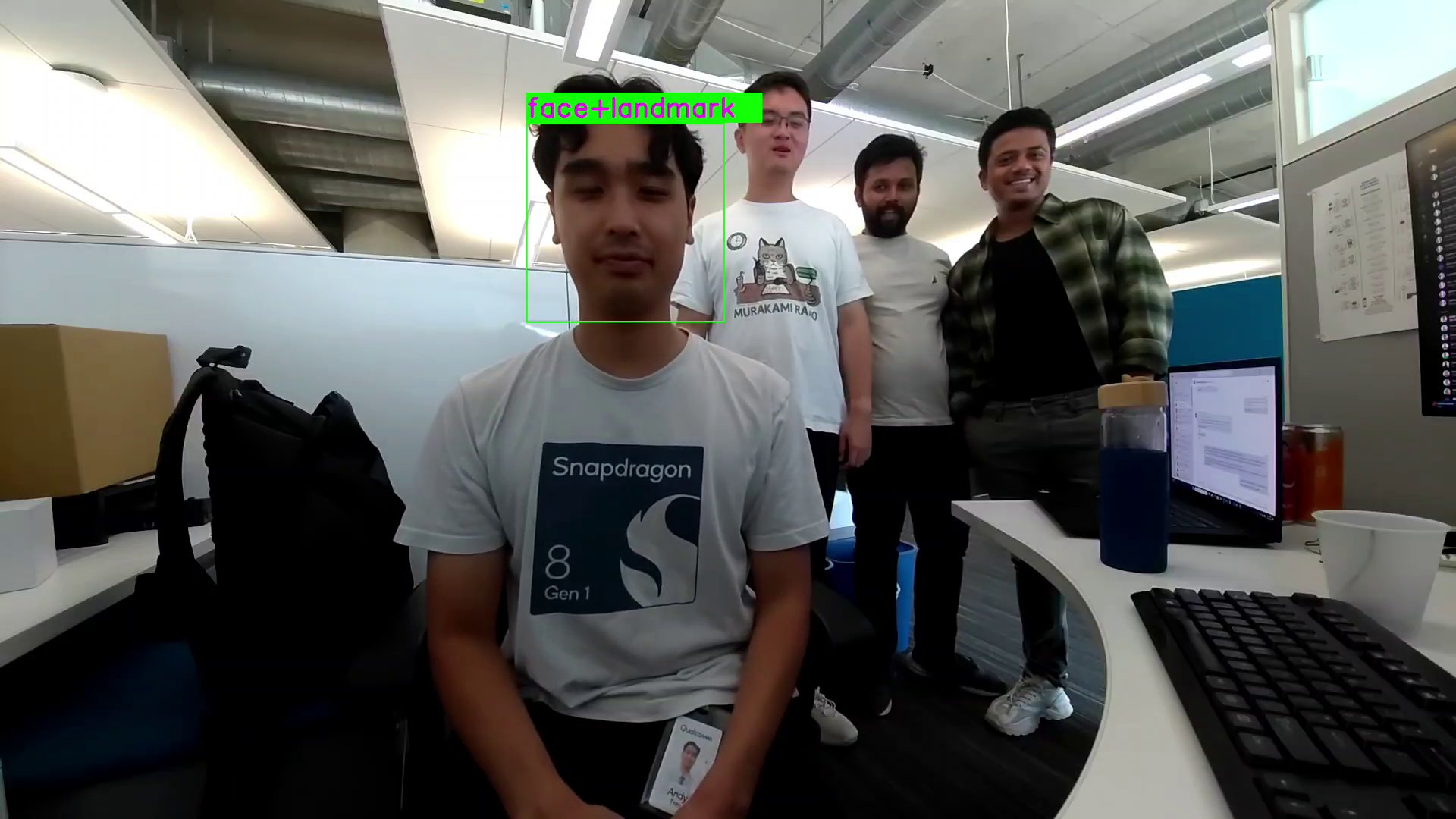
Pipeline Flow
- Source: The configured source branch decodes/produces NV12 video frames.
- Tee: Each frame is duplicated — one copy goes to the ML preprocessing branch, the
other is held for later metadata attachment (
qtimetamux). - Custom preprocess (
qtimlvconverter,engine=none): Because no built-in engine is configured, the element emits theprocesssignal instead of transforming the frame itself. The connected callback,gst_app_preprocess:- Validates the ML tensor contract (
UINT8type, 4 dimensions, 1 channel). - Reads the Y (luma) plane of the input
GstVideoBlit. - Nearest-neighbor scales it to the model’s input width/height.
- Writes the resulting single-channel grayscale image into the output ML tensor buffer.
- Validates the ML tensor contract (
- Inference (
qtimltflite): Runsface_det_lite_w8a8.tfliteon the GPU delegate, producing raw score/bbox/landmark tensors. - Postprocess (
qtimlpostprocess,module=qfd): Decodes the raw tensors into face bounding boxes using theqfdmodule — applies a confidence threshold, reconstructs boxes from center/landmark offsets, squares them with margin, runs non-max suppression, and stabilizes boxes across frames. Labels come fromqfd-labels.json. - Metadata mux (
qtimetamux): Merges the postprocess results (as GStreamer metadata) back onto the original (tee’d) video frame. - Overlay (
qtivoverlay): Draws the bounding boxes/labels on top of the video frame. - Sink: The annotated stream is sent to the selected output (
display,videofile, orappsink). - Shutdown:
SIGINT(Ctrl+C) or anEOS/ERRORbus message stops the GLib main loop; the pipeline transitions toNULLand all resources are released.
Troubleshooting
Model not available after running the download script?
Model not available after running the download script?
If any model isn’t available after downloading the script file, you can download the model manually from IoT — Qualcomm AI Hub
and push it to the target device:For example:
Running sample applications from the UART shell
Running sample applications from the UART shell
Remount the file system with read/write permissions:For Qualcomm Linux:
Cannot locate the qticamsrc plugin?
Cannot locate the qticamsrc plugin?
If you cannot locate the qticamsrc plugin, ensure that the camera server is
running and clear the GStreamer cache using the following commands:
GStreamer logging and debugging
GStreamer logging and debugging
To enable basic GStreamer logging, run the following before launching the
application:To increase verbosity for specific
plugins, use a comma-separated list with log levels (1–7):To redirect logs to a file for offline analysis: