

What is the QIM SDK C++ App Builder?
Overview
The QIM SDK C++ App Builder is a modern C++ SDK for building, running, and managing multimedia and AI pipelines on Qualcomm platforms. It provides a high-level abstraction layer over GStreamer, handling framework-level complexity such as element negotiation, pad linking, signal management, event loops, and state transitions. This lets developers focus on application logic rather than framework boilerplate.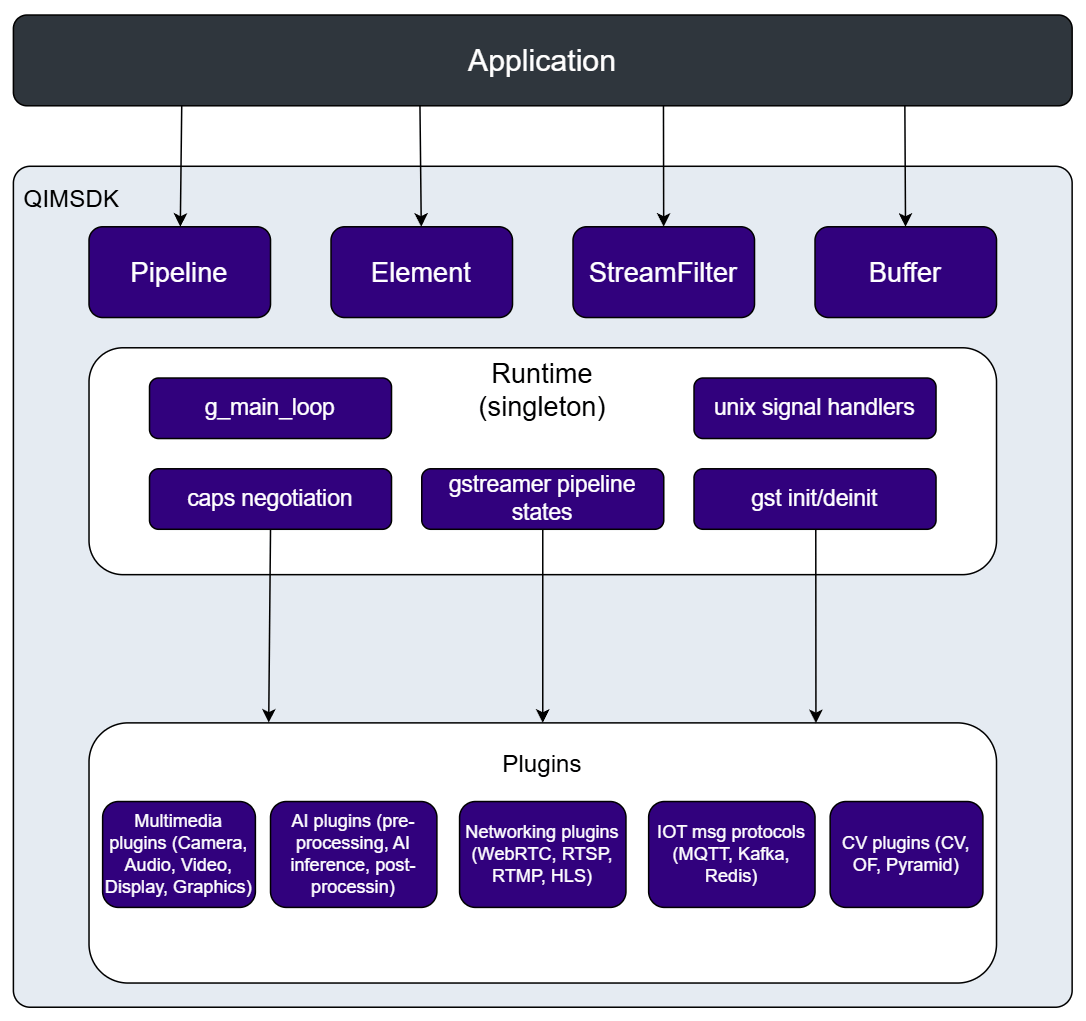
Key Capabilities
- No GStreamer expertise required — the SDK manages all underlying GStreamer mechanics internally, with no compile-time dependency on GStreamer headers.
- Fast pipeline development — a functional camera-to-display pipeline can be written in just a few lines of C++.
- AI inference support — built-in ML bins for TFLite, QNN, SNPE, and ONNX models, with support for custom pre/post-processing.
- Two pipeline definition styles — pipelines can be defined programmatically using the C++ fluent API (
add()/link()calls), or declaratively using a YAML configuration file passed to thePipelineconstructor. - Broad multimedia support — video capture, signal processing, ML inference, overlay rendering, and display output.
API Reference
| API | Description | API Code Reference |
|---|---|---|
| Pipeline | Builds, links, and manages the full lifecycle of a GStreamer pipeline. Supports both programmatic (C++ fluent API) and declarative (YAML) pipeline definition. Key methods: add(), link(), add_stream_filter(), execute(), prepare(), start(), stop(), get(). | |
| Element | Generic wrapper around a GStreamer element. Supports fluent property setting at create time or at runtime to update a live pipeline. | |
| Buffer | Unified buffer abstraction over native GStreamer memory. Provides read/write access, timestamp metadata, and zero-copy transfer paths. Key methods: data(), size(), resize(), pts(), dts(), duration(). | |
| AppSrc | App-facing source. Feeds buffers from application code into the pipeline using lambda callbacks or a push API. | |
| AppSink | App-facing sink. Delivers pipeline output buffers to application code with zero-copy. | |
| CamSrc | Built-in ISP camera source. Exposes an API for runtime image capture and snapshots. | |
| MLPreProcess | Attaches a custom C++ lambda for pre-processing input frames before ML inference. | |
| MLPostProcess | Attaches a custom C++ lambda for post-processing raw inference tensor output. | |
| MLVideoTFLiteBin / MLVideoQNNBin / MLVideoSNPEBin / MLVideoONNXBin | All-in-one preprocess + inference + postprocess bins. Supports TFLite, QNN, SNPE, and ONNX models. | |
| VideoFilter / AudioFilter / ImageFilter / H264Filter / TensorFilter / TextFilter | Fluent caps builders for add_stream_filter(). Describes stream characteristics for caps negotiation between pipeline stages. |
Build your application
Built-in Camera Source
This pipeline includes a built-in camera node, a stream filter, and a display node. If the device has more than one built-in camera, you can specify which one to use by providing the camera’s unique ID. The stream filter defines the camera’s output format, resolution, and framerate. You can also configure the display settings, such as enabling fullscreen rendering.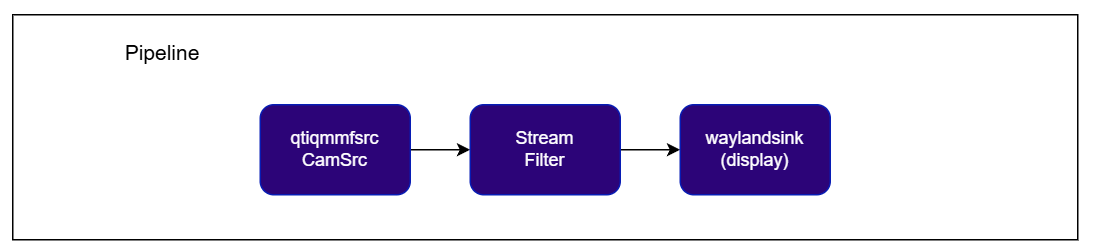
Check application source code on GitHub:
qimsdk_ref_cameraPre-built application on device: /usr/bin/qimsdk_ref_cameraCheck application source code on GitHub:
qimsdk_ref_camera_implPre-built application on device: /usr/bin/qimsdk_ref_camera_implImage capture with the built-in camera is available in the C++ implementation only.
Object Detection
This pipeline captures from a built-in camera, runs an object detection model through an ML inference bin, renders bounding box overlays on the output frames, and displays the result. The ML bin handles preprocessing, inference, and postprocessing internally. The stream filter pins the input video format expected by the model. The overlay element draws detection results on each frame before display.
Check application source code on GitHub:
qimsdk_ref_camera_yolov8Pre-built application on device: /usr/bin/qimsdk_ref_camera_yolov81
Download Required Files
If the downloaded model file is a
.zip archive, extract it on your host machine before copying: unzip filename.zip2
Copy the assets to the device
The model and labels must be present on the device before running. Copy them to the paths the application expects:
3
Run the application
Custom Post-Processing
The QIM SDK implements AI model post-processing through dedicated modules that take tensors as input and produce predictions. All underlying complexity — batching, daisy-chaining, image mask support, and ML metadata handling — is encapsulated within the post-processing plugin. This makesMLPostProcess the ideal integration point for application-specific logic, since the application does not need to handle any of that complexity directly. A specialized post-processing module manages the bindings between the pipeline and the application.
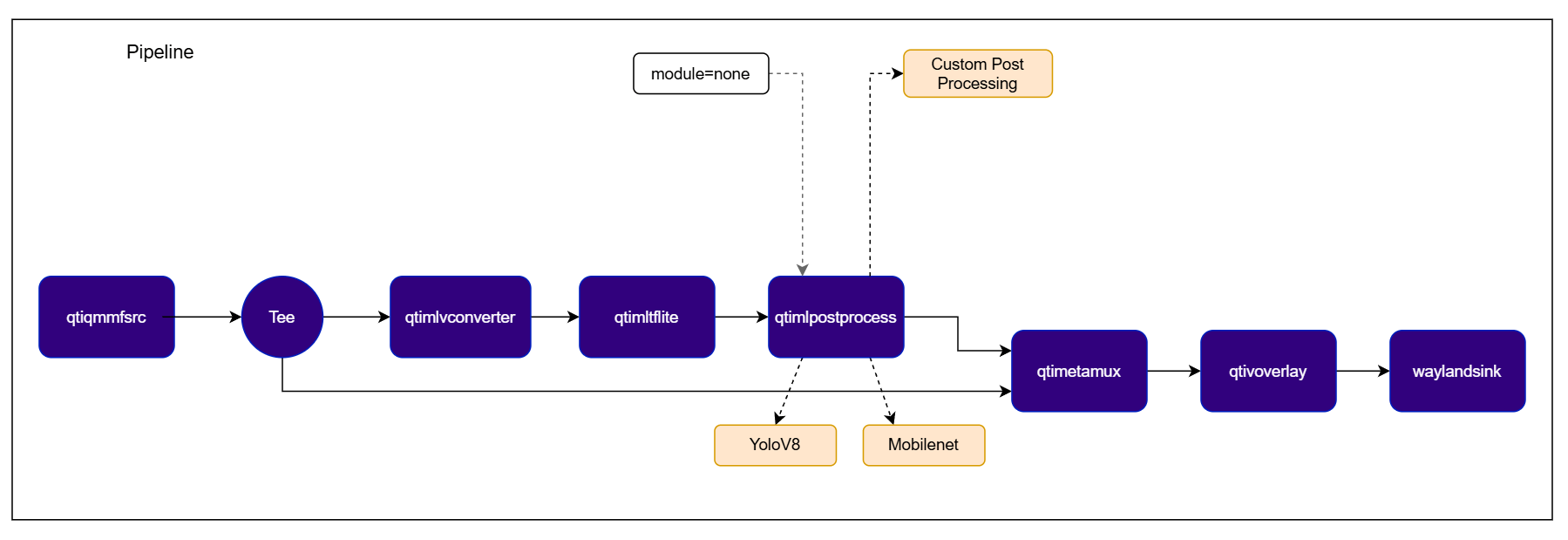
Check application source code on GitHub:
qimsdk_ref_external_postprocess_mlbin_yolov8Pre-built application on device: /usr/bin/qimsdk_ref_external_postprocess_mlbin_yolov81
Download Required Files
If the downloaded model file is a
.zip archive, extract it on your host machine before copying: unzip filename.zip2
Copy the assets to the device
The input video, model, and labels must be present on the device before running. Copy them to the paths the application expects:
3
Run the application