> ## Documentation Index
> Fetch the complete documentation index at: https://imsdkdocs.qualcomm.com/llms.txt
> Use this file to discover all available pages before exploring further.
# AI
This section covers QIM SDK AI pipelines that use LiteRT for inference.
## Vision AI Pipelines
### Object Detection
#### Single‑Stream Object Detection Pipeline.
Detects objects in each frame using a [YOLOX](https://aihub.qualcomm.com/iot/models/yolox) LiteRT model and overlays bounding boxes and labels.
**Pipeline Diagram**
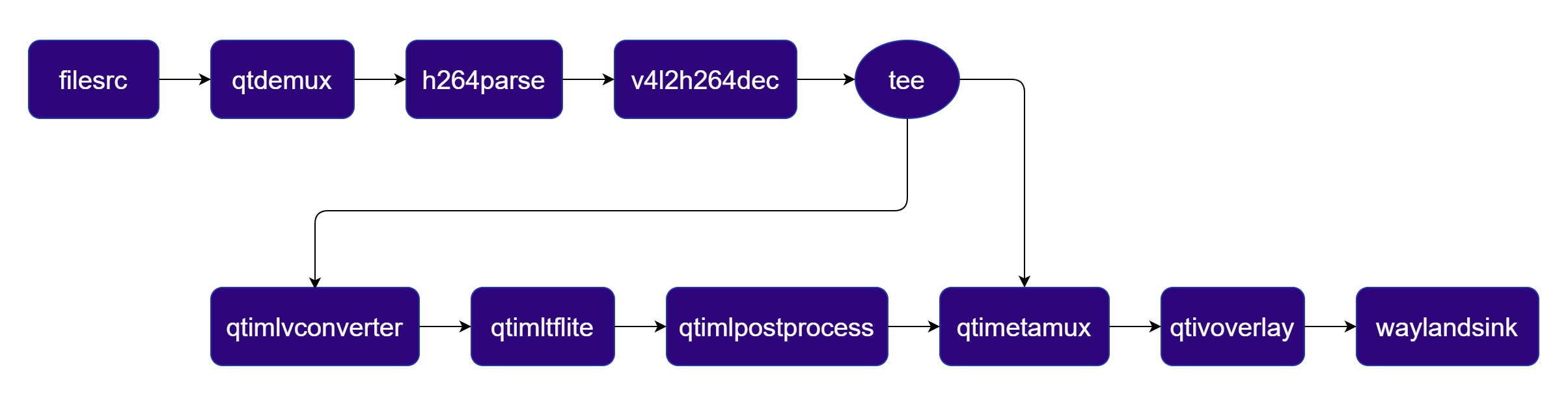 ***
| File | Download | Save as |
| ---------------- | ------------------------------------------------------------------------------------------------------------------------------------------------------ | -------------------- |
| YOLOX W8A8 model | [Qualcomm AI Hub — YOLOX](https://aihub.qualcomm.com/iot/models/yolox) | `yolox_w8a8.tflite` |
| Detection labels | yolov8.json | `yolov8.json` |
| Sample video | Input video | `ai_demo_sample.mp4` |
If any downloaded file is a `.zip` archive, extract it on your host machine before copying:
`unzip filename.zip`
Create the required directories and transfer the downloaded files to your device.
```bash SCP (SSH) theme={null}
# Replace $HOME to the appropriate device path before running the commands.
# For QLI: /root
# For Ubuntu: /home/ubuntu
# Modify this based on your platform and ensure files are copied to the correct location on the device.
# Run from your host machine — replace and
ssh @ "mkdir -p $HOME/{models,media,media/output}"
scp yolox_w8a8.tflite @:$HOME/models/
scp yolov8.json @:$HOME/labels/
scp ai_demo_sample.mp4 @:$HOME/media/
```
```bash SCP (SSH) theme={null}
# Run from your host machine — replace and
ssh @
```
Run below command on your device
```bash theme={null}
export MODEL_NAME=yolox_w8a8.tflite
export LABELS_NAME=yolov8.json
export SRC_VIDEO_NAME=ai_demo_sample.mp4
```
```bash theme={null}
gst-launch-1.0 -e --gst-debug=2 \
filesrc location=$HOME/media/$SRC_VIDEO_NAME ! qtdemux ! h264parse ! \
v4l2h264dec capture-io-mode=4 output-io-mode=4 ! video/x-raw,format=NV12 ! queue ! \
tee name=t ! qtimetamux name=obj_mux ! qtivoverlay ! waylandsink fullscreen=true sync=true \
t. ! queue ! qtimlvconverter ! queue ! \
qtimltflite model=$HOME/models/$MODEL_NAME delegate=external external-delegate-path=libQnnTFLiteDelegate.so external-delegate-options="QNNExternalDelegate,backend_type=htp,log_level=(string)1;" ! queue ! \
qtimlpostprocess module=yolov8 labels=$HOME/labels/$LABELS_NAME bbox-stabilization=true ! text/x-raw ! queue ! obj_mux.
```
The pipeline overlays bounding boxes and class labels on each video frame. Results are rendered on the display or saved to the output file.
***
| File | Download | Save as |
| ---------------- | ------------------------------------------------------------------------------------------------------------------------------------------------------ | -------------------- |
| YOLOX W8A8 model | [Qualcomm AI Hub — YOLOX](https://aihub.qualcomm.com/iot/models/yolox) | `yolox_w8a8.tflite` |
| Detection labels | yolov8.json | `yolov8.json` |
| Sample video | Input video | `ai_demo_sample.mp4` |
If any downloaded file is a `.zip` archive, extract it on your host machine before copying:
`unzip filename.zip`
Create the required directories and transfer the downloaded files to your device.
```bash SCP (SSH) theme={null}
# Replace $HOME to the appropriate device path before running the commands.
# For QLI: /root
# For Ubuntu: /home/ubuntu
# Modify this based on your platform and ensure files are copied to the correct location on the device.
# Run from your host machine — replace and
ssh @ "mkdir -p $HOME/{models,media,media/output}"
scp yolox_w8a8.tflite @:$HOME/models/
scp yolov8.json @:$HOME/labels/
scp ai_demo_sample.mp4 @:$HOME/media/
```
```bash SCP (SSH) theme={null}
# Run from your host machine — replace and
ssh @
```
Run below command on your device
```bash theme={null}
export MODEL_NAME=yolox_w8a8.tflite
export LABELS_NAME=yolov8.json
export SRC_VIDEO_NAME=ai_demo_sample.mp4
```
```bash theme={null}
gst-launch-1.0 -e --gst-debug=2 \
filesrc location=$HOME/media/$SRC_VIDEO_NAME ! qtdemux ! h264parse ! \
v4l2h264dec capture-io-mode=4 output-io-mode=4 ! video/x-raw,format=NV12 ! queue ! \
tee name=t ! qtimetamux name=obj_mux ! qtivoverlay ! waylandsink fullscreen=true sync=true \
t. ! queue ! qtimlvconverter ! queue ! \
qtimltflite model=$HOME/models/$MODEL_NAME delegate=external external-delegate-path=libQnnTFLiteDelegate.so external-delegate-options="QNNExternalDelegate,backend_type=htp,log_level=(string)1;" ! queue ! \
qtimlpostprocess module=yolov8 labels=$HOME/labels/$LABELS_NAME bbox-stabilization=true ! text/x-raw ! queue ! obj_mux.
```
The pipeline overlays bounding boxes and class labels on each video frame. Results are rendered on the display or saved to the output file.
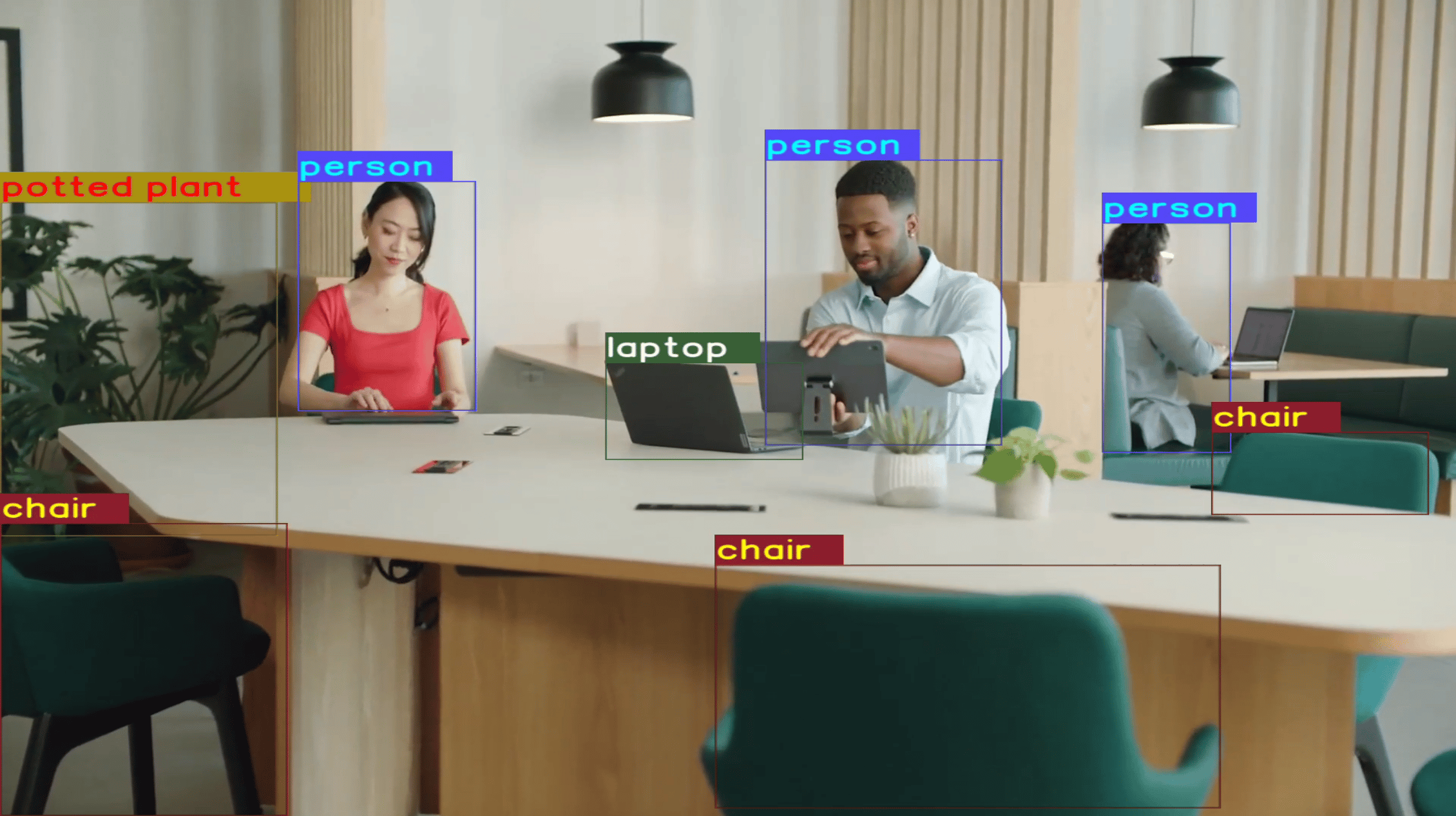 **Object Detection Pipelines with Various Input and Output Configurations**
Make sure you have completed **Download Required Files (Step 1)** and **Set Environment Variables (Step 2)** before running the pipelines below.
**Render object detection result on display**
**Pipeline Diagram**
```bash theme={null}
gst-launch-1.0 -e --gst-debug=2 \
filesrc location=$HOME/media/$SRC_VIDEO_NAME ! qtdemux ! h264parse ! \
v4l2h264dec capture-io-mode=4 output-io-mode=4 ! video/x-raw,format=NV12 ! queue ! \
tee name=t ! qtimetamux name=obj_mux ! qtivoverlay ! waylandsink fullscreen=true sync=true \
t. ! queue ! qtimlvconverter ! queue ! \
qtimltflite model=$HOME/models/$MODEL_NAME delegate=external external-delegate-path=libQnnTFLiteDelegate.so external-delegate-options="QNNExternalDelegate,backend_type=htp,log_level=(string)1;" ! queue ! \
qtimlpostprocess module=yolov8 labels=$HOME/labels/$LABELS_NAME settings="{\"confidence\": 51.0}" bbox-stabilization=true ! text/x-raw ! queue ! obj_mux.
```
**Pipeline Diagram**
**Object Detection Pipelines with Various Input and Output Configurations**
Make sure you have completed **Download Required Files (Step 1)** and **Set Environment Variables (Step 2)** before running the pipelines below.
**Render object detection result on display**
**Pipeline Diagram**
```bash theme={null}
gst-launch-1.0 -e --gst-debug=2 \
filesrc location=$HOME/media/$SRC_VIDEO_NAME ! qtdemux ! h264parse ! \
v4l2h264dec capture-io-mode=4 output-io-mode=4 ! video/x-raw,format=NV12 ! queue ! \
tee name=t ! qtimetamux name=obj_mux ! qtivoverlay ! waylandsink fullscreen=true sync=true \
t. ! queue ! qtimlvconverter ! queue ! \
qtimltflite model=$HOME/models/$MODEL_NAME delegate=external external-delegate-path=libQnnTFLiteDelegate.so external-delegate-options="QNNExternalDelegate,backend_type=htp,log_level=(string)1;" ! queue ! \
qtimlpostprocess module=yolov8 labels=$HOME/labels/$LABELS_NAME settings="{\"confidence\": 51.0}" bbox-stabilization=true ! text/x-raw ! queue ! obj_mux.
```
**Pipeline Diagram**
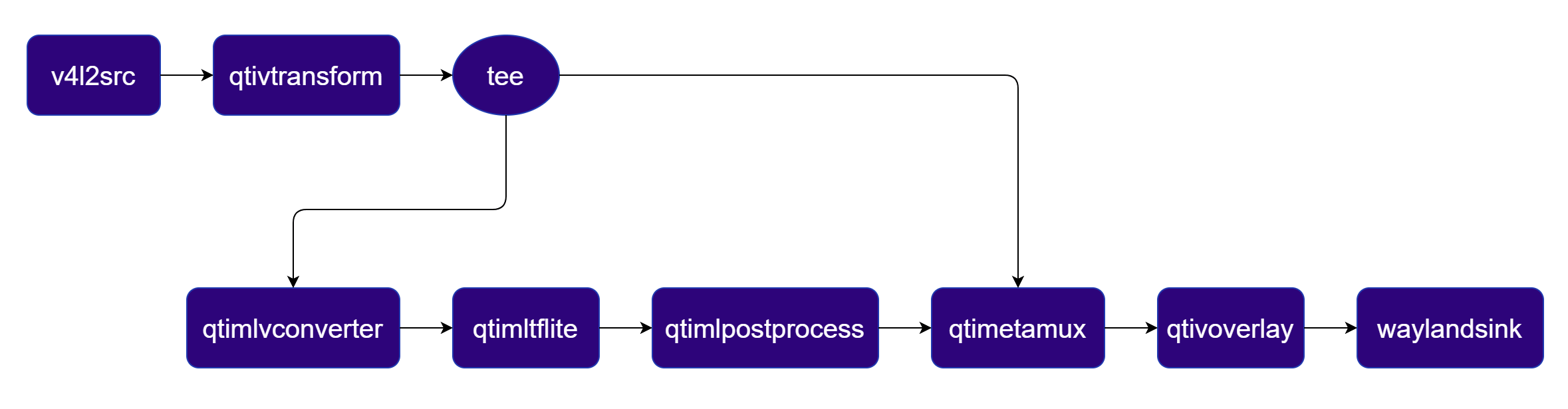 ```bash theme={null}
gst-launch-1.0 -e --gst-debug=2 \
v4l2src device=/dev/video0 ! video/x-raw,format=YUY2 ! qtivtransform ! video/x-raw,format=NV12 ! queue ! \
tee name=t ! qtimetamux name=obj_mux ! qtivoverlay ! waylandsink fullscreen=true sync=true \
t. ! queue ! qtimlvconverter ! queue ! \
qtimltflite model=$HOME/models/$MODEL_NAME delegate=external external-delegate-path=libQnnTFLiteDelegate.so external-delegate-options="QNNExternalDelegate,backend_type=htp,log_level=(string)1;" ! queue ! \
qtimlpostprocess module=yolov8 labels=$HOME/labels/$LABELS_NAME settings="{\"confidence\": 51.0}" bbox-stabilization=true ! text/x-raw ! queue ! obj_mux.
```
**Pipeline Diagram**
```bash theme={null}
gst-launch-1.0 -e --gst-debug=2 \
v4l2src device=/dev/video0 ! video/x-raw,format=YUY2 ! qtivtransform ! video/x-raw,format=NV12 ! queue ! \
tee name=t ! qtimetamux name=obj_mux ! qtivoverlay ! waylandsink fullscreen=true sync=true \
t. ! queue ! qtimlvconverter ! queue ! \
qtimltflite model=$HOME/models/$MODEL_NAME delegate=external external-delegate-path=libQnnTFLiteDelegate.so external-delegate-options="QNNExternalDelegate,backend_type=htp,log_level=(string)1;" ! queue ! \
qtimlpostprocess module=yolov8 labels=$HOME/labels/$LABELS_NAME settings="{\"confidence\": 51.0}" bbox-stabilization=true ! text/x-raw ! queue ! obj_mux.
```
**Pipeline Diagram**
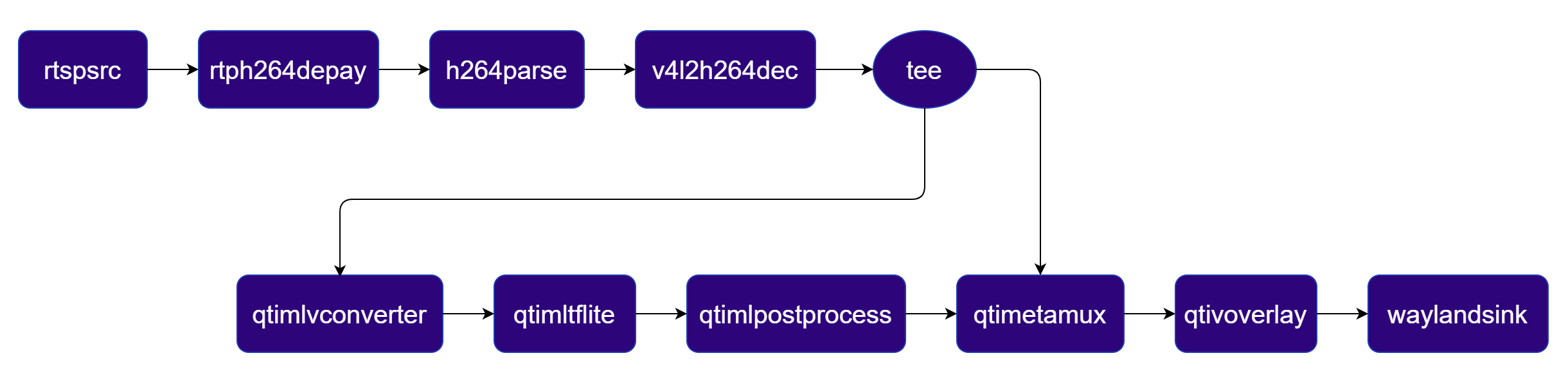 ```bash theme={null}
gst-launch-1.0 -e --gst-debug=2 \
rtspsrc location=rtsp://:/stream ! rtph264depay ! h264parse ! \
v4l2h264dec capture-io-mode=4 output-io-mode=4 ! video/x-raw,format=NV12 ! queue ! \
tee name=t ! qtimetamux name=obj_mux ! qtivoverlay ! waylandsink fullscreen=true sync=true \
t. ! queue ! qtimlvconverter ! queue ! \
qtimltflite model=$HOME/models/$MODEL_NAME delegate=external external-delegate-path=libQnnTFLiteDelegate.so external-delegate-options="QNNExternalDelegate,backend_type=htp,log_level=(string)1;" ! queue ! \
qtimlpostprocess module=yolov8 labels=$HOME/labels/$LABELS_NAME settings="{\"confidence\": 51.0}" bbox-stabilization=true ! text/x-raw ! queue ! obj_mux.
```
**Pipeline Diagram**
```bash theme={null}
gst-launch-1.0 -e --gst-debug=2 \
rtspsrc location=rtsp://:/stream ! rtph264depay ! h264parse ! \
v4l2h264dec capture-io-mode=4 output-io-mode=4 ! video/x-raw,format=NV12 ! queue ! \
tee name=t ! qtimetamux name=obj_mux ! qtivoverlay ! waylandsink fullscreen=true sync=true \
t. ! queue ! qtimlvconverter ! queue ! \
qtimltflite model=$HOME/models/$MODEL_NAME delegate=external external-delegate-path=libQnnTFLiteDelegate.so external-delegate-options="QNNExternalDelegate,backend_type=htp,log_level=(string)1;" ! queue ! \
qtimlpostprocess module=yolov8 labels=$HOME/labels/$LABELS_NAME settings="{\"confidence\": 51.0}" bbox-stabilization=true ! text/x-raw ! queue ! obj_mux.
```
**Pipeline Diagram**
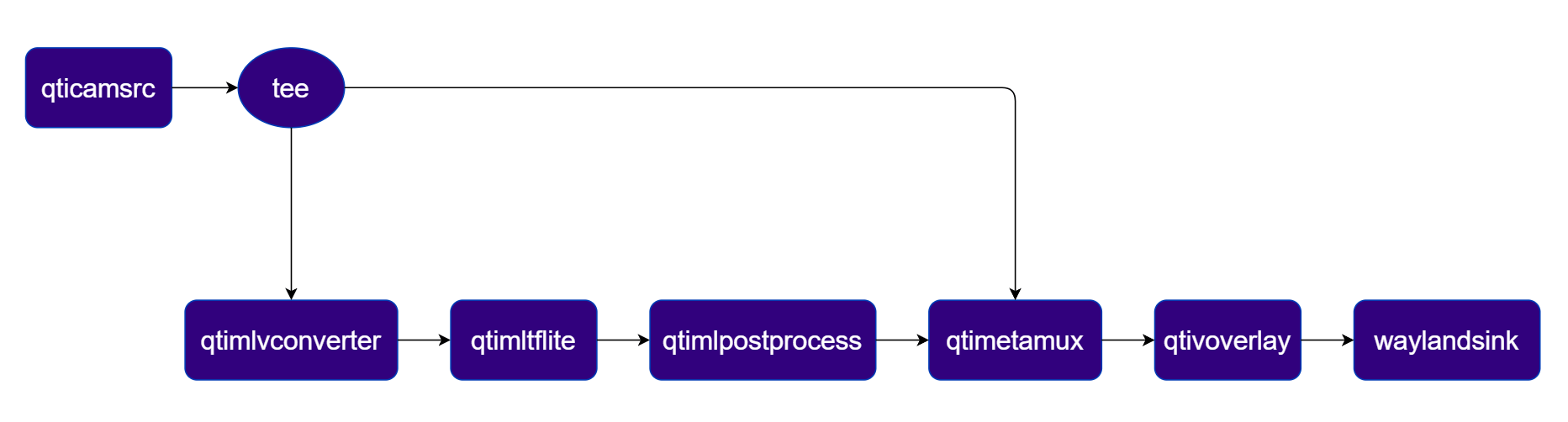 ```bash theme={null}
gst-launch-1.0 -e --gst-debug=2 \
qticamsrc name=camsrc ! video/x-raw,format=NV12,width=1920,height=1080,framerate=30/1 ! queue ! \
tee name=t ! qtimetamux name=obj_mux ! qtivoverlay ! waylandsink fullscreen=true sync=true \
t. ! queue ! qtimlvconverter ! queue ! \
qtimltflite model=$HOME/models/$MODEL_NAME delegate=external external-delegate-path=libQnnTFLiteDelegate.so external-delegate-options="QNNExternalDelegate,backend_type=htp,log_level=(string)1;" ! queue ! \
qtimlpostprocess module=yolov8 labels=$HOME/labels/$LABELS_NAME settings="{\"confidence\": 51.0}" bbox-stabilization=true ! text/x-raw ! queue ! obj_mux.
```
**Encode object detection result into file**
**Pipeline Diagram**
```bash theme={null}
gst-launch-1.0 -e --gst-debug=2 \
qticamsrc name=camsrc ! video/x-raw,format=NV12,width=1920,height=1080,framerate=30/1 ! queue ! \
tee name=t ! qtimetamux name=obj_mux ! qtivoverlay ! waylandsink fullscreen=true sync=true \
t. ! queue ! qtimlvconverter ! queue ! \
qtimltflite model=$HOME/models/$MODEL_NAME delegate=external external-delegate-path=libQnnTFLiteDelegate.so external-delegate-options="QNNExternalDelegate,backend_type=htp,log_level=(string)1;" ! queue ! \
qtimlpostprocess module=yolov8 labels=$HOME/labels/$LABELS_NAME settings="{\"confidence\": 51.0}" bbox-stabilization=true ! text/x-raw ! queue ! obj_mux.
```
**Encode object detection result into file**
**Pipeline Diagram**
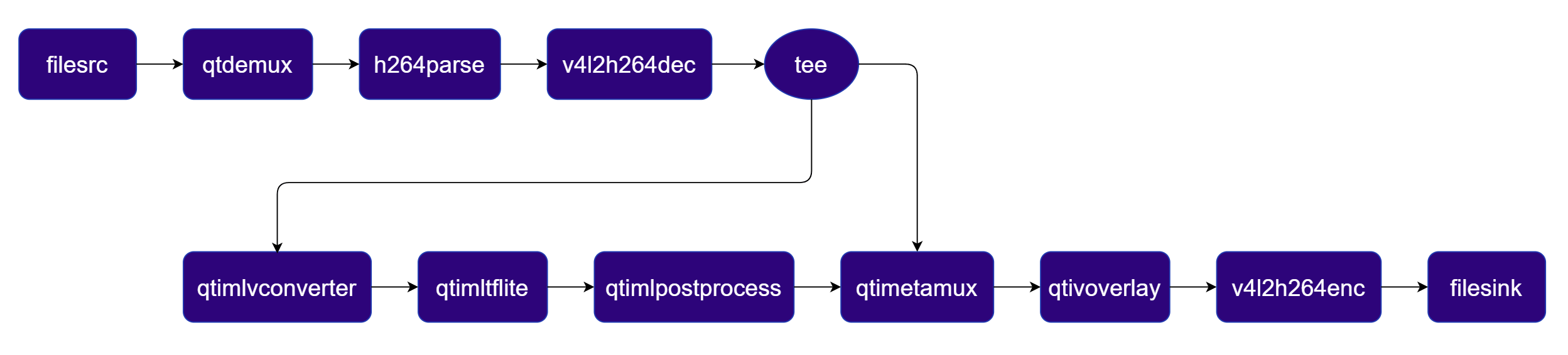 ```bash theme={null}
gst-launch-1.0 -e --gst-debug=2 \
filesrc location=$HOME/media/$SRC_VIDEO_NAME ! qtdemux ! h264parse ! \
v4l2h264dec capture-io-mode=4 output-io-mode=4 ! video/x-raw,format=NV12 ! queue ! \
tee name=t ! qtimetamux name=obj_mux ! qtivoverlay ! v4l2h264enc capture-io-mode=4 output-io-mode=4 ! h264parse ! mp4mux ! filesink location=$HOME/media/output/obj_detect_out.mp4 \
t. ! queue ! qtimlvconverter ! queue ! \
qtimltflite model=$HOME/models/$MODEL_NAME delegate=external external-delegate-path=libQnnTFLiteDelegate.so external-delegate-options="QNNExternalDelegate,backend_type=htp,log_level=(string)1;" ! queue ! \
qtimlpostprocess module=yolov8 labels=$HOME/labels/$LABELS_NAME settings="{\"confidence\": 51.0}" bbox-stabilization=true ! text/x-raw ! queue ! obj_mux.
```
**Pipeline Diagram**
```bash theme={null}
gst-launch-1.0 -e --gst-debug=2 \
filesrc location=$HOME/media/$SRC_VIDEO_NAME ! qtdemux ! h264parse ! \
v4l2h264dec capture-io-mode=4 output-io-mode=4 ! video/x-raw,format=NV12 ! queue ! \
tee name=t ! qtimetamux name=obj_mux ! qtivoverlay ! v4l2h264enc capture-io-mode=4 output-io-mode=4 ! h264parse ! mp4mux ! filesink location=$HOME/media/output/obj_detect_out.mp4 \
t. ! queue ! qtimlvconverter ! queue ! \
qtimltflite model=$HOME/models/$MODEL_NAME delegate=external external-delegate-path=libQnnTFLiteDelegate.so external-delegate-options="QNNExternalDelegate,backend_type=htp,log_level=(string)1;" ! queue ! \
qtimlpostprocess module=yolov8 labels=$HOME/labels/$LABELS_NAME settings="{\"confidence\": 51.0}" bbox-stabilization=true ! text/x-raw ! queue ! obj_mux.
```
**Pipeline Diagram**
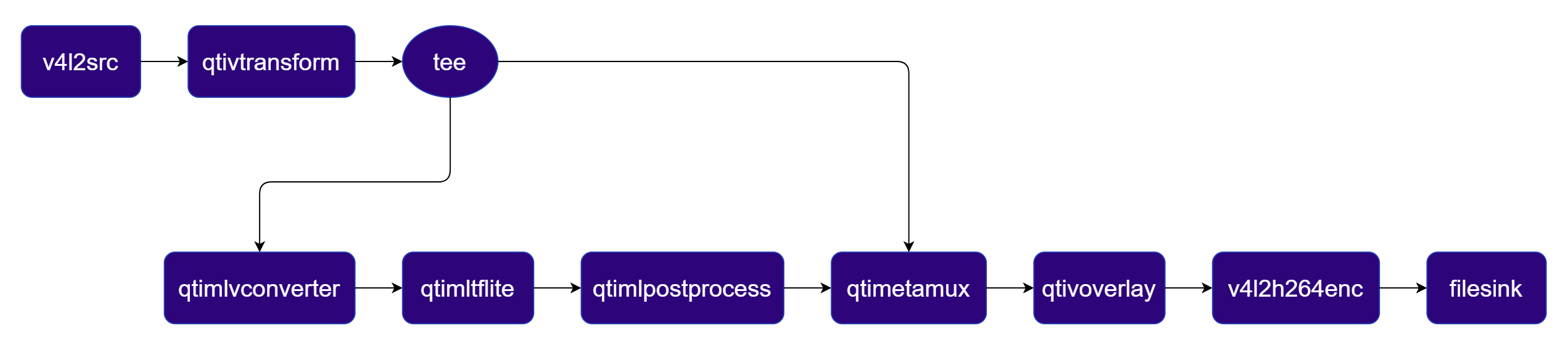 ```bash theme={null}
gst-launch-1.0 -e --gst-debug=2 \
v4l2src device=/dev/video0 ! video/x-raw,format=YUY2 ! qtivtransform ! video/x-raw,format=NV12 ! queue ! \
tee name=t ! qtimetamux name=obj_mux ! qtivoverlay ! queue ! v4l2h264enc capture-io-mode=4 output-io-mode=4 ! h264parse ! mp4mux ! filesink location=$HOME/media/output/obj_detect_out.mp4 \
t. ! queue ! qtimlvconverter ! queue ! \
qtimltflite model=$HOME/models/$MODEL_NAME delegate=external external-delegate-path=libQnnTFLiteDelegate.so external-delegate-options="QNNExternalDelegate,backend_type=htp,log_level=(string)1;" ! queue ! \
qtimlpostprocess module=yolov8 labels=$HOME/labels/$LABELS_NAME settings="{\"confidence\": 51.0}" ! text/x-raw bbox-stabilization=true ! queue ! obj_mux.
```
**Pipeline Diagram**
```bash theme={null}
gst-launch-1.0 -e --gst-debug=2 \
v4l2src device=/dev/video0 ! video/x-raw,format=YUY2 ! qtivtransform ! video/x-raw,format=NV12 ! queue ! \
tee name=t ! qtimetamux name=obj_mux ! qtivoverlay ! queue ! v4l2h264enc capture-io-mode=4 output-io-mode=4 ! h264parse ! mp4mux ! filesink location=$HOME/media/output/obj_detect_out.mp4 \
t. ! queue ! qtimlvconverter ! queue ! \
qtimltflite model=$HOME/models/$MODEL_NAME delegate=external external-delegate-path=libQnnTFLiteDelegate.so external-delegate-options="QNNExternalDelegate,backend_type=htp,log_level=(string)1;" ! queue ! \
qtimlpostprocess module=yolov8 labels=$HOME/labels/$LABELS_NAME settings="{\"confidence\": 51.0}" ! text/x-raw bbox-stabilization=true ! queue ! obj_mux.
```
**Pipeline Diagram**
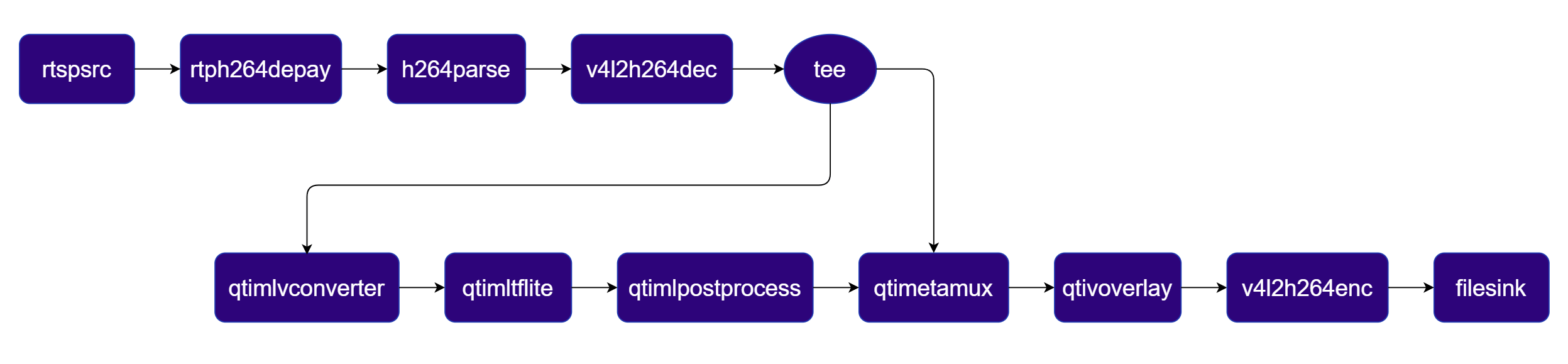 ```bash theme={null}
gst-launch-1.0 -e --gst-debug=2 \
rtspsrc location=rtsp://:/stream ! rtph264depay ! h264parse ! \
v4l2h264dec capture-io-mode=4 output-io-mode=4 ! video/x-raw,format=NV12 ! queue ! \
tee name=t ! qtimetamux name=obj_mux ! qtivoverlay ! v4l2h264enc capture-io-mode=4 output-io-mode=4 ! h264parse ! mp4mux ! filesink location=$HOME/media/output/obj_detect_out.mp4 \
t. ! queue ! qtimlvconverter ! queue ! \
qtimltflite model=$HOME/models/$MODEL_NAME delegate=external external-delegate-path=libQnnTFLiteDelegate.so external-delegate-options="QNNExternalDelegate,backend_type=htp,log_level=(string)1;" ! queue ! \
qtimlpostprocess module=yolov8 labels=$HOME/labels/$LABELS_NAME settings="{\"confidence\": 51.0}" bbox-stabilization=true ! text/x-raw ! queue ! obj_mux.
```
**Pipeline Diagram**
```bash theme={null}
gst-launch-1.0 -e --gst-debug=2 \
rtspsrc location=rtsp://:/stream ! rtph264depay ! h264parse ! \
v4l2h264dec capture-io-mode=4 output-io-mode=4 ! video/x-raw,format=NV12 ! queue ! \
tee name=t ! qtimetamux name=obj_mux ! qtivoverlay ! v4l2h264enc capture-io-mode=4 output-io-mode=4 ! h264parse ! mp4mux ! filesink location=$HOME/media/output/obj_detect_out.mp4 \
t. ! queue ! qtimlvconverter ! queue ! \
qtimltflite model=$HOME/models/$MODEL_NAME delegate=external external-delegate-path=libQnnTFLiteDelegate.so external-delegate-options="QNNExternalDelegate,backend_type=htp,log_level=(string)1;" ! queue ! \
qtimlpostprocess module=yolov8 labels=$HOME/labels/$LABELS_NAME settings="{\"confidence\": 51.0}" bbox-stabilization=true ! text/x-raw ! queue ! obj_mux.
```
**Pipeline Diagram**
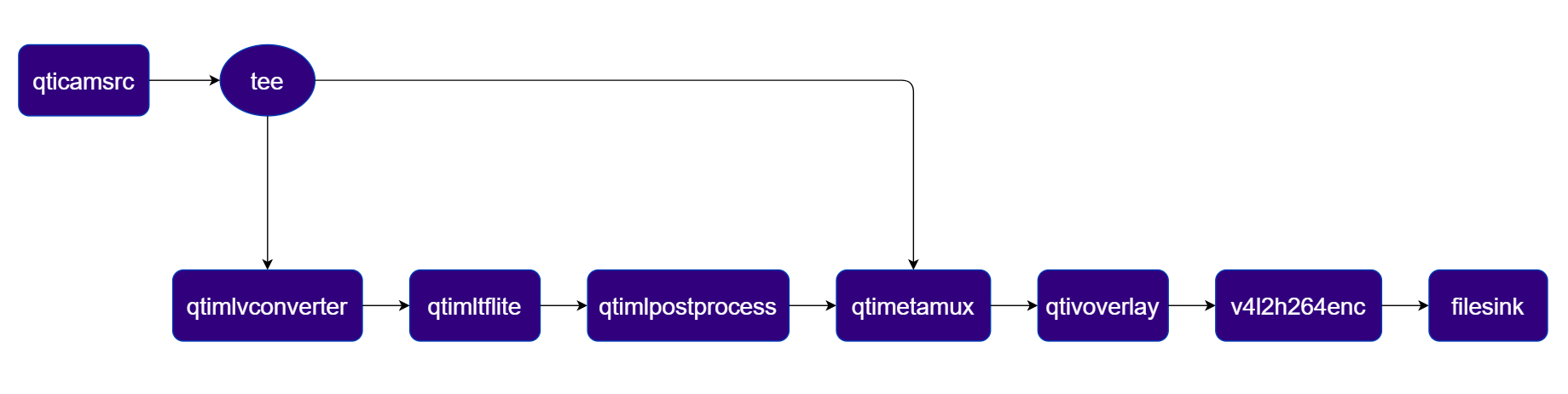 ```bash theme={null}
gst-launch-1.0 -e --gst-debug=2 \
qticamsrc name=camsrc ! video/x-raw,format=NV12,width=1920,height=1080,framerate=30/1 ! queue ! \
tee name=t ! qtimetamux name=obj_mux ! qtivoverlay ! v4l2h264enc capture-io-mode=4 output-io-mode=4 ! h264parse ! mp4mux ! filesink location=$HOME/media/output/obj_detect_out.mp4 \
t. ! queue ! qtimlvconverter ! queue ! \
qtimltflite model=$HOME/models/$MODEL_NAME delegate=external external-delegate-path=libQnnTFLiteDelegate.so external-delegate-options="QNNExternalDelegate,backend_type=htp,log_level=(string)1;" ! queue ! \
qtimlpostprocess module=yolov8 labels=$HOME/labels/$LABELS_NAME settings="{\"confidence\": 51.0}" bbox-stabilization=true ! text/x-raw ! queue ! obj_mux.
```
| Plugin | Description |
| -------------------------------------------------------- | --------------------------------------------------------------------------------------------------- |
| filesrc | Reads an H.264 encoded video file as the pipeline source. |
| [v4l2h264dec](../plugin-reference/v4l2h264dec) | Hardware-decodes the H.264 stream to raw NV12 frames using V4L2. |
| tee | Duplicates the decoded video stream for parallel video passthrough and ML inference branches. |
| [qtimlvconverter](../plugin-reference/qtimlvconverter) | Preprocesses video frames (color conversion, scaling, normalization) and converts to tensor stream. |
| [qtimltflite](../plugin-reference/qtimltflite) | Loads the TFLite model, applies the chosen delegate, and runs inference to produce result tensors. |
| [qtimlpostprocess](../plugin-reference/qtimlpostprocess) | Post-processes detection tensors, applies confidence threshold, and forwards bounding-box metadata. |
| [qtimetamux](../plugin-reference/qtimetamux) | Merges video and metadata/text streams, attaching inference results as GST buffer metadata. |
| [qtivoverlay](../plugin-reference/qtivoverlay) | Overlays inference results (labels, bounding boxes, keypoints) onto the video frame using CL. |
| [v4l2h264enc](../plugin-reference/v4l2h264enc) | Hardware-encodes the video stream to H.264 using V4L2. |
| filesink | Writes the encoded video stream to an output file. |
#### Two‑Stream Object Detection Pipeline
Object detection on Stream 1 with side‑by‑side composition on Stream 2
**Pipeline Diagram**
```bash theme={null}
gst-launch-1.0 -e --gst-debug=2 \
qticamsrc name=camsrc ! video/x-raw,format=NV12,width=1920,height=1080,framerate=30/1 ! queue ! \
tee name=t ! qtimetamux name=obj_mux ! qtivoverlay ! v4l2h264enc capture-io-mode=4 output-io-mode=4 ! h264parse ! mp4mux ! filesink location=$HOME/media/output/obj_detect_out.mp4 \
t. ! queue ! qtimlvconverter ! queue ! \
qtimltflite model=$HOME/models/$MODEL_NAME delegate=external external-delegate-path=libQnnTFLiteDelegate.so external-delegate-options="QNNExternalDelegate,backend_type=htp,log_level=(string)1;" ! queue ! \
qtimlpostprocess module=yolov8 labels=$HOME/labels/$LABELS_NAME settings="{\"confidence\": 51.0}" bbox-stabilization=true ! text/x-raw ! queue ! obj_mux.
```
| Plugin | Description |
| -------------------------------------------------------- | --------------------------------------------------------------------------------------------------- |
| filesrc | Reads an H.264 encoded video file as the pipeline source. |
| [v4l2h264dec](../plugin-reference/v4l2h264dec) | Hardware-decodes the H.264 stream to raw NV12 frames using V4L2. |
| tee | Duplicates the decoded video stream for parallel video passthrough and ML inference branches. |
| [qtimlvconverter](../plugin-reference/qtimlvconverter) | Preprocesses video frames (color conversion, scaling, normalization) and converts to tensor stream. |
| [qtimltflite](../plugin-reference/qtimltflite) | Loads the TFLite model, applies the chosen delegate, and runs inference to produce result tensors. |
| [qtimlpostprocess](../plugin-reference/qtimlpostprocess) | Post-processes detection tensors, applies confidence threshold, and forwards bounding-box metadata. |
| [qtimetamux](../plugin-reference/qtimetamux) | Merges video and metadata/text streams, attaching inference results as GST buffer metadata. |
| [qtivoverlay](../plugin-reference/qtivoverlay) | Overlays inference results (labels, bounding boxes, keypoints) onto the video frame using CL. |
| [v4l2h264enc](../plugin-reference/v4l2h264enc) | Hardware-encodes the video stream to H.264 using V4L2. |
| filesink | Writes the encoded video stream to an output file. |
#### Two‑Stream Object Detection Pipeline
Object detection on Stream 1 with side‑by‑side composition on Stream 2
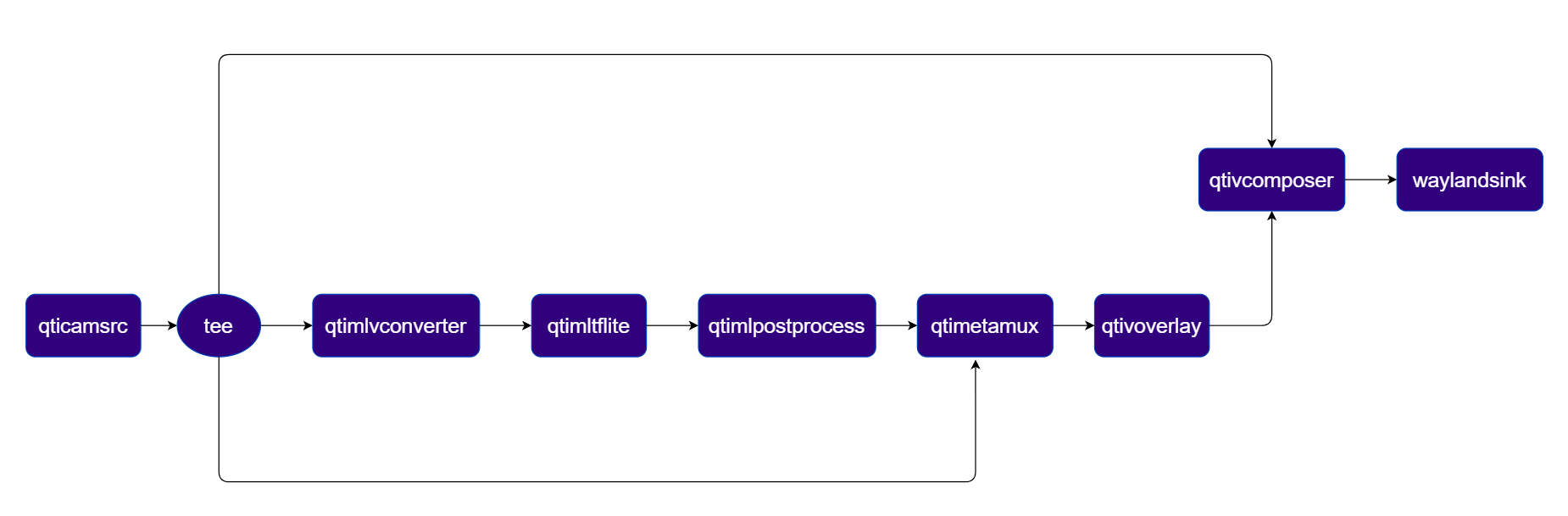
**Pipeline Diagram**
 ***
| File | Download | Save as |
| ---------------- | ---------------------------------------------------------------------- | ------------------- |
| YOLOX W8A8 model | [Qualcomm AI Hub — YOLOX](https://aihub.qualcomm.com/iot/models/yolox) | `yolox_w8a8.tflite` |
| Detection labels | yolov8.json | `yolov8.json` |
If any downloaded file is a `.zip` archive, extract it on your host machine before copying:
`unzip filename.zip`
```bash SCP (SSH) theme={null}
# Replace $HOME to the appropriate device path before running the commands.
# For QLI: /root
# For Ubuntu: /home/ubuntu
# Modify this based on your platform and ensure files are copied to the correct location on the device.
ssh @ "mkdir -p $HOME/{models,media,media/output}"
scp yolox_w8a8.tflite @:$HOME/models/
scp yolov8.json @:$HOME/labels/
```
```bash SCP (SSH) theme={null}
# Run from your host machine — replace and
ssh @
```
Run below command on your device
```bash theme={null}
export MODEL_NAME=yolox_w8a8.tflite
export LABELS_NAME=yolov8.json
export SRC_VIDEO_NAME=ai_demo_sample.mp4
```
```bash theme={null}
gst-launch-1.0 -e --gst-debug=2 \
qtivcomposer name=comp \
sink_0::position="<0, 0>" sink_0::dimensions="<960, 1080>" \
sink_1::position="<960, 0>" sink_1::dimensions="<960, 1080>" ! \
queue ! waylandsink fullscreen=true sync=true \
qtimetamux name=obj_mux ! queue ! qtivoverlay ! queue ! comp.sink_1 \
qticamsrc name=camsrc ! video/x-raw,format=NV12,width=1920,height=1080,framerate=30/1 ! queue ! \
tee name=t_src \
t_src. ! queue ! comp.sink_0 \
t_src. ! queue ! qtimlvconverter ! queue ! \
qtimltflite model=$HOME/models/$MODEL_NAME delegate=external external-delegate-path=libQnnTFLiteDelegate.so external-delegate-options="QNNExternalDelegate,backend_type=htp,log_level=(string)1;" ! queue ! \
qtimlpostprocess module=yolov8 labels=$HOME/labels/$LABELS_NAME settings="{\"confidence\": 51.0}" bbox-stabilization=true ! text/x-raw ! queue ! obj_mux. \
t_src. ! queue ! obj_mux.
```
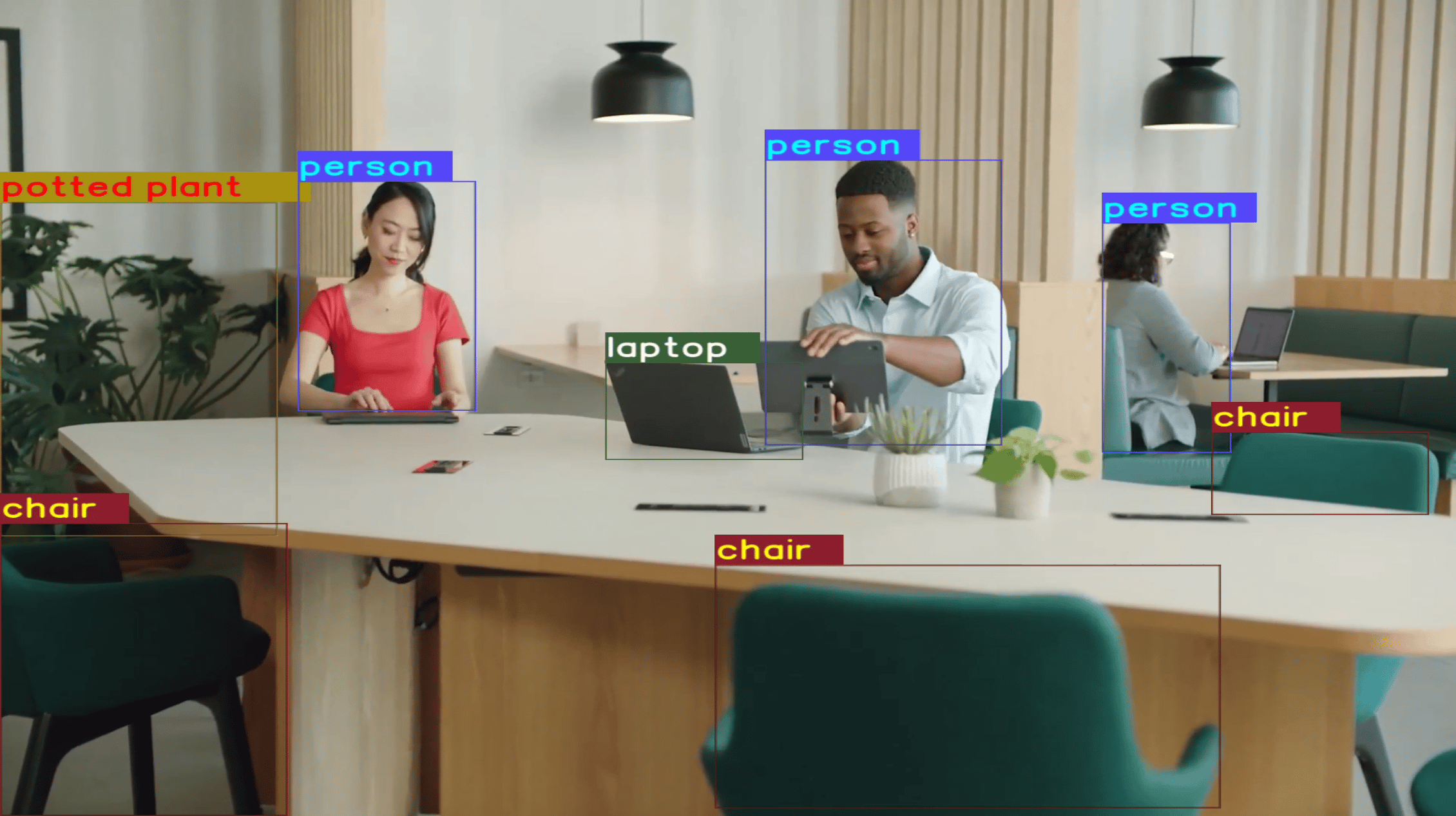
The pipeline overlays bounding boxes and class labels on each video frame. Results are rendered on the display or saved to the output file.
***
| File | Download | Save as |
| ---------------- | ---------------------------------------------------------------------- | ------------------- |
| YOLOX W8A8 model | [Qualcomm AI Hub — YOLOX](https://aihub.qualcomm.com/iot/models/yolox) | `yolox_w8a8.tflite` |
| Detection labels | yolov8.json | `yolov8.json` |
If any downloaded file is a `.zip` archive, extract it on your host machine before copying:
`unzip filename.zip`
```bash SCP (SSH) theme={null}
# Replace $HOME to the appropriate device path before running the commands.
# For QLI: /root
# For Ubuntu: /home/ubuntu
# Modify this based on your platform and ensure files are copied to the correct location on the device.
ssh @ "mkdir -p $HOME/{models,media,media/output}"
scp yolox_w8a8.tflite @:$HOME/models/
scp yolov8.json @:$HOME/labels/
```
```bash SCP (SSH) theme={null}
# Run from your host machine — replace and
ssh @
```
Run below command on your device
```bash theme={null}
export MODEL_NAME=yolox_w8a8.tflite
export LABELS_NAME=yolov8.json
export SRC_VIDEO_NAME=ai_demo_sample.mp4
```
```bash theme={null}
gst-launch-1.0 -e --gst-debug=2 \
qtivcomposer name=comp \
sink_0::position="<0, 0>" sink_0::dimensions="<960, 1080>" \
sink_1::position="<960, 0>" sink_1::dimensions="<960, 1080>" ! \
queue ! waylandsink fullscreen=true sync=true \
qtimetamux name=obj_mux ! queue ! qtivoverlay ! queue ! comp.sink_1 \
qticamsrc name=camsrc ! video/x-raw,format=NV12,width=1920,height=1080,framerate=30/1 ! queue ! \
tee name=t_src \
t_src. ! queue ! comp.sink_0 \
t_src. ! queue ! qtimlvconverter ! queue ! \
qtimltflite model=$HOME/models/$MODEL_NAME delegate=external external-delegate-path=libQnnTFLiteDelegate.so external-delegate-options="QNNExternalDelegate,backend_type=htp,log_level=(string)1;" ! queue ! \
qtimlpostprocess module=yolov8 labels=$HOME/labels/$LABELS_NAME settings="{\"confidence\": 51.0}" bbox-stabilization=true ! text/x-raw ! queue ! obj_mux. \
t_src. ! queue ! obj_mux.
```
The pipeline overlays bounding boxes and class labels on each video frame. Results are rendered on the display or saved to the output file.
 | Plugin | Description |
| -------------------------------------------------------- | --------------------------------------------------------------------------------------------------- |
| [qticamsrc](../plugin-reference/qticamsrc) | Captures live video from the ISP camera as the pipeline source. |
| tee | Splits the camera stream into three branches: raw passthrough, ML inference, and metadata mux. |
| [qtimlvconverter](../plugin-reference/qtimlvconverter) | Preprocesses video frames (color conversion, scaling, normalization) and converts to tensor stream. |
| [qtimltflite](../plugin-reference/qtimltflite) | Loads the TFLite model, applies the chosen delegate, and runs inference to produce result tensors. |
| [qtimlpostprocess](../plugin-reference/qtimlpostprocess) | Post-processes detection tensors, applies confidence threshold, and forwards bounding-box metadata. |
| [qtimetamux](../plugin-reference/qtimetamux) | Merges video and metadata/text streams, attaching inference results as GST buffer metadata. |
| [qtivoverlay](../plugin-reference/qtivoverlay) | Overlays inference results (labels, bounding boxes, keypoints) onto the video frame using CL. |
| [qtivcomposer](../plugin-reference/qtivcomposer) | Composites the raw camera stream (sink\_0) and the overlay stream (sink\_1) side-by-side. |
| [waylandsink](../plugin-reference/waylandsink) | Renders the final composited video stream to a local display via Weston. |
#### Three-Stream Object Detection Pipeline
Object detection on Stream 1, side‑by‑side composition on Stream 2, and video encoding to file on Stream 3
**Pipeline Diagram**
| Plugin | Description |
| -------------------------------------------------------- | --------------------------------------------------------------------------------------------------- |
| [qticamsrc](../plugin-reference/qticamsrc) | Captures live video from the ISP camera as the pipeline source. |
| tee | Splits the camera stream into three branches: raw passthrough, ML inference, and metadata mux. |
| [qtimlvconverter](../plugin-reference/qtimlvconverter) | Preprocesses video frames (color conversion, scaling, normalization) and converts to tensor stream. |
| [qtimltflite](../plugin-reference/qtimltflite) | Loads the TFLite model, applies the chosen delegate, and runs inference to produce result tensors. |
| [qtimlpostprocess](../plugin-reference/qtimlpostprocess) | Post-processes detection tensors, applies confidence threshold, and forwards bounding-box metadata. |
| [qtimetamux](../plugin-reference/qtimetamux) | Merges video and metadata/text streams, attaching inference results as GST buffer metadata. |
| [qtivoverlay](../plugin-reference/qtivoverlay) | Overlays inference results (labels, bounding boxes, keypoints) onto the video frame using CL. |
| [qtivcomposer](../plugin-reference/qtivcomposer) | Composites the raw camera stream (sink\_0) and the overlay stream (sink\_1) side-by-side. |
| [waylandsink](../plugin-reference/waylandsink) | Renders the final composited video stream to a local display via Weston. |
#### Three-Stream Object Detection Pipeline
Object detection on Stream 1, side‑by‑side composition on Stream 2, and video encoding to file on Stream 3
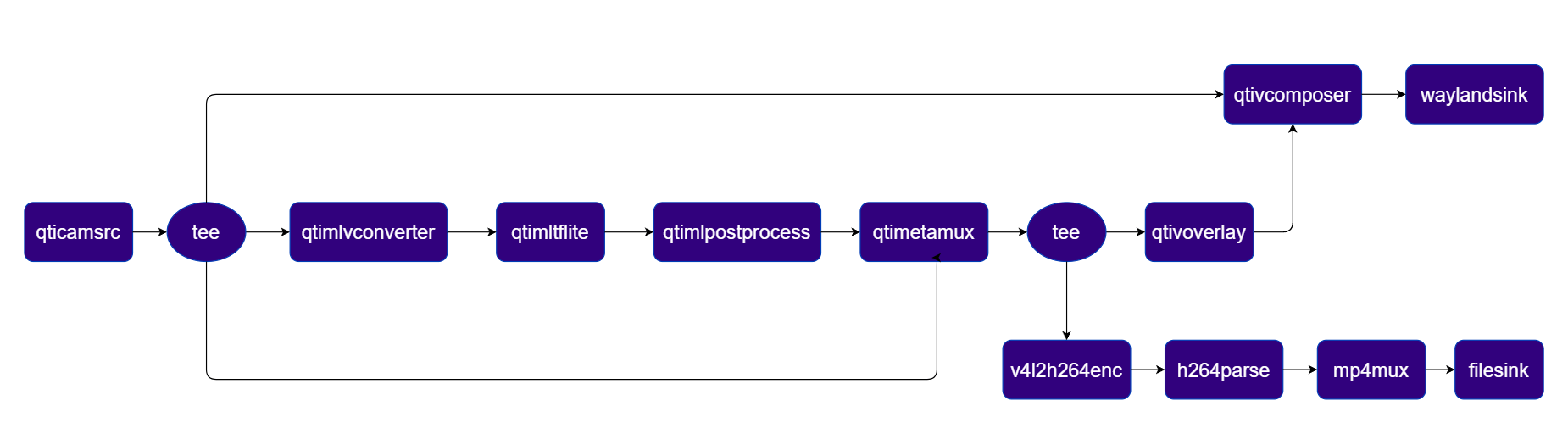
**Pipeline Diagram**
 ***
| File | Download | Save as |
| ---------------- | ---------------------------------------------------------------------- | ------------------- |
| YOLOX W8A8 model | [Qualcomm AI Hub — YOLOX](https://aihub.qualcomm.com/iot/models/yolox) | `yolox_w8a8.tflite` |
| Detection labels | yolov8.json | `yolov8.json` |
If any downloaded file is a `.zip` archive, extract it on your host machine before copying:
`unzip filename.zip`
```bash SCP (SSH) theme={null}
# Replace $HOME to the appropriate device path before running the commands.
# For QLI: /root
# For Ubuntu: /home/ubuntu
# Modify this based on your platform and ensure files are copied to the correct location on the device.
ssh @ "mkdir -p $HOME/{models,media,media/output}"
scp yolox_w8a8.tflite @:$HOME/models/
scp yolov8.json @:$HOME/labels/
```
```bash SCP (SSH) theme={null}
# Run from your host machine — replace and
ssh @
```
Run below command on your device
```bash theme={null}
export MODEL_NAME=yolox_w8a8.tflite
export LABELS_NAME=yolov8.json
export SRC_VIDEO_NAME=ai_demo_sample.mp4
```
```bash theme={null}
gst-launch-1.0 -e --gst-debug=2 \
qtivcomposer name=comp \
sink_0::position="<0, 0>" sink_0::dimensions="<960, 1080>" \
sink_1::position="<960, 0>" sink_1::dimensions="<960, 1080>" ! \
queue ! waylandsink fullscreen=true sync=true \
qtimetamux name=obj_mux ! queue ! tee name=ai_tee \
ai_tee. ! queue ! qtivoverlay ! queue ! comp.sink_1 \
ai_tee. ! queue ! v4l2h264enc capture-io-mode=4 output-io-mode=4 ! h264parse ! mp4mux ! \
filesink location=$HOME/media/output/obj_detect_out.mp4 sync=false \
qticamsrc name=camsrc ! video/x-raw,format=NV12,width=1920,height=1080,framerate=30/1 ! queue ! \
tee name=t_src \
t_src. ! queue ! comp.sink_0 \
t_src. ! queue ! qtimlvconverter ! queue ! \
qtimltflite model=$HOME/models/$MODEL_NAME delegate=external external-delegate-path=libQnnTFLiteDelegate.so external-delegate-options="QNNExternalDelegate,backend_type=htp,log_level=(string)1;" ! queue ! \
qtimlpostprocess module=yolov8 labels=$HOME/labels/$LABELS_NAME settings="{\"confidence\": 51.0}" bbox-stabilization=true ! text/x-raw ! queue ! obj_mux. \
t_src. ! queue ! obj_mux.
```
The pipeline overlays bounding boxes and class labels on each video frame. Results are rendered on the display or saved to the output file.
***
| Plugin | Description |
| -------------------------------------------------------- | --------------------------------------------------------------------------------------------------- |
| [qticamsrc](../plugin-reference/qticamsrc) | Captures live video from the ISP camera as the pipeline source. |
| tee | Splits the stream into branches for display composition, ML inference, and file encoding. |
| [qtimlvconverter](../plugin-reference/qtimlvconverter) | Preprocesses video frames (color conversion, scaling, normalization) and converts to tensor stream. |
| [qtimltflite](../plugin-reference/qtimltflite) | Loads the TFLite model, applies the chosen delegate, and runs inference to produce result tensors. |
| [qtimlpostprocess](../plugin-reference/qtimlpostprocess) | Post-processes detection tensors, applies confidence threshold, and forwards bounding-box metadata. |
| [qtimetamux](../plugin-reference/qtimetamux) | Merges video and metadata/text streams, attaching inference results as GST buffer metadata. |
| [qtivcomposer](../plugin-reference/qtivcomposer) | Composites the raw camera stream (sink\_0) and the overlay stream (sink\_1) side-by-side. |
| [qtivoverlay](../plugin-reference/qtivoverlay) | Overlays inference results (labels, bounding boxes, keypoints) onto the video frame using CL. |
| [v4l2h264enc](../plugin-reference/v4l2h264enc) | Hardware-encodes the video stream to H.264 using V4L2. |
| filesink | Writes the encoded video stream to an output file. |
| [waylandsink](../plugin-reference/waylandsink) | Renders the final composited video stream to a local display via Weston. |
***
### Face Detection
Detects faces using a quantized [Face Detection Lite](https://aihub.qualcomm.com/iot/models/face_det_lite) model accelerated via QNN (HTP backend).
**Pipeline Diagram**
***
| File | Download | Save as |
| ---------------- | ---------------------------------------------------------------------- | ------------------- |
| YOLOX W8A8 model | [Qualcomm AI Hub — YOLOX](https://aihub.qualcomm.com/iot/models/yolox) | `yolox_w8a8.tflite` |
| Detection labels | yolov8.json | `yolov8.json` |
If any downloaded file is a `.zip` archive, extract it on your host machine before copying:
`unzip filename.zip`
```bash SCP (SSH) theme={null}
# Replace $HOME to the appropriate device path before running the commands.
# For QLI: /root
# For Ubuntu: /home/ubuntu
# Modify this based on your platform and ensure files are copied to the correct location on the device.
ssh @ "mkdir -p $HOME/{models,media,media/output}"
scp yolox_w8a8.tflite @:$HOME/models/
scp yolov8.json @:$HOME/labels/
```
```bash SCP (SSH) theme={null}
# Run from your host machine — replace and
ssh @
```
Run below command on your device
```bash theme={null}
export MODEL_NAME=yolox_w8a8.tflite
export LABELS_NAME=yolov8.json
export SRC_VIDEO_NAME=ai_demo_sample.mp4
```
```bash theme={null}
gst-launch-1.0 -e --gst-debug=2 \
qtivcomposer name=comp \
sink_0::position="<0, 0>" sink_0::dimensions="<960, 1080>" \
sink_1::position="<960, 0>" sink_1::dimensions="<960, 1080>" ! \
queue ! waylandsink fullscreen=true sync=true \
qtimetamux name=obj_mux ! queue ! tee name=ai_tee \
ai_tee. ! queue ! qtivoverlay ! queue ! comp.sink_1 \
ai_tee. ! queue ! v4l2h264enc capture-io-mode=4 output-io-mode=4 ! h264parse ! mp4mux ! \
filesink location=$HOME/media/output/obj_detect_out.mp4 sync=false \
qticamsrc name=camsrc ! video/x-raw,format=NV12,width=1920,height=1080,framerate=30/1 ! queue ! \
tee name=t_src \
t_src. ! queue ! comp.sink_0 \
t_src. ! queue ! qtimlvconverter ! queue ! \
qtimltflite model=$HOME/models/$MODEL_NAME delegate=external external-delegate-path=libQnnTFLiteDelegate.so external-delegate-options="QNNExternalDelegate,backend_type=htp,log_level=(string)1;" ! queue ! \
qtimlpostprocess module=yolov8 labels=$HOME/labels/$LABELS_NAME settings="{\"confidence\": 51.0}" bbox-stabilization=true ! text/x-raw ! queue ! obj_mux. \
t_src. ! queue ! obj_mux.
```
The pipeline overlays bounding boxes and class labels on each video frame. Results are rendered on the display or saved to the output file.
***
| Plugin | Description |
| -------------------------------------------------------- | --------------------------------------------------------------------------------------------------- |
| [qticamsrc](../plugin-reference/qticamsrc) | Captures live video from the ISP camera as the pipeline source. |
| tee | Splits the stream into branches for display composition, ML inference, and file encoding. |
| [qtimlvconverter](../plugin-reference/qtimlvconverter) | Preprocesses video frames (color conversion, scaling, normalization) and converts to tensor stream. |
| [qtimltflite](../plugin-reference/qtimltflite) | Loads the TFLite model, applies the chosen delegate, and runs inference to produce result tensors. |
| [qtimlpostprocess](../plugin-reference/qtimlpostprocess) | Post-processes detection tensors, applies confidence threshold, and forwards bounding-box metadata. |
| [qtimetamux](../plugin-reference/qtimetamux) | Merges video and metadata/text streams, attaching inference results as GST buffer metadata. |
| [qtivcomposer](../plugin-reference/qtivcomposer) | Composites the raw camera stream (sink\_0) and the overlay stream (sink\_1) side-by-side. |
| [qtivoverlay](../plugin-reference/qtivoverlay) | Overlays inference results (labels, bounding boxes, keypoints) onto the video frame using CL. |
| [v4l2h264enc](../plugin-reference/v4l2h264enc) | Hardware-encodes the video stream to H.264 using V4L2. |
| filesink | Writes the encoded video stream to an output file. |
| [waylandsink](../plugin-reference/waylandsink) | Renders the final composited video stream to a local display via Weston. |
***
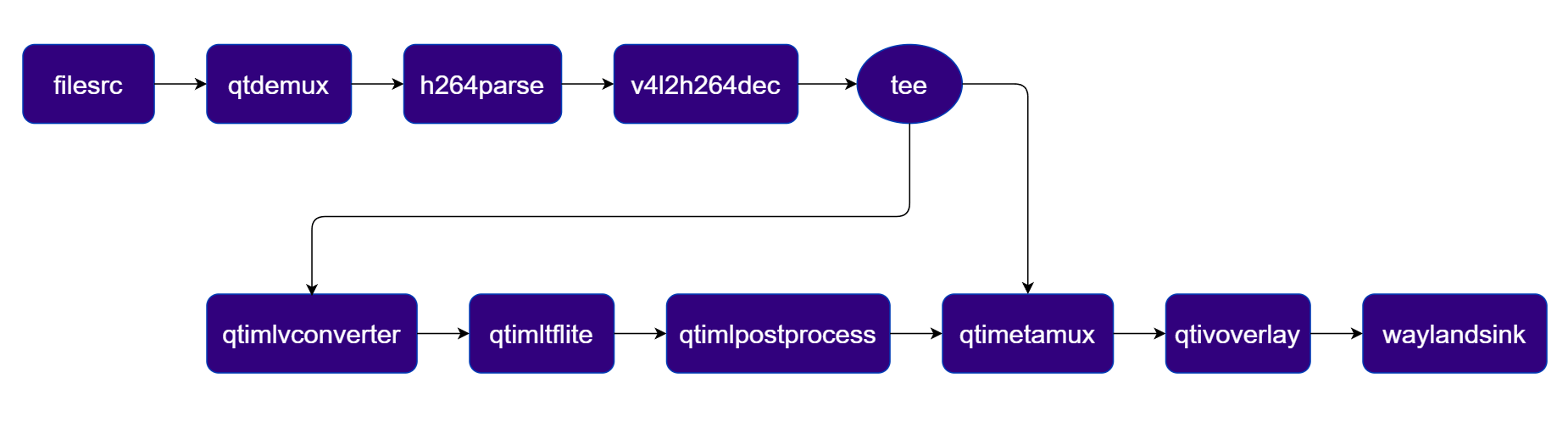
### Face Detection
Detects faces using a quantized [Face Detection Lite](https://aihub.qualcomm.com/iot/models/face_det_lite) model accelerated via QNN (HTP backend).
**Pipeline Diagram**
 ***
| File | Download | Save as |
| ------------------------- | ------------------------------------------------------------------------------------------------------------------------------------------------------ | --------------------------- |
| Face Detection Lite model | [Qualcomm AI Hub — Face Detection Lite](https://aihub.qualcomm.com/iot/models/face_det_lite) | `face_det_lite_w8a8.tflite` |
| Detection labels | face\_det\_lite labels | `face_det_lite.json` |
| Sample video | Input video | `ai_demo_sample.mp4` |
If any downloaded file is a `.zip` archive, extract it on your host machine before copying:
`unzip filename.zip`
```bash SCP (SSH) theme={null}
# Replace $HOME to the appropriate device path before running the commands.
# For QLI: /root
# For Ubuntu: /home/ubuntu
# Modify this based on your platform and ensure files are copied to the correct location on the device.
ssh @ "mkdir -p $HOME/{models,media,media/output}"
scp face_det_lite_w8a8.tflite @:$HOME/models/
scp face_det_lite.json @:$HOME/labels/
scp ai_demo_sample.mp4 @:$HOME/media/
```
```bash SCP (SSH) theme={null}
# Run from your host machine — replace and
ssh @
```
Run below command on your device
```bash theme={null}
export MODEL_NAME=face_det_lite_w8a8.tflite
export LABELS_NAME=face_det_lite.json
export SRC_VIDEO_NAME=ai_demo_sample.mp4
```
```bash theme={null}
gst-launch-1.0 -e --gst-debug=2 \
filesrc location=$HOME/media/$SRC_VIDEO_NAME ! qtdemux ! h264parse ! \
v4l2h264dec capture-io-mode=4 output-io-mode=4 ! video/x-raw,format=NV12 ! queue ! \
tee name=t ! qtimetamux name=face_mux ! qtivoverlay ! waylandsink fullscreen=true sync=true \
t. ! queue ! qtimlvconverter ! queue ! \
qtimltflite model=$HOME/models/$MODEL_NAME delegate=external external-delegate-path=libQnnTFLiteDelegate.so external-delegate-options="QNNExternalDelegate,backend_type=htp,log_level=(string)1;" ! queue ! \
qtimlpostprocess module=qfd labels=$HOME/labels/$LABELS_NAME ! text/x-raw ! queue ! face_mux.
```
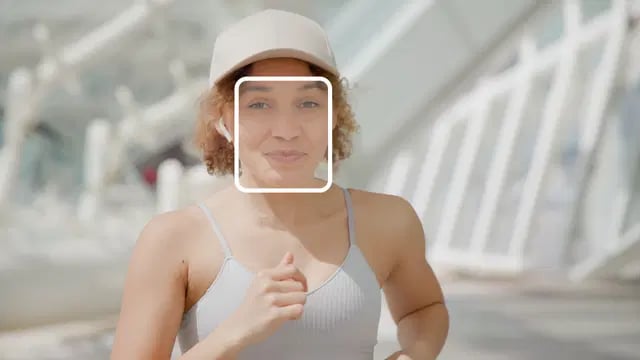
The pipeline detects faces and overlays bounding boxes on each frame. Results are rendered on the display or saved to the output file.
***
| File | Download | Save as |
| ------------------------- | ------------------------------------------------------------------------------------------------------------------------------------------------------ | --------------------------- |
| Face Detection Lite model | [Qualcomm AI Hub — Face Detection Lite](https://aihub.qualcomm.com/iot/models/face_det_lite) | `face_det_lite_w8a8.tflite` |
| Detection labels | face\_det\_lite labels | `face_det_lite.json` |
| Sample video | Input video | `ai_demo_sample.mp4` |
If any downloaded file is a `.zip` archive, extract it on your host machine before copying:
`unzip filename.zip`
```bash SCP (SSH) theme={null}
# Replace $HOME to the appropriate device path before running the commands.
# For QLI: /root
# For Ubuntu: /home/ubuntu
# Modify this based on your platform and ensure files are copied to the correct location on the device.
ssh @ "mkdir -p $HOME/{models,media,media/output}"
scp face_det_lite_w8a8.tflite @:$HOME/models/
scp face_det_lite.json @:$HOME/labels/
scp ai_demo_sample.mp4 @:$HOME/media/
```
```bash SCP (SSH) theme={null}
# Run from your host machine — replace and
ssh @
```
Run below command on your device
```bash theme={null}
export MODEL_NAME=face_det_lite_w8a8.tflite
export LABELS_NAME=face_det_lite.json
export SRC_VIDEO_NAME=ai_demo_sample.mp4
```
```bash theme={null}
gst-launch-1.0 -e --gst-debug=2 \
filesrc location=$HOME/media/$SRC_VIDEO_NAME ! qtdemux ! h264parse ! \
v4l2h264dec capture-io-mode=4 output-io-mode=4 ! video/x-raw,format=NV12 ! queue ! \
tee name=t ! qtimetamux name=face_mux ! qtivoverlay ! waylandsink fullscreen=true sync=true \
t. ! queue ! qtimlvconverter ! queue ! \
qtimltflite model=$HOME/models/$MODEL_NAME delegate=external external-delegate-path=libQnnTFLiteDelegate.so external-delegate-options="QNNExternalDelegate,backend_type=htp,log_level=(string)1;" ! queue ! \
qtimlpostprocess module=qfd labels=$HOME/labels/$LABELS_NAME ! text/x-raw ! queue ! face_mux.
```
The pipeline detects faces and overlays bounding boxes on each frame. Results are rendered on the display or saved to the output file.
 ***
| Plugin | Description |
| -------------------------------------------------------- | --------------------------------------------------------------------------------------------------- |
| filesrc | Reads an H.264 encoded video file as the pipeline source. |
| [v4l2h264dec](../plugin-reference/v4l2h264dec) | Hardware-decodes the H.264 stream to raw NV12 frames using V4L2. |
| tee | Splits the decoded stream for video passthrough and ML inference branches. |
| [qtimlvconverter](../plugin-reference/qtimlvconverter) | Preprocesses video frames (color conversion, scaling, normalization) and converts to tensor stream. |
| [qtimltflite](../plugin-reference/qtimltflite) | Loads the TFLite model, applies the chosen delegate, and runs inference to produce result tensors. |
| [qtimlpostprocess](../plugin-reference/qtimlpostprocess) | Post-processes face detection tensors and forwards bounding-box/landmark metadata. |
| [qtimetamux](../plugin-reference/qtimetamux) | Merges video and metadata/text streams, attaching inference results as GST buffer metadata. |
| [qtivoverlay](../plugin-reference/qtivoverlay) | Overlays inference results (labels, bounding boxes, keypoints) onto the video frame using CL. |
| [v4l2h264enc](../plugin-reference/v4l2h264enc) | Hardware-encodes the video stream to H.264 using V4L2. |
| filesink | Writes the encoded video stream to an output file. |
***
### Image Classification
Classifies each video frame into predefined scene categories using the [InceptionV3](https://aihub.qualcomm.com/iot/models/inception_v3) LiteRT model and overlays the top classification results on the video stream.
**Pipeline Diagram**
***
| Plugin | Description |
| -------------------------------------------------------- | --------------------------------------------------------------------------------------------------- |
| filesrc | Reads an H.264 encoded video file as the pipeline source. |
| [v4l2h264dec](../plugin-reference/v4l2h264dec) | Hardware-decodes the H.264 stream to raw NV12 frames using V4L2. |
| tee | Splits the decoded stream for video passthrough and ML inference branches. |
| [qtimlvconverter](../plugin-reference/qtimlvconverter) | Preprocesses video frames (color conversion, scaling, normalization) and converts to tensor stream. |
| [qtimltflite](../plugin-reference/qtimltflite) | Loads the TFLite model, applies the chosen delegate, and runs inference to produce result tensors. |
| [qtimlpostprocess](../plugin-reference/qtimlpostprocess) | Post-processes face detection tensors and forwards bounding-box/landmark metadata. |
| [qtimetamux](../plugin-reference/qtimetamux) | Merges video and metadata/text streams, attaching inference results as GST buffer metadata. |
| [qtivoverlay](../plugin-reference/qtivoverlay) | Overlays inference results (labels, bounding boxes, keypoints) onto the video frame using CL. |
| [v4l2h264enc](../plugin-reference/v4l2h264enc) | Hardware-encodes the video stream to H.264 using V4L2. |
| filesink | Writes the encoded video stream to an output file. |
***
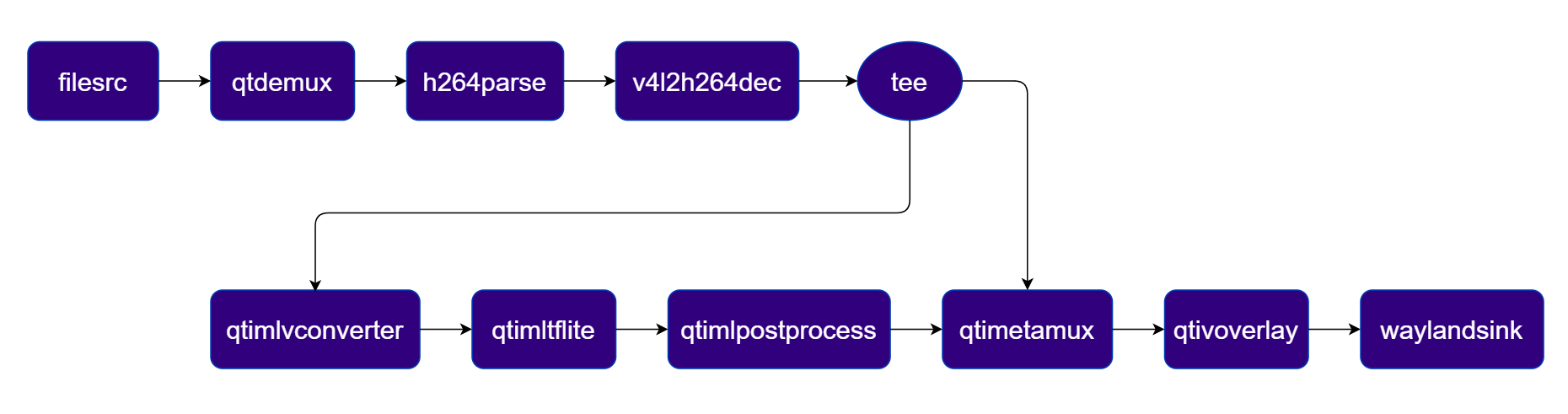
### Image Classification
Classifies each video frame into predefined scene categories using the [InceptionV3](https://aihub.qualcomm.com/iot/models/inception_v3) LiteRT model and overlays the top classification results on the video stream.
**Pipeline Diagram**
 ***
| File | Download | Save as |
| --------------------- | ------------------------------------------------------------------------------------------------------------------------------------------------------ | -------------------------- |
| InceptionV3 model | [Qualcomm AI Hub — InceptionV3](https://aihub.qualcomm.com/iot/models/inception_v3) | `mobilenet_v2_w8a8.tflite` |
| Classification labels | mobilenet.json | `mobilenet.json` |
| Sample video | Input video | `ai_demo_sample.mp4` |
If any downloaded file is a `.zip` archive, extract it on your host machine before copying:
`unzip filename.zip`
```bash SCP (SSH) theme={null}
# Replace $HOME to the appropriate device path before running the commands.
# For QLI: /root
# For Ubuntu: /home/ubuntu
# Modify this based on your platform and ensure files are copied to the correct location on the device.
ssh @ "mkdir -p $HOME/{models,media,media/output}"
scp mobilenet_v2_w8a8.tflite @:$HOME/models/
scp mobilenet.json @:$HOME/labels/
scp ai_demo_sample.mp4 @:$HOME/media/
```
```bash SCP (SSH) theme={null}
# Run from your host machine — replace and
ssh @
```
Run below command on your device
```bash theme={null}
export MODEL_NAME=mobilenet_v2_w8a8.tflite
export LABELS_NAME=mobilenet.json
export SRC_VIDEO_NAME=ai_demo_sample.mp4
```
```bash theme={null}
gst-launch-1.0 -e --gst-debug=2 \
filesrc location=$HOME/media/$SRC_VIDEO_NAME ! qtdemux ! h264parse ! \
v4l2h264dec capture-io-mode=4 output-io-mode=4 ! video/x-raw,format=NV12 ! queue ! \
tee name=t ! qtimetamux name=class_mux ! qtivoverlay ! waylandsink fullscreen=true sync=true \
t. ! queue ! qtimlvconverter ! queue ! \
qtimltflite model=$HOME/models/$MODEL_NAME delegate=external external-delegate-path=libQnnTFLiteDelegate.so external-delegate-options="QNNExternalDelegate,backend_type=htp,log_level=(string)1;" ! queue ! \
qtimlpostprocess module=mobilenet labels=$HOME/labels/$LABELS_NAME settings="{\"confidence\": 51.0}" ! text/x-raw ! queue ! class_mux.
```
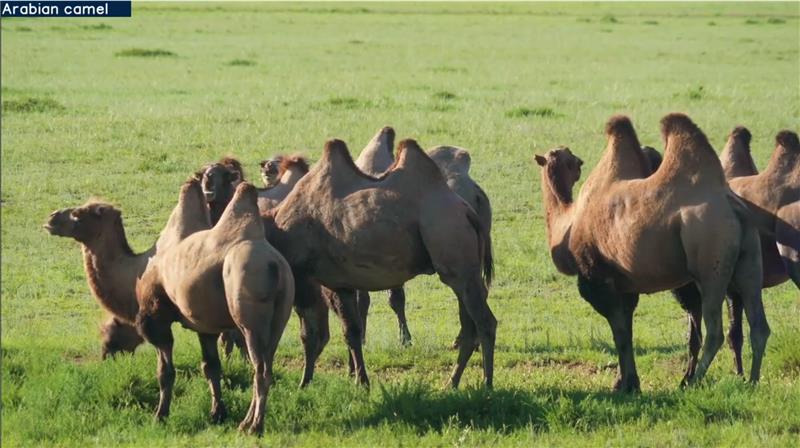
The pipeline classifies each frame and overlays the top label and confidence score in the corner. Results are rendered on the display or saved to the output file.
***
| File | Download | Save as |
| --------------------- | ------------------------------------------------------------------------------------------------------------------------------------------------------ | -------------------------- |
| InceptionV3 model | [Qualcomm AI Hub — InceptionV3](https://aihub.qualcomm.com/iot/models/inception_v3) | `mobilenet_v2_w8a8.tflite` |
| Classification labels | mobilenet.json | `mobilenet.json` |
| Sample video | Input video | `ai_demo_sample.mp4` |
If any downloaded file is a `.zip` archive, extract it on your host machine before copying:
`unzip filename.zip`
```bash SCP (SSH) theme={null}
# Replace $HOME to the appropriate device path before running the commands.
# For QLI: /root
# For Ubuntu: /home/ubuntu
# Modify this based on your platform and ensure files are copied to the correct location on the device.
ssh @ "mkdir -p $HOME/{models,media,media/output}"
scp mobilenet_v2_w8a8.tflite @:$HOME/models/
scp mobilenet.json @:$HOME/labels/
scp ai_demo_sample.mp4 @:$HOME/media/
```
```bash SCP (SSH) theme={null}
# Run from your host machine — replace and
ssh @
```
Run below command on your device
```bash theme={null}
export MODEL_NAME=mobilenet_v2_w8a8.tflite
export LABELS_NAME=mobilenet.json
export SRC_VIDEO_NAME=ai_demo_sample.mp4
```
```bash theme={null}
gst-launch-1.0 -e --gst-debug=2 \
filesrc location=$HOME/media/$SRC_VIDEO_NAME ! qtdemux ! h264parse ! \
v4l2h264dec capture-io-mode=4 output-io-mode=4 ! video/x-raw,format=NV12 ! queue ! \
tee name=t ! qtimetamux name=class_mux ! qtivoverlay ! waylandsink fullscreen=true sync=true \
t. ! queue ! qtimlvconverter ! queue ! \
qtimltflite model=$HOME/models/$MODEL_NAME delegate=external external-delegate-path=libQnnTFLiteDelegate.so external-delegate-options="QNNExternalDelegate,backend_type=htp,log_level=(string)1;" ! queue ! \
qtimlpostprocess module=mobilenet labels=$HOME/labels/$LABELS_NAME settings="{\"confidence\": 51.0}" ! text/x-raw ! queue ! class_mux.
```
The pipeline classifies each frame and overlays the top label and confidence score in the corner. Results are rendered on the display or saved to the output file.
 | Plugin | Description |
| -------------------------------------------------------- | --------------------------------------------------------------------------------------------------- |
| filesrc | Reads an H.264 encoded video file as the pipeline source. |
| [v4l2h264dec](../plugin-reference/v4l2h264dec) | Hardware-decodes the H.264 stream to raw NV12 frames using V4L2. |
| tee | Splits the decoded stream for video passthrough and ML inference branches. |
| [qtimlvconverter](../plugin-reference/qtimlvconverter) | Preprocesses video frames (color conversion, scaling, normalization) and converts to tensor stream. |
| [qtimltflite](../plugin-reference/qtimltflite) | Loads the TFLite model, applies the chosen delegate, and runs inference to produce result tensors. |
| [qtimlpostprocess](../plugin-reference/qtimlpostprocess) | Post-processes classification tensors, applies confidence threshold, and produces top-N label text. |
| [qtimetamux](../plugin-reference/qtimetamux) | Merges video and metadata/text streams, attaching inference results as GST buffer metadata. |
| [qtivoverlay](../plugin-reference/qtivoverlay) | Overlays inference results (labels, bounding boxes, keypoints) onto the video frame using CL. |
| [v4l2h264enc](../plugin-reference/v4l2h264enc) | Hardware-encodes the video stream to H.264 using V4L2. |
| filesink | Writes the encoded video stream to an output file. |
### Segmentation
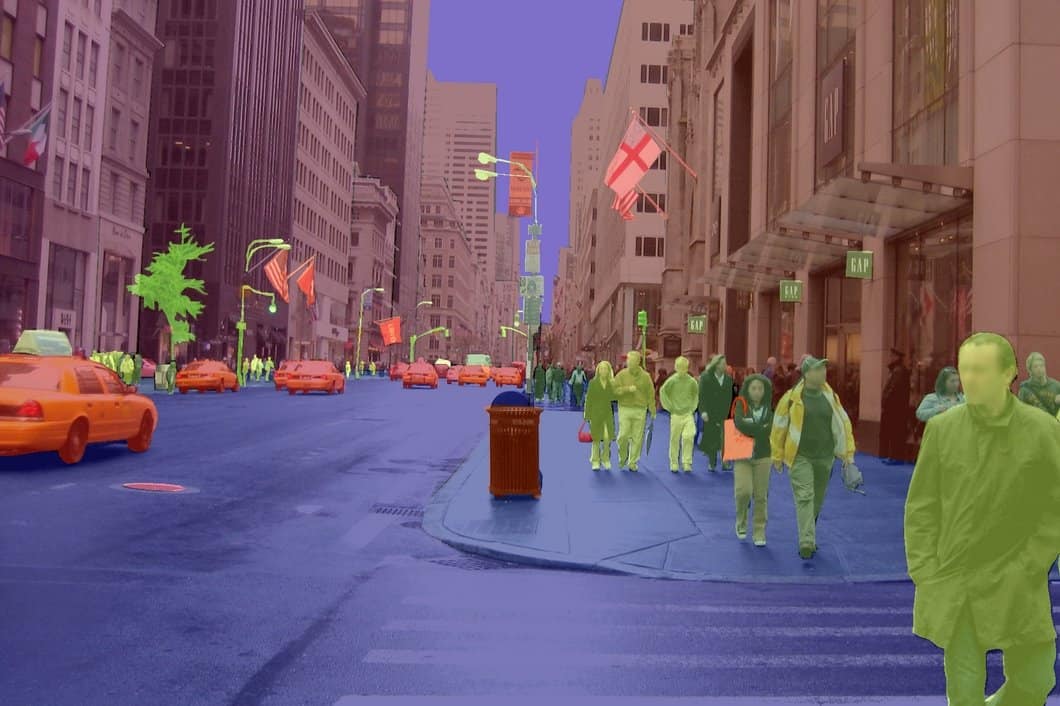
Performs pixel-wise semantic segmentation using [DeepLabV3+](https://aihub.qualcomm.com/iot/models/deeplabv3_plus_mobilenet) and blends the segmentation mask with the original video.
**Pipeline Diagram**
| Plugin | Description |
| -------------------------------------------------------- | --------------------------------------------------------------------------------------------------- |
| filesrc | Reads an H.264 encoded video file as the pipeline source. |
| [v4l2h264dec](../plugin-reference/v4l2h264dec) | Hardware-decodes the H.264 stream to raw NV12 frames using V4L2. |
| tee | Splits the decoded stream for video passthrough and ML inference branches. |
| [qtimlvconverter](../plugin-reference/qtimlvconverter) | Preprocesses video frames (color conversion, scaling, normalization) and converts to tensor stream. |
| [qtimltflite](../plugin-reference/qtimltflite) | Loads the TFLite model, applies the chosen delegate, and runs inference to produce result tensors. |
| [qtimlpostprocess](../plugin-reference/qtimlpostprocess) | Post-processes classification tensors, applies confidence threshold, and produces top-N label text. |
| [qtimetamux](../plugin-reference/qtimetamux) | Merges video and metadata/text streams, attaching inference results as GST buffer metadata. |
| [qtivoverlay](../plugin-reference/qtivoverlay) | Overlays inference results (labels, bounding boxes, keypoints) onto the video frame using CL. |
| [v4l2h264enc](../plugin-reference/v4l2h264enc) | Hardware-encodes the video stream to H.264 using V4L2. |
| filesink | Writes the encoded video stream to an output file. |
### Segmentation
Performs pixel-wise semantic segmentation using [DeepLabV3+](https://aihub.qualcomm.com/iot/models/deeplabv3_plus_mobilenet) and blends the segmentation mask with the original video.
**Pipeline Diagram**
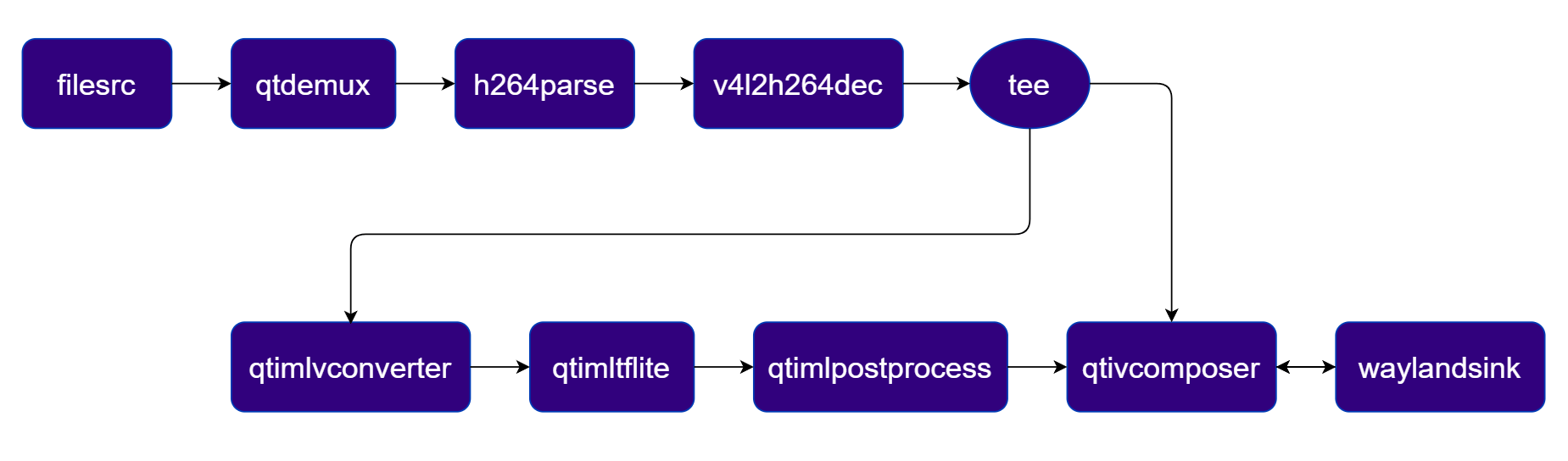 ***
| File | Download | Save as |
| ------------------- | ------------------------------------------------------------------------------------------------------------------------------------------------------ | -------------------------------------- |
| DeepLabV3+ model | [Qualcomm AI Hub — DeepLabV3+](https://aihub.qualcomm.com/iot/models/deeplabv3_plus_mobilenet) | `deeplabv3_plus_mobilenet_w8a8.tflite` |
| Segmentation labels | dv3-argmax.json | `dv3-argmax.json` |
| Sample video | Input video | `ai_demo_sample.mp4` |
If any downloaded file is a `.zip` archive, extract it on your host machine before copying:
`unzip filename.zip`
```bash SCP (SSH) theme={null}
# Replace $HOME to the appropriate device path before running the commands.
# For QLI: /root
# For Ubuntu: /home/ubuntu
# Modify this based on your platform and ensure files are copied to the correct location on the device.
ssh @ "mkdir -p $HOME/{models,media,media/output}"
scp deeplabv3_plus_mobilenet_w8a8.tflite @:$HOME/models/
scp dv3-argmax.json @:$HOME/labels/
scp ai_demo_sample.mp4 @:$HOME/media/
```
```bash SCP (SSH) theme={null}
# Run from your host machine — replace and
ssh @
```
Run below command on your device
```bash theme={null}
export MODEL_NAME=deeplabv3_plus_mobilenet_w8a8.tflite
export LABELS_NAME=dv3-argmax.json
export SRC_VIDEO_NAME=ai_demo_sample.mp4
```
```bash theme={null}
gst-launch-1.0 -e --gst-debug=2 \
filesrc location=$HOME/media/$SRC_VIDEO_NAME ! qtdemux ! h264parse ! \
v4l2h264dec capture-io-mode=4 output-io-mode=4 ! video/x-raw,format=NV12 ! queue ! \
tee name=t \
t. ! queue ! qtivcomposer name=seg_mix sink_1::alpha=0.5 ! queue ! waylandsink fullscreen=true sync=true \
t. ! queue ! qtimlvconverter ! queue ! \
qtimltflite model=$HOME/models/$MODEL_NAME delegate=external external-delegate-path=libQnnTFLiteDelegate.so external-delegate-options="QNNExternalDelegate,backend_type=htp,log_level=(string)1;" ! queue ! \
qtimlpostprocess module=deeplab-argmax labels=$HOME/labels/$LABELS_NAME ! video/x-raw,format=BGRA,width=520,height=520 ! queue ! seg_mix.
```
The pipeline blends the segmentation mask with the original video frame. Results are rendered on the display or saved to the output file.
***
| File | Download | Save as |
| ------------------- | ------------------------------------------------------------------------------------------------------------------------------------------------------ | -------------------------------------- |
| DeepLabV3+ model | [Qualcomm AI Hub — DeepLabV3+](https://aihub.qualcomm.com/iot/models/deeplabv3_plus_mobilenet) | `deeplabv3_plus_mobilenet_w8a8.tflite` |
| Segmentation labels | dv3-argmax.json | `dv3-argmax.json` |
| Sample video | Input video | `ai_demo_sample.mp4` |
If any downloaded file is a `.zip` archive, extract it on your host machine before copying:
`unzip filename.zip`
```bash SCP (SSH) theme={null}
# Replace $HOME to the appropriate device path before running the commands.
# For QLI: /root
# For Ubuntu: /home/ubuntu
# Modify this based on your platform and ensure files are copied to the correct location on the device.
ssh @ "mkdir -p $HOME/{models,media,media/output}"
scp deeplabv3_plus_mobilenet_w8a8.tflite @:$HOME/models/
scp dv3-argmax.json @:$HOME/labels/
scp ai_demo_sample.mp4 @:$HOME/media/
```
```bash SCP (SSH) theme={null}
# Run from your host machine — replace and
ssh @
```
Run below command on your device
```bash theme={null}
export MODEL_NAME=deeplabv3_plus_mobilenet_w8a8.tflite
export LABELS_NAME=dv3-argmax.json
export SRC_VIDEO_NAME=ai_demo_sample.mp4
```
```bash theme={null}
gst-launch-1.0 -e --gst-debug=2 \
filesrc location=$HOME/media/$SRC_VIDEO_NAME ! qtdemux ! h264parse ! \
v4l2h264dec capture-io-mode=4 output-io-mode=4 ! video/x-raw,format=NV12 ! queue ! \
tee name=t \
t. ! queue ! qtivcomposer name=seg_mix sink_1::alpha=0.5 ! queue ! waylandsink fullscreen=true sync=true \
t. ! queue ! qtimlvconverter ! queue ! \
qtimltflite model=$HOME/models/$MODEL_NAME delegate=external external-delegate-path=libQnnTFLiteDelegate.so external-delegate-options="QNNExternalDelegate,backend_type=htp,log_level=(string)1;" ! queue ! \
qtimlpostprocess module=deeplab-argmax labels=$HOME/labels/$LABELS_NAME ! video/x-raw,format=BGRA,width=520,height=520 ! queue ! seg_mix.
```
The pipeline blends the segmentation mask with the original video frame. Results are rendered on the display or saved to the output file.
 ***
| Plugin | Description |
| -------------------------------------------------------- | --------------------------------------------------------------------------------------------------- |
| filesrc | Reads an H.264 encoded video file as the pipeline source. |
| [v4l2h264dec](../plugin-reference/v4l2h264dec) | Hardware-decodes the H.264 stream to raw NV12 frames using V4L2. |
| [qtivtransform](../plugin-reference/qtivtransform) | Performs GPU-accelerated color/format conversion on the video frame. |
| tee | Splits the stream for video passthrough and ML inference branches. |
| [qtimlvconverter](../plugin-reference/qtimlvconverter) | Preprocesses video frames (color conversion, scaling, normalization) and converts to tensor stream. |
| [qtimltflite](../plugin-reference/qtimltflite) | Loads the TFLite model, applies the chosen delegate, and runs inference to produce result tensors. |
| [qtimlpostprocess](../plugin-reference/qtimlpostprocess) | Applies argmax post-processing to segmentation tensors and outputs an RGBA mask frame. |
| [qtivcomposer](../plugin-reference/qtivcomposer) | Blends the original video frame with the segmentation mask (alpha composite). |
| [v4l2h264enc](../plugin-reference/v4l2h264enc) | Hardware-encodes the video stream to H.264 using V4L2. |
| filesink | Writes the encoded video stream to an output file. |
***
### Pose Estimation
This pipeline performs real-time Human Pose Estimation using the [HRNet Pose](https://aihub.qualcomm.com/iot/models/hrnet_pose) model. It analyzes video frames to identify individuals and precisely maps their anatomical keypoints (such as shoulders, elbows, knees, and ankles). It then generates a skeletal overlay on the video stream, allowing for the tracking of body posture and movement dynamics.
**Pipeline Diagram**
***
| Plugin | Description |
| -------------------------------------------------------- | --------------------------------------------------------------------------------------------------- |
| filesrc | Reads an H.264 encoded video file as the pipeline source. |
| [v4l2h264dec](../plugin-reference/v4l2h264dec) | Hardware-decodes the H.264 stream to raw NV12 frames using V4L2. |
| [qtivtransform](../plugin-reference/qtivtransform) | Performs GPU-accelerated color/format conversion on the video frame. |
| tee | Splits the stream for video passthrough and ML inference branches. |
| [qtimlvconverter](../plugin-reference/qtimlvconverter) | Preprocesses video frames (color conversion, scaling, normalization) and converts to tensor stream. |
| [qtimltflite](../plugin-reference/qtimltflite) | Loads the TFLite model, applies the chosen delegate, and runs inference to produce result tensors. |
| [qtimlpostprocess](../plugin-reference/qtimlpostprocess) | Applies argmax post-processing to segmentation tensors and outputs an RGBA mask frame. |
| [qtivcomposer](../plugin-reference/qtivcomposer) | Blends the original video frame with the segmentation mask (alpha composite). |
| [v4l2h264enc](../plugin-reference/v4l2h264enc) | Hardware-encodes the video stream to H.264 using V4L2. |
| filesink | Writes the encoded video stream to an output file. |
***
### Pose Estimation
This pipeline performs real-time Human Pose Estimation using the [HRNet Pose](https://aihub.qualcomm.com/iot/models/hrnet_pose) model. It analyzes video frames to identify individuals and precisely maps their anatomical keypoints (such as shoulders, elbows, knees, and ankles). It then generates a skeletal overlay on the video stream, allowing for the tracking of body posture and movement dynamics.
**Pipeline Diagram**
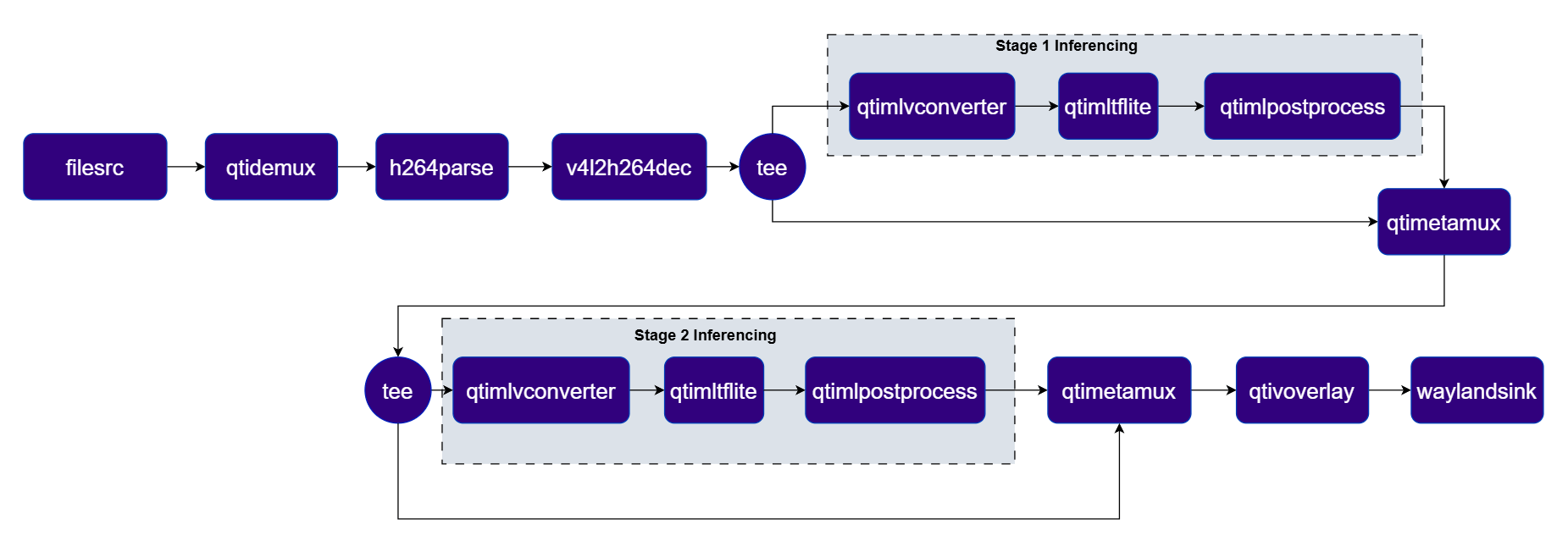 ***
| File | Download | Save as |
| --------------------------- | ------------------------------------------------------------------------------------------------------------------------------------------------------ | ----------------------------------- |
| Person/foot detection model | [Qualcomm AI Hub — HRNet Pose](https://aihub.qualcomm.com/iot/models/foot_track_net) | `person_foot_detection_w8a8.tflite` |
| Person detection labels | foot\_track\_net.json | `foot_track_net.json` |
| HRNet pose model | [Qualcomm AI Hub — HRNet Pose](https://aihub.qualcomm.com/iot/models/hrnet_pose) | `hrnetpose_w8a8.tflite` |
| Pose labels | hrnet.json | `hrnet.json` |
| Sample video | Input video | `ai_demo_sample.mp4` |
You also need `foot_track_net_settings.json` and `hrnet_settings.json` — these are included in the QIM SDK sample package at `$HOME/labels/` on Qualcomm Linux or `$HOME/models/` on Ubuntu.
If any downloaded file is a `.zip` archive, extract it on your host machine before copying:
`unzip filename.zip`
```bash SCP (SSH) theme={null}
# Replace $HOME to the appropriate device path before running the commands.
# For QLI: /root
# For Ubuntu: /home/ubuntu
# Modify this based on your platform and ensure files are copied to the correct location on the device.
ssh @ "mkdir -p $HOME/{models,media,media/output}"
scp person_foot_detection_w8a8.tflite @:$HOME/models/
scp foot_track_net.json @:$HOME/labels/
scp hrnetpose_w8a8.tflite @:$HOME/models/
scp hrnet.json @:$HOME/labels/
scp ai_demo_sample.mp4 @:$HOME/media/
```
```bash SCP (SSH) theme={null}
# Run from your host machine — replace and
ssh @
```
Run below command on your device
```bash theme={null}
export MODEL_NAME_1=person_foot_detection_w8a8.tflite
export LABELS_NAME_1=foot_track_net.json
export MODEL_NAME_2=hrnetpose_w8a8.tflite
export LABELS_NAME_2=hrnet.json
export SRC_VIDEO_NAME=ai_demo_sample.mp4
```
```bash theme={null}
gst-launch-1.0 -e --gst-debug=2 \
qtimlvconverter name=stage_01_preproc \
qtimltflite name=stage_01_inference delegate=external external-delegate-path=libQnnTFLiteDelegate.so \
external-delegate-options="QNNExternalDelegate,backend_type=htp,log_level=(string)1;" \
model=$HOME/models/$MODEL_NAME_1 \
qtimlpostprocess name=stage_01_postproc results=10 module=qpd labels=$HOME/labels/$LABELS_NAME_1 \
settings=$HOME/labels/foot_track_net_settings.json \
qtimlvconverter name=stage_02_preproc mode=roi-batch-cumulative image-disposition=centre \
qtimltflite name=stage_02_inference delegate=external external-delegate-path=libQnnTFLiteDelegate.so \
external-delegate-options="QNNExternalDelegate,backend_type=htp,htp_performance_mode=(string)2,log_level=(string)1;" \
model=$HOME/models/$MODEL_NAME_2 \
qtimlpostprocess name=stage_02_postproc results=2 module=hrnet labels=$HOME/labels/$LABELS_NAME_2 \
settings=$HOME/labels/hrnet_settings.json \
filesrc location=$HOME/media/$SRC_VIDEO_NAME ! qtdemux ! h264parse ! \
v4l2h264dec capture-io-mode=4 output-io-mode=4 ! video/x-raw,format=NV12 ! queue ! \
tee name=t_split_1 \
t_split_1. ! queue ! stage_01_preproc. stage_01_preproc. ! queue ! stage_01_inference. stage_01_inference. ! queue ! \
stage_01_postproc. stage_01_postproc. ! text/x-raw ! queue ! qtimetamux name=metamux_1 \
t_split_1. ! queue ! metamux_1. metamux_1. ! queue ! tee name=t_split_2 \
t_split_2. ! queue ! stage_02_preproc. stage_02_preproc. ! queue ! stage_02_inference. stage_02_inference. ! queue ! \
stage_02_postproc. stage_02_postproc. ! text/x-raw ! queue ! qtimetamux name=metamux_2 \
metamux_2. ! queue ! qtivoverlay ! queue ! waylandsink fullscreen=true sync=true \
t_split_2. ! queue ! metamux_2.
```
The pipeline detects persons and overlays skeleton keypoints on each frame. Results are rendered on the display or saved to the output file.
| Plugin | Description |
| -------------------------------------------------------- | ------------------------------------------------------------------------------------------------ |
| filesrc | Reads an H.264 encoded video file as the pipeline source. |
| [v4l2h264dec](../plugin-reference/v4l2h264dec) | Hardware-decodes the H.264 stream to raw NV12 frames using V4L2. |
| [qtivtransform](../plugin-reference/qtivtransform) | Performs GPU-accelerated color/format conversion on the video frame. |
| tee | Splits the stream for video passthrough and person-detection inference. |
| [qtimlvconverter](../plugin-reference/qtimlvconverter) | Preprocesses frames for Stage 1 (person detection) and Stage 2 (pose estimation) respectively. |
| [qtimltflite](../plugin-reference/qtimltflite) | Runs Stage 1 (foot/person detection) and Stage 2 (HRNet pose estimation) inference sequentially. |
| [qtimlpostprocess](../plugin-reference/qtimlpostprocess) | Post-processes detection and pose tensors, producing keypoint metadata for overlay. |
| [qtimetamux](../plugin-reference/qtimetamux) | Merges video and metadata/text streams, attaching inference results as GST buffer metadata. |
| [qtivoverlay](../plugin-reference/qtivoverlay) | Overlays inference results (labels, bounding boxes, keypoints) onto the video frame using CL. |
| [v4l2h264enc](../plugin-reference/v4l2h264enc) | Hardware-encodes the video stream to H.264 using V4L2. |
| filesink | Writes the encoded video stream to an output file. |
### AI Wall
This use-case demonstrates the capability to run **4 parallel AI inference sessions** simultaneously using [InceptionV3](https://aihub.qualcomm.com/iot/models/inception_v3), [Face Detection Lite](https://aihub.qualcomm.com/iot/models/face_det_lite), [DeepLabV3+](https://aihub.qualcomm.com/iot/models/deeplabv3_plus_mobilenet), and [YOLOX](https://aihub.qualcomm.com/iot/models/yolox). The results are composed into a single 2x2 grid display. This use case highlights the multi-stream processing and compositing capabilities of the platform.
**Pipeline Diagram**
***
| File | Download | Save as |
| --------------------------- | ------------------------------------------------------------------------------------------------------------------------------------------------------ | ----------------------------------- |
| Person/foot detection model | [Qualcomm AI Hub — HRNet Pose](https://aihub.qualcomm.com/iot/models/foot_track_net) | `person_foot_detection_w8a8.tflite` |
| Person detection labels | foot\_track\_net.json | `foot_track_net.json` |
| HRNet pose model | [Qualcomm AI Hub — HRNet Pose](https://aihub.qualcomm.com/iot/models/hrnet_pose) | `hrnetpose_w8a8.tflite` |
| Pose labels | hrnet.json | `hrnet.json` |
| Sample video | Input video | `ai_demo_sample.mp4` |
You also need `foot_track_net_settings.json` and `hrnet_settings.json` — these are included in the QIM SDK sample package at `$HOME/labels/` on Qualcomm Linux or `$HOME/models/` on Ubuntu.
If any downloaded file is a `.zip` archive, extract it on your host machine before copying:
`unzip filename.zip`
```bash SCP (SSH) theme={null}
# Replace $HOME to the appropriate device path before running the commands.
# For QLI: /root
# For Ubuntu: /home/ubuntu
# Modify this based on your platform and ensure files are copied to the correct location on the device.
ssh @ "mkdir -p $HOME/{models,media,media/output}"
scp person_foot_detection_w8a8.tflite @:$HOME/models/
scp foot_track_net.json @:$HOME/labels/
scp hrnetpose_w8a8.tflite @:$HOME/models/
scp hrnet.json @:$HOME/labels/
scp ai_demo_sample.mp4 @:$HOME/media/
```
```bash SCP (SSH) theme={null}
# Run from your host machine — replace and
ssh @
```
Run below command on your device
```bash theme={null}
export MODEL_NAME_1=person_foot_detection_w8a8.tflite
export LABELS_NAME_1=foot_track_net.json
export MODEL_NAME_2=hrnetpose_w8a8.tflite
export LABELS_NAME_2=hrnet.json
export SRC_VIDEO_NAME=ai_demo_sample.mp4
```
```bash theme={null}
gst-launch-1.0 -e --gst-debug=2 \
qtimlvconverter name=stage_01_preproc \
qtimltflite name=stage_01_inference delegate=external external-delegate-path=libQnnTFLiteDelegate.so \
external-delegate-options="QNNExternalDelegate,backend_type=htp,log_level=(string)1;" \
model=$HOME/models/$MODEL_NAME_1 \
qtimlpostprocess name=stage_01_postproc results=10 module=qpd labels=$HOME/labels/$LABELS_NAME_1 \
settings=$HOME/labels/foot_track_net_settings.json \
qtimlvconverter name=stage_02_preproc mode=roi-batch-cumulative image-disposition=centre \
qtimltflite name=stage_02_inference delegate=external external-delegate-path=libQnnTFLiteDelegate.so \
external-delegate-options="QNNExternalDelegate,backend_type=htp,htp_performance_mode=(string)2,log_level=(string)1;" \
model=$HOME/models/$MODEL_NAME_2 \
qtimlpostprocess name=stage_02_postproc results=2 module=hrnet labels=$HOME/labels/$LABELS_NAME_2 \
settings=$HOME/labels/hrnet_settings.json \
filesrc location=$HOME/media/$SRC_VIDEO_NAME ! qtdemux ! h264parse ! \
v4l2h264dec capture-io-mode=4 output-io-mode=4 ! video/x-raw,format=NV12 ! queue ! \
tee name=t_split_1 \
t_split_1. ! queue ! stage_01_preproc. stage_01_preproc. ! queue ! stage_01_inference. stage_01_inference. ! queue ! \
stage_01_postproc. stage_01_postproc. ! text/x-raw ! queue ! qtimetamux name=metamux_1 \
t_split_1. ! queue ! metamux_1. metamux_1. ! queue ! tee name=t_split_2 \
t_split_2. ! queue ! stage_02_preproc. stage_02_preproc. ! queue ! stage_02_inference. stage_02_inference. ! queue ! \
stage_02_postproc. stage_02_postproc. ! text/x-raw ! queue ! qtimetamux name=metamux_2 \
metamux_2. ! queue ! qtivoverlay ! queue ! waylandsink fullscreen=true sync=true \
t_split_2. ! queue ! metamux_2.
```
The pipeline detects persons and overlays skeleton keypoints on each frame. Results are rendered on the display or saved to the output file.
| Plugin | Description |
| -------------------------------------------------------- | ------------------------------------------------------------------------------------------------ |
| filesrc | Reads an H.264 encoded video file as the pipeline source. |
| [v4l2h264dec](../plugin-reference/v4l2h264dec) | Hardware-decodes the H.264 stream to raw NV12 frames using V4L2. |
| [qtivtransform](../plugin-reference/qtivtransform) | Performs GPU-accelerated color/format conversion on the video frame. |
| tee | Splits the stream for video passthrough and person-detection inference. |
| [qtimlvconverter](../plugin-reference/qtimlvconverter) | Preprocesses frames for Stage 1 (person detection) and Stage 2 (pose estimation) respectively. |
| [qtimltflite](../plugin-reference/qtimltflite) | Runs Stage 1 (foot/person detection) and Stage 2 (HRNet pose estimation) inference sequentially. |
| [qtimlpostprocess](../plugin-reference/qtimlpostprocess) | Post-processes detection and pose tensors, producing keypoint metadata for overlay. |
| [qtimetamux](../plugin-reference/qtimetamux) | Merges video and metadata/text streams, attaching inference results as GST buffer metadata. |
| [qtivoverlay](../plugin-reference/qtivoverlay) | Overlays inference results (labels, bounding boxes, keypoints) onto the video frame using CL. |
| [v4l2h264enc](../plugin-reference/v4l2h264enc) | Hardware-encodes the video stream to H.264 using V4L2. |
| filesink | Writes the encoded video stream to an output file. |
### AI Wall
This use-case demonstrates the capability to run **4 parallel AI inference sessions** simultaneously using [InceptionV3](https://aihub.qualcomm.com/iot/models/inception_v3), [Face Detection Lite](https://aihub.qualcomm.com/iot/models/face_det_lite), [DeepLabV3+](https://aihub.qualcomm.com/iot/models/deeplabv3_plus_mobilenet), and [YOLOX](https://aihub.qualcomm.com/iot/models/yolox). The results are composed into a single 2x2 grid display. This use case highlights the multi-stream processing and compositing capabilities of the platform.
**Pipeline Diagram**
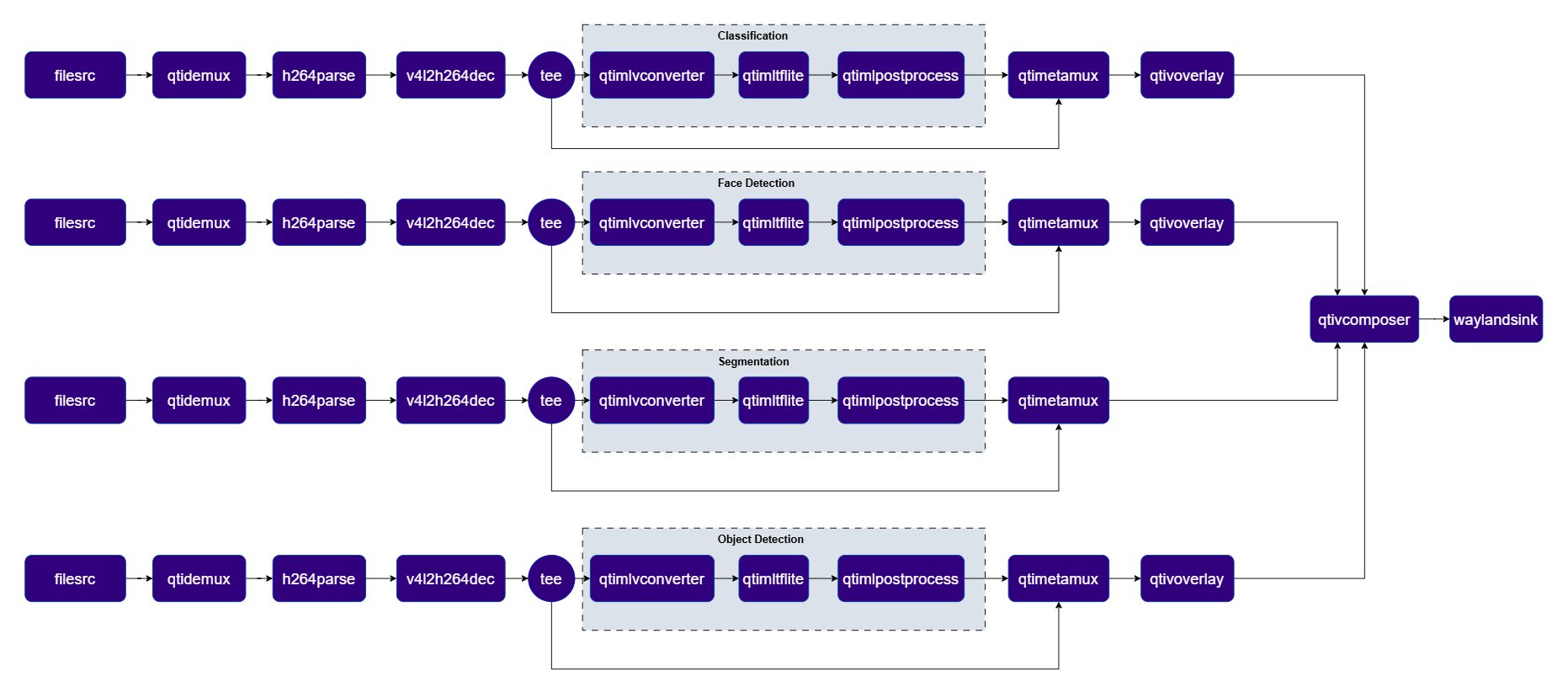 ***
| File | Download | Save as |
| ----------------------- | ------------------------------------------------------------------------------------------------------------------------------------------------------ | -------------------------------------- |
| Classification model | [Qualcomm AI Hub — InceptionV3](https://aihub.qualcomm.com/iot/models/inception_v3) | `mobilenet_v2_w8a8.tflite` |
| Classification labels | mobilenet.json | `mobilenet.json` |
| Face detection model | [Qualcomm AI Hub — Face Detection Lite](https://aihub.qualcomm.com/iot/models/face_det_lite) | `face_det_lite_w8a8.tflite` |
| Face detection labels | face\_det\_lite labels | `face_det_lite.json` |
| Segmentation model | [Qualcomm AI Hub — DeepLabV3+](https://aihub.qualcomm.com/iot/models/deeplabv3_plus_mobilenet) | `deeplabv3_plus_mobilenet_w8a8.tflite` |
| Segmentation labels | dv3-argmax.json | `dv3-argmax.json` |
| Object detection model | [Qualcomm AI Hub — YOLOX](https://aihub.qualcomm.com/iot/models/yolox) | `yolox_w8a8.tflite` |
| Object detection labels | yolov8.json | `yolov8.json` |
| Sample video | Input video | `ai_demo_sample.mp4` |
If any downloaded file is a `.zip` archive, extract it on your host machine before copying:
`unzip filename.zip`
```bash SCP (SSH) theme={null}
# Replace $HOME to the appropriate device path before running the commands.
# For QLI: /root
# For Ubuntu: /home/ubuntu
# Modify this based on your platform and ensure files are copied to the correct location on the device.
ssh @ "mkdir -p $HOME/{models,media,media/output}"
scp mobilenet_v2_w8a8.tflite @:$HOME/models/
scp mobilenet.json @:$HOME/labels/
scp face_det_lite_w8a8.tflite @:$HOME/models/
scp face_det_lite.json @:$HOME/labels/
scp deeplabv3_plus_mobilenet_w8a8.tflite @:$HOME/models/
scp dv3-argmax.json @:$HOME/labels/
scp yolox_w8a8.tflite @:$HOME/models/
scp yolov8.json @:$HOME/labels/
scp ai_demo_sample.mp4 @:$HOME/media/
```
```bash SCP (SSH) theme={null}
# Run from your host machine — replace and
ssh @
```
Run below command on your device
```bash theme={null}
export MODEL_NAME_1=mobilenet_v2_w8a8.tflite
export LABELS_NAME_1=mobilenet.json
export MODEL_NAME_2=face_det_lite_w8a8.tflite
export LABELS_NAME_2=face_det_lite.json
export MODEL_NAME_3=deeplabv3_plus_mobilenet_w8a8.tflite
export LABELS_NAME_3=dv3-argmax.json
export MODEL_NAME_4=yolox_w8a8.tflite
export LABELS_NAME_4=yolov8.json
export SRC_VIDEO_NAME=ai_demo_sample.mp4
```
```bash theme={null}
gst-launch-1.0 -e --gst-debug=2 \
qtimlvconverter name=class_pre \
qtimltflite name=class_infer model=$HOME/models/$MODEL_NAME_1 delegate=external external-delegate-path=libQnnTFLiteDelegate.so external-delegate-options="QNNExternalDelegate,backend_type=htp,log_level=(string)1;" \
qtimlpostprocess name=class_post results=5 module=mobilenet labels=$HOME/labels/$LABELS_NAME_1 settings="{\"confidence\": 51.0}" \
qtimetamux name=class_mux \
qtivoverlay name=class_overlay \
qtimlvconverter name=face_pre \
qtimltflite name=face_infer model=$HOME/models/$MODEL_NAME_2 delegate=external external-delegate-path=libQnnTFLiteDelegate.so external-delegate-options="QNNExternalDelegate,backend_type=htp,log_level=(string)1;" \
qtimlpostprocess name=face_post module=qfd results=6 labels=$HOME/labels/$LABELS_NAME_2 \
qtimetamux name=face_mux \
qtivoverlay name=face_overlay \
qtimlvconverter name=seg_pre \
qtimltflite name=seg_infer model=$HOME/models/$MODEL_NAME_3 delegate=external external-delegate-path=libQnnTFLiteDelegate.so external-delegate-options="QNNExternalDelegate,backend_type=htp,log_level=(string)1;" \
qtimlpostprocess name=seg_post module=deeplab-argmax labels=$HOME/labels/$LABELS_NAME_3 \
qtivcomposer name=seg_mix sink_1::alpha=0.5 \
qtimlvconverter name=obj_pre \
qtimltflite name=obj_infer model=$HOME/models/$MODEL_NAME_4 delegate=external external-delegate-path=libQnnTFLiteDelegate.so external-delegate-options="QNNExternalDelegate,backend_type=htp,log_level=(string)1;" \
qtimlpostprocess name=obj_post module=yolov8 labels=$HOME/labels/$LABELS_NAME_4 settings="{\"confidence\": 51.0}" \
qtimetamux name=obj_mux \
qtivcomposer name=comp \
sink_0::position="<0, 0>" sink_0::dimensions="<960, 540>" \
sink_1::position="<960, 0>" sink_1::dimensions="<960, 540>" \
sink_2::position="<0, 540>" sink_2::dimensions="<960, 540>" \
sink_3::position="<960, 540>" sink_3::dimensions="<960, 540>" ! \
queue ! waylandsink fullscreen=true sync=true \
filesrc location=$HOME/media/$SRC_VIDEO_NAME ! qtdemux ! h264parse ! \
v4l2h264dec capture-io-mode=4 output-io-mode=4 ! video/x-raw,format=NV12 ! queue ! \
tee name=class_tee \
class_tee. ! queue ! class_mux. \
class_tee. ! queue ! class_pre. class_pre. ! queue ! class_infer. class_infer. ! queue ! class_post. class_post. ! text/x-raw ! queue ! class_mux. \
class_mux. ! queue ! class_overlay. class_overlay. ! queue ! comp.sink_0 \
filesrc location=$HOME/media/$SRC_VIDEO_NAME ! qtdemux ! h264parse ! \
v4l2h264dec capture-io-mode=4 output-io-mode=4 ! video/x-raw,format=NV12 ! queue ! \
tee name=face_tee \
face_tee. ! queue ! face_mux. \
face_tee. ! queue ! face_pre. face_pre. ! queue ! face_infer. face_infer. ! queue ! face_post. face_post. ! text/x-raw ! queue ! face_mux. \
face_mux. ! queue ! face_overlay. face_overlay. ! queue ! comp.sink_1 \
filesrc location=$HOME/media/$SRC_VIDEO_NAME ! qtdemux ! h264parse ! \
v4l2h264dec capture-io-mode=4 output-io-mode=4 ! video/x-raw,format=NV12 ! queue ! \
tee name=seg_tee \
seg_tee. ! queue ! seg_mix. \
seg_tee. ! queue ! seg_pre. seg_pre. ! queue ! seg_infer. seg_infer. ! queue ! seg_post. seg_post. ! video/x-raw,format=BGRA,width=520,height=520 ! queue ! seg_mix. \
seg_mix. ! video/x-raw,format=NV12 ! queue ! comp.sink_2 \
filesrc location=$HOME/media/$SRC_VIDEO_NAME ! qtdemux ! h264parse ! \
v4l2h264dec capture-io-mode=4 output-io-mode=4 ! video/x-raw,format=NV12 ! queue ! \
tee name=obj_tee \
obj_tee. ! queue ! obj_mux. \
obj_tee. ! queue ! obj_pre. obj_pre. ! queue ! obj_infer. obj_infer. ! queue ! obj_post. obj_post. ! text/x-raw ! queue ! obj_mux. \
obj_mux. ! queue ! qtivoverlay ! queue ! comp.sink_3
```
The pipeline processes multiple streams simultaneously and renders all detection results in a composed multi-stream view on the display.
| Plugin | Description |
| -------------------------------------------------------- | --------------------------------------------------------------------------------------------------- |
| filesrc | Four independent file sources feed the four parallel AI branches. |
| [v4l2h264dec](../plugin-reference/v4l2h264dec) | Hardware-decodes each H.264 stream to raw NV12 frames using V4L2. |
| tee | Splits each branch stream for video passthrough and ML inference. |
| [qtimlvconverter](../plugin-reference/qtimlvconverter) | Preprocesses each branch's video frames into tensors for inference. |
| [qtimltflite](../plugin-reference/qtimltflite) | Runs branch-specific inference: classification, face detection, segmentation, and object detection. |
| [qtimlpostprocess](../plugin-reference/qtimlpostprocess) | Post-processes each branch's tensors (labels, bounding boxes, masks) for overlay or compositing. |
| [qtimetamux](../plugin-reference/qtimetamux) | Merges video and metadata/text streams, attaching inference results as GST buffer metadata. |
| [qtivcomposer](../plugin-reference/qtivcomposer) | Composites all four inference-overlaid streams into a 2×2 grid display. |
| [qtivoverlay](../plugin-reference/qtivoverlay) | Overlays inference results (labels, bounding boxes, keypoints) onto the video frame using CL. |
| [v4l2h264enc](../plugin-reference/v4l2h264enc) | Hardware-encodes the video stream to H.264 using V4L2. |
| filesink | Writes the encoded video stream to an output file. |
***
### Super Resolution
Real-time AI video upscaling using [quicksrnetlarge](https://aihub.qualcomm.com/iot/models/quicksrnetlarge) that reconstructs high-definition details from low-resolution inputs, visualized via a side-by-side comparison.
**Pipeline Diagram**
***
| File | Download | Save as |
| ----------------------- | ------------------------------------------------------------------------------------------------------------------------------------------------------ | -------------------------------------- |
| Classification model | [Qualcomm AI Hub — InceptionV3](https://aihub.qualcomm.com/iot/models/inception_v3) | `mobilenet_v2_w8a8.tflite` |
| Classification labels | mobilenet.json | `mobilenet.json` |
| Face detection model | [Qualcomm AI Hub — Face Detection Lite](https://aihub.qualcomm.com/iot/models/face_det_lite) | `face_det_lite_w8a8.tflite` |
| Face detection labels | face\_det\_lite labels | `face_det_lite.json` |
| Segmentation model | [Qualcomm AI Hub — DeepLabV3+](https://aihub.qualcomm.com/iot/models/deeplabv3_plus_mobilenet) | `deeplabv3_plus_mobilenet_w8a8.tflite` |
| Segmentation labels | dv3-argmax.json | `dv3-argmax.json` |
| Object detection model | [Qualcomm AI Hub — YOLOX](https://aihub.qualcomm.com/iot/models/yolox) | `yolox_w8a8.tflite` |
| Object detection labels | yolov8.json | `yolov8.json` |
| Sample video | Input video | `ai_demo_sample.mp4` |
If any downloaded file is a `.zip` archive, extract it on your host machine before copying:
`unzip filename.zip`
```bash SCP (SSH) theme={null}
# Replace $HOME to the appropriate device path before running the commands.
# For QLI: /root
# For Ubuntu: /home/ubuntu
# Modify this based on your platform and ensure files are copied to the correct location on the device.
ssh @ "mkdir -p $HOME/{models,media,media/output}"
scp mobilenet_v2_w8a8.tflite @:$HOME/models/
scp mobilenet.json @:$HOME/labels/
scp face_det_lite_w8a8.tflite @:$HOME/models/
scp face_det_lite.json @:$HOME/labels/
scp deeplabv3_plus_mobilenet_w8a8.tflite @:$HOME/models/
scp dv3-argmax.json @:$HOME/labels/
scp yolox_w8a8.tflite @:$HOME/models/
scp yolov8.json @:$HOME/labels/
scp ai_demo_sample.mp4 @:$HOME/media/
```
```bash SCP (SSH) theme={null}
# Run from your host machine — replace and
ssh @
```
Run below command on your device
```bash theme={null}
export MODEL_NAME_1=mobilenet_v2_w8a8.tflite
export LABELS_NAME_1=mobilenet.json
export MODEL_NAME_2=face_det_lite_w8a8.tflite
export LABELS_NAME_2=face_det_lite.json
export MODEL_NAME_3=deeplabv3_plus_mobilenet_w8a8.tflite
export LABELS_NAME_3=dv3-argmax.json
export MODEL_NAME_4=yolox_w8a8.tflite
export LABELS_NAME_4=yolov8.json
export SRC_VIDEO_NAME=ai_demo_sample.mp4
```
```bash theme={null}
gst-launch-1.0 -e --gst-debug=2 \
qtimlvconverter name=class_pre \
qtimltflite name=class_infer model=$HOME/models/$MODEL_NAME_1 delegate=external external-delegate-path=libQnnTFLiteDelegate.so external-delegate-options="QNNExternalDelegate,backend_type=htp,log_level=(string)1;" \
qtimlpostprocess name=class_post results=5 module=mobilenet labels=$HOME/labels/$LABELS_NAME_1 settings="{\"confidence\": 51.0}" \
qtimetamux name=class_mux \
qtivoverlay name=class_overlay \
qtimlvconverter name=face_pre \
qtimltflite name=face_infer model=$HOME/models/$MODEL_NAME_2 delegate=external external-delegate-path=libQnnTFLiteDelegate.so external-delegate-options="QNNExternalDelegate,backend_type=htp,log_level=(string)1;" \
qtimlpostprocess name=face_post module=qfd results=6 labels=$HOME/labels/$LABELS_NAME_2 \
qtimetamux name=face_mux \
qtivoverlay name=face_overlay \
qtimlvconverter name=seg_pre \
qtimltflite name=seg_infer model=$HOME/models/$MODEL_NAME_3 delegate=external external-delegate-path=libQnnTFLiteDelegate.so external-delegate-options="QNNExternalDelegate,backend_type=htp,log_level=(string)1;" \
qtimlpostprocess name=seg_post module=deeplab-argmax labels=$HOME/labels/$LABELS_NAME_3 \
qtivcomposer name=seg_mix sink_1::alpha=0.5 \
qtimlvconverter name=obj_pre \
qtimltflite name=obj_infer model=$HOME/models/$MODEL_NAME_4 delegate=external external-delegate-path=libQnnTFLiteDelegate.so external-delegate-options="QNNExternalDelegate,backend_type=htp,log_level=(string)1;" \
qtimlpostprocess name=obj_post module=yolov8 labels=$HOME/labels/$LABELS_NAME_4 settings="{\"confidence\": 51.0}" \
qtimetamux name=obj_mux \
qtivcomposer name=comp \
sink_0::position="<0, 0>" sink_0::dimensions="<960, 540>" \
sink_1::position="<960, 0>" sink_1::dimensions="<960, 540>" \
sink_2::position="<0, 540>" sink_2::dimensions="<960, 540>" \
sink_3::position="<960, 540>" sink_3::dimensions="<960, 540>" ! \
queue ! waylandsink fullscreen=true sync=true \
filesrc location=$HOME/media/$SRC_VIDEO_NAME ! qtdemux ! h264parse ! \
v4l2h264dec capture-io-mode=4 output-io-mode=4 ! video/x-raw,format=NV12 ! queue ! \
tee name=class_tee \
class_tee. ! queue ! class_mux. \
class_tee. ! queue ! class_pre. class_pre. ! queue ! class_infer. class_infer. ! queue ! class_post. class_post. ! text/x-raw ! queue ! class_mux. \
class_mux. ! queue ! class_overlay. class_overlay. ! queue ! comp.sink_0 \
filesrc location=$HOME/media/$SRC_VIDEO_NAME ! qtdemux ! h264parse ! \
v4l2h264dec capture-io-mode=4 output-io-mode=4 ! video/x-raw,format=NV12 ! queue ! \
tee name=face_tee \
face_tee. ! queue ! face_mux. \
face_tee. ! queue ! face_pre. face_pre. ! queue ! face_infer. face_infer. ! queue ! face_post. face_post. ! text/x-raw ! queue ! face_mux. \
face_mux. ! queue ! face_overlay. face_overlay. ! queue ! comp.sink_1 \
filesrc location=$HOME/media/$SRC_VIDEO_NAME ! qtdemux ! h264parse ! \
v4l2h264dec capture-io-mode=4 output-io-mode=4 ! video/x-raw,format=NV12 ! queue ! \
tee name=seg_tee \
seg_tee. ! queue ! seg_mix. \
seg_tee. ! queue ! seg_pre. seg_pre. ! queue ! seg_infer. seg_infer. ! queue ! seg_post. seg_post. ! video/x-raw,format=BGRA,width=520,height=520 ! queue ! seg_mix. \
seg_mix. ! video/x-raw,format=NV12 ! queue ! comp.sink_2 \
filesrc location=$HOME/media/$SRC_VIDEO_NAME ! qtdemux ! h264parse ! \
v4l2h264dec capture-io-mode=4 output-io-mode=4 ! video/x-raw,format=NV12 ! queue ! \
tee name=obj_tee \
obj_tee. ! queue ! obj_mux. \
obj_tee. ! queue ! obj_pre. obj_pre. ! queue ! obj_infer. obj_infer. ! queue ! obj_post. obj_post. ! text/x-raw ! queue ! obj_mux. \
obj_mux. ! queue ! qtivoverlay ! queue ! comp.sink_3
```
The pipeline processes multiple streams simultaneously and renders all detection results in a composed multi-stream view on the display.
| Plugin | Description |
| -------------------------------------------------------- | --------------------------------------------------------------------------------------------------- |
| filesrc | Four independent file sources feed the four parallel AI branches. |
| [v4l2h264dec](../plugin-reference/v4l2h264dec) | Hardware-decodes each H.264 stream to raw NV12 frames using V4L2. |
| tee | Splits each branch stream for video passthrough and ML inference. |
| [qtimlvconverter](../plugin-reference/qtimlvconverter) | Preprocesses each branch's video frames into tensors for inference. |
| [qtimltflite](../plugin-reference/qtimltflite) | Runs branch-specific inference: classification, face detection, segmentation, and object detection. |
| [qtimlpostprocess](../plugin-reference/qtimlpostprocess) | Post-processes each branch's tensors (labels, bounding boxes, masks) for overlay or compositing. |
| [qtimetamux](../plugin-reference/qtimetamux) | Merges video and metadata/text streams, attaching inference results as GST buffer metadata. |
| [qtivcomposer](../plugin-reference/qtivcomposer) | Composites all four inference-overlaid streams into a 2×2 grid display. |
| [qtivoverlay](../plugin-reference/qtivoverlay) | Overlays inference results (labels, bounding boxes, keypoints) onto the video frame using CL. |
| [v4l2h264enc](../plugin-reference/v4l2h264enc) | Hardware-encodes the video stream to H.264 using V4L2. |
| filesink | Writes the encoded video stream to an output file. |
***
### Super Resolution
Real-time AI video upscaling using [quicksrnetlarge](https://aihub.qualcomm.com/iot/models/quicksrnetlarge) that reconstructs high-definition details from low-resolution inputs, visualized via a side-by-side comparison.
**Pipeline Diagram**
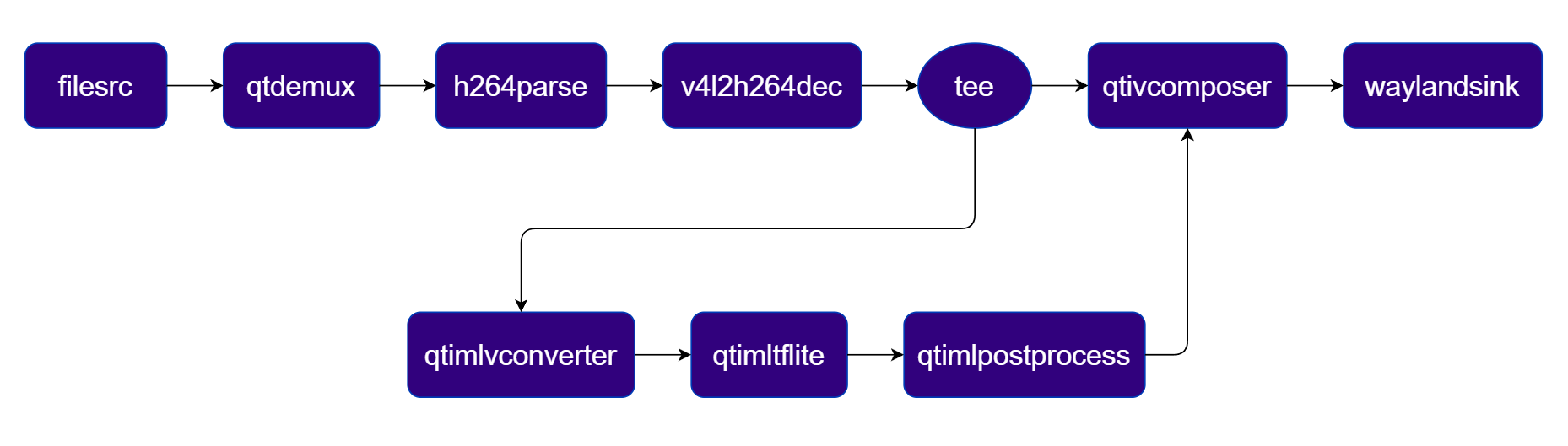 ***
| File | Download | Save as |
| ---------------------- | ------------------------------------------------------------------------------------------------------------------------------------------------------ | ----------------------------- |
| QuickSRNet Large model | [Qualcomm AI Hub — QuickSRNet Large](https://aihub.qualcomm.com/iot/models/quicksrnetlarge) | `quicksrnetlarge_w8a8.tflite` |
| Sample video | Input video | `ai_demo_sample.mp4` |
The super-resolution pipeline requires an input video resolution of 128×128 or similar low-resolution source.
If any downloaded file is a `.zip` archive, extract it on your host machine before copying:
`unzip filename.zip`
```bash SCP (SSH) theme={null}
# Replace $HOME to the appropriate device path before running the commands.
# For QLI: /root
# For Ubuntu: /home/ubuntu
# Modify this based on your platform and ensure files are copied to the correct location on the device.
ssh @ "mkdir -p $HOME/{models,media,media/output}"
scp quicksrnetlarge_w8a8.tflite @:$HOME/models/
scp ai_demo_sample.mp4 @:$HOME/media/
```
```bash SCP (SSH) theme={null}
# Run from your host machine — replace and
ssh @
```
Run below command on your device
```bash theme={null}
export MODEL_NAME=quicksrnetlarge_w8a8.tflite
export SRC_VIDEO_NAME=ai_demo_sample.mp4
```
```bash theme={null}
gst-launch-1.0 -e --gst-debug=2 \
filesrc location=$HOME/media/$SRC_VIDEO_NAME ! qtdemux ! h264parse ! \
v4l2h264dec capture-io-mode=4 output-io-mode=4 ! video/x-raw,format=NV12 ! queue ! \
tee name=t \
t. ! queue ! qtivcomposer name=mixer sink_0::position="<0, 0>" sink_0::dimensions="<960, 1080>" sink_1::position="<960, 0>" sink_1::dimensions="<960, 1080>" ! queue ! waylandsink fullscreen=true sync=true \
t. ! qtimlvconverter ! queue ! \
qtimltflite model=$HOME/models/$MODEL_NAME delegate=external external-delegate-path=libQnnTFLiteDelegate.so external-delegate-options="QNNExternalDelegate,backend_type=htp,log_level=(string)1;" ! queue ! \
qtimlpostprocess module=srnet ! video/x-raw,format=RGB ! queue ! mixer.
```
The pipeline outputs an upscaled high-resolution video. Results are rendered on the display or saved to the output file.
***
| Plugin | Description |
| ------------------------------------------------------------------ | --------------------------------------------------------------------------------------------------- |
| filesrc | Reads an H.264 encoded video file as the pipeline source. |
| [v4l2h264dec](../plugin-reference/v4l2h264dec) | Hardware-decodes the H.264 stream to raw NV12 frames using V4L2. |
| tee | Splits the decoded stream — one branch for the original view, one for SR inference. |
| [qtimlvconverter](../plugin-reference/qtimlvconverter) | Preprocesses video frames (color conversion, scaling, normalization) and converts to tensor stream. |
| [qtimltflite](../plugin-reference/qtimltflite) | Loads the TFLite model, applies the chosen delegate, and runs inference to produce result tensors. |
| [qtimlvsuperresolution](../plugin-reference/qtimlvsuperresolution) | Applies the super-resolution post-processing module to reconstruct high-definition output. |
| [qtivcomposer](../plugin-reference/qtivcomposer) | Composites the original and upscaled streams side-by-side for comparison. |
| [waylandsink](../plugin-reference/waylandsink) | Renders the final composited video stream to a local display via Weston. |
***
### Daisy Chain
***
#### Detection-Classification Daisy Chain
This section details the Detection-Classification Daisy Chain pipeline. This pipeline demonstrates a cascaded inference approach where the output of the [YOLOX](https://aihub.qualcomm.com/iot/models/yolox) detection model is used to crop regions of interest (ROIs) which are then fed into the [InceptionV3](https://aihub.qualcomm.com/iot/models/inception_v3) classification model.
**Pipeline Diagram**
***
| File | Download | Save as |
| ---------------------- | ------------------------------------------------------------------------------------------------------------------------------------------------------ | ----------------------------- |
| QuickSRNet Large model | [Qualcomm AI Hub — QuickSRNet Large](https://aihub.qualcomm.com/iot/models/quicksrnetlarge) | `quicksrnetlarge_w8a8.tflite` |
| Sample video | Input video | `ai_demo_sample.mp4` |
The super-resolution pipeline requires an input video resolution of 128×128 or similar low-resolution source.
If any downloaded file is a `.zip` archive, extract it on your host machine before copying:
`unzip filename.zip`
```bash SCP (SSH) theme={null}
# Replace $HOME to the appropriate device path before running the commands.
# For QLI: /root
# For Ubuntu: /home/ubuntu
# Modify this based on your platform and ensure files are copied to the correct location on the device.
ssh @ "mkdir -p $HOME/{models,media,media/output}"
scp quicksrnetlarge_w8a8.tflite @:$HOME/models/
scp ai_demo_sample.mp4 @:$HOME/media/
```
```bash SCP (SSH) theme={null}
# Run from your host machine — replace and
ssh @
```
Run below command on your device
```bash theme={null}
export MODEL_NAME=quicksrnetlarge_w8a8.tflite
export SRC_VIDEO_NAME=ai_demo_sample.mp4
```
```bash theme={null}
gst-launch-1.0 -e --gst-debug=2 \
filesrc location=$HOME/media/$SRC_VIDEO_NAME ! qtdemux ! h264parse ! \
v4l2h264dec capture-io-mode=4 output-io-mode=4 ! video/x-raw,format=NV12 ! queue ! \
tee name=t \
t. ! queue ! qtivcomposer name=mixer sink_0::position="<0, 0>" sink_0::dimensions="<960, 1080>" sink_1::position="<960, 0>" sink_1::dimensions="<960, 1080>" ! queue ! waylandsink fullscreen=true sync=true \
t. ! qtimlvconverter ! queue ! \
qtimltflite model=$HOME/models/$MODEL_NAME delegate=external external-delegate-path=libQnnTFLiteDelegate.so external-delegate-options="QNNExternalDelegate,backend_type=htp,log_level=(string)1;" ! queue ! \
qtimlpostprocess module=srnet ! video/x-raw,format=RGB ! queue ! mixer.
```
The pipeline outputs an upscaled high-resolution video. Results are rendered on the display or saved to the output file.
***
| Plugin | Description |
| ------------------------------------------------------------------ | --------------------------------------------------------------------------------------------------- |
| filesrc | Reads an H.264 encoded video file as the pipeline source. |
| [v4l2h264dec](../plugin-reference/v4l2h264dec) | Hardware-decodes the H.264 stream to raw NV12 frames using V4L2. |
| tee | Splits the decoded stream — one branch for the original view, one for SR inference. |
| [qtimlvconverter](../plugin-reference/qtimlvconverter) | Preprocesses video frames (color conversion, scaling, normalization) and converts to tensor stream. |
| [qtimltflite](../plugin-reference/qtimltflite) | Loads the TFLite model, applies the chosen delegate, and runs inference to produce result tensors. |
| [qtimlvsuperresolution](../plugin-reference/qtimlvsuperresolution) | Applies the super-resolution post-processing module to reconstruct high-definition output. |
| [qtivcomposer](../plugin-reference/qtivcomposer) | Composites the original and upscaled streams side-by-side for comparison. |
| [waylandsink](../plugin-reference/waylandsink) | Renders the final composited video stream to a local display via Weston. |
***
### Daisy Chain
***
#### Detection-Classification Daisy Chain
This section details the Detection-Classification Daisy Chain pipeline. This pipeline demonstrates a cascaded inference approach where the output of the [YOLOX](https://aihub.qualcomm.com/iot/models/yolox) detection model is used to crop regions of interest (ROIs) which are then fed into the [InceptionV3](https://aihub.qualcomm.com/iot/models/inception_v3) classification model.
**Pipeline Diagram**
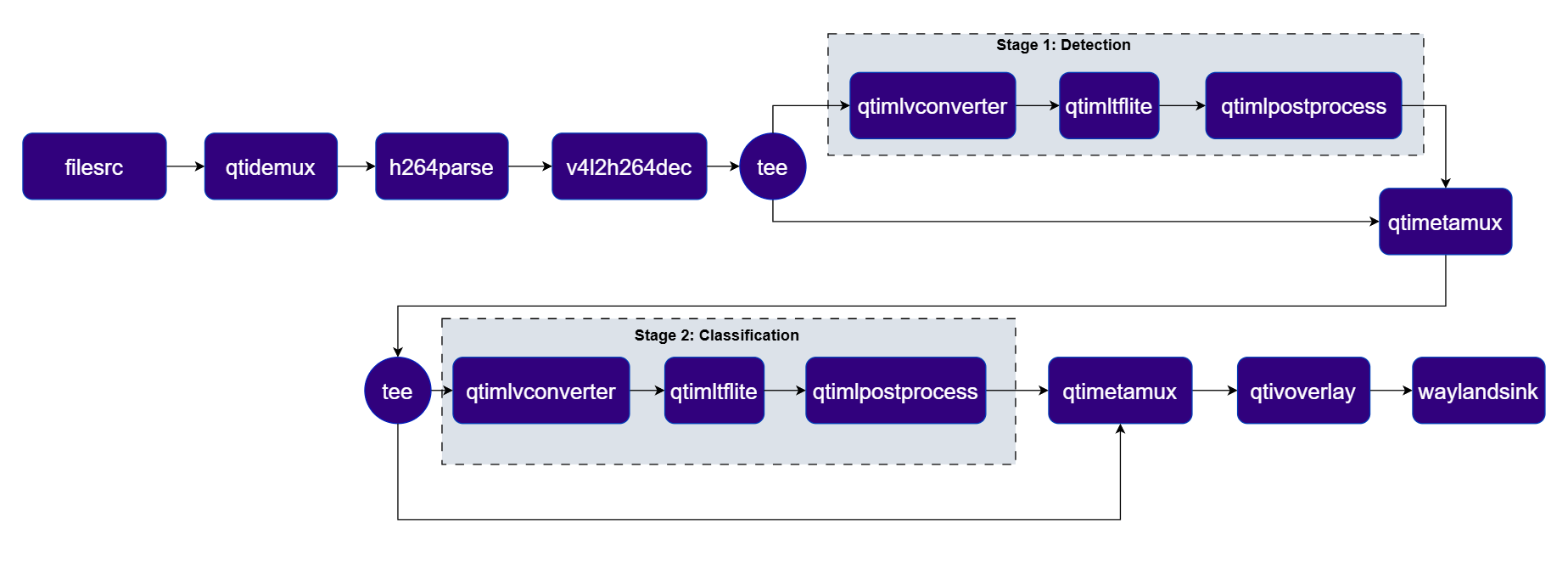 ***
| File | Download | Save as |
| ---------------------------------- | ------------------------------------------------------------------------------------------------------------------------------------------------------ | -------------------------- |
| Detection model (YOLOX) | [Qualcomm AI Hub — YOLOX](https://aihub.qualcomm.com/iot/models/yolox) | `yolox_w8a8.tflite` |
| Detection labels | yolov8.json | `yolov8.json` |
| Classification model (InceptionV3) | [Qualcomm AI Hub — InceptionV3](https://aihub.qualcomm.com/iot/models/inception_v3) | `mobilenet_v2_w8a8.tflite` |
| Classification labels | mobilenet.json | `mobilenet.json` |
| Sample video | Input video | `ai_demo_sample.mp4` |
If any downloaded file is a `.zip` archive, extract it on your host machine before copying:
`unzip filename.zip`
```bash SCP (SSH) theme={null}
# Replace $HOME to the appropriate device path before running the commands.
# For QLI: /root
# For Ubuntu: /home/ubuntu
# Modify this based on your platform and ensure files are copied to the correct location on the device.
ssh @ "mkdir -p $HOME/{models,media,media/output}"
scp yolox_w8a8.tflite @:$HOME/models/
scp yolov8.json @:$HOME/labels/
scp mobilenet_v2_w8a8.tflite @:$HOME/models/
scp mobilenet.json @:$HOME/labels/
scp ai_demo_sample.mp4 @:$HOME/media/
```
```bash SCP (SSH) theme={null}
# Run from your host machine — replace and
ssh @
```
Run below command on your device
```bash theme={null}
export MODEL_NAME_1=yolox_w8a8.tflite
export LABELS_NAME_1=yolov8.json
export MODEL_NAME_2=mobilenet_v2_w8a8.tflite
export LABELS_NAME_2=mobilenet.json
export SRC_VIDEO_NAME=ai_demo_sample.mp4
```
```bash theme={null}
gst-launch-1.0 -e --gst-debug=2 \
qtimlvconverter name=stage_01_preproc \
qtimltflite name=stage_01_inference delegate=external external-delegate-path=libQnnTFLiteDelegate.so \
external-delegate-options="QNNExternalDelegate,backend_type=htp,log_level=(string)1;" \
model=$HOME/models/$MODEL_NAME_1 \
qtimlpostprocess name=stage_01_postproc module=yolov8 labels=$HOME/labels/$LABELS_NAME_1 \
settings="{\"confidence\": 51.0}" \
qtimetamux name=metamux_1 \
qtivoverlay name=main_overlay \
qtimlvconverter name=stage_02_preproc \
qtimltflite name=stage_02_inference delegate=external external-delegate-path=libQnnTFLiteDelegate.so \
external-delegate-options="QNNExternalDelegate,backend_type=htp,log_level=(string)1;" \
model=$HOME/models/$MODEL_NAME_2 \
qtimlpostprocess name=stage_02_postproc module=mobilenet labels=$HOME/labels/$LABELS_NAME_2 \
settings="{\"confidence\": 51.0}" \
qtimetamux name=metamux_2 \
qtivoverlay name=cls_overlay \
filesrc location=$HOME/media/$SRC_VIDEO_NAME ! qtdemux ! h264parse ! \
v4l2h264dec capture-io-mode=4 output-io-mode=4 ! video/x-raw,format=NV12 ! queue ! \
tee name=t_split_1 \
t_split_1. ! queue ! metamux_1. \
t_split_1. ! queue ! stage_01_preproc. stage_01_preproc. ! queue ! stage_01_inference. stage_01_inference. ! queue ! \
stage_01_postproc. stage_01_postproc. ! text/x-raw ! queue ! metamux_1. \
metamux_1. ! queue ! tee name=t_split_2 \
t_split_2. ! queue ! metamux_2. \
t_split_2. ! queue ! stage_02_preproc. stage_02_preproc. ! queue ! stage_02_inference. stage_02_inference. ! queue ! \
stage_02_postproc. stage_02_postproc. ! text/x-raw ! queue ! metamux_2. \
metamux_2. ! queue ! cls_overlay. cls_overlay. ! queue ! waylandsink sync=true fullscreen=true
```
The pipeline classifies each frame and overlays the top label and confidence score in the corner. Results are rendered on the display or saved to the output file.
***
| Plugin | Description |
| -------------------------------------------------------- | --------------------------------------------------------------------------------------------- |
| filesrc | Reads an H.264 encoded video file as the pipeline source. |
| [v4l2h264dec](../plugin-reference/v4l2h264dec) | Hardware-decodes the H.264 stream to raw NV12 frames using V4L2. |
| tee | Splits the stream for Stage 1 video passthrough and YOLOX detection inference. |
| [qtimlvconverter](../plugin-reference/qtimlvconverter) | Preprocesses frames for Stage 1 (YOLOX detection) and Stage 2 (MobileNet classification). |
| [qtimltflite](../plugin-reference/qtimltflite) | Runs YOLOX (Stage 1) and MobileNet (Stage 2) inference sequentially. |
| [qtimlpostprocess](../plugin-reference/qtimlpostprocess) | Post-processes detection and classification tensors, forwarding structured metadata. |
| [qtimetamux](../plugin-reference/qtimetamux) | Merges video and metadata/text streams, attaching inference results as GST buffer metadata. |
| [qtivoverlay](../plugin-reference/qtivoverlay) | Overlays inference results (labels, bounding boxes, keypoints) onto the video frame using CL. |
| [waylandsink](../plugin-reference/waylandsink) | Renders the final composited video stream to a local display via Weston. |
#### Gesture Recognition
A four-stage cascading pipeline that performs palm detection, hand landmark estimation, gesture embedding, and gesture classification on a live camera stream using ROI-based metadata propagation.
**Pipeline Diagram**
***
| File | Download | Save as |
| ---------------------------------- | ------------------------------------------------------------------------------------------------------------------------------------------------------ | -------------------------- |
| Detection model (YOLOX) | [Qualcomm AI Hub — YOLOX](https://aihub.qualcomm.com/iot/models/yolox) | `yolox_w8a8.tflite` |
| Detection labels | yolov8.json | `yolov8.json` |
| Classification model (InceptionV3) | [Qualcomm AI Hub — InceptionV3](https://aihub.qualcomm.com/iot/models/inception_v3) | `mobilenet_v2_w8a8.tflite` |
| Classification labels | mobilenet.json | `mobilenet.json` |
| Sample video | Input video | `ai_demo_sample.mp4` |
If any downloaded file is a `.zip` archive, extract it on your host machine before copying:
`unzip filename.zip`
```bash SCP (SSH) theme={null}
# Replace $HOME to the appropriate device path before running the commands.
# For QLI: /root
# For Ubuntu: /home/ubuntu
# Modify this based on your platform and ensure files are copied to the correct location on the device.
ssh @ "mkdir -p $HOME/{models,media,media/output}"
scp yolox_w8a8.tflite @:$HOME/models/
scp yolov8.json @:$HOME/labels/
scp mobilenet_v2_w8a8.tflite @:$HOME/models/
scp mobilenet.json @:$HOME/labels/
scp ai_demo_sample.mp4 @:$HOME/media/
```
```bash SCP (SSH) theme={null}
# Run from your host machine — replace and
ssh @
```
Run below command on your device
```bash theme={null}
export MODEL_NAME_1=yolox_w8a8.tflite
export LABELS_NAME_1=yolov8.json
export MODEL_NAME_2=mobilenet_v2_w8a8.tflite
export LABELS_NAME_2=mobilenet.json
export SRC_VIDEO_NAME=ai_demo_sample.mp4
```
```bash theme={null}
gst-launch-1.0 -e --gst-debug=2 \
qtimlvconverter name=stage_01_preproc \
qtimltflite name=stage_01_inference delegate=external external-delegate-path=libQnnTFLiteDelegate.so \
external-delegate-options="QNNExternalDelegate,backend_type=htp,log_level=(string)1;" \
model=$HOME/models/$MODEL_NAME_1 \
qtimlpostprocess name=stage_01_postproc module=yolov8 labels=$HOME/labels/$LABELS_NAME_1 \
settings="{\"confidence\": 51.0}" \
qtimetamux name=metamux_1 \
qtivoverlay name=main_overlay \
qtimlvconverter name=stage_02_preproc \
qtimltflite name=stage_02_inference delegate=external external-delegate-path=libQnnTFLiteDelegate.so \
external-delegate-options="QNNExternalDelegate,backend_type=htp,log_level=(string)1;" \
model=$HOME/models/$MODEL_NAME_2 \
qtimlpostprocess name=stage_02_postproc module=mobilenet labels=$HOME/labels/$LABELS_NAME_2 \
settings="{\"confidence\": 51.0}" \
qtimetamux name=metamux_2 \
qtivoverlay name=cls_overlay \
filesrc location=$HOME/media/$SRC_VIDEO_NAME ! qtdemux ! h264parse ! \
v4l2h264dec capture-io-mode=4 output-io-mode=4 ! video/x-raw,format=NV12 ! queue ! \
tee name=t_split_1 \
t_split_1. ! queue ! metamux_1. \
t_split_1. ! queue ! stage_01_preproc. stage_01_preproc. ! queue ! stage_01_inference. stage_01_inference. ! queue ! \
stage_01_postproc. stage_01_postproc. ! text/x-raw ! queue ! metamux_1. \
metamux_1. ! queue ! tee name=t_split_2 \
t_split_2. ! queue ! metamux_2. \
t_split_2. ! queue ! stage_02_preproc. stage_02_preproc. ! queue ! stage_02_inference. stage_02_inference. ! queue ! \
stage_02_postproc. stage_02_postproc. ! text/x-raw ! queue ! metamux_2. \
metamux_2. ! queue ! cls_overlay. cls_overlay. ! queue ! waylandsink sync=true fullscreen=true
```
The pipeline classifies each frame and overlays the top label and confidence score in the corner. Results are rendered on the display or saved to the output file.
***
| Plugin | Description |
| -------------------------------------------------------- | --------------------------------------------------------------------------------------------- |
| filesrc | Reads an H.264 encoded video file as the pipeline source. |
| [v4l2h264dec](../plugin-reference/v4l2h264dec) | Hardware-decodes the H.264 stream to raw NV12 frames using V4L2. |
| tee | Splits the stream for Stage 1 video passthrough and YOLOX detection inference. |
| [qtimlvconverter](../plugin-reference/qtimlvconverter) | Preprocesses frames for Stage 1 (YOLOX detection) and Stage 2 (MobileNet classification). |
| [qtimltflite](../plugin-reference/qtimltflite) | Runs YOLOX (Stage 1) and MobileNet (Stage 2) inference sequentially. |
| [qtimlpostprocess](../plugin-reference/qtimlpostprocess) | Post-processes detection and classification tensors, forwarding structured metadata. |
| [qtimetamux](../plugin-reference/qtimetamux) | Merges video and metadata/text streams, attaching inference results as GST buffer metadata. |
| [qtivoverlay](../plugin-reference/qtivoverlay) | Overlays inference results (labels, bounding boxes, keypoints) onto the video frame using CL. |
| [waylandsink](../plugin-reference/waylandsink) | Renders the final composited video stream to a local display via Weston. |
#### Gesture Recognition
A four-stage cascading pipeline that performs palm detection, hand landmark estimation, gesture embedding, and gesture classification on a live camera stream using ROI-based metadata propagation.
**Pipeline Diagram**
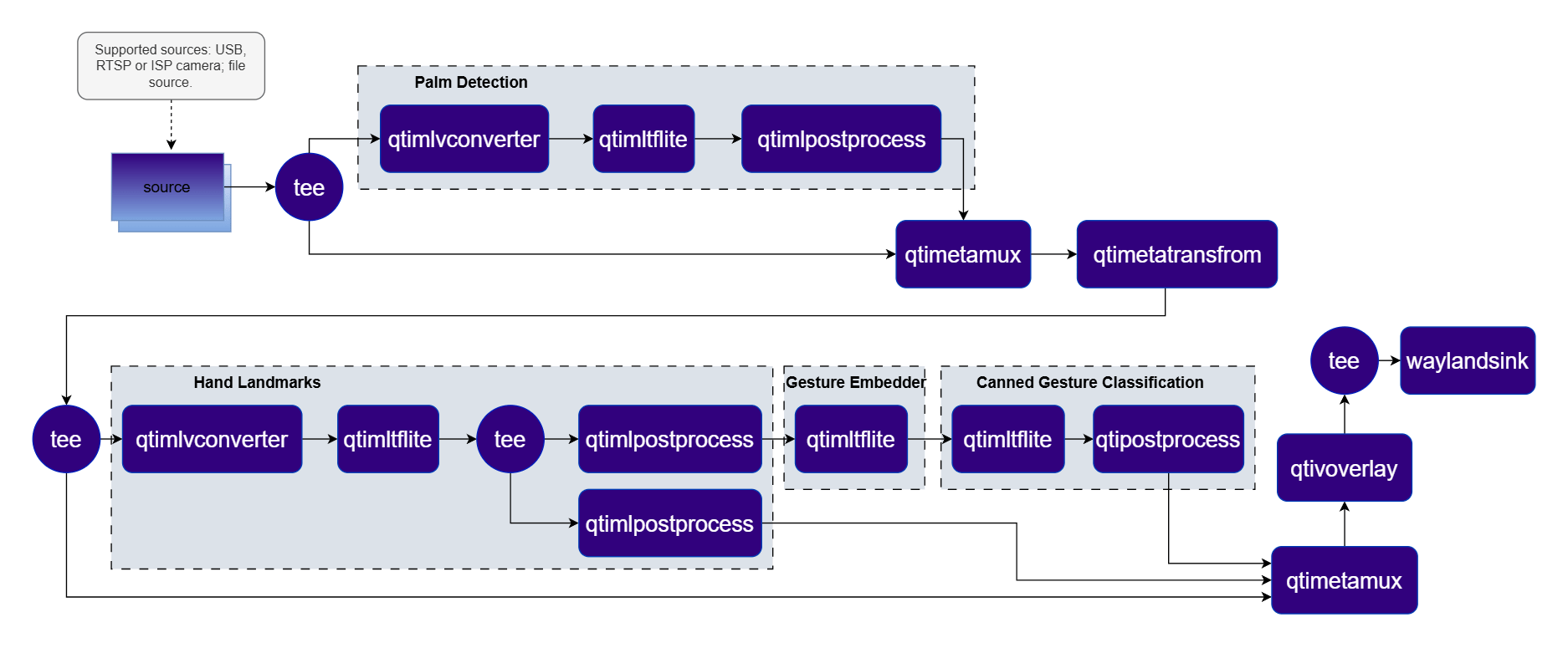 ***
Download the gesture recognizer models from Google MediaPipe:
```bash theme={null}
# Download the gesture recognizer task bundle
wget https://storage.googleapis.com/mediapipe-models/gesture_recognizer/gesture_recognizer/float16/latest/gesture_recognizer.task
# Extract the top-level task
unzip gesture_recognizer.task
# Extract hand landmarker models
unzip hand_landmarker.task
# → hand_detector.tflite, hand_landmarks_detector.tflite
# Extract gesture recognizer models
unzip hand_gesture_recognizer.task
# → gesture_embedder.tflite, canned_gesture_classifier.tflite
```
These are FLOAT precision models.
| File | Download | Save as |
| ------------------------ | ----------------------------------------------------------------------------------------------------------- | ---------------------------------- |
| Palm detection model | See download steps above | `hand_detector.tflite` |
| Palm detection labels | palmd\_labels.json | `palmd_labels.json` |
| Palm detection settings | palmd\_settings.json | `palmd_settings.json` |
| Hand landmark model | See download steps above | `hand_landmarks_detector.tflite` |
| Hand landmark labels | hlandmark\_labels.json | `hlandmark_labels.json` |
| Hand landmark settings | hlandmark\_settings.json | `hlandmark_settings.json` |
| Gesture embedder model | See download steps above | `gesture_embedder.tflite` |
| Gesture classifier model | See download steps above | `canned_gesture_classifier.tflite` |
| Gesture labels | gesture\_labels.json | `gesture_labels.json` |
```bash SCP (SSH) theme={null}
# Run from your host machine — replace and
ssh @ "mkdir -p $HOME/{models,labels}"
scp hand_detector.tflite @:$HOME/models/
scp palmd_labels.json @:$HOME/labels/
scp palmd_settings.json @:$HOME/labels/
scp hand_landmarks_detector.tflite @:$HOME/models/
scp hlandmark_labels.json @:$HOME/labels/
scp hlandmark_settings.json @:$HOME/labels/
scp gesture_embedder.tflite @:$HOME/models/
scp canned_gesture_classifier.tflite @:$HOME/models/
scp gesture_labels.json @:$HOME/labels/
```
```bash SCP (SSH) theme={null}
# Run from your host machine — replace and
ssh @
```
Run below command on your device
```bash theme={null}
mkdir -p $HOME/{models,labels}
export MODEL_NAME_1=hand_detector.tflite
export LABELS_NAME_1=palmd_labels.json
export LABELS_NAME_2=palmd_settings.json
export MODEL_NAME_2=hand_landmarks_detector.tflite
export LABELS_NAME_3=hlandmark_labels.json
export LABELS_NAME_4=hlandmark_settings.json
export MODEL_NAME_3=gesture_embedder.tflite
export MODEL_NAME_4=canned_gesture_classifier.tflite
export LABELS_NAME_5=gesture_labels.json
```
```bash theme={null}
gst-launch-1.0 -e --gst-debug=2 \
qtimlvconverter name=stage_01_preproc \
qtimltflite name=stage_01_inference model=$HOME/models/$MODEL_NAME_1 delegate=gpu \
qtimlpostprocess name=stage_01_postproc results=1 module=palmd \
labels=$HOME/labels/$LABELS_NAME_1 settings=$HOME/labels/$LABELS_NAME_2 \
qtimlvconverter name=stage_02_preproc mode=roi-batch-non-cumulative \
qtimltflite name=stage_02_inference model=$HOME/models/$MODEL_NAME_2 delegate=gpu \
qtimlpostprocess name=stage_02_1_postproc results=6 module=hlandmark \
labels=$HOME/labels/$LABELS_NAME_3 settings=$HOME/labels/$LABELS_NAME_4 \
qtimlpostprocess name=stage_02_2_postproc results=6 module=tensor \
qtimltflite name=stage_03_1_inference model=$HOME/models/$MODEL_NAME_3 delegate=gpu \
qtimltflite name=stage_03_2_inference model=$HOME/models/$MODEL_NAME_4 delegate=gpu \
qtimlpostprocess name=stage_03_postproc results=8 module=mobilenet labels=$HOME/labels/$LABELS_NAME_5 \
qticamsrc ! video/x-raw,format=NV12,width=1920,height=1080,framerate=30/1 ! queue ! \
tee name=t_split_1 \
t_split_1. ! queue ! qtimetamux name=metamux_1 ! queue ! qtimetatransform module=roi-palmd ! \
queue ! tee name=t_split_2 \
t_split_1. ! queue ! stage_01_preproc. stage_01_preproc. ! queue ! stage_01_inference. \
stage_01_inference. ! queue ! stage_01_postproc. stage_01_postproc. ! text/x-raw ! queue ! metamux_1. \
t_split_2. ! queue ! qtimetamux name=metamux_2 ! queue ! qtivoverlay ! waylandsink fullscreen=true sync=false \
t_split_2. ! queue ! stage_02_preproc. stage_02_preproc. ! queue ! stage_02_inference. \
stage_02_inference. ! queue ! tee name=t_split_3 \
t_split_3. ! queue ! stage_02_1_postproc. stage_02_1_postproc. ! text/x-raw ! metamux_2. \
t_split_3. ! queue ! stage_02_2_postproc. stage_02_2_postproc. ! queue ! \
stage_03_1_inference. stage_03_1_inference. ! stage_03_2_inference. \
stage_03_2_inference. ! stage_03_postproc. stage_03_postproc. ! text/x-raw ! metamux_2.
```
The pipeline detects hands, estimates keypoints, and recognizes gestures. Results are overlaid on each frame and rendered on the display.
***
| Plugin | Description |
| -------------------------------------------------------- | ---------------------------------------------------------------------------------------------------- |
| [qticamsrc](../plugin-reference/qticamsrc) | Captures live video from the ISP camera as the pipeline source. |
| tee | Splits the stream for palm detection and downstream ROI-based stages. |
| [qtimlvconverter](../plugin-reference/qtimlvconverter) | Preprocesses full frames (Stage 1) and ROI-cropped patches (Stage 2) for inference. |
| [qtimltflite](../plugin-reference/qtimltflite) | Runs palm detection, hand landmark, gesture embedder, and gesture classifier inference sequentially. |
| [qtimlpostprocess](../plugin-reference/qtimlpostprocess) | Post-processes each stage's tensors (palm ROIs, landmarks, gesture labels). |
| [qtimetatransform](../plugin-reference/qtimetatransform) | Transforms ROI palm-detection metadata into cropped regions for the landmark stage. |
| [qtimetamux](../plugin-reference/qtimetamux) | Merges video and metadata/text streams, attaching inference results as GST buffer metadata. |
| [qtivoverlay](../plugin-reference/qtivoverlay) | Overlays inference results (labels, bounding boxes, keypoints) onto the video frame using CL. |
| [waylandsink](../plugin-reference/waylandsink) | Renders the final annotated video stream to a local display via Weston. |
***
## Audio AI Pipelines
### Audio Classification (FLAC File Decode)
Classifies audio events from a video file containing a FLAC audio track using [YAMNet](https://aihub.qualcomm.com/iot/models/yamnet). The audio is decoded and processed in parallel with video playback, with classification results overlaid on the display.
**Pipeline Diagram**
***
Download the gesture recognizer models from Google MediaPipe:
```bash theme={null}
# Download the gesture recognizer task bundle
wget https://storage.googleapis.com/mediapipe-models/gesture_recognizer/gesture_recognizer/float16/latest/gesture_recognizer.task
# Extract the top-level task
unzip gesture_recognizer.task
# Extract hand landmarker models
unzip hand_landmarker.task
# → hand_detector.tflite, hand_landmarks_detector.tflite
# Extract gesture recognizer models
unzip hand_gesture_recognizer.task
# → gesture_embedder.tflite, canned_gesture_classifier.tflite
```
These are FLOAT precision models.
| File | Download | Save as |
| ------------------------ | ----------------------------------------------------------------------------------------------------------- | ---------------------------------- |
| Palm detection model | See download steps above | `hand_detector.tflite` |
| Palm detection labels | palmd\_labels.json | `palmd_labels.json` |
| Palm detection settings | palmd\_settings.json | `palmd_settings.json` |
| Hand landmark model | See download steps above | `hand_landmarks_detector.tflite` |
| Hand landmark labels | hlandmark\_labels.json | `hlandmark_labels.json` |
| Hand landmark settings | hlandmark\_settings.json | `hlandmark_settings.json` |
| Gesture embedder model | See download steps above | `gesture_embedder.tflite` |
| Gesture classifier model | See download steps above | `canned_gesture_classifier.tflite` |
| Gesture labels | gesture\_labels.json | `gesture_labels.json` |
```bash SCP (SSH) theme={null}
# Run from your host machine — replace and
ssh @ "mkdir -p $HOME/{models,labels}"
scp hand_detector.tflite @:$HOME/models/
scp palmd_labels.json @:$HOME/labels/
scp palmd_settings.json @:$HOME/labels/
scp hand_landmarks_detector.tflite @:$HOME/models/
scp hlandmark_labels.json @:$HOME/labels/
scp hlandmark_settings.json @:$HOME/labels/
scp gesture_embedder.tflite @:$HOME/models/
scp canned_gesture_classifier.tflite @:$HOME/models/
scp gesture_labels.json @:$HOME/labels/
```
```bash SCP (SSH) theme={null}
# Run from your host machine — replace and
ssh @
```
Run below command on your device
```bash theme={null}
mkdir -p $HOME/{models,labels}
export MODEL_NAME_1=hand_detector.tflite
export LABELS_NAME_1=palmd_labels.json
export LABELS_NAME_2=palmd_settings.json
export MODEL_NAME_2=hand_landmarks_detector.tflite
export LABELS_NAME_3=hlandmark_labels.json
export LABELS_NAME_4=hlandmark_settings.json
export MODEL_NAME_3=gesture_embedder.tflite
export MODEL_NAME_4=canned_gesture_classifier.tflite
export LABELS_NAME_5=gesture_labels.json
```
```bash theme={null}
gst-launch-1.0 -e --gst-debug=2 \
qtimlvconverter name=stage_01_preproc \
qtimltflite name=stage_01_inference model=$HOME/models/$MODEL_NAME_1 delegate=gpu \
qtimlpostprocess name=stage_01_postproc results=1 module=palmd \
labels=$HOME/labels/$LABELS_NAME_1 settings=$HOME/labels/$LABELS_NAME_2 \
qtimlvconverter name=stage_02_preproc mode=roi-batch-non-cumulative \
qtimltflite name=stage_02_inference model=$HOME/models/$MODEL_NAME_2 delegate=gpu \
qtimlpostprocess name=stage_02_1_postproc results=6 module=hlandmark \
labels=$HOME/labels/$LABELS_NAME_3 settings=$HOME/labels/$LABELS_NAME_4 \
qtimlpostprocess name=stage_02_2_postproc results=6 module=tensor \
qtimltflite name=stage_03_1_inference model=$HOME/models/$MODEL_NAME_3 delegate=gpu \
qtimltflite name=stage_03_2_inference model=$HOME/models/$MODEL_NAME_4 delegate=gpu \
qtimlpostprocess name=stage_03_postproc results=8 module=mobilenet labels=$HOME/labels/$LABELS_NAME_5 \
qticamsrc ! video/x-raw,format=NV12,width=1920,height=1080,framerate=30/1 ! queue ! \
tee name=t_split_1 \
t_split_1. ! queue ! qtimetamux name=metamux_1 ! queue ! qtimetatransform module=roi-palmd ! \
queue ! tee name=t_split_2 \
t_split_1. ! queue ! stage_01_preproc. stage_01_preproc. ! queue ! stage_01_inference. \
stage_01_inference. ! queue ! stage_01_postproc. stage_01_postproc. ! text/x-raw ! queue ! metamux_1. \
t_split_2. ! queue ! qtimetamux name=metamux_2 ! queue ! qtivoverlay ! waylandsink fullscreen=true sync=false \
t_split_2. ! queue ! stage_02_preproc. stage_02_preproc. ! queue ! stage_02_inference. \
stage_02_inference. ! queue ! tee name=t_split_3 \
t_split_3. ! queue ! stage_02_1_postproc. stage_02_1_postproc. ! text/x-raw ! metamux_2. \
t_split_3. ! queue ! stage_02_2_postproc. stage_02_2_postproc. ! queue ! \
stage_03_1_inference. stage_03_1_inference. ! stage_03_2_inference. \
stage_03_2_inference. ! stage_03_postproc. stage_03_postproc. ! text/x-raw ! metamux_2.
```
The pipeline detects hands, estimates keypoints, and recognizes gestures. Results are overlaid on each frame and rendered on the display.
***
| Plugin | Description |
| -------------------------------------------------------- | ---------------------------------------------------------------------------------------------------- |
| [qticamsrc](../plugin-reference/qticamsrc) | Captures live video from the ISP camera as the pipeline source. |
| tee | Splits the stream for palm detection and downstream ROI-based stages. |
| [qtimlvconverter](../plugin-reference/qtimlvconverter) | Preprocesses full frames (Stage 1) and ROI-cropped patches (Stage 2) for inference. |
| [qtimltflite](../plugin-reference/qtimltflite) | Runs palm detection, hand landmark, gesture embedder, and gesture classifier inference sequentially. |
| [qtimlpostprocess](../plugin-reference/qtimlpostprocess) | Post-processes each stage's tensors (palm ROIs, landmarks, gesture labels). |
| [qtimetatransform](../plugin-reference/qtimetatransform) | Transforms ROI palm-detection metadata into cropped regions for the landmark stage. |
| [qtimetamux](../plugin-reference/qtimetamux) | Merges video and metadata/text streams, attaching inference results as GST buffer metadata. |
| [qtivoverlay](../plugin-reference/qtivoverlay) | Overlays inference results (labels, bounding boxes, keypoints) onto the video frame using CL. |
| [waylandsink](../plugin-reference/waylandsink) | Renders the final annotated video stream to a local display via Weston. |
***
## Audio AI Pipelines
### Audio Classification (FLAC File Decode)
Classifies audio events from a video file containing a FLAC audio track using [YAMNet](https://aihub.qualcomm.com/iot/models/yamnet). The audio is decoded and processed in parallel with video playback, with classification results overlaid on the display.
**Pipeline Diagram**
 ***
| File | Download | Save as |
| ---------------------------- | --------------------------------------------------------------------------------------------------------------------- | -------------------------- |
| YAMNet model | [Qualcomm AI Hub — YAMNet](https://aihub.qualcomm.com/iot/models/yamnet) | `yamnet.tflite` |
| Audio classification labels | yamnet.json | `yamnet.json` |
| Sample video with FLAC audio | H264\_720p\_30fps\_FLAC.mp4 | `H264_720p_30fps_FLAC.mp4` |
If any downloaded file is a `.zip` archive, extract it on your host machine before copying:
`unzip filename.zip`
```bash SCP (SSH) theme={null}
# Replace $HOME to the appropriate device path before running the commands.
# For QLI: /root
# For Ubuntu: /home/ubuntu
# Modify this based on your platform and ensure files are copied to the correct location on the device.
ssh @ "mkdir -p $HOME/{models,media,media/output}"
scp yamnet.tflite @:$HOME/models/
scp yamnet.json @:$HOME/labels/
scp H264_720p_30fps_FLAC.mp4 @:$HOME/media/
```
```bash SCP (SSH) theme={null}
# Run from your host machine — replace and
ssh @
```
Run below command on your device
```bash theme={null}
export MODEL_NAME=yamnet.tflite
export LABELS_NAME=yamnet.json
export SRC_VIDEO_NAME=H264_720p_30fps_FLAC.mp4
```
```bash theme={null}
gst-launch-1.0 -e filesrc location=$HOME/media/$SRC_VIDEO_NAME ! qtdemux name=demux demux. ! queue ! h264parse ! \
v4l2h264dec capture-io-mode=4 output-io-mode=4 ! video/x-raw, format=NV12 ! qtivcomposer name=mixer sink_1::position="<50, 50>" sink_1::dimensions="<368, 64>" ! \
queue ! waylandsink fullscreen=true demux. ! queue ! flacparse ! flacdec ! queue ! audioconvert ! audioresample ! \
audiobuffersplit output-buffer-size=31200 ! queue ! qtimlaconverter sample-rate=16000 feature=lmfe params="params,nfft=96,nhop=160,nmels=64,chunklen=0.96;" ! \
queue ! qtimltflite name=infeng model=$HOME/models/$MODEL_NAME ! qtimlpostprocess settings="{\"confidence\": 10.0}" results=3 module=yamnet \
labels=$HOME/labels/$LABELS_NAME ! video/x-raw,format=BGRA,width=368,height=64 ! queue ! mixer.
```
Classification results are printed to the terminal. Each detected audio class with its confidence score is output per audio segment processed.
| Plugin | Description |
| ---------------------------------------------------------------- | -------------------------------------------------------------------------------------------------- |
| filesrc | Reads an MP4 container file with H.264 video and FLAC audio as the source. |
| qtdemux | Demultiplexes the container into separate H.264 video and FLAC audio elementary streams. |
| h264parse | Parses the H.264 bitstream for downstream decoding. |
| [v4l2h264dec](../plugin-reference/v4l2h264dec) | Hardware-decodes the H.264 stream to raw NV12 frames using V4L2. |
| flacparse | Parses the FLAC audio bitstream from the demuxed stream. |
| flacdec | Decodes the FLAC audio stream to raw PCM. |
| audioconvert | Converts decoded PCM to the required sample format (S16LE). |
| audioresample | Resamples the audio to the model's required sample rate. |
| audiobuffersplit | Splits the audio into fixed-size buffers for frame-by-frame inference. |
| [qtimlaconverter](../plugin-reference/qtimlaconverter) | Converts raw PCM audio into the feature representation expected by the model. |
| [qtimltflite](../plugin-reference/qtimltflite) | Loads the TFLite model, applies the chosen delegate, and runs inference to produce result tensors. |
| [qtimlaclassification](../plugin-reference/qtimlaclassification) | Post-processes audio inference tensors and produces classification label overlays. |
| [qtivcomposer](../plugin-reference/qtivcomposer) | Overlays the audio classification result panel onto the video playback stream. |
| [waylandsink](../plugin-reference/waylandsink) | Renders the final composited video stream to a local display via Weston. |
***
| File | Download | Save as |
| ---------------------------- | --------------------------------------------------------------------------------------------------------------------- | -------------------------- |
| YAMNet model | [Qualcomm AI Hub — YAMNet](https://aihub.qualcomm.com/iot/models/yamnet) | `yamnet.tflite` |
| Audio classification labels | yamnet.json | `yamnet.json` |
| Sample video with FLAC audio | H264\_720p\_30fps\_FLAC.mp4 | `H264_720p_30fps_FLAC.mp4` |
If any downloaded file is a `.zip` archive, extract it on your host machine before copying:
`unzip filename.zip`
```bash SCP (SSH) theme={null}
# Replace $HOME to the appropriate device path before running the commands.
# For QLI: /root
# For Ubuntu: /home/ubuntu
# Modify this based on your platform and ensure files are copied to the correct location on the device.
ssh @ "mkdir -p $HOME/{models,media,media/output}"
scp yamnet.tflite @:$HOME/models/
scp yamnet.json @:$HOME/labels/
scp H264_720p_30fps_FLAC.mp4 @:$HOME/media/
```
```bash SCP (SSH) theme={null}
# Run from your host machine — replace and
ssh @
```
Run below command on your device
```bash theme={null}
export MODEL_NAME=yamnet.tflite
export LABELS_NAME=yamnet.json
export SRC_VIDEO_NAME=H264_720p_30fps_FLAC.mp4
```
```bash theme={null}
gst-launch-1.0 -e filesrc location=$HOME/media/$SRC_VIDEO_NAME ! qtdemux name=demux demux. ! queue ! h264parse ! \
v4l2h264dec capture-io-mode=4 output-io-mode=4 ! video/x-raw, format=NV12 ! qtivcomposer name=mixer sink_1::position="<50, 50>" sink_1::dimensions="<368, 64>" ! \
queue ! waylandsink fullscreen=true demux. ! queue ! flacparse ! flacdec ! queue ! audioconvert ! audioresample ! \
audiobuffersplit output-buffer-size=31200 ! queue ! qtimlaconverter sample-rate=16000 feature=lmfe params="params,nfft=96,nhop=160,nmels=64,chunklen=0.96;" ! \
queue ! qtimltflite name=infeng model=$HOME/models/$MODEL_NAME ! qtimlpostprocess settings="{\"confidence\": 10.0}" results=3 module=yamnet \
labels=$HOME/labels/$LABELS_NAME ! video/x-raw,format=BGRA,width=368,height=64 ! queue ! mixer.
```
Classification results are printed to the terminal. Each detected audio class with its confidence score is output per audio segment processed.
| Plugin | Description |
| ---------------------------------------------------------------- | -------------------------------------------------------------------------------------------------- |
| filesrc | Reads an MP4 container file with H.264 video and FLAC audio as the source. |
| qtdemux | Demultiplexes the container into separate H.264 video and FLAC audio elementary streams. |
| h264parse | Parses the H.264 bitstream for downstream decoding. |
| [v4l2h264dec](../plugin-reference/v4l2h264dec) | Hardware-decodes the H.264 stream to raw NV12 frames using V4L2. |
| flacparse | Parses the FLAC audio bitstream from the demuxed stream. |
| flacdec | Decodes the FLAC audio stream to raw PCM. |
| audioconvert | Converts decoded PCM to the required sample format (S16LE). |
| audioresample | Resamples the audio to the model's required sample rate. |
| audiobuffersplit | Splits the audio into fixed-size buffers for frame-by-frame inference. |
| [qtimlaconverter](../plugin-reference/qtimlaconverter) | Converts raw PCM audio into the feature representation expected by the model. |
| [qtimltflite](../plugin-reference/qtimltflite) | Loads the TFLite model, applies the chosen delegate, and runs inference to produce result tensors. |
| [qtimlaclassification](../plugin-reference/qtimlaclassification) | Post-processes audio inference tensors and produces classification label overlays. |
| [qtivcomposer](../plugin-reference/qtivcomposer) | Overlays the audio classification result panel onto the video playback stream. |
| [waylandsink](../plugin-reference/waylandsink) | Renders the final composited video stream to a local display via Weston. |