> ## Documentation Index
> Fetch the complete documentation index at: https://imsdkdocs.qualcomm.com/llms.txt
> Use this file to discover all available pages before exploring further.
# waylandsink
> Display plugin for weston compositor
# Overview
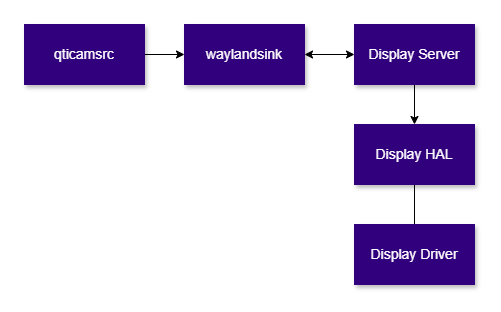
`waylandsink` is a GStreamer sink element used to render raw video frames to a display through a **Wayland-based compositor**. It supports rendering to the device’s built-in display as well as external displays connected via DisplayPort (DP) or HDMI. The element is based on the Wayland protocol and operates as a client of a Wayland-based compositor.
This plugin is provided and maintained by the GStreamer community([waylandsink](https://gstreamer.freedesktop.org/documentation/waylandsink/index.html?gi-language=c))
This document focuses on its usage in conjunction with Qualcomm-specific IM SDK GStreamer plugins, along with relevant use cases and internal architectural considerations.
waylandsink is typically used at the end of pipelines such as:
* video playback
* camera preview
* composed multi-stream display
* AI visualization pipelines
The element is responsible only for **displaying video frames**. It does not perform decoding, composition, or other video transformations on its own. Those operations must be handled by peer GStreamer elements before the video frames reaches `waylandsink`.
When required, `waylandsink` can create its own top-level Wayland window. It can also render into an application-provided Wayland surface through the `GstVideoOverlay` interface, allowing it to be embedded into a larger application UI.
 ## Example Pipeline
 | File | Download | Save as |
| ------------ | ------------------------------------------------------------------------------------------------------------------------------------------------------ | ----------- |
| Sample video | Input video | `video.mp4` |
```bash SCP (SSH) theme={null}
# Replace $HOME to the appropriate device path before running the commands.
# For QLI: /root
# For Ubuntu: /home/ubuntu
# Modify this based on your platform and ensure files are copied to the correct location on the device.
# Run from your host machine — replace and
ssh @ "mkdir -p $HOME/{media}"
scp video.mp4 @:$HOME/media/
```
```bash SCP (SSH) theme={null}
# Run from your host machine — replace and
ssh @
```
Run below command on your device
```bash theme={null}
export SRC_VIDEO_NAME=video.mp4
```
```bash theme={null}
gst-launch-1.0 -e --gst-debug=2 \
filesrc location=$HOME/media/$SRC_VIDEO_NAME ! qtdemux ! h264parse ! \
v4l2h264dec capture-io-mode=4 output-io-mode=4 ! video/x-raw,format=NV12 ! queue ! \
waylandsink fullscreen=true sync=false enable-last-sample=false
```
# Hierarchy
[GObject](https://docs.gtk.org/gobject/)
| File | Download | Save as |
| ------------ | ------------------------------------------------------------------------------------------------------------------------------------------------------ | ----------- |
| Sample video | Input video | `video.mp4` |
```bash SCP (SSH) theme={null}
# Replace $HOME to the appropriate device path before running the commands.
# For QLI: /root
# For Ubuntu: /home/ubuntu
# Modify this based on your platform and ensure files are copied to the correct location on the device.
# Run from your host machine — replace and
ssh @ "mkdir -p $HOME/{media}"
scp video.mp4 @:$HOME/media/
```
```bash SCP (SSH) theme={null}
# Run from your host machine — replace and
ssh @
```
Run below command on your device
```bash theme={null}
export SRC_VIDEO_NAME=video.mp4
```
```bash theme={null}
gst-launch-1.0 -e --gst-debug=2 \
filesrc location=$HOME/media/$SRC_VIDEO_NAME ! qtdemux ! h264parse ! \
v4l2h264dec capture-io-mode=4 output-io-mode=4 ! video/x-raw,format=NV12 ! queue ! \
waylandsink fullscreen=true sync=false enable-last-sample=false
```
# Hierarchy
[GObject](https://docs.gtk.org/gobject/)
[GstObject](https://gstreamer.freedesktop.org/documentation/gstreamer/gstobject.html)
[GstElement](https://gstreamer.freedesktop.org/documentation/gstreamer/gstelement.html)
[GstBaseSink](https://gstreamer.freedesktop.org/documentation/base/gstbasesink.html)
[GstVideoSink](https://gstreamer.freedesktop.org/documentation/video/gstvideosink.html)
[waylandsink](https://gstreamer.freedesktop.org/documentation/waylandsink/index.html)
# Pad templates
### sink
| Capabilities | |
| ---------------------------- | -------------------------------------------------------------------------------------------------------------------------------------------------------------------------------------------------------------------------------------------------------------------------------------------------------------------------------------------------------------------------------- |
| `video/x-raw` | `format: { BGR10A2_LE, RGB10A2_LE, AYUV, RGBA, ARGB, BGRA, ABGR, BGR10x2_LE, RGB10x2_LE, P010_10LE, NV12_10LE40, Y444, v308, RGBx, xRGB, BGRx, xBGR, RGB, BGR, Y42B, NV16, NV61, YUY2, YVYU, UYVY, I420, YV12, NV12, NV21, Y41B, YUV9, YVU9, BGR16, RGB16, NV12_Q08C }`
`width: [1, 2147483647]`
`height: [1, 2147483647]`
`framerate: [0/1, 2147483647/1]` |
| `video/x-raw(memory:DMABuf)` | `format: { DMA_DRM }`
`width: [1, 2147483647]`
`height: [1, 2147483647]`
`framerate: [0/1, 2147483647/1]` |
| Availability: *Always* | |
| Direction: *sink* | |
# Element Properties
| Property | Description |
| -------------------- | ----------------------------------------------------------------------------------------------------------------------------------------------------------------------------------------------------------------------------------------------------------------------------------------------------------------------------------------------------------------------------------------------------------------------------------------------------------------------------------------------------------------------------------------------------------------------------------------------------------------------------------------------------------------------------------------------------------------------------------------------------------------------------------------------------- |
| `display` | Wayland display name to connect to, if a display is not provided through `GstContext`.
`Type: String`
`Default: NULL`
`Flags: readable/writable` |
| `drm-device` | DRM device selection property available in newer upstream versions. Marked as construct-only in upstream documentation.
`Type: String`
`Default: NULL`
`Flags: readable/writable` |
| `force-aspect-ratio` | Preserves the video aspect ratio when rendering, where supported by the plugin version.
`Type: Boolean`
`Default: false`
`Flags: readable/writable` |
| `fullscreen` | Requests that the Wayland surface be made fullscreen.
`Type: Boolean`
`Default: false`
`Flags: readable/writable` |
| `fullscreen-output` | Selects the fullscreen output where supported by the plugin version.
`Type: String`
`Default: NULL`
`Flags: readable/writable` |
| `rotate-method` | Selects the video orientation or rotation method where supported by the plugin version.
`Type: Enum `
`Default: identity`
`Range:`
`(0): identity - GST_VIDEO_ORIENTATION_IDENTITY`
`(1): 90r - GST_VIDEO_ORIENTATION_90R`
`(2): 180 - GST_VIDEO_ORIENTATION_180`
`(3): 90l - GST_VIDEO_ORIENTATION_90L`
`(4): horiz - GST_VIDEO_ORIENTATION_HORIZ`
`(5): vert - GST_VIDEO_ORIENTATION_VERT`
`(6): ul-lr - GST_VIDEO_ORIENTATION_UL_LR`
`(7): ur-ll - GST_VIDEO_ORIENTATION_UR_LL`
`(8): auto - GST_VIDEO_ORIENTATION_AUTO`
`(9): custom - GST_VIDEO_ORIENTATION_CUSTOM`
`Flags: readable/writable`
`Example: rotate-method="identity" (or) rotate-method=0` |
# Internal Architecture
At a high level, the element receives raw video buffers from the GStreamer pipeline, converts or imports them into Wayland-compatible buffers when needed, attaches them to a Wayland surface, and commits them for display through the compositor.
The main internal components are:
| Component | Role |
| ------------------------ | ----------------------------------------------------------------------------------------------------------------------------------------- |
| `GstWaylandSink` | Core sink element implementation. Manages state transitions, caps negotiation, properties, buffer handling, and frame rendering. |
| `GstWlDisplay` | Manages the Wayland display connection and tracks compositor-supported buffer formats, including SHM and DMABuf formats. |
| `GstWlWindow` | Represents the Wayland rendering surface or window. It can be created internally by the sink or bound to an application-provided surface. |
| `GstWlBuffer` | Wraps a Wayland `wl_buffer` associated with a `GstBuffer`. |
| Wayland SHM allocator | Creates shared-memory Wayland buffers when rendering uses the SHM path. |
| Linux DMABuf import path | Imports DMABuf-backed video buffers into Wayland buffers when supported by the compositor. |
# State Transition behaviour
`waylandsink` behaviour is closely tied to normal GStreamer state transitions.
| State Transition | Behavior |
| -------------------------- | --------------------------------------------------------------------------------------------------------- |
| `NULL → READY` | Creates or reuses a Wayland display connection. If no usable display is available, the transition fails. |
| `READY / PAUSED / PLAYING` | Negotiates caps, prepares buffer handling, and renders incoming frames. |
| `PAUSED → READY` | Clears the last rendered buffer and releases or resets the window state as required. |
| `READY → NULL` | Releases internal resources, including buffer pools and, when applicable, the Wayland display connection. |
# Caps Negotiation
During caps negotiation, `waylandsink`:
* Starts from its sink pad template caps.
* Queries the connected Wayland compositor for supported formats.
* Filters the advertised caps to formats that are both pipeline-compatible and compositor-supported.
* Stores the negotiated `GstVideoInfo`.
* Determines whether the rendering path will use DMA-Buf or SHM (Shared memory backend).
* Prepares an internal buffer pool If required.
# Caps Negotiation
The negotiated output path depends not only on the pipeline caps, but also on compositor capabilities and the memory type of the incoming buffers.
When a frame arrives at `waylandsink`, the element first checks whether a valid Wayland window or surface is available. If no surface is currently associated with the sink, it prepares to receive one through the `GstVideoOverlay` interface. If the application does not provide a window handle, `waylandsink` creates its own Wayland toplevel window.
Next, the element checks whether the incoming `GstBuffer` already has an associated Wayland buffer for the current display. If it does, the buffer can be rendered directly. If not, `waylandsink` attempts to create a Wayland-compatible buffer from the incoming memory.
The preferred path is to import the buffer through **DMABuf** when the input memory and compositor both support it. If DMABuf import is not possible, the element falls back to creating a **shared-memory (SHM)** Wayland buffer. If the incoming memory cannot be used directly through either path, the video frame is copied into an internal SHM-backed buffer pool.
Once a Wayland-compatible buffer has been prepared, it is attached to the Wayland surface and committed to the compositor for display.
# Buffer and Memory Management
`waylandsink` supports multiple rendering paths depending on negotiated caps, compositor support, and the memory backing the incoming buffers.
## Direct Wayland Buffer Reuse
If the incoming `GstBuffer` already carries a `GstWlBuffer` associated with the current Wayland display, the sink can render it directly. This is the preferred path because it avoids creating a new Wayland buffer for each frame.
## DMA Buffer Import
When peer upstream plugin provides `video/x-raw(memory:DMABuf)` buffers and the compositor supports the negotiated format, `waylandsink` imports the DMA Buffer into a Wayland buffer. This path reduces copies and is generally the most efficient option for display pipelines built around DMA-backed buffers.
## SHM Rendering
If the input memory is suitable for Wayland shared-memory rendering, the sink creates a Wayland SHM buffer and uses that for presentation.
## Internal Copy Fallback
If the incoming buffer cannot be reused or imported directly, `waylandsink` falls back to an internal buffer pool and copies the frame into SHM-compatible memory before rendering. This path ensures compatibility, but increases CPU usage and memory bandwidth compared to direct Wayland buffer reuse or DMA Buffer import.
## Buffer Lifetime
Once a buffer is attached to the Wayland surface, `waylandsink` keeps the corresponding GstBuffer alive until the compositor signals that it has finished using the underlying wl\_buffer. Only after that release event can the buffer be returned to the pool or freed.
## Frame Synchronization
`waylandsink` uses Wayland frame-callback mechanisms to synchronize presentation with the compositor. This prevents unbounded queuing of frames when the display path is slower than the incoming stream. If a previous frame is still pending presentation, newer frames may be dropped rather than queued indefinitely.
This behavior helps maintain responsive real-time display characteristics, especially in preview and live-rendering pipelines.
## GAP Buffer Handling
`waylandsink` is GAP-aware and correctly handles input buffers marked with `GST_BUFFER_FLAG_GAP`.
When a GAP buffer is received, the sink skips rendering for that input while preserving normal timing and synchronization behavior. This allows the pipeline to represent the absence of valid frame data for a given timestamp without treating it as an error or stall.
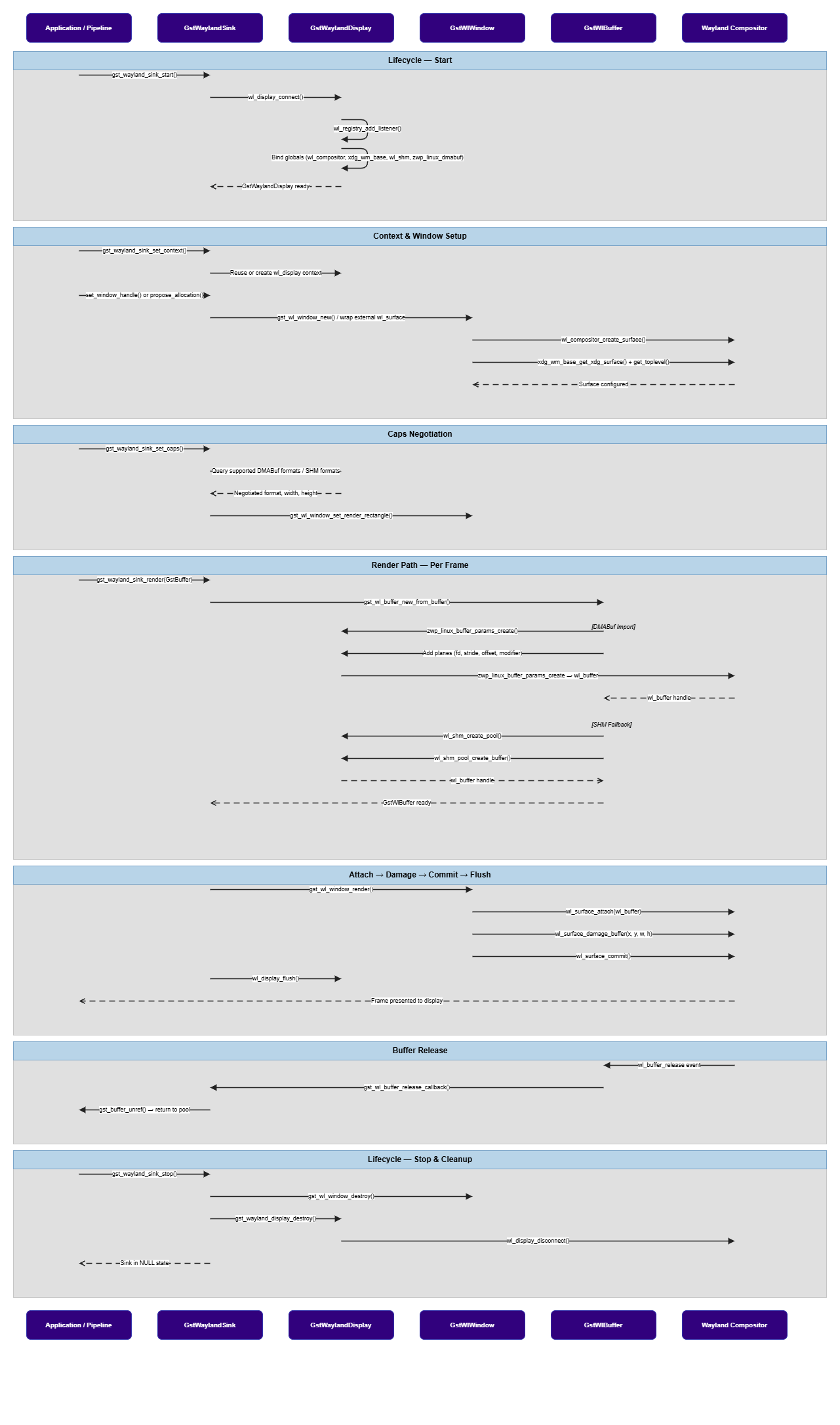
**Call Flow**
Below is the call flow depicting how waylandsink is setup and a buffer flows through it:
 # Usage
Ensure you have followed the [prerequisites](waylandsink#example-pipeline) before continuing
Before running display pipelines on target, ensure the Wayland environment is configured for the target image.
Use the path appropriate for the platform
### Two-stream Picture-in-Picture display
This example demonstrates picture-in-picture composition of two decoded input streams using [`qtivcomposer`](qtivcomposer). The two streams are combined into a single composed output, which is then rendered for display using `waylandsink`.
# Usage
Ensure you have followed the [prerequisites](waylandsink#example-pipeline) before continuing
Before running display pipelines on target, ensure the Wayland environment is configured for the target image.
Use the path appropriate for the platform
### Two-stream Picture-in-Picture display
This example demonstrates picture-in-picture composition of two decoded input streams using [`qtivcomposer`](qtivcomposer). The two streams are combined into a single composed output, which is then rendered for display using `waylandsink`.
 ```
gst-launch-1.0 -e --gst-debug=2 \
qtivcomposer name=mixer \
sink_0::position="<0, 0>" \
sink_0::dimensions="<1920, 1080>" \
sink_1::position="<1440, 810>" \
sink_1::dimensions="<480, 270>" \
! queue ! \
waylandsink fullscreen=true sync=false enable-last-sample=false \
filesrc location=$HOME/media/$SRC_VIDEO_NAME ! \
qtdemux ! queue ! h264parse ! v4l2h264dec output-io-mode=4 capture-io-mode=4 ! queue ! mixer. \
filesrc location=$HOME/media/$SRC_VIDEO_NAME ! \
qtdemux ! queue ! h264parse ! v4l2h264dec output-io-mode=4 capture-io-mode=4 ! queue ! mixer.
```
[`qtivcomposer`](qtivcomposer) performs the Picture-in-Picture layout. `waylandsink` displays the final composed frame.
### Four-stream side-by-side video composition
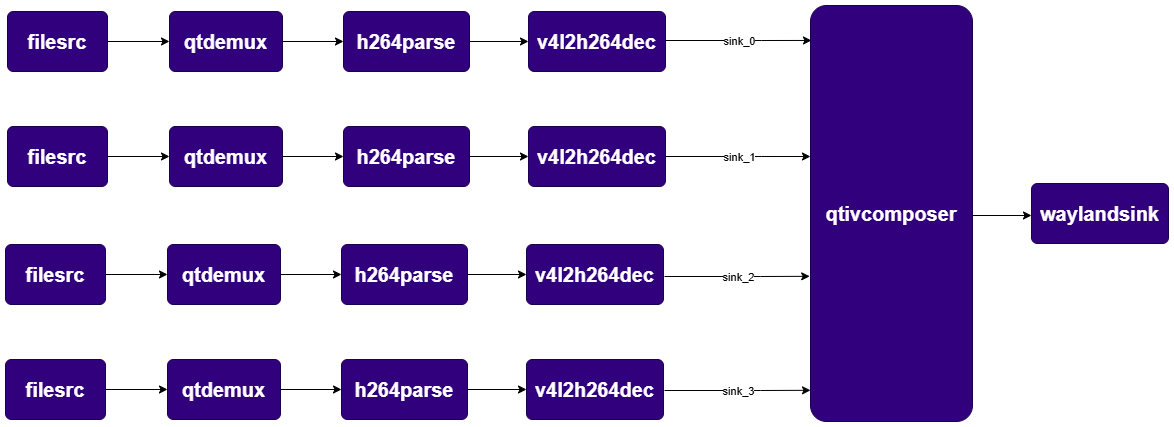
This pipeline decodes four input streams, arranges them in a 2x2 grid using [`qtivcomposer`](qtivcomposer), and displays the composed frame using `waylandsink`.
```
gst-launch-1.0 -e --gst-debug=2 \
qtivcomposer name=mixer \
sink_0::position="<0, 0>" \
sink_0::dimensions="<1920, 1080>" \
sink_1::position="<1440, 810>" \
sink_1::dimensions="<480, 270>" \
! queue ! \
waylandsink fullscreen=true sync=false enable-last-sample=false \
filesrc location=$HOME/media/$SRC_VIDEO_NAME ! \
qtdemux ! queue ! h264parse ! v4l2h264dec output-io-mode=4 capture-io-mode=4 ! queue ! mixer. \
filesrc location=$HOME/media/$SRC_VIDEO_NAME ! \
qtdemux ! queue ! h264parse ! v4l2h264dec output-io-mode=4 capture-io-mode=4 ! queue ! mixer.
```
[`qtivcomposer`](qtivcomposer) performs the Picture-in-Picture layout. `waylandsink` displays the final composed frame.
### Four-stream side-by-side video composition
This pipeline decodes four input streams, arranges them in a 2x2 grid using [`qtivcomposer`](qtivcomposer), and displays the composed frame using `waylandsink`.
 ```
gst-launch-1.0 -e --gst-debug=2 \
qtivcomposer name=mixer \
sink_0::position="<0, 0>" \
sink_0::dimensions="<960, 540>" \
sink_1::position="<960, 0>" \
sink_1::dimensions="<960, 540>" \
sink_2::position="<0, 540>" \
sink_2::dimensions="<960, 540>" \
sink_3::position="<960, 540>" \
sink_3::dimensions="<960, 540>" \
! queue ! \
waylandsink fullscreen=true sync=false enable-last-sample=false \
filesrc location=$HOME/media/$SRC_VIDEO_NAME ! \
qtdemux ! queue ! h264parse ! v4l2h264dec output-io-mode=4 capture-io-mode=4 ! queue ! mixer. \
filesrc location=$HOME/media/$SRC_VIDEO_NAME ! \
qtdemux ! queue ! h264parse ! v4l2h264dec output-io-mode=4 capture-io-mode=4 ! queue ! mixer. \
filesrc location=$HOME/media/$SRC_VIDEO_NAME ! \
qtdemux ! queue ! h264parse ! v4l2h264dec output-io-mode=4 capture-io-mode=4 ! queue ! mixer. \
filesrc location=$HOME/media/$SRC_VIDEO_NAME ! \
qtdemux ! queue ! h264parse ! v4l2h264dec output-io-mode=4 capture-io-mode=4 ! queue ! mixer.
```
The 2x2 layout is performed by [`qtivcomposer`](qtivcomposer). `waylandsink` is only the display endpoint.
```
gst-launch-1.0 -e --gst-debug=2 \
qtivcomposer name=mixer \
sink_0::position="<0, 0>" \
sink_0::dimensions="<960, 540>" \
sink_1::position="<960, 0>" \
sink_1::dimensions="<960, 540>" \
sink_2::position="<0, 540>" \
sink_2::dimensions="<960, 540>" \
sink_3::position="<960, 540>" \
sink_3::dimensions="<960, 540>" \
! queue ! \
waylandsink fullscreen=true sync=false enable-last-sample=false \
filesrc location=$HOME/media/$SRC_VIDEO_NAME ! \
qtdemux ! queue ! h264parse ! v4l2h264dec output-io-mode=4 capture-io-mode=4 ! queue ! mixer. \
filesrc location=$HOME/media/$SRC_VIDEO_NAME ! \
qtdemux ! queue ! h264parse ! v4l2h264dec output-io-mode=4 capture-io-mode=4 ! queue ! mixer. \
filesrc location=$HOME/media/$SRC_VIDEO_NAME ! \
qtdemux ! queue ! h264parse ! v4l2h264dec output-io-mode=4 capture-io-mode=4 ! queue ! mixer. \
filesrc location=$HOME/media/$SRC_VIDEO_NAME ! \
qtdemux ! queue ! h264parse ! v4l2h264dec output-io-mode=4 capture-io-mode=4 ! queue ! mixer.
```
The 2x2 layout is performed by [`qtivcomposer`](qtivcomposer). `waylandsink` is only the display endpoint.