> ## Documentation Index
> Fetch the complete documentation index at: https://imsdkdocs.qualcomm.com/llms.txt
> Use this file to discover all available pages before exploring further.
# v4l2av1dec
> Hardware-accelerated AV1 video decoder using the V4L2 stateful decoder API on Qualcomm hardware.
# Overview
`v4l2av1dec` is a hardware-accelerated video decoder that uses the Video4Linux2 (V4L2) stateful decoder API to offload AV1 video decoding to the Qualcomm Video Processing Unit (VPU).
This plugin is provided and maintained by the GStreamer community. This document focuses on its usage in conjunction with Qualcomm-specific QIM SDK GStreamer plugins, along with relevant use cases and internal architectural considerations.
`v4l2av1dec` is typically used to decode AV1 streams provided by:
* File sources (WebM, Matroska/MKV, MP4/ISOBMFF containers)
* RTSP sources
* HLS/HTTP streaming sources (e.g., YouTube AV1, streaming platforms)
The element is responsible **only for decoding** video frames. It does not demux or parse streams on its own — those operations must be handled by peer GStreamer elements upstream (e.g., `matroskademux` and `av1parse`).
## Example Pipeline
 av1\_1080p.webm file is used here as an example.
```bash SCP (SSH) theme={null}
# Replace $HOME to the appropriate device path before running the commands.
# For QLI: /root
# For Ubuntu: /home/ubuntu
# Modify this based on your platform and ensure files are copied to the correct location on the device.
# Run from your host machine — replace and
ssh @ "mkdir -p $HOME/{media}"
scp av1_1080p.webm @:$HOME/media/
```
```bash SCP (SSH) theme={null}
# Run from your host machine — replace and
ssh @
```
Run below command on your device
```bash theme={null}
export SRC_VIDEO_NAME=av1_1080p.webm
```
```bash theme={null}
gst-launch-1.0 -e \
filesrc location=$HOME/media/$SRC_VIDEO_NAME ! \
matroskademux ! queue ! av1parse ! \
v4l2av1dec capture-io-mode=4 output-io-mode=4 ! \
video/x-raw,format=NV12 ! queue ! \
waylandsink fullscreen=true sync=false
```
# Key Responsibilities
`v4l2av1dec` is responsible for:
* **Hardware acceleration** — offloads AV1 decoding to the dedicated VPU
* **V4L2 state management** — manages the V4L2 stateful decoder state machine (device open, buffer allocation, stream on/off)
* **Buffer I/O management** — handles buffer exchange between GStreamer and the V4L2 driver using DMABuf, MMAP, or UserPtr modes
* **Format negotiation** — negotiates raw output formats supported by the hardware, including UBWC-compressed formats (`NV12_Q08C` for 8-bit SDR, `NV12_Q10LE32C` for 10-bit HDR) for reduced memory bandwidth
* **Multi-stream support** — supports multiple concurrent decoder instances (subject to hardware resource limits)
* **Error handling** — supports decoder error controls such as `max-errors` and corrupted-frame discard behavior
# Hierarchy
[GObject](https://docs.gtk.org/gobject/)
av1\_1080p.webm file is used here as an example.
```bash SCP (SSH) theme={null}
# Replace $HOME to the appropriate device path before running the commands.
# For QLI: /root
# For Ubuntu: /home/ubuntu
# Modify this based on your platform and ensure files are copied to the correct location on the device.
# Run from your host machine — replace and
ssh @ "mkdir -p $HOME/{media}"
scp av1_1080p.webm @:$HOME/media/
```
```bash SCP (SSH) theme={null}
# Run from your host machine — replace and
ssh @
```
Run below command on your device
```bash theme={null}
export SRC_VIDEO_NAME=av1_1080p.webm
```
```bash theme={null}
gst-launch-1.0 -e \
filesrc location=$HOME/media/$SRC_VIDEO_NAME ! \
matroskademux ! queue ! av1parse ! \
v4l2av1dec capture-io-mode=4 output-io-mode=4 ! \
video/x-raw,format=NV12 ! queue ! \
waylandsink fullscreen=true sync=false
```
# Key Responsibilities
`v4l2av1dec` is responsible for:
* **Hardware acceleration** — offloads AV1 decoding to the dedicated VPU
* **V4L2 state management** — manages the V4L2 stateful decoder state machine (device open, buffer allocation, stream on/off)
* **Buffer I/O management** — handles buffer exchange between GStreamer and the V4L2 driver using DMABuf, MMAP, or UserPtr modes
* **Format negotiation** — negotiates raw output formats supported by the hardware, including UBWC-compressed formats (`NV12_Q08C` for 8-bit SDR, `NV12_Q10LE32C` for 10-bit HDR) for reduced memory bandwidth
* **Multi-stream support** — supports multiple concurrent decoder instances (subject to hardware resource limits)
* **Error handling** — supports decoder error controls such as `max-errors` and corrupted-frame discard behavior
# Hierarchy
[GObject](https://docs.gtk.org/gobject/)
[GstObject](https://gstreamer.freedesktop.org/documentation/gstreamer/gstobject.html)
[GstElement](https://gstreamer.freedesktop.org/documentation/gstreamer/gstelement.html)
GstVideoDecoder
GstV4l2VideoDec
v4l2av1dec
# Pad Templates
### sink
| Capabilities | |
| ---------------------- | ------------ |
| `video/x-av1` | `format: NA` |
| Availability: *Always* | |
| Direction: *sink* | |
### src
| Capabilities | |
| ---------------------- | --------------------------------------------------------------------------------------------------------- |
| `video/x-raw` | `format: { NV12_Q08C, NV12_Q10LE32C, NV12, NV21 }`
`width: [1, 32768]`
`height: [1, 32768]` |
| Availability: *Always* | |
| Direction: *source* | |
AV1 does not perform profile or level probing via V4L2 control enumeration in the current implementation. The sink caps are therefore unconstrained beyond the `video/x-av1` media type. Hardware capabilities are implicitly constrained by what the V4L2 driver accepts at runtime — if the driver does not support a particular AV1 profile or level, it will return an error during format negotiation (`VIDIOC_S_FMT`).
# Element Properties
| Property | Description |
| ------------------------------------ | --------------------------------------------------------------------------------------------------------------------------------------------------------------------------------------------------------------- |
| `automatic-request-sync-point-flags` | Flags used when automatically requesting sync points.
`Type: Flags`
`Default: 0x3 (corrupt-output+discard-input)`
`Flags: readable/writable` |
| `automatic-request-sync-points` | Automatically requests sync points such as keyframes when useful, for example after decoding errors.
`Type: Boolean`
`Default: false`
`Flags: readable/writable` |
| `capture-io-mode` | I/O mode for the capture queue (src pad). Controls how decoded frame buffers are allocated and transferred.
`Type: Enum (GstV4l2IOMode)`
`Default: 0, "auto"`
`Flags: readable/writable` |
| `device` | The V4L2 device node path. Set automatically at registration time and read-only after element creation.
`Type: String`
`Default: "/dev/video32"`
`Flags: readable` |
| `device-fd` | File descriptor of the opened V4L2 device. A value of `-1` indicates that the device is not open.
`Type: Integer`
`Default: -1`
`Flags: readable` |
| `device-name` | Human-readable name of the V4L2 device as reported by the driver via VIDIOC\_QUERYCAP.
`Type: String`
`Default: NULL`
`Flags: readable` |
| `discard-corrupted-frames` | When enabled, frames marked as corrupted by the driver are dropped instead of passed downstream.
`Type: Boolean`
`Default: false`
`Flags: readable/writable` |
| `extra-controls` | Extra V4L2 controls (CIDs) to set on the device, specified as a GstStructure. Applied via VIDIOC\_S\_EXT\_CTRLS.
`Type: GstStructure`
`Default: NULL`
`Flags: readable/writable` |
| `max-errors` | Maximum number of consecutive decoder errors before the element returns a flow error. A value of `-1` means unlimited.
`Type: Integer`
`Default: -1`
`Flags: readable/writable` |
| `min-force-key-unit-interval` | Minimum interval in nanoseconds between force-keyunit requests sent upstream. A value of `0` means no minimum interval.
`Type: Unsigned Integer64`
`Default: 0`
`Flags: readable/writable` |
| `output-io-mode` | I/O mode for the output queue (sink pad). Controls how compressed input buffers are submitted to the driver.
`Type: Enum (GstV4l2IOMode)`
`Default: 0, "auto"`
`Flags: readable/writable` |
| `qos` | Handles Quality-of-Service events from downstream. When enabled, the decoder may drop frames to maintain real-time playback.
`Type: Boolean`
`Default: true`
`Flags: readable/writable` |
## I/O Mode Values
Both `capture-io-mode` and `output-io-mode` accept the same `GstV4l2IOMode` enumeration:
| Value | Integer | Description |
| --------------- | ------- | --------------------------------------------------------------------------------------------------------------------------------- |
| `auto` | 0 | Automatically select the best I/O mode. Prefers DMABuf export for capture, MMAP for output. |
| `rw` | 1 | Use read/write system calls. Rarely used for M2M devices. |
| `mmap` | 2 | Use kernel memory-mapped buffers (`V4L2_MEMORY_MMAP`). |
| `userptr` | 3 | Use user-space pointer buffers (`V4L2_MEMORY_USERPTR`). |
| `dmabuf` | 4 | Export buffers as DMABuf file descriptors (`V4L2_MEMORY_DMABUF`). Enables zero-copy sharing with downstream GPU/display elements. |
| `dmabuf-import` | 5 | Import DMABuf file descriptors from an external allocator into the V4L2 queue. |
# Internal Architecture
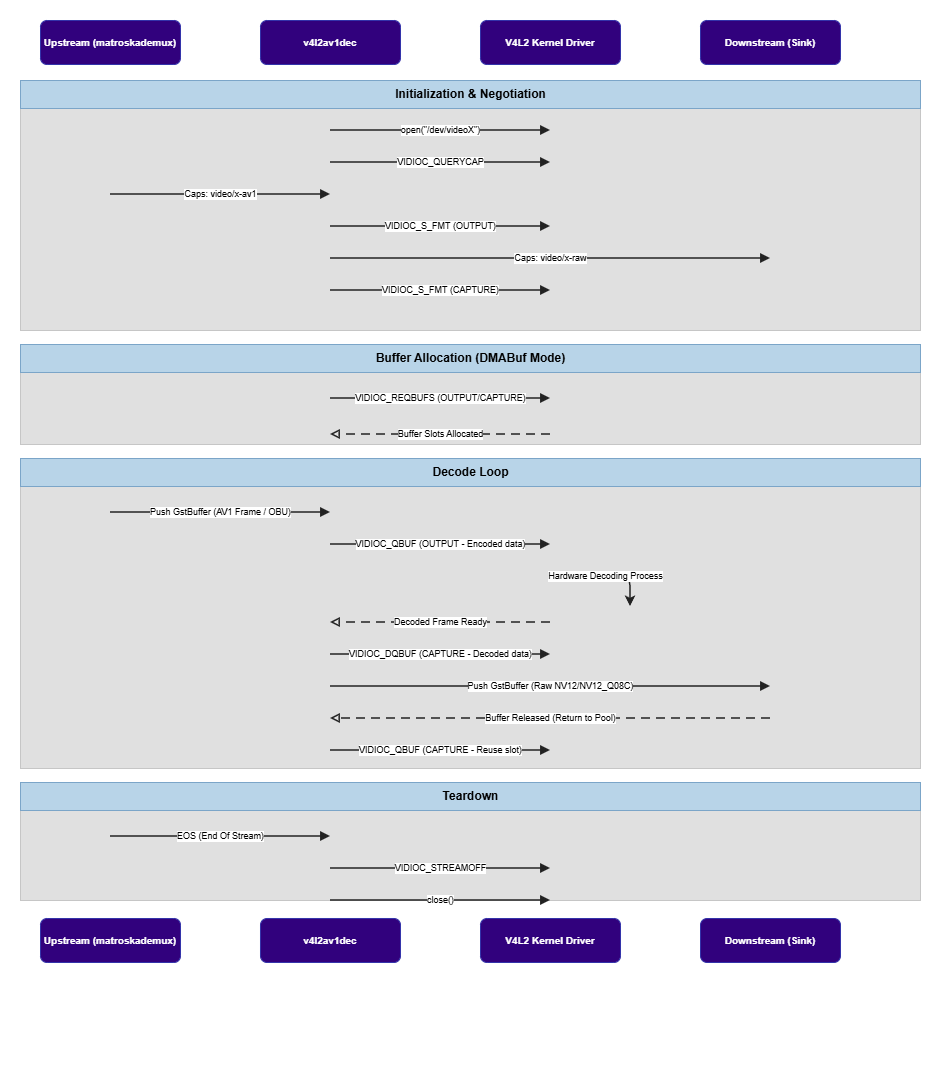
`v4l2av1dec` operates using two V4L2 queue objects internally:
* **Output queue** (`V4L2_BUF_TYPE_VIDEO_OUTPUT`) — receives compressed AV1 OBU buffers from upstream
* **Capture queue** (`V4L2_BUF_TYPE_VIDEO_CAPTURE`) — produces decoded raw video frames for downstream
 # State Transitions
| Transition | Decoder Behavior | Notes |
| ------------------------ | -------------------------------------------------------------------------- | ------------------------------------------------------------------------------------------------------------------------------------------------------------------------- |
| `NULL → READY` | Element becomes ready. Static configuration available. | Configure `capture-io-mode` and `output-io-mode` before active decoding. |
| `READY → PAUSED` | Decoder activates. V4L2 session setup begins. | Caps negotiation: sink is `video/x-av1`, src is `video/x-raw` (NV12/NV12\_Q08C). AV1 OBU-aligned frames are expected — use `av1parse` upstream to ensure correct framing. |
| `PAUSED → PLAYING` | Continuous decode starts. | With `capture-io-mode=4` and `output-io-mode=4`, pipeline is configured for DMABuf zero-copy. |
| `PLAYING → PAUSED` | Decoding paused at GStreamer scheduling level. | No full decoder teardown. Resume continues from current position. |
| `PLAYING/PAUSED → READY` | Decoder stops. V4L2 streaming stopped, buffers released. | Key cleanup transition. |
| `READY → NULL` | Element fully shut down. All resources released. | |
| EOS while PLAYING | Decoder drains pending input, outputs remaining frames, then forwards EOS. | |
| FLUSH | Current decode interrupted. Queued buffers discarded. | Common during seek or pipeline reset. Decoder waits for new AV1 intra-only (keyframe) after flush. |
# Dynamic Resolution Change
`v4l2av1dec` supports mid-stream dynamic resolution changes without requiring a pipeline restart, handled through the V4L2 source change event mechanism:
1. At initialization, the decoder subscribes to `V4L2_EVENT_SOURCE_CHANGE` events on the capture queue.
2. When the driver detects a resolution change in the bitstream (e.g., a new AV1 sequence header with different frame dimensions), it signals the event.
3. The decoder stops the capture queue, discards the existing buffer pool, re-negotiates format via `VIDIOC_G_FMT`, sets a new output state with updated dimensions, and reallocates the capture buffer pool.
This allows seamless decoding of adaptive bitrate AV1 streams and content with embedded resolution changes (e.g., AV1 streams with multiple sequence headers).
# Memory and Buffer Management
## DMABuf Usage
Setting `capture-io-mode=4` exports decoded frame buffers as DMABuf file descriptors. These can be imported directly by `waylandsink` or `qtivcomposer` without CPU memory copies, enabling zero-copy pipelines.
## Alignment Requirements
Decoded buffers follow Qualcomm hardware alignment requirements (e.g., 128-byte stride alignment).
## Format Support
Standard NV12 is common. UBWC (Universal Bandwidth Compression) is supported through:
* `NV12_Q08C` — 8-bit SDR content
* `NV12_Q10LE32C` — 10-bit HDR content (HDR10, HDR10+, HLG)
For 10-bit AV1 content, the decoder automatically selects `NV12_Q10LE32C` when the downstream element supports it.
## Codec Header Initialization
Before the first frame is decoded, the decoder sends the AV1 sequence header OBU (Open Bitstream Unit) to the output queue. If the input caps contain `codec_data` (e.g., from the `av1C` configuration record in MP4/ISOBMFF containers), that data is sent first. Otherwise, the first input buffer itself is used as the initialization data.
## Latency
The decoder computes and reports pipeline latency based on the minimum number of capture buffers required by the driver and the frame duration:
```
latency = min_buffers × frame_duration
```
## Drain and Flush
* **Drain** — sends `V4L2_DEC_CMD_STOP` to signal end-of-stream; waits for all remaining frames to be produced
* **Flush** — stops both queues, resets buffer pools, and restarts streaming; used during seek operations
# Usage
Ensure you have followed the [prerequisites](v4l2av1dec#example-pipeline) before continuing
### Decode AV1 from a WebM File and Display
Demonstrates hardware-accelerated AV1 decoding from a WebM file with DMABuf zero-copy for Wayland preview.
# State Transitions
| Transition | Decoder Behavior | Notes |
| ------------------------ | -------------------------------------------------------------------------- | ------------------------------------------------------------------------------------------------------------------------------------------------------------------------- |
| `NULL → READY` | Element becomes ready. Static configuration available. | Configure `capture-io-mode` and `output-io-mode` before active decoding. |
| `READY → PAUSED` | Decoder activates. V4L2 session setup begins. | Caps negotiation: sink is `video/x-av1`, src is `video/x-raw` (NV12/NV12\_Q08C). AV1 OBU-aligned frames are expected — use `av1parse` upstream to ensure correct framing. |
| `PAUSED → PLAYING` | Continuous decode starts. | With `capture-io-mode=4` and `output-io-mode=4`, pipeline is configured for DMABuf zero-copy. |
| `PLAYING → PAUSED` | Decoding paused at GStreamer scheduling level. | No full decoder teardown. Resume continues from current position. |
| `PLAYING/PAUSED → READY` | Decoder stops. V4L2 streaming stopped, buffers released. | Key cleanup transition. |
| `READY → NULL` | Element fully shut down. All resources released. | |
| EOS while PLAYING | Decoder drains pending input, outputs remaining frames, then forwards EOS. | |
| FLUSH | Current decode interrupted. Queued buffers discarded. | Common during seek or pipeline reset. Decoder waits for new AV1 intra-only (keyframe) after flush. |
# Dynamic Resolution Change
`v4l2av1dec` supports mid-stream dynamic resolution changes without requiring a pipeline restart, handled through the V4L2 source change event mechanism:
1. At initialization, the decoder subscribes to `V4L2_EVENT_SOURCE_CHANGE` events on the capture queue.
2. When the driver detects a resolution change in the bitstream (e.g., a new AV1 sequence header with different frame dimensions), it signals the event.
3. The decoder stops the capture queue, discards the existing buffer pool, re-negotiates format via `VIDIOC_G_FMT`, sets a new output state with updated dimensions, and reallocates the capture buffer pool.
This allows seamless decoding of adaptive bitrate AV1 streams and content with embedded resolution changes (e.g., AV1 streams with multiple sequence headers).
# Memory and Buffer Management
## DMABuf Usage
Setting `capture-io-mode=4` exports decoded frame buffers as DMABuf file descriptors. These can be imported directly by `waylandsink` or `qtivcomposer` without CPU memory copies, enabling zero-copy pipelines.
## Alignment Requirements
Decoded buffers follow Qualcomm hardware alignment requirements (e.g., 128-byte stride alignment).
## Format Support
Standard NV12 is common. UBWC (Universal Bandwidth Compression) is supported through:
* `NV12_Q08C` — 8-bit SDR content
* `NV12_Q10LE32C` — 10-bit HDR content (HDR10, HDR10+, HLG)
For 10-bit AV1 content, the decoder automatically selects `NV12_Q10LE32C` when the downstream element supports it.
## Codec Header Initialization
Before the first frame is decoded, the decoder sends the AV1 sequence header OBU (Open Bitstream Unit) to the output queue. If the input caps contain `codec_data` (e.g., from the `av1C` configuration record in MP4/ISOBMFF containers), that data is sent first. Otherwise, the first input buffer itself is used as the initialization data.
## Latency
The decoder computes and reports pipeline latency based on the minimum number of capture buffers required by the driver and the frame duration:
```
latency = min_buffers × frame_duration
```
## Drain and Flush
* **Drain** — sends `V4L2_DEC_CMD_STOP` to signal end-of-stream; waits for all remaining frames to be produced
* **Flush** — stops both queues, resets buffer pools, and restarts streaming; used during seek operations
# Usage
Ensure you have followed the [prerequisites](v4l2av1dec#example-pipeline) before continuing
### Decode AV1 from a WebM File and Display
Demonstrates hardware-accelerated AV1 decoding from a WebM file with DMABuf zero-copy for Wayland preview.
 ```bash theme={null}
gst-launch-1.0 -e \
filesrc location=$HOME/media/$SRC_VIDEO_NAME ! \
matroskademux ! queue ! av1parse ! \
v4l2av1dec output-io-mode=4 capture-io-mode=4 ! \
video/x-raw,format=NV12 ! queue ! \
waylandsink fullscreen=true
```
### Four-Stream Side-by-Side Composition
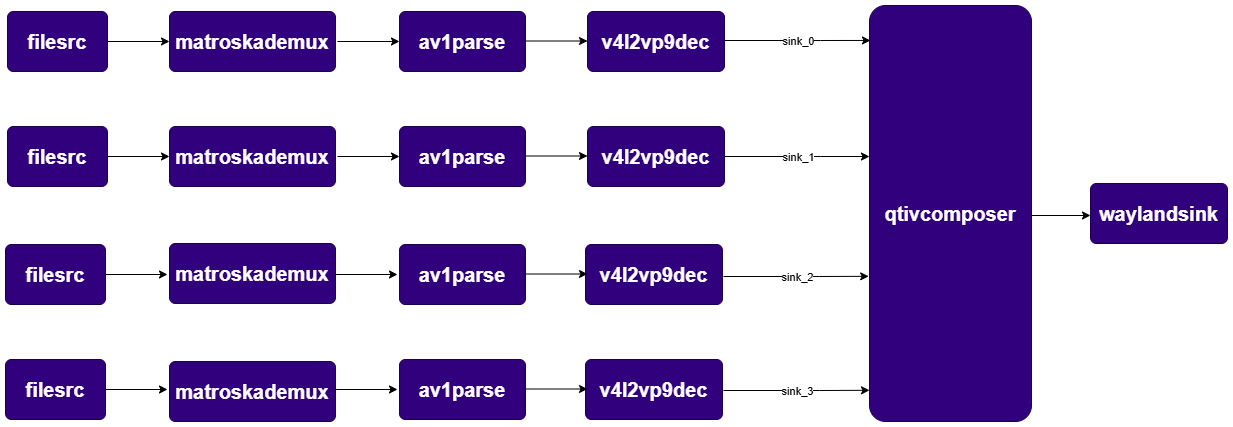
Demonstrates decoding four AV1 input streams using four hardware decoder instances, arranging them in a 2×2 grid using `qtivcomposer`, and displaying the composed frame.
```bash theme={null}
gst-launch-1.0 -e \
filesrc location=$HOME/media/$SRC_VIDEO_NAME ! \
matroskademux ! queue ! av1parse ! \
v4l2av1dec output-io-mode=4 capture-io-mode=4 ! \
video/x-raw,format=NV12 ! queue ! \
waylandsink fullscreen=true
```
### Four-Stream Side-by-Side Composition
Demonstrates decoding four AV1 input streams using four hardware decoder instances, arranging them in a 2×2 grid using `qtivcomposer`, and displaying the composed frame.
 ```bash theme={null}
gst-launch-1.0 -e --gst-debug=2 \
qtivcomposer name=mixer \
sink_0::position="<0, 0>" sink_0::dimensions="<960, 540>" \
sink_1::position="<960, 0>" sink_1::dimensions="<960, 540>" \
sink_2::position="<0, 540>" sink_2::dimensions="<960, 540>" \
sink_3::position="<960, 540>" sink_3::dimensions="<960, 540>" \
! queue ! waylandsink fullscreen=true sync=false enable-last-sample=false \
filesrc location=$HOME/media/$SRC_VIDEO_NAME ! \
matroskademux ! queue ! av1parse ! v4l2av1dec output-io-mode=4 capture-io-mode=4 ! queue ! mixer. \
filesrc location=$HOME/media/$SRC_VIDEO_NAME ! \
matroskademux ! queue ! av1parse ! v4l2av1dec output-io-mode=4 capture-io-mode=4 ! queue ! mixer. \
filesrc location=$HOME/media/$SRC_VIDEO_NAME ! \
matroskademux ! queue ! av1parse ! v4l2av1dec output-io-mode=4 capture-io-mode=4 ! queue ! mixer. \
filesrc location=$HOME/media/$SRC_VIDEO_NAME ! \
matroskademux ! queue ! av1parse ! v4l2av1dec output-io-mode=4 capture-io-mode=4 ! queue ! mixer.
```
```bash theme={null}
gst-launch-1.0 -e --gst-debug=2 \
qtivcomposer name=mixer \
sink_0::position="<0, 0>" sink_0::dimensions="<960, 540>" \
sink_1::position="<960, 0>" sink_1::dimensions="<960, 540>" \
sink_2::position="<0, 540>" sink_2::dimensions="<960, 540>" \
sink_3::position="<960, 540>" sink_3::dimensions="<960, 540>" \
! queue ! waylandsink fullscreen=true sync=false enable-last-sample=false \
filesrc location=$HOME/media/$SRC_VIDEO_NAME ! \
matroskademux ! queue ! av1parse ! v4l2av1dec output-io-mode=4 capture-io-mode=4 ! queue ! mixer. \
filesrc location=$HOME/media/$SRC_VIDEO_NAME ! \
matroskademux ! queue ! av1parse ! v4l2av1dec output-io-mode=4 capture-io-mode=4 ! queue ! mixer. \
filesrc location=$HOME/media/$SRC_VIDEO_NAME ! \
matroskademux ! queue ! av1parse ! v4l2av1dec output-io-mode=4 capture-io-mode=4 ! queue ! mixer. \
filesrc location=$HOME/media/$SRC_VIDEO_NAME ! \
matroskademux ! queue ! av1parse ! v4l2av1dec output-io-mode=4 capture-io-mode=4 ! queue ! mixer.
```