> ## Documentation Index
> Fetch the complete documentation index at: https://imsdkdocs.qualcomm.com/llms.txt
> Use this file to discover all available pages before exploring further.
# qtivcomposer
> Video composition pipelines plugin
# Overview
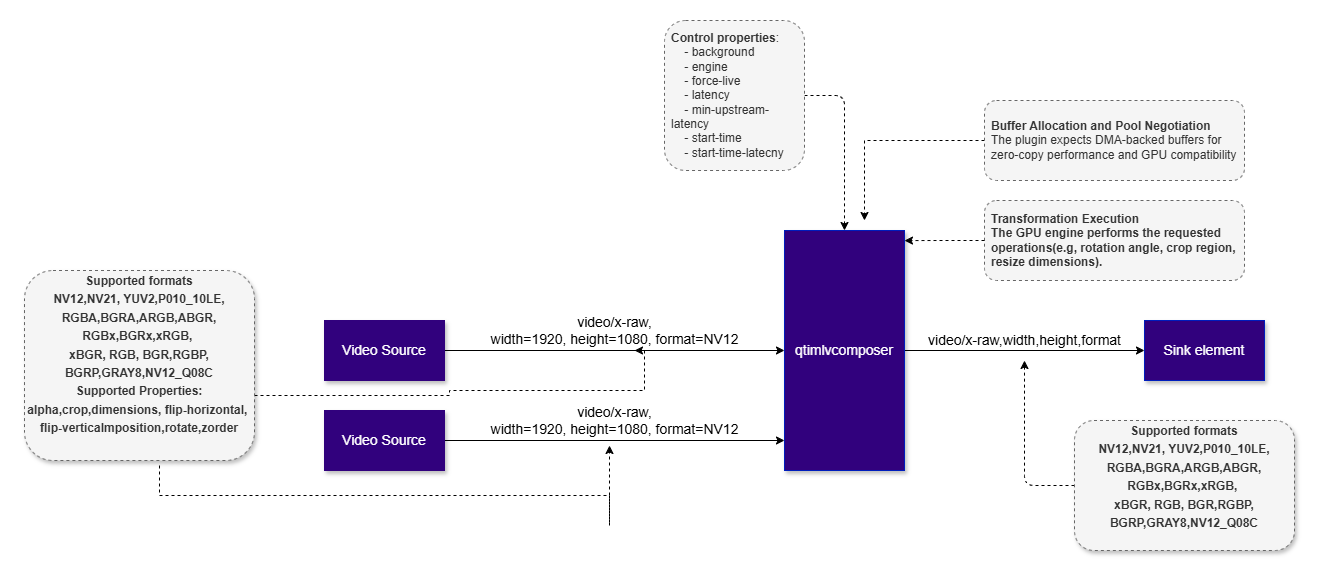
**qtivcomposer** is a video composition element that combines multiple video streams into a single output frame using GPU hardware acceleration.
At a fundamental level, video composition involves taking multiple independent video frames and arranging them into one output frame according to defined spatial rules. These rules determine the position of each input frame and, when necessary, resize it to fit its destination window in the output frame. Resizing may involve either downscaling or upscaling, depending on the source and destination rectangles.
**qtivcomposer** is commonly used in scenarios such as:
* Multi-camera systems, such as surround-view and security grid layouts
* Picture-in-picture compositions
* Video wall applications
* Overlaying auxiliary video streams onto a primary video feed
The element is optimized for real-time, low-latency pipelines and is designed to operate efficiently on platforms that provide GPU or dedicated hardware composition engines.
Unlike software-based compositors, which rely on CPU memory copies and pixel-by-pixel processing, **qtivcomposer** leverages hardware acceleration to reduce memory bandwidth usage and lower end-to-end latency.
By enforcing strict buffer requirements and separating layout definition from execution, the plugin provides a hardware-accelerated, deterministic, and scalable solution for video composition in GStreamer pipelines.
 ## Example Pipeline
| File | Download | Save as |
| ------------ | ------------------------------------------------------------------------------------------------------------------------------------------------------ | ----------- |
| Sample video | Input video | `video.mp4` |
```bash SCP (SSH) theme={null}
# Replace $HOME to the appropriate device path before running the commands.
# For QLI: /root
# For Ubuntu: /home/ubuntu
# Modify this based on your platform and ensure files are copied to the correct location on the device.
# Run from your host machine — replace and
ssh @ "mkdir -p $HOME/{media,media/output}"
scp video.mp4 @:$HOME/media/
```
```bash SCP (SSH) theme={null}
# Run from your host machine — replace and
ssh @
```
Run below command on your device
```bash theme={null}
mkdir -p $HOME/{media,media/output}
export SRC_VIDEO_NAME=video.mp4
```
```bash theme={null}
gst-launch-1.0 -e --gst-debug=2 \
filesrc location=$HOME/media/$SRC_VIDEO_NAME ! qtdemux ! h264parse ! \
v4l2h264dec capture-io-mode=4 output-io-mode=4 ! video/x-raw,format=NV12 ! queue ! tee name=t \
t. ! queue ! qtivcomposer name=mixer sink_0::dimensions="<960,540>" sink_1::dimensions="<960,540>" ! \
queue ! waylandsink fullscreen=true sync=false \
t. ! queue ! mixer.
```
# Hierarchy
[GObject](https://docs.gtk.org/gobject/)
## Example Pipeline
| File | Download | Save as |
| ------------ | ------------------------------------------------------------------------------------------------------------------------------------------------------ | ----------- |
| Sample video | Input video | `video.mp4` |
```bash SCP (SSH) theme={null}
# Replace $HOME to the appropriate device path before running the commands.
# For QLI: /root
# For Ubuntu: /home/ubuntu
# Modify this based on your platform and ensure files are copied to the correct location on the device.
# Run from your host machine — replace and
ssh @ "mkdir -p $HOME/{media,media/output}"
scp video.mp4 @:$HOME/media/
```
```bash SCP (SSH) theme={null}
# Run from your host machine — replace and
ssh @
```
Run below command on your device
```bash theme={null}
mkdir -p $HOME/{media,media/output}
export SRC_VIDEO_NAME=video.mp4
```
```bash theme={null}
gst-launch-1.0 -e --gst-debug=2 \
filesrc location=$HOME/media/$SRC_VIDEO_NAME ! qtdemux ! h264parse ! \
v4l2h264dec capture-io-mode=4 output-io-mode=4 ! video/x-raw,format=NV12 ! queue ! tee name=t \
t. ! queue ! qtivcomposer name=mixer sink_0::dimensions="<960,540>" sink_1::dimensions="<960,540>" ! \
queue ! waylandsink fullscreen=true sync=false \
t. ! queue ! mixer.
```
# Hierarchy
[GObject](https://docs.gtk.org/gobject/)
[GstObject](https://gstreamer.freedesktop.org/documentation/gstreamer/gstobject.html?gi-language=c)
[GstElement](https://gstreamer.freedesktop.org/documentation/gstreamer/gstelement.html?gi-language=c)
[GstAggregator](https://gstreamer.freedesktop.org/documentation/base/gstaggregator.html?gi-language=c#GstAggregator)
[GstVideoAggregator](https://gstreamer.freedesktop.org/documentation/video/gstvideoaggregator.html?gi-language=c#GstVideoAggregator)
qtivcomposer
# Pad Templates
### sink
| Capabilities | |
| -------------------------- | ------------------------------------------------------------------------------------------------------------------------------------------------------------------------------------------------------------------- |
| `video/x-raw` | `format: { NV12, NV21, UYVY, YUY2, P010_10LE, RGBA, BGRA, ARGB, ABGR, RGBx, BGRx, xRGB, xBGR, RGB, BGR, GRAY8, NV12_Q08C }`
`width: [1, 32767]`
`height: [1, 32767]`
`framerate: [0/1, 255/1]` |
| Availability: *On request* | |
| Direction: *sink* | |
### src
| Capabilities | |
| ------------------- | ------------------------------------------------------------------------------------------------------------------------------------------------------------------------------------------------------------------- |
| `video/x-raw` | `format: { NV12, NV21, UYVY, YUY2, P010_10LE, RGBA, BGRA, ARGB, ABGR, RGBx, BGRx, xRGB, xBGR, RGB, BGR, GRAY8, NV12_Q08C }`
`width: [1, 32767]`
`height: [1, 32767]`
`framerate: [0/1, 255/1]` |
| Presence: *Always* | |
| Direction: *source* | |
# Pad Properties
### sink
| Property | Description |
| ----------------- | --------------------------------------------------------------------------------------------------------------------------------------------------------------------------------------------------------------------------------------------------------------------------------------------------------------------------------------------------------------------- |
| `alpha` | Alpha channel value.
`Type: Double`
`Default: 1`
`Range: 0 - 1`
`Flags: readable/writable` |
| `crop` | The crop rectangle in the format ``.
`Type: GstValueArray of type gint`
`Default: "<0, 0, 0, 0>"`
`Flags: readable/writable`
`Example: crop="<0,0,1280,720>"` |
| `dimensions` | The destination rectangle width and height. If not set, it remains the same as input dimensions in the format ``.
`Type: GstValueArray of type gint`
`Default: "< >"`
`Flags: readable/writable`
`Example: crop="<1280,720>"` |
| `flip-horizontal` | Flips the video frame horizontally.
`Type: Boolean`
`Default: false`
`Flags: readable/writable` |
| `flip-vertical` | Flips the video frame vertically.
`Type: Boolean`
`Default: false`
`Flags: readable/writable` |
| `position` | The X and Y coordinates of the destination rectangle's top-left corner in the format ``.
`Type: GstValueArray of type gint`
`Default: "< >"`
`Flags: readable/writable`
`Example: position="<10,20>"` |
| `rotate` | Specifies rotation to apply to the video.
`Type: Enum `
`Default: 0, "none"`
`Range:`
`(0): none`
`(1): 90CW - Rotate 90 degrees clockwise`
`(2): 90CCW - Rotate 90 degrees counter-clockwise`
`(3): 180 - Rotate 180 degrees`
`Flags: readable/writable`
`Example: rotate="90CW" (or) rotate=1` |
| `zorder` | Z-axis order. By default, follows the order of creation.
`Type: Integer`
`Default: -1`
`Range: -1 - 2147483647`
`Flags: readable/writable` |
# Element Properties
| Property | Description |
| ------------ | ----------------------------------------------------------------------------------------------------------------------------------------------------------------------------------------------------------------------------------------------------------------------------------------------------------------------------------------------------------- |
| `background` | Background color.
`Type: Unsigned Integer`
`Default: 4286611584`
`Range: 0 - 4294967295`
`Flags: readable/writable` |
| `engine` | Engine backend used for the conversion operations.
`Type: Enum `
`Default: 2, "gles"`
`Range:`
`(0): none - No backend used`
`(2): gles - Use OpenGLES based video converter`
`(3): fcv - Use FastCV based video converter`
`Flags: readable/writable`
`Example: engine="gles" (or) engine=2` |
# Architecture, Processing, and Role in Vision AI
**qtivcomposer** is a multi-sink GStreamer element with one source pad. Each sink pad accepts one input stream, typically through dynamically requested pads such as `sink_0`, `sink_1`, and so on. The source pad produces the final composed frame.
Internally, the element includes four main parts: a pad manager that tracks active inputs, a layout configuration that defines where and how each input appears in the output, a hardware composition backend that performs the composition, and a buffer manager that enforces DMA-compatible memory usage.
At setup time, caps negotiation defines the output frame, including resolution and color format. Input streams must be compatible with the compositor. When needed, hardware-supported scaling and format conversion are applied during composition.
Each sink pad is configured with layout metadata that specifies:
* Output position `(x, y)`
* Output size `(width, height)`
* Z-order
These settings are typically provided through element or per-pad properties. The properties are parsed into an internal layout structure that describes the final output frame independently of buffer arrival order. This separation keeps composition deterministic and reproducible.
During runtime, each sink pad receives buffers independently. To generate a valid output frame, **qtivcomposer** synchronizes inputs by presentation time and ensures that all required frames are available. If a frame is missing or delayed, the element may reuse the previous frame, drop the output frame, or stall, depending on configuration.
**qtivcomposer** operates only on DMA-backed buffers. This allows the hardware backend to access memory directly without CPU copies, enabling zero-copy operation, hardware interoperability, and predictable latency. If upstream does not provide suitable buffers, the element advertises its own buffer pool through GStreamer allocation negotiation. If compatible allocation cannot be established, pipeline setup fails rather than falling back to software memory.
Once the required input buffers are ready, the hardware backend reads each frame, applies scaling, positioning, and any supported blending, and draws the inputs onto the output surface in Z-order. The composed frame is then pushed downstream to encoders, display sinks, or network outputs with a consistent format and timeline.
In multi-stream vision AI pipelines, **qtivcomposer** is not only a display component but also a performance optimization stage. It combines multiple AI-processed streams into a single output surface, reducing memory bandwidth pressure, CPU overhead, GPU context switching, and cross-stream synchronization cost. In a typical IMSDK pipeline, each stream is decoded, preprocessed, inferred, and post-processed independently, with overlays such as boxes or labels applied per stream. The streams are merged only at the final stage by **qtivcomposer**, which preserves parallel processing while making final output efficient.
# Usage
### Side-by-side composition of two camera streams
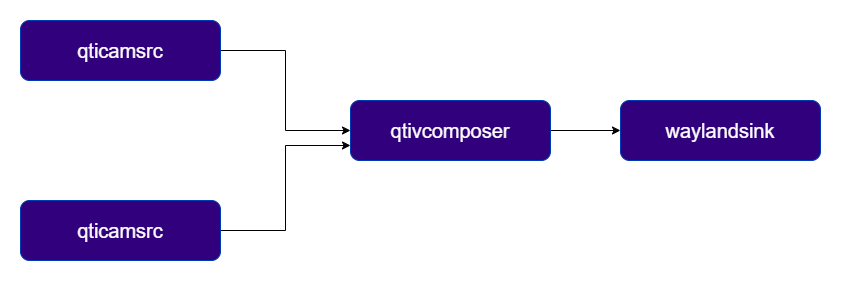
This pipeline uses `qtivcomposer` to combine two NV12 camera streams into a single output frame arranged side by side, with the resulting output displayed on the screen.
 ```
gst-launch-1.0 \
qtivcomposer name=mixer \
sink_0::position="<0, 0>" sink_0::dimensions="<960, 540>" \
sink_1::position="<960, 0>" sink_1::dimensions="<960, 540>" \
! waylandsink fullscreen=true async=true sync=false \
qticamsrc camera=0 ! video/x-raw,format=NV12,width=1280,height=720 ! mixer. \
qticamsrc camera=1 ! video/x-raw,format=NV12,width=1280,height=720 ! mixer.
```
### Picture-in-picture (PiP) composition of two camera streams
This example uses qtivcomposer to overlay a secondary video stream on top of a primary stream, creating a PiP layout in a single output frame.
```
gst-launch-1.0 \
qtivcomposer name=mixer \
sink_0::position="<0, 0>" sink_0::dimensions="<960, 540>" \
sink_1::position="<960, 0>" sink_1::dimensions="<960, 540>" \
! waylandsink fullscreen=true async=true sync=false \
qticamsrc camera=0 ! video/x-raw,format=NV12,width=1280,height=720 ! mixer. \
qticamsrc camera=1 ! video/x-raw,format=NV12,width=1280,height=720 ! mixer.
```
### Picture-in-picture (PiP) composition of two camera streams
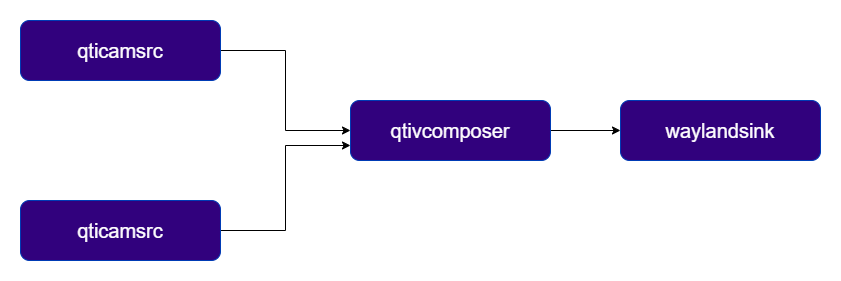
This example uses qtivcomposer to overlay a secondary video stream on top of a primary stream, creating a PiP layout in a single output frame.
 ```
gst-launch-1.0 \
qtivcomposer name=mixer \
sink_0::position="<0, 0>" sink_0::dimensions="<1920, 1080>" \
sink_1::position="<1180, 620>" sink_1::dimensions="<640, 360>" \
! waylandsink fullscreen=true async=true sync=false
qticamsrc camera=0 ! video/x-raw,format=NV12,width=1920,height=1080 ! mixer. \
qticamsrc camera=1 ! video/x-raw,format=NV12,width=1920,height=1080 ! mixer.
```
### Multi‑Stream Vision AI Video Wall
This example demonstrates how `qtivcomposer` serves as the final aggregation point for building an video wall, where each stream runs its own AI inference pipeline, applies AI Metadata as overlay, and is then composed into a single output to create the final video wall.
```
gst-launch-1.0 \
qtivcomposer name=mixer \
sink_0::position="<0, 0>" sink_0::dimensions="<1920, 1080>" \
sink_1::position="<1180, 620>" sink_1::dimensions="<640, 360>" \
! waylandsink fullscreen=true async=true sync=false
qticamsrc camera=0 ! video/x-raw,format=NV12,width=1920,height=1080 ! mixer. \
qticamsrc camera=1 ! video/x-raw,format=NV12,width=1920,height=1080 ! mixer.
```
### Multi‑Stream Vision AI Video Wall
This example demonstrates how `qtivcomposer` serves as the final aggregation point for building an video wall, where each stream runs its own AI inference pipeline, applies AI Metadata as overlay, and is then composed into a single output to create the final video wall.
 | File | Download | Save as |
| ----------- | ------------------------------------------------------------- | ----------------------------- |
| YOLO model | [Qualcomm Model](https://aihub.qualcomm.com/iot/models/yolox) | `yolov8_det_quantized.tflite` |
| YOLO labels | [Labels](https://qimsdk.mintlify.io/labels/yolov8.json) | `yolov8.json` |
```bash SCP (SSH) theme={null}
ssh @ "mkdir -p $HOME/{models,labels}"
scp yolov8_det_quantized.tflite @:$HOME/models/
scp yolov8.json @:$HOME/labels/
```
```bash SCP (SSH) theme={null}
ssh @
```
Run below command on your device
```bash theme={null}
mkdir -p $HOME/{models,labels}
```
```bash theme={null}
gst-launch-1.0 -v qtivcomposer background=0x000000FF name=mix \
sink_0::position="<0, 0>" sink_0::dimensions="<640, 360>" \
sink_1::position="<640, 0>" sink_1::dimensions="<640, 360>" \
sink_2::position="<1280, 0>" sink_2::dimensions="<640, 360>" \
sink_3::position="<0, 360>" sink_3::dimensions="<640, 360>" \
sink_4::position="<640, 360>" sink_4::dimensions="<640, 360>" \
sink_5::position="<1280, 360>" sink_5::dimensions="<640, 360>" \
sink_6::position="<0, 720>" sink_6::dimensions="<640, 360>" \
sink_7::position="<640, 720>" sink_7::dimensions="<640, 360>" \
sink_8::position="<1280, 720>" sink_8::dimensions="<640, 360>" \
sink_9::position="<0, 0>" sink_9::dimensions="<640, 360>" \
sink_10::position="<640, 0>" sink_10::dimensions="<640, 360>" \
sink_11::position="<1280, 0>" sink_11::dimensions="<640, 360>" \
sink_12::position="<0, 360>" sink_12::dimensions="<640, 360>" \
sink_13::position="<640, 360>" sink_13::dimensions="<640, 360>" \
sink_14::position="<1280, 360>" sink_14::dimensions="<640, 360>" \
sink_15::position="<0, 720>" sink_15::dimensions="<640, 360>" \
sink_16::position="<640, 720>" sink_16::dimensions="<640, 360>" \
sink_17::position="<1280, 720>" sink_17::dimensions="<640, 360>" \
mix. ! queue ! fpsdisplaysink text-overlay=false sync=true video-sink="waylandsink fullscreen=true async=true sync=true" \
rtspsrc location=rtsp://admin:qualcomm1@192.168.0.14:554/Streaming/Channels/101 ! queue ! rtpptdemux ! rtph264depay ! h264parse ! v4l2h264dec capture-io-mode=4 output-io-mode=4 ! video/x-raw, format=NV12 ! queue ! tee name=t0 ! queue ! mix. \
rtspsrc location=rtsp://admin:qualcomm1@192.168.0.14:554/Streaming/Channels/101 ! queue ! rtpptdemux ! rtph264depay ! h264parse ! v4l2h264dec capture-io-mode=4 output-io-mode=4 ! video/x-raw, format=NV12 ! queue ! tee name=t1 ! queue ! mix. \
rtspsrc location=rtsp://admin:qualcomm1@192.168.0.14:554/Streaming/Channels/101 ! queue ! rtpptdemux ! rtph264depay ! h264parse ! v4l2h264dec capture-io-mode=4 output-io-mode=4 ! video/x-raw, format=NV12 ! queue ! tee name=t2 ! queue ! mix. \
rtspsrc location=rtsp://admin:qualcomm1@192.168.0.14:554/Streaming/Channels/101 ! queue ! rtpptdemux ! rtph264depay ! h264parse ! v4l2h264dec capture-io-mode=4 output-io-mode=4 ! video/x-raw, format=NV12 ! queue ! tee name=t3 ! queue ! mix. \
rtspsrc location=rtsp://admin:qualcomm1@192.168.0.14:554/Streaming/Channels/101 ! queue ! rtpptdemux ! rtph264depay ! h264parse ! v4l2h264dec capture-io-mode=4 output-io-mode=4 ! video/x-raw, format=NV12 ! queue ! tee name=t4 ! queue ! mix. \
rtspsrc location=rtsp://admin:qualcomm1@192.168.0.14:554/Streaming/Channels/101 ! queue ! rtpptdemux ! rtph264depay ! h264parse ! v4l2h264dec capture-io-mode=4 output-io-mode=4 ! video/x-raw, format=NV12 ! queue ! tee name=t5 ! queue ! mix. \
rtspsrc location=rtsp://admin:qualcomm1@192.168.0.14:554/Streaming/Channels/101 ! queue ! rtpptdemux ! rtph264depay ! h264parse ! v4l2h264dec capture-io-mode=4 output-io-mode=4 ! video/x-raw, format=NV12 ! queue ! tee name=t6 ! queue ! mix. \
rtspsrc location=rtsp://admin:qualcomm1@192.168.0.14:554/Streaming/Channels/101 ! queue ! rtpptdemux ! rtph264depay ! h264parse ! v4l2h264dec capture-io-mode=4 output-io-mode=4 ! video/x-raw, format=NV12 ! queue ! tee name=t7 ! queue ! mix. \
rtspsrc location=rtsp://admin:qualcomm1@192.168.0.14:554/Streaming/Channels/101 ! queue ! rtpptdemux ! rtph264depay ! h264parse ! v4l2h264dec capture-io-mode=4 output-io-mode=4 ! video/x-raw, format=NV12 ! queue ! tee name=t8 ! queue ! mix. \
split0. ! videorate drop-only=true ! video/x-raw,framerate=15/1 ! queue ! qtimlvconverter ! queue ! qtimltflite delegate=external external-delegate-path=libQnnTFLiteDelegate.so external-delegate-options="QNNExternalDelegate,backend_type=htp;" model=$HOME/models/yolov8_det_quantized.tflite ! queue ! qtimlpostprocess module=yolov8 labels=$HOME/models/yolov8.json settings="{\"confidence\": 50.0}" ! queue ! mix. \
split1. ! videorate drop-only=true ! video/x-raw,framerate=15/1 ! queue ! qtimlvconverter ! queue ! qtimltflite delegate=external external-delegate-path=libQnnTFLiteDelegate.so external-delegate-options="QNNExternalDelegate,backend_type=htp;" model=$HOME/models/yolov8_det_quantized.tflite ! queue ! qtimlpostprocess module=yolov8 labels=$HOME/models/yolov8.json settings="{\"confidence\": 50.0}" ! queue ! mix. \
split2. ! videorate drop-only=true ! video/x-raw,framerate=15/1 ! queue ! qtimlvconverter ! queue ! qtimltflite delegate=external external-delegate-path=libQnnTFLiteDelegate.so external-delegate-options="QNNExternalDelegate,backend_type=htp;" model=$HOME/models/yolov8_det_quantized.tflite ! queue ! qtimlpostprocess module=yolov8 labels=$HOME/models/yolov8.json settings="{\"confidence\": 50.0}" ! queue ! mix. \
split3. ! videorate drop-only=true ! video/x-raw,framerate=15/1 ! queue ! qtimlvconverter ! queue ! qtimltflite delegate=external external-delegate-path=libQnnTFLiteDelegate.so external-delegate-options="QNNExternalDelegate,backend_type=htp;" model=$HOME/models/yolov8_det_quantized.tflite ! queue ! qtimlpostprocess module=yolov8 labels=$HOME/models/yolov8.json settings="{\"confidence\": 50.0}" ! queue ! mix. \
split4. ! videorate drop-only=true ! video/x-raw,framerate=15/1 ! queue ! qtimlvconverter ! queue ! qtimltflite delegate=external external-delegate-path=libQnnTFLiteDelegate.so external-delegate-options="QNNExternalDelegate,backend_type=htp;" model=$HOME/models/yolov8_det_quantized.tflite ! queue ! qtimlpostprocess module=yolov8 labels=$HOME/models/yolov8.json settings="{\"confidence\": 50.0}" ! queue ! mix. \
split5. ! videorate drop-only=true ! video/x-raw,framerate=15/1 ! queue ! qtimlvconverter ! queue ! qtimltflite delegate=external external-delegate-path=libQnnTFLiteDelegate.so external-delegate-options="QNNExternalDelegate,backend_type=htp;" model=$HOME/models/yolov8_det_quantized.tflite ! queue ! qtimlpostprocess module=yolov8 labels=$HOME/models/yolov8.json settings="{\"confidence\": 50.0}" ! queue ! mix. \
split6. ! videorate drop-only=true ! video/x-raw,framerate=15/1 ! queue ! qtimlvconverter ! queue ! qtimltflite delegate=external external-delegate-path=libQnnTFLiteDelegate.so external-delegate-options="QNNExternalDelegate,backend_type=htp;" model=$HOME/models/yolov8_det_quantized.tflite ! queue ! qtimlpostprocess module=yolov8 labels=$HOME/models/yolov8.json settings="{\"confidence\": 50.0}" ! queue ! mix. \
split7. ! videorate drop-only=true ! video/x-raw,framerate=15/1 ! queue ! qtimlvconverter ! queue ! qtimltflite delegate=external external-delegate-path=libQnnTFLiteDelegate.so external-delegate-options="QNNExternalDelegate,backend_type=htp;" model=$HOME/models/yolov8_det_quantized.tflite ! queue ! qtimlpostprocess module=yolov8 labels=$HOME/models/yolov8.json settings="{\"confidence\": 50.0}" ! queue ! mix. \
split8. ! videorate drop-only=true ! video/x-raw,framerate=15/1 ! queue ! qtimlvconverter ! queue ! qtimltflite delegate=external external-delegate-path=libQnnTFLiteDelegate.so external-delegate-options="QNNExternalDelegate,backend_type=htp;" model=$HOME/models/yolov8_det_quantized.tflite ! queue ! qtimlpostprocess module=yolov8 labels=$HOME/models/yolov8.json settings="{\"confidence\": 50.0}" ! queue ! mix.
```
| File | Download | Save as |
| ----------- | ------------------------------------------------------------- | ----------------------------- |
| YOLO model | [Qualcomm Model](https://aihub.qualcomm.com/iot/models/yolox) | `yolov8_det_quantized.tflite` |
| YOLO labels | [Labels](https://qimsdk.mintlify.io/labels/yolov8.json) | `yolov8.json` |
```bash SCP (SSH) theme={null}
ssh @ "mkdir -p $HOME/{models,labels}"
scp yolov8_det_quantized.tflite @:$HOME/models/
scp yolov8.json @:$HOME/labels/
```
```bash SCP (SSH) theme={null}
ssh @
```
Run below command on your device
```bash theme={null}
mkdir -p $HOME/{models,labels}
```
```bash theme={null}
gst-launch-1.0 -v qtivcomposer background=0x000000FF name=mix \
sink_0::position="<0, 0>" sink_0::dimensions="<640, 360>" \
sink_1::position="<640, 0>" sink_1::dimensions="<640, 360>" \
sink_2::position="<1280, 0>" sink_2::dimensions="<640, 360>" \
sink_3::position="<0, 360>" sink_3::dimensions="<640, 360>" \
sink_4::position="<640, 360>" sink_4::dimensions="<640, 360>" \
sink_5::position="<1280, 360>" sink_5::dimensions="<640, 360>" \
sink_6::position="<0, 720>" sink_6::dimensions="<640, 360>" \
sink_7::position="<640, 720>" sink_7::dimensions="<640, 360>" \
sink_8::position="<1280, 720>" sink_8::dimensions="<640, 360>" \
sink_9::position="<0, 0>" sink_9::dimensions="<640, 360>" \
sink_10::position="<640, 0>" sink_10::dimensions="<640, 360>" \
sink_11::position="<1280, 0>" sink_11::dimensions="<640, 360>" \
sink_12::position="<0, 360>" sink_12::dimensions="<640, 360>" \
sink_13::position="<640, 360>" sink_13::dimensions="<640, 360>" \
sink_14::position="<1280, 360>" sink_14::dimensions="<640, 360>" \
sink_15::position="<0, 720>" sink_15::dimensions="<640, 360>" \
sink_16::position="<640, 720>" sink_16::dimensions="<640, 360>" \
sink_17::position="<1280, 720>" sink_17::dimensions="<640, 360>" \
mix. ! queue ! fpsdisplaysink text-overlay=false sync=true video-sink="waylandsink fullscreen=true async=true sync=true" \
rtspsrc location=rtsp://admin:qualcomm1@192.168.0.14:554/Streaming/Channels/101 ! queue ! rtpptdemux ! rtph264depay ! h264parse ! v4l2h264dec capture-io-mode=4 output-io-mode=4 ! video/x-raw, format=NV12 ! queue ! tee name=t0 ! queue ! mix. \
rtspsrc location=rtsp://admin:qualcomm1@192.168.0.14:554/Streaming/Channels/101 ! queue ! rtpptdemux ! rtph264depay ! h264parse ! v4l2h264dec capture-io-mode=4 output-io-mode=4 ! video/x-raw, format=NV12 ! queue ! tee name=t1 ! queue ! mix. \
rtspsrc location=rtsp://admin:qualcomm1@192.168.0.14:554/Streaming/Channels/101 ! queue ! rtpptdemux ! rtph264depay ! h264parse ! v4l2h264dec capture-io-mode=4 output-io-mode=4 ! video/x-raw, format=NV12 ! queue ! tee name=t2 ! queue ! mix. \
rtspsrc location=rtsp://admin:qualcomm1@192.168.0.14:554/Streaming/Channels/101 ! queue ! rtpptdemux ! rtph264depay ! h264parse ! v4l2h264dec capture-io-mode=4 output-io-mode=4 ! video/x-raw, format=NV12 ! queue ! tee name=t3 ! queue ! mix. \
rtspsrc location=rtsp://admin:qualcomm1@192.168.0.14:554/Streaming/Channels/101 ! queue ! rtpptdemux ! rtph264depay ! h264parse ! v4l2h264dec capture-io-mode=4 output-io-mode=4 ! video/x-raw, format=NV12 ! queue ! tee name=t4 ! queue ! mix. \
rtspsrc location=rtsp://admin:qualcomm1@192.168.0.14:554/Streaming/Channels/101 ! queue ! rtpptdemux ! rtph264depay ! h264parse ! v4l2h264dec capture-io-mode=4 output-io-mode=4 ! video/x-raw, format=NV12 ! queue ! tee name=t5 ! queue ! mix. \
rtspsrc location=rtsp://admin:qualcomm1@192.168.0.14:554/Streaming/Channels/101 ! queue ! rtpptdemux ! rtph264depay ! h264parse ! v4l2h264dec capture-io-mode=4 output-io-mode=4 ! video/x-raw, format=NV12 ! queue ! tee name=t6 ! queue ! mix. \
rtspsrc location=rtsp://admin:qualcomm1@192.168.0.14:554/Streaming/Channels/101 ! queue ! rtpptdemux ! rtph264depay ! h264parse ! v4l2h264dec capture-io-mode=4 output-io-mode=4 ! video/x-raw, format=NV12 ! queue ! tee name=t7 ! queue ! mix. \
rtspsrc location=rtsp://admin:qualcomm1@192.168.0.14:554/Streaming/Channels/101 ! queue ! rtpptdemux ! rtph264depay ! h264parse ! v4l2h264dec capture-io-mode=4 output-io-mode=4 ! video/x-raw, format=NV12 ! queue ! tee name=t8 ! queue ! mix. \
split0. ! videorate drop-only=true ! video/x-raw,framerate=15/1 ! queue ! qtimlvconverter ! queue ! qtimltflite delegate=external external-delegate-path=libQnnTFLiteDelegate.so external-delegate-options="QNNExternalDelegate,backend_type=htp;" model=$HOME/models/yolov8_det_quantized.tflite ! queue ! qtimlpostprocess module=yolov8 labels=$HOME/models/yolov8.json settings="{\"confidence\": 50.0}" ! queue ! mix. \
split1. ! videorate drop-only=true ! video/x-raw,framerate=15/1 ! queue ! qtimlvconverter ! queue ! qtimltflite delegate=external external-delegate-path=libQnnTFLiteDelegate.so external-delegate-options="QNNExternalDelegate,backend_type=htp;" model=$HOME/models/yolov8_det_quantized.tflite ! queue ! qtimlpostprocess module=yolov8 labels=$HOME/models/yolov8.json settings="{\"confidence\": 50.0}" ! queue ! mix. \
split2. ! videorate drop-only=true ! video/x-raw,framerate=15/1 ! queue ! qtimlvconverter ! queue ! qtimltflite delegate=external external-delegate-path=libQnnTFLiteDelegate.so external-delegate-options="QNNExternalDelegate,backend_type=htp;" model=$HOME/models/yolov8_det_quantized.tflite ! queue ! qtimlpostprocess module=yolov8 labels=$HOME/models/yolov8.json settings="{\"confidence\": 50.0}" ! queue ! mix. \
split3. ! videorate drop-only=true ! video/x-raw,framerate=15/1 ! queue ! qtimlvconverter ! queue ! qtimltflite delegate=external external-delegate-path=libQnnTFLiteDelegate.so external-delegate-options="QNNExternalDelegate,backend_type=htp;" model=$HOME/models/yolov8_det_quantized.tflite ! queue ! qtimlpostprocess module=yolov8 labels=$HOME/models/yolov8.json settings="{\"confidence\": 50.0}" ! queue ! mix. \
split4. ! videorate drop-only=true ! video/x-raw,framerate=15/1 ! queue ! qtimlvconverter ! queue ! qtimltflite delegate=external external-delegate-path=libQnnTFLiteDelegate.so external-delegate-options="QNNExternalDelegate,backend_type=htp;" model=$HOME/models/yolov8_det_quantized.tflite ! queue ! qtimlpostprocess module=yolov8 labels=$HOME/models/yolov8.json settings="{\"confidence\": 50.0}" ! queue ! mix. \
split5. ! videorate drop-only=true ! video/x-raw,framerate=15/1 ! queue ! qtimlvconverter ! queue ! qtimltflite delegate=external external-delegate-path=libQnnTFLiteDelegate.so external-delegate-options="QNNExternalDelegate,backend_type=htp;" model=$HOME/models/yolov8_det_quantized.tflite ! queue ! qtimlpostprocess module=yolov8 labels=$HOME/models/yolov8.json settings="{\"confidence\": 50.0}" ! queue ! mix. \
split6. ! videorate drop-only=true ! video/x-raw,framerate=15/1 ! queue ! qtimlvconverter ! queue ! qtimltflite delegate=external external-delegate-path=libQnnTFLiteDelegate.so external-delegate-options="QNNExternalDelegate,backend_type=htp;" model=$HOME/models/yolov8_det_quantized.tflite ! queue ! qtimlpostprocess module=yolov8 labels=$HOME/models/yolov8.json settings="{\"confidence\": 50.0}" ! queue ! mix. \
split7. ! videorate drop-only=true ! video/x-raw,framerate=15/1 ! queue ! qtimlvconverter ! queue ! qtimltflite delegate=external external-delegate-path=libQnnTFLiteDelegate.so external-delegate-options="QNNExternalDelegate,backend_type=htp;" model=$HOME/models/yolov8_det_quantized.tflite ! queue ! qtimlpostprocess module=yolov8 labels=$HOME/models/yolov8.json settings="{\"confidence\": 50.0}" ! queue ! mix. \
split8. ! videorate drop-only=true ! video/x-raw,framerate=15/1 ! queue ! qtimlvconverter ! queue ! qtimltflite delegate=external external-delegate-path=libQnnTFLiteDelegate.so external-delegate-options="QNNExternalDelegate,backend_type=htp;" model=$HOME/models/yolov8_det_quantized.tflite ! queue ! qtimlpostprocess module=yolov8 labels=$HOME/models/yolov8.json settings="{\"confidence\": 50.0}" ! queue ! mix.
```