> ## Documentation Index
> Fetch the complete documentation index at: https://imsdkdocs.qualcomm.com/llms.txt
> Use this file to discover all available pages before exploring further.
# qtisocketsrc
> Socket Source plugin
# Overview
`qtisocketsrc` is a GStreamer source element designed to receive `GstBuffer` objects from another process over a UNIX domain socket.
It is typically used together with [`qtisocketsink`](qtisocketsink), forming a pair that enables efficient inter-process communication between separate GStreamer pipelines running in separate processes.
A key feature of `qtisocketsrc` is its support for zero-copy data transfer using file descriptor-backed buffers, such as DMA buffers. Instead of copying media data from one process to another, the buffer ownership is passed through the socket using file descriptors. This significantly reduces memory bandwidth usage and CPU overhead, while improving overall performance and latency!
The element listens on a UNIX socket file, usually with a `.sock` extension, which is specified through the `socket` property. When [`qtisocketsink`](qtisocketsink) sends a buffer, the source receives the associated file descriptor, reconstructs it into a `GstBuffer`, and injects it into the downstream GStreamer pipeline. From that point onward, the buffer behaves like any other standard GStreamer buffer and can be consumed by elements such as encoders, inference engines, converters, or display sinks.
This design is especially useful in modular media architectures where different stages of a pipeline are separated into independent processes or containers. For example, a camera capture pipeline can run in one process, while an AI inference pipeline or video encoding pipeline runs in another. `qtisocketsrc` acts as the bridge between them, allowing media to flow efficiently without requiring shared memory copies or tight coupling between components.
The element supports multiple data types, making it flexible for different workloads:
* `video/x-raw` — for raw video frames
* `neural-network/tensors` — for tensor data used in machine learning workflows
* `text/x-raw` — for textual metadata or structured annotations.
Because of this flexibility, `qtisocketsrc` can be used not only for video transport, but also for AI and metadata pipelines. It can receive raw camera frames for further processing, ingest tensor outputs from an inference stage for post-processing, or consume metadata such as bounding boxes, labels, or classifications for overlay and logging.
In practical deployments, this makes `qtisocketsrc` valuable in embedded systems, edge AI applications, and containerized media platforms where scalability, isolation, and performance are important. By combining zero-copy transport with process isolation, it enables high-throughput, low-latency communication between GStreamer components while preserving a clean and modular pipeline design.
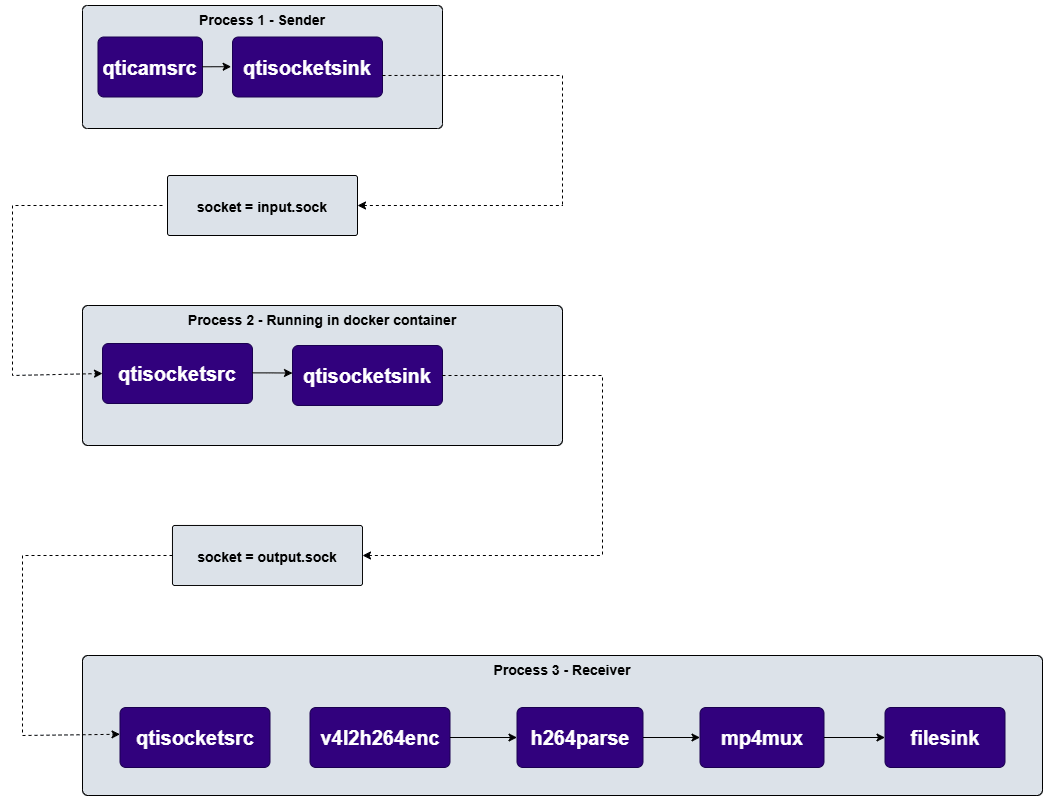
As shown in the diagram below [`qtisocketsink`](qtisocketsink) can be used to transmit buffers from a camera source such as qtqmmfsrc to another process or container. On the receiving side, qtisocketsrc ingests these buffers and continues pipeline processing, such as encoding, muxing, or saving the output to storage. This approach enables a modular pipeline architecture, supports containerized deployment, and provides efficient zero-copy buffer sharing between isolated components.
 ## Example Pipeline
 ```bash SCP (SSH) theme={null}
# Replace $HOME to the appropriate device path before running the commands.
# For QLI: /root
# For Ubuntu: /home/ubuntu
# Modify this based on your platform and ensure files are copied to the correct location on the device.
# Run from your host machine — replace and
ssh @ "mkdir -p $HOME/{media,media/output}"
```
```bash SCP (SSH) theme={null}
# Run from your host machine — replace and
ssh @
```
```bash theme={null}
gst-launch-1.0 -e --gst-debug=2 \
qtisocketsrc socket=/tmp/qimsdk.sock ! video/x-raw,width=1920,height=1080,format=NV12 ! queue ! \
waylandsink fullscreen=true sync=false
#To receive data with above pipeline and display, run the Example Pipeline from qtisocketsink in a different terminal
```
# Hieararchy
[GObject](https://docs.gtk.org/gobject/)
```bash SCP (SSH) theme={null}
# Replace $HOME to the appropriate device path before running the commands.
# For QLI: /root
# For Ubuntu: /home/ubuntu
# Modify this based on your platform and ensure files are copied to the correct location on the device.
# Run from your host machine — replace and
ssh @ "mkdir -p $HOME/{media,media/output}"
```
```bash SCP (SSH) theme={null}
# Run from your host machine — replace and
ssh @
```
```bash theme={null}
gst-launch-1.0 -e --gst-debug=2 \
qtisocketsrc socket=/tmp/qimsdk.sock ! video/x-raw,width=1920,height=1080,format=NV12 ! queue ! \
waylandsink fullscreen=true sync=false
#To receive data with above pipeline and display, run the Example Pipeline from qtisocketsink in a different terminal
```
# Hieararchy
[GObject](https://docs.gtk.org/gobject/)
[GstObject](https://gstreamer.freedesktop.org/documentation/gstreamer/gstobject.html?gi-language=c)
[GstElement](https://gstreamer.freedesktop.org/documentation/gstreamer/gstelement.html?gi-language=c)
[GstBaseSrc](https://gstreamer.freedesktop.org/documentation/base/gstbasesrc.html?gi-language=c)
[GstPushSrc](https://gstreamer.freedesktop.org/documentation/base/gstpushsrc.html?gi-language=c)
qtisocketsrc
# Pad Templates
### src
| Capabilities | |
| ------------------------ | ------------ |
| `video/x-raw` | `format: NA` |
| `text/x-raw` | `format: NA` |
| `neural-network/tensors` | `format: NA` |
| Availability: *Always* | |
| Direction: *source* | |
# Element Properties
| Property | Description |
| --------- | ----------------------------------------------------------------------------------------------------------------------------------------------------------------------------------------------- |
| `socket` | Location of the Unix Domain Socket.
`Type: String`
`Default: NULL`
`Flags: readable/writable (changeable only in NULL or READY state)` |
| `timeout` | Socket post timeout.
`Type: Unsigned Integer64`
`Default: 1000`
`Range: 0 - 18446744073709551615`
`Flags: readable/writable (changeable only in NULL or READY state)` |
# Internal Architecture
The internal architecture of `qtisocketsrc` is built around a lightweight but efficient mechanism for receiving media buffers from another process and delivering them into a GStreamer pipeline. Its design focuses on preserving performance, minimizing memory copies, and keeping the transfer of data between processes seamless and reliable.
## Core Components
### Source Pad
The source pad is the output interface of `qtisocketsrc`. Once a buffer is received and reconstructed, it is pushed out through this pad so that downstream GStreamer elements can consume it. In practice, the source pad serves as the handoff point between the socket-receiving logic and the rest of the media pipeline.
### Socket Listener
The socket listener is responsible for opening, monitoring, and maintaining the UNIX domain socket specified by the `socket` property. It waits for incoming connections from the sending side, typically [`qtisocketsink`](qtisocketsink), and listens for buffer transmissions over this local IPC channel.
This component acts as the communication entry point for the plugin. It ensures that the source element can continuously receive data from a peer process without requiring shared memory copying or network-based transport.
### Buffer Importer
The buffer importer takes the received file descriptors and converts them into `GstBuffer` objects that can be used by GStreamer. Since the incoming data is FD-backed, the importer does not need to duplicate the actual media payload. Instead, it wraps the descriptor and makes the buffer available to the pipeline in a form that downstream elements understand.
If additional information such as caps, timestamps, or other metadata is available, the importer can attach that information to the buffer so the receiving pipeline maintains proper media context and synchronization.
### Buffer Lifecycle Manager
The buffer lifecycle manager is responsible for tracking buffer ownership, usage, and release. Because buffers may be shared across process boundaries, careful management is needed to ensure that resources are not leaked and are released at the correct time.
In some cases, the lifecycle manager may also support returning buffers to the sender once downstream processing is complete, depending on the buffer-handling strategy used by the pipeline.
## Data Flow
The data flow in `qtisocketsrc` follows a clear sequence from socket setup to buffer delivery. Each step is designed to keep the transfer efficient while preserving the semantics of the original media stream.
### Socket Initialization
At startup, the plugin opens the UNIX socket specified through the `socket` property. It then begins waiting for incoming connections from the remote process.
This stage establishes the IPC channel that will be used for media exchange. Once the connection is ready, the element is prepared to receive file descriptors and any associated control information sent by the peer.
### Buffer Reception
When the sender process transmits data through [`qtisocketsink`](qtisocketsink), `qtisocketsrc` receives the FD-backed buffers over the socket. These buffers may represent:
* raw video frames
* ML tensor data
* structured metadata or text-based annotations
At this stage, the source element is only receiving the transport representation of the buffer, not copying the underlying memory contents.
### Buffer Wrapping
After reception, each file descriptor is wrapped into a `GstBuffer`. This step transforms the incoming IPC payload into a native GStreamer object that downstream plugins can process.
If available, the plugin also applies buffer metadata such as caps, timestamps, or other stream attributes. This ensures that the received data remains properly formatted and synchronized within the pipeline.
### Buffer Output
Once the `GstBuffer` is prepared, it is pushed out through the source pad into the downstream portion of the pipeline.
From this point onward, the data can be consumed by elements such as:
* encoders
* inference models
* converters
* display sinks
* post-processing components
This allows the receiving pipeline to continue processing the media stream as if the data had originated locally.
# Usage
Ensure you have followed the [prerequisites](qtisocketsrc#example-pipeline) before continuing
### Transmitting camera stream through a Docker container for encoding
 ```bash theme={null}
gst-launch-1.0 -e --gst-debug=2 qtisocketsrc socket=/tmp/docker/output.sock ! \
video/x-raw,format=NV12,width=1920,height=1080 ! \
v4l2h264enc output-io-mode=dmabuf-import capture-io-mode=dmabuf ! \
h264parse ! mp4mux ! queue ! filesink location=$HOME/media/output/video.mp4
```
```bash theme={null}
docker run -v /tmp/docker:/tmp/docker -ti gst-image /bin/bash -c \
"gst-launch-1.0 -e --gst-debug=2 qtisocketsrc socket=/tmp/docker/input.sock ! \
qtisocketsink socket=/tmp/docker/output.sock"
```
```bash theme={null}
gst-launch-1.0 -e --gst-debug=2 qticamsrc ! video/x-raw,format=NV12,width=1920,height=1080,framerate=30/1 \
! qtisocketsink socket=/tmp/docker/input.sock
```
```bash theme={null}
gst-launch-1.0 -e --gst-debug=2 qtisocketsrc socket=/tmp/docker/output.sock ! \
video/x-raw,format=NV12,width=1920,height=1080 ! \
v4l2h264enc output-io-mode=dmabuf-import capture-io-mode=dmabuf ! \
h264parse ! mp4mux ! queue ! filesink location=$HOME/media/output/video.mp4
```
```bash theme={null}
docker run -v /tmp/docker:/tmp/docker -ti gst-image /bin/bash -c \
"gst-launch-1.0 -e --gst-debug=2 qtisocketsrc socket=/tmp/docker/input.sock ! \
qtisocketsink socket=/tmp/docker/output.sock"
```
```bash theme={null}
gst-launch-1.0 -e --gst-debug=2 qticamsrc ! video/x-raw,format=NV12,width=1920,height=1080,framerate=30/1 \
! qtisocketsink socket=/tmp/docker/input.sock
```