> ## Documentation Index
> Fetch the complete documentation index at: https://imsdkdocs.qualcomm.com/llms.txt
> Use this file to discover all available pages before exploring further.
# qtisocketsink
> Socket Sink plugin
# Overview
The `qtisocketsink` is a GStreamer sink element that transmits `GstBuffers` between processes over UNIX domain sockets. It is designed for zero-copy buffer sharing between tightly coupled components, such as a media pipeline and an AI inference engine running in a separate process or container.
The element sends FD-backed buffers, such as DMA buffers, to a receiving process that uses qtisocketsrc as first element in pipeline to receive FD-backed buffers. This avoids memory copies, reduces CPU overhead, and improves overall performance.
To use `qtisocketsink`, provide a valid UNIX socket path through the `socket` property. The socket file must use the .sock extension. Buffer lifetime is managed through reference counting mechanism when buffers are sent and returned back.
Supported buffer types include:
* `video/x-raw` for raw video frames
* `neural-network/tensors` for ML tensor data
* `text/x-raw` for textual or structured metadata
`qtisocketsink` is well suited for modular and containerized pipelines where capture, transform, inference, encoding, or visualization run in separate processes. Common use cases include:
* Sending raw camera or decode video frames from capture pipeline running in separate process to another process for encoding/ live streaming, live display, or AI inference.
* Sending AI tensor data `neural-network/tensors` between the pipelines running in separate processes.
* Streaming AI metadata, such as bounding boxes, using `text/x-raw`
By using FD-backed buffers without memory copies, qtisocketsink enables efficient real-time communication between GStreamer components and is well suited for embedded systems, edge AI, and scalable media pipelines.
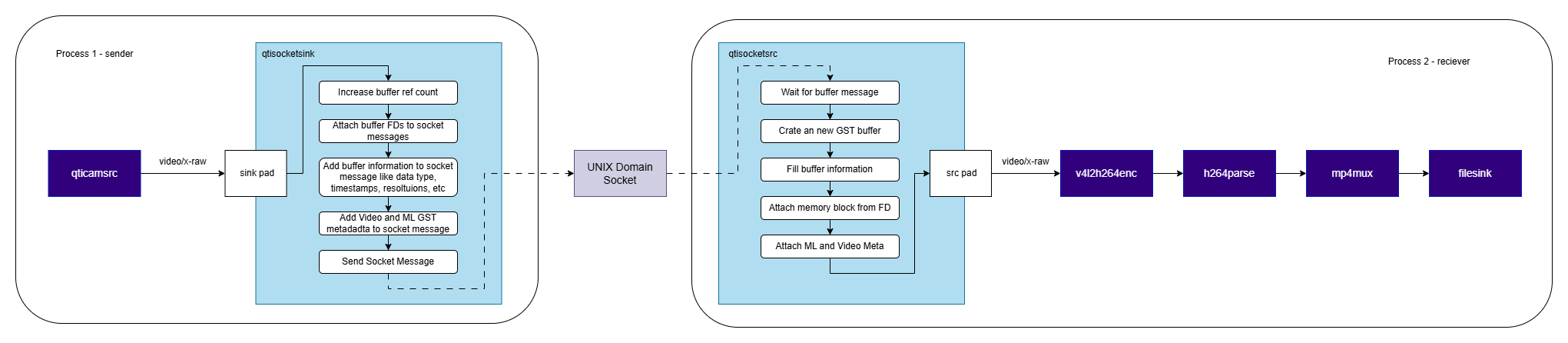
As illustrated in the diagram, `qtisocketsink` enables the transmission of buffers from a camera source `qticamsrc`, to a separate process or container, where [`qtisocketsrc`](qtisocketsrc) receives the buffers for subsequent processing, including encoding, muxing, or storage. This architecture facilitates a modular pipeline design, supports containerized deployment, and enables efficient zero-copy buffer sharing.
 # Hierarchy
[GObject](https://docs.gtk.org/gobject/)
# Hierarchy
[GObject](https://docs.gtk.org/gobject/)
[GstObject](https://gstreamer.freedesktop.org/documentation/gstreamer/gstobject.html?gi-language=c)
[GstElement](https://gstreamer.freedesktop.org/documentation/gstreamer/gstelement.html?gi-language=c)
[GstBaseSink](https://gstreamer.freedesktop.org/documentation/base/gstbasesink.html?gi-language=c)
qtisocketsink
# Pad Templates
### sink
\| Capabilities |
| Capabilities | |
| ------------------------ | ------------ |
| `video/x-raw` | `format: NA` |
| `text/x-raw` | `format: NA` |
| `neural-network/tensors` | `format: NA` |
| Availability: *Always* | |
| Direction: *sink* | |
# Element Properties
| Property | Description |
| -------- | ----------------------------------------------------------------------------------------------------------------------------------------------------------- |
| `socket` | Location of the Unix Domain Socket.
`Type: String`
`Default: NULL`
`Flags: readable/writable (changeable only in NULL or READY state)` |
## Example Pipeline
 | File | Download | Save as |
| ------------ | ------------------------------------------------------------------------------------------------------------------------------------------------------ | ----------- |
| Sample video | Input video | `video.mp4` |
```bash SCP (SSH) theme={null}
# Replace $HOME to the appropriate device path before running the commands.
# For QLI: /root
# For Ubuntu: /home/ubuntu
# Modify this based on your platform and ensure files are copied to the correct location on the device.
# Run from your host machine — replace and
ssh @ "mkdir -p $HOME/{media,media/output}"
scp video.mp4 @:$HOME/media/
```
```bash SCP (SSH) theme={null}
# Run from your host machine — replace and
ssh @
```
Run below command on your device
```bash theme={null}
export SRC_VIDEO_NAME=video.mp4
```
```bash theme={null}
gst-launch-1.0 -e --gst-debug=2 \
filesrc location=$HOME/media/$SRC_VIDEO_NAME ! qtdemux ! h264parse ! \
v4l2h264dec capture-io-mode=4 output-io-mode=4 ! video/x-raw,format=NV12 ! queue ! \
qtisocketsink socket=/tmp/qimsdk.sock
#To receive data with above pipeline and display, run the Example Pipeline from qtisocketsrc in a different terminal
```
# Internal Architecture Details
## Core Components
### Sink Pad
Receives `GstBuffer` objects from upstream pipeline elements.
### Socket Manager
Establishes and manages a UNIX domain socket connection to the consumer process.
| File | Download | Save as |
| ------------ | ------------------------------------------------------------------------------------------------------------------------------------------------------ | ----------- |
| Sample video | Input video | `video.mp4` |
```bash SCP (SSH) theme={null}
# Replace $HOME to the appropriate device path before running the commands.
# For QLI: /root
# For Ubuntu: /home/ubuntu
# Modify this based on your platform and ensure files are copied to the correct location on the device.
# Run from your host machine — replace and
ssh @ "mkdir -p $HOME/{media,media/output}"
scp video.mp4 @:$HOME/media/
```
```bash SCP (SSH) theme={null}
# Run from your host machine — replace and
ssh @
```
Run below command on your device
```bash theme={null}
export SRC_VIDEO_NAME=video.mp4
```
```bash theme={null}
gst-launch-1.0 -e --gst-debug=2 \
filesrc location=$HOME/media/$SRC_VIDEO_NAME ! qtdemux ! h264parse ! \
v4l2h264dec capture-io-mode=4 output-io-mode=4 ! video/x-raw,format=NV12 ! queue ! \
qtisocketsink socket=/tmp/qimsdk.sock
#To receive data with above pipeline and display, run the Example Pipeline from qtisocketsrc in a different terminal
```
# Internal Architecture Details
## Core Components
### Sink Pad
Receives `GstBuffer` objects from upstream pipeline elements.
### Socket Manager
Establishes and manages a UNIX domain socket connection to the consumer process.
Transfers buffer file descriptors over the socket.
### Buffer Tracker
Tracks buffer ownership and reference counts after transmission.
Prevents buffer release until the receiving process returns ownership.
### Timing Controller
Applies timing-based drop decisions using max-lateness.
Throttles outgoing data rate using max-bitrate.
### Async Transition Handler
When `async=false`, the element completes the transition to `PAUSED` synchronously instead of asynchronously.
## Data Flow
### Buffer reception
Buffers are received on the sink pad from upstream elements.
To be transferable over a UNIX domain socket, buffers must be backed by a valid file descriptor, such as DMA-backed memory.
### Socket Transmission
For each eligible buffer, the element sends the associated file descriptor to the receiver process over the UNIX domain socket.
Any required metadata is transmitted either together with the file descriptor or through a separate channel, depending on implementation.
### Buffer Reference Count Management
When a buffer is sent to the receiver, the plugin increments its internal reference tracking.
Once the receiver returns the buffer, the plugin decrements the corresponding reference count.
A buffer is released only after all outstanding references have been returned.
### Timing and Drop Control
If `async=false`, the element performs a synchronous state transition to `PAUSED`.
`max-lateness` defines the maximum allowed delay for a buffer relative to its expected presentation time. Buffers exceeding this threshold are dropped.
`max-bitrate` limits the transmission rate by capping the total number of bits sent per second.
# Usage
Ensure you have followed the [prerequisites](qtisocketsink#example-pipeline) before continuing
### Encode raw frames in a secondary process to a file
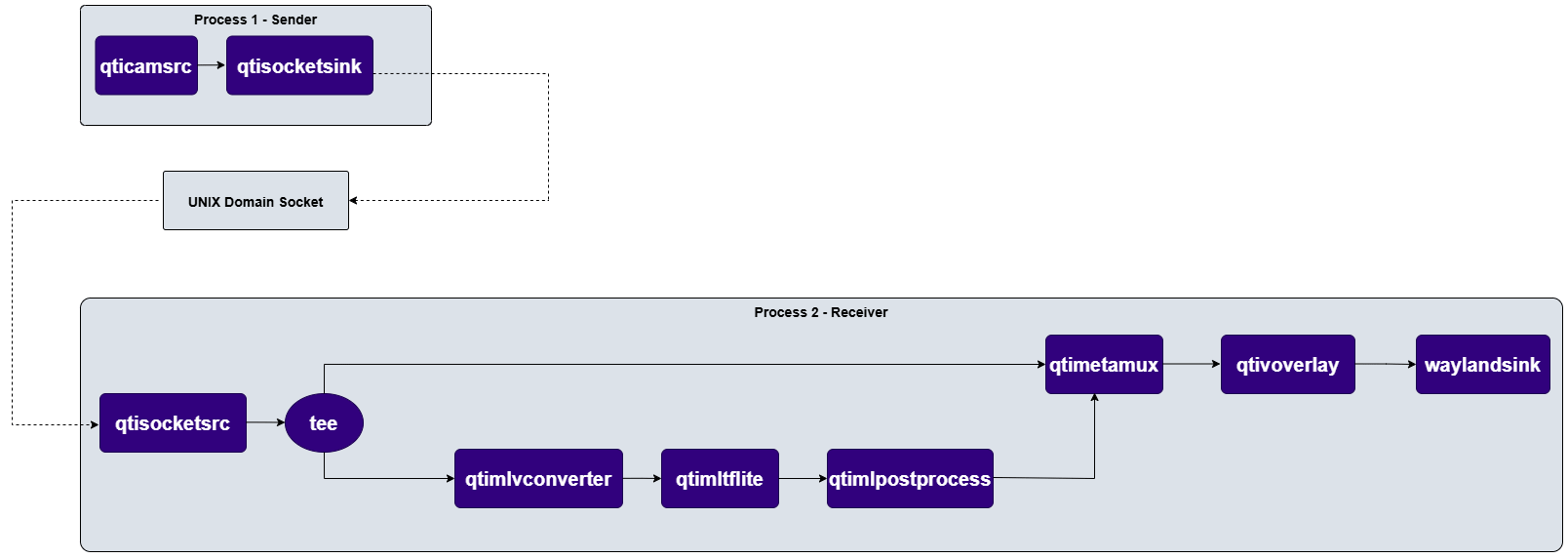
This example demonstrates a camera pipeline executing in one process and transferring raw frames to a second process, which receives the frames, performs encoding, and muxes the resulting stream into an output file.
 **Start 2 separate shell consoles**
**In 1st console:**
```
gst-launch-1.0 -e --gst-debug=2 qticamsrc ! video/x-raw,format=NV12,width=1920,height=1080,framerate=30/1 ! \
qtisocketsink socket=/tmp/docker/socket.sock
```
**In 2nd console:**
```
gst-launch-1.0 -e --gst-debug=2 qtisocketsrc socket=/tmp/docker/socket.sock ! video/x-raw,format=NV12,width=1920,height=1080 ! \
queue ! v4l2h264enc capture-io-mode=4 output-io-mode=4 ! queue ! h264parse ! mp4mux ! queue ! filesink location=$HOME/media/video.mp4
```
### Render raw frames from a secondary process to display
This example demonstrates a camera pipeline executing in one process and transferring raw frames to a second process, which receives the frames, performs AI inference, Overlay and rendering the composed out to a display.
**Start 2 separate shell consoles**
**In 1st console:**
```
gst-launch-1.0 -e --gst-debug=2 qticamsrc ! video/x-raw,format=NV12,width=1920,height=1080,framerate=30/1 ! \
qtisocketsink socket=/tmp/docker/socket.sock
```
**In 2nd console:**
```
gst-launch-1.0 -e --gst-debug=2 qtisocketsrc socket=/tmp/docker/socket.sock ! video/x-raw,format=NV12,width=1920,height=1080 ! \
queue ! v4l2h264enc capture-io-mode=4 output-io-mode=4 ! queue ! h264parse ! mp4mux ! queue ! filesink location=$HOME/media/video.mp4
```
### Render raw frames from a secondary process to display
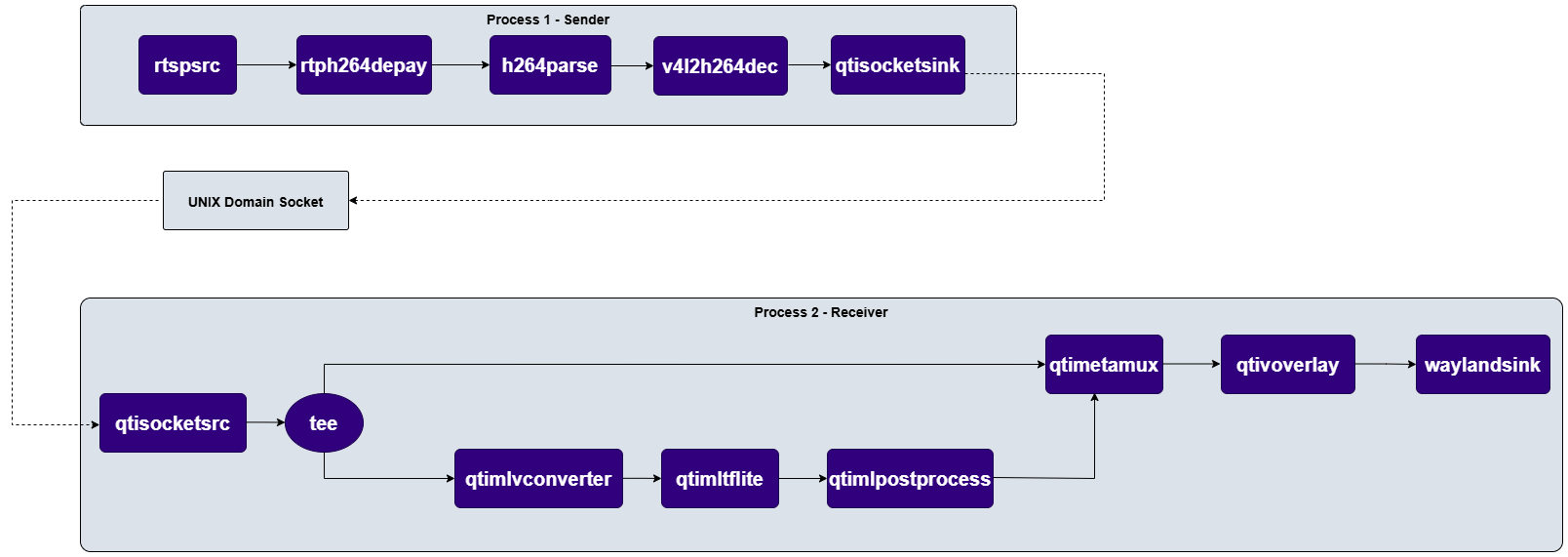
This example demonstrates a camera pipeline executing in one process and transferring raw frames to a second process, which receives the frames, performs AI inference, Overlay and rendering the composed out to a display.
 **Start 2 separate shell consoles**
**In 1st console:**
```
gst-launch-1.0 -e --gst-debug=2 rtspsrc location=rtsp://127.0.0.1:8900/live ! rtph264depay ! video/x-h264,colorimetry=bt709 ! h264parse ! \
v4l2h264dec capture-io-mode=4 output-io-mode=4 ! queue ! qtisocketsink socket=/tmp/socket.sock
```
**In 2nd console:**
```
gst-launch-1.0 -e --gst-debug=2 qtisocketsrc socket=/tmp/socket.sock ! video/x-raw,format=NV12,width=1920,height=1080,framerate=30/1 ! tee name=t \
t. ! queue ! qtimlvconverter ! queue ! \
qtimltflite delegate=external external-delegate-path=libQnnTFLiteDelegate.so external-delegate-options="QNNExternalDelegate,backend_type=htp;" model=$HOME/models/yolov8_det_quantized.tflite ! \
qtimlpostprocess module=yolov8 results=5 labels=$HOME/labels/yolov8.json settings="{\"confidence\": 70.0}" ! text/x-raw ! metamux. \
t. ! qtimetamux name=metamux ! queue ! qtivoverlay ! waylandsink async=false sync=true fullscreen=true
```
**Start 2 separate shell consoles**
**In 1st console:**
```
gst-launch-1.0 -e --gst-debug=2 rtspsrc location=rtsp://127.0.0.1:8900/live ! rtph264depay ! video/x-h264,colorimetry=bt709 ! h264parse ! \
v4l2h264dec capture-io-mode=4 output-io-mode=4 ! queue ! qtisocketsink socket=/tmp/socket.sock
```
**In 2nd console:**
```
gst-launch-1.0 -e --gst-debug=2 qtisocketsrc socket=/tmp/socket.sock ! video/x-raw,format=NV12,width=1920,height=1080,framerate=30/1 ! tee name=t \
t. ! queue ! qtimlvconverter ! queue ! \
qtimltflite delegate=external external-delegate-path=libQnnTFLiteDelegate.so external-delegate-options="QNNExternalDelegate,backend_type=htp;" model=$HOME/models/yolov8_det_quantized.tflite ! \
qtimlpostprocess module=yolov8 results=5 labels=$HOME/labels/yolov8.json settings="{\"confidence\": 70.0}" ! text/x-raw ! metamux. \
t. ! qtimetamux name=metamux ! queue ! qtivoverlay ! waylandsink async=false sync=true fullscreen=true
```