> ## Documentation Index
> Fetch the complete documentation index at: https://imsdkdocs.qualcomm.com/llms.txt
> Use this file to discover all available pages before exploring further.
# qtimlqnn
> GStreamer inference element that executes neural network models using QNN runtime.
qtimlqnn is only available in `qcom-multimedia-proprietary-image`
For more information on QLI images refer to [Qualcomm Linux release](https://dragonwingdocs.qualcomm.com/Key-Documents/Yocto-Guide/add-image-recipes#qualcomm-reference-images)
# Overview
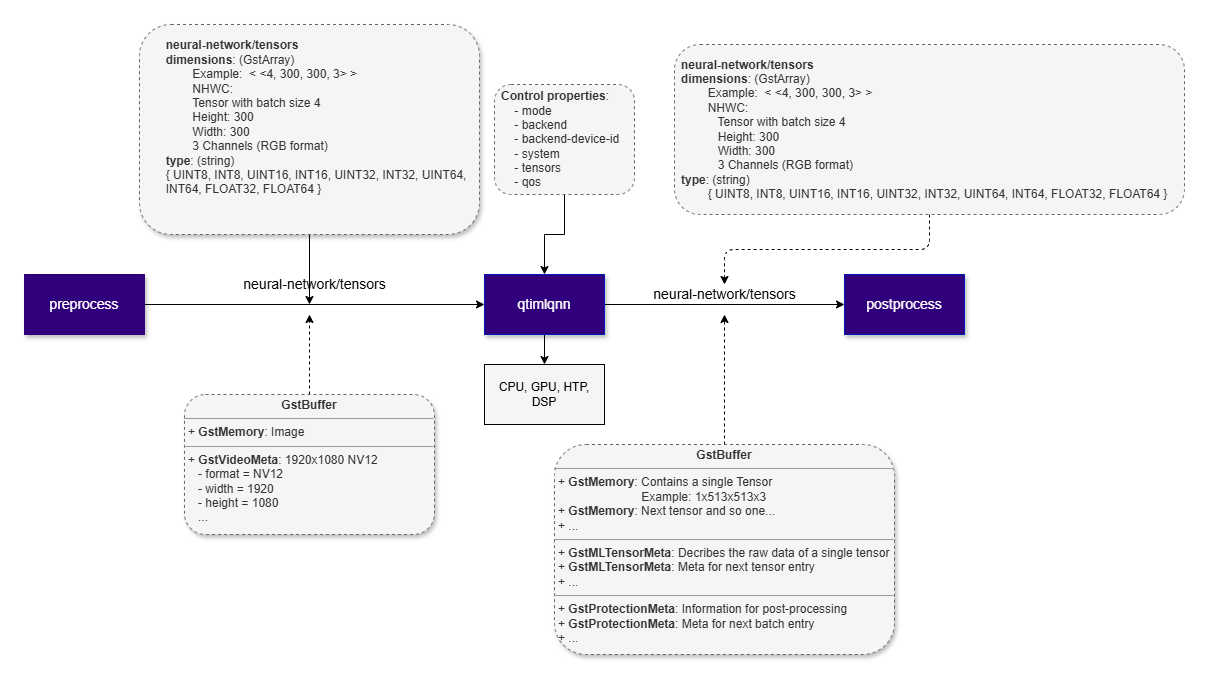
**qtimlqnn** is a GStreamer inference element that executes neural network models using the **Qualcomm AI Engine Direct (QNN)** runtime. The element operates entirely in **tensor mode**: it accepts input tensors on its sink pad and produces output tensors on its source pad according to the model's declared input and output specifications.
**qtimlqnn** is designed to run models prepared for the QNN runtime, typically in the form of a **QNN context binary**. To use this element, the model must first be exported to a QNN-compatible format using the **Qualcomm AI Runtime (QAIRT) SDK**. For additional details, refer to the [QAIRT documentation](https://docs.qualcomm.com).
The element is limited to **model execution**. It does not perform preprocessing, tensor reshaping, batching, layout conversion, or model-specific post-processing. These functions are expected to be handled by adjacent elements in the pipeline.
**qtimlqnn** supports multiple QNN execution backends, including **CPU**, **GPU**, and **NPU** targets. This allows the same pipeline structure to be deployed across different hardware configurations and tuned for different performance, latency, and power requirements. The element is intended for **real-time and embedded AI pipelines**, where inference is one stage in a larger modular processing flow.
### Key Responsibilities
**qtimlqnn** is responsible for:
* Loading and executing a QNN model artifact, such as a model library (`.so`) or cached binary (`.bin`)
* Accepting preformatted input tensors from upstream elements
* Producing output tensors that match the model output signature
* Negotiating tensor data types and dimensions with adjacent pipeline elements
* Propagating tensor metadata required by downstream elements
* Managing DMA-backed buffers through `GstMLBufferPool` to reduce unnecessary memory copies
In practice, **qtimlqnn** serves as the inference stage in the pipeline, while tensor preparation and result interpretation are handled externally.
 ## Example Pipeline
| File | Download | Save as |
| --------------------------- | ------------------------------------------------------------------------------------------------------------------------------------------------------ | --------------------- |
| Yolov8 Detection W8A8 model | [Export from Qualcomm AI Hub](https://aihub.qualcomm.com/iot/models/yolov8_det) | `yolov8_det_w8a8.bin` |
| Detection labels | yolov8.json | `yolov8.json` |
| Sample video | Input video | `ai_demo_sample.mp4` |
```bash SCP (SSH) theme={null}
# Replace $HOME to the appropriate device path before running the commands.
# For QLI: /root
# For Ubuntu: /home/ubuntu
# Modify this based on your platform and ensure files are copied to the correct location on the device.
# Run from your host machine — replace and
ssh @ "mkdir -p $HOME/{models,labels,media,media/output}"
scp yolov8_det_w8a8.bin @:$HOME/models/
scp yolov8.json @:$HOME/labels/
scp ai_demo_sample.mp4 @:$HOME/media/
```
```bash SCP (SSH) theme={null}
# Run from your host machine — replace and
ssh @
```
Run below command on your device
```bash theme={null}
mkdir -p $HOME/{models,labels,media,media/output}
export MODEL_NAME=yolov8_det_w8a8.bin
export LABELS_NAME=yolov8.json
export SRC_VIDEO_NAME=ai_demo_sample.mp4
```
```bash theme={null}
gst-launch-1.0 -e --gst-debug=2 \
filesrc location=$HOME/media/$SRC_VIDEO_NAME ! qtdemux ! h264parse ! \
v4l2h264dec capture-io-mode=4 output-io-mode=4 ! video/x-raw,format=NV12 ! queue ! \
tee name=t ! queue ! qtimetamux name=obj_mux ! qtivoverlay ! waylandsink fullscreen=true sync=false \
t. ! queue ! qtimlvconverter ! queue ! \
qtimlqnn model=$HOME/models/$MODEL_NAME backend=/usr/lib/libQnnHtp.so tensors="" ! queue ! \
qtimlpostprocess module=yolov8 labels=$HOME/labels/$LABELS_NAME settings="{\"confidence\": 51.0}" ! text/x-raw ! queue ! obj_mux.
```
# Hierarchy
[GObject](https://docs.gtk.org/gobject/)
## Example Pipeline
| File | Download | Save as |
| --------------------------- | ------------------------------------------------------------------------------------------------------------------------------------------------------ | --------------------- |
| Yolov8 Detection W8A8 model | [Export from Qualcomm AI Hub](https://aihub.qualcomm.com/iot/models/yolov8_det) | `yolov8_det_w8a8.bin` |
| Detection labels | yolov8.json | `yolov8.json` |
| Sample video | Input video | `ai_demo_sample.mp4` |
```bash SCP (SSH) theme={null}
# Replace $HOME to the appropriate device path before running the commands.
# For QLI: /root
# For Ubuntu: /home/ubuntu
# Modify this based on your platform and ensure files are copied to the correct location on the device.
# Run from your host machine — replace and
ssh @ "mkdir -p $HOME/{models,labels,media,media/output}"
scp yolov8_det_w8a8.bin @:$HOME/models/
scp yolov8.json @:$HOME/labels/
scp ai_demo_sample.mp4 @:$HOME/media/
```
```bash SCP (SSH) theme={null}
# Run from your host machine — replace and
ssh @
```
Run below command on your device
```bash theme={null}
mkdir -p $HOME/{models,labels,media,media/output}
export MODEL_NAME=yolov8_det_w8a8.bin
export LABELS_NAME=yolov8.json
export SRC_VIDEO_NAME=ai_demo_sample.mp4
```
```bash theme={null}
gst-launch-1.0 -e --gst-debug=2 \
filesrc location=$HOME/media/$SRC_VIDEO_NAME ! qtdemux ! h264parse ! \
v4l2h264dec capture-io-mode=4 output-io-mode=4 ! video/x-raw,format=NV12 ! queue ! \
tee name=t ! queue ! qtimetamux name=obj_mux ! qtivoverlay ! waylandsink fullscreen=true sync=false \
t. ! queue ! qtimlvconverter ! queue ! \
qtimlqnn model=$HOME/models/$MODEL_NAME backend=/usr/lib/libQnnHtp.so tensors="" ! queue ! \
qtimlpostprocess module=yolov8 labels=$HOME/labels/$LABELS_NAME settings="{\"confidence\": 51.0}" ! text/x-raw ! queue ! obj_mux.
```
# Hierarchy
[GObject](https://docs.gtk.org/gobject/)
[GstObject](https://gstreamer.freedesktop.org/documentation/gstreamer/gstobject.html?gi-language=c)
[GstElement](https://gstreamer.freedesktop.org/documentation/gstreamer/gstelement.html?gi-language=c)
[GstBaseTransform](https://gstreamer.freedesktop.org/documentation/base/gstbasetransform.html?gi-language=c)
qtimlqnn
# Pad Templates
### sink
| Capabilities | |
| ------------------------ | ------------------------------------------------------------------------- |
| `neural-network/tensors` | `format: { INT8, UINT8, INT16, UINT16, INT32, UINT32, FLOAT16, FLOAT32 }` |
| Availability: *Always* | |
| Direction: *sink* | |
### src
| Capabilities | |
| ------------------------ | ------------------------------------------------------------------------- |
| `neural-network/tensors` | `format: { INT8, UINT8, INT16, UINT16, INT32, UINT32, FLOAT16, FLOAT32 }` |
| Availability: *Always* | |
| Direction: *source* | |
# Element Properties
| Property | Description |
| ------------------- | -------------------------------------------------------------------------------------------------------------------------------------------------------------------------------------------------------------------------------------------------------------------------------------------- |
| `backend` | Path to the QNN backend library. Selects the execution backend used for inference. Supported backends include CPU, HTP or NPU, GPU, and DSP implementations depending on the library used.
`Type: String`
`Default: "/usr/lib/libQnnCpu.so"`
`Flags: readable/writable` |
| `backend-device-id` | Backend device selector. Platform dependent and used for some DSP or HTP variants to select a specific hardware instance.
`Type: Unsigned Integer`
`Default: 0`
`Flags: readable/writable` |
| `model` | Path to the QNN model file. This property is required and must reference a valid `.so` model or cached `.bin` file.
`Type: String`
`Default: NULL`
`Flags: readable/writable` |
| `system` | Path to the QNN system library required for QNN runtime initialization.
`Type: String`
`Default: "/usr/lib/libQnnSystem.so"`
`Flags: readable/writable` |
| `tensors` | Output tensor filter. When set, only the specified output tensor names are emitted on the source pad. When empty, all model outputs are emitted.
`Type: GstValueArray of type gchararray`
`Default: "< >"`
`Flags: readable/writable` |
# Input and Output Behavior
### Input Tensors
**qtimlqnn** exposes a single sink pad, but it supports both single-input and multi-input models. For multi-input models, all required tensors are delivered through the same sink pad as a tensor set.
Input tensors must be fully prepared before they reach **qtimlqnn**. Expected tensor layout, shape, data type, and batch size are determined by:
* The QNN model input signature
* Caps negotiation with upstream elements
Typical upstream elements include:
* [`qtimlvconverter`](qtimlvconverter) — for scaling, color conversion, normalization, and quantization (if required)
**qtimlqnn** does not modify, reshape, batch, or reinterpret incoming tensors. It passes them to the QNN runtime as received.
### Output Tensors
**qtimlqnn** exposes a single source pad and produces output tensors that follow the model's declared output signature. Models with multiple output tensors are fully supported, and all outputs are emitted together on the source pad.
Supported output behavior includes:
* Single-tensor and multi-tensor outputs
* Arbitrary tensor shapes and ranks, including batch and depth dimensions
* Both quantized and floating-point tensor types
* Selective emission of output tensors using the `tensors` property
The generated output tensors are intended for downstream post-processing stages, which are responsible for decoding model-specific results such as classification outputs, detection results, segmentation masks, landmark data, and other structured inference outputs.
# Supported Data Types
**qtimlqnn** supports the tensor data types provided by the QNN runtime and the selected execution backend, subject to caps negotiation with adjacent elements.
Supported data types include:
* `INT8`
* `UINT8`
* `INT16`
* `UINT16`
* `INT32`
* `UINT32`
* `FLOAT16`
* `FLOAT32`
The element does not impose additional data-type restrictions beyond those required by the runtime, the selected backend, and negotiated pipeline caps.
# Backends
A QNN **backend** defines the hardware target used to run a model. Backends allow **qtimlqnn** to offload inference from the default CPU interpreter to an optimized hardware accelerator. The backend is selected through the `backend` property and controls how the QNN runtime dispatches model operations during inference.
### NPU — libQnnHtp.so
Runs the model on the AI accelerator (NPU).
* **Backend**: Qualcomm AI Accelerator / NPU
* **Use case**: Preferred backend where available. Best performance and power efficiency for quantized models.
* **Additional configuration**: set `backend=libQnnHtp.so`; optionally set `backend-device-id` for multi-device platforms
### GPU — libQnnGpu.so
Runs supported operations through the QNN GPU backend.
* **Backend**: GPU
* **Use case**: Floating-point models and workloads that benefit from GPU parallelism.
* **Additional configuration**: set `backend=/usr/lib/libQnnGpu.so`
### CPU — libQnnCpu.so
Runs the model on the default QNN CPU backend.
* **Backend**: CPU
* **Use case**: Reference execution, debugging, bring-up, or systems without hardware acceleration.
* **Additional configuration**: none required
# Runtime Memory Behavior and GAP Handling
### QNN Memory Model
**qtimlqnn** operates within the memory model of the QNN runtime. The element uses DMA buffers via `GstMLBufferPool` to minimize memory copies and maintain zero-copy transport where possible.
QNN uses runtime-managed memory to allocate:
* Input tensors
* Intermediate activation tensors
* Output tensors
The element discovers input/output tensor metadata (count, shape, type) at model load time and configures buffer pools accordingly.
### GAP Buffer Handling
**qtimlqnn** is GAP-aware and correctly handles input buffers marked with `GST_BUFFER_FLAG_GAP`.
When a GAP buffer is received, the element skips inference and forwards the buffer downstream. This preserves timing and synchronization while explicitly indicating that no valid inference input is available for that timestamp.
GAP buffers commonly appear in conditional AI pipelines, such as cascaded workflows where later inference stages run only when earlier stages produce valid regions of interest.
# Usage
### Single-Stage AI Inference on Live Camera Stream (HTP)
This example demonstrates real-time inference on a live camera stream using a single instance of **qtimlqnn** with the HTP backend. Inference results are attached to each `GstBuffer` as `MLMeta`, allowing downstream elements to access synchronized metadata directly from the frame. An overlay stage then uses this metadata to render annotations such as bounding boxes, labels, or key-points before display or further processing.
 | File | Download | Save as |
| --------------------------- | ------------------------------------------------------------------------------- | --------------------- |
| Yolov8 Detection W8A8 model | [Export from Qualcomm AI Hub](https://aihub.qualcomm.com/iot/models/yolov8_det) | `yolov8_det_w8a8.bin` |
| Detection labels | yolov8.json | `yolov8.json` |
```bash SCP (SSH) theme={null}
# Run from your host machine — replace and
ssh @ "mkdir -p $HOME/{models,labels}"
scp yolov8_det_w8a8.bin @:$HOME/models/
scp yolov8.json @:$HOME/labels/
```
```bash SCP (SSH) theme={null}
# Run from your host machine — replace and
ssh @
```
Run below command on your device
```bash theme={null}
mkdir -p $HOME/{models,labels}
export MODEL_NAME=yolov8_det_w8a8.bin
export LABELS_NAME=yolov8.json
```
```bash Run the pipeline theme={null}
gst-launch-1.0 -e --gst-debug=2 \
qticamsrc name=camsrc ! video/x-raw,format=NV12,width=1920,height=1080,framerate=30/1 ! queue ! \
tee name=t ! queue ! qtimetamux name=obj_mux ! qtivoverlay ! waylandsink fullscreen=true sync=false \
t. ! queue ! qtimlvconverter ! queue ! \
qtimlqnn model=$HOME/models/$MODEL_NAME backend=/usr/lib/libQnnHtp.so tensors="" ! queue ! \
qtimlpostprocess module=yolov8 labels=$HOME/labels/$LABELS_NAME settings="{\"confidence\": 51.0}" ! text/x-raw ! queue ! obj_mux.
```
### Single-Stage AI Inference on Live Camera Stream (GPU)
This example demonstrates the same single-stage inference workflow using the GPU backend instead of HTP. This is suitable for floating-point models or workloads that benefit from GPU parallelism.
| File | Download | Save as |
| ---------------------------- | ------------------------------------------------------------------------------- | ---------------------- |
| Yolov8 Detection Float model | [Export from Qualcomm AI Hub](https://aihub.qualcomm.com/iot/models/yolov8_det) | `yolov8_det_float.bin` |
| Detection labels | yolov8.json | `yolov8.json` |
```bash SCP (SSH) theme={null}
# Run from your host machine — replace and
ssh @ "mkdir -p $HOME/{models,labels}"
scp yolov8_det_float.bin @:$HOME/models/
scp yolov8.json @:$HOME/labels/
```
```bash SCP (SSH) theme={null}
# Run from your host machine — replace and
ssh @
```
Run below command on your device
```bash theme={null}
export MODEL_NAME=yolov8_det_float.bin
export LABELS_NAME=yolov8.json
```
```bash Run the pipeline theme={null}
gst-launch-1.0 -e --gst-debug=2 \
qticamsrc name=camsrc ! video/x-raw,format=NV12,width=1920,height=1080,framerate=30/1 ! queue ! \
tee name=t ! queue ! qtimetamux name=obj_mux ! qtivoverlay ! waylandsink fullscreen=true sync=false \
t. ! queue ! qtimlvconverter ! queue ! \
qtimlqnn model=$HOME/models/$MODEL_NAME backend=/usr/lib/libQnnGpu.so tensors="" ! queue ! \
qtimlpostprocess module=yolov8 labels=$HOME/labels/$LABELS_NAME settings="{\"confidence\": 51.0}" ! text/x-raw ! queue ! obj_mux.
```
| File | Download | Save as |
| --------------------------- | ------------------------------------------------------------------------------- | --------------------- |
| Yolov8 Detection W8A8 model | [Export from Qualcomm AI Hub](https://aihub.qualcomm.com/iot/models/yolov8_det) | `yolov8_det_w8a8.bin` |
| Detection labels | yolov8.json | `yolov8.json` |
```bash SCP (SSH) theme={null}
# Run from your host machine — replace and
ssh @ "mkdir -p $HOME/{models,labels}"
scp yolov8_det_w8a8.bin @:$HOME/models/
scp yolov8.json @:$HOME/labels/
```
```bash SCP (SSH) theme={null}
# Run from your host machine — replace and
ssh @
```
Run below command on your device
```bash theme={null}
mkdir -p $HOME/{models,labels}
export MODEL_NAME=yolov8_det_w8a8.bin
export LABELS_NAME=yolov8.json
```
```bash Run the pipeline theme={null}
gst-launch-1.0 -e --gst-debug=2 \
qticamsrc name=camsrc ! video/x-raw,format=NV12,width=1920,height=1080,framerate=30/1 ! queue ! \
tee name=t ! queue ! qtimetamux name=obj_mux ! qtivoverlay ! waylandsink fullscreen=true sync=false \
t. ! queue ! qtimlvconverter ! queue ! \
qtimlqnn model=$HOME/models/$MODEL_NAME backend=/usr/lib/libQnnHtp.so tensors="" ! queue ! \
qtimlpostprocess module=yolov8 labels=$HOME/labels/$LABELS_NAME settings="{\"confidence\": 51.0}" ! text/x-raw ! queue ! obj_mux.
```
### Single-Stage AI Inference on Live Camera Stream (GPU)
This example demonstrates the same single-stage inference workflow using the GPU backend instead of HTP. This is suitable for floating-point models or workloads that benefit from GPU parallelism.
| File | Download | Save as |
| ---------------------------- | ------------------------------------------------------------------------------- | ---------------------- |
| Yolov8 Detection Float model | [Export from Qualcomm AI Hub](https://aihub.qualcomm.com/iot/models/yolov8_det) | `yolov8_det_float.bin` |
| Detection labels | yolov8.json | `yolov8.json` |
```bash SCP (SSH) theme={null}
# Run from your host machine — replace and
ssh @ "mkdir -p $HOME/{models,labels}"
scp yolov8_det_float.bin @:$HOME/models/
scp yolov8.json @:$HOME/labels/
```
```bash SCP (SSH) theme={null}
# Run from your host machine — replace and
ssh @
```
Run below command on your device
```bash theme={null}
export MODEL_NAME=yolov8_det_float.bin
export LABELS_NAME=yolov8.json
```
```bash Run the pipeline theme={null}
gst-launch-1.0 -e --gst-debug=2 \
qticamsrc name=camsrc ! video/x-raw,format=NV12,width=1920,height=1080,framerate=30/1 ! queue ! \
tee name=t ! queue ! qtimetamux name=obj_mux ! qtivoverlay ! waylandsink fullscreen=true sync=false \
t. ! queue ! qtimlvconverter ! queue ! \
qtimlqnn model=$HOME/models/$MODEL_NAME backend=/usr/lib/libQnnGpu.so tensors="" ! queue ! \
qtimlpostprocess module=yolov8 labels=$HOME/labels/$LABELS_NAME settings="{\"confidence\": 51.0}" ! text/x-raw ! queue ! obj_mux.
```