> ## Documentation Index
> Fetch the complete documentation index at: https://imsdkdocs.qualcomm.com/llms.txt
> Use this file to discover all available pages before exploring further.
# qtijpegenc
> JPEG encoding plugin
qtijpegenc is only available in `qcom-multimedia-proprietary-image`
For more information on QLI images refer to [Qualcomm Linux release](https://dragonwingdocs.qualcomm.com/Key-Documents/Yocto-Guide/add-image-recipes#qualcomm-reference-images)
# Overview
`qtijpegenc` is a hardware-accelerated GStreamer element that performs JPEG encoding of raw video frames in ***NV12*** and ***NV21*** formats. Raw frames can be provided by either live source such as ISP Camera, or any other source which can generate NV12/21 frames. It is designed for use cases such as high-quality snapshot capture from an ISP camera and offline video sources. The element leverages the ***Camera Service*** and the ***Offline JPEG engine*** to generate JPEG images with low latency and high image quality. It is therefore well suited for camera snapshot pipelines, timelapse capture, and other still-image encoding workflows that require efficient, high-performance JPEG generation.
 In contrast to software-based JPEG encoders, `qtijpegenc` leverages the Qualcomm hardware JPEG engine to offload encoding from the CPU, enabling efficient parallel processing with reduced CPU overhead.
It also supports downscaling, allowing the output JPEG image to be generated at a lower resolution than the input raw frame. This is particularly useful for use cases such as generating thumbnails alongside full-resolution image captures.
**Typical use cases include:**
* **Camera snapshots:** Capturing still JPEG images from a live camera stream
* **Timelapse recording:** Periodically saving frames as JPEG images alongside video recording
* **Thumbnail generation:** Encoding a downscaled JPEG image in parallel with a full-resolution stream
* **Multi-resolution capture:** Encoding the same frame at multiple resolutions simultaneously using a `tee`
## Example Pipeline
In contrast to software-based JPEG encoders, `qtijpegenc` leverages the Qualcomm hardware JPEG engine to offload encoding from the CPU, enabling efficient parallel processing with reduced CPU overhead.
It also supports downscaling, allowing the output JPEG image to be generated at a lower resolution than the input raw frame. This is particularly useful for use cases such as generating thumbnails alongside full-resolution image captures.
**Typical use cases include:**
* **Camera snapshots:** Capturing still JPEG images from a live camera stream
* **Timelapse recording:** Periodically saving frames as JPEG images alongside video recording
* **Thumbnail generation:** Encoding a downscaled JPEG image in parallel with a full-resolution stream
* **Multi-resolution capture:** Encoding the same frame at multiple resolutions simultaneously using a `tee`
## Example Pipeline
 | File | Download | Save as |
| ------------ | ------------------------------------------------------------------------------------------------------------------------------------------------------ | ----------- |
| Sample video | Input video | `video.mp4` |
```bash SCP (SSH) theme={null}
# Replace $HOME to the appropriate device path before running the commands.
# For QLI: /root
# For Ubuntu: /home/ubuntu
# Modify this based on your platform and ensure files are copied to the correct location on the device.
# Run from your host machine — replace and
ssh @ "mkdir -p $HOME/{media,media/output}"
scp video.mp4 @:$HOME/media/
```
```bash SCP (SSH) theme={null}
# Run from your host machine — replace and
ssh @
```
Run below command on your device
```bash theme={null}
export SRC_VIDEO_NAME=video.mp4
```
```bash theme={null}
gst-launch-1.0 -e --gst-debug=2 \
filesrc location=$HOME/media/$SRC_VIDEO_NAME ! qtdemux ! h264parse ! \
v4l2h264dec capture-io-mode=4 output-io-mode=4 ! video/x-raw,format=NV12 ! queue ! \
qtijpegenc quality=90 ! \
multifilesink location=$HOME/media/output/frame_%05d.jpg
```
# Hierarchy
[GObject](https://docs.gtk.org/gobject/)
| File | Download | Save as |
| ------------ | ------------------------------------------------------------------------------------------------------------------------------------------------------ | ----------- |
| Sample video | Input video | `video.mp4` |
```bash SCP (SSH) theme={null}
# Replace $HOME to the appropriate device path before running the commands.
# For QLI: /root
# For Ubuntu: /home/ubuntu
# Modify this based on your platform and ensure files are copied to the correct location on the device.
# Run from your host machine — replace and
ssh @ "mkdir -p $HOME/{media,media/output}"
scp video.mp4 @:$HOME/media/
```
```bash SCP (SSH) theme={null}
# Run from your host machine — replace and
ssh @
```
Run below command on your device
```bash theme={null}
export SRC_VIDEO_NAME=video.mp4
```
```bash theme={null}
gst-launch-1.0 -e --gst-debug=2 \
filesrc location=$HOME/media/$SRC_VIDEO_NAME ! qtdemux ! h264parse ! \
v4l2h264dec capture-io-mode=4 output-io-mode=4 ! video/x-raw,format=NV12 ! queue ! \
qtijpegenc quality=90 ! \
multifilesink location=$HOME/media/output/frame_%05d.jpg
```
# Hierarchy
[GObject](https://docs.gtk.org/gobject/)
[GstObject](https://gstreamer.freedesktop.org/documentation/gstreamer/gstobject.html?gi-language=c)
[GstElement](https://gstreamer.freedesktop.org/documentation/gstreamer/gstelement.html?gi-language=c)
[GstVideoEncoder](https://gstreamer.freedesktop.org/documentation/video/gstvideoencoder.html?gi-language=c)
qtijpegenc
# Pad Templates
### sink
| Capabilities | |
| ---------------------- | ----------------------------------------------------------------------------------------------------------------------- |
| `video/x-raw` | `format: { NV12, NV21 }`
`width: [1, 32767]`
`height: [1, 32767]`
`framerate: [0/1, 2147483647/1]` |
| Availability: *Always* | |
| Direction: *sink* | |
### src
| Capabilities | |
| ---------------------- | --------------------------------------------------------------------------------------- |
| `image/jpeg` | `width: [1, 32767]`
`height: [1, 32767]`
`framerate: [0/1, 2147483647/1]` |
| Availability: *Always* | |
| Direction: *source* | |
# Element Properties
| Property | Description |
| ------------- | -------------------------------------------------------------------------------------------------------------------------------------------------------------------------------------------------------------------------------------------------------------------------------------------------------------------------------------------------------------------------------------------------------------------------------------------------------------------------------------------------------------- |
| `camera-id` | The camera device ID associated with the JPEG encoding session. Passed to the offline JPEG engine to select the appropriate hardware encoder when multiple cameras are active.
`Type: Unsigned Integer`
`Default: 0`
`Flags: readable/writable` |
| `orientation` | Specifies the EXIF orientation to embed in the output JPEG. Available values correspond to rotation angles such as 0, 90, 180, and 270 degrees. Note that this is metadata orientation and does not rotate pixels.
`Type: Enum `
`Default: 0, "0"`
`Range:`
`(0): 0 - 0 degrees`
`(90): 90 - 90 degrees`
`(180): 180 - 180 degrees`
`(270): 270 - 270 degrees`
`Flags: readable/writable`
`Example: orientation="90" (or) orientation=90` |
| `quality` | JPEG encoding quality. Higher values produce larger files with better image fidelity, while lower values produce smaller files with more compression artifacts. This property can be changed dynamically at runtime while the pipeline is playing.
`Type: Integer`
`Default: 85`
`Range: 0 - 100`
`Flags: readable/writable (changeable in PLAYING state)` |
# Internal Architecture
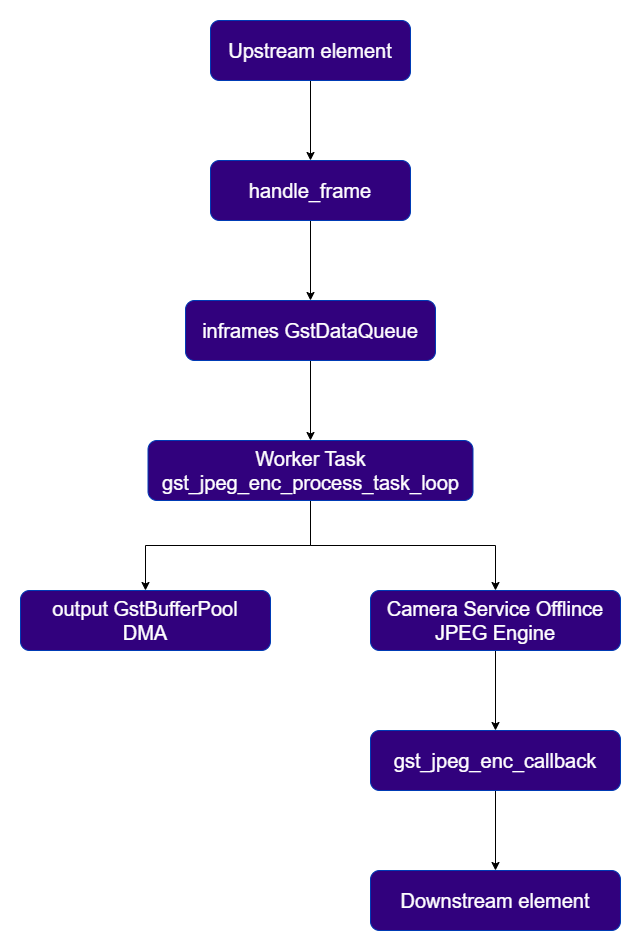
The `qtijpegenc` element is organized around three key internal components:
* `GstJPEGEncoderContext` provides a C++ abstraction over the Camera Service recorder object and is responsible for managing the lifecycle of the Offline JPEG encoder session.
* `GstDataQueue (inframes)` serves as an internal producer-consumer queue that decouples the handle\_frame path from the encoding path. The streaming thread enqueues incoming GstVideoCodecFrame instances, while the worker task dequeues them for processing.
* `GstTask (worktask)` implements the dedicated processing thread, gst\_jpeg\_enc\_process\_task\_loop, which repeatedly retrieves frames from inframes, obtains an output buffer from the pool, and dispatches the encode request to the hardware JPEG engine.
 # Buffer Management and Pool Requirements
DMA Buffer Requirements
`qtijpegenc` requires **FD-backed DMA buffers** on both the input and output paths. The Offline JPEG encode API operates directly on file descriptors (`in_buf_fd` and `out_buf_fd`), so both the upstream input buffer and the output buffer allocated by the element must be backed by FD memory. In practice, this means `gst_is_fd_memory()` must return `TRUE` for both buffers.
## Output Buffer Pool
The output buffer pool is created in `gst_jpeg_enc_create_pool()`.
* Buffers are allocated using `GstQtiAllocator`, DMA-capable allocator, instantiated through `gst_qti_allocator_new()`
* The allocator uses the flag `GST_FD_MEMORY_FLAG_KEEP_MAPPED`
* Each output buffer is sized according to `jpeg_size`, which is obtained from JPEG encode engine through `GetOfflineJpegParams`
* The pool is configured with a minimum of `DEFAULT_PROP_MIN_BUFFERS = 2` buffers
* The output caps are set to `image/jpeg` with the negotiated output resolution
## Input Buffer Requirements
`qtijpegenc` expects the upstream element to provide FD-backed input buffers. If upstream delivers buffers that are not backed by DMA/FD memory, `gst_jpeg_enc_context_execute()` fails with the error: `Input buffer is not FD memory`
`qtijpegenc` is intended to be used downstream of elements that natively produce DMA-backed buffers, such as `qticamsrc`, which provides GBM/DMA buffers, or `qtivtransform`, which also operates on DMA-backed buffer pools.
# Usage
### Basic Camera Snapshot
This example demonstrates live snapshot capture from the camera. NV12 frames are acquired from the camera plugin and passed to `qtijpegenc`, which encodes them into a JPEG image.
# Buffer Management and Pool Requirements
DMA Buffer Requirements
`qtijpegenc` requires **FD-backed DMA buffers** on both the input and output paths. The Offline JPEG encode API operates directly on file descriptors (`in_buf_fd` and `out_buf_fd`), so both the upstream input buffer and the output buffer allocated by the element must be backed by FD memory. In practice, this means `gst_is_fd_memory()` must return `TRUE` for both buffers.
## Output Buffer Pool
The output buffer pool is created in `gst_jpeg_enc_create_pool()`.
* Buffers are allocated using `GstQtiAllocator`, DMA-capable allocator, instantiated through `gst_qti_allocator_new()`
* The allocator uses the flag `GST_FD_MEMORY_FLAG_KEEP_MAPPED`
* Each output buffer is sized according to `jpeg_size`, which is obtained from JPEG encode engine through `GetOfflineJpegParams`
* The pool is configured with a minimum of `DEFAULT_PROP_MIN_BUFFERS = 2` buffers
* The output caps are set to `image/jpeg` with the negotiated output resolution
## Input Buffer Requirements
`qtijpegenc` expects the upstream element to provide FD-backed input buffers. If upstream delivers buffers that are not backed by DMA/FD memory, `gst_jpeg_enc_context_execute()` fails with the error: `Input buffer is not FD memory`
`qtijpegenc` is intended to be used downstream of elements that natively produce DMA-backed buffers, such as `qticamsrc`, which provides GBM/DMA buffers, or `qtivtransform`, which also operates on DMA-backed buffer pools.
# Usage
### Basic Camera Snapshot
This example demonstrates live snapshot capture from the camera. NV12 frames are acquired from the camera plugin and passed to `qtijpegenc`, which encodes them into a JPEG image.
 ```
gst-launch-1.0 -e --gst-debug=2 qticamsrc ! \
video/x-raw,format=NV12,width=1920,height=1080,framerate=30/1 ! \
queue ! qtijpegenc quality=90 ! \
image/jpeg,framerate=30/1 ! \
multifilesink location=$HOME/media/snapshot_%d.jpg
```
### Concurrent 4K Video Recording and JPEG Capture
This example demonstrates how a 4K stream can be recorded as an H.264 MP4 file while JPEG snapshots are captured in parallel. A tee is used to branch the stream, enabling simultaneous video encoding and still-image generation.
```
gst-launch-1.0 -e --gst-debug=2 qticamsrc ! \
video/x-raw,format=NV12,width=1920,height=1080,framerate=30/1 ! \
queue ! qtijpegenc quality=90 ! \
image/jpeg,framerate=30/1 ! \
multifilesink location=$HOME/media/snapshot_%d.jpg
```
### Concurrent 4K Video Recording and JPEG Capture
This example demonstrates how a 4K stream can be recorded as an H.264 MP4 file while JPEG snapshots are captured in parallel. A tee is used to branch the stream, enabling simultaneous video encoding and still-image generation.
 ```
gst-launch-1.0 -e --gst-debug=2 qticamsrc ! \
video/x-raw,format=NV12,width=3840,height=2160,framerate=30/1 ! \
tee name=tee_4k \
tee_4k. ! queue ! v4l2h264enc ! h264parse ! mp4mux ! \
filesink location=$HOME/media/timelapse_4k.mp4 async=false \
tee_4k. ! queue ! qtijpegenc ! \
multifilesink location=$HOME/media/timelapse_4k_%d.jpg max-files=1 async=false
```
```
gst-launch-1.0 -e --gst-debug=2 qticamsrc ! \
video/x-raw,format=NV12,width=3840,height=2160,framerate=30/1 ! \
tee name=tee_4k \
tee_4k. ! queue ! v4l2h264enc ! h264parse ! mp4mux ! \
filesink location=$HOME/media/timelapse_4k.mp4 async=false \
tee_4k. ! queue ! qtijpegenc ! \
multifilesink location=$HOME/media/timelapse_4k_%d.jpg max-files=1 async=false
```