 ## Typical Usage Patterns
`qticamsrc` is commonly used in the following scenarios:
### Live camera preview
Capturing and streaming YUV frames for real-time display, or forwarding them directly to downstream encoding elements for preview and recording pipelines.
### Concurrent multi-stream capture
Producing multiple output streams from a single camera session, such as recording video while simultaneously capturing JPEG snapshots, and generating additional streams for AI inference, local storage, or network streaming.
### High-frame-rate video
Supporting high-frame-rate capture workflows, including pipelines operating above 60 FPS, with super-buffer mode used to reduce per-frame processing overhead in downstream elements.
### Raw Bayer capture
Acquiring unprocessed sensor data for custom imaging pipelines, computational photography workflows, or computer vision applications that require direct access to raw camera output.
### Multi-camera and logical-camera workflows
Accessing frames from multiple physical sensors, or working with coordinated camera configurations, for use cases such as stereo imaging, synchronized capture, and composite camera solutions.
### Still-image capture
Triggering single-shot or burst image capture workflows through GStreamer signals, with support for JPEG and RAW-based snapshot paths depending on platform configuration.
## Element Hierarchy
# Hierarchy
[GObject](https://docs.gtk.org/gobject/)
## Typical Usage Patterns
`qticamsrc` is commonly used in the following scenarios:
### Live camera preview
Capturing and streaming YUV frames for real-time display, or forwarding them directly to downstream encoding elements for preview and recording pipelines.
### Concurrent multi-stream capture
Producing multiple output streams from a single camera session, such as recording video while simultaneously capturing JPEG snapshots, and generating additional streams for AI inference, local storage, or network streaming.
### High-frame-rate video
Supporting high-frame-rate capture workflows, including pipelines operating above 60 FPS, with super-buffer mode used to reduce per-frame processing overhead in downstream elements.
### Raw Bayer capture
Acquiring unprocessed sensor data for custom imaging pipelines, computational photography workflows, or computer vision applications that require direct access to raw camera output.
### Multi-camera and logical-camera workflows
Accessing frames from multiple physical sensors, or working with coordinated camera configurations, for use cases such as stereo imaging, synchronized capture, and composite camera solutions.
### Still-image capture
Triggering single-shot or burst image capture workflows through GStreamer signals, with support for JPEG and RAW-based snapshot paths depending on platform configuration.
## Element Hierarchy
# Hierarchy
[GObject](https://docs.gtk.org/gobject/)`Type: GstValueArray of type gint`
`Default: "<0, 0, 0, 0>"`
`Flags: readable (available in READY and higher states)` | | `camera` | Camera device ID to open. Selects which physical or logical camera device is used for all pads on this element instance.
`Type: Unsigned Integer`
`Default: 0`
`Range: 0 - 32`
`Flags: readable/writable` | | `sensor-mode` | Force a specific sensor mode index (0–15). A value of -1 means automatic selection by the camera HAL.
`Type: Integer`
`Default: -1`
`Range: -1 - 15`
`Flags: readable/writable` | | `slave` | Set camera as slave device. In slave mode the camera session is subordinate to a master session, enabling synchronized multi-camera capture.
`Type: Boolean`
`Default: false`
`Flags: readable/writable` | | `static-metadata` | Returns the camera's static capabilities as a CameraMetadata object. The caller is responsible for releasing the object.
`Type: Pointer (CameraMetadata)`
`Flags: readable` | | `static-metas` | Returns a map of all connected camera IDs to their corresponding static metadata objects.
`Type: GHashTable`
`Flags: readable` | ### Image Quality Properties (changeable in PLAYING) | Property | Description | | ------------ | ---------------------------------------------------------------------------------------------------------------------------- | | `contrast` | Image contrast strength.
`Type: Integer`
`Default: 5`
`Range: 1 - 10`
`Flags: readable/writable` | | `saturation` | Image saturation strength.
`Type: Integer`
`Default: 5`
`Range: 0 - 10`
`Flags: readable/writable` | | `sharpness` | Image sharpness strength.
`Type: Integer`
`Default: 2`
`Range: 0 - 6`
`Flags: readable/writable` | ### 3A (Auto-Exposure, Auto-White-Balance, Auto-Focus) Properties | Property | Description | | ----------------------- | ------------------------------------------------------------------------------------------------------------------------------------------------------------------------------------------------------------------------------------------------------------------------------------------------------------------------------------------------------------------------------------------------------------------------------------------------------------------------------------------------------------------------------------------------------------------------------------------------------------------------------------------------------------------------------------------------------------------------------------------------------------------------------------------------------------------------------------------------------------------------------------------------------------------------------------------------------------------------------------------------------------------------------------------------------------------------------------------------------------------------------------------------------------------------------------------------------------------------------------------------------------------------------------------------------------------------------------------------------------------------------------------------------------------------------------------------------------------------------------------------------------------------------------------------------------------------------------------------------------------------------------------------------------------------------------------------------------------------------------------------------------------------------------------------------------------------------------------------- | | `antibanding` | Antibanding mode to suppress flicker from artificial lighting: `off`, `50hz`, `60hz`, or `auto`.
`Type: Enum`
`Default: 3, "auto"`
`Range:`
`(0): off - The camera device will not adjust exposure duration to avoid banding problems.`
`(1): 50hz - The camera device will adjust exposure duration to avoid banding problems with 50Hz illumination sources.`
`(2): 60hz - The camera device will adjust exposure duration to avoid banding problems with 60Hz illumination sources.`
`(3): auto - The camera device will automatically adapt its antibanding routine to the current illumination condition.`
`Flags: readable/writable (changeable in PLAYING state)`
`Example: antibanding="off" (or) antibanding=0` | | `control-mode` | Top-level 3A control switch. `off` disables all 3A routines, `auto` enables them, and `use-scene-mode` delegates to the scene mode setting.
`Type: Enum`
`Default: 1, "auto"`
`Range:`
`(0): off - Full application control of pipeline.`
`(1): auto - Manual control of capture parameters is disabled.`
`(2): use-scene-mode - Use a specific scene mode.`
`(3): off-keep-state - Same as OFF mode, except that this capture will not be used by camera device background auto-exposure, auto-white balance and auto-focus algorithms (3A) to update their statistics.`
`Flags: readable/writable (changeable in PLAYING state)`
`Example: control-mode="off" (or) control-mode=0` | | `custom-exposure-table` | A serialized GstStructure string describing a custom exposure table (vendor tag `org.codeaurora.qcamera3.exposuretable`).
`Type: String`
`Default: NULL`
`Flags: readable/writable (changeable in PLAYING state)` | | `exposure-compensation` | Exposure compensation in steps.
`Type: Integer`
`Default: 0`
`Range: -12 - 12`
`Flags: readable/writable (changeable in PLAYING state)` | | `exposure-lock` | Locks the current auto-exposure values, preventing further adjustments.
`Type: Boolean`
`Default: false`
`Flags: readable/writable (changeable in PLAYING state)` | | `exposure-metering` | Exposure metering algorithm: `average`, `center-weighted`, `spot`, or `custom`.
`Type: Enum`
`Default: 0, "average"`
`Range:`
`(0): average - The camera device's exposure metering is calculated as average from the whole frame.`
`(1): center-weighted - The camera device's exposure metering is calculated from the center region of the frame.`
`(2): spot - The camera device's exposure metering is calculated from a chosen spot.`
`(6): custom - The camera device's exposure metering is calculated from a custom metering table.`
`Flags: readable/writable (changeable in PLAYING state)`
`Example: exposure-metering="average" (or) exposure-metering=0` | | `exposure-mode` | Auto-exposure mode. Set to `off` to use manual exposure time.
`Type: Enum`
`Default: 1, "auto"`
`Range:`
`(0): off - The auto exposure routine is disabled. Manual exposure time will be used set via the 'exposure-time' property`
`(1): auto - The auto exposure routine is active.`
`Flags: readable/writable (changeable in PLAYING state)`
`Example: exposure-mode="off" (or) exposure-mode=0` | | `focus-mode` | Auto-focus mode: `off`, `auto`, `macro`, `continuous`, or `edof`.
`Type: Enum`
`Default: 0, "off"`
`Range:`
`(0): off - The auto focus routine is disabled.`
`(1): auto - The auto focus routine is active.`
`(2): macro - In this mode, the auto focus algorithm is optimized for focusing on objects very close to the camera.`
`(3): continuous - In this mode, the AF algorithm modifies the lens position continually to attempt to provide a constantly-in-focus image stream.`
`(4): edof - The camera device will produce images with an extended depth of field automatically; no special focusing operations need to be done before taking a picture.`
`Flags: readable/writable (changeable in PLAYING state)`
`Example: focus-mode="auto" (or) focus-mode=1` | | `iso-mode` | ISO sensitivity mode. Set to `manual` to use `manual-iso-value`.
`Type: Enum`
`Default: 0, "auto"`
`Range:`
`(0): auto - The ISO exposure mode will be chosen depending on the scene.`
`(1): deblur - The ISO exposure sensitivity set to prioritize motion deblur.`
`(2): 100 - The ISO exposure sensitivity set to prioritize level 100.`
`(3): 200 - The ISO exposure sensitivity set to prioritize level 200.`
`(4): 400 - The ISO exposure sensitivity set to prioritize level 400.`
`(5): 800 - The ISO exposure sensitivity set to prioritize level 800.`
`(6): 1600 - The ISO exposure sensitivity set to prioritize level 1600.`
`(7): 3200 - The ISO exposure sensitivity set to prioritize level 3200.`
`(8): manual - The ISO exposure value provided by manual-iso-value will be used.`
`Flags: readable/writable (changeable in PLAYING state)`
`Example: iso-mode="deblur" (or) iso-mode=1` | | `manual-exposure-time` | Manual exposure time in nanoseconds. Active only when `exposure-mode=off`.
`Type: Integer64`
`Default: 33333333`
`Range: 0 - 9223372036854775807`
`Flags: readable/writable (changeable in PLAYING state)` | | `manual-iso-value` | Manual ISO value. Active only when `iso-mode=manual`.
`Type: Integer`
`Default: 800`
`Range: 100 - 3200`
`Flags: readable/writable (changeable in PLAYING state)` | | `manual-wb-settings` | A serialized GstStructure string for manual white balance settings (color temperature or RGB gains). Used with `manual-cc-temp` or `manual-rgb-gains` modes.
`Type: String`
`Default: NULL`
`Flags: readable/writable (changeable in PLAYING state)` | | `white-balance-lock` | Locks the current auto white-balance values.
`Type: Boolean`
`Default: false`
`Flags: readable/writable (changeable in PLAYING state)` | | `white-balance-mode` | White balance mode. Supports `auto`, `daylight`, `incandescent`, `fluorescent`, `manual-cc-temp`, `manual-rgb-gains`, and others.
`Type: Enum`
`Default: 3, "auto"`
`Range:`
`(0): off - Both auto and manual white balance routines are disabled.`
`(1): manual-cc-temp - The auto-white balance routine is inactive and manual color correction temperature is used which is set via the 'manual-wb-settings' property.`
`(2): manual-rgb-gains - The auto-white balance routine is inactive and manual R/G/B gains are used which are set via the 'manual-wb-settings' property.`
`(3): auto - The auto-white balance routine is active.`
`(4): shade - The camera device uses shade light as the assumed scene illumination for white balance correction.`
`(5): incandescent - The camera device uses incandescent light as the assumed scene illumination for white balance correction.`
`(6): fluorescent - The camera device uses fluorescent light as the assumed scene illumination for white balance correction.`
`(7): warm-fluorescent - The camera device uses warm fluorescent light as the assumed scene illumination for white balance correction.`
`(8): daylight - The camera device uses daylight light as the assumed scene illumination for white balance correction.`
`(9): cloudy-daylight - The camera device uses cloudy daylight light as the assumed scene illumination for white balance correction.`
`(10): twilight - The camera device uses twilight light as the assumed scene illumination for white balance correction.`
`Flags: readable/writable (changeable in PLAYING state)`
`Example: white-balance-mode="auto" (or) white-balance-mode=3` | ### Scene and Effect Properties | Property | Description | | -------- | ---------------------------------------------------------------------------------------------------------------------------------------------------------------------------------------------------------------------------------------------------------------------------------------------------------------------------------------------------------------------------------------------------------------------------------------------------------------------------------------------------------------------------------------------------------------------------------------------------------------------------------------------------------------------------------------------------------------------------------------------------------------------------------------------------------------------------------------------------------------------------------------------------------------------------------------------------------------------------------------------------------------------------------------------------------------------------------------------------------------------------------------------------------------------------------------------------------------------------------------------------------------------------------------------------------------------------------------------------------------------------------------------------------------------------------------------------------------------------------------------------------------------------------------------------------------------------------------------------------------------------------------------------------------------------------------------------------------------------------------------------------------------- | | `effect` | Color effect applied to frames such as `off`, `mono`, `negative`, `sepia`, `aqua`, and others.
`Type: Enum `
`Default: 0, "off"`
`Range:`
`(0): off - No color effect will be applied.`
`(1): mono - A 'monocolor' effect where the image is mapped into a single color.`
`(2): negative - A 'photo-negative' effect where the image's colors are inverted.`
`(3): solarize - A 'solarisation' effect (Sabattier effect) where the image is wholly or partially reversed in tone.`
`(4): sepia - A 'sepia' effect where the image is mapped into warm gray, red, and brown tones.`
`(5): posterize - A 'posterization' effect where the image uses discrete regions of tone rather than a continuous gradient of tones.`
`(6): whiteboard - A 'whiteboard' effect where the image is typically displayed as regions of white, with black or grey details.`
`(7): blackboard - A 'blackboard' effect where the image is typically displayed as regions of black, with white or grey details.`
`(8): aqua - An 'aqua' effect where a blue hue is added to the image.`
`Flags: readable/writable (changeable in PLAYING state)`
`Example: effect="aqua" (or) effect=8` | | `scene` | Scene optimization mode. Options include `action`, `portrait`, `landscape`, `night`, `hdr`, and others.
`Type: Enum `
`Default: 1, "face-priority"`
`Range:`
`(0): disabled - Indicates that no scene modes are set.`
`(1): face-priority - Optimized for photos of with priority of people faces.`
`(2): action - Optimized for photos of quickly moving objects.`
`(3): portrait - Optimized for still photos of people.`
`(4): landscape - Optimized for photos of distant macroscopic objects.`
`(5): night - Optimized for low-light settings.`
`(6): night-portrait - Optimized for still photos of people in low-light settings.`
`(7): theatre - Optimized for dim, indoor settings where flash must remain off.`
`(8): beach - Optimized for bright, outdoor beach settings.`
`(9): snow - Optimized for bright, outdoor settings containing snow.`
`(10): sunset - Optimized for scenes of the setting sun.`
`(11): steady-photo - Optimized to avoid blurry photos due to small amounts of device motion (for example: due to hand shake).`
`(12): fireworks - Optimized for nighttime photos of fireworks.`
`(13): sports - Optimized for photos of quickly moving people.`
`(14): party - Optimized for dim, indoor settings with multiple moving people.`
`(15): candlelight - Optimized for dim settings where the main light source is a candle.`
`(16): hdr - Turn on a device-specific high dynamic range (HDR) mode.`
`Flags: readable/writable (changeable in PLAYING state)`
`Example: scene="hdr" (or) scene=16` | ### Advanced ISP / Hardware Properties | Property | Description | | ------------------------ | ----------------------------------------------------------------------------------------------------------------------------------------------------------------------------------------------------------------------------------------------------------------------------------------------------------------------------------------------------------------------------------------------------------------------------------------------------------------------------------------------------------------------------------------------------------------------------------------------------------------------------------------------------------------------------------------------------------------------------------------------------------------------------------------------------------------------------------------------------------------------------------------------------------------------------------------------------------------------------------------------------------------------------------------------------------------------------------------------------------------------------------------------------------------------------------------------------------------------------------------------------------------------------------------------------------------------------------------------------------------------------------------------------------------------------------------------------------------------------------------------------------------------------------------------------------------------------- | | `adrc` | Enable Automatic Dynamic Range Compression.
`Type: Boolean`
`Default: false`
`Flags: readable/writable (changeable in PLAYING state)` | | `defog-table` | A serialized GstStructure for defog algorithm parameters (vendor tag `org.quic.camera.defog`).
`Type: String`
`Default: NULL`
`Flags: readable/writable (changeable in PLAYING state)` | | `eis` | Electronic Image Stabilization. When EIS modes are enabled at build time, accepts values such as `eis-off`, `eis-on-single-stream`, or `eis-on-dual-stream`.
`Type: Enum`
`Default:0, "eis-off"`
`Range:`
`(0): eis-off - EIS is not applied.`
`(1): eis-on-single-stream - EIS is applied on first (non-snapshot) stream. Maximum number of each of preview, video and snapshot streams can be one.`
`(2): eis-on-dual-stream - EIS is applied on both preview and video streams. Maximum number of each of preview, video and snapshot streams can be one.`
`Flags: readable/writable`
`Example: eis="eis-off" (or) eis=0` | | `ife-direct-stream` | Enable IFE (Image Front End) direct stream mode. Bypasses IPE and other downstream ISP modules, outputting directly from the IFE. Useful for low-latency or raw-like pipelines.
`Type: Boolean`
`Default: false`
`Flags: readable/writable` | | `infrared-mode` | Infrared LED and cut-filter control such as `off`, `on`, `auto`, `cut-filter-only`, or `cut-filter-disable`.
`Type: Enum`
`Default: off`
`Range:`
`(0): off - The infrared LED is OFF and cut filter is applied i.e. infrared light is blocked.`
`(1): on - The infrared LED is ON and cut filter is removed i.e. infrared light is allowed.`
`(2): auto - The infrared LED and cut filter are turned ON or OFF dependingon the conditions.`
`(3): cut-filter-only - The infrared LED is turned OFF and cut filter is applied i.e. IR light is blocked.`
`(4): cut-filter-disable - Infrared cut filter is removed allowing IR light to pass. This mode is used for transitioning from 'cut-filter-only' mode i.e. disabling only the cut filter.`
`Flags: readable/writable (changeable in PLAYING state)`
`Example: infrared-mode="auto" (or) infrared-mode=2` | | `lcac` | Enable Lateral Chromatic Aberration Correction (LCAC). Reduces color fringing at high-contrast edges.
`Type: Boolean`
`Default: false`
`Flags: readable/writable` | | `ldc` | Enable Lens Distortion Correction (LDC). Corrects barrel and pincushion distortion introduced by the lens.
`Type: Boolean`
`Default: false`
`Flags: readable/writable` | | `ltm-data` | A serialized GstStructure for Local Tone Mapping (LTM) parameters (vendor tag `org.quic.camera.ltmDynamicContrast`).
`Type: String`
`Default: NULL`
`Flags: readable/writable (changeable in PLAYING state)` | | `noise-reduction` | Temporal Noise Reduction (TNR) mode such as `off`, `fast`, or `hq` (high quality).
`Type: Enum`
`Default: fast`
`Range:`
`(0): off - No noise reduction filter is applied.`
`(1): fast - TNR (Temoral Noise Reduction) Fast Mode.`
`(2): hq - TNR (Temoral Noise Reduction) High Quality Mode.`
`Flags: readable/writable (changeable in PLAYING state)`
`Example: noise-reduction="fast" (or) noise-reduction=1` | | `noise-reduction-tuning` | A serialized GstStructure for custom ANR tuning parameters (vendor tag `org.quic.camera.anr_tuning`).
`Type: String`
`Default: NULL`
`Flags: readable/writable (changeable in PLAYING state)` | | `shdr` / `vhdr` | Super or Video High Dynamic Range. When VHDR modes are enabled at build time, supports values such as `off`, `shdr-raw`, `shdr-yuv`, `raw-shdr-switch`, `yuv-shdr-switch`, `qbc-hdr-video`, and `qbc-hdr-snapshot`.
`Type: Enum `
`Default: false / off`
`Range:`
`(0): off - VHDR is disabled.`
`(1): shdr-raw - Raw SHDR line interleaved mode with 2 frame. Use this mode for better performance on supporting sensor.`
`(2): shdr-yuv - YUV SHDR virtual channel mode with 2 frames. Use this mode for better quality on supporting sensor. This mode may result in reduced framerate.`
`(3): raw-shdr-switch - Enable Raw SHDR switch. Use this mode for enabling shdr switch in camera backend based on lux value. The switch is between linear and Raw SHDR based on support in camera.`
`(4): yuv-shdr-switch - Enable YUV SHDR switch. Use this mode for enabling shdr switch in camera backend based on lux value. The switch is between linear and YUV SHDR based on support in camera.`
`(5): qbc-hdr-video - Enable in-sensor HDR for video stream. This mode is applicable for sensor that support this feature only.`
`(6): qbc-hdr-snapshot - Enable in-sensor HDR for snapshot. When enabled camera backend decides to enable in-sensor hdr for snapshot based on the scene. This mode is applicable for sensor that support this feature only.`
`Flags: readable/writable (changeable in PLAYING state)`
`Example: vhdr="off" (or) vhdr=0` | | `sw-tnr` | Enable software-based Temporal Noise Reduction. Only available if the platform supports it.
`Type: Boolean`
`Default: false`
`Flags: readable/writable` | ### Zoom Properties | Property | Description | | -------- | ------------------------------------------------------------------------------------------------------------------------------------------------------------------------------------------------------------------------------------------------------------------------------------------------------------------------------------------------------------- | | `zoom` | Zoom rectangle in the format `
`Type: GstValueArray of type gint`
`Default: sensor active size`
`Flags: readable/writable (changeable in PLAYING state)` | ### Frame Rate Control | Property | Description | | ---------- | ----------------------------------------------------------------------------------------------------------------------------------------------------------------------------------------------------------------------------------------------------------------------------------------------------------------------------------------------------------------------------------------------------------------------------------------------------------------------------------- | | `frc-mode` | Stream frame rate control mode. `frame-skip` drops frames at the HAL level, while `capture-request` controls the rate via camera capture requests.
`Type: Enum `
`Default: 0, "frame-skip"`
`Range:`
`(0): frame-skip - Control stream frame rate by frame skip`
`(1): capture-request - Control stream frame rate by camera capture request`
`Flags: readable/writable`
`Example: frc-mode="frame-skip" (or) frc-mode=0` | ### Metadata Properties | Property | Description | | ------------------ | ------------------------------------------------------------------------------------------------------------------------------------------------------------------------------------------------------------------------------------------------------------------------ | | `image-metadata` | Returns the CameraMetadata object used for still image capture requests (read-only).
`Type: Pointer (CameraMetadata)`
`Default: NULL`
`Flags: readable (available in PLAYING state)` | | `session-metadata` | A CameraMetadata object used for stream configuration (write-only).
`Type: Pointer (CameraMetadata)`
`Default: NULL`
`Flags: writable (changeable in PLAYING state)` | | `video-metadata` | A CameraMetadata object used for per-frame capture request settings on video streams. The caller is responsible for releasing the object.
`Type: Pointer (CameraMetadata)`
`Default: NULL`
`Flags: readable/writable (changeable in PLAYING state)` | ### MultiCamera Properties | Property | Description | | ----------------------- | ----------------------------------------------------------------------------------------------------------------------------------------------------------------------------------------------------------------------------------------------------------------------------------------------------------------------------------------------- | | `camera-switch-index` | For logical multi-camera SAT mode, selects which physical sensor to use by index. A value of -1 selects the next valid physical camera. Only available on platforms with logical camera support.
`Type: Integer`
`Default: -1`
`Flags: readable/writable (changeable in PLAYING state)` | | `multicamera-hint` | Enables offline IFE mode for multi-camera setups where the number of sensors exceeds the available hardware ISP pipelines. This impacts memory usage and latency.
`Type: Boolean`
`Default: false`
`Flags: readable/writable` | | `multi-camera-exp-time` | Per-camera exposure times in the format `
`Type: GstValueArray of type gint64`
`Default: NA`
`Flags: readable/writable (changeable in PLAYING state)` | ### Operation Mode and ROI | Property | Description | | ------------------ | ---------------------------------------------------------------------------------------------------------------------------------------------------------------------------------------------------------------------------------------------------------------- | | `input-roi-enable` | Enable Input Region of Interest (ROI) reprocessing use case.
`Type: Boolean`
`Default: false`
`Flags: readable/writable` | | `input-roi-info` | ROI coordinates provided as an array in the format `
`Type: GstValueArray of type gint`
`Default: NA`
`Flags: readable/writable (changeable in PLAYING state)` | | `op-mode` | Camera operation mode flags. Supports values such as `none`, `frameselection`, and `fastswitch`. Multiple flags can be combined.
`Type: Flags (GstFrameSelection)`
`Default: none`
`Flags: readable/writable` | ### Pad Activation Mode | Property | Description | | ---------------------------- | ------------------------------------------------------------------------------------------------------------------------------------------------------------------------------------------------------------------------------------------------------------------------------------------------------------------------------------------------------------------------------------- | | `video-pads-activation-mode` | Controls how video pad activation is managed. In `normal` mode, pads activate or deactivate automatically with the pipeline state. In `signal` mode, pad activation is controlled manually via the `video-pads-activation` signal together with `gst_pad_set_active()`.
`Type: Enum `
`Default: normal`
`Flags: readable/writable (changeable in PLAYING state)` | ### Video Pad Properties (`video_%u`) These properties are set on individual video pads using the GstChildProxy interface (e.g., `src.video_0::framerate=60`). | Property | Description | | --------------------- | ------------------------------------------------------------------------------------------------------------------------------------------------------------------------------------------------------------------------------------------------------------------------------------------------------------------------------------------------------- | | `attach-cam-meta` | When enabled, attaches camera result metadata as a `GstCameraMeta` structure to each GstBuffer. Requires the downstream element to send a `need-metadata` custom query.
`Type: Boolean`
`Default: false`
`Flags: readable/writable` | | `crop` | Crop rectangle in the format `
`Type: GstValueArray of type gint`
`Default: "<0,0,0,0>"`
`Flags: readable/writable (changeable in PLAYING state)` | | `extra-buffers` | Number of additional buffers to allocate beyond the minimum required.
`Type: Unsigned Integer`
`Default: 0`
`Flags: readable/writable (changeable in READY state)` | | `framerate` | Target display framerate in frames per second.
`Type: Double`
`Default: 30.0`
`Range: 0.0 - 30.0`
`Flags: readable/writable (changeable in PLAYING state)` | | `logical-stream-type` | For logical multi-camera setups, selects a specific physical camera by index (`camera-index-0` to `camera-index-15`), a stitching layout (`sidebyside`, `panorama`), or `none` for the default logical output.
`Type: Enum`
`Default: none`
`Flags: readable/writable (changeable in PAUSED state)` | | `reprocess-enable` | Marks this pad as a reprocess pad. The stream will be used as input for a reprocessing pipeline.
`Type: Boolean`
`Default: false`
`Flags: readable/writable (changeable in READY state)` | | `rotate` | Stream rotation such as `none`, `90CCW`, `180CCW`, or `270CCW`.
`Type: Enum`
`Default: none`
`Flags: readable/writable` | | `source-index` | Index of a source video pad to link this pad to as a reprocess input. A value of -1 means no source linkage.
`Type: Integer`
`Default: -1`
`Flags: readable/writable (changeable in READY state)` | | `super-buffer-mode` | Enables Super Buffer Mode for High Frame Rate (HFR) capture. In this mode, each buffer contains multiple frames. The batch size is calculated as `framerate / superframerate`. Requires a fixed framerate greater than or equal to 60 fps.
`Type: Boolean`
`Default: false`
`Flags: readable/writable (changeable in READY state)` | | `type` | Stream tuning type such as `video` for encoding optimization or `preview` for display optimization.
`Type: Enum`
`Default: video`
`Flags: readable/writable (changeable in PLAYING state)` | ### Image Pad Properties (`image_%u`) | Property | Description | | --------------------- | ------------------------------------------------------------------------------------------------------------------------------------------------------------------------------------------------------------------------------------------ | | `logical-stream-type` | For logical multi-camera setups, selects a specific physical camera, a stitching layout, or `pd` (Phase Detection data stream).
`Type: Enum `
`Default: none`
`Flags: readable/writable (changeable in PAUSED state)` | | `rotate` | Image stream rotation such as `none`, `90CCW`, `180CCW`, or `270CCW`.
`Type: Enum `
`Default: none`
`Flags: readable/writable` | ## Signals qticamsrc exposes the following GObject signals for programmatic control of image capture and pipeline events. ### Action Signals (callable via `g_signal_emit_by_name`) | Signals | Description | | ----------------------- | -------------------------------------------------------------------------------------------------------------------------------------------------------------------------------------------------------------------------------------------------------------------------------------------------------------------------------------------------------------------------------------- | | `cancel-capture` | Cancels any pending image capture requests.
`Type: Signal (gboolean return)`
`Parameters: none` | | `capture-image` | Triggers a still image capture. `imgtype` can be `video` (uses current video metadata) or `still` (uses per-frame metadata from metas). `n_images` specifies the burst count, and `metas` is an optional array of CameraMetadata objects, one per image.
`Type: Signal (gboolean return)`
`Parameters: (GstImageCaptureMode imgtype, guint n_images, GPtrArray metas)` | | `dynamic-capture-image` | Triggers a dynamic capture with a custom request group string. `req_group` defines the capture request grouping pattern. `imgtype`, `n_burst`, and `metas` behave similarly to `capture-image`.
`Type: Signal (gboolean return)`
`Parameters: (GstImageCaptureMode imgtype, gchar req_group, guint n_burst, GPtrArray metas)` | | `video-pads-activation` | Activates or deactivates specific video pads by name. Effective only when `video-pads-activation-mode=signal`.
`Type: Signal (gboolean return)`
`Parameters: (gboolean activate, GPtrArray padnames)` | ### Notification Signals (emitted by the element) | Property | Description | | ---------------------- | ----------------------------------------------------------------------------------------------------------------------------------------------------------------------------------------------------------------------------------- | | `device-status-change` | Emitted when a camera device's physical presence status changes, such as hot-plug or unplug events.
`Type: Signal`
`Parameters: (guint camera_id, gboolean is_present)` | | `result-metadata` | Emitted when a full result CameraMetadata frame is received from the camera HAL. The metadata pointer is a `const CameraMetadata*`.
`Type: Signal`
`Parameters: (gpointer metadata)` | | `urgent-metadata` | Emitted when an urgent (partial) CameraMetadata frame is received. Urgent metadata arrives before the full result and does not contain `ANDROID_SENSOR_TIMESTAMP`.
`Type: Signal`
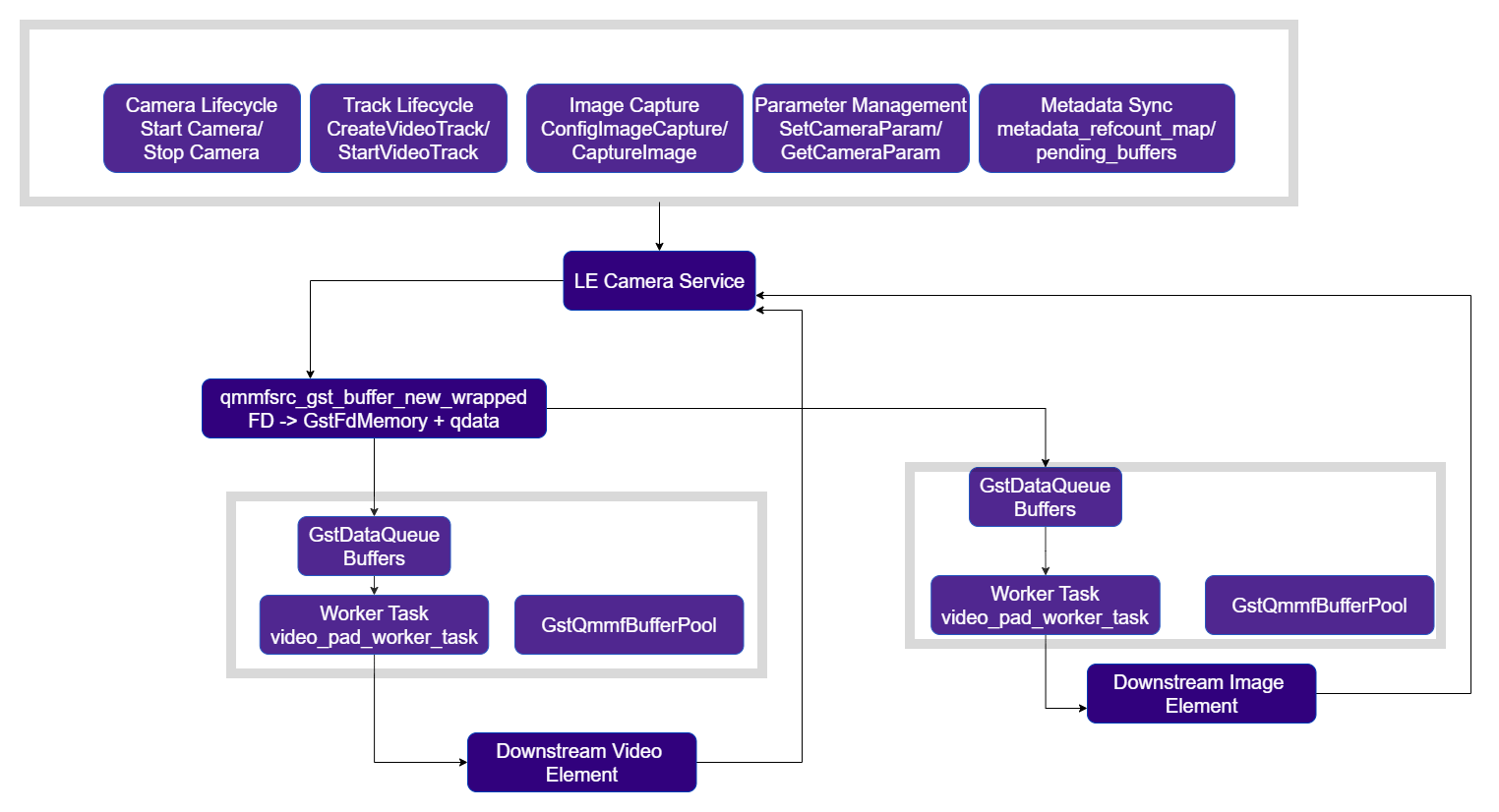
`Parameters: (gpointer metadata)` | ## Camera Event Handling `qticamsrc` handles camera service events internally and propagates them as GStreamer element messages and signals: | Event | Handling | | ---------------------------- | --------------------------------------------------------------------- | | `EVENT_SERVICE_DIED` | Posts `GST_ELEMENT_ERROR` (RESOURCE / NOT\_FOUND) | | `EVENT_CAMERA_ERROR` | Posts `GST_ELEMENT_ERROR` (RESOURCE / FAILED) | | `EVENT_CAMERA_CLOSING` | Pushes EOS to all source pads (slave mode only) | | `EVENT_FRAME_ERROR` | Posts `GST_WARNING` (non-fatal frame drop) | | `EVENT_METADATA_ERROR` | Posts `GST_WARNING` (non-fatal metadata drop) | | `EVENT_SOF_FREEZE` | Logs warning | | `EVENT_RECOVERYFAILURE` | Logs warning | | `EVENT_RECOVERYSUCCESS` | Logs info | | `EVENT_INTERNAL_RECOVERY` | Logs info | | `EVENT_DEVICE_STATUS_CHANGE` | Emits `device-status-change` signal with `camera_id` and `is_present` | ## Internal Architecture Details `qticamsrc` is built around a client-server camera architecture in which the GStreamer element acts as a client of the camera service. The camera service manages the underlying camera HAL, stream creation, buffer allocation, and capture control, while `qticamsrc` exposes those capabilities to the GStreamer pipeline through source pads, camera properties, and control signals. At a high level, the element: * opens and configures the selected camera device * creates and manages video and image output streams * receives captured frames from the `camera service` * wraps camera buffers as `GstBuffer` objects * pushes those buffers downstream through the corresponding source pads * returns buffers to the camera service when downstream processing is complete This design allows `qticamsrc` to provide zero-copy camera output while keeping ownership of camera buffers and stream resources in the service layer. ### Core Internal Components `qticamsrc` is organized around four main internal components: #### `GstQmmfContext` — camera session manager A C++ wrapper around the camera service API. It is the primary interface between the plugin and the camera service, and is responsible for camera open and close operations, stream creation and deletion, image capture requests, translation of plugin properties into camera metadata, and per-frame metadata synchronization. #### `GstQmmfSrcVideoPad` — video output pad implementation A custom pad implementation used for each `video_%u` source pad. Each video pad owns its own queue, worker thread, and reusable buffer pool. Frames received from the camera service are queued per pad and then pushed downstream asynchronously. #### `GstQmmfSrcImagePad` — image capture pad implementation A pad implementation used for each `image_%u` source pad. It is similar in structure to the video pad implementation, but is used for still-image capture workflows rather than continuous video streaming. #### `GstQmmfBufferPool` — reusable buffer wrapper pool A lightweight buffer pool used to reuse GstBuffer wrapper objects. The pool does not allocate camera memory itself; instead, it provides reusable GstBuffer shells that are populated with camera-provided DMA-backed memory when frames arrive. ## Plugin State Management The operation of `qticamsrc` is closely tied to normal GStreamer state transitions. **`NULL → READY`** The element opens and initializes the camera device selected by the `camera` property. **`READY → PAUSED`** The negotiated pad capabilities are translated into camera stream configuration, and the required streams are prepared through the camera service. **`PAUSED → PLAYING`** The prepared streams are activated. For video pads, capture requests are submitted and frame delivery begins. This state-driven design ensures that camera initialization, stream setup, and frame acquisition are aligned with the pipeline lifecycle. ## Stream Types `qticamsrc` supports two stream types: video streams and image streams. ### Video Pads Video pads (`video_%u`) produce a continuous stream of buffers at the negotiated frame rate. They are typically used for: * preview * video encoding * display * streaming * AI inference Each video pad can be configured independently. The `camera service` selects an appropriate internal buffer count based on stream properties such as resolution, format, and frame rate. If additional buffering is required, it can be requested through the `extra-buffers` property. Video orientation can be adjusted in 90-degree increments through the `rotate` property. For high-frame-rate operation, when the negotiated frame rate is 60 FPS or higher, the stream enters HFR mode. In this mode, the `super-buffer-mode` property becomes available. When enabled, a single `GstBuffer` may contain multiple captured frames. The number of frames per buffer is computed as: $$ \text{frames per buffer} = \frac{\text{negotiated frame rate}}{60} $$ For example, at 120 FPS, each output buffer contains 2 frames. By default, video pads begin streaming automatically when the element enters the PLAYING state. This behavior can be changed through `video-pads-activation-mode`. When configured for signal-based activation, streaming starts and stops only when controlled explicitly through the `video-pads-activation` signal. ### Image Pads Image pads (`image_%u`) are used for on-demand image capture. Unlike video pads, they do not stream continuously. Image capture is triggered by the application through the `capture-image` signal, which specifies: * the image type * the number of images to capture * optional camera metadata If multiple image captures are requested, the operation can be canceled through the `cancel-capture` signal. Image orientation can also be adjusted in 90-degree increments through the `rotate` property. The number of simultaneously supported image pads is platform-dependent. All supported platforms allow multiple video pads, while support for multiple image pads depends on chipset capability. ## Buffer Handling and Data Flow When a frame is received from the camera service, `qticamsrc` obtains a reusable GstBuffer wrapper from the corresponding pad's `GstQmmfBufferPool`. The incoming camera buffer is then wrapped as `GstFdMemory`, and the resulting GstBuffer is queued on the target pad. Each source pad has its own internal queue and worker thread. The worker thread dequeues buffers and pushes them downstream through the connected GStreamer pad. This design separates: * camera callback handling * buffer wrapping * downstream `gst_pad_push()` execution As a result, frame acquisition remains decoupled from downstream pipeline timing, which helps maintain stable capture behavior even when downstream elements operate at different speeds. Buffers produced by `qticamsrc` are **DMA-backed file-descriptor buffers**, making them compatible with zero-copy downstream processing when the rest of the pipeline supports FD-backed memory. ### Output Buffer Pool Behavior Each video pad and image pad owns a dedicated `GstQmmfBufferPool`. This pool is used only to reuse GstBuffer wrapper objects and reduce the overhead of repeatedly creating and destroying GStreamer buffers. The pool behaves as follows: * it maintains a small number of reusable GstBuffer shells * it does not allocate the actual camera frame memory * frame memory is attached later when a capture callback is received * when a buffer is returned to the pool, the wrapper is cleaned by removing attached memory and auxiliary data before reuse This keeps wrapper reuse efficient while ensuring that stale memory references are not retained across frames. ### DMA Buffer Lifecycle The actual frame buffers are allocated and owned by camera service, not by `qticamsrc` plugin. When a frame arrives: * the camera-provided file descriptor is wrapped as `GstFdMemory` * the memory is marked with `GST_FD_MEMORY_FLAG_DONT_CLOSE` * GStreamer is therefore prevented from closing the underlying file descriptor Additional buffer return information is stored with the GstBuffer so that the plugin can return the buffer to the camera service when downstream processing is complete. When the final reference to the GstBuffer is released: * a cleanup callback reconstructs the information needed to identify the original camera buffer * the buffer is returned to the camera service * any associated metadata references are released This mechanism ensures that buffers are safely recycled back into the camera pipeline while preserving zero-copy delivery downstream. ### Metadata Handling `qticamsrc` supports attachment of camera metadata to captured frames. When metadata attachment is enabled for a video pad, per-frame camera metadata is matched to the corresponding frame using timestamps before the buffer is pushed downstream. The element also exposes a range of camera-control properties that map to underlying camera metadata settings, including controls for tuning and capture behavior. These settings provide a GStreamer-facing interface for configuring standard camera parameters and Qualcomm-specific camera features. ## Camera Selection and Multi-Instance Behavior The camera device used by a `qticamsrc` instance is selected through the `camera` property. If no camera is specified, the element uses the first detected sensor by default. Under normal operation, multiple instances of `qticamsrc` cannot open the same camera ID at the same time. An exception exists through **slave mode**: * a primary instance owns the camera and controls its configuration and lifetime * a secondary instance can access the same camera by enabling the `slave` property In slave mode, the secondary instance can request additional output streams from the same camera, but it cannot: * change camera tuning parameters * modify camera settings * control camera lifetime This allows multiple GStreamer branches or clients to share the same physical camera while keeping ownership centralized in the primary instance. ### Multi-Camera and Multi-Client Operation `qticamsrc` also supports multi-camera workflows, where each plugin instance corresponds to a single physical camera device. This allows applications to instantiate multiple `qticamsrc` elements to access and process streams from multiple cameras concurrently. For example, a dual-camera configuration can be implemented by creating two separate plugin instances, one for each physical camera. The maximum number of cameras that can be used simultaneously is determined by the hardware capabilities of the target Qualcomm chipset and its ISP capabilities.
 ## Usage
 ### Live Camera Preview and Image Capture
This example demonstrates live snapshot capture while a live preview stream continues to run in parallel. The `gst-pipeline-app` application is used to trigger the capture signal while the preview pipeline remains active.
```bash theme={null}
gst-pipeline-app -e qticamsrc name=camsrc ! video/x-raw,format=NV12,width=1920,height=1080,framerate=30/1 ! queue ! waylandsink sync=false fullscreen=true camsrc.image_1 ! image/jpeg,width=1920,height=1080,framerate=30/1 ! multifilesink location=$HOME/media/output/frame%d.jpg sync=true async=false
```
```
#Choose options in the order displayed.
#Use the alpha-numeric characters displayed corresponding to each of the below options:
PLAYING
Plugin Mode
camsrc
capture-image
still
3
```
### Live Camera Preview and Image Capture
This example demonstrates live snapshot capture while a live preview stream continues to run in parallel. The `gst-pipeline-app` application is used to trigger the capture signal while the preview pipeline remains active.
```bash theme={null}
gst-pipeline-app -e qticamsrc name=camsrc ! video/x-raw,format=NV12,width=1920,height=1080,framerate=30/1 ! queue ! waylandsink sync=false fullscreen=true camsrc.image_1 ! image/jpeg,width=1920,height=1080,framerate=30/1 ! multifilesink location=$HOME/media/output/frame%d.jpg sync=true async=false
```
```
#Choose options in the order displayed.
#Use the alpha-numeric characters displayed corresponding to each of the below options:
PLAYING
Plugin Mode
camsrc
capture-image
still
3
```
 ### Two Streams Use Case
This example demonstrates simultaneous capture of two output streams from the camera source plugin. Both streams are processed in parallel, encoded independently, and then muxed into MP4 output.
```bash theme={null}
gst-launch-1.0 -e qticamsrc name=src \
video_0::type=preview ! video/x-raw,format=NV12_Q08C,width=3840,height=2160,framerate=30/1 ! \
queue ! v4l2h264enc ! h264parse ! mp4mux ! \
filesink location=$HOME/media/output/4k_video.mp4 async=false \
src.video_1 ! video/x-raw,format=NV12,width=1280,height=720,framerate=30/1 ! \
queue ! v4l2h264enc ! h264parse ! mp4mux ! \
filesink location=$HOME/media/output/720p_video.mp4 async=false
```
### Two Streams Use Case
This example demonstrates simultaneous capture of two output streams from the camera source plugin. Both streams are processed in parallel, encoded independently, and then muxed into MP4 output.
```bash theme={null}
gst-launch-1.0 -e qticamsrc name=src \
video_0::type=preview ! video/x-raw,format=NV12_Q08C,width=3840,height=2160,framerate=30/1 ! \
queue ! v4l2h264enc ! h264parse ! mp4mux ! \
filesink location=$HOME/media/output/4k_video.mp4 async=false \
src.video_1 ! video/x-raw,format=NV12,width=1280,height=720,framerate=30/1 ! \
queue ! v4l2h264enc ! h264parse ! mp4mux ! \
filesink location=$HOME/media/output/720p_video.mp4 async=false
```
 ### Three Stream Use Case
This example demonstrates simultaneous camera capture for three parallel streams: a live preview stream, a 1080p H.264 recording stream muxed into an MP4 file, and a periodic JPEG snapshot capture stream.
```bash theme={null}
gst-pipeline-app -e \
qticamsrc name=camsrc \
video_0::type=preview \
video_1::type=video \
image_0::type=jpeg \
\
camsrc.video_0 ! queue ! \
video/x-raw,format=NV12_Q08C,width=1280,height=720,framerate=30/1 ! \
waylandsink sync=false fullscreen=true \
\
camsrc.video_1 ! queue ! \
video/x-raw,format=NV12,width=1920,height=1080,framerate=30/1 ! \
v4l2h264enc ! h264parse ! mp4mux ! \
filesink location=$HOME/media/output/720p_video.mp4 async=false \
\
camsrc.image_2 ! \
image/jpeg,width=1920,height=1080,framerate=5/1 ! \
multifilesink location=$HOME/media/output/frame_%04d.jpg sync=true async=false
```
```
#Choose options in the order displayed.
#Use the alpha-numeric characters displayed corresponding to each of the below options:
PLAYING
Plugin Mode
camsrc
capture-image
still
3
```
### Three Stream Use Case
This example demonstrates simultaneous camera capture for three parallel streams: a live preview stream, a 1080p H.264 recording stream muxed into an MP4 file, and a periodic JPEG snapshot capture stream.
```bash theme={null}
gst-pipeline-app -e \
qticamsrc name=camsrc \
video_0::type=preview \
video_1::type=video \
image_0::type=jpeg \
\
camsrc.video_0 ! queue ! \
video/x-raw,format=NV12_Q08C,width=1280,height=720,framerate=30/1 ! \
waylandsink sync=false fullscreen=true \
\
camsrc.video_1 ! queue ! \
video/x-raw,format=NV12,width=1920,height=1080,framerate=30/1 ! \
v4l2h264enc ! h264parse ! mp4mux ! \
filesink location=$HOME/media/output/720p_video.mp4 async=false \
\
camsrc.image_2 ! \
image/jpeg,width=1920,height=1080,framerate=5/1 ! \
multifilesink location=$HOME/media/output/frame_%04d.jpg sync=true async=false
```
```
#Choose options in the order displayed.
#Use the alpha-numeric characters displayed corresponding to each of the below options:
PLAYING
Plugin Mode
camsrc
capture-image
still
3
```
 ### Dual Camera Use Case
This example demonstrates a dual-camera pipeline in which each camera produces two output streams. One stream from each camera is composited side-by-side for live display, while the second stream from each camera is encoded independently and saved as an MP4 file.
```bash theme={null}
gst-launch-1.0 -e \
qticamsrc name=cam0 camera=0 \
video_0::type=preview \
video_1::type=video \
\
qticamsrc name=cam1 camera=1 \
video_0::type=video \
video_1::type=video \
\
qtivcomposer name=mixer \
sink_0::position="<0,0>" sink_0::dimensions="<640,480>" \
sink_1::position="<640,0>" sink_1::dimensions="<640,480>" \
\
mixer. ! queue ! waylandsink fullscreen=true \
\
cam0.video_0 ! queue ! \
video/x-raw,format=NV12_Q08C,width=640,height=480,framerate=30/1 ! \
mixer.sink_0 \
\
cam1.video_0 ! queue ! \
video/x-raw,format=NV12_Q08C,width=640,height=480,framerate=30/1 ! \
mixer.sink_1 \
\
cam0.video_1 ! queue ! \
video/x-raw,format=NV12,width=1920,height=1080,framerate=30/1 ! \
v4l2h264enc ! h264parse ! mp4mux ! \
filesink location=$HOME/media/output/cam0.mp4 async=false \
\
cam1.video_1 ! queue ! \
video/x-raw,format=NV12,width=1280,height=720,framerate=30/1 ! \
v4l2h264enc ! h264parse ! mp4mux ! \
filesink location=$HOME/media/output/cam1.mp4 async=false
```
### Dual Camera Use Case
This example demonstrates a dual-camera pipeline in which each camera produces two output streams. One stream from each camera is composited side-by-side for live display, while the second stream from each camera is encoded independently and saved as an MP4 file.
```bash theme={null}
gst-launch-1.0 -e \
qticamsrc name=cam0 camera=0 \
video_0::type=preview \
video_1::type=video \
\
qticamsrc name=cam1 camera=1 \
video_0::type=video \
video_1::type=video \
\
qtivcomposer name=mixer \
sink_0::position="<0,0>" sink_0::dimensions="<640,480>" \
sink_1::position="<640,0>" sink_1::dimensions="<640,480>" \
\
mixer. ! queue ! waylandsink fullscreen=true \
\
cam0.video_0 ! queue ! \
video/x-raw,format=NV12_Q08C,width=640,height=480,framerate=30/1 ! \
mixer.sink_0 \
\
cam1.video_0 ! queue ! \
video/x-raw,format=NV12_Q08C,width=640,height=480,framerate=30/1 ! \
mixer.sink_1 \
\
cam0.video_1 ! queue ! \
video/x-raw,format=NV12,width=1920,height=1080,framerate=30/1 ! \
v4l2h264enc ! h264parse ! mp4mux ! \
filesink location=$HOME/media/output/cam0.mp4 async=false \
\
cam1.video_1 ! queue ! \
video/x-raw,format=NV12,width=1280,height=720,framerate=30/1 ! \
v4l2h264enc ! h264parse ! mp4mux ! \
filesink location=$HOME/media/output/cam1.mp4 async=false
```
