> ## Documentation Index
> Fetch the complete documentation index at: https://imsdkdocs.qualcomm.com/llms.txt
> Use this file to discover all available pages before exploring further.

# Building a Wrist-Controlled Car Game Using QIM SDK

> A two-stage palm detection and hand landmark pipeline turns wrist movement into a virtual steering wheel for a real-time, touchless split-screen driving game, built with QIM SDK

<div
  style={{
width: "100%", borderRadius: "14px", overflow: "hidden",
position: "relative", marginBottom: "1.5rem"
}}
>
  <video src="https://mintcdn.com/qimsdk/QarSxH4rrv0vwi-l/blogs/images/car-game-expected-output.mp4?fit=max&auto=format&n=QarSxH4rrv0vwi-l&q=85&s=a3da6542e336461fccab8a7ce33372fc" alt="Smart Board Application" autoPlay muted loop playsInline style={{ width: "100%", height: "auto", display: "block" }} data-path="blogs/images/car-game-expected-output.mp4" />

  <div
    style={{
position: "absolute", bottom: "16px", left: "50%", transform: "translateX(-50%)",
background: "rgba(255,255,255,0.15)", border: "1px solid rgba(255,255,255,0.4)",
color: "#fff", fontSize: "0.75rem", fontWeight: 700, letterSpacing: "1px",
padding: "5px 14px", borderRadius: "20px", textTransform: "uppercase", whiteSpace: "nowrap",
zIndex: 1
}}
  >
    QIM SDK · Qualcomm
  </div>
</div>

<div style={{ marginBottom: "2rem" }}>
  <div
    style={{
fontSize: "0.72rem", fontWeight: 700, color: "var(--primary, #31017D)",
letterSpacing: "1.5px", textTransform: "uppercase", marginBottom: "0.5rem"
}}
  >
    Gesture Recognition
  </div>

  <p style={{ fontSize: "0.95rem", color: "var(--muted-foreground, #555)", lineHeight: 1.7, margin: "0 0 0.75rem" }}>
    A split-screen touchless driving game controlled entirely by wrist movement, built on a two-stage
    palm detection and hand landmark pipeline running on Qualcomm QIM SDK with QNN HTP acceleration.
  </p>

  <div style={{ fontSize: "0.85rem", color: "var(--muted-foreground, #888)", display: "flex", gap: "0.5rem", flexWrap: "wrap", alignItems: "center" }}>
    <span>QIM SDK Team</span>
    <span>·</span>
    <span>Aug 3, 2026</span>
    <span>·</span>
    <a href="/blogs" target="_self" style={{ color: "var(--primary, #31017D)", fontWeight: 600, textDecoration: "none" }}>← All posts</a>
  </div>
</div>

<hr style={{ border: "none", borderTop: "1px solid var(--border, rgba(128,128,128,0.15))", margin: "0 0 2rem" }} />

## Introduction

"TouchlessDrive" is a touchless car game that turns a player's raised hands into a virtual steering wheel. Using a single USB camera, the system tracks both wrists and interprets the line between them as the steering input. When the player tilts their hands left or right, the on-screen car responds in real time. The experience is displayed in a split-screen layout, with the live camera feed shown alongside the game interface.

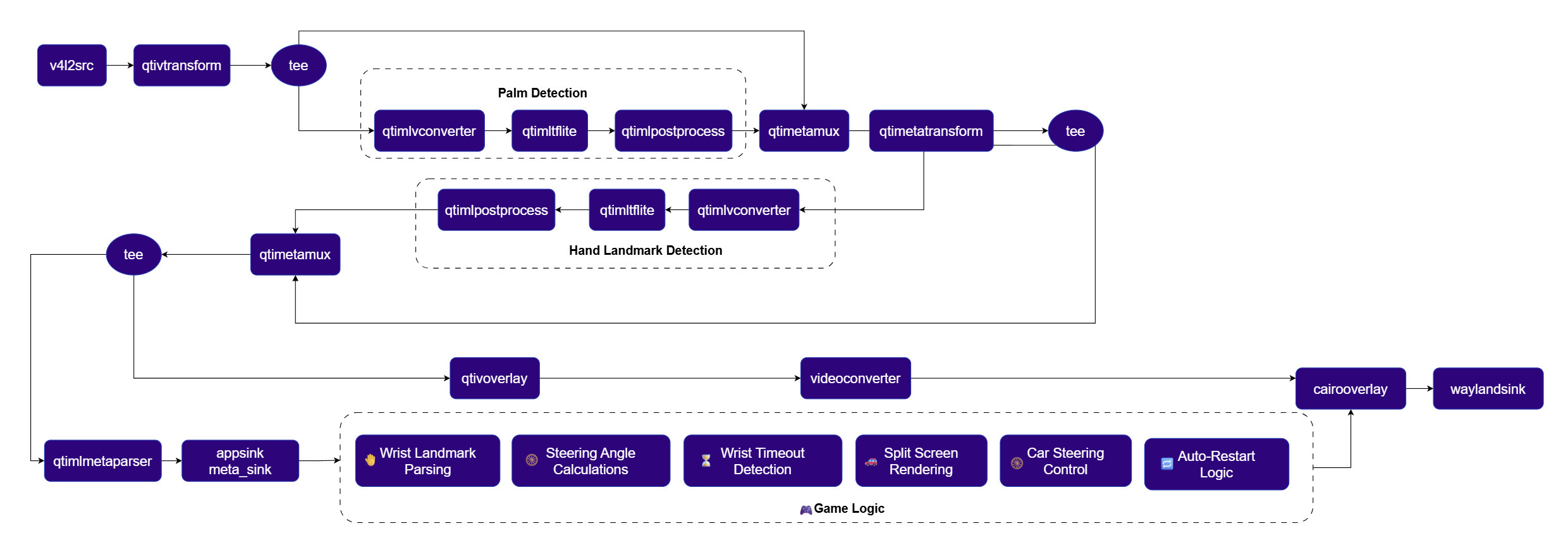
Under the hood, TouchlessDrive runs on a two-stage hand-tracking pipeline built with the Qualcomm QIM SDK. First, a palm detection model identifies each hand in the frame. Then, a hand-landmark model extracts precise keypoints, including the wrist locations used for steering. Both models run through the QNN TFLite delegate, offloading inference to the on-device HTP instead of the CPU. This helps keep the game loop responsive and capable of real-time performance.

The project highlights how the QIM SDK's metadata pipeline can power interactive application logic beyond traditional video analytics. In TouchlessDrive, AI-generated hand keypoints are transformed directly into game-controller input, enabling a natural, controller-free gaming experience.

## Use Case Overview

<Steps>
  <Step title="Hand Tracking">
    Two-stage inference, palm detection followed by hand landmark estimation, locates both of the player's hands and extracts their wrist keypoints every frame.
  </Step>

  <Step title="Virtual Steering Wheel">
    The line connecting the two wrist points is treated as a steering wheel. Its tilt angle, measured relative to horizontal, becomes the steering input.
  </Step>

  <Step title="Steering-to-Motion Mapping">
    The tilt angle is converted into a clamped steering value that moves the on-screen car left or right, with smoothing applied to avoid jittery motion.
  </Step>

  <Step title="Split-Screen Rendering">
    The display is divided into two halves: the left shows the raw camera feed with hand-tracking overlays, and the right renders the game itself, including the road, car, obstacles, and score.
  </Step>

  <Step title="Game Loop">
    Obstacles spawn and scroll down the game lane; a collision ends the run and briefly shows a crash state before the game automatically resets.
  </Step>
</Steps>

## Pipeline diagram

<img src="https://mintcdn.com/qimsdk/QarSxH4rrv0vwi-l/blogs/images/car-game-pipeline.png?fit=max&auto=format&n=QarSxH4rrv0vwi-l&q=85&s=5f8588ba874c9b528cbee73eaf265140" alt="Touchless Wrist Steering Car Game Pipeline" width="2480" height="873" data-path="blogs/images/car-game-pipeline.png" />

## Elements used in pipeline

| Element                                                    | Description                                                                                                                           |
| ---------------------------------------------------------- | ------------------------------------------------------------------------------------------------------------------------------------- |
| `v4l2src`                                                  | Captures raw frames from the USB camera.                                                                                              |
| [`qtivtransform`](../plugin-reference/qtivtransform)       | Applies a horizontal flip so the camera feed behaves like a mirror, matching the player's actual hand motion.                         |
| [`qtimlvconverter`](../plugin-reference/qtimlvconverter)   | Hardware-accelerated resize, color-space conversion, and normalization ahead of each inference stage.                                 |
| [`qtimltflite`](../plugin-reference/qtimltflite)           | Runs the palm detection and hand landmark TFLite models on the QNN HTP delegate.                                                      |
| [`qtimlpostprocess`](../plugin-reference/qtimlpostprocess) | Decodes raw model output into structured detections, using the `palmd` module for palm detection and `hlandmark` for hand landmarks.  |
| [`qtimetamux`](../plugin-reference/qtimetamux)             | Synchronizes inference metadata from each stage with the corresponding video frame.                                                   |
| `qtimetatransform`                                         | Remaps palm-detection metadata (via the `roi-palmd` module) into per-hand regions of interest for the landmark stage.                 |
| [`qtivoverlay`](../plugin-reference/qtivoverlay)           | Draws bounding boxes and keypoints onto the camera-feed half of the split screen.                                                     |
| [`qtimlmetaparser`](../plugin-reference/qtimetaparser)     | Exposes per-frame landmark metadata to the application through an `appsink` callback.                                                 |
| `cairooverlay`                                             | Renders the game itself, including the road, car, obstacles, score, and the steering-wheel visualization, as a Cairo drawing surface. |
| [`waylandsink`](../plugin-reference/waylandsink)           | Displays the final composited split-screen output.                                                                                    |

## How it works
<Steps>
  <Step title="Capture and Mirror">
    The USB camera feed is flipped horizontally so on-screen motion matches the player's real-world hand movement, then formatted to a fixed resolution and frame rate for the rest of the pipeline.
  </Step>

  <Step title="Two-Stage Hand Tracking">
    Palm detection runs first, locating each hand's bounding region. `qtimetatransform` uses the `roi-palmd` module to convert each detected region into an aligned crop, which the hand landmark model then processes to extract per-hand keypoints, most importantly the wrist.
  </Step>

  <Step title="Wrist Extraction">
    An `appsink` callback receives the landmark metadata for every frame and pulls out the wrist keypoint (keypoint ID 0) for each tracked hand. When two hands are present, the pair with the largest horizontal separation is selected as the active steering pair.
  </Step>

  <Step title="Steering Angle Calculation">
    The angle of the line between the two wrist points is computed and mapped to a steering value clamped to a fixed range, then smoothed across frames so small tracking jitter doesn't translate into an erratic car.
  </Step>

  <Step title="Game Update">
    Each frame, the steering value nudges the car's horizontal position, obstacles advance down the lane, and a collision check runs against the car's current position. A collision triggers a brief crash state and increments state that leads to an automatic restart.
  </Step>

  <Step title="Split-Screen Composition">
    A Cairo drawing callback renders both halves of the display in a single pass: the left half shows the camera feed with the tracked wrist line and a steering-wheel indicator overlaid, and the right half draws the road, car, obstacles, and score.
  </Step>
</Steps>

## Setup Requirements

### Hardware

<img src="https://mintcdn.com/qimsdk/QarSxH4rrv0vwi-l/blogs/images/car-game-hw.png?fit=max&auto=format&n=QarSxH4rrv0vwi-l&q=85&s=b423fb791d230fc0c97cd12b9f5f04ed" alt="HW Setup" width="746" height="529" data-path="blogs/images/car-game-hw.png" />

| Component                | Description                                                                 |
| ------------------------ | --------------------------------------------------------------------------- |
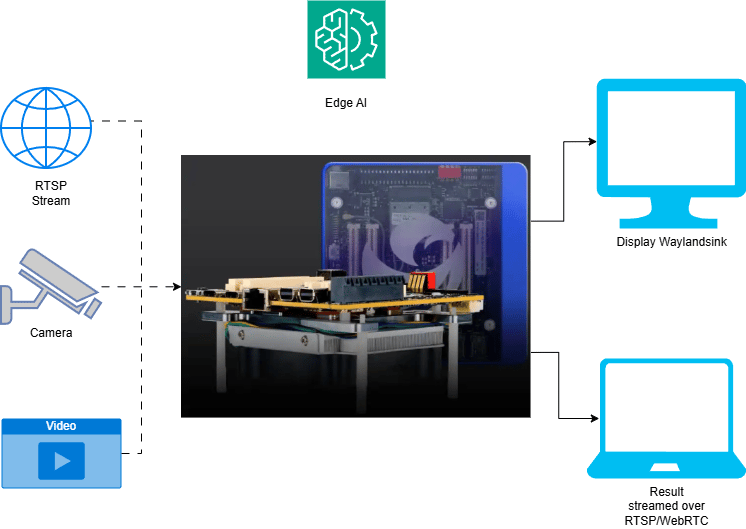
| **Edge Device**          | RB3 Gen 2, IQ8, or IQ9. Runs the hand-tracking inference and the game loop. |
| **Camera Source**        | USB camera positioned to capture the player's hands and upper body.         |
| **HDMI Display Monitor** | Connected to the edge device to show the split-screen game output.          |

### Software

Flash your Qualcomm Edge device by following the device setup and flashing instructions [here](../installation), then install the Python and GStreamer prerequisites (`python3`, `gstreamer1.0`, `python3-gi`) needed to run the pipeline.

The palm detection and hand landmark TFLite models, along with their label and settings files, are the same assets used by the [hand gesture recognition pipeline](/blogs/smart-hand-gesture-recognition). See that post's model download steps for the palm and hand landmark model files.

<Accordion title="Try me">
  <Tabs sync={false}>
    <Tab title="C++">
      <Info>
        Check application source code on GitHub: [`demo_car_game/main.cc`](https://github.com/qualcomm/qimsdk/blob/main/cpp/examples/demo-apps/demo_car_game/main.cc)

        Pre-built application on device: `/usr/bin/qimsdk_demo_car_game`
      </Info>

      #### Download Required Files

      Download the gesture recognizer task bundle from Google MediaPipe to obtain the palm detection and hand landmark models:

      ```bash theme={null}
      # Download the gesture recognizer task bundle
      wget https://storage.googleapis.com/mediapipe-models/gesture_recognizer/gesture_recognizer/float16/latest/gesture_recognizer.task

      # Extract the top-level task
      unzip gesture_recognizer.task

      # Extract hand landmarker models
      unzip hand_landmarker.task
      # save hand_detector.tflite as palm_detection_full.tflite
      # save hand_landmarks_detector.tflite as hand_landmark_full.tflite
      ```

      | File                                                                                                        | Save as                      |
      | ----------------------------------------------------------------------------------------------------------- | ---------------------------- |
      | Palm detection model (see steps above)                                                                      | palm\_detection\_full.tflite |
      | Hand landmark model (see steps above)                                                                       | hand\_landmark\_full.tflite  |
      | <a href="../labels/palmd_labels.json" download="palmd_labels.json">palmd\_labels.json</a>                   | palmd\_labels.json           |
      | <a href="../labels/palmd_settings.json" download="palmd_settings.json">palmd\_settings.json</a>             | palmd\_settings.json         |
      | <a href="../labels/hlandmarks.json" download="hlandmarks.json">hlandmarks.json</a>                          | hlandmarks.json              |
      | <a href="../labels/hlandmark_settings.json" download="hlandmark_settings.json">hlandmark\_settings.json</a> | hlandmark\_settings.json     |

      <Note>
        If a downloaded model file is a `.zip` archive, extract it on your host machine before copying: `unzip filename.zip`
      </Note>

      <Steps>
        <Step title="Copy Files to Device">
          <CodeGroup>
            ```bash SCP (SSH) theme={null}
            # Replace <user> and <device-ip> with your device credentials.
            ssh <user>@<device-ip> "mkdir -p ~/Downloads/qimsdk_samples/{models,labels}"
            scp palm_detection_full.tflite <user>@<device-ip>:~/Downloads/qimsdk_samples/models/
            scp hand_landmark_full.tflite  <user>@<device-ip>:~/Downloads/qimsdk_samples/models/
            scp palmd_labels.json          <user>@<device-ip>:~/Downloads/qimsdk_samples/labels/
            scp palmd_settings.json        <user>@<device-ip>:~/Downloads/qimsdk_samples/labels/
            scp hlandmarks.json            <user>@<device-ip>:~/Downloads/qimsdk_samples/labels/
            scp hlandmark_settings.json    <user>@<device-ip>:~/Downloads/qimsdk_samples/labels/
            ```
          </CodeGroup>
        </Step>

        <Step title="Connect a USB camera">
          Connect a USB (UVC) camera to the target device and verify it is exposed as `/dev/video2` (update the `--input-config` value below if your camera is exposed on a different node).
        </Step>

        <Step title="Run the application">
          ```bash theme={null}
          /usr/bin/qimsdk_demo_car_game --input-config /dev/video2
          ```

          The application tracks both wrists from the live USB camera feed, mapping their relative tilt to a virtual steering wheel that steers a split-screen driving game in real time.

          To stop the application, press **CTRL + C**.
        </Step>
      </Steps>
    </Tab>

    <Tab title="Python">
      <Info>
        Check application source code on GitHub: [`qimsdk_demo_car_game.py`](https://github.com/qualcomm/qimsdk/blob/main/python/examples/demo-apps/qimsdk_demo_car_game.py)

        Pre-built application on device: `/usr/bin/qimsdk_demo_car_game.py`
      </Info>

      #### Download Required Files

      Download the gesture recognizer task bundle from Google MediaPipe to obtain the palm detection and hand landmark models:

      ```bash theme={null}
      # Download the gesture recognizer task bundle
      wget https://storage.googleapis.com/mediapipe-models/gesture_recognizer/gesture_recognizer/float16/latest/gesture_recognizer.task

      # Extract the top-level task
      unzip gesture_recognizer.task

      # Extract hand landmarker models
      unzip hand_landmarker.task
      # save hand_detector.tflite as palm_detection_full.tflite
      # save hand_landmarks_detector.tflite as hand_landmark_full.tflite
      ```

      | File                                                                                                        | Save as                      |
      | ----------------------------------------------------------------------------------------------------------- | ---------------------------- |
      | Palm detection model (see steps above)                                                                      | palm\_detection\_full.tflite |
      | Hand landmark model (see steps above)                                                                       | hand\_landmark\_full.tflite  |
      | <a href="../labels/palmd_labels.json" download="palmd_labels.json">palmd\_labels.json</a>                   | palmd\_labels.json           |
      | <a href="../labels/palmd_settings.json" download="palmd_settings.json">palmd\_settings.json</a>             | palmd\_settings.json         |
      | <a href="../labels/hlandmarks.json" download="hlandmarks.json">hlandmarks.json</a>                          | hlandmarks.json              |
      | <a href="../labels/hlandmark_settings.json" download="hlandmark_settings.json">hlandmark\_settings.json</a> | hlandmark\_settings.json     |

      <Note>
        If a downloaded model file is a `.zip` archive, extract it on your host machine before copying: `unzip filename.zip`
      </Note>

      <Steps>
        <Step title="Copy Files to Device">
          <CodeGroup>
            ```bash SCP (SSH) theme={null}
            # Replace <user> and <device-ip> with your device credentials.
            ssh <user>@<device-ip> "mkdir -p ~/Downloads/qimsdk_samples/{models,labels}"
            scp palm_detection_full.tflite <user>@<device-ip>:~/Downloads/qimsdk_samples/models/
            scp hand_landmark_full.tflite  <user>@<device-ip>:~/Downloads/qimsdk_samples/models/
            scp palmd_labels.json          <user>@<device-ip>:~/Downloads/qimsdk_samples/labels/
            scp palmd_settings.json        <user>@<device-ip>:~/Downloads/qimsdk_samples/labels/
            scp hlandmarks.json            <user>@<device-ip>:~/Downloads/qimsdk_samples/labels/
            scp hlandmark_settings.json    <user>@<device-ip>:~/Downloads/qimsdk_samples/labels/
            ```
          </CodeGroup>
        </Step>

        <Step title="Connect a USB camera">
          Connect a USB (UVC) camera to the target device and verify it is exposed as `/dev/video2` (update the `--input-config` value below if your camera is exposed on a different node).
        </Step>

        <Step title="Run the application">
          ```bash theme={null}
          python3 /usr/bin/qimsdk_demo_car_game.py --input-config /dev/video2
          ```

          The application tracks both wrists from the live USB camera feed, mapping their relative tilt to a virtual steering wheel that steers a split-screen driving game in real time.

          To stop the application, press **CTRL + C**.
        </Step>
      </Steps>
    </Tab>
  </Tabs>
</Accordion>

## Application Function Breakdown

The TouchlessDrive application is organized into a handful of function groups, each responsible for one stage of the hand-to-steering flow:

* **Metadata parsing**: extracts the wrist keypoint (ID 0) for each tracked hand from the raw landmark metadata stream, handling frames where zero, one, or two hands are detected.
* **Steering pair selection**: when two hands are present, selects the pair with the largest horizontal separation as the active steering wheel, discarding stray or partial detections.
* **Steering angle calculation**: computes the tilt angle of the line between the two wrist points, maps it to a clamped steering value, and smooths it across frames to filter out landmark jitter.
* **Game state and physics**: advances the car's horizontal position based on the current steering value, scrolls obstacles down the lane, runs collision checks, and manages the crash/restart state machine.
* **Rendering**: a Cairo drawing callback composes the split-screen output each frame — the camera feed with the wrist line and steering-wheel indicator on the left, and the road, car, obstacles, and score on the right.
* **Pipeline setup**: assembles the two-stage palm detection and hand landmark QIM SDK pipeline and wires the `appsink` callback and Cairo overlay into the runtime before the pipeline starts.

## Expected Output

<video src="https://mintcdn.com/qimsdk/QarSxH4rrv0vwi-l/blogs/images/car-game-expected-output.mp4?fit=max&auto=format&n=QarSxH4rrv0vwi-l&q=85&s=a3da6542e336461fccab8a7ce33372fc" alt="Touchless Wrist Steering Car Game" autoPlay muted loop playsInline style={{ width: "100%", height: "auto", display: "block", borderRadius: "14px", marginBottom: "1.5rem" }} data-path="blogs/images/car-game-expected-output.mp4" />

Running the application opens a full-screen split view:

* **Left panel**: live camera feed with the tracked wrist-to-wrist line and a steering-wheel indicator overlaid.
* **Right panel**: the driving game, including a scrolling road, the player-controlled car, incoming obstacles, and a running score.

Tilting the virtual wheel formed by both wrists steers the car left or right; colliding with an obstacle shows a brief crash state before the game restarts automatically. Press `Ctrl+C` to stop the application.

## Conclusion

TouchlessDrive demonstrates how a two-stage hand-tracking pipeline, accelerated entirely on-device through the QNN HTP, can extend beyond traditional video analytics to enable real-time interactive experiences. The wrist-tracking technique used in the driving game can also be adapted for touchless kiosks, accessibility solutions, and other gesture-based human–computer interaction applications built with the Qualcomm QIM SDK.
