> ## Documentation Index
> Fetch the complete documentation index at: https://imsdkdocs.qualcomm.com/llms.txt
> Use this file to discover all available pages before exploring further.

# Edge AI for Smart Manufacturing — Real-Time Bottle Counting Using Qualcomm QIM SDK

> A YOLOv8-based object detection pipeline that counts products crossing a center region of interest in real time, built with Qualcomm QIM SDK and QNN HTP acceleration.
<div
  style={{
width: "100%", borderRadius: "14px", overflow: "hidden",
position: "relative", marginBottom: "1.5rem"
}}
>
  <video src="https://mintcdn.com/qimsdk/QarSxH4rrv0vwi-l/blogs/images/bottle_count.mp4?fit=max&auto=format&n=QarSxH4rrv0vwi-l&q=85&s=ddc1729ac286b81553a03affeda86429" autoPlay muted loop playsInline style={{ width: "100%", height: "auto", display: "block" }} data-path="blogs/images/bottle_count.mp4" />

  <div
    style={{
position: "absolute", bottom: "16px", left: "50%", transform: "translateX(-50%)",
background: "rgba(255,255,255,0.15)", border: "1px solid rgba(255,255,255,0.4)",
color: "#fff", fontSize: "0.75rem", fontWeight: 700, letterSpacing: "1px",
padding: "5px 14px", borderRadius: "20px", textTransform: "uppercase", whiteSpace: "nowrap",
zIndex: 1
}}
  >
    QIM SDK · Qualcomm
  </div>
</div>

<div style={{ marginBottom: "2rem" }}>
  <div
    style={{
fontSize: "0.72rem", fontWeight: 700, color: "var(--primary, #31017D)",
letterSpacing: "1.5px", textTransform: "uppercase", marginBottom: "0.5rem"
}}
  >
    Computer Vision
  </div>

  <p style={{ fontSize: "0.95rem", color: "var(--muted-foreground, #555)", lineHeight: 1.7, margin: "0 0 0.75rem" }}>
    A YOLOv8-based object detection pipeline that counts products crossing a center region of
    interest in real time, built with Qualcomm QIM SDK and QNN HTP acceleration.
  </p>

  <div style={{ fontSize: "0.85rem", color: "var(--muted-foreground, #888)", display: "flex", gap: "0.5rem", flexWrap: "wrap", alignItems: "center" }}>
    <span>QIM SDK Team</span>
    <span>·</span>
    <span>Aug 3, 2026</span>
    <span>·</span>
    <a href="/blogs" target="_self" style={{ color: "var(--primary, #31017D)", fontWeight: 600, textDecoration: "none" }}>← All posts</a>
  </div>
</div>

<hr style={{ border: "none", borderTop: "1px solid var(--border, rgba(128,128,128,0.15))", margin: "0 0 2rem" }} />

## Introduction

Counting products as they move along a conveyor belt or production line is a common but essential task in manufacturing, packaging, and warehouse environments. Manual counting is difficult to scale, while basic frame-by-frame object detection can easily over-count the same item as it appears across multiple consecutive frames.

The Product Counting Application addresses this challenge with a Qualcomm QIM SDK pipeline that combines a YOLOv8 object detector with a center region-of-interest (ROI) counting strategy. Instead of counting every detection in every frame, the application defines a narrow vertical band in the center of the camera view. The count increases only when a tracked object's centroid passes through this band, similar to how a physical counting gate would operate on a production line.

Inference runs fully on-device through the QNN HTP delegate, keeping the YOLOv8 TFLite model off the CPU and allowing the counting logic to keep pace with the live camera stream. Between detection and counting, a lightweight object tracker assigns each item a stable identity across frames, ensuring that each object is counted only once—even if it briefly leaves and re-enters the ROI.

## Use Case Overview

<Steps>
  <Step title="Video Capture">
    A USB camera feed is captured and normalized to a fixed resolution, format, and frame rate before entering the inference branch.
  </Step>

  <Step title="YOLOv8 Detection">
    Frames are preprocessed and passed through a quantized YOLOv8 model on the QNN HTP delegate, producing per-frame bounding box detections.
  </Step>

  <Step title="Metadata Delivery">
    Detection metadata is synchronized with the video stream and delivered to the application through an `appsink` callback as JSON.
  </Step>

  <Step title="Center-ROI Evaluation">
    Each detection's centroid is checked against a vertical counting band spanning the full frame height and the middle third of the frame width.
  </Step>

  <Step title="Cumulative Tracking">
    A tracker matches detections to previously seen objects across frames and increments the count only once per confirmed object, supporting re-entry if an object leaves and comes back.
  </Step>

  <Step title="Overlay Rendering">
    The ROI band and running count are drawn onto the display branch alongside the YOLOv8 detection boxes, and the composited frame is shown on the connected display.
  </Step>
</Steps>

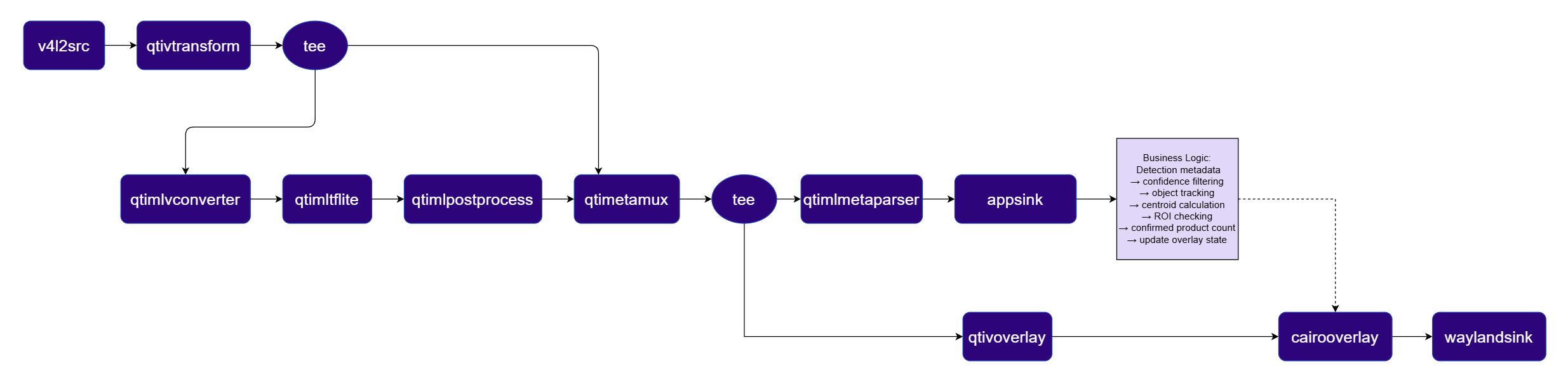
## Pipeline diagram

<img src="https://mintcdn.com/qimsdk/QarSxH4rrv0vwi-l/blogs/images/product-counting-pipeline.png?fit=max&auto=format&n=QarSxH4rrv0vwi-l&q=85&s=5e74ae6c2af532c141d5089e39b77130" alt="Product Counting Pipeline" width="2469" height="599" data-path="blogs/images/product-counting-pipeline.png" />

## Elements used in pipeline

| Element                                                                                                        | Description                                                                                                                |
| -------------------------------------------------------------------------------------------------------------- | -------------------------------------------------------------------------------------------------------------------------- |
| `v4l2src`                                                                                                      | Captures raw frames from the USB camera (`/dev/video2` by default).                                                        |
| [`qtivtransform`](../plugin-reference/qtivtransform)                                                           | Formats the raw camera frames for the pipeline; a second instance later reformats frames for the display/overlay branch.   |
| Caps filter (`NV12`, `1920x1080`, `30/1`)                                                                      | Fixes camera output to a known resolution, format, and frame rate for the rest of the pipeline.                            |
| `tee` (`split`)                                                                                                | Splits the raw video into an inference branch and a pass-through branch carried into the metadata muxer.                   |
| `queue`                                                                                                        | Decouples and buffers data between branches; used multiple times throughout the pipeline.                                  |
| [`qtimlvconverter`](../plugin-reference/qtimlvconverter)                                                       | Resizes, converts color space, and normalizes frames ahead of inference.                                                   |
| [`qtimltflite`](../plugin-reference/qtimltflite)                                                               | Runs the quantized YOLOv8 detection model through the QNN HTP external delegate (`libQnnTFLiteDelegate.so`).               |
| [`qtimlpostprocess`](../plugin-reference/qtimlpostprocess)                                                     | Decodes raw model output into structured detections using the `yolov8` module.                                             |
| `tee` (`post_split`)                                                                                           | Splits the detection-carrying stream again, feeding both the display path and the counting path.                           |
| [`qtimetamux`](../plugin-reference/qtimetamux)                                                                 | Synchronizes detection metadata with the corresponding video frame.                                                        |
| [`qtivoverlay`](../plugin-reference/qtivoverlay)                                                               | Draws YOLOv8 bounding boxes and labels onto the video stream.                                                              |
| [`qtimlmetaparse`](../plugin-reference/qtimetaparser) / [`qtimlmetaparser`](../plugin-reference/qtimetaparser) | Parses metadata into JSON. The application selects whichever element name is available at runtime.                         |
| `appsink` (`count_sink`)                                                                                       | Delivers per-frame detection JSON to the counting logic (`emit-signals=true`, `sync=false`, `max-buffers=1`, `drop=true`). |
| Caps filter (`BGRA`)                                                                                           | Reformats the display branch into a format Cairo can draw onto directly.                                                   |
| `cairooverlay` (`roi_overlay`)                                                                                 | Renders the green ROI rectangle and the running "ROI Objects Counted" text onto the display branch.                        |
| [`waylandsink`](../plugin-reference/waylandsink)                                                               | Displays the final composited output (`sync=true`, `async=true`).                                                          |

## How it works
<Steps>
  <Step title="Capture and Format">
    `v4l2src` captures the raw camera feed, which is normalized to a fixed NV12 resolution and frame rate before a `tee` splits it into an inference branch and a reference branch.
  </Step>

  <Step title="Detection">
    The inference branch runs `qtimlvconverter` to prepare frames, then `qtimltflite` executes the quantized YOLOv8 model (`/etc/models/yolov8_det_w8a8.tflite`) via the QNN HTP delegate. `qtimlpostprocess`, using the `yolov8` module, decodes the raw output into bounding boxes, and `qtimetamux` merges the detections back onto the reference video frame.
  </Step>

  <Step title="Metadata Delivery">
    A second `tee` sends the metadata-carrying stream down both a display branch and a metadata branch. The metadata branch parses detections into JSON and hands them to the `count_sink` `appsink` callback for every frame.
  </Step>

  <Step title="Flexible Metadata Parsing">
    Because the detection-list and bounding-box key names can vary depending on the post-processing module version, the callback normalizes incoming JSON, checking a set of known key aliases for the detection list and for the bounding box, before extracting label, confidence, and rectangle values.
  </Step>

  <Step title="Center-ROI Evaluation">
    The counting logic defines a vertical band covering the full frame height and the middle third of the frame width, then tests whether each detection's centroid falls inside that band.
  </Step>

  <Step title="Cumulative Tracking">
    A tracker matches each frame's detections against previously tracked objects using centroid distance, bounding-box overlap, label agreement, and simple motion prediction. It smooths bounding boxes, tolerates brief detection dropouts, and increments the count only once an object is confirmed inside the ROI, while still allowing the same physical slot to be counted again if an object exits and re-enters.
  </Step>

  <Step title="Overlay and Display">
    The display branch is reformatted to BGRA, and `cairooverlay` draws the ROI rectangle and the current count on top of the `qtivoverlay`-annotated frame before `waylandsink` renders the result.
  </Step>
</Steps>

## Setup Requirements

### Hardware

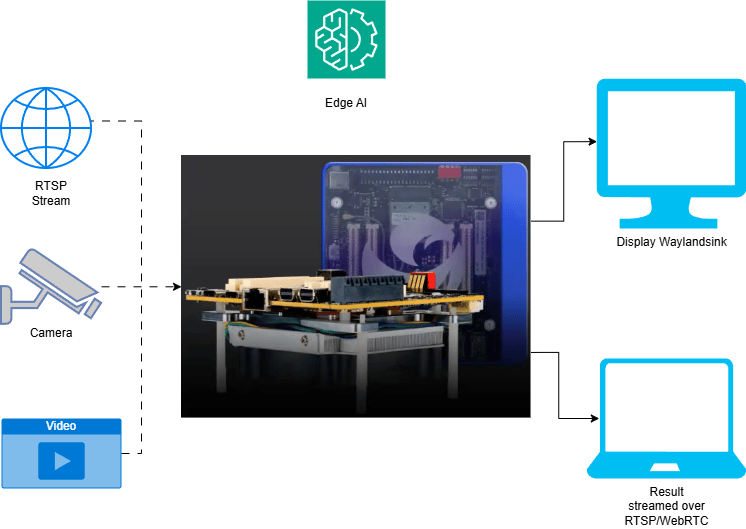
<img src="https://mintcdn.com/qimsdk/QarSxH4rrv0vwi-l/blogs/images/product-counting-hw.png?fit=max&auto=format&n=QarSxH4rrv0vwi-l&q=85&s=a91ddcf8295429a51d51dce3e1e10880" alt="HW Setup" width="746" height="529" data-path="blogs/images/product-counting-hw.png" />

| Component                      | Description                                                                                   |
| ------------------------------ | --------------------------------------------------------------------------------------------- |
| **Edge Device**                | RB3 Gen 2, IQ8, or IQ9. Runs the YOLOv8 detection inference and counting logic.               |
| **Camera Source**              | USB camera by default; an IP/RTSP camera, ISP camera, or local video file can be substituted. |
| **HDMI Display Monitor**       | Connected to the edge device to show the live detection and counting overlay.                 |
| **PoE Switch / Local Network** | Required only when using an IP/RTSP camera or streaming results over the network.             |

### Software

Flash your Qualcomm Edge device by following the device setup and flashing instructions [here](../installation), then install the Python and GStreamer prerequisites (`python3`, `gstreamer1.0`, `python3-gi`) needed to run the pipeline.

The YOLOv8 detection model and its labels are expected at `/etc/models/yolov8_det_w8a8.tflite` and `/etc/labels/yolov8.json` respectively.

<Accordion title="Try me">
  <Tabs sync={false}>
    <Tab title="C++">
      <Info>
        Check application source code on GitHub: [`demo_product_counting/main.cc`](https://github.com/qualcomm/qimsdk/blob/main/cpp/examples/demo-apps/demo_product_counting/main.cc)

        Pre-built application on device: `/usr/bin/qimsdk_demo_product_counting`
      </Info>

      #### Download Required Files

      | File                                                                   | Save as                       |
      | ---------------------------------------------------------------------- | ----------------------------- |
      | [Model](https://aihub.qualcomm.com/iot/models/yolov8_det)              | yolov8\_det\_quantized.tflite |
      | <a href="../labels/yolov8.json" download="yolov8.json">yolov8.json</a> | yolov8.json                   |

      <Note>
        If the downloaded model file is a `.zip` archive, extract it on your host machine before copying: `unzip filename.zip`
      </Note>

      <Steps>
        <Step title="Copy Files to Device">
          <CodeGroup>
            ```bash SCP (SSH) theme={null}
            # Replace <user> and <device-ip> with your device credentials.
            ssh <user>@<device-ip> "mkdir -p ~/Downloads/qimsdk_samples/{models,labels}"
            scp yolov8_det_quantized.tflite <user>@<device-ip>:~/Downloads/qimsdk_samples/models/
            scp yolov8.json                 <user>@<device-ip>:~/Downloads/qimsdk_samples/labels/
            ```
          </CodeGroup>
        </Step>

        <Step title="Connect a USB camera">
          Connect a USB (UVC) camera to the target device and verify it is exposed as `/dev/video2` (update the `--input-config` value below if your camera is exposed on a different node).
        </Step>

        <Step title="Run the application">
          ```bash theme={null}
          /usr/bin/qimsdk_demo_product_counting --input-config /dev/video2
          ```

          The application overlays YOLOv8 detection bounding boxes on the live USB camera feed and displays a running "ROI Objects Counted" total whenever a detected object's centroid crosses into the defined region of interest.

          To stop the application, press **CTRL + C**.
        </Step>
      </Steps>
    </Tab>

    <Tab title="Python">
      <Info>
        Check application source code on GitHub: [`qimsdk_demo_product_counting.py`](https://github.com/qualcomm/qimsdk/blob/main/python/examples/demo-apps/qimsdk_demo_product_counting.py)

        Pre-built application on device: `/usr/bin/qimsdk_demo_product_counting.py`
      </Info>

      #### Download Required Files

      | File                                                                   | Save as                       |
      | ---------------------------------------------------------------------- | ----------------------------- |
      | [Model](https://aihub.qualcomm.com/iot/models/yolov8_det)              | yolov8\_det\_quantized.tflite |
      | <a href="../labels/yolov8.json" download="yolov8.json">yolov8.json</a> | yolov8.json                   |

      <Note>
        If the downloaded model file is a `.zip` archive, extract it on your host machine before copying: `unzip filename.zip`
      </Note>

      <Steps>
        <Step title="Copy Files to Device">
          <CodeGroup>
            ```bash SCP (SSH) theme={null}
            # Replace <user> and <device-ip> with your device credentials.
            ssh <user>@<device-ip> "mkdir -p ~/Downloads/qimsdk_samples/{models,labels}"
            scp yolov8_det_quantized.tflite <user>@<device-ip>:~/Downloads/qimsdk_samples/models/
            scp yolov8.json                 <user>@<device-ip>:~/Downloads/qimsdk_samples/labels/
            ```
          </CodeGroup>
        </Step>

        <Step title="Connect a USB camera">
          Connect a USB (UVC) camera to the target device and verify it is exposed as `/dev/video2` (update the `--input-config` value below if your camera is exposed on a different node).
        </Step>

        <Step title="Run the application">
          ```bash theme={null}
          python3 /usr/bin/qimsdk_demo_product_counting.py --input-config /dev/video2
          ```

          The application overlays YOLOv8 detection bounding boxes on the live USB camera feed and displays a running "ROI Objects Counted" total whenever a detected object's centroid crosses into the defined region of interest.

          To stop the application, press **CTRL + C**.
        </Step>
      </Steps>
    </Tab>
  </Tabs>
</Accordion>

## Application Function Breakdown

The Product Counting application is organized into a handful of function groups, each responsible for one stage of the detection-to-count flow:

* **Metadata parsing**: normalizes incoming JSON keys and extracts label, confidence, and bounding-box values regardless of which detection-list or bbox key names the post-processing module emits.
* **ROI and counting**: computes the center ROI band from the frame dimensions and tests whether a detection's centroid falls inside it.
* **Object tracking**: a cumulative tracker that assigns stable IDs, matches detections across frames using centroid distance, IoU, label, and motion prediction, smooths bounding boxes, tolerates brief dropouts, and prevents duplicate counts while still supporting re-entry counting.
* **Rendering**: draws the ROI rectangle and the current count text onto the display branch each frame.
* **Callback and pipeline utility**: the `appsink` callback that receives each frame's metadata, a helper that selects the correct metadata-parser element name at runtime, and setup logic that wires the runtime hooks together before the pipeline starts.

## Expected Output

<video src="https://mintcdn.com/qimsdk/QarSxH4rrv0vwi-l/blogs/images/bottle_count.mp4?fit=max&auto=format&n=QarSxH4rrv0vwi-l&q=85&s=ddc1729ac286b81553a03affeda86429" autoPlay muted loop playsInline style={{ width: "100%", height: "auto", display: "block", borderRadius: "14px", marginBottom: "1.5rem" }} data-path="blogs/images/bottle_count.mp4" />

Running the application opens a live view on the connected monitor:

* The camera feed is shown with YOLOv8 detection boxes and labels overlaid.
* A green vertical rectangle marks the center counting ROI, spanning the full frame height.
* A running "ROI Objects Counted" total is drawn on screen and increments as tracked objects pass through the ROI.
* Objects that leave and re-enter the ROI are counted again, while objects lingering inside it are not double-counted.

Press `Ctrl+C` to stop the application; the pipeline transitions to the `NULL` state and releases the camera and display cleanly.

## Conclusion

The Product Counting Application demonstrates how an on-device YOLOv8 detector, a simple spatial rule based on a central ROI band, and a lightweight cumulative tracker can transform raw AI metadata into accurate, real-time counts. QNN HTP acceleration enables detection to keep pace with fast-moving objects, making this approach applicable beyond conveyor belts to any use case that requires counting objects as they cross a defined boundary—from retail shelf monitoring to people-flow and footfall analytics.
