> ## Documentation Index
> Fetch the complete documentation index at: https://imsdkdocs.qualcomm.com/llms.txt
> Use this file to discover all available pages before exploring further.
# Coding Agent
> Use the QIM SDK GStreamer App Builder skill to generate native C pipeline apps and gst-launch scripts with an AI coding agent.
## What is the GStreamer App Builder Skill?
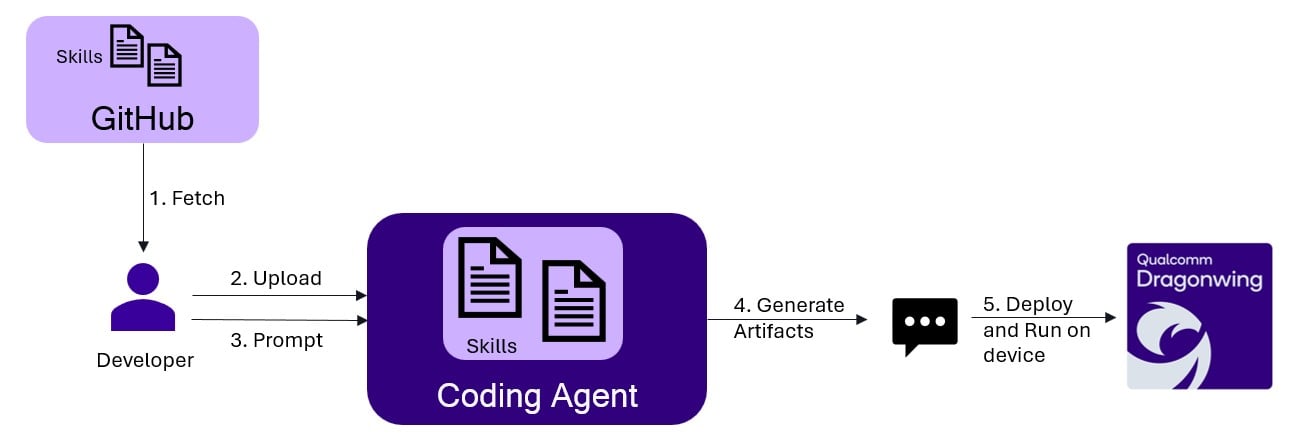
The **QIM SDK GStreamer App Builder** is an AI coding skill that generates GStreamer pipelines/applications using the `QIM SDK GStreamer API`. You describe the pipeline behavior and configuration in natural language, and the agent produces either a **native GStreamer C application** (`main.c` + `CMakeLists.txt`) or a **gst-launch shell script** — along with a `README.md` that documents the generated app.
The skill can generate both **native C applications** and **gst-launch shell scripts**. The example on this page shows a native C application; use the prompt to request a `gst-launch` script instead when you want a quick, build-free pipeline.
**Flow**
 **What it generates**
For a native C application request, the agent produces an artifact folder containing:
* **`main.c`** — a complete, buildable native GStreamer C application, including element creation, property configuration, dynamic pad handling, linking, and bus/event-loop management
* **`CMakeLists.txt`** — the build script that compiles `main.c` against GStreamer and links `gstappsutils`
* **`README.md`** — a detailed document covering:
* Purpose and pipeline behavior summary
* Configuration placeholders (input, model, labels, output paths)
* A step-by-step pipeline flow (text summary + Mermaid diagram)
* Steps to build and run the app on device
For a `gst-launch` request, the agent instead produces a shell script containing the full `gst-launch-1.0` pipeline plus a `README.md`.
**Supported use cases:**
| Category | Details |
| --------------------- | ---------------------------------------------------------------------------------------------------------------------------------------------------------------------------------------------- |
| **AI pipelines** | Object detection, image classification, semantic segmentation, face detection, pose estimation, super resolution, depth estimation, audio classification, object tracking, gesture recognition |
| **Inputs** | ISP camera, USB camera, file source (MP4/H.264), RTSP stream |
| **Outputs** | HDMI display, encoded file (MP4), RTSP stream, Redis/MQTT metadata |
| **ML backends** | TFLite (HTP/NPU), QNN, SNPE |
| **Pipeline patterns** | Single-stream, multi-stream, daisy-chained models, ML-bin fused inference, batching, zero-copy cross-process pipelines, gst-launch scripts |
## Prerequisites
### For generating code
Qualcomm dev kits are not needed for code generation.
**Host Machine**: Any PC with internet access
**Coding Agent**: Any AI coding agent installed (Claude Code, Cursor, Codex, etc.) which supports skills — the skills provided are agent-agnostic.
This skill is designed to work well even with low-reasoning / smaller models.
Eg: A Sonnet 4.5 model is sufficient.
### For deploying and running apps
The target devices where QIM SDK is supported (see [QIM SDK Installation Guide](/installation))
## How to Use
### Step 1: Get the skill
Clone the skill repository to your host machine, then copy the **QIM SDK GStreamer App Builder skill** into your coding agent's skills directory. Also copy the **qimsdk-deploy** skill, which builds, deploys, and runs the generated app on device (see [Step 4](#step-4-running-the-applications)):
```bash theme={null}
git clone https://github.com/qualcomm/qimsdk-agentic-skills
# Set this to your coding agent's skills directory.
# Claude Code example (see your agent's docs for its skills path):
# App Builder skill — generates the app
cp -r qimsdk-agentic-skills/skills/qimsdk-gstreamer-app-builder ~/.claude/skills
# Deploy skill — builds, pushes, and runs the app on device
cp -r qimsdk-agentic-skills/skills/qimsdk-deploy ~/.claude/skills
```
After copying, your skills directory should look like this:
```
/
├── qimsdk-gstreamer-app-builder/
│ ├── SKILL.md # Skill definition with rules and API quick reference
│ └── references/ # Condensed reference documents
└── qimsdk-deploy/
├── SKILL.md # Deploy skill definition
└── references/ # Condensed reference documents
```
The skills directory is agent-specific — Claude Code uses `~/.claude/skills/`. Check your coding agent's documentation for its skills location. You can also scope skills to a single workspace (e.g. Claude Code supports `/.claude/skills/`).
***
### Step 2: Load the skill
Restart (or reload) your coding agent after placing the skills so it picks them up. They will appear automatically in the `/skills` list.
To verify, open the agent panel and run:
```
/skills
```
You should see both `qimsdk-gstreamer-app-builder` and `qimsdk-deploy` listed.
***
### Step 3: Generate the application
Describe your pipeline to the agent. It will automatically activate the skill and generate a complete `main.c`, `CMakeLists.txt`, and `README.md` (or a `gst-launch` script plus `README.md`).
#### Sample Prompt
**Prompt format — describe pipeline behavior and configuration:**
```
Create a QIM SDK Native C app for single-stream YOLOX object detection from an
MP4 file, encoding the result to a file.
## Pipeline Behavior
- Decode an MP4 file using Qualcomm hardware decoder
- Run YOLOX object detection on full frames using TFLite external delegate on HTP/NPU
- Merge metadata with the video stream before overlay
- Overlay bounding boxes and labels
- Encode the overlaid video and save to an output MP4 file
## Configuration
- Input: ~/Downloads/qimsdk_samples/media/ai_demo_sample.mp4
- Model: ~/Downloads/qimsdk_samples/models/yolox_w8a8.tflite
- Labels: ~/Downloads/qimsdk_samples/labels/yolov8.json
- Backend: TFLite external delegate, HTP/NPU
- Confidence: 51.0
- Output: ~/Downloads/qimsdk_samples/media/obj_detect_out.mp4
```
To generate a `gst-launch` shell script instead of a C app, ask for it explicitly — e.g. "Create a `gst-launch` script for single-stream YOLOX object detection ...".
More sample prompts can be found in the [Available Sample Prompts](#available-sample-prompts) section below.
#### Generated `README.md`
The README documents the generated app in full:
* **Purpose** — a plain-English summary of what the pipeline does
* **Files** — lists `main.c`, `CMakeLists.txt`, and `README.md` with descriptions
* **Assumptions** — codec format, quantization requirements, camera defaults, output directory pre-conditions
* **Configuration** — all user-supplied paths (input, model, labels, output) with instructions on where to change them
* **Placeholders to Fill** — any values you still need to supply, or a note that none remain when the request was fully specified
* **Pipeline Flow** — a `Text Summary` walkthrough of every element plus a `Mermaid Diagram` of the full pipeline
* **Steps to Compile** — how to build the app for Yocto
* **Steps to Run** — exact commands to run on device
# QIM SDK GStreamer C App — Single-Stream YOLOX Object Detection (MP4 → MP4)
## Purpose
Decode an MP4 file with the Qualcomm hardware decoder, run **YOLOX** object
detection on full frames using the **TFLite external delegate on the HTP/NPU**,
merge the detection metadata with the video stream, overlay bounding boxes and
class labels, then hardware-encode the annotated video to an output MP4 file.
Headless (no display).
## Files
* `main.c` — GStreamer C sample app (uses `gst_parse_launch`)
* `CMakeLists.txt` — build target `gst-qimsdk-yolox-obj-detect-encode`
* `README.md` — this file
## Assumptions
* Input is H.264-in-MP4, decoded with `v4l2h264dec` (`capture-io-mode=4`,
`output-io-mode=4`).
* YOLOX (`yolox_w8a8.tflite`) uses the `yolov8` postprocess module with
`yolov8.json` labels, per the model catalog.
* Confidence threshold: `{"confidence": 51.0}`.
* No `bbox-stabilization` — this is a file source, not a live camera feed.
* Encoder `v4l2h264enc` io-modes `4/4` — correct for decoder-produced (DMA)
NV12 buffers from a file source.
* All file paths are resolved at runtime via `g_getenv("HOME")` — C string
literals do not expand `$HOME`.
## Configuration (resolved at runtime from `$HOME`)
| Value | Path |
| ------ | --------------------------------------------------------- |
| Input | `$HOME/Downloads/qimsdk_samples/media/ai_demo_sample.mp4` |
| Model | `$HOME/Downloads/qimsdk_samples/models/yolox_w8a8.tflite` |
| Labels | `$HOME/Downloads/qimsdk_samples/labels/yolov8.json` |
| Output | `$HOME/Downloads/qimsdk_samples/media/obj_detect_out.mp4` |
## Placeholders to Fill
None — all paths and values are concrete. If you need different paths, edit
the `g_strdup_printf` calls in `main.c`.
## Pipeline Flow
### Text Summary
`filesrc` reads the MP4; `qtdemux` demuxes the H.264 stream, `h264parse`
prepares it, and `v4l2h264dec` hardware-decodes to NV12. A `tee` (`t`) splits:
* **AI branch**: `qtimlvconverter` → `qtimltflite` (YOLOX, HTP/NPU external
delegate) → `qtimlpostprocess` (`module=yolov8`, confidence 51.0) →
`text/x-raw` caps-filter → `qtimetamux.`
* **Passthrough / video branch**: → `qtimetamux` (`metamux`).
`qtimetamux` merges metadata onto the video frames, `qtivoverlay` draws
bounding boxes and labels, and `v4l2h264enc` encodes back to H.264.
`h264parse` + `mp4mux` + `filesink` write the output MP4.
### Mermaid Diagram
```mermaid theme={null}
flowchart TD
SRC[filesrc] --> DEMUX[qtdemux]
DEMUX --> PARSE[h264parse]
PARSE --> DEC[v4l2h264dec]
DEC --> NV12[video/x-raw NV12]
NV12 --> TEE[tee t]
TEE -->|AI| PRE[qtimlvconverter]
PRE --> INFER[qtimltflite YOLOX HTP]
INFER --> POST[qtimlpostprocess yolov8]
POST --> TEXT[text/x-raw]
TEXT --> MUX[qtimetamux metamux]
TEE -->|passthrough| MUX
MUX --> OVL[qtivoverlay]
OVL --> ENC[v4l2h264enc]
ENC --> ENCQ[queue]
ENCQ --> PARSEOUT[h264parse]
PARSEOUT --> MP4[mp4mux]
MP4 --> SINK[filesink]
```
## Steps to Compile
Yocto: [https://imsdkdocs.qualcomm.com/advanced/yocto-build#steps-to-build-custom-application](https://imsdkdocs.qualcomm.com/advanced/yocto-build#steps-to-build-custom-application)
## Steps to Run
All referenced files — the input MP4, the `yolox_w8a8.tflite` model, and the
`yolov8.json` labels — must already be present on the device at the paths
listed in Configuration above.
```bash theme={null}
# Copy the binary to device
scp gst-qimsdk-yolox-obj-detect-encode @:~/
# SSH into device and run
ssh @
chmod +x ~/gst-qimsdk-yolox-obj-detect-encode
./gst-qimsdk-yolox-obj-detect-encode
```
The app runs to end-of-file, finalizes the MP4 container, and exits. The
output file is written to
`$HOME/Downloads/qimsdk_samples/media/obj_detect_out.mp4` on the device.
#### Generated `main.c`
* The generated application uses `gst_parse_launch` to build the full pipeline from a single pipeline string — no manual element creation or pad linking.
* All file paths are resolved at runtime via `g_getenv("HOME")` and formatted with `g_strdup_printf` — C string literals do not expand `$HOME`.
* A GLib main loop and bus watch handle EOS and errors; a `SIGINT` handler (`g_unix_signal_add`) allows clean shutdown.
* `qtivoverlay` draws bounding boxes, and the result is hardware-encoded and written to an MP4 file via `filesink`.
```c theme={null}
#include
#include
#include
/*
* Single-stream YOLOX object detection from an MP4 file, encoding the
* annotated video to an output MP4 file.
*
* Pipeline:
* filesrc -> qtdemux -> h264parse -> v4l2h264dec -> video/x-raw,format=NV12
* -> tee name=t
* t. -> qtimlvconverter -> qtimltflite (YOLOX, HTP/NPU external delegate)
* -> qtimlpostprocess (module=yolov8, confidence=51.0) -> text/x-raw
* -> qtimetamux.
* t. -> qtimetamux name=metamux -> qtivoverlay
* -> v4l2h264enc -> h264parse -> mp4mux -> filesink
*/
int main(int argc, char *argv[])
{
GstAppContext appctx = { 0 };
guint interrupt_watch_id = 0;
GstBus *bus = NULL;
GError *error = NULL;
/* Resolve HOME at runtime; C string literals do not expand $HOME. */
const gchar *home = g_getenv ("HOME");
if (!home || *home == '\0') {
g_printerr ("ERROR: HOME is not set; cannot resolve file paths.\n");
return -1;
}
gchar *input_file = g_strdup_printf (
"%s/Downloads/qimsdk_samples/media/ai_demo_sample.mp4", home);
gchar *model_path = g_strdup_printf (
"%s/Downloads/qimsdk_samples/models/yolox_w8a8.tflite", home);
gchar *labels_path = g_strdup_printf (
"%s/Downloads/qimsdk_samples/labels/yolov8.json", home);
gchar *output_file = g_strdup_printf (
"%s/Downloads/qimsdk_samples/media/obj_detect_out.mp4", home);
gst_init (&argc, &argv);
/*
* Build the full pipeline string from source, AI overlay, and encode sink.
*
* Notes:
* - video/x-raw,format=NV12 caps-filter after hardware decode normalizes
* the decoded buffers before branching.
* - No bbox-stabilization: this is a file source (not a live camera feed).
* - text/x-raw caps-filter routes the postprocess metadata to qtimetamux.
* - Encoder io-modes 4/4: file-decoded NV12 (DMA, driver-managed buffers).
*/
gchar *pipeline_str = g_strdup_printf (
/* Source: hardware-decode the input MP4 */
"filesrc location=\"%s\" ! qtdemux ! h264parse ! "
"v4l2h264dec capture-io-mode=4 output-io-mode=4 ! "
"video/x-raw,format=NV12 ! "
/* Split into passthrough (video) branch and AI inference branch */
"tee name=t "
/* AI branch: preprocess -> inference -> postprocess -> metadata */
"t. ! qtimlvconverter name=preprocess ! queue ! "
"qtimltflite name=inference delegate=external "
"external-delegate-path=libQnnTFLiteDelegate.so "
"external-delegate-options=\"QNNExternalDelegate,backend_type=htp,log_level=(string)1;\" "
"model=\"%s\" ! queue ! "
"qtimlpostprocess name=postprocess module=yolov8 "
"labels=\"%s\" "
"settings=\"{\\\"confidence\\\": 51.0}\" ! text/x-raw ! metamux. "
/* Passthrough branch: merge metadata, overlay, encode, write */
"t. ! qtimetamux name=metamux ! "
"qtivoverlay ! "
"v4l2h264enc capture-io-mode=4 output-io-mode=4 ! queue ! "
"h264parse ! mp4mux ! "
"filesink location=\"%s\"",
input_file,
model_path,
labels_path,
output_file
);
g_print ("Pipeline:\n%s\n\n", pipeline_str);
appctx.pipeline = gst_parse_launch (pipeline_str, &error);
g_free (pipeline_str);
if (!appctx.pipeline) {
g_printerr ("ERROR: Pipeline creation failed: %s\n",
error ? error->message : "unknown error");
if (error) g_error_free (error);
goto cleanup;
}
appctx.mloop = g_main_loop_new (NULL, FALSE);
bus = gst_pipeline_get_bus (GST_PIPELINE (appctx.pipeline));
if (!bus) {
g_printerr ("ERROR: Failed to get pipeline bus.\n");
goto cleanup;
}
gst_bus_add_signal_watch (bus);
g_signal_connect (bus, "message::eos", G_CALLBACK (eos_cb), appctx.mloop);
g_signal_connect (bus, "message::error", G_CALLBACK (error_cb), appctx.mloop);
gst_object_unref (bus);
interrupt_watch_id = g_unix_signal_add (SIGINT,
handle_interrupt_signal, &appctx);
g_print ("Starting pipeline...\n");
gst_element_set_state (appctx.pipeline, GST_STATE_PAUSED);
g_main_loop_run (appctx.mloop);
g_print ("Pipeline finished.\n");
g_source_remove (interrupt_watch_id);
cleanup:
if (appctx.pipeline) {
gst_element_set_state (appctx.pipeline, GST_STATE_NULL);
gst_object_unref (appctx.pipeline);
}
if (appctx.mloop)
g_main_loop_unref (appctx.mloop);
g_free (input_file);
g_free (model_path);
g_free (labels_path);
g_free (output_file);
gst_deinit ();
return 0;
}
```
#### Generated `CMakeLists.txt`
* Uses `pkg-config` to locate the required `gstreamer-1.0` development package.
* Builds a single executable (`gst-qimsdk-yolox-obj-detect-encode`) from `main.c` and links GStreamer libraries plus `gstappsutils`.
* Installs the binary to `${GST_PLUGINS_QTI_OSS_INSTALL_BINDIR}` with standard executable permissions.
```cmake theme={null}
cmake_minimum_required(VERSION 3.16)
project(GST-QIMSDK-YOLOX-OBJ-DETECT-ENCODE LANGUAGES C CXX)
set(CMAKE_INCLUDE_CURRENT_DIR ON)
find_package(PkgConfig)
pkg_check_modules(GST
REQUIRED gstreamer-1.0>=${GST_VERSION_REQUIRED})
set(GST_EXAMPLE_BIN gst-qimsdk-yolox-obj-detect-encode)
set(CMAKE_C_FLAGS "${CMAKE_C_FLAGS} -Wall -Wextra -Wno-unused-parameter")
add_executable(${GST_EXAMPLE_BIN}
main.c
)
target_include_directories(${GST_EXAMPLE_BIN} PRIVATE
${GST_INCLUDE_DIRS}
)
target_link_libraries(${GST_EXAMPLE_BIN} PRIVATE
${GST_LIBRARIES}
gstappsutils
)
install(
TARGETS ${GST_EXAMPLE_BIN}
RUNTIME DESTINATION ${GST_PLUGINS_QTI_OSS_INSTALL_BINDIR}
PERMISSIONS OWNER_EXECUTE OWNER_WRITE OWNER_READ
GROUP_EXECUTE GROUP_READ
WORLD_EXECUTE WORLD_READ
)
```
***
### Step 4: Running the applications
| File | Download | Save as |
| ---------------- | ------------------------------------------------------------------------------------------------------------------------------------------------------ | -------------------- |
| YOLOX W8A8 model | [Qualcomm AI Hub — YOLOX](https://aihub.qualcomm.com/iot/models/yolox) | `yolox_w8a8.tflite` |
| Detection labels | yolov8.json | `yolov8.json` |
| Sample video | Input video | `ai_demo_sample.mp4` |
If the downloaded model file is a `.zip` archive, extract it on your host machine before copying: `unzip filename.zip`
The input video, model, and labels must be present on the device before running — regardless of how you build and run the app. Copy them to the paths `main.c` expects:
```bash theme={null}
# Replace and with your device credentials.
ssh @ "mkdir -p ~/Downloads/qimsdk_samples/media ~/Downloads/qimsdk_samples/models ~/Downloads/qimsdk_samples/labels"
# Copy the assets to device (paths must match main.c)
scp ai_demo_sample.mp4 @:~/Downloads/qimsdk_samples/media/
scp yolox_w8a8.tflite @:~/Downloads/qimsdk_samples/models/
scp yolov8.json @:~/Downloads/qimsdk_samples/labels/
```
Unlike a `gst-launch` script, a native C app must be compiled before it can run. With the assets in place, you have two options to build and run the agent-generated app:
**Option A — Use the QIM SDK Deploy skill:**
The `qimsdk-deploy` skill builds the app on your host against the SDK, then pushes the compiled binary to the device and runs it over SSH. It handles only the app build and binary transfer — the assets from the previous step must already be on the device.
**Option B — Follow the generated README:**
Follow the steps in the [generated `README.md`](#generated-readme-md) to compile the app, then push the binary to the device and run it:
1. **Compile the app** by following the build steps for your platform:
* **Yocto:** [Yocto Build](/advanced/yocto-build)
2. **Push the compiled binary to the device and run it:**
```bash theme={null}
# Copy the built binary to device
scp gst-qimsdk-yolox-obj-detect-encode @:~/
# SSH into device and run
ssh @
chmod +x ~/gst-qimsdk-yolox-obj-detect-encode
./gst-qimsdk-yolox-obj-detect-encode
```
On completion (EOS), the annotated video is written to `~/Downloads/qimsdk_samples/media/obj_detect_out.mp4`.
***
## Available Sample Prompts
| # | Prompt |
| -- | ------------------------------------------------------------------------------------------------------------------------------------------------------------------------------------------------------------------------------------------ |
| 1 | [Single-stream YOLOX object detection from MP4, encoded to file](https://github.com/qualcomm/qimsdk-agentic-skills/blob/main/sample-prompts/qimsdk-gstreamer-app-builder/c-app/AI_01_single_stream_object_detection.md) |
| 2 | [AI wall — four parallel AI inference streams composed into a 2×2 grid display](https://github.com/qualcomm/qimsdk-agentic-skills/blob/main/sample-prompts/qimsdk-gstreamer-app-builder/c-app/AI_02_ai_wall.md) |
| 3 | [Two-stage detection + classification daisy-chain pipeline](https://github.com/qualcomm/qimsdk-agentic-skills/blob/main/sample-prompts/qimsdk-gstreamer-app-builder/c-app/AI_03_detection_classification_daisy_chain.md) |
| 4 | [Event-triggered recording — record to file only when a person is detected](https://github.com/qualcomm/qimsdk-agentic-skills/blob/main/sample-prompts/qimsdk-gstreamer-app-builder/c-app/AI_04_event_triggered_recording.md) |
| 5 | [Four-stage gesture recognition daisy-chain pipeline](https://github.com/qualcomm/qimsdk-agentic-skills/blob/main/sample-prompts/qimsdk-gstreamer-app-builder/c-app/AI_05_gesture_recognition.md) |
| 6 | [Audio classification — classify audio events from video and overlay results](https://github.com/qualcomm/qimsdk-agentic-skills/blob/main/sample-prompts/qimsdk-gstreamer-app-builder/c-app/AI_06_audio_classification.md) |
| 7 | [Smart codec detection — YOLOv8 detection driving adaptive bitrate encoding](https://github.com/qualcomm/qimsdk-agentic-skills/blob/main/sample-prompts/qimsdk-gstreamer-app-builder/c-app/AI_07_smartcodec_detection.md) |
| 8 | [Event encoder conditional recording from MP4 file, result on Wayland display](https://github.com/qualcomm/qimsdk-agentic-skills/blob/main/sample-prompts/qimsdk-gstreamer-app-builder/c-app/AI_08_event_encoder_conditional_recording.md) |
| 9 | [2-stream face detection from MP4 file, result on Wayland display](https://github.com/qualcomm/qimsdk-agentic-skills/blob/main/sample-prompts/qimsdk-gstreamer-app-builder/c-app/AI_09_multistream_face_detection.md) |
| 10 | [AV playback — H.264 video + MP3 audio from MP4, video on display, audio on speaker](https://github.com/qualcomm/qimsdk-agentic-skills/blob/main/sample-prompts/qimsdk-gstreamer-app-builder/c-app/MM_01_av_playback_h264_mp3.md) |
| # | Prompt |
| -- | -------------------------------------------------------------------------------------------------------------------------------------------------------------------------------------------------------------------------------------- |
| 1 | [Single-stream YOLOX object detection from MP4, encoded to file](https://github.com/qualcomm/qimsdk-agentic-skills/blob/main/sample-prompts/qimsdk-gstreamer-app-builder/gst-launch/AI_01_single_stream_object_detection.md) |
| 2 | [AI wall — four parallel AI inference streams composed into a 2×2 grid display](https://github.com/qualcomm/qimsdk-agentic-skills/blob/main/sample-prompts/qimsdk-gstreamer-app-builder/gst-launch/AI_02_ai_wall.md) |
| 3 | [Two-stage detection + classification daisy-chain pipeline](https://github.com/qualcomm/qimsdk-agentic-skills/blob/main/sample-prompts/qimsdk-gstreamer-app-builder/gst-launch/AI_03_detection_classification_daisy_chain.md) |
| 4 | [Four-stage gesture recognition daisy-chain pipeline](https://github.com/qualcomm/qimsdk-agentic-skills/blob/main/sample-prompts/qimsdk-gstreamer-app-builder/gst-launch/AI_04_gesture_recognition.md) |
| 5 | [Audio classification — classify audio events from video and overlay results](https://github.com/qualcomm/qimsdk-agentic-skills/blob/main/sample-prompts/qimsdk-gstreamer-app-builder/gst-launch/AI_05_audio_classification.md) |
| 6 | [Single-stream YOLOv8 object detection using SNPE DSP delegate, MP4 to file](https://github.com/qualcomm/qimsdk-agentic-skills/blob/main/sample-prompts/qimsdk-gstreamer-app-builder/gst-launch/AI_06_snpe_dsp_object_detection.md) |
| 7 | [RTSP input YOLOv8 detection — video + metadata streamed over RTSP](https://github.com/qualcomm/qimsdk-agentic-skills/blob/main/sample-prompts/qimsdk-gstreamer-app-builder/gst-launch/AI_07_rtsp_input_yolov8_meta_over_rtsp.md) |
| 8 | [2-stream face detection pipeline](https://github.com/qualcomm/qimsdk-agentic-skills/blob/main/sample-prompts/qimsdk-gstreamer-app-builder/gst-launch/AI_08_multistream_face_detection.md) |
| 9 | [AV record — ISP camera 1080p video + microphone audio muxed to MP4](https://github.com/qualcomm/qimsdk-agentic-skills/blob/main/sample-prompts/qimsdk-gstreamer-app-builder/gst-launch/MM_01_av_record_h264_mp3.md) |
| 10 | [AV playback — H.264 video + MP3 audio from MP4, video on display, audio on speaker](https://github.com/qualcomm/qimsdk-agentic-skills/blob/main/sample-prompts/qimsdk-gstreamer-app-builder/gst-launch/MM_02_av_playback_h264_mp3.md) |
**What it generates**
For a native C application request, the agent produces an artifact folder containing:
* **`main.c`** — a complete, buildable native GStreamer C application, including element creation, property configuration, dynamic pad handling, linking, and bus/event-loop management
* **`CMakeLists.txt`** — the build script that compiles `main.c` against GStreamer and links `gstappsutils`
* **`README.md`** — a detailed document covering:
* Purpose and pipeline behavior summary
* Configuration placeholders (input, model, labels, output paths)
* A step-by-step pipeline flow (text summary + Mermaid diagram)
* Steps to build and run the app on device
For a `gst-launch` request, the agent instead produces a shell script containing the full `gst-launch-1.0` pipeline plus a `README.md`.
**Supported use cases:**
| Category | Details |
| --------------------- | ---------------------------------------------------------------------------------------------------------------------------------------------------------------------------------------------- |
| **AI pipelines** | Object detection, image classification, semantic segmentation, face detection, pose estimation, super resolution, depth estimation, audio classification, object tracking, gesture recognition |
| **Inputs** | ISP camera, USB camera, file source (MP4/H.264), RTSP stream |
| **Outputs** | HDMI display, encoded file (MP4), RTSP stream, Redis/MQTT metadata |
| **ML backends** | TFLite (HTP/NPU), QNN, SNPE |
| **Pipeline patterns** | Single-stream, multi-stream, daisy-chained models, ML-bin fused inference, batching, zero-copy cross-process pipelines, gst-launch scripts |
## Prerequisites
### For generating code
Qualcomm dev kits are not needed for code generation.
**Host Machine**: Any PC with internet access
**Coding Agent**: Any AI coding agent installed (Claude Code, Cursor, Codex, etc.) which supports skills — the skills provided are agent-agnostic.
This skill is designed to work well even with low-reasoning / smaller models.
Eg: A Sonnet 4.5 model is sufficient.
### For deploying and running apps
The target devices where QIM SDK is supported (see [QIM SDK Installation Guide](/installation))
## How to Use
### Step 1: Get the skill
Clone the skill repository to your host machine, then copy the **QIM SDK GStreamer App Builder skill** into your coding agent's skills directory. Also copy the **qimsdk-deploy** skill, which builds, deploys, and runs the generated app on device (see [Step 4](#step-4-running-the-applications)):
```bash theme={null}
git clone https://github.com/qualcomm/qimsdk-agentic-skills
# Set this to your coding agent's skills directory.
# Claude Code example (see your agent's docs for its skills path):
# App Builder skill — generates the app
cp -r qimsdk-agentic-skills/skills/qimsdk-gstreamer-app-builder ~/.claude/skills
# Deploy skill — builds, pushes, and runs the app on device
cp -r qimsdk-agentic-skills/skills/qimsdk-deploy ~/.claude/skills
```
After copying, your skills directory should look like this:
```
/
├── qimsdk-gstreamer-app-builder/
│ ├── SKILL.md # Skill definition with rules and API quick reference
│ └── references/ # Condensed reference documents
└── qimsdk-deploy/
├── SKILL.md # Deploy skill definition
└── references/ # Condensed reference documents
```
The skills directory is agent-specific — Claude Code uses `~/.claude/skills/`. Check your coding agent's documentation for its skills location. You can also scope skills to a single workspace (e.g. Claude Code supports `/.claude/skills/`).
***
### Step 2: Load the skill
Restart (or reload) your coding agent after placing the skills so it picks them up. They will appear automatically in the `/skills` list.
To verify, open the agent panel and run:
```
/skills
```
You should see both `qimsdk-gstreamer-app-builder` and `qimsdk-deploy` listed.
***
### Step 3: Generate the application
Describe your pipeline to the agent. It will automatically activate the skill and generate a complete `main.c`, `CMakeLists.txt`, and `README.md` (or a `gst-launch` script plus `README.md`).
#### Sample Prompt
**Prompt format — describe pipeline behavior and configuration:**
```
Create a QIM SDK Native C app for single-stream YOLOX object detection from an
MP4 file, encoding the result to a file.
## Pipeline Behavior
- Decode an MP4 file using Qualcomm hardware decoder
- Run YOLOX object detection on full frames using TFLite external delegate on HTP/NPU
- Merge metadata with the video stream before overlay
- Overlay bounding boxes and labels
- Encode the overlaid video and save to an output MP4 file
## Configuration
- Input: ~/Downloads/qimsdk_samples/media/ai_demo_sample.mp4
- Model: ~/Downloads/qimsdk_samples/models/yolox_w8a8.tflite
- Labels: ~/Downloads/qimsdk_samples/labels/yolov8.json
- Backend: TFLite external delegate, HTP/NPU
- Confidence: 51.0
- Output: ~/Downloads/qimsdk_samples/media/obj_detect_out.mp4
```
To generate a `gst-launch` shell script instead of a C app, ask for it explicitly — e.g. "Create a `gst-launch` script for single-stream YOLOX object detection ...".
More sample prompts can be found in the [Available Sample Prompts](#available-sample-prompts) section below.
#### Generated `README.md`
The README documents the generated app in full:
* **Purpose** — a plain-English summary of what the pipeline does
* **Files** — lists `main.c`, `CMakeLists.txt`, and `README.md` with descriptions
* **Assumptions** — codec format, quantization requirements, camera defaults, output directory pre-conditions
* **Configuration** — all user-supplied paths (input, model, labels, output) with instructions on where to change them
* **Placeholders to Fill** — any values you still need to supply, or a note that none remain when the request was fully specified
* **Pipeline Flow** — a `Text Summary` walkthrough of every element plus a `Mermaid Diagram` of the full pipeline
* **Steps to Compile** — how to build the app for Yocto
* **Steps to Run** — exact commands to run on device
# QIM SDK GStreamer C App — Single-Stream YOLOX Object Detection (MP4 → MP4)
## Purpose
Decode an MP4 file with the Qualcomm hardware decoder, run **YOLOX** object
detection on full frames using the **TFLite external delegate on the HTP/NPU**,
merge the detection metadata with the video stream, overlay bounding boxes and
class labels, then hardware-encode the annotated video to an output MP4 file.
Headless (no display).
## Files
* `main.c` — GStreamer C sample app (uses `gst_parse_launch`)
* `CMakeLists.txt` — build target `gst-qimsdk-yolox-obj-detect-encode`
* `README.md` — this file
## Assumptions
* Input is H.264-in-MP4, decoded with `v4l2h264dec` (`capture-io-mode=4`,
`output-io-mode=4`).
* YOLOX (`yolox_w8a8.tflite`) uses the `yolov8` postprocess module with
`yolov8.json` labels, per the model catalog.
* Confidence threshold: `{"confidence": 51.0}`.
* No `bbox-stabilization` — this is a file source, not a live camera feed.
* Encoder `v4l2h264enc` io-modes `4/4` — correct for decoder-produced (DMA)
NV12 buffers from a file source.
* All file paths are resolved at runtime via `g_getenv("HOME")` — C string
literals do not expand `$HOME`.
## Configuration (resolved at runtime from `$HOME`)
| Value | Path |
| ------ | --------------------------------------------------------- |
| Input | `$HOME/Downloads/qimsdk_samples/media/ai_demo_sample.mp4` |
| Model | `$HOME/Downloads/qimsdk_samples/models/yolox_w8a8.tflite` |
| Labels | `$HOME/Downloads/qimsdk_samples/labels/yolov8.json` |
| Output | `$HOME/Downloads/qimsdk_samples/media/obj_detect_out.mp4` |
## Placeholders to Fill
None — all paths and values are concrete. If you need different paths, edit
the `g_strdup_printf` calls in `main.c`.
## Pipeline Flow
### Text Summary
`filesrc` reads the MP4; `qtdemux` demuxes the H.264 stream, `h264parse`
prepares it, and `v4l2h264dec` hardware-decodes to NV12. A `tee` (`t`) splits:
* **AI branch**: `qtimlvconverter` → `qtimltflite` (YOLOX, HTP/NPU external
delegate) → `qtimlpostprocess` (`module=yolov8`, confidence 51.0) →
`text/x-raw` caps-filter → `qtimetamux.`
* **Passthrough / video branch**: → `qtimetamux` (`metamux`).
`qtimetamux` merges metadata onto the video frames, `qtivoverlay` draws
bounding boxes and labels, and `v4l2h264enc` encodes back to H.264.
`h264parse` + `mp4mux` + `filesink` write the output MP4.
### Mermaid Diagram
```mermaid theme={null}
flowchart TD
SRC[filesrc] --> DEMUX[qtdemux]
DEMUX --> PARSE[h264parse]
PARSE --> DEC[v4l2h264dec]
DEC --> NV12[video/x-raw NV12]
NV12 --> TEE[tee t]
TEE -->|AI| PRE[qtimlvconverter]
PRE --> INFER[qtimltflite YOLOX HTP]
INFER --> POST[qtimlpostprocess yolov8]
POST --> TEXT[text/x-raw]
TEXT --> MUX[qtimetamux metamux]
TEE -->|passthrough| MUX
MUX --> OVL[qtivoverlay]
OVL --> ENC[v4l2h264enc]
ENC --> ENCQ[queue]
ENCQ --> PARSEOUT[h264parse]
PARSEOUT --> MP4[mp4mux]
MP4 --> SINK[filesink]
```
## Steps to Compile
Yocto: [https://imsdkdocs.qualcomm.com/advanced/yocto-build#steps-to-build-custom-application](https://imsdkdocs.qualcomm.com/advanced/yocto-build#steps-to-build-custom-application)
## Steps to Run
All referenced files — the input MP4, the `yolox_w8a8.tflite` model, and the
`yolov8.json` labels — must already be present on the device at the paths
listed in Configuration above.
```bash theme={null}
# Copy the binary to device
scp gst-qimsdk-yolox-obj-detect-encode @:~/
# SSH into device and run
ssh @
chmod +x ~/gst-qimsdk-yolox-obj-detect-encode
./gst-qimsdk-yolox-obj-detect-encode
```
The app runs to end-of-file, finalizes the MP4 container, and exits. The
output file is written to
`$HOME/Downloads/qimsdk_samples/media/obj_detect_out.mp4` on the device.
#### Generated `main.c`
* The generated application uses `gst_parse_launch` to build the full pipeline from a single pipeline string — no manual element creation or pad linking.
* All file paths are resolved at runtime via `g_getenv("HOME")` and formatted with `g_strdup_printf` — C string literals do not expand `$HOME`.
* A GLib main loop and bus watch handle EOS and errors; a `SIGINT` handler (`g_unix_signal_add`) allows clean shutdown.
* `qtivoverlay` draws bounding boxes, and the result is hardware-encoded and written to an MP4 file via `filesink`.
```c theme={null}
#include
#include
#include
/*
* Single-stream YOLOX object detection from an MP4 file, encoding the
* annotated video to an output MP4 file.
*
* Pipeline:
* filesrc -> qtdemux -> h264parse -> v4l2h264dec -> video/x-raw,format=NV12
* -> tee name=t
* t. -> qtimlvconverter -> qtimltflite (YOLOX, HTP/NPU external delegate)
* -> qtimlpostprocess (module=yolov8, confidence=51.0) -> text/x-raw
* -> qtimetamux.
* t. -> qtimetamux name=metamux -> qtivoverlay
* -> v4l2h264enc -> h264parse -> mp4mux -> filesink
*/
int main(int argc, char *argv[])
{
GstAppContext appctx = { 0 };
guint interrupt_watch_id = 0;
GstBus *bus = NULL;
GError *error = NULL;
/* Resolve HOME at runtime; C string literals do not expand $HOME. */
const gchar *home = g_getenv ("HOME");
if (!home || *home == '\0') {
g_printerr ("ERROR: HOME is not set; cannot resolve file paths.\n");
return -1;
}
gchar *input_file = g_strdup_printf (
"%s/Downloads/qimsdk_samples/media/ai_demo_sample.mp4", home);
gchar *model_path = g_strdup_printf (
"%s/Downloads/qimsdk_samples/models/yolox_w8a8.tflite", home);
gchar *labels_path = g_strdup_printf (
"%s/Downloads/qimsdk_samples/labels/yolov8.json", home);
gchar *output_file = g_strdup_printf (
"%s/Downloads/qimsdk_samples/media/obj_detect_out.mp4", home);
gst_init (&argc, &argv);
/*
* Build the full pipeline string from source, AI overlay, and encode sink.
*
* Notes:
* - video/x-raw,format=NV12 caps-filter after hardware decode normalizes
* the decoded buffers before branching.
* - No bbox-stabilization: this is a file source (not a live camera feed).
* - text/x-raw caps-filter routes the postprocess metadata to qtimetamux.
* - Encoder io-modes 4/4: file-decoded NV12 (DMA, driver-managed buffers).
*/
gchar *pipeline_str = g_strdup_printf (
/* Source: hardware-decode the input MP4 */
"filesrc location=\"%s\" ! qtdemux ! h264parse ! "
"v4l2h264dec capture-io-mode=4 output-io-mode=4 ! "
"video/x-raw,format=NV12 ! "
/* Split into passthrough (video) branch and AI inference branch */
"tee name=t "
/* AI branch: preprocess -> inference -> postprocess -> metadata */
"t. ! qtimlvconverter name=preprocess ! queue ! "
"qtimltflite name=inference delegate=external "
"external-delegate-path=libQnnTFLiteDelegate.so "
"external-delegate-options=\"QNNExternalDelegate,backend_type=htp,log_level=(string)1;\" "
"model=\"%s\" ! queue ! "
"qtimlpostprocess name=postprocess module=yolov8 "
"labels=\"%s\" "
"settings=\"{\\\"confidence\\\": 51.0}\" ! text/x-raw ! metamux. "
/* Passthrough branch: merge metadata, overlay, encode, write */
"t. ! qtimetamux name=metamux ! "
"qtivoverlay ! "
"v4l2h264enc capture-io-mode=4 output-io-mode=4 ! queue ! "
"h264parse ! mp4mux ! "
"filesink location=\"%s\"",
input_file,
model_path,
labels_path,
output_file
);
g_print ("Pipeline:\n%s\n\n", pipeline_str);
appctx.pipeline = gst_parse_launch (pipeline_str, &error);
g_free (pipeline_str);
if (!appctx.pipeline) {
g_printerr ("ERROR: Pipeline creation failed: %s\n",
error ? error->message : "unknown error");
if (error) g_error_free (error);
goto cleanup;
}
appctx.mloop = g_main_loop_new (NULL, FALSE);
bus = gst_pipeline_get_bus (GST_PIPELINE (appctx.pipeline));
if (!bus) {
g_printerr ("ERROR: Failed to get pipeline bus.\n");
goto cleanup;
}
gst_bus_add_signal_watch (bus);
g_signal_connect (bus, "message::eos", G_CALLBACK (eos_cb), appctx.mloop);
g_signal_connect (bus, "message::error", G_CALLBACK (error_cb), appctx.mloop);
gst_object_unref (bus);
interrupt_watch_id = g_unix_signal_add (SIGINT,
handle_interrupt_signal, &appctx);
g_print ("Starting pipeline...\n");
gst_element_set_state (appctx.pipeline, GST_STATE_PAUSED);
g_main_loop_run (appctx.mloop);
g_print ("Pipeline finished.\n");
g_source_remove (interrupt_watch_id);
cleanup:
if (appctx.pipeline) {
gst_element_set_state (appctx.pipeline, GST_STATE_NULL);
gst_object_unref (appctx.pipeline);
}
if (appctx.mloop)
g_main_loop_unref (appctx.mloop);
g_free (input_file);
g_free (model_path);
g_free (labels_path);
g_free (output_file);
gst_deinit ();
return 0;
}
```
#### Generated `CMakeLists.txt`
* Uses `pkg-config` to locate the required `gstreamer-1.0` development package.
* Builds a single executable (`gst-qimsdk-yolox-obj-detect-encode`) from `main.c` and links GStreamer libraries plus `gstappsutils`.
* Installs the binary to `${GST_PLUGINS_QTI_OSS_INSTALL_BINDIR}` with standard executable permissions.
```cmake theme={null}
cmake_minimum_required(VERSION 3.16)
project(GST-QIMSDK-YOLOX-OBJ-DETECT-ENCODE LANGUAGES C CXX)
set(CMAKE_INCLUDE_CURRENT_DIR ON)
find_package(PkgConfig)
pkg_check_modules(GST
REQUIRED gstreamer-1.0>=${GST_VERSION_REQUIRED})
set(GST_EXAMPLE_BIN gst-qimsdk-yolox-obj-detect-encode)
set(CMAKE_C_FLAGS "${CMAKE_C_FLAGS} -Wall -Wextra -Wno-unused-parameter")
add_executable(${GST_EXAMPLE_BIN}
main.c
)
target_include_directories(${GST_EXAMPLE_BIN} PRIVATE
${GST_INCLUDE_DIRS}
)
target_link_libraries(${GST_EXAMPLE_BIN} PRIVATE
${GST_LIBRARIES}
gstappsutils
)
install(
TARGETS ${GST_EXAMPLE_BIN}
RUNTIME DESTINATION ${GST_PLUGINS_QTI_OSS_INSTALL_BINDIR}
PERMISSIONS OWNER_EXECUTE OWNER_WRITE OWNER_READ
GROUP_EXECUTE GROUP_READ
WORLD_EXECUTE WORLD_READ
)
```
***
### Step 4: Running the applications
| File | Download | Save as |
| ---------------- | ------------------------------------------------------------------------------------------------------------------------------------------------------ | -------------------- |
| YOLOX W8A8 model | [Qualcomm AI Hub — YOLOX](https://aihub.qualcomm.com/iot/models/yolox) | `yolox_w8a8.tflite` |
| Detection labels | yolov8.json | `yolov8.json` |
| Sample video | Input video | `ai_demo_sample.mp4` |
If the downloaded model file is a `.zip` archive, extract it on your host machine before copying: `unzip filename.zip`
The input video, model, and labels must be present on the device before running — regardless of how you build and run the app. Copy them to the paths `main.c` expects:
```bash theme={null}
# Replace and with your device credentials.
ssh @ "mkdir -p ~/Downloads/qimsdk_samples/media ~/Downloads/qimsdk_samples/models ~/Downloads/qimsdk_samples/labels"
# Copy the assets to device (paths must match main.c)
scp ai_demo_sample.mp4 @:~/Downloads/qimsdk_samples/media/
scp yolox_w8a8.tflite @:~/Downloads/qimsdk_samples/models/
scp yolov8.json @:~/Downloads/qimsdk_samples/labels/
```
Unlike a `gst-launch` script, a native C app must be compiled before it can run. With the assets in place, you have two options to build and run the agent-generated app:
**Option A — Use the QIM SDK Deploy skill:**
The `qimsdk-deploy` skill builds the app on your host against the SDK, then pushes the compiled binary to the device and runs it over SSH. It handles only the app build and binary transfer — the assets from the previous step must already be on the device.
**Option B — Follow the generated README:**
Follow the steps in the [generated `README.md`](#generated-readme-md) to compile the app, then push the binary to the device and run it:
1. **Compile the app** by following the build steps for your platform:
* **Yocto:** [Yocto Build](/advanced/yocto-build)
2. **Push the compiled binary to the device and run it:**
```bash theme={null}
# Copy the built binary to device
scp gst-qimsdk-yolox-obj-detect-encode @:~/
# SSH into device and run
ssh @
chmod +x ~/gst-qimsdk-yolox-obj-detect-encode
./gst-qimsdk-yolox-obj-detect-encode
```
On completion (EOS), the annotated video is written to `~/Downloads/qimsdk_samples/media/obj_detect_out.mp4`.
***
## Available Sample Prompts
| # | Prompt |
| -- | ------------------------------------------------------------------------------------------------------------------------------------------------------------------------------------------------------------------------------------------ |
| 1 | [Single-stream YOLOX object detection from MP4, encoded to file](https://github.com/qualcomm/qimsdk-agentic-skills/blob/main/sample-prompts/qimsdk-gstreamer-app-builder/c-app/AI_01_single_stream_object_detection.md) |
| 2 | [AI wall — four parallel AI inference streams composed into a 2×2 grid display](https://github.com/qualcomm/qimsdk-agentic-skills/blob/main/sample-prompts/qimsdk-gstreamer-app-builder/c-app/AI_02_ai_wall.md) |
| 3 | [Two-stage detection + classification daisy-chain pipeline](https://github.com/qualcomm/qimsdk-agentic-skills/blob/main/sample-prompts/qimsdk-gstreamer-app-builder/c-app/AI_03_detection_classification_daisy_chain.md) |
| 4 | [Event-triggered recording — record to file only when a person is detected](https://github.com/qualcomm/qimsdk-agentic-skills/blob/main/sample-prompts/qimsdk-gstreamer-app-builder/c-app/AI_04_event_triggered_recording.md) |
| 5 | [Four-stage gesture recognition daisy-chain pipeline](https://github.com/qualcomm/qimsdk-agentic-skills/blob/main/sample-prompts/qimsdk-gstreamer-app-builder/c-app/AI_05_gesture_recognition.md) |
| 6 | [Audio classification — classify audio events from video and overlay results](https://github.com/qualcomm/qimsdk-agentic-skills/blob/main/sample-prompts/qimsdk-gstreamer-app-builder/c-app/AI_06_audio_classification.md) |
| 7 | [Smart codec detection — YOLOv8 detection driving adaptive bitrate encoding](https://github.com/qualcomm/qimsdk-agentic-skills/blob/main/sample-prompts/qimsdk-gstreamer-app-builder/c-app/AI_07_smartcodec_detection.md) |
| 8 | [Event encoder conditional recording from MP4 file, result on Wayland display](https://github.com/qualcomm/qimsdk-agentic-skills/blob/main/sample-prompts/qimsdk-gstreamer-app-builder/c-app/AI_08_event_encoder_conditional_recording.md) |
| 9 | [2-stream face detection from MP4 file, result on Wayland display](https://github.com/qualcomm/qimsdk-agentic-skills/blob/main/sample-prompts/qimsdk-gstreamer-app-builder/c-app/AI_09_multistream_face_detection.md) |
| 10 | [AV playback — H.264 video + MP3 audio from MP4, video on display, audio on speaker](https://github.com/qualcomm/qimsdk-agentic-skills/blob/main/sample-prompts/qimsdk-gstreamer-app-builder/c-app/MM_01_av_playback_h264_mp3.md) |
| # | Prompt |
| -- | -------------------------------------------------------------------------------------------------------------------------------------------------------------------------------------------------------------------------------------- |
| 1 | [Single-stream YOLOX object detection from MP4, encoded to file](https://github.com/qualcomm/qimsdk-agentic-skills/blob/main/sample-prompts/qimsdk-gstreamer-app-builder/gst-launch/AI_01_single_stream_object_detection.md) |
| 2 | [AI wall — four parallel AI inference streams composed into a 2×2 grid display](https://github.com/qualcomm/qimsdk-agentic-skills/blob/main/sample-prompts/qimsdk-gstreamer-app-builder/gst-launch/AI_02_ai_wall.md) |
| 3 | [Two-stage detection + classification daisy-chain pipeline](https://github.com/qualcomm/qimsdk-agentic-skills/blob/main/sample-prompts/qimsdk-gstreamer-app-builder/gst-launch/AI_03_detection_classification_daisy_chain.md) |
| 4 | [Four-stage gesture recognition daisy-chain pipeline](https://github.com/qualcomm/qimsdk-agentic-skills/blob/main/sample-prompts/qimsdk-gstreamer-app-builder/gst-launch/AI_04_gesture_recognition.md) |
| 5 | [Audio classification — classify audio events from video and overlay results](https://github.com/qualcomm/qimsdk-agentic-skills/blob/main/sample-prompts/qimsdk-gstreamer-app-builder/gst-launch/AI_05_audio_classification.md) |
| 6 | [Single-stream YOLOv8 object detection using SNPE DSP delegate, MP4 to file](https://github.com/qualcomm/qimsdk-agentic-skills/blob/main/sample-prompts/qimsdk-gstreamer-app-builder/gst-launch/AI_06_snpe_dsp_object_detection.md) |
| 7 | [RTSP input YOLOv8 detection — video + metadata streamed over RTSP](https://github.com/qualcomm/qimsdk-agentic-skills/blob/main/sample-prompts/qimsdk-gstreamer-app-builder/gst-launch/AI_07_rtsp_input_yolov8_meta_over_rtsp.md) |
| 8 | [2-stream face detection pipeline](https://github.com/qualcomm/qimsdk-agentic-skills/blob/main/sample-prompts/qimsdk-gstreamer-app-builder/gst-launch/AI_08_multistream_face_detection.md) |
| 9 | [AV record — ISP camera 1080p video + microphone audio muxed to MP4](https://github.com/qualcomm/qimsdk-agentic-skills/blob/main/sample-prompts/qimsdk-gstreamer-app-builder/gst-launch/MM_01_av_record_h264_mp3.md) |
| 10 | [AV playback — H.264 video + MP3 audio from MP4, video on display, audio on speaker](https://github.com/qualcomm/qimsdk-agentic-skills/blob/main/sample-prompts/qimsdk-gstreamer-app-builder/gst-launch/MM_02_av_playback_h264_mp3.md) |