> ## Documentation Index
> Fetch the complete documentation index at: https://imsdkdocs.qualcomm.com/llms.txt
> Use this file to discover all available pages before exploring further.
# Technology Overview
> Qualcomm Technology components used in by QIM SDK
# GStreamer plugin architecture
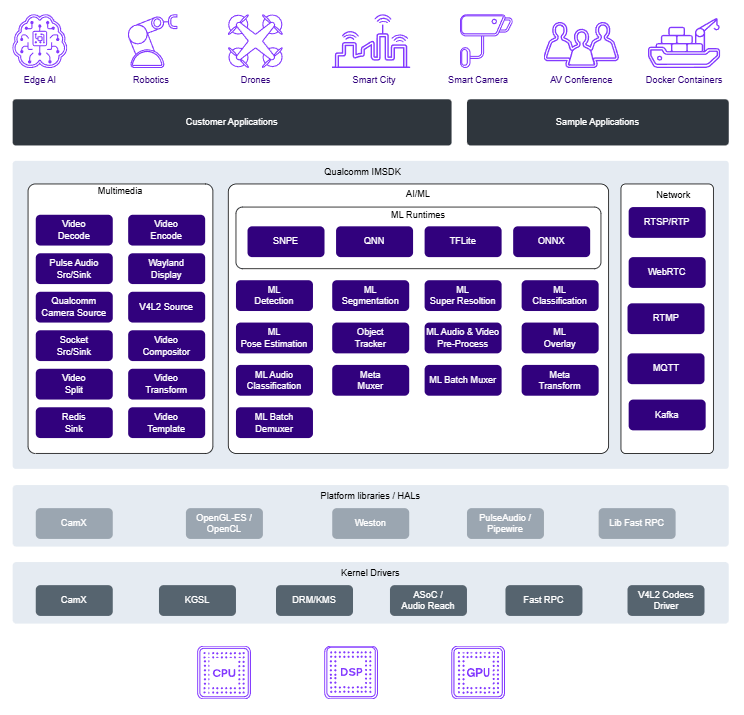
The QIM SDK encapsulates hardware complexity within a modular plugin architecture, freeing developers from the burden of managing low-level platform libraries or hardware-specific details that vary across Qualcomm chipsets and generations.
Each [QIMSDK plugin](../plugin-reference/introduction) in the SDK maps directly to a dedicated hardware accelerator — including video encode/decode, camera ISP, GPU, display, and AI/ML accelerators — giving developers a clean, unified API surface to build sophisticated multimedia and AI pipelines with minimal integration overhead
 ## Camera Architecture
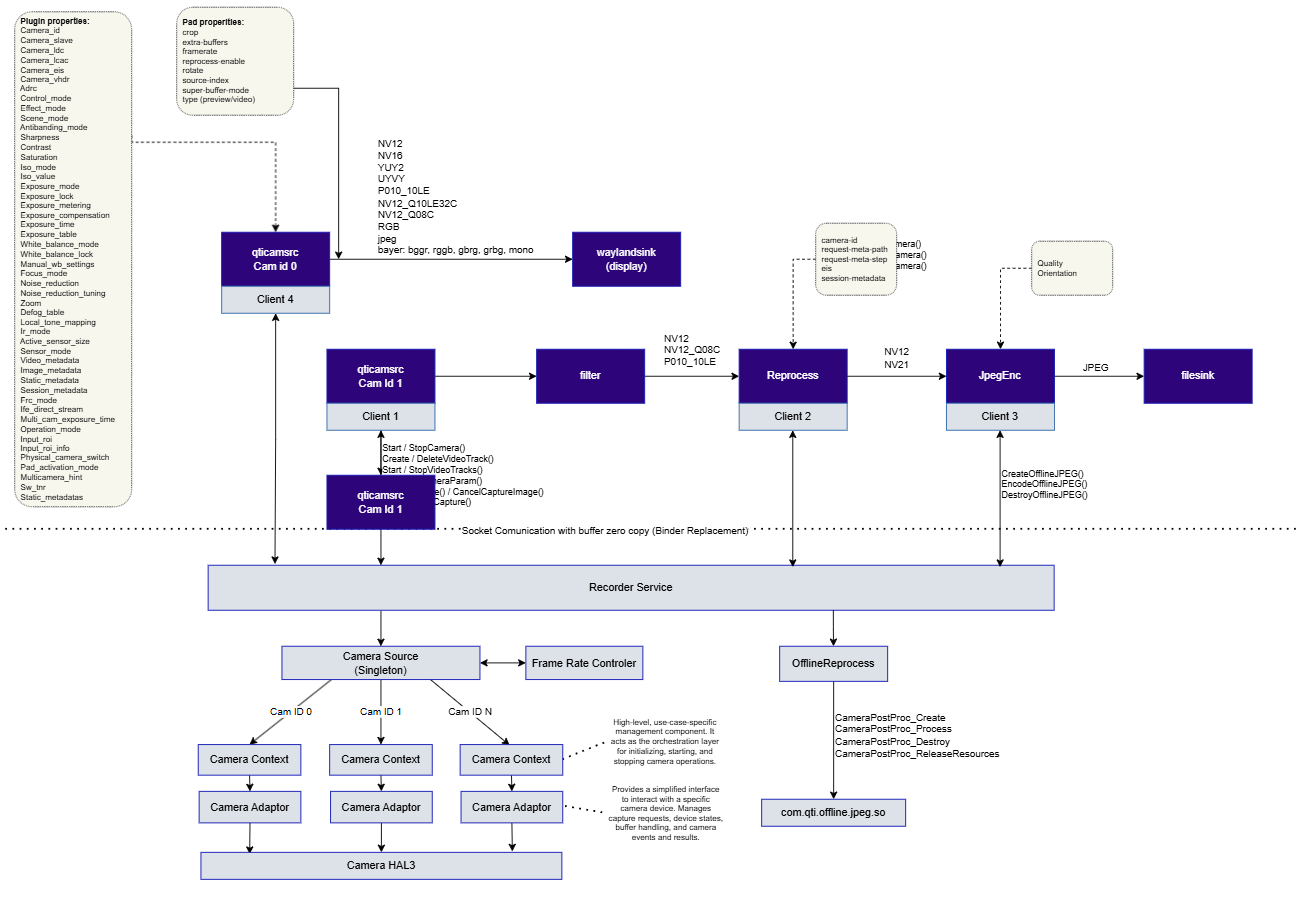
The QIM SDK abstracts the underlying camera driver and hardware through a client-server architecture, shielding developers from the complexities of low-level camera management and enabling rapid construction of single-stream, multi-stream, multi-client, and multi-camera applications.
At its core, the [`qticamsrc`](../plugin-reference/qticamsrc) GStreamer element operates as a client to the le-camera service — a system-level service responsible for managing the camera HAL, stream lifecycle, buffer allocation, and capture control. This separation of responsibilities allows [`qticamsrc`](../plugin-reference/qticamsrc) to surface the full camera capability set to the GStreamer pipeline through a developer-friendly interface of source pads, camera properties, and control signals.
At runtime, [`qticamsrc`](../plugin-reference/qticamsrc) performs the following on behalf of the pipeline:
* Opens and configures the target camera device
* Creates and manages video and image output streams
* Receives captured frames from the le-camera service
* Wraps camera buffers as GstBuffer objects and pushes them downstream through the corresponding source pads
* Returns buffers to the camera service upon downstream consumption
This architecture enables zero-copy camera output by retaining buffer ownership and stream resources within the service layer — maximizing pipeline throughput while minimizing memory overhead.
## Camera Architecture
The QIM SDK abstracts the underlying camera driver and hardware through a client-server architecture, shielding developers from the complexities of low-level camera management and enabling rapid construction of single-stream, multi-stream, multi-client, and multi-camera applications.
At its core, the [`qticamsrc`](../plugin-reference/qticamsrc) GStreamer element operates as a client to the le-camera service — a system-level service responsible for managing the camera HAL, stream lifecycle, buffer allocation, and capture control. This separation of responsibilities allows [`qticamsrc`](../plugin-reference/qticamsrc) to surface the full camera capability set to the GStreamer pipeline through a developer-friendly interface of source pads, camera properties, and control signals.
At runtime, [`qticamsrc`](../plugin-reference/qticamsrc) performs the following on behalf of the pipeline:
* Opens and configures the target camera device
* Creates and manages video and image output streams
* Receives captured frames from the le-camera service
* Wraps camera buffers as GstBuffer objects and pushes them downstream through the corresponding source pads
* Returns buffers to the camera service upon downstream consumption
This architecture enables zero-copy camera output by retaining buffer ownership and stream resources within the service layer — maximizing pipeline throughput while minimizing memory overhead.
 ### Related Information
[Camera use cases](../sample-pipelines/multimediapipelines#1-camera)
## AI Inference Architecture
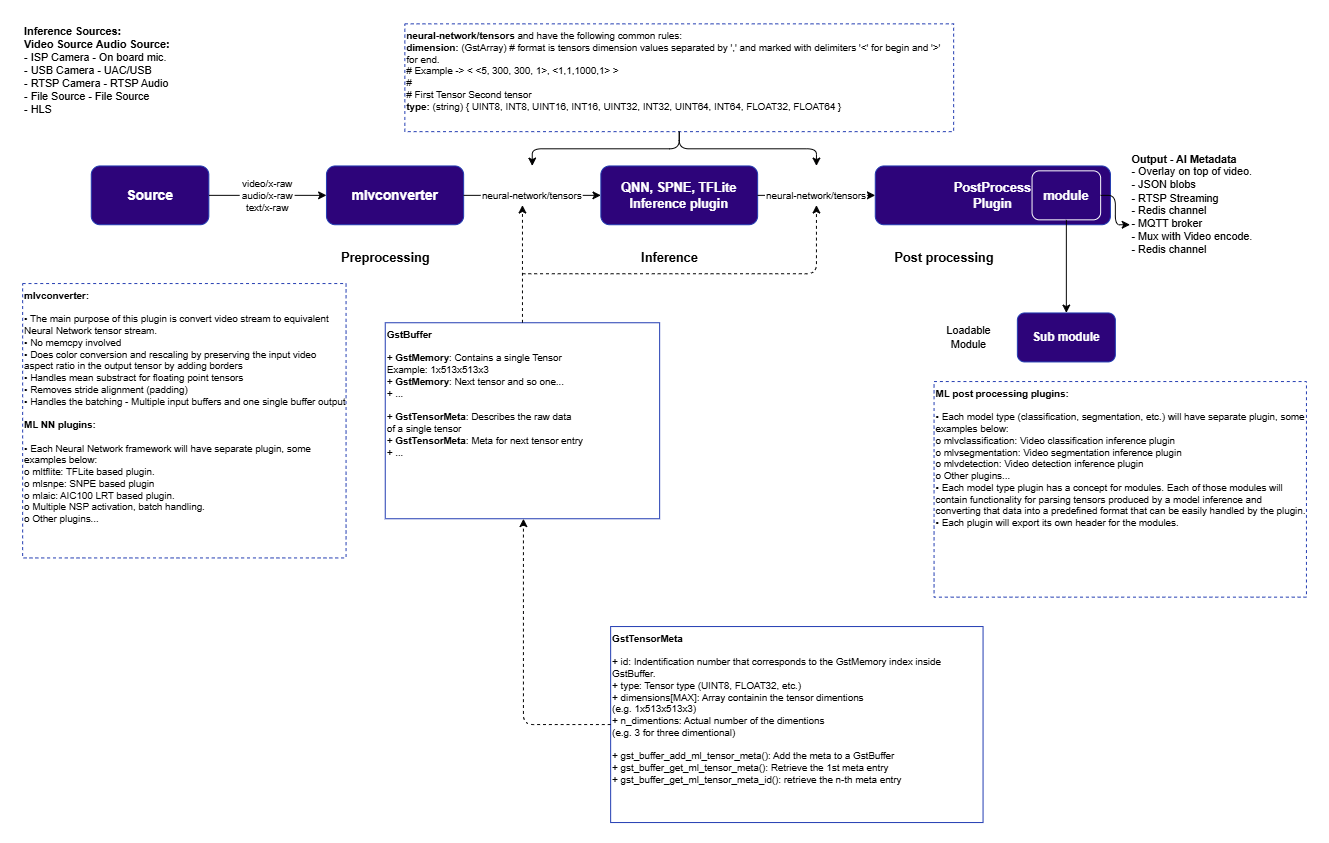
The QIM SDK provides end-to-end support for AI/ML video and audio analytics pipelines, covering the full processing chain from raw media ingestion through model inference to real-time result visualization.
AI pipelines in QIM SDK are built around a tensor-based, three-stage processing model: preprocessing, inference, and postprocessing. Each stage is handled by a dedicated plugin and executes in parallel across consecutive frames — source capture at frame N-2, preprocessing at N-1, inference at N, and postprocessing at N+1 — delivering maximum pipeline throughput and optimal hardware utilization. The pipeline source can be live camera frames via [`qticamsrc`](../plugin-reference/qticamsrc) (YUV) or offline media via `filesrc` (with format conversion); the sink can be an on-screen display via [`waylandsink`](../plugin-reference/waylandsink) or local storage via `filesink`.
The [`qtimlvconverter`](../plugin-reference/qtimlvconverter) preprocessing plugin converts raw video frames into normalized tensors by performing color space conversion, resizing, and mean subtraction. It queries tensor dimensions and format requirements directly from the downstream inference plugin at runtime, making it a fully generic, model-agnostic preprocessing stage compatible with all inference backends. All inference plugins operate in tensor-in / tensor-out mode and share the same [`qtimlvconverter`](../plugin-reference/qtimlvconverter) for preprocessing. QIM SDK supports the following inference engines, each with hardware delegate support for acceleration across Qualcomm's neural processing subsystems:
| Plugin | Engine |
| ------------------------------------------------ | ------------------------------------------ |
| [`qtimltflite`](../plugin-reference/qtimltflite) | LiteRT / TensorFlow Lite |
| [`qtimlsnpe`](../plugin-reference/qtimltflite) | Snapdragon Neural Processing Engine (SNPE) |
| [`qtimlqnn`](../plugin-reference/qtimlqnn) | Qualcomm Neural Network (QNN) |
| [`qtimlonnx`](../plugin-reference/qtimlonnx) | ONNX Runtime |
Inference output tensors are passed directly to task-specific postprocessing plugins that decode multi-dimensional tensor data — bounding boxes, class labels, segmentation masks, and keypoints — into structured ML metadata. The postprocessing layer follows a modular sub-module architecture, allowing developers to author custom postprocessing modules to support proprietary or non-standard model architectures. Finally, the [`qtivoverlay`](../plugin-reference/qtivoverlay) plugin consumes the structured ML metadata and renders inference results directly onto the video buffer in real time. The annotated stream can then be rendered to a display, encoded and stored locally, or streamed over a network.
### Related Information
[Camera use cases](../sample-pipelines/multimediapipelines#1-camera)
## AI Inference Architecture
The QIM SDK provides end-to-end support for AI/ML video and audio analytics pipelines, covering the full processing chain from raw media ingestion through model inference to real-time result visualization.
AI pipelines in QIM SDK are built around a tensor-based, three-stage processing model: preprocessing, inference, and postprocessing. Each stage is handled by a dedicated plugin and executes in parallel across consecutive frames — source capture at frame N-2, preprocessing at N-1, inference at N, and postprocessing at N+1 — delivering maximum pipeline throughput and optimal hardware utilization. The pipeline source can be live camera frames via [`qticamsrc`](../plugin-reference/qticamsrc) (YUV) or offline media via `filesrc` (with format conversion); the sink can be an on-screen display via [`waylandsink`](../plugin-reference/waylandsink) or local storage via `filesink`.
The [`qtimlvconverter`](../plugin-reference/qtimlvconverter) preprocessing plugin converts raw video frames into normalized tensors by performing color space conversion, resizing, and mean subtraction. It queries tensor dimensions and format requirements directly from the downstream inference plugin at runtime, making it a fully generic, model-agnostic preprocessing stage compatible with all inference backends. All inference plugins operate in tensor-in / tensor-out mode and share the same [`qtimlvconverter`](../plugin-reference/qtimlvconverter) for preprocessing. QIM SDK supports the following inference engines, each with hardware delegate support for acceleration across Qualcomm's neural processing subsystems:
| Plugin | Engine |
| ------------------------------------------------ | ------------------------------------------ |
| [`qtimltflite`](../plugin-reference/qtimltflite) | LiteRT / TensorFlow Lite |
| [`qtimlsnpe`](../plugin-reference/qtimltflite) | Snapdragon Neural Processing Engine (SNPE) |
| [`qtimlqnn`](../plugin-reference/qtimlqnn) | Qualcomm Neural Network (QNN) |
| [`qtimlonnx`](../plugin-reference/qtimlonnx) | ONNX Runtime |
Inference output tensors are passed directly to task-specific postprocessing plugins that decode multi-dimensional tensor data — bounding boxes, class labels, segmentation masks, and keypoints — into structured ML metadata. The postprocessing layer follows a modular sub-module architecture, allowing developers to author custom postprocessing modules to support proprietary or non-standard model architectures. Finally, the [`qtivoverlay`](../plugin-reference/qtivoverlay) plugin consumes the structured ML metadata and renders inference results directly onto the video buffer in real time. The annotated stream can then be rendered to a display, encoded and stored locally, or streamed over a network.
 ### Related information
[Run AI/ML use cases](../sample-pipelines/aipipelines)
## Video Architecture
The QIM SDK provides hardware-accelerated video encode and decode through V4L2-based plugins that interface directly with the Qualcomm multimedia engine. Video encoding and decoding are performed entirely on the dedicated VPU (Video Processing Unit), offloading this work from the CPU and allowing concurrent camera capture, AI inference, and video processing without resource contention.
The architecture supports AVC (H.264) and HEVC (H.265) formats for both encode and decode paths. Encoded output can be written to file via a multiplexer or streamed over the network. Decoded output is delivered as DMA-buf-backed NV12 frames, compatible with all downstream QIM SDK plugins including AI preprocessing and display.
### Encode
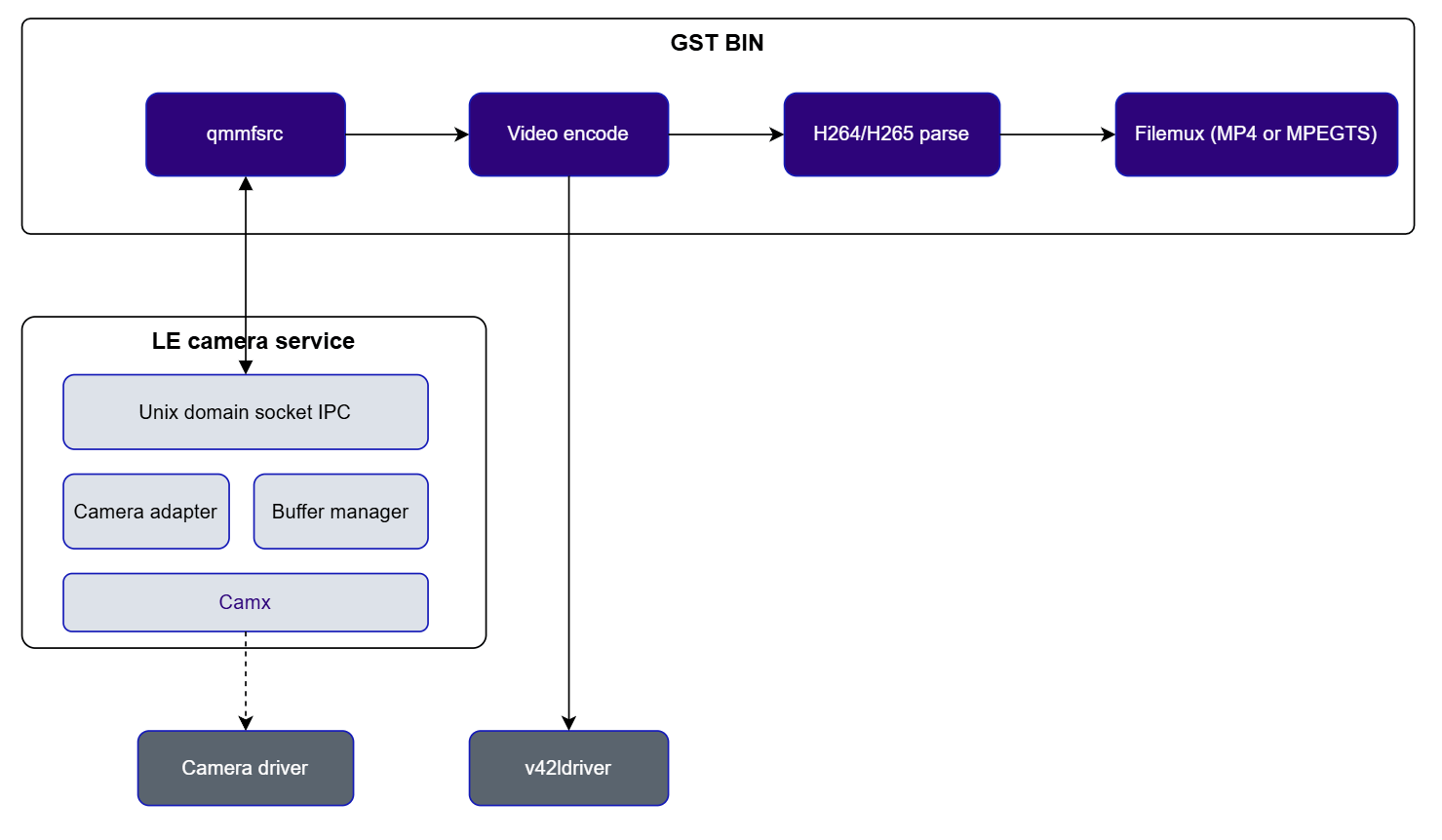
Video frames captured from the camera via [`qticamsrc`](../plugin-reference/qticamsrc) are passed directly to the hardware encoder. The encoded bitstream is parsed and multiplexed into an MP4 or MPEGTS container before being written to file or transmitted over the network.
### Related information
[Run AI/ML use cases](../sample-pipelines/aipipelines)
## Video Architecture
The QIM SDK provides hardware-accelerated video encode and decode through V4L2-based plugins that interface directly with the Qualcomm multimedia engine. Video encoding and decoding are performed entirely on the dedicated VPU (Video Processing Unit), offloading this work from the CPU and allowing concurrent camera capture, AI inference, and video processing without resource contention.
The architecture supports AVC (H.264) and HEVC (H.265) formats for both encode and decode paths. Encoded output can be written to file via a multiplexer or streamed over the network. Decoded output is delivered as DMA-buf-backed NV12 frames, compatible with all downstream QIM SDK plugins including AI preprocessing and display.
### Encode
Video frames captured from the camera via [`qticamsrc`](../plugin-reference/qticamsrc) are passed directly to the hardware encoder. The encoded bitstream is parsed and multiplexed into an MP4 or MPEGTS container before being written to file or transmitted over the network.
 | Component | Description |
| ------------------------------------------------ | -------------------------------------------------------------------------------------------------------------- |
| [`qticamsrc`](../plugin-reference/qticamsrc) | Captures video streams from the ISP camera. See [Camera Architecture](technologyoverview#camera-architecture). |
| [`v4l2h264enc`](../plugin-reference/v4l2h264enc) | Encodes the video stream to AVC (H.264) format using the V4L2 driver. |
| [`v4l2h265enc`](../plugin-reference/v4l2h265enc) | Encodes the video stream to HEVC (H.265) format using the V4L2 driver. |
| `h264parse` / `h265parse` | Parses the encoded bitstream and inserts headers required for downstream muxing or streaming. |
| `mp4mux` / `mpegtsmux` | Multiplexes the encoded stream into an MP4 or MPEGTS container. |
| `filesink` | Writes the muxed container to the file system. |
### Decode
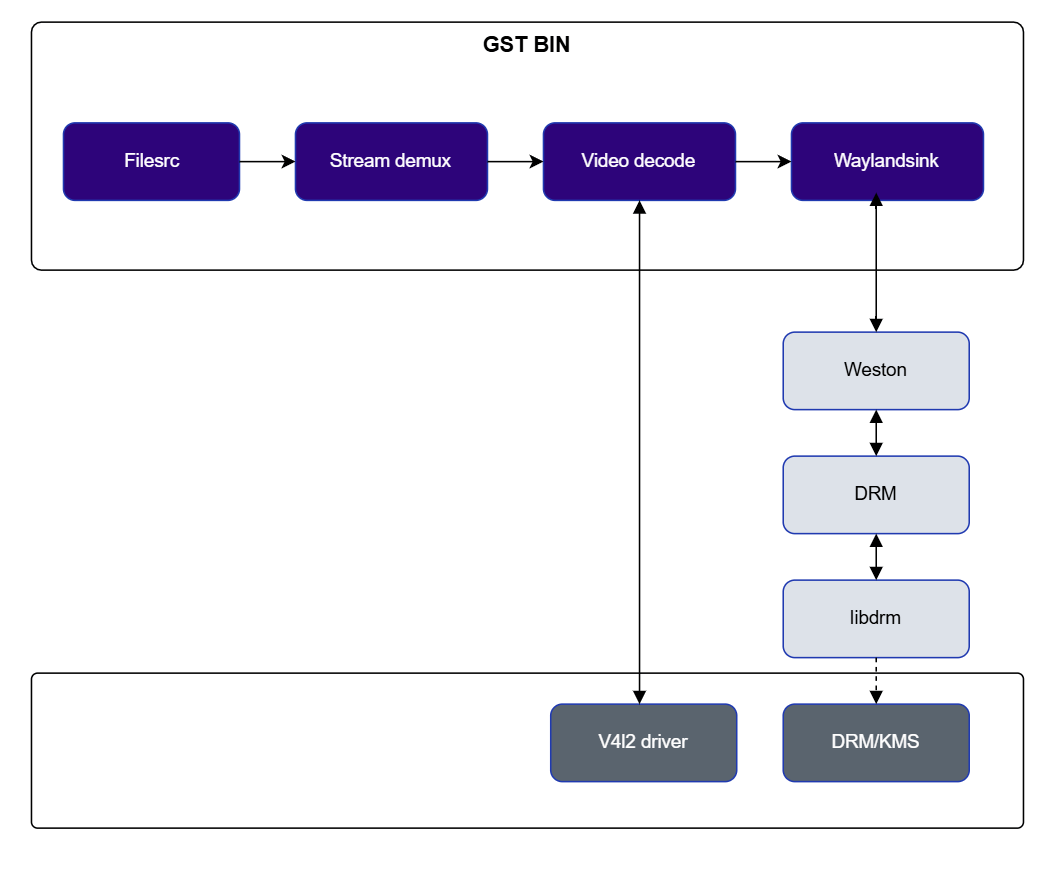
A video file is demultiplexed, the elementary stream is parsed, and the hardware decoder produces raw NV12 frames for display or downstream AI processing. Decode parameters are exposed as GStreamer element properties for direct application control.
| Component | Description |
| ------------------------------------------------ | -------------------------------------------------------------------------------------------------------------- |
| [`qticamsrc`](../plugin-reference/qticamsrc) | Captures video streams from the ISP camera. See [Camera Architecture](technologyoverview#camera-architecture). |
| [`v4l2h264enc`](../plugin-reference/v4l2h264enc) | Encodes the video stream to AVC (H.264) format using the V4L2 driver. |
| [`v4l2h265enc`](../plugin-reference/v4l2h265enc) | Encodes the video stream to HEVC (H.265) format using the V4L2 driver. |
| `h264parse` / `h265parse` | Parses the encoded bitstream and inserts headers required for downstream muxing or streaming. |
| `mp4mux` / `mpegtsmux` | Multiplexes the encoded stream into an MP4 or MPEGTS container. |
| `filesink` | Writes the muxed container to the file system. |
### Decode
A video file is demultiplexed, the elementary stream is parsed, and the hardware decoder produces raw NV12 frames for display or downstream AI processing. Decode parameters are exposed as GStreamer element properties for direct application control.
 | Component | Description |
| ------------------------------------------------ | -------------------------------------------------------------------------------------------------- |
| `filesrc` | Reads the video container from the file system. |
| `qtdemux` | Demultiplexes the container into separate elementary streams. |
| `h264parse` / `h265parse` | Parses the encoded elementary stream before decoding. |
| [`v4l2h264dec`](../plugin-reference/v4l2h264dec) | Decodes the AVC (H.264) video stream to raw NV12 frames using the V4L2 driver. |
| [`v4l2h265dec`](../plugin-reference/v4l2h265dec) | Decodes the HEVC (H.265) video stream to raw NV12 frames using the V4L2 driver. |
| [`waylandsink`](../plugin-reference/waylandsink) | Receives decoded NV12 frames as GBM buffers and submits them to the Weston compositor for display. |
### Related Information
[Video encode and decode use cases](../sample-pipelines/multimediapipelines#2-camera-and-video-encode)
[Video playback use cases](../sample-pipelines/multimediapipelines#5-video-playback-use-cases)
## Audio Architecture
Audio capture and playback in QIM SDK are handled through the `pulsesrc` and `pulsesink` GStreamer plugins, which interface with the system-level PulseAudio server. The PulseAudio server in turn communicates with the ALSA driver to interact with the underlying audio hardware.
Audio encode and decode use open-source GStreamer plugins (such as `flacenc`, `flacparse`, `flacdec`, `lamemp3enc`, `mpegaudioparse`, `mpg123audiodec`) combined with the PulseAudio integration, enabling a complete audio pipeline without requiring custom hardware-specific code.
### Capture
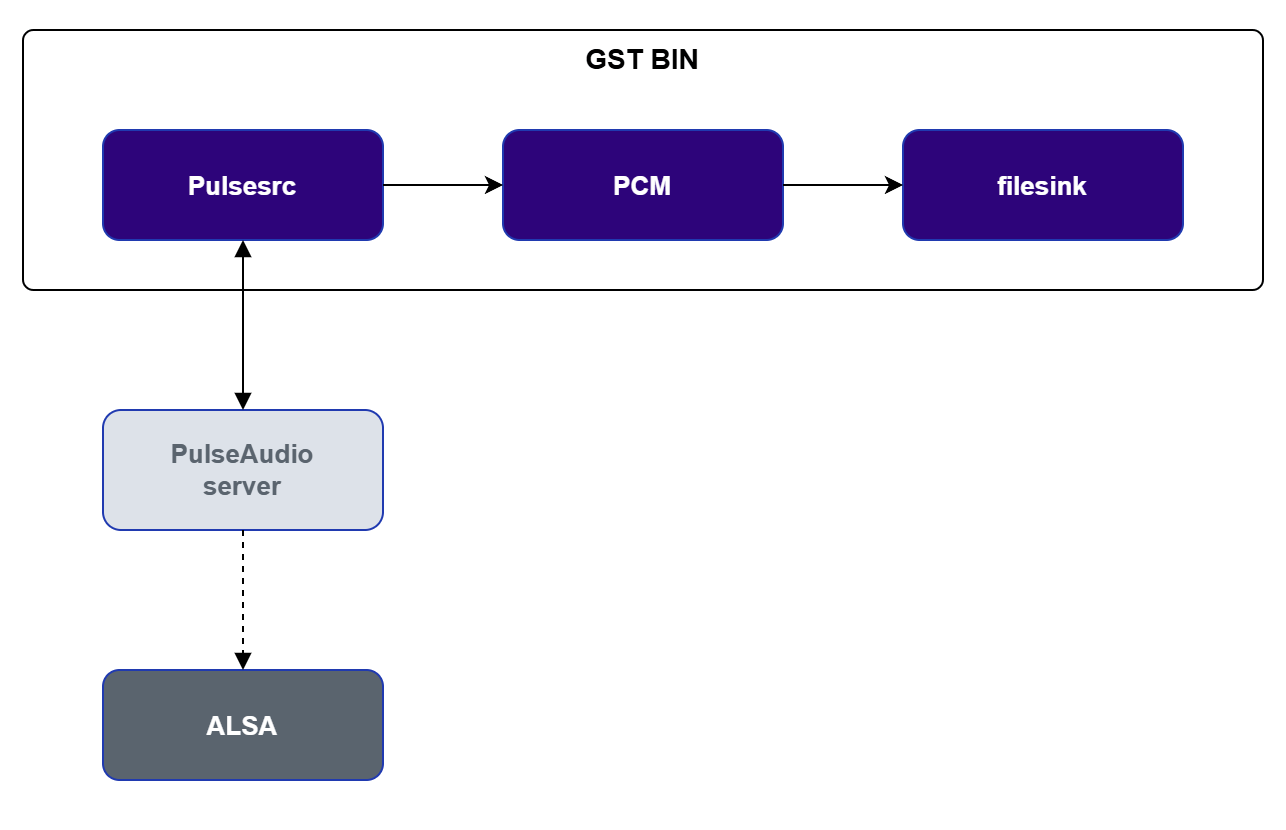
The `pulsesrc` plugin captures raw PCM audio from the microphone and passes it to the PulseAudio server, which handles hardware interaction via the ALSA driver. The PCM stream can then be encoded or written directly to file.
| Component | Description |
| ------------------------------------------------ | -------------------------------------------------------------------------------------------------- |
| `filesrc` | Reads the video container from the file system. |
| `qtdemux` | Demultiplexes the container into separate elementary streams. |
| `h264parse` / `h265parse` | Parses the encoded elementary stream before decoding. |
| [`v4l2h264dec`](../plugin-reference/v4l2h264dec) | Decodes the AVC (H.264) video stream to raw NV12 frames using the V4L2 driver. |
| [`v4l2h265dec`](../plugin-reference/v4l2h265dec) | Decodes the HEVC (H.265) video stream to raw NV12 frames using the V4L2 driver. |
| [`waylandsink`](../plugin-reference/waylandsink) | Receives decoded NV12 frames as GBM buffers and submits them to the Weston compositor for display. |
### Related Information
[Video encode and decode use cases](../sample-pipelines/multimediapipelines#2-camera-and-video-encode)
[Video playback use cases](../sample-pipelines/multimediapipelines#5-video-playback-use-cases)
## Audio Architecture
Audio capture and playback in QIM SDK are handled through the `pulsesrc` and `pulsesink` GStreamer plugins, which interface with the system-level PulseAudio server. The PulseAudio server in turn communicates with the ALSA driver to interact with the underlying audio hardware.
Audio encode and decode use open-source GStreamer plugins (such as `flacenc`, `flacparse`, `flacdec`, `lamemp3enc`, `mpegaudioparse`, `mpg123audiodec`) combined with the PulseAudio integration, enabling a complete audio pipeline without requiring custom hardware-specific code.
### Capture
The `pulsesrc` plugin captures raw PCM audio from the microphone and passes it to the PulseAudio server, which handles hardware interaction via the ALSA driver. The PCM stream can then be encoded or written directly to file.
 | Component | Description |
| ------------------- | ------------------------------------------------------------------------- |
| `pulsesrc` | Captures PCM audio samples from the microphone via the PulseAudio server. |
| PulseAudio server | Interfaces with the ALSA driver to acquire audio data from the hardware. |
| Encode / `filesink` | Optionally encodes and writes the captured audio to a file. |
### Playback
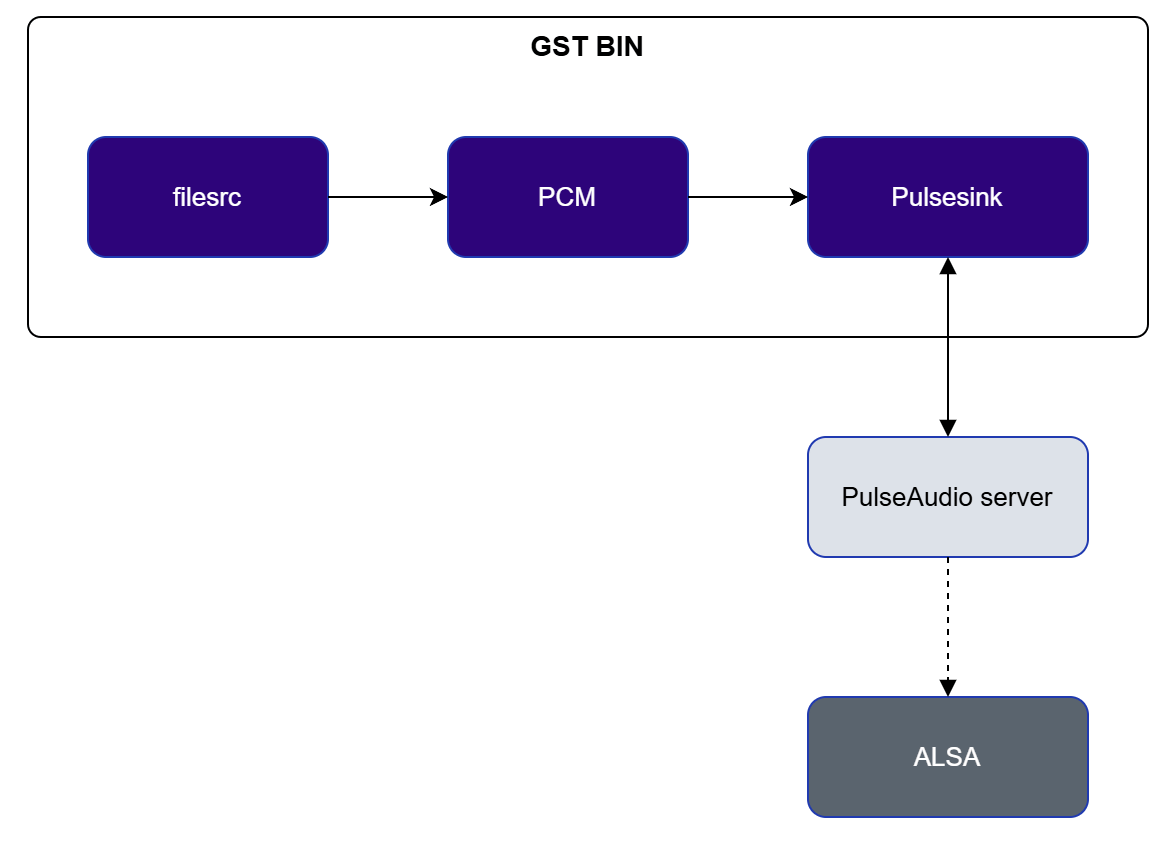
The `pulsesink` plugin receives PCM audio data and routes it through the PulseAudio server for hardware playback. It supports both live audio sources and pre-encoded audio files after decoding.
| Component | Description |
| ------------------- | ------------------------------------------------------------------------- |
| `pulsesrc` | Captures PCM audio samples from the microphone via the PulseAudio server. |
| PulseAudio server | Interfaces with the ALSA driver to acquire audio data from the hardware. |
| Encode / `filesink` | Optionally encodes and writes the captured audio to a file. |
### Playback
The `pulsesink` plugin receives PCM audio data and routes it through the PulseAudio server for hardware playback. It supports both live audio sources and pre-encoded audio files after decoding.
 | Component | Description |
| ----------------- | ------------------------------------------------------------------------------------------ |
| `filesrc` | Reads audio data from a file. |
| Decode | Decodes encoded audio (e.g., MP3, FLAC, WAV) to raw PCM using open-source decoder plugins. |
| `pulsesink` | Sends PCM audio data to the PulseAudio server for playback on the audio hardware. |
| PulseAudio server | Interfaces with the ALSA driver to route audio to the hardware output. |
### Encode
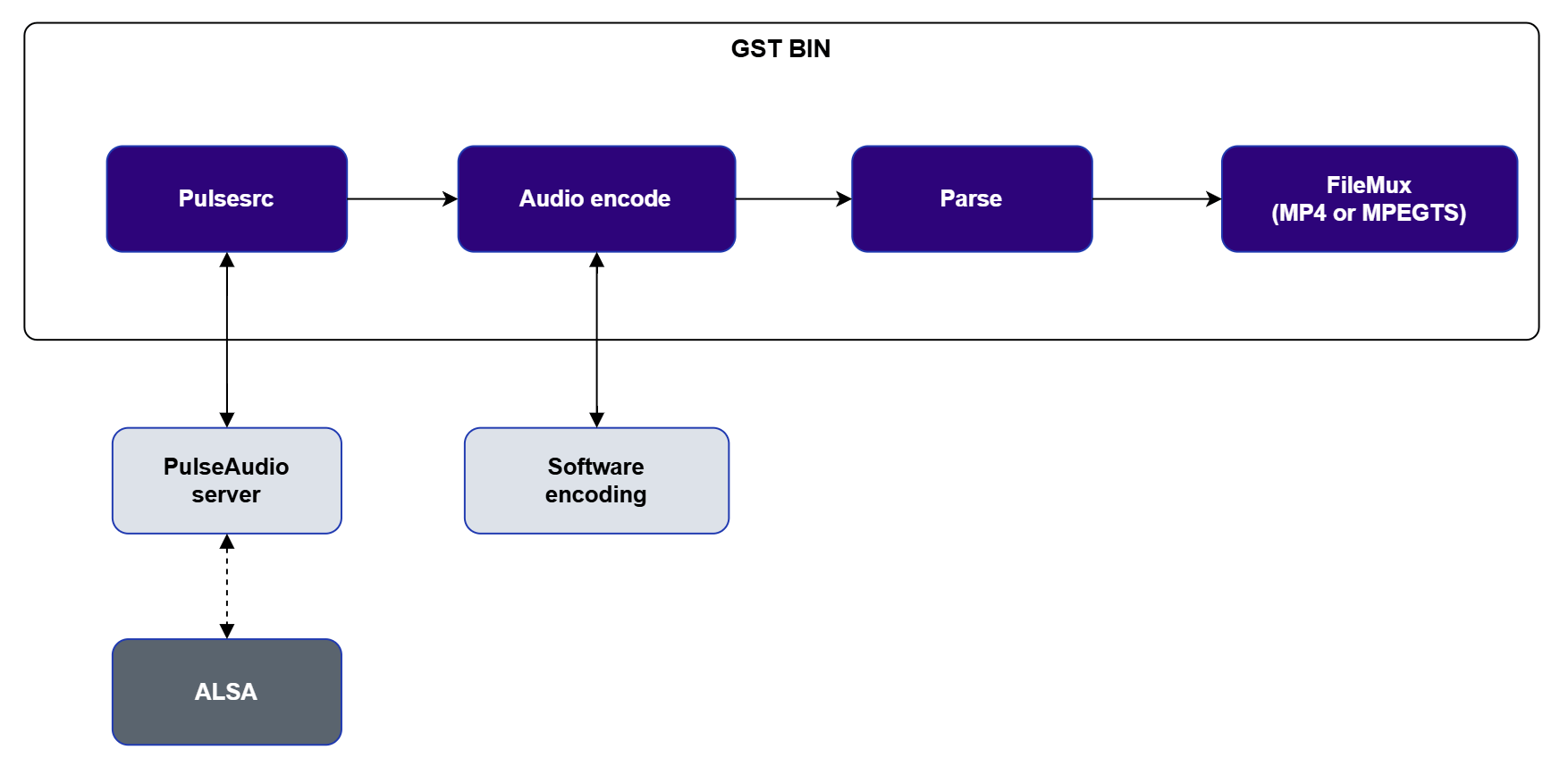
Captured PCM audio is encoded using an open-source encoder, parsed, and multiplexed into a container before being written to file.
| Component | Description |
| ----------------- | ------------------------------------------------------------------------------------------ |
| `filesrc` | Reads audio data from a file. |
| Decode | Decodes encoded audio (e.g., MP3, FLAC, WAV) to raw PCM using open-source decoder plugins. |
| `pulsesink` | Sends PCM audio data to the PulseAudio server for playback on the audio hardware. |
| PulseAudio server | Interfaces with the ALSA driver to route audio to the hardware output. |
### Encode
Captured PCM audio is encoded using an open-source encoder, parsed, and multiplexed into a container before being written to file.
 | Component | Description |
| ---------------------- | ------------------------------------------------------------------------------ |
| `pulsesrc` | Captures PCM audio from the microphone. |
| PulseAudio server | Interacts with the ALSA driver to supply raw audio data. |
| Encode | Encodes PCM to a compressed format (MP3, FLAC, AAC) using open-source plugins. |
| Parse | Parses the encoded bitstream before muxing. |
| `mp4mux` / `mpegtsmux` | Multiplexes the encoded audio into an MP4 or MPEGTS container. |
| `filesink` | Writes the container to the file system. |
### Decode
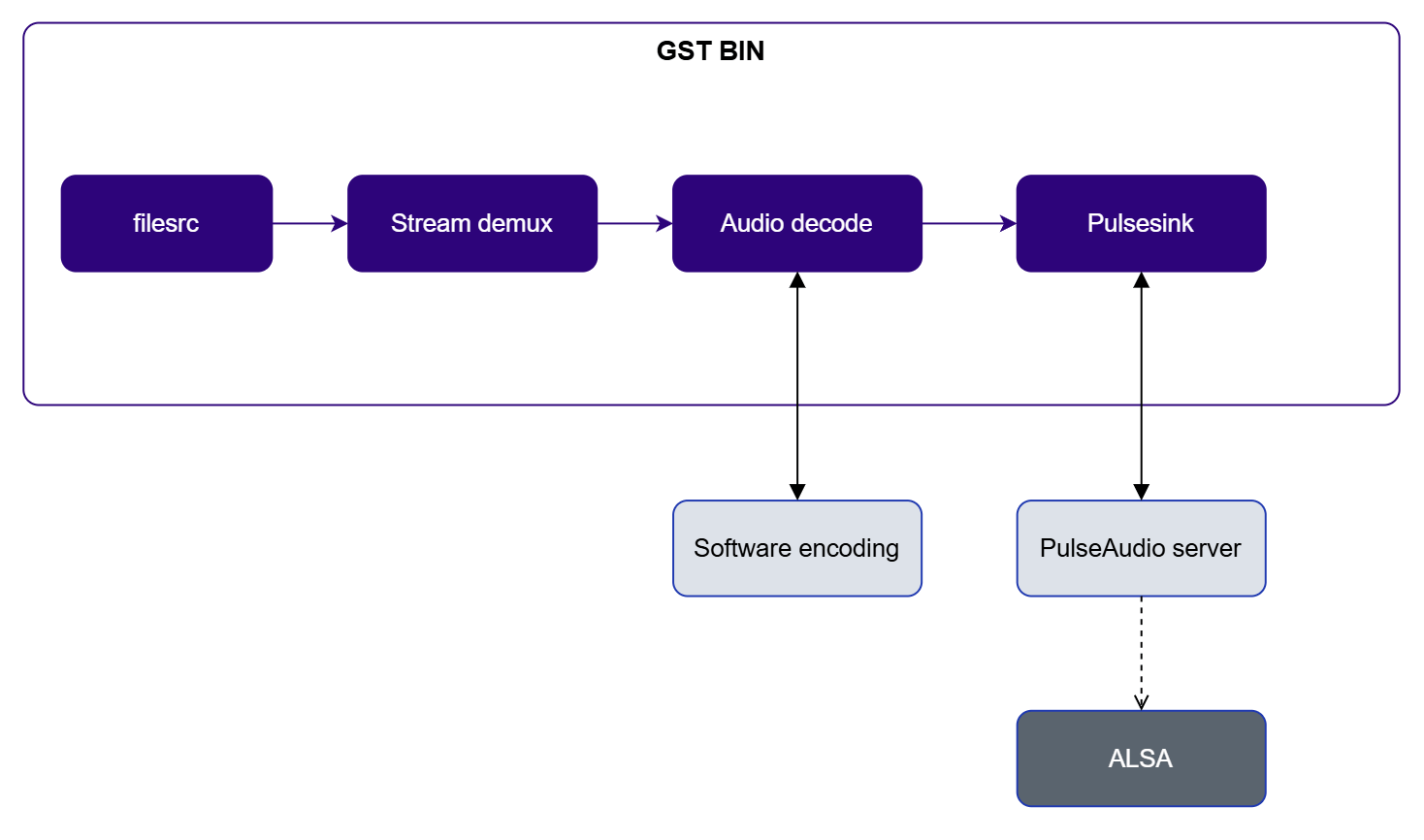
An encoded audio file is read, demultiplexed, decoded back to PCM, and played back through `pulsesink`.
| Component | Description |
| ---------------------- | ------------------------------------------------------------------------------ |
| `pulsesrc` | Captures PCM audio from the microphone. |
| PulseAudio server | Interacts with the ALSA driver to supply raw audio data. |
| Encode | Encodes PCM to a compressed format (MP3, FLAC, AAC) using open-source plugins. |
| Parse | Parses the encoded bitstream before muxing. |
| `mp4mux` / `mpegtsmux` | Multiplexes the encoded audio into an MP4 or MPEGTS container. |
| `filesink` | Writes the container to the file system. |
### Decode
An encoded audio file is read, demultiplexed, decoded back to PCM, and played back through `pulsesink`.
 | Component | Description |
| ----------------- | -------------------------------------------------------------------------- |
| `filesrc` | Reads the audio container from the file system. |
| `qtdemux` | Demultiplexes the container to extract the audio elementary stream. |
| Decode | Decodes the compressed audio to raw PCM using open-source decoder plugins. |
| `pulsesink` | Sends the decoded PCM to the PulseAudio server for playback. |
| PulseAudio server | Interfaces with the ALSA driver to route audio to the hardware output. |
### Related Information
[Audio use cases](../sample-pipelines/multimediapipelines#6-audio-use-cases)
## Graphics and Display Architecture
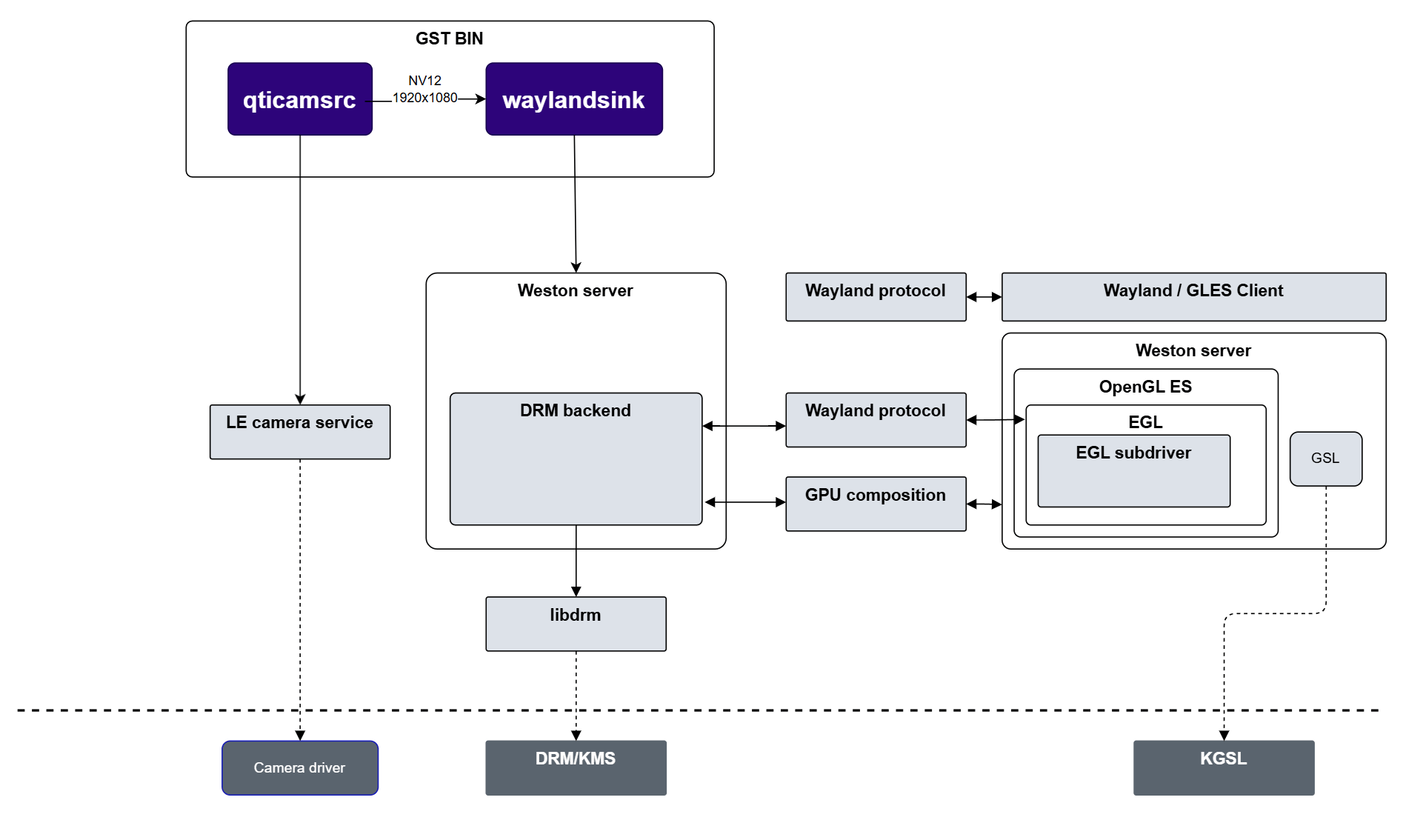
The QIM SDK uses the Wayland display protocol with the Weston compositor to manage display composition and output. Weston runs as an independent process and handles all display composition using OpenGL ES, communicating with the display hardware through the DRM/KMS subsystem.
QIM SDK plugins deliver video buffers as GBM-backed DMA-buf handles. Weston receives these buffers via the Wayland protocol and composites them directly onto the display without intermediate CPU copies, maintaining the zero-copy path from camera capture or video decode through to the screen.
| Component | Description |
| ----------------- | -------------------------------------------------------------------------- |
| `filesrc` | Reads the audio container from the file system. |
| `qtdemux` | Demultiplexes the container to extract the audio elementary stream. |
| Decode | Decodes the compressed audio to raw PCM using open-source decoder plugins. |
| `pulsesink` | Sends the decoded PCM to the PulseAudio server for playback. |
| PulseAudio server | Interfaces with the ALSA driver to route audio to the hardware output. |
### Related Information
[Audio use cases](../sample-pipelines/multimediapipelines#6-audio-use-cases)
## Graphics and Display Architecture
The QIM SDK uses the Wayland display protocol with the Weston compositor to manage display composition and output. Weston runs as an independent process and handles all display composition using OpenGL ES, communicating with the display hardware through the DRM/KMS subsystem.
QIM SDK plugins deliver video buffers as GBM-backed DMA-buf handles. Weston receives these buffers via the Wayland protocol and composites them directly onto the display without intermediate CPU copies, maintaining the zero-copy path from camera capture or video decode through to the screen.
 | Component | Description |
| ------------------- | ------------------------------------------------------------------------------------------------------------------------------------------------------------- |
| Wayland/GLES client | GStreamer plugins such as [`waylandsink`](../plugin-reference/waylandsink) implement the Wayland client protocol to submit video buffers to Weston. |
| Weston server | Implements the Wayland compositor. Uses KMS to configure the display and OpenGL ES with DRM for hardware-accelerated compositing. |
| SDM back-end | Display hardware abstraction layer (HAL) that provides the DRM/KMS platform implementation for Weston. |
| libGBM | Buffer allocation and sharing library. Provides a DMA-backed allocator enabling zero-copy buffer sharing between the GPU, display, and other hardware blocks. |
| EGL sub-driver | Interface between GBM/EGL and the Wayland protocol, allowing GStreamer elements to share hardware-allocated buffers with the Weston compositor. |
### Related Information
[Display and composition use cases](../sample-pipelines/multimediapipelines)
| Component | Description |
| ------------------- | ------------------------------------------------------------------------------------------------------------------------------------------------------------- |
| Wayland/GLES client | GStreamer plugins such as [`waylandsink`](../plugin-reference/waylandsink) implement the Wayland client protocol to submit video buffers to Weston. |
| Weston server | Implements the Wayland compositor. Uses KMS to configure the display and OpenGL ES with DRM for hardware-accelerated compositing. |
| SDM back-end | Display hardware abstraction layer (HAL) that provides the DRM/KMS platform implementation for Weston. |
| libGBM | Buffer allocation and sharing library. Provides a DMA-backed allocator enabling zero-copy buffer sharing between the GPU, display, and other hardware blocks. |
| EGL sub-driver | Interface between GBM/EGL and the Wayland protocol, allowing GStreamer elements to share hardware-allocated buffers with the Weston compositor. |
### Related Information
[Display and composition use cases](../sample-pipelines/multimediapipelines)